Autopitch Pricing, Reviews, Pros and Cons (2026 Guide)
A neutral, hands-on breakdown of Autopitch pricing, real user reviews, and the pros and cons of its AI personalization — plus where it fits a 2026 outbound stack.
Autopitch promises one thing that every cold emailer wants: personalized first lines at scale without writing each one by hand. But "AI does the research for you" is a crowded pitch in 2026, and the price you pay — in dollars and in deliverability — matters more than the demo video. This is a neutral teardown of Autopitch pricing, what reviewers actually say, and where the tool helps versus where it quietly hurts.
TL;DR#
- Autopitch is an AI personalization layer, not a full sending platform or a data provider. It writes icebreakers and short personalized snippets from a lead's website, LinkedIn, or company signals.
- Pricing is usage-based (credits per generated line), so your real cost scales with list size — budget for that before committing.
- Reviews are split: people love the time saved on line-one personalization; critics flag generic output on thin profiles and the need to still verify every email yourself.
- It does not find or verify emails. You still need an email finder and an email verifier in front of it, or bounces will sink the campaign Autopitch helped you write.
- Best fit: small-to-mid outbound teams that already have clean data and want faster first lines. Poor fit for anyone treating it as a one-tool prospecting stack.
What is Autopitch and what does it actually do?#
Autopitch is an AI cold-email personalization tool. You feed it a list of prospects — typically with a name, company, and a URL or LinkedIn profile — and it generates a custom opening line or short personalized paragraph for each one. The goal is to replace the 3–5 minutes a rep spends manually researching each lead with a few seconds of generated copy.
Think of it like a research intern who skims each prospect's website and drafts the "I noticed you just launched X" sentence. It is good at the skimming-and-drafting part. It is not a strategist, a data vendor, or a sending engine.
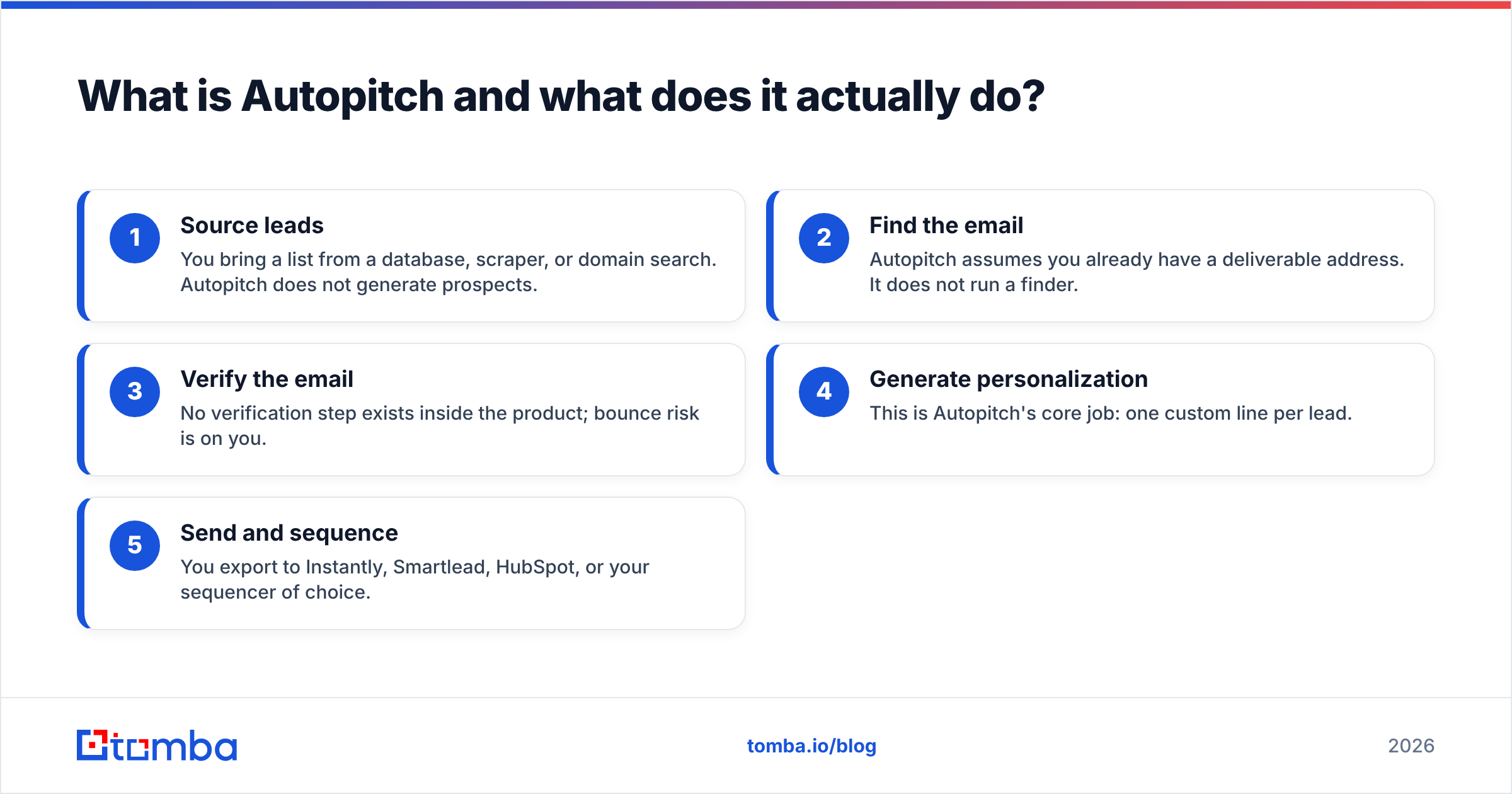
Here is where Autopitch sits in a typical outbound workflow:
- Source leads — You bring a list from a database, scraper, or domain search. Autopitch does not generate prospects.
- Find the email — Autopitch assumes you already have a deliverable address. It does not run a finder.
- Verify the email — No verification step exists inside the product; bounce risk is on you.
- Generate personalization — This is Autopitch's core job: one custom line per lead.
- Send and sequence — You export to Instantly, Smartlead, HubSpot, or your sequencer of choice.
Misreading step 4 as the whole funnel is the single most common reason teams feel burned by personalization tools. Autopitch makes the email sound researched. It does nothing to make sure the email arrives.

How much does Autopitch cost in 2026?#
Autopitch uses usage-based, credit-style pricing: you pay per personalized line generated, usually bundled into monthly tiers with a credit allowance. That model is fair when your volume is predictable and brutal when it is not — a 50,000-line month costs far more than the headline starter price suggests.
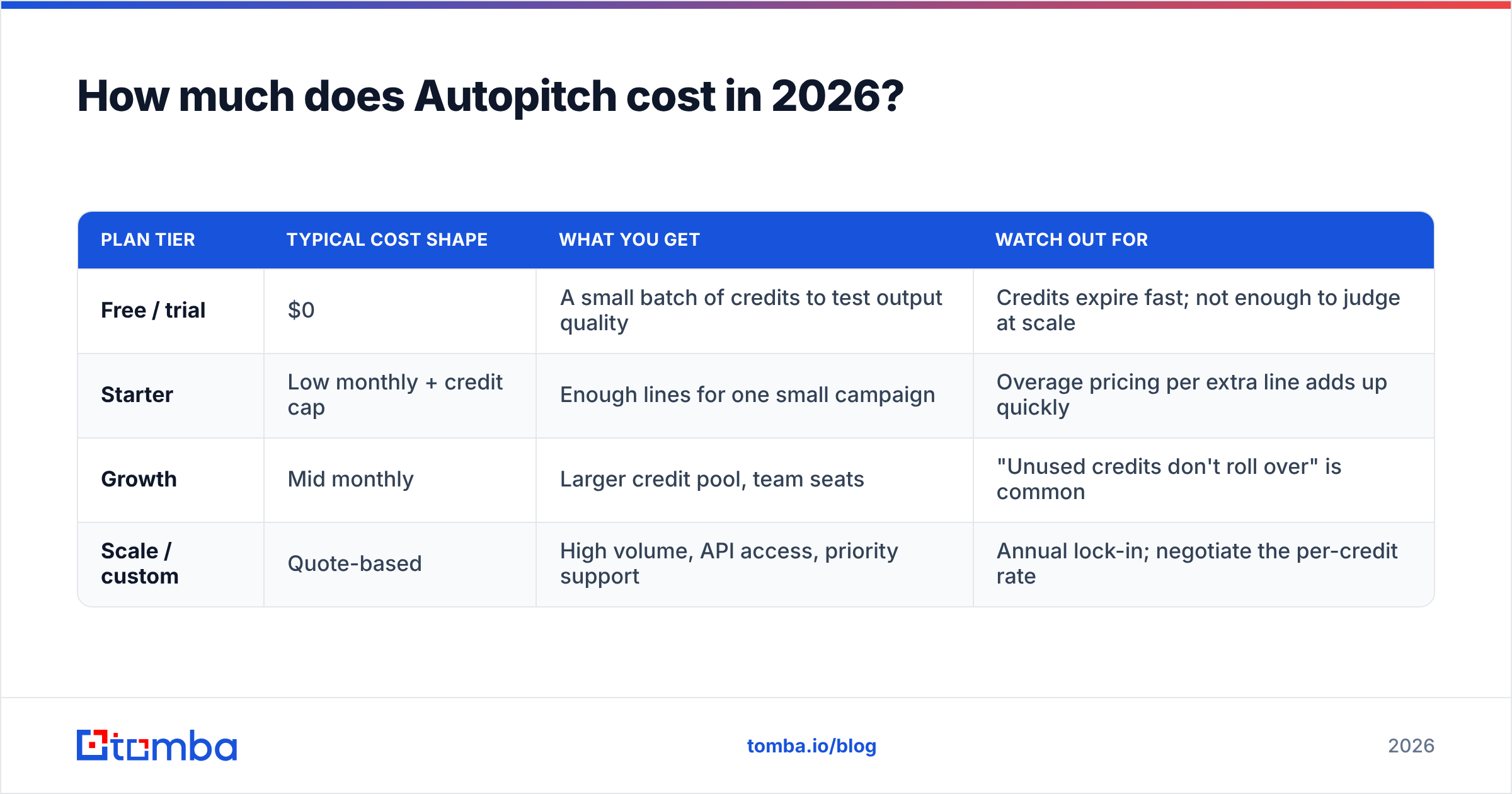
Because vendor pricing pages change often, treat the figures below as the shape of the pricing rather than a contract. Always confirm on the official Autopitch site and check current plan limits before you buy.
| Plan tier | Typical cost shape | What you get | Watch out for |
|---|---|---|---|
| Free / trial | $0 | A small batch of credits to test output quality | Credits expire fast; not enough to judge at scale |
| Starter | Low monthly + credit cap | Enough lines for one small campaign | Overage pricing per extra line adds up quickly |
| Growth | Mid monthly | Larger credit pool, team seats | "Unused credits don't roll over" is common |
| Scale / custom | Quote-based | High volume, API access, priority support | Annual lock-in; negotiate the per-credit rate |
The pricing lesson is simple: model your monthly line volume first, then pick a tier. A team sending 2,000 emails a month behaves nothing like one sending 40,000. The per-line economics that look cheap on the Starter plan can quietly become your most expensive outbound tool at scale.
Compare that to a data tool like Tomba pricing, where a Free tier gives 25 searches, Starter is $49/mo, Growth $99/mo, and Pro $249/mo — flat, predictable buckets you can forecast against. Personalization credits and data credits are different line items, and you will likely pay for both.
Is Autopitch worth it? Pros and cons from real reviews#
Pulling together patterns from user reviews on platforms like G2 and Reddit outbound communities, the sentiment clusters into a clear set of pros and cons. Treat single-star and five-star reviews with equal suspicion; the useful signal is in the repeated themes.
The pros people consistently mention#
- Real time savings on line one. The most common praise: research that took an afternoon now takes minutes. For SDRs sending high volume, this is the headline value.
- Decent output on rich profiles. When a prospect has an active LinkedIn, a content-heavy website, and recent news, the generated line is often genuinely usable with light editing.
- Easy CSV in, CSV out. Reviewers like that it slots into an existing sequencer without a platform migration.
- Lowers the "blank page" tax. Even when reps rewrite the output, having a draft beats staring at an empty field.
The cons that keep coming up#
- Generic output on thin profiles. Prospects with a bare LinkedIn or a one-page site produce filler lines like "I love what you're doing at [Company]." Reviewers call these "AI tells" that hurt more than no personalization.
- No email finding or verification. Multiple reviews note the surprise that the tool assumes you already have clean, deliverable data. It does not.
- Credits burn faster than expected. Usage-based pricing means a re-run, a bad batch, or list bloat costs real money.
- Sameness at scale. Send 5,000 AI-personalized lines and patterns emerge; prospects in the same niche sometimes get near-identical "personalization."
- Still needs a human pass. The best results come from reviewing and trimming output, which erodes some of the promised time savings.
The honest verdict: Autopitch is a good accelerator, not an autopilot. It is worth it if your data is already clean and your reps will spend the saved time on strategy and editing — not if you expect to paste a raw list in one end and pull qualified replies out the other.
How does Autopitch compare to other personalization tools?#
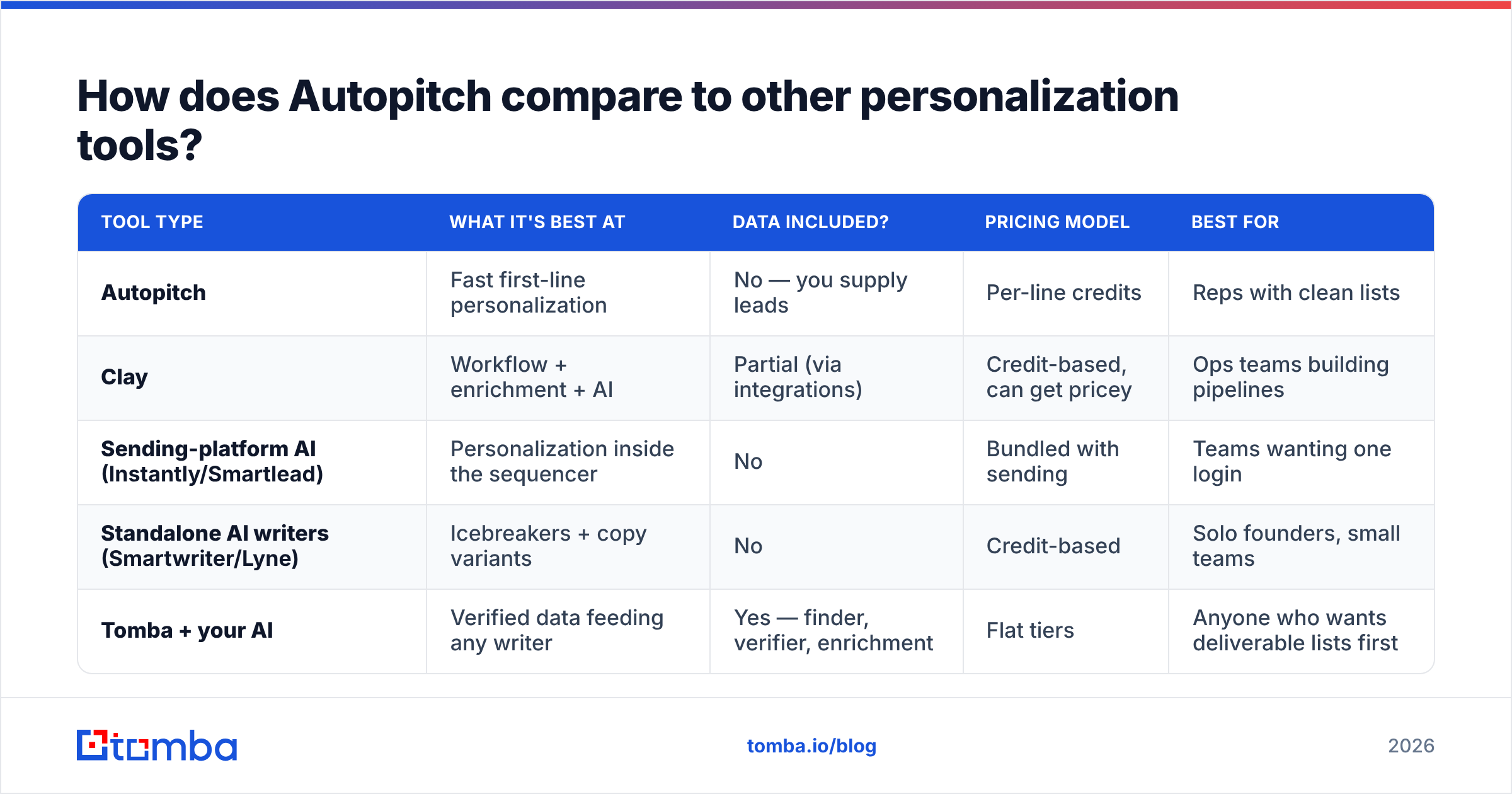
Autopitch competes in a category that now includes Clay, Lyne, Smartwriter, and the personalization features baked into sending platforms like Instantly and Smartlead. The differences are less about "who writes the best sentence" and more about scope, data dependency, and price model.
| Tool type | What it's best at | Data included? | Pricing model | Best for |
|---|---|---|---|---|
| Autopitch | Fast first-line personalization | No — you supply leads | Per-line credits | Reps with clean lists |
| Clay | Workflow + enrichment + AI | Partial (via integrations) | Credit-based, can get pricey | Ops teams building pipelines |
| Sending-platform AI (Instantly/Smartlead) | Personalization inside the sequencer | No | Bundled with sending | Teams wanting one login |
| Standalone AI writers (Smartwriter/Lyne) | Icebreakers + copy variants | No | Credit-based | Solo founders, small teams |
| Tomba + your AI | Verified data feeding any writer | Yes — finder, verifier, enrichment | Flat tiers | Anyone who wants deliverable lists first |
Notice the column that decides everything: data included. Personalization tools almost universally assume you arrive with accurate emails. That assumption is where campaigns die. A perfectly worded icebreaker sent to a guessed or stale address is a hard bounce that drags down your sender reputation for every future send.
If you are weighing AI copy tools generally, you can also test a free option like Tomba's cold email AI writer before paying for credits, just to calibrate what "good" output looks like on your audience.

What does Autopitch not do (and why it matters)?#
This is the section most reviews skip, and it is the most important one for your budget. Autopitch is a personalization layer. The two jobs it explicitly does not handle are the two that determine whether your campaign lands at all.
- Finding the email. Autopitch needs an address to personalize toward. It will not discover it from a name and company. You need a dedicated email finder or bulk email finder for that, especially when prospecting from a company list rather than a contact list.
- Verifying the email. Even a "found" email can be stale, role-based, or a catch-all that silently swallows mail. Without an email verifier in your pipeline, you are gambling your domain reputation on every send.
- Protecting deliverability. Personalization improves reply rates only if the message reaches the inbox. Bounces, spam traps, and catch-all domains are a data problem, not a copy problem.
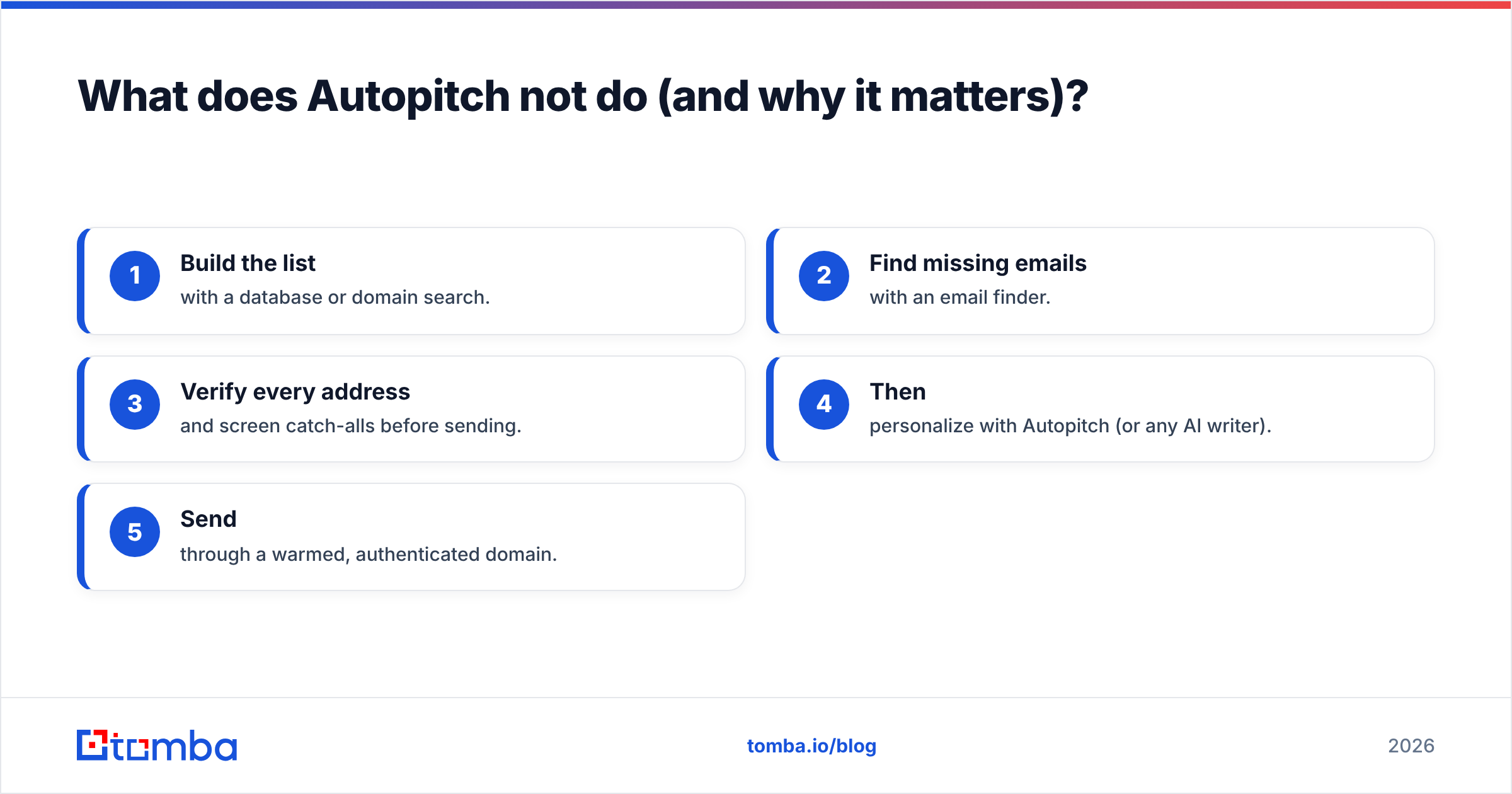
Here is the order of operations that actually works in 2026:
- Build the list with a database or domain search.
- Find missing emails with an email finder.
- Verify every address and screen catch-alls before sending.
- Then personalize with Autopitch (or any AI writer).
- Send through a warmed, authenticated domain.
Skip steps 2 and 3 and Autopitch becomes an expensive way to write beautiful letters to dead mailboxes. The tool is only as good as the list you feed it — which is exactly why the data layer deserves more of your budget than the copy layer.
Who should buy Autopitch — and who should skip it?#
Buy it if: you run high-volume outbound, your data hygiene is already solid, and your reps will use the recovered time to edit and strategize rather than just send more. Teams that target prospects with rich public footprints (active founders, content creators, funded startups) get the most usable output.
Skip it if: you are prospecting into thin-profile industries (trades, local services, non-English-first markets), you do not yet have a verification step, or you expect AI to replace research entirely. In those cases your money is better spent first on a clean data foundation — find and verify — and only then on a personalization layer.
A practical middle path: start with verified data and a free AI writer, measure your reply rate, and only graduate to a paid personalization tool like Autopitch once you can prove that better copy — not better data — is your bottleneck. Most teams discover the bottleneck was data all along.
Frequently asked questions#
Does Autopitch find email addresses? No. It personalizes messages for addresses you already have. Pair it with an email finder and verifier.
Is Autopitch pricing cheaper than hiring an SDR for research? Per line, yes. But credit overages and the human editing pass mean the real cost is higher than the sticker price. Model your monthly volume first.
Will AI personalization hurt my deliverability? The copy itself usually does not. Unverified recipient data does. Verify before you send, every time.
Can I get similar results for free? You can test AI icebreakers with free tools and validate addresses with a free email checker before committing to paid credits.
The bottom line on Autopitch#
Autopitch is a competent, usage-priced personalization tool that earns its keep for teams with clean data and disciplined reps — and frustrates everyone who expects it to be a full prospecting stack. The pros (real time savings, solid output on rich profiles) are genuine. The cons (credit burn, generic lines on thin profiles, zero data or verification) are equally real and almost always trace back to the same root cause: a personalization tool can only be as accurate as the list underneath it.
Before you spend a dollar on AI copy, fix the layer that decides whether anyone reads it. Use the Tomba Email Finder to find professional email addresses by name, domain, or company, then verify them so your beautifully personalized lines actually reach a human inbox. Start free with 25 searches, scale to a flat $49/mo Starter plan, and let Autopitch — or any writer — do its job on top of data you can trust. Personalization is the multiplier. Verified data is the number you are multiplying.
// get started
Find, verify and enrich your first contacts today
Start on the free plan with 25 searches a month, then scale when your team is ready.
Free plan · No credit card required · GDPR & CCPA
// about the author