Autoreach Pricing, Reviews, Pros and Cons: 2026 Breakdown
Thinking about Autoreach for outbound calling? Here's an honest 2026 breakdown of Autoreach pricing, real user reviews, the pros and cons, and how it stacks up against the alternatives.
Autoreach promises to turn your reps' dial pads into an AI-assisted machine that connects more conversations per hour. But the marketing site is light on numbers, and "request a demo" is not the same as "here's what it costs." This breakdown gives you the straight version: what Autoreach actually does, what it costs, what real reviewers say, and where it falls short.
TL;DR#
- Autoreach is a sales dialer, not a data tool. It speeds up outbound calling by auto-dialing, logging, and syncing calls into your CRM and sequencer.
- Pricing is quote-based. Autoreach does not publish per-seat pricing; you contact sales for a custom plan, typically billed per user per month with annual commitments.
- Reviews are strong on connect rates and integrations, weaker on onboarding complexity and the lack of transparent pricing.
- A dialer is only as good as the phone numbers and emails you feed it. Bad contact data wastes dials no matter how fast the tool is.
- Best fit: mid-market and enterprise outbound teams already running Salesforce, Outreach, or Salesloft. Solo founders and small teams will find it overkill.
What is Autoreach?#
Autoreach is a cloud-based power dialer and parallel dialer built for outbound sales teams. Think of it as cruise control for cold calling: instead of a rep manually punching in numbers, listening to ring tones, and logging each attempt by hand, Autoreach dials automatically, drops pre-recorded voicemails, detects answering machines, and writes everything back to your CRM.
Its core selling point is connect rate. By dialing multiple numbers at once (parallel dialing) and filtering out voicemails and bad numbers, it aims to put reps in front of live humans more often per hour. It layers in local presence (showing an area code that matches the prospect), call analytics, and tight integrations with the rest of the outbound stack.
Where does Autoreach sit in your tooling? It's the execution layer for phone outreach — it does not find leads, it does not enrich them, and it does not write your scripts. It assumes you already have a list of contacts with valid phone numbers and a sequence telling reps who to call and when.
)
That distinction matters for budgeting. You're not just paying for Autoreach; you're paying for the data pipeline that keeps it fed. We'll come back to that.
How much does Autoreach cost?#
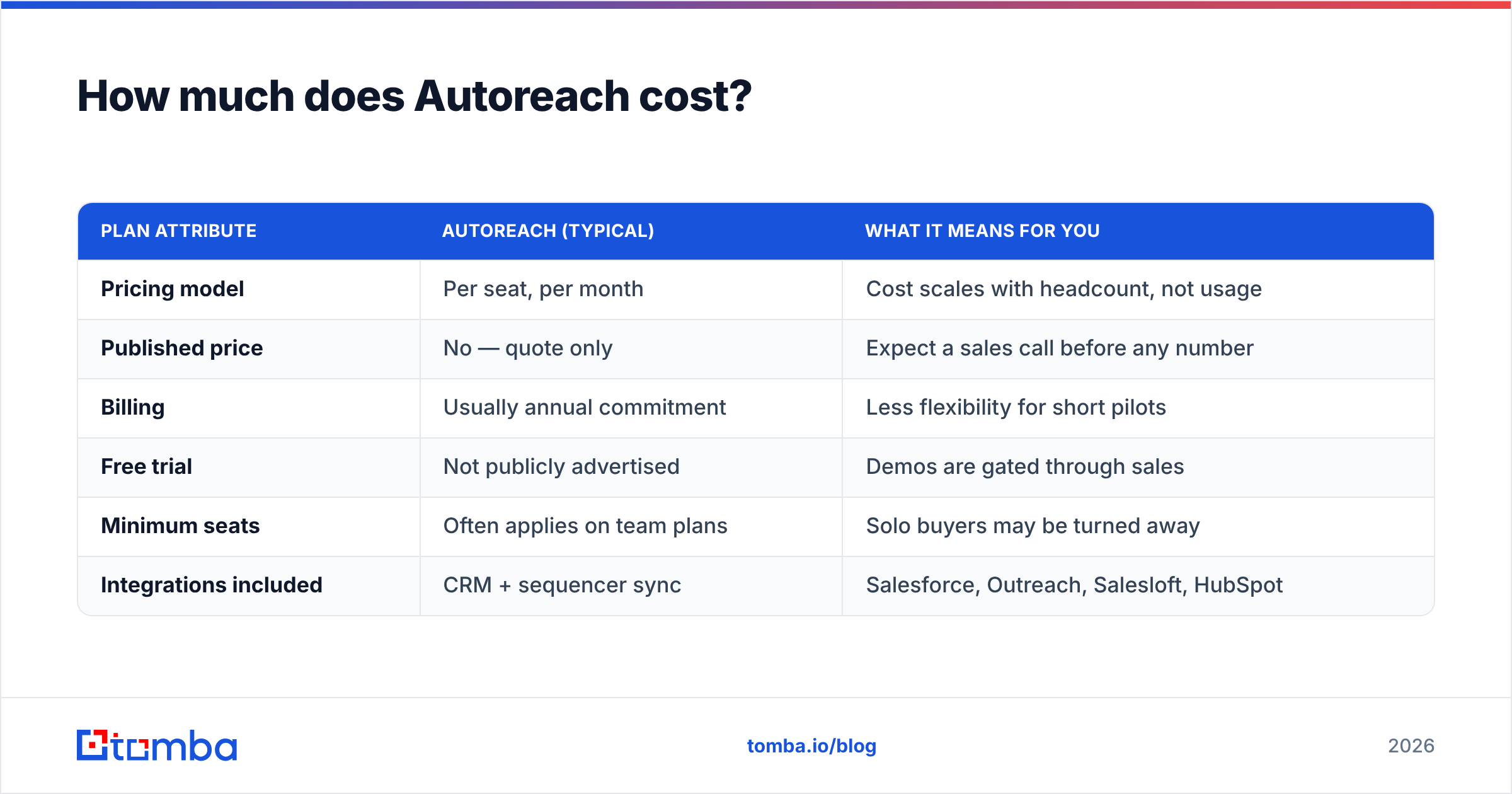
Short answer: Autoreach does not publish pricing. Like most enterprise-leaning sales tools, it routes you to a demo and a custom quote rather than a public pricing page. That makes a clean comparison hard, but here's the realistic structure based on how dialers in this category are typically sold.
| Plan attribute | Autoreach (typical) | What it means for you |
|---|---|---|
| Pricing model | Per seat, per month | Cost scales with headcount, not usage |
| Published price | No — quote only | Expect a sales call before any number |
| Billing | Usually annual commitment | Less flexibility for short pilots |
| Free trial | Not publicly advertised | Demos are gated through sales |
| Minimum seats | Often applies on team plans | Solo buyers may be turned away |
| Integrations included | CRM + sequencer sync | Salesforce, Outreach, Salesloft, HubSpot |
A few honest caveats:
- Treat any specific dollar figure you see online as unverified. Because pricing is negotiated, two teams of the same size can pay different rates depending on contract length and seat count.
- Per-seat pricing punishes large, low-activity teams. If only half your reps dial daily, you're still paying for every seat.
- The real cost includes data. A dialer with a 40% bad-number rate effectively doubles your cost per conversation. Budget for verification and enrichment alongside the license.
For comparison, a transparent tool like Tomba publishes everything: a Free tier with 25 searches a month, then Starter at $49/mo, Growth at $99/mo, and Pro at $249/mo. You can see the full Tomba pricing without a sales call. That transparency is increasingly what buyers expect — and something Autoreach reviewers frequently wish for.
What do Autoreach reviews say?#
Pulling from public review sites like G2 and user discussion, the sentiment clusters into a few clear themes.
What reviewers praise:
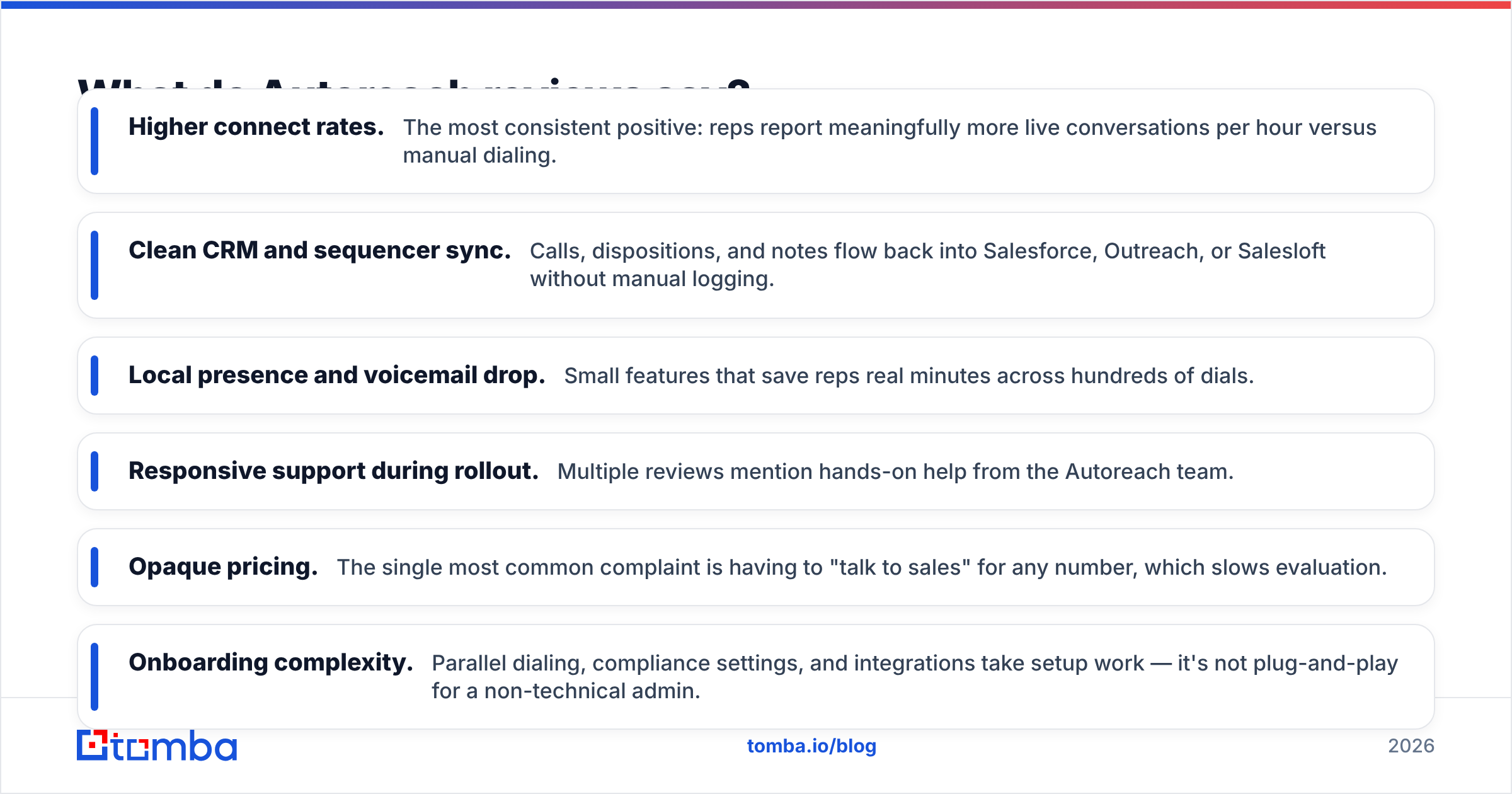
- Higher connect rates. The most consistent positive: reps report meaningfully more live conversations per hour versus manual dialing.
- Clean CRM and sequencer sync. Calls, dispositions, and notes flow back into Salesforce, Outreach, or Salesloft without manual logging.
- Local presence and voicemail drop. Small features that save reps real minutes across hundreds of dials.
- Responsive support during rollout. Multiple reviews mention hands-on help from the Autoreach team.
What reviewers criticize:
- Opaque pricing. The single most common complaint is having to "talk to sales" for any number, which slows evaluation.
- Onboarding complexity. Parallel dialing, compliance settings, and integrations take setup work — it's not plug-and-play for a non-technical admin.
- Data quality is your problem, not theirs. Reviewers note that the tool happily dials bad numbers; it doesn't fix list hygiene.
- Overkill for small teams. Solo sellers and tiny startups find the feature set and contract structure heavier than they need.
The throughline: Autoreach is a capable engine, but reviewers repeatedly stress that garbage data in means wasted dials out. That's not a knock on the software — it's a reminder that your contact database is the real lever.
What are the pros and cons of Autoreach?#
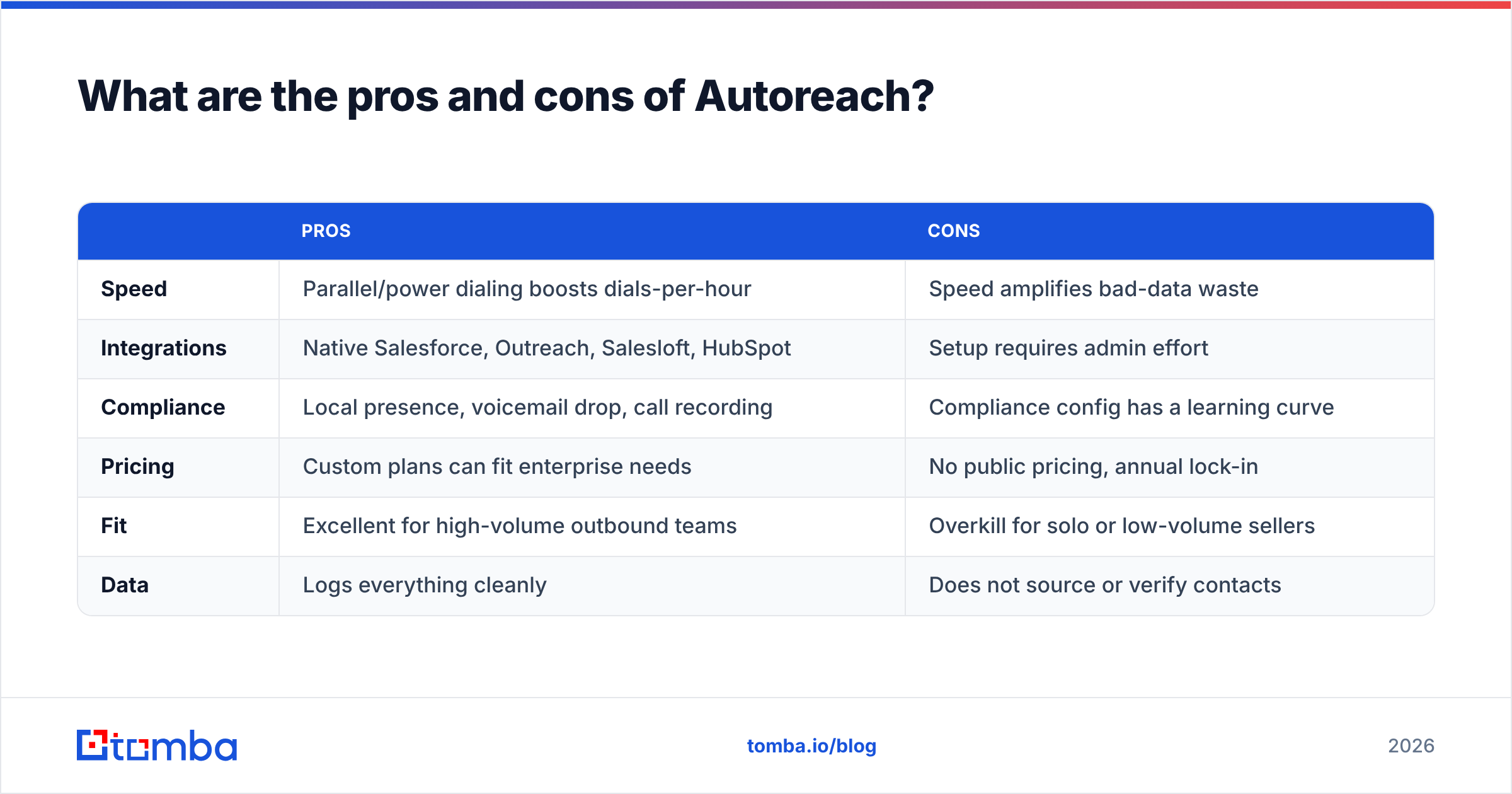
Here's the balanced view in one place.
| Pros | Cons | |
|---|---|---|
| Speed | Parallel/power dialing boosts dials-per-hour | Speed amplifies bad-data waste |
| Integrations | Native Salesforce, Outreach, Salesloft, HubSpot | Setup requires admin effort |
| Compliance | Local presence, voicemail drop, call recording | Compliance config has a learning curve |
| Pricing | Custom plans can fit enterprise needs | No public pricing, annual lock-in |
| Fit | Excellent for high-volume outbound teams | Overkill for solo or low-volume sellers |
| Data | Logs everything cleanly | Does not source or verify contacts |
The pattern is consistent: Autoreach is strong where volume and integration matter, and weak where transparency, simplicity, and self-serve buying matter.
Who is Autoreach best for?#
Autoreach is a good fit if you:
- Run an outbound team of 5+ SDRs making high daily call volume.
- Already live inside Salesforce plus Outreach or Salesloft.
- Have a RevOps or sales-ops person who can own setup and compliance.
- Care more about connect rate than about self-serve pricing.
Autoreach is probably the wrong fit if you:
- Are a founder or solo seller who wants to start dialing this afternoon.
- Need transparent, month-to-month pricing without a contract.
- Don't yet have a clean, verified list of phone numbers to call.
- Do most of your outreach over email rather than phone.
If you're in that second group, you don't need a heavyweight dialer — you need accurate contact data and a simpler workflow first. That's where a focused data tool earns its keep before you ever add a dialer license.
)
How does Autoreach compare to alternatives?#
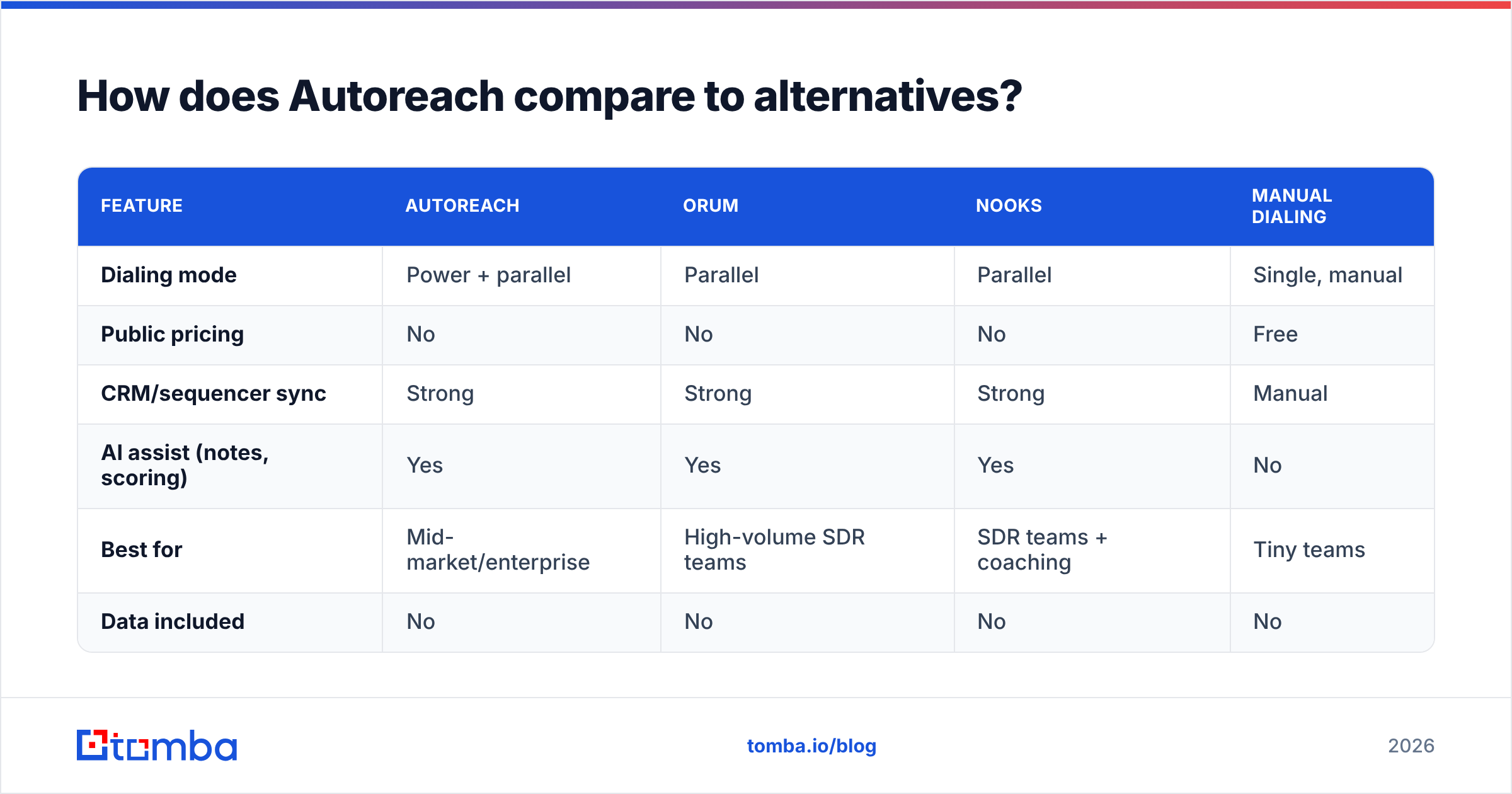
Autoreach competes with a growing field of AI dialers. Here's how the category lines up on the attributes buyers actually weigh.
| Feature | Autoreach | Orum | Nooks | Manual dialing |
|---|---|---|---|---|
| Dialing mode | Power + parallel | Parallel | Parallel | Single, manual |
| Public pricing | No | No | No | Free |
| CRM/sequencer sync | Strong | Strong | Strong | Manual |
| AI assist (notes, scoring) | Yes | Yes | Yes | No |
| Best for | Mid-market/enterprise | High-volume SDR teams | SDR teams + coaching | Tiny teams |
| Data included | No | No | No | No |
Notice the last row. None of these dialers solve your data problem. They all assume you arrive with valid phone numbers and emails. That's the gap that quietly determines your ROI: a $100/seat dialer running on a 50%-accurate list is more expensive per conversation than a cheaper dialer running on clean data.
This is also why many teams pair a dialer with a dedicated data layer. You source and verify contacts first, then let the dialer do what it's good at — moving fast through a list you trust.
Does Autoreach replace your data stack?#
No — and this is the most important thing to understand before you buy. Autoreach is an execution tool, not a data source. It needs three things you have to supply:
- Accurate phone numbers — direct dials, not switchboards. A dialer pointed at main lines burns time on gatekeepers.
- Verified emails for multi-channel follow-up — most reps blend calls with email; a connect rarely closes on the first dial.
- Enriched context — title, company, and recent triggers so reps say something relevant when a prospect picks up.
That's the workflow a tool like Tomba is built to feed. Use the phone finder to pull direct B2B phone numbers, the email finder to find verified work emails for the same contacts, and data enrichment to add the title and company context your reps need on the call. Run the list through an email verifier so your follow-up doesn't bounce and torch your sender reputation.
The sequence matters: build and clean the list, then dial it. A dialer makes a good list faster and a bad list expensive.
Frequently asked questions#
Is Autoreach worth it? For high-volume outbound teams already on Salesforce and a sequencer, yes — the connect-rate gains usually justify the per-seat cost. For solo sellers or email-first teams, the contract structure and setup overhead make it hard to justify.
Why doesn't Autoreach publish pricing? Like most enterprise sales tools, it sells through demos and custom quotes tied to seat count and contract length. The trade-off is flexibility for the vendor and less transparency for you.
Does Autoreach find phone numbers or emails? No. It dials and logs the contacts you provide. You need a separate data source for accurate numbers and emails — that's a common misunderstanding among first-time buyers.
What's the cheapest way to test the value of a dialer? Start by fixing your data. Clean, verified phone numbers and emails will lift your connect rate before you spend a dollar on a dialer license — and they make any dialer you eventually choose perform better.
The bottom line#
Autoreach is a legitimately strong dialer for the right team: high outbound volume, an existing Salesforce-plus-sequencer stack, and ops support to run it. The recurring knocks — opaque pricing, setup complexity, and zero help with data quality — are real but manageable if you go in with eyes open.
Before you commit to a per-seat contract, make sure the thing you're feeding the dialer is worth dialing. Accurate, verified contacts are the highest-leverage upgrade you can make to any calling motion. Start with Tomba's Email Finder to build verified, enriched contact lists — then layer a dialer like Autoreach on top of data you actually trust. Clean data first, speed second. That order is what turns more dials into more conversations.
// get started
Find, verify and enrich your first contacts today
Start on the free plan with 25 searches a month, then scale when your team is ready.
Free plan · No credit card required · GDPR & CCPA
// about the author