Average Email CTR by Industry: 2026 Benchmarks & Data
What counts as a good email click-through rate in 2026? See average email CTR by industry, how it's calculated, and the levers that actually move clicks.
Average Email CTR by Industry: 2026 Benchmarks & Data
You can't tell if a 2.1% click-through rate is a win or a disaster until you know what your industry actually does. A 2.1% CTR is below average for hobbies and media, but well above average for legal services and real estate. Context is everything.
This guide gives you the 2026 benchmarks, shows you exactly how CTR is calculated (and where the math quietly lies to you), and walks through the levers that move clicks more than any subject-line tweak ever will.
TL;DR#
- Average email CTR by industry sits around 1.4%–3.0% for most B2B and B2C senders in 2026; the overall cross-industry average lands near 2.0%–2.6%.
- CTR ≠ CTOR. Click-through rate is clicks ÷ delivered; click-to-open rate is clicks ÷ opens. Apple Mail Privacy Protection has made open-based metrics unreliable since 2021, so CTR and CTOR are now the numbers that matter.
- List quality beats copy. A clean, verified list lifts CTR more than any single subject line, because dead and mistargeted addresses never click.
- Hobbies, media, and nonprofits post the highest CTRs; e-commerce, real estate, and restaurants sit at the low end.
- Want above-benchmark clicks? Segment, verify, send relevant offers, and fix deliverability before you touch the creative.
What is email click-through rate (CTR)?#
Email click-through rate is the percentage of delivered emails in which at least one recipient clicked a link. It's the cleanest single proxy for "did this email actually make someone do something."
Think of it like a billboard on a highway. Impressions are how many cars drove past (delivered emails). Opens are how many drivers glanced at it. Clicks are how many actually took the next exit because of it. The exit-takers are what you're paid on — not the glances.
The standard formula:
CTR = (Unique clicks ÷ Delivered emails) × 100
A campaign delivered to 10,000 inboxes that generates 240 unique clicks has a 2.4% CTR. Simple — but the denominator is where people fool themselves, which we'll get to.

What is the average email CTR by industry in 2026?#
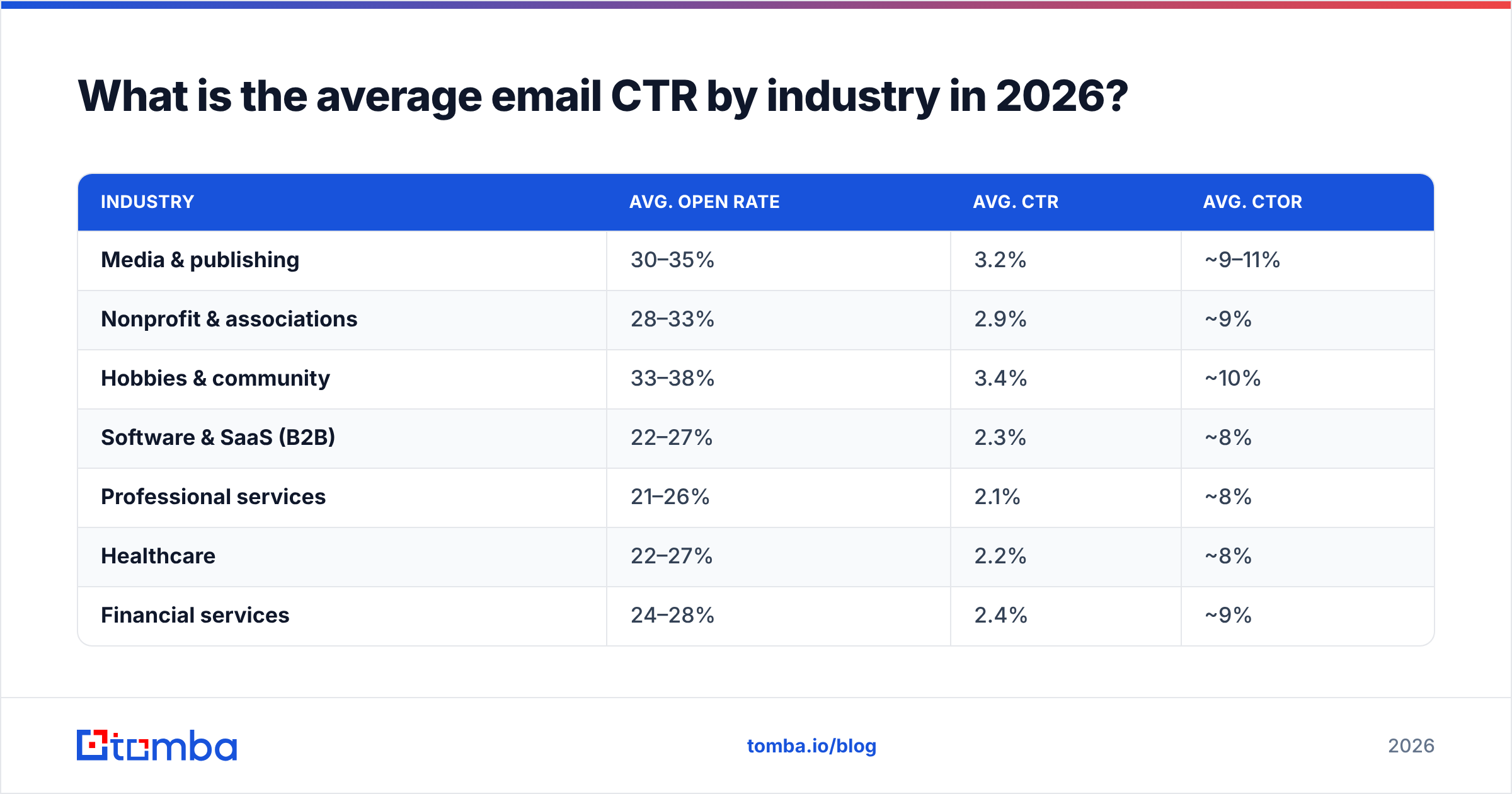
Here's the headline question. Across aggregated 2026 reporting from major ESPs, the cross-industry average CTR sits in the 2.0%–2.6% range, but the spread by vertical is wide enough that the average alone is nearly useless. Use the row that matches your business.
| Industry | Avg. open rate | Avg. CTR | Avg. CTOR |
|---|---|---|---|
| Media & publishing | 30–35% | 3.2% | ~9–11% |
| Nonprofit & associations | 28–33% | 2.9% | ~9% |
| Hobbies & community | 33–38% | 3.4% | ~10% |
| Software & SaaS (B2B) | 22–27% | 2.3% | ~8% |
| Professional services | 21–26% | 2.1% | ~8% |
| Healthcare | 22–27% | 2.2% | ~8% |
| Financial services | 24–28% | 2.4% | ~9% |
| E-commerce & retail | 16–20% | 1.6% | ~6% |
| Real estate | 19–23% | 1.8% | ~7% |
| Restaurants & hospitality | 18–22% | 1.4% | ~6% |
A few things worth reading off this table:
- High-intent, content-led audiences click more. Media, hobbies, and nonprofits send to people who opted in for the content itself, so clicks come naturally.
- Transactional and high-frequency senders click less. E-commerce and restaurants email often, which trains recipients to skim. Volume costs you per-send engagement.
- B2B clusters in the middle. SaaS, professional services, and finance land between 2.1% and 2.4% because the audience is smaller, more targeted, but also busier.
These are directional figures aggregated from public ESP benchmark reports. Your own historical baseline beats any external table — but if you're new, this tells you whether you're in the right neighborhood.
How is CTR different from CTOR and open rate?#
Conclusion first: stop trusting open rate, and learn to read CTOR alongside CTR.
Since Apple's Mail Privacy Protection (MPP) rolled out in 2021 and now covers a large share of opens, the tracking pixel fires automatically whether or not a human looked at the email. That inflates open rates and makes them close to meaningless as a performance signal. The email deliverability world adapted by leaning on click-based metrics.
Here are the three metrics and what each actually answers:
- Open rate — Opens ÷ delivered. Inflated by MPP. Treat as a rough trend line, not a KPI.
- Click-through rate (CTR) — Unique clicks ÷ delivered. The honest measure of campaign-level performance.
- Click-to-open rate (CTOR) — Unique clicks ÷ unique opens. Measures content quality: of the people who opened, how many were compelled to click.
A practical way to use them together: CTR tells you how the whole campaign performed (list + subject + content + timing). CTOR isolates the content and offer, because it only counts people who already opened. If your CTR is low but CTOR is healthy, your subject line or list is the problem, not your body copy. If both are low, look at relevance and targeting.
For a deeper read on the metrics that survive in a post-MPP world, our notes on response rate and engagement signals are a useful companion.
How do you calculate email CTR correctly?#
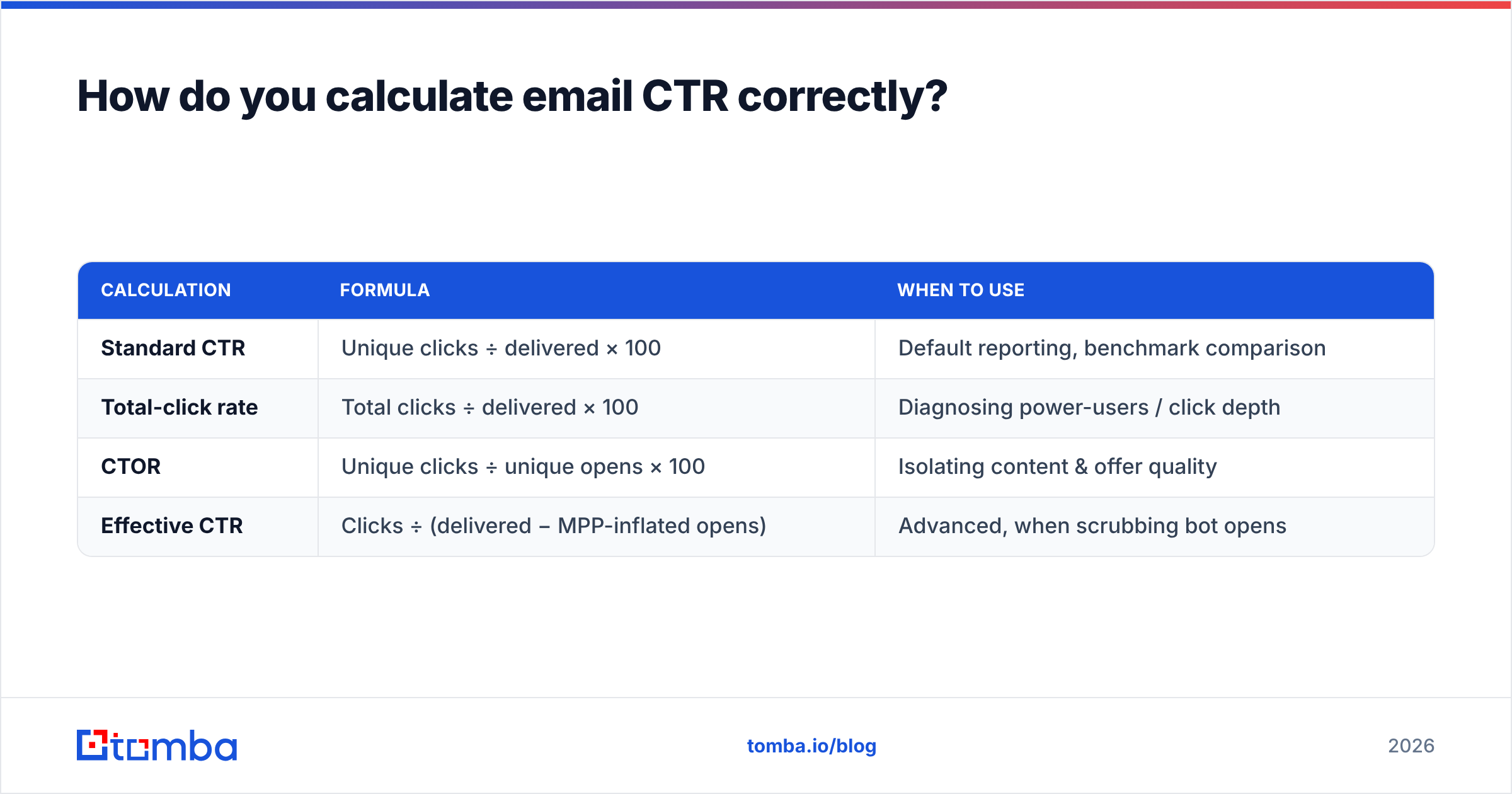
The formula is easy. The denominator is where teams quietly inflate their own numbers.
Use delivered, not sent. If you send 12,000 emails and 1,500 bounce, your real reach is 10,500. Calculating CTR against 12,000 understates your true performance and hides a deliverability problem. Always divide by delivered.
Unique vs. total clicks. Unique clicks count each recipient once no matter how many times they click. Total clicks count every click. CTR almost always uses unique clicks — reporting total clicks makes your number look bigger and breaks comparability with every benchmark table, including the one above.
| Calculation | Formula | When to use |
|---|---|---|
| Standard CTR | Unique clicks ÷ delivered × 100 | Default reporting, benchmark comparison |
| Total-click rate | Total clicks ÷ delivered × 100 | Diagnosing power-users / click depth |
| CTOR | Unique clicks ÷ unique opens × 100 | Isolating content & offer quality |
| Effective CTR | Clicks ÷ (delivered − MPP-inflated opens) | Advanced, when scrubbing bot opens |
One more trap: bot clicks. Security gateways and link scanners (common in finance, healthcare, and government) click every link in an email to check it for malware. Those phantom clicks inflate CTR in regulated industries. If your B2B CTR looks suspiciously high, filter known scanner user-agents before you celebrate.
Why is your CTR below the industry average?#
If you're under the benchmark, the cause is almost always one of these five — and they're listed in the order they usually matter:
- Dirty list. Invalid, abandoned, and mistargeted addresses can't click. They also drag your sender reputation down, which lands more of your good emails in spam. This is the single biggest hidden CTR killer.
- Poor segmentation. Sending one offer to your whole list guarantees most recipients see something irrelevant. Relevant segments routinely double CTR.
- Deliverability problems. If you're landing in Promotions or Spam, the click never had a chance. Check your sender reputation and authentication first.
- Weak or buried CTA. One clear, above-the-fold call to action beats five competing links. Decision paralysis reads as "no click."
- Bad timing and frequency. Over-mailing trains recipients to ignore you; the click rate decays with every extra send that week.
Notice that four of the five are about who you send to and whether it arrives — not the words in the email. That's the part most teams under-invest in.
How do you get above-benchmark email CTR?#
Here's the playbook, ordered by return on effort.
1. Verify and clean your list first#
You cannot out-write a bad list. Every invalid address you remove raises your delivered-based CTR mechanically and protects your reputation so real inboxes keep receiving you. Run your list through an email verifier before every major send, and handle risky catch-all domains deliberately rather than blasting them.
If you're building lists from scratch, sourcing accurate contacts up front saves you the cleanup later. An accurate email finder that returns verified, role-correct addresses means fewer bounces and more clicks from the first send.
2. Segment by behavior and intent#
The biggest jumps in CTR come from sending the right offer to the right slice. Segment by past clicks, lifecycle stage, industry, or role. A re-engagement message to dormant subscribers and a product update to power users should never be the same email.
3. Fix deliverability before creative#
A beautiful email in the spam folder has a 0% CTR. Confirm SPF, DKIM, and DMARC are aligned, warm new domains gradually, and monitor your sender reputation. Most "low CTR" problems are actually inbox-placement problems wearing a costume.
4. One email, one job#
Strip competing links. Make the primary CTA obvious, repeated, and above the fold on mobile (where the majority of B2C opens now happen). Clarity converts.
5. Test the variables that move the needle#
A/B test in this priority order: audience segment → offer → subject line → send time → button copy. Most teams test button color first; that's the least impactful variable on the list.
6. Enrich your data so relevance is possible#
You can't personalize what you don't know. Data enrichment fills in role, company size, and industry so your segmentation is real, not guessed. Relevance is the engine behind every above-average CTR.
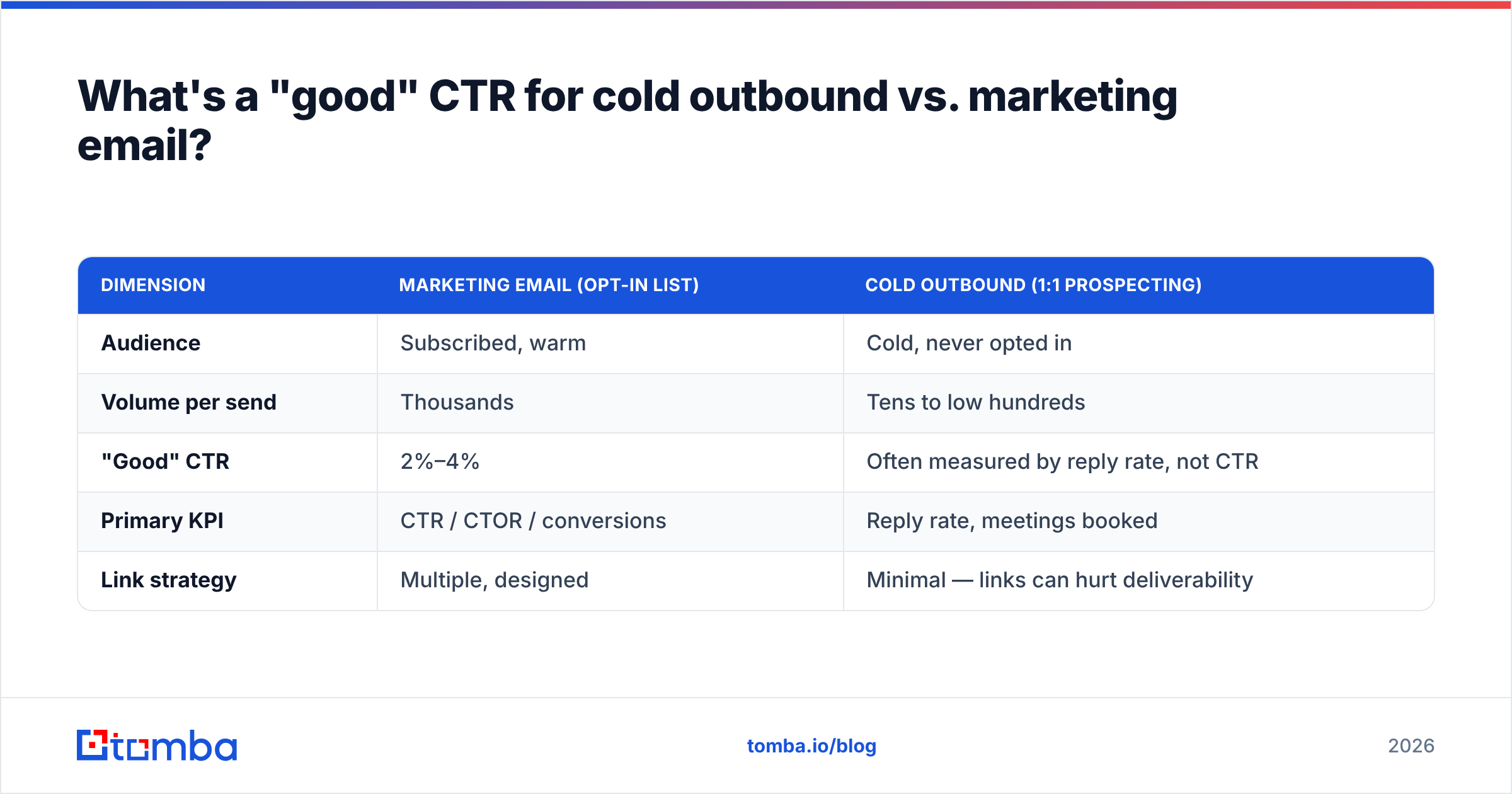
What's a "good" CTR for cold outbound vs. marketing email?#
These are two different sports, and mixing their benchmarks is how people set themselves up to fail.
| Dimension | Marketing email (opt-in list) | Cold outbound (1:1 prospecting) |
|---|---|---|
| Audience | Subscribed, warm | Cold, never opted in |
| Volume per send | Thousands | Tens to low hundreds |
| "Good" CTR | 2%–4% | Often measured by reply rate, not CTR |
| Primary KPI | CTR / CTOR / conversions | Reply rate, meetings booked |
| Link strategy | Multiple, designed | Minimal — links can hurt deliverability |
For cold outbound, reply rate matters more than CTR, and stuffing a cold email with tracked links often lowers deliverability because link-heavy first-touch emails look promotional to filters. If you run cold campaigns, judge them on replies and booked meetings, and keep links scarce until you have a relationship.
For marketing email to an opt-in list, the benchmark table earlier in this post applies directly. Pick your industry row, beat it, repeat.
How often should you recheck your CTR benchmarks?#
Quarterly for benchmarks, every campaign for your own numbers. Industry averages drift as inbox providers change filtering and as MPP-style privacy features evolve. Your internal baseline, though, is the one that should drive decisions — a 2.5% CTR is good or bad only relative to your last twenty campaigns.
Track the trend, not the single data point. One campaign below benchmark is noise; three in a row is a list, deliverability, or relevance problem you need to investigate with the five-cause checklist above.
For broader context on email performance standards, vendor benchmark reports from established players like HubSpot and review aggregators such as G2 are useful cross-references — just confirm whether each report calculates CTR on delivered or sent, because that one difference can swing the headline number by 10–15%.
The bottom line#
Average email CTR by industry gives you the goalpost; your list quality, segmentation, and deliverability decide whether you clear it. The benchmark table tells you where you stand. The five-cause checklist tells you why you're short. And the playbook — verify, segment, fix deliverability, simplify the CTA — tells you how to get above the line and stay there.
Start where the leverage is highest: the list. If a meaningful share of your contacts are invalid, mistargeted, or stale, no subject-line experiment will save you. Use the Tomba Email Finder to source verified, role-accurate B2B contacts, then keep them clean with the email verifier before every send. Accurate data in, above-benchmark clicks out. You can start on the free tier (25 searches/month) and scale through Tomba pricing as your sending grows.
// get started
Find, verify and enrich your first contacts today
Start on the free plan with 25 searches a month, then scale when your team is ready.
Free plan · No credit card required · GDPR & CCPA
// about the author