Average Lead Response Time in 2026: Benchmarks & Fixes
Most teams take 47 hours to reply to a new lead — but the buyers who convert expect minutes. Here are the 2026 benchmarks and how to close the gap.
TL;DR
- The average lead response time in B2B still sits around 47 hours, while the leads that actually convert expect a reply in 5 minutes or less.
- Contacting a lead within 5 minutes makes you up to 100x more likely to connect and 21x more likely to qualify it than waiting 30 minutes (Lead Response Management Study).
- Speed-to-lead is a process problem, not a hustle problem — routing, enrichment, and automation matter more than rep effort.
- Most delay hides in manual data lookup: reps stall because the lead record has no verified email or phone. Fixing enrichment is the fastest single lever.
- Below: the real 2026 benchmarks, a comparison of response-time tiers, and a concrete playbook to get under five minutes.
What is average lead response time?#
Average lead response time is the mean elapsed time between when a lead raises a hand — a form fill, a demo request, a chat message — and when a human (or a well-built automation) makes the first real contact attempt. It is the headline metric inside the broader discipline of speed-to-lead.
Think of it like a fire alarm. The value of responding isn't constant — it decays by the second. A lead who just submitted a form is standing in your store with their wallet out. An hour later they've closed the tab, opened three competitor tabs, and moved on. Your response time decides whether you catch them mid-intent or chase a cold memory.
The number that gets quoted most often comes from the Lead Response Management Study by James Oldroyd, which found the median first-response time across hundreds of companies was extraordinarily slow, and that the odds of qualifying a lead drop off a cliff after the first five minutes. Nearly two decades later, the depressing part is how little the average has moved.
)
What is a good average lead response time in 2026?#
Conclusion first: aim for under 5 minutes for inbound, high-intent leads. Everything slower is leaving pipeline on the table.
Here's how the tiers actually break down, and what each one does to your connect and conversion rates.
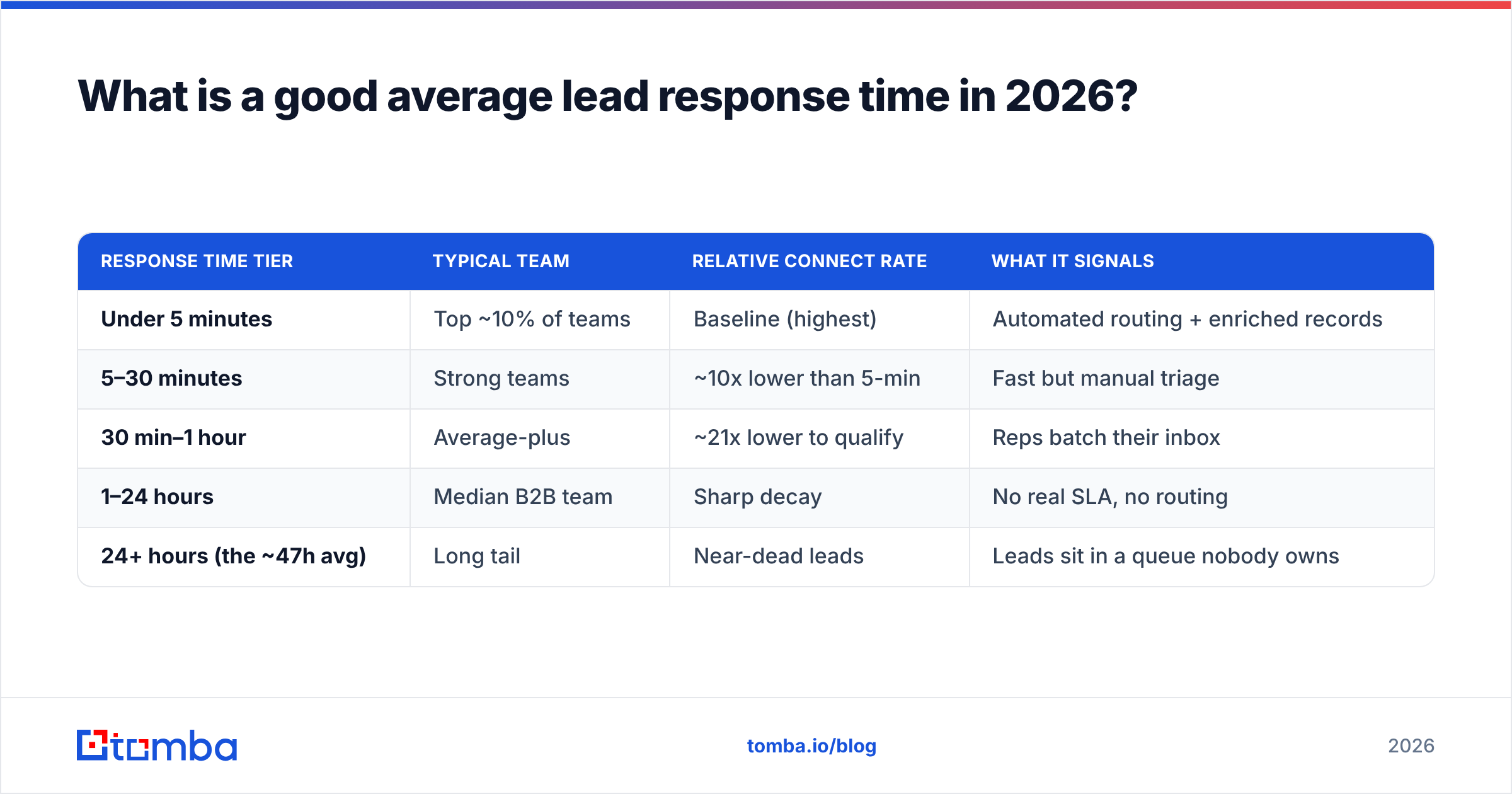
| Response time tier | Typical team | Relative connect rate | What it signals |
|---|---|---|---|
| Under 5 minutes | Top ~10% of teams | Baseline (highest) | Automated routing + enriched records |
| 5–30 minutes | Strong teams | ~10x lower than 5-min | Fast but manual triage |
| 30 min–1 hour | Average-plus | ~21x lower to qualify | Reps batch their inbox |
| 1–24 hours | Median B2B team | Sharp decay | No real SLA, no routing |
| 24+ hours (the ~47h avg) | Long tail | Near-dead leads | Leads sit in a queue nobody owns |
The gap between the top tier and the average isn't talent. It's plumbing. Teams under five minutes have almost always automated three things: instant routing to an owner, instant notification, and pre-enriched contact data so the rep never stops to hunt for an email or a phone number.
That last one is the silent killer. A rep who has to copy a name into LinkedIn, guess the email format, and verify it before sending has already burned the window. When the verified email and direct dial are already on the record, "respond in five minutes" stops being a heroic act and becomes the default.
Why does the 5-minute window matter so much?#
Because buyer intent is perishable and your competitors are also watching the clock.
Three forces compound inside that first window:
- Attention is highest at submission. The lead is literally looking at their screen, thinking about your category, right now. Every minute you wait, that attention scatters.
- First contact wins disproportionately. Studies of B2B buying consistently show the vendor who responds first often sets the agenda and the evaluation criteria. You don't just want to be in the deal — you want to frame it.
- Decay is exponential, not linear. The drop from 5 to 30 minutes is far steeper than the drop from 5 to 6 hours, because the 6-hour lead was already gone. Most of your conversion value lives in the first 300 seconds.
This is why "we usually get back within a business day" is a polite way of saying "we forfeit." A one-day response time in a market where someone else replies in two minutes is not a minor disadvantage — it is the whole game.
If you want to pair speed with quality, lead scoring decides which alarms get the fastest trucks. Combining a tight SLA with solid lead management and scoring means your five-minute response goes to the leads most likely to close, not to every newsletter signup.
What slows lead response time down?#
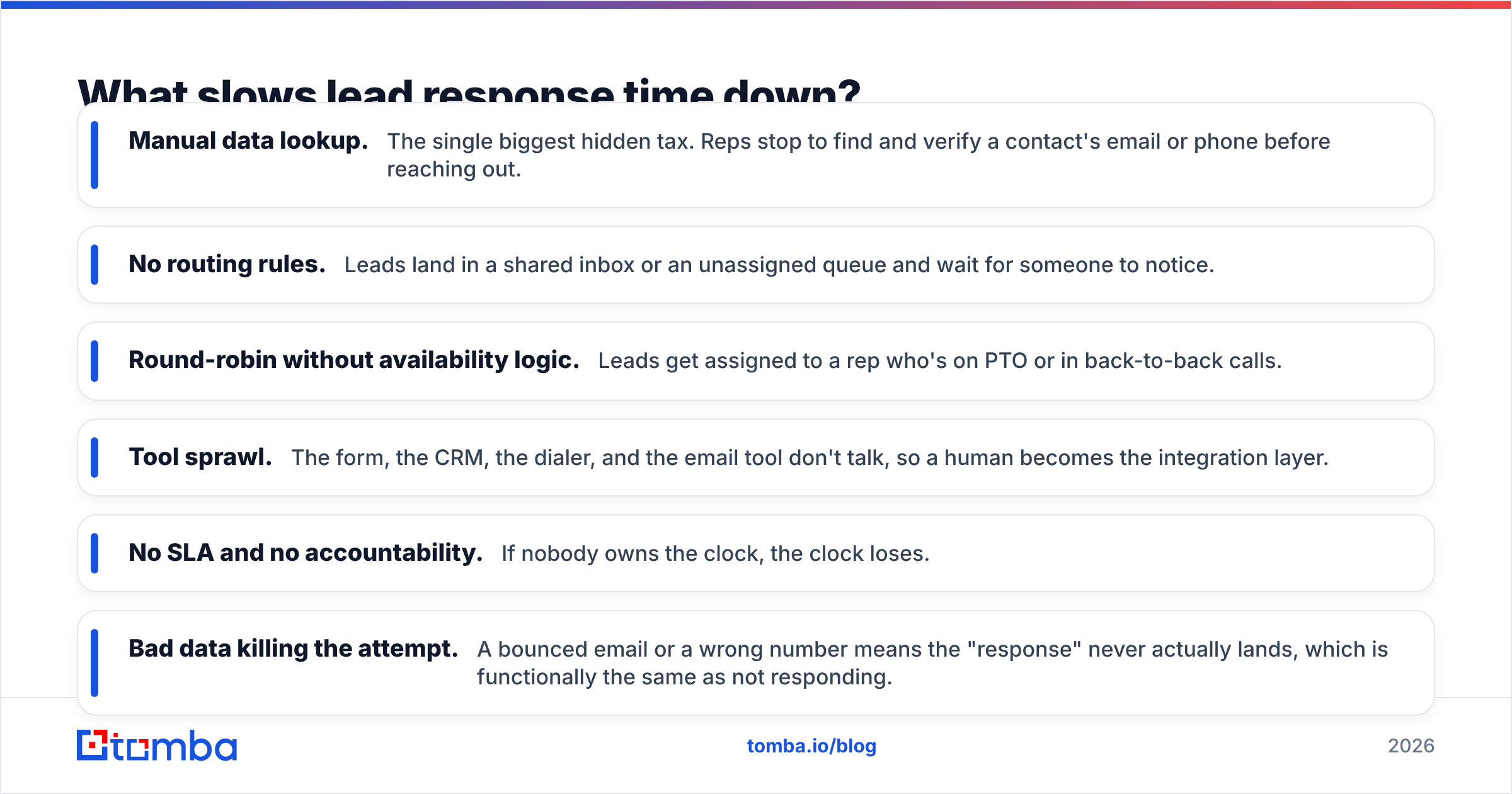
Almost never laziness. Almost always friction. The usual suspects:
- Manual data lookup. The single biggest hidden tax. Reps stop to find and verify a contact's email or phone before reaching out.
- No routing rules. Leads land in a shared inbox or an unassigned queue and wait for someone to notice.
- Round-robin without availability logic. Leads get assigned to a rep who's on PTO or in back-to-back calls.
- Tool sprawl. The form, the CRM, the dialer, and the email tool don't talk, so a human becomes the integration layer.
- No SLA and no accountability. If nobody owns the clock, the clock loses.
- Bad data killing the attempt. A bounced email or a wrong number means the "response" never actually lands, which is functionally the same as not responding.
)
Notice how many of these trace back to data. A lead with a missing or unverified email forces a detour. Pre-enrichment removes the detour entirely. If you run inbound at any volume, wiring an email finder and a email verifier into your intake flow means every new record arrives with a verified, send-ready address — no manual hunting, no guessing the format, no waiting on a tool to load.
How do you measure and benchmark your response time?#
You can't fix what you don't time. Set up measurement before you set up a fix, so you have a real before-and-after.
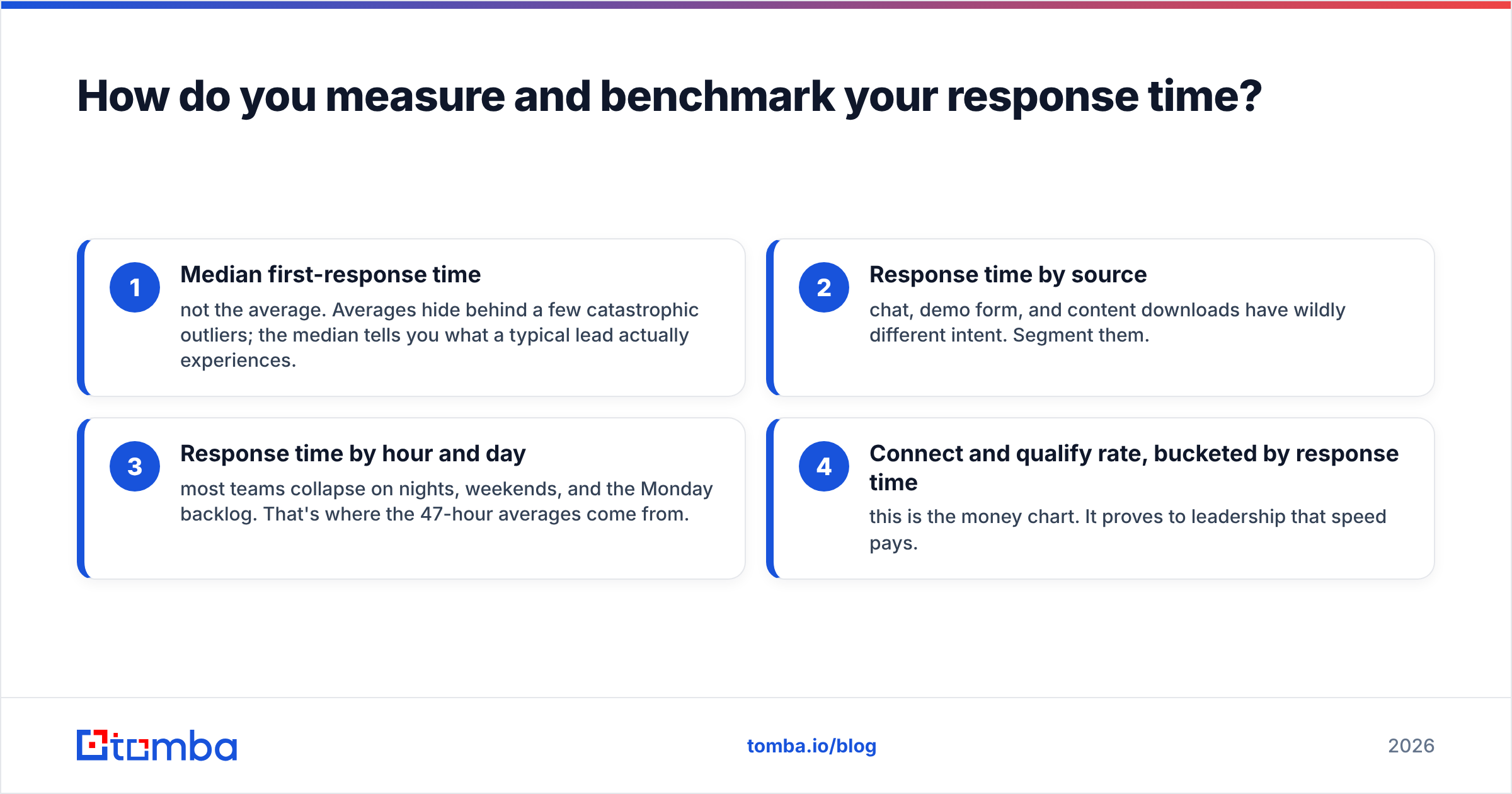
Track these four numbers:
- Median first-response time — not the average. Averages hide behind a few catastrophic outliers; the median tells you what a typical lead actually experiences.
- Response time by source — chat, demo form, and content downloads have wildly different intent. Segment them.
- Response time by hour and day — most teams collapse on nights, weekends, and the Monday backlog. That's where the 47-hour averages come from.
- Connect and qualify rate, bucketed by response time — this is the money chart. It proves to leadership that speed pays.
Pull these from your CRM's lead history or your form timestamps. Then look at your response rate sliced by speed tier. The correlation is usually so stark that the business case writes itself.
A practical benchmark to hold yourself to: median under 5 minutes during business hours, under 1 hour off-hours via automation. If you're far from that, don't aim for perfection on day one. Cutting a 12-hour median to 1 hour captures most of the available upside.
How do you cut your average lead response time?#
Here's the playbook, in the order that delivers the most speed per unit of effort.
1. Enrich every lead the moment it arrives. This is the highest-leverage move and the one most teams skip. The instant a form fires, append a verified work email, a direct phone number, and firmographics to the record — automatically. The rep opens a complete contact card instead of an investigation. Tools like Tomba's data enrichment and phone finder plug into this step so the contact details are ready before the rep even sees the notification.
2. Route instantly and unambiguously. Every lead gets an owner within seconds, based on territory, segment, or round-robin-with-availability. No shared-inbox limbo.
3. Notify on the channel reps actually watch. Push the alert to Slack or mobile, not a CRM tab nobody refreshes. A Slack integration that pings the owner with the enriched card the moment a lead lands turns response time into a reflex.
4. Automate the first touch off-hours. A human-quality, instant auto-reply (with a real calendar link) holds the lead's attention until a rep is available. This alone can rescue your nights-and-weekends numbers.
5. Set an SLA and report on it weekly. What gets measured and shown to the team improves. Make median response time a scoreboard metric, not a buried report.
6. Verify before you send. Speed is worthless if the message bounces. A quick verification pass — or a clean, pre-verified record from step one — ensures the fast response actually reaches a human inbox and protects your sender reputation.
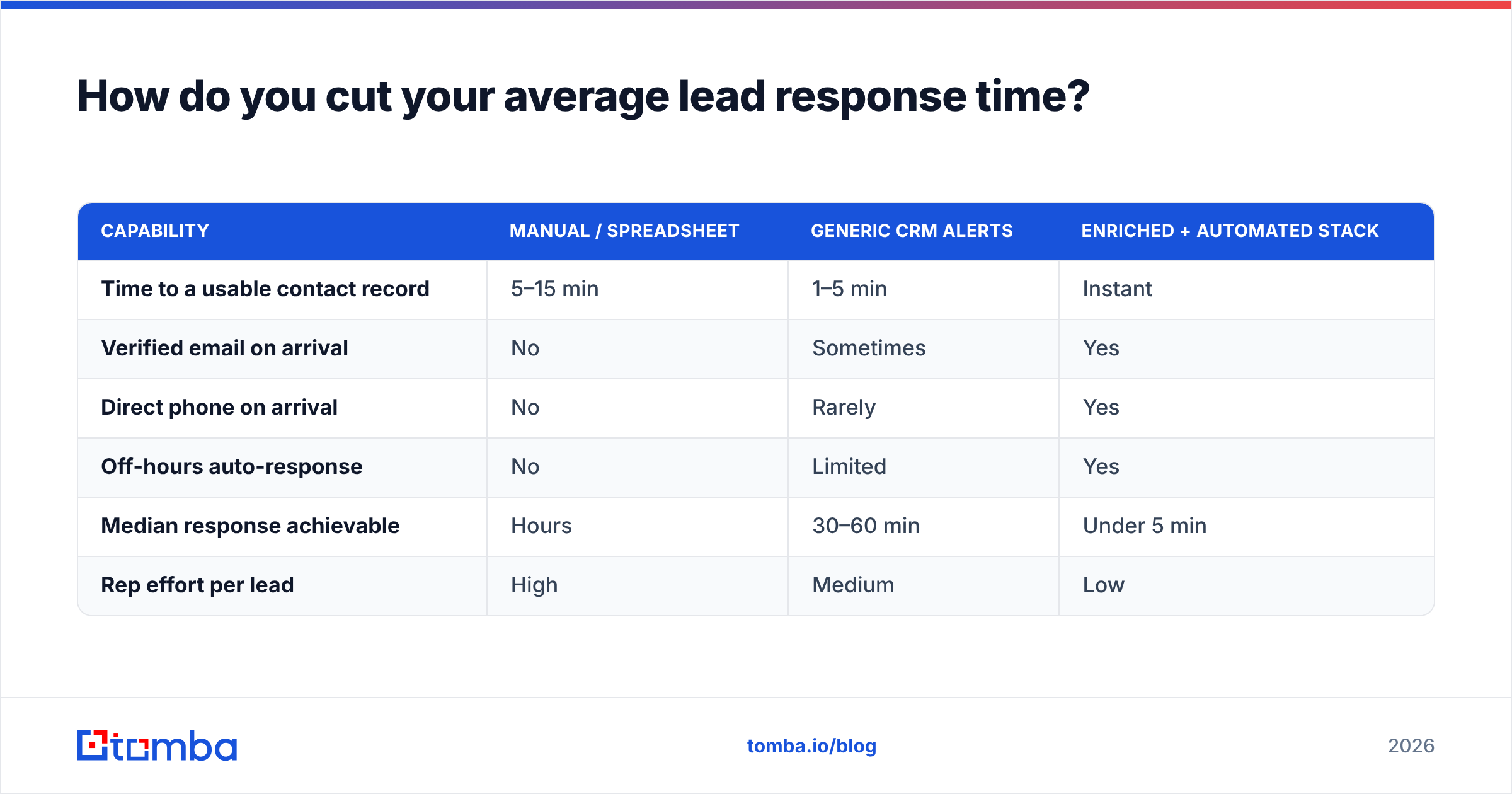
How the tools stack up for speed-to-lead#
| Capability | Manual / spreadsheet | Generic CRM alerts | Enriched + automated stack |
|---|---|---|---|
| Time to a usable contact record | 5–15 min | 1–5 min | Instant |
| Verified email on arrival | No | Sometimes | Yes |
| Direct phone on arrival | No | Rarely | Yes |
| Off-hours auto-response | No | Limited | Yes |
| Median response achievable | Hours | 30–60 min | Under 5 min |
| Rep effort per lead | High | Medium | Low |
The pattern is clear: the teams hitting sub-five-minute response times didn't ask reps to try harder. They removed the work that stood between the lead and the first touch — and most of that work was data lookup.
You can wire this together with a HubSpot integration or your CRM of choice, plus enrichment on intake. For the underlying philosophy and broader context on automating the busywork, see HubSpot's research on sales response time and Salesforce's guidance on lead management best practices. The independent reviews on G2 are also a useful sanity check when you're comparing enrichment and routing tools.
What's the bottom line on average lead response time?#
The average lead response time in B2B is still measured in hours or days, but the leads worth winning are measured in minutes. That gap is your opportunity. You don't beat it with more hustle — you beat it by removing the friction that makes fast responses hard, and the biggest piece of that friction is incomplete contact data.
Get the verified email and phone onto the record the instant a lead arrives, route it to an owner automatically, and notify them where they actually look. Do that and "respond in five minutes" stops being an aspiration and becomes your floor.
Ready to kill the lookup delay? Start with the Tomba Email Finder to auto-append a verified, send-ready email to every new lead the moment it lands — so your reps spend the five-minute window selling, not searching. Pair it with data enrichment and check the Tomba pricing plans (free tier included, Starter at $49/mo) to size it to your lead volume. The fastest responder usually wins the deal — make sure that's you.
// get started
Find, verify and enrich your first contacts today
Start on the free plan with 25 searches a month, then scale when your team is ready.
Free plan · No credit card required · GDPR & CCPA
// about the author