Avoma Pricing Reviews Pros and Cons (2026 Buyer Guide)
A no-fluff breakdown of Avoma pricing, real user reviews, and the honest pros and cons of its AI meeting assistant and conversation intelligence in 2026.
Avoma Pricing Reviews Pros and Cons (2026 Buyer Guide)
Avoma is one of the better-known AI meeting assistants. But buyers ask a simpler question than the marketing copy: is it worth the seat cost, and where does it fall short? This guide covers Avoma pricing reviews pros and cons in plain terms. Read it before you talk to a sales rep.
TL;DR#
- Avoma is an AI meeting assistant and conversation intelligence platform. It records, transcribes, summarizes, and scores sales and customer calls.
- Pricing scales fast. The free notetaker is genuinely useful. But conversation and revenue intelligence sit on higher tiers. Those plans often reach $70–$130 per user each month when billed monthly.
- Reviews are strong on transcription and notes. They are weaker on deep analytics and on noisy calls.
- It is not a prospecting tool. Avoma helps after you are on the call. You still need a separate way to find and verify contact data.
- Best fit: SMB and mid-market sales teams that live in meetings. They want automated notes and coaching without paying Gong-level prices.
What is Avoma?#
Think of Avoma as a diligent assistant. It sits in every meeting, takes flawless notes, and files a tidy report before you close your laptop. Technically, it is an "AI Meeting Lifecycle Assistant." It combines a notetaker, a transcription engine, and a conversation intelligence layer. That layer analyzes talk patterns, topics, and deal risk.
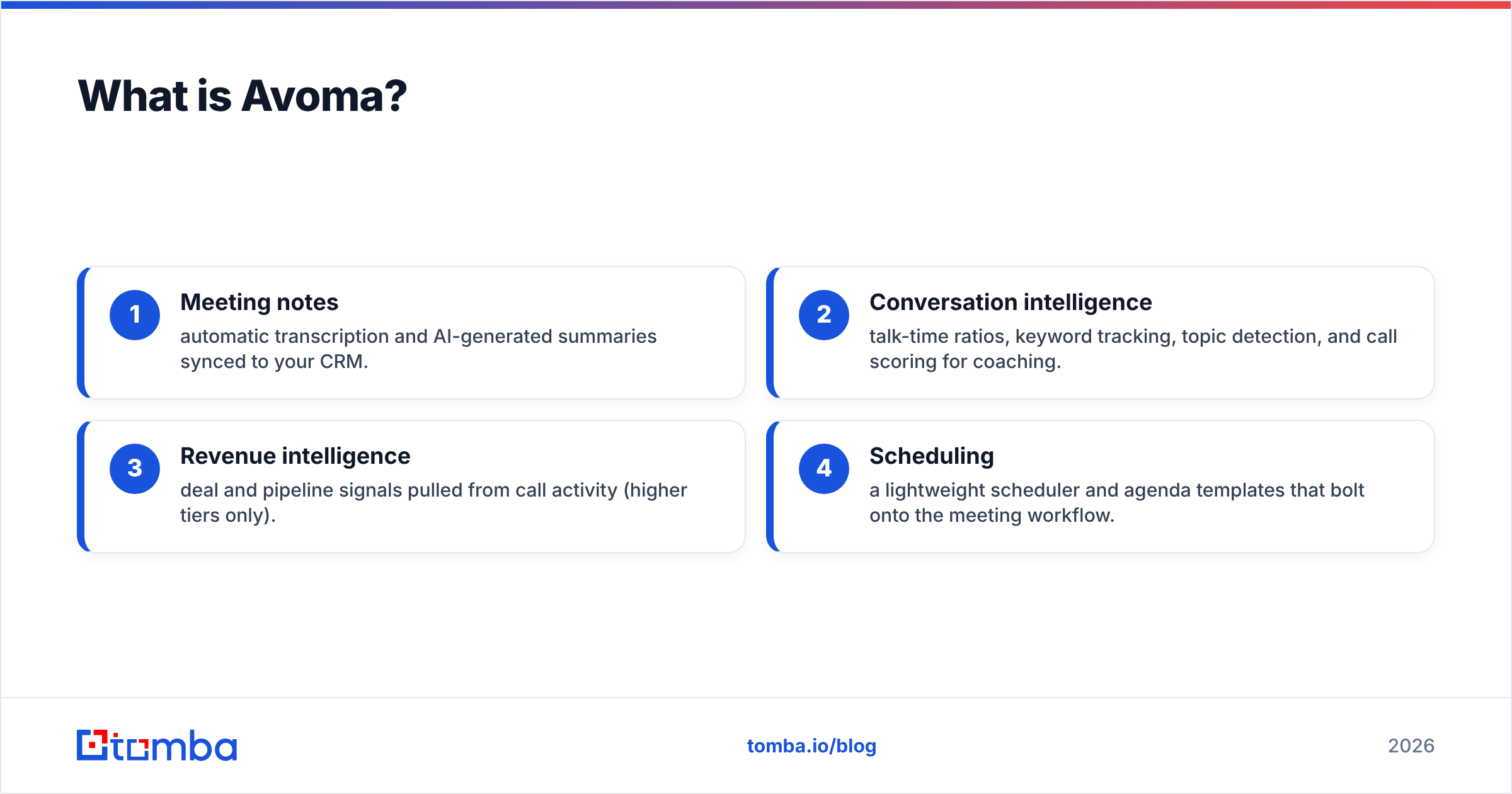
The platform spans four jobs most revenue teams care about:
- Meeting notes — automatic transcription and AI-generated summaries synced to your CRM.
- Conversation intelligence — talk-time ratios, keyword tracking, topic detection, and call scoring for coaching.
- Revenue intelligence — deal and pipeline signals pulled from call activity (higher tiers only).
- Scheduling — a lightweight scheduler and agenda templates that bolt onto the meeting workflow.
That breadth is the selling point. It is also the source of most pricing confusion. The cheap plans only cover job #1.
How much does Avoma cost in 2026?#
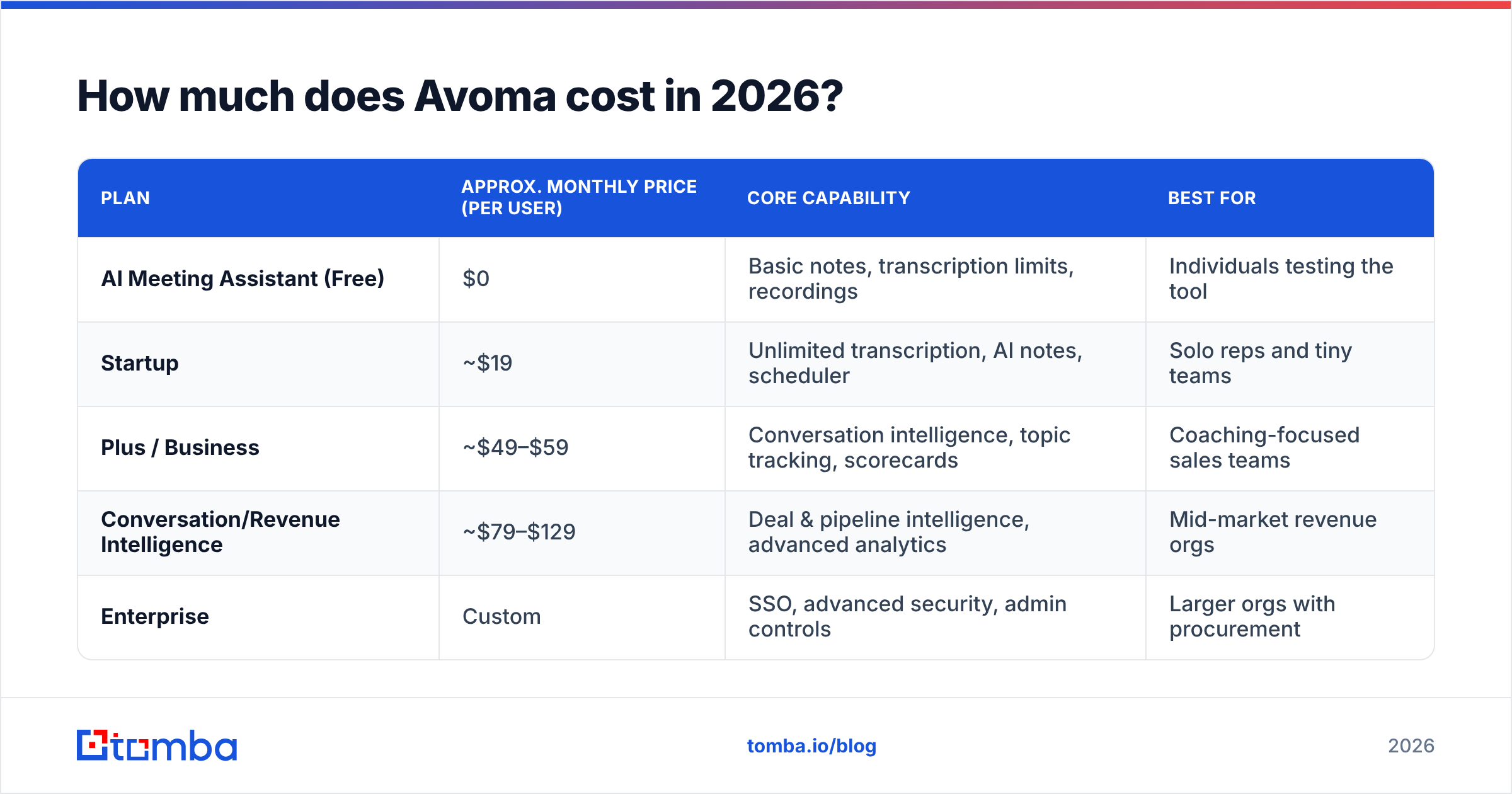
Short answer: free for basic notes. Roughly $19–$59 per user each month for transcription tiers. And $70+ per user each month once you want real conversation and revenue intelligence (billed monthly; annual billing cuts it). Avoma restructures its tiers often. Always confirm the live numbers on avoma.com before budgeting.
Here is the representative shape of Avoma's plans as of early 2026. Treat these as planning estimates, not quotes.
| Plan | Approx. monthly price (per user) | Core capability | Best for |
|---|---|---|---|
| AI Meeting Assistant (Free) | $0 | Basic notes, transcription limits, recordings | Individuals testing the tool |
| Startup | ~$19 | Unlimited transcription, AI notes, scheduler | Solo reps and tiny teams |
| Plus / Business | ~$49–$59 | Conversation intelligence, topic tracking, scorecards | Coaching-focused sales teams |
| Conversation/Revenue Intelligence | ~$79–$129 | Deal & pipeline intelligence, advanced analytics | Mid-market revenue orgs |
| Enterprise | Custom | SSO, advanced security, admin controls | Larger orgs with procurement |
Two things to budget for that the table does not show:
- Annual vs monthly gap. Avoma, like most SaaS, prices annual commitments well below the monthly sticker. Compare monthly to monthly, or you are not comparing apples to apples.
- Tier jumps for features you assume are standard. Call scoring, advanced topic tracking, and deep CRM automations often live one tier higher than buyers expect.
Is Avoma worth the price?#
Yes for meeting-heavy teams. No for teams that mostly need data or outbound volume. The math is simple. If your reps each sit in 15+ recorded calls a week, the saved note time can justify a mid-tier seat. If your team runs mostly async or cold outbound, you are paying for a meeting engine you rarely fill.
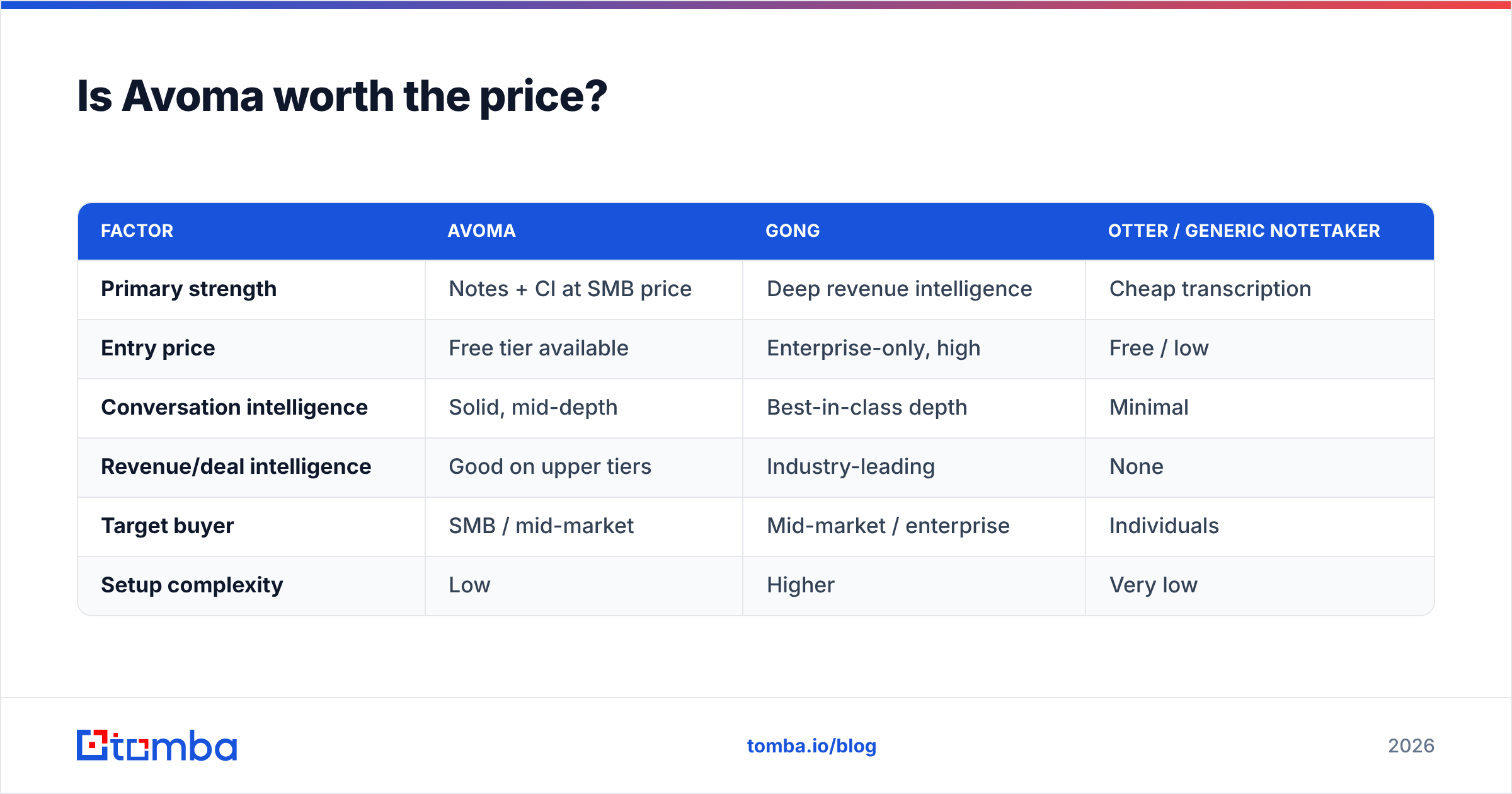
The honest comparison most buyers run is Avoma against the premium incumbents.
| Factor | Avoma | Gong | Otter / generic notetaker |
|---|---|---|---|
| Primary strength | Notes + CI at SMB price | Deep revenue intelligence | Cheap transcription |
| Entry price | Free tier available | Enterprise-only, high | Free / low |
| Conversation intelligence | Solid, mid-depth | Best-in-class depth | Minimal |
| Revenue/deal intelligence | Good on upper tiers | Industry-leading | None |
| Target buyer | SMB / mid-market | Mid-market / enterprise | Individuals |
| Setup complexity | Low | Higher | Very low |
Avoma's pitch is "80% of Gong's value at a fraction of the cost." For many SMB teams that holds up. But if you need forecasting rigor, you will feel the ceiling.
Avoma Pricing Reviews Pros and Cons: What Users Say#
Across G2 and other public review sites, Avoma lands in the high-4-star range. The themes are consistent. Here is the balanced read.
Pros#
- Note accuracy and time savings. The top praise: reps stop typing notes. They trust the AI summaries enough to paste them into the CRM.
- Fast, painless onboarding. Reviewers describe setup in minutes, not weeks. That is a real contrast with enterprise CI tools.
- Genuinely useful free tier. Few rivals give away a notetaker this capable. That lowers the risk of trying it.
- Coaching features at SMB pricing. Scorecards, talk-time ratios, and topic tracking let small teams coach like enterprise ones.
- Solid CRM and calendar integrations. Salesforce, HubSpot, and major conferencing tools connect cleanly.
Cons#
- Transcription stumbles on noisy or multi-accent calls. Accuracy is good, not perfect. Heavy crosstalk and strong accents still trip it up.
- Advanced analytics feel shallow versus Gong. Power users who want deep deal forensics report hitting limits.
- Pricing tiers gate the good stuff. The features that sell the demo often sit one plan above where buyers expect.
- Occasional UI sluggishness on large recording libraries.
- It does nothing for top-of-funnel. Avoma starts working once a meeting exists. Filling the calendar is your problem.
That last point quietly costs teams the most. It deserves its own section.
What Avoma does not do: the pipeline gap#
Avoma is a post-connection tool. It shines once a prospect is on your calendar. But it will not find that prospect, get you their email, or tell you whether the address bounces. A meeting assistant with no meetings booked is an expensive transcription license.
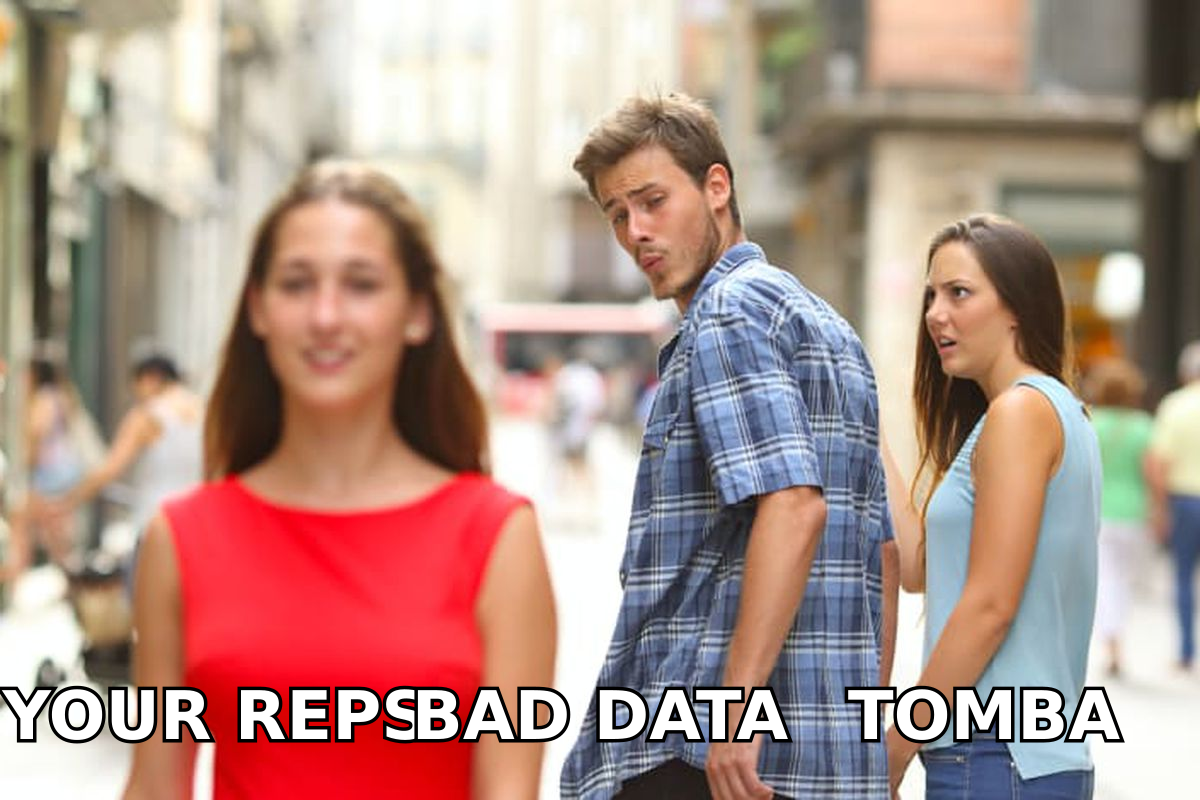
This is where the distracted-boyfriend problem shows up. Reps obsess over the shiny conversation-intelligence dashboard. Meanwhile the real constraint — accurate contact data to book calls — goes ignored.
Before a single Avoma recording exists, someone has to:
- Find the right contact at the target account.
- Verify the email so outreach lands and your sender reputation survives.
- Enrich the record with role, company, and phone so the meeting is with a decision-maker.
That stack is a different category of tool. Tomba's email finder and email verifier handle the front of the funnel. Avoma assumes that part is already solved. Pair the two — accurate data in, AI meeting analysis out — and the spend on Avoma actually pays back.
Who should buy Avoma — and who should skip it?#
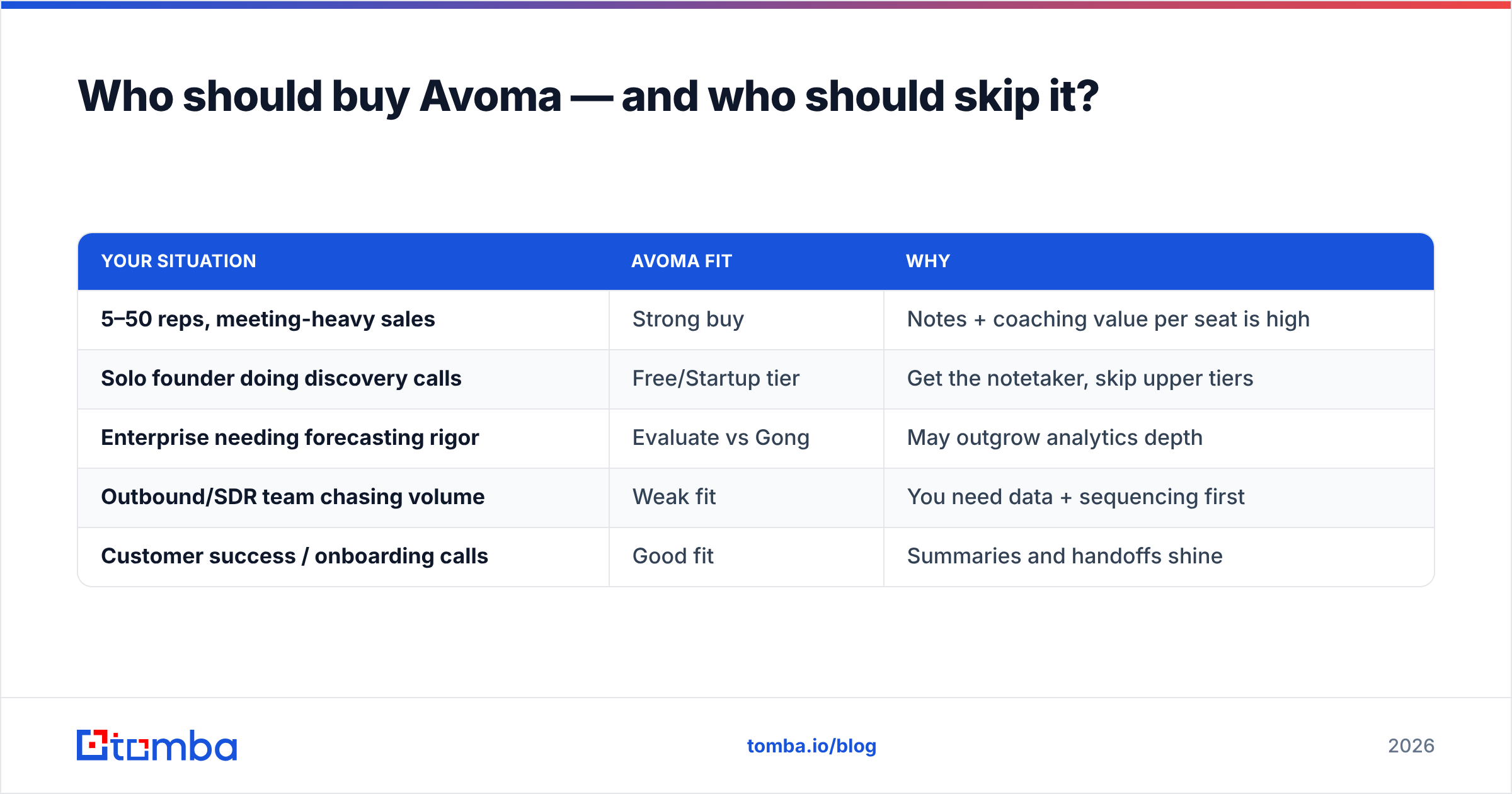
Use this quick decision framework instead of the demo's enthusiasm.
| Your situation | Avoma fit | Why |
|---|---|---|
| 5–50 reps, meeting-heavy sales | Strong buy | Notes + coaching value per seat is high |
| Solo founder doing discovery calls | Free/Startup tier | Get the notetaker, skip upper tiers |
| Enterprise needing forecasting rigor | Evaluate vs Gong | May outgrow analytics depth |
| Outbound/SDR team chasing volume | Weak fit | You need data + sequencing first |
| Customer success / onboarding calls | Good fit | Summaries and handoffs shine |
If you land in the "weak fit" row, spend earlier in the funnel. Put money into data enrichment and verified contacts first. Then invest in analyzing calls you have actually booked.
How to evaluate Avoma without wasting the trial#
Most buyers waste the free trial. They record a few calls and eyeball the summaries. Run it like a real test instead:
- Pick your three noisiest call types (multi-speaker, accented, fast-paced). Judge transcription on those, not on a clean one-on-one.
- Map the demo feature to its actual tier. If call scoring sold you, confirm which plan includes it and price that plan.
- Test the CRM sync end to end. Does the note land where reps will read it, formatted usefully?
- Compare annual and monthly totals for your real seat count. The gap is often 20%+.
- Check the gap. Note everything Avoma assumes you already have (contacts, verified emails) and price that separately.
Do that and the "is it worth it" question answers itself in a week.
Avoma pricing FAQ#
Does Avoma have a free plan? Yes. The free AI Meeting Assistant tier covers basic notes and transcription with limits. That makes it one of the lower-risk tools to trial in this category.
Why is Avoma cheaper than Gong? Avoma targets SMB and mid-market. It deliberately offers a leaner revenue-intelligence layer. You trade some analytics depth for a lower entry price and faster setup.
Is Avoma pricing per user? Yes. Plans are billed per user per month. Annual commitments get meaningful discounts. Budget on annual pricing if you will keep it past a quarter.
Does Avoma replace my email finder or CRM? No. Avoma analyzes meetings. It does not find contacts or replace your CRM. You still need a domain search or email-finding workflow to fill the calendar.
The bottom line#
Avoma is a well-reviewed, fairly priced AI meeting assistant. It earns its keep for meeting-heavy SMB and mid-market teams. It is strong on notes and solid on coaching. Its value sits honestly below the enterprise CI giants. The real limit is not a feature gap. It is scope. Avoma starts working after the meeting is booked. So your results still hinge on the contacts feeding your calendar. Weigh the Avoma pricing reviews pros and cons against that one truth.
Fix the front of the funnel first. Use the Tomba Email Finder to find and verify decision-maker emails by name, company, or domain. Then let Avoma do its job on the calls those contacts turn into. Start free with 25 searches a month. Check Tomba pricing when you are ready to scale. Accurate data in is what makes every dollar on meeting intelligence convert.
// get started
Find, verify and enrich your first contacts today
Start on the free plan with 25 searches a month, then scale when your team is ready.
Free plan · No credit card required · GDPR & CCPA
// about the author