B2B Contact Data Decay: Why Your CRM Rots Fast in 2026
B2B contact data decay quietly kills 20-30% of your CRM every year. Here's how decay works, what it costs, and how to fight it in 2026.
TL;DR
- B2B contact data decays at roughly 20-30% per year — job changes, company moves, and email format shifts silently rot your CRM.
- Decay isn't a one-time cleanup problem. It's a continuous leak that drains deliverability, wastes rep hours, and skews your pipeline forecasts.
- The biggest drivers are job changes (people leave roles every ~2-4 years) and email/domain changes (rebrands, acquisitions, MX migrations).
- The fix is a maintenance loop, not a heroic purge: re-verify on a schedule, enrich on entry, and suppress what you can't confirm.
- Tools like a real-time email verifier and bulk re-verification turn decay from a silent killer into a managed metric.
What is B2B contact data decay?#
B2B contact data decay is the steady process by which the contact records in your CRM become wrong, stale, or unreachable over time. A record that was perfect the day you captured it slowly drifts out of sync with reality — the person changes jobs, the company gets acquired, the email format changes, or the phone line gets disconnected.
Think of your contact database like milk in the fridge. It looks fine on the day you buy it, but it has an expiry date whether the carton shows one or not. Leave it untouched for a year and a meaningful share has gone bad — even though nobody opened the fridge and "broke" anything. Decay is the default state of B2B data, not an accident.
Technically, decay shows up across several fields at once: the email bounces, the title is outdated, the company name is a former brand, and the direct dial routes to someone who left. Because each field decays at a different rate, a record can be 70% accurate — which is often worse than 0%, because it looks trustworthy enough to act on.
How fast does B2B contact data decay in 2026?#
Fast enough that doing nothing is a strategic decision with a cost. Industry consensus puts B2B data decay at 20-30% per year for typical databases, and higher in fast-moving segments like tech and startups where tenure is short.
Here's how the main fields decay, roughly:
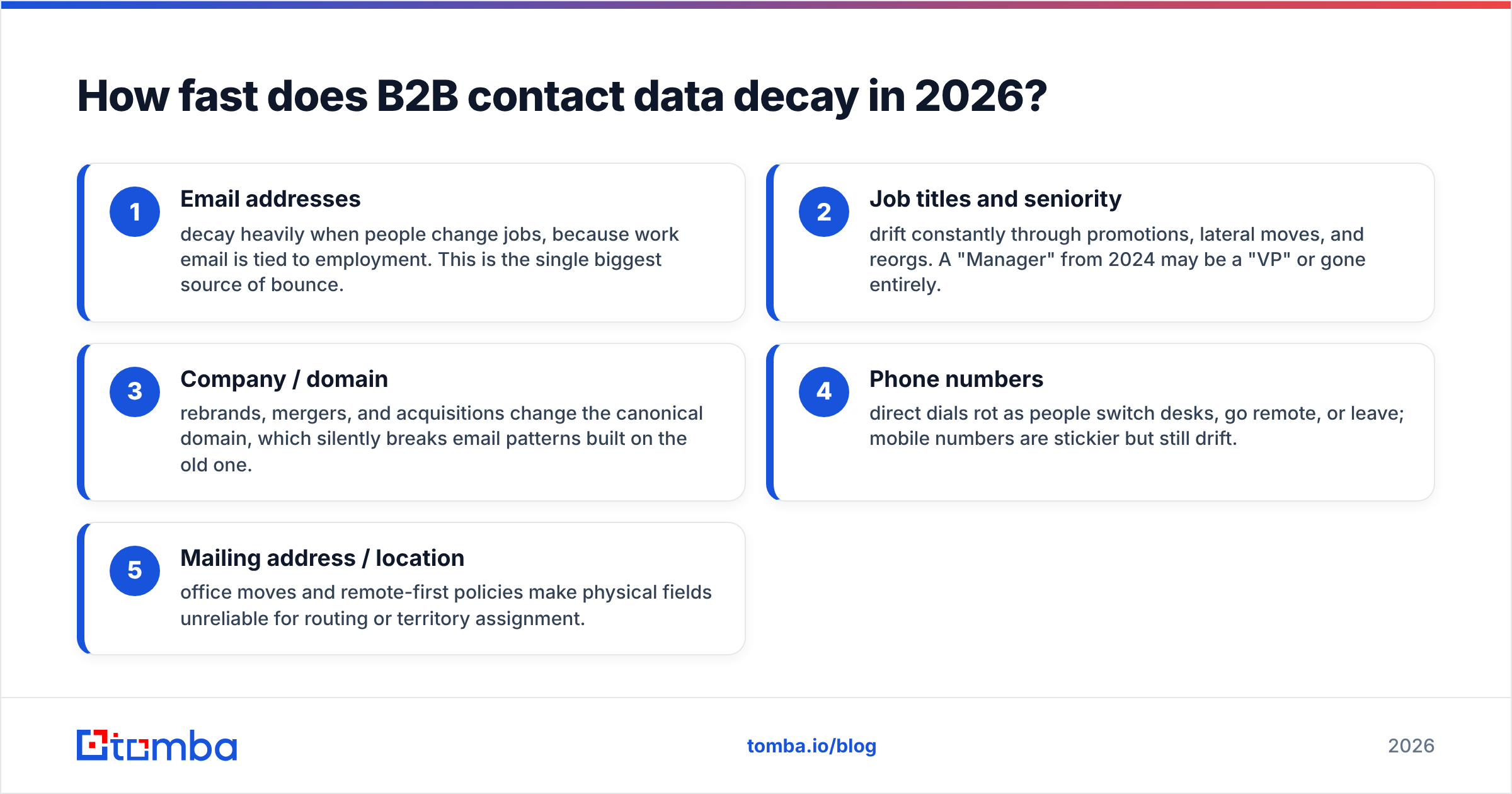
- Email addresses — decay heavily when people change jobs, because work email is tied to employment. This is the single biggest source of bounce.
- Job titles and seniority — drift constantly through promotions, lateral moves, and reorgs. A "Manager" from 2024 may be a "VP" or gone entirely.
- Company / domain — rebrands, mergers, and acquisitions change the canonical domain, which silently breaks email patterns built on the old one.
- Phone numbers — direct dials rot as people switch desks, go remote, or leave; mobile numbers are stickier but still drift.
- Mailing address / location — office moves and remote-first policies make physical fields unreliable for routing or territory assignment.
The compounding effect is what hurts. At 25% annual decay, roughly half your database is unreliable inside two years if you never re-verify. You don't notice because the rot is invisible until you hit send.

Why does contact data decay matter for revenue?#
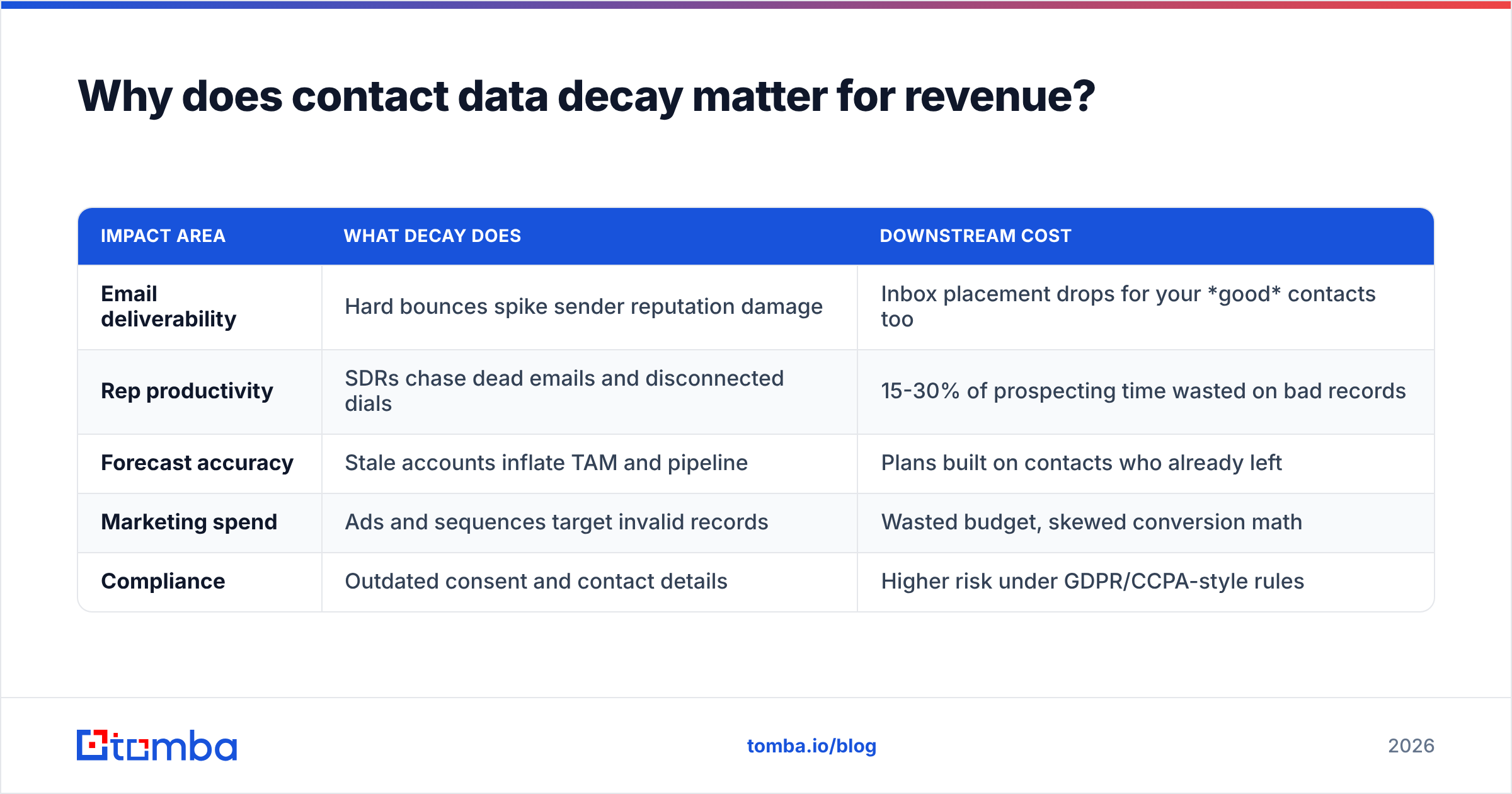
Because decayed data quietly taxes every downstream system — deliverability, rep productivity, forecasting, and ad spend — and nobody sends you the bill.
| Impact area | What decay does | Downstream cost |
|---|---|---|
| Email deliverability | Hard bounces spike sender reputation damage | Inbox placement drops for your good contacts too |
| Rep productivity | SDRs chase dead emails and disconnected dials | 15-30% of prospecting time wasted on bad records |
| Forecast accuracy | Stale accounts inflate TAM and pipeline | Plans built on contacts who already left |
| Marketing spend | Ads and sequences target invalid records | Wasted budget, skewed conversion math |
| Compliance | Outdated consent and contact details | Higher risk under GDPR/CCPA-style rules |
Deliverability is the one that surprises teams. A high bounce rate doesn't just lose the bounced message — it signals mailbox providers that you're sending to unverified lists, which lowers email deliverability for your entire domain. One rotten list can suppress the inbox placement of your healthiest contacts. That's why mailbox providers like Google publish sender guidelines that explicitly penalize high bounce rates.
What causes B2B contact data to decay?#
Most decay traces back to a handful of predictable human and organizational events. Knowing the causes tells you where to point your maintenance loop.
- Job changes. The dominant cause. Average B2B tenure runs only a few years, and every departure invalidates a work email and direct dial at once. Research from sources like LinkedIn's workforce data consistently shows churn well above 10% annually in many roles.
- Mergers and acquisitions. A single acquisition can migrate thousands of mailboxes to a new domain overnight, breaking every email pattern you stored for that account.
- Rebrands and domain migrations. When a company moves from
oldname.comtonewname.io, the MX records and email formats change, and your stored addresses silently start bouncing. - Typos and bad capture. Manual entry at trade shows, webinars, and form fills introduces errors on day one — decay that was baked in before the record aged a single day.
- Catch-all and shifting mail servers. Domains that switch to catch-all configurations make verification ambiguous, so a once-clean address becomes "unknown."
The throughline: decay is driven by change in the real world, not by anything you did wrong. Your only lever is how quickly you detect and react to that change.
How do you measure contact data decay?#
You measure it the way a factory measures defects: sample, track a few hard metrics over time, and watch the trend. You can't manage decay you don't quantify.
Track these four:
- Bounce rate — the clearest lagging indicator. A creeping hard-bounce rate means your stored emails are aging out.
- Verification pass rate — re-run a sample of records through an email verification check each quarter and watch the "valid" percentage fall.
- Engagement decay — opens and replies from a static segment drift down as contacts leave roles.
- Field completeness — the share of records missing a confirmed email, title, or phone.
A practical habit: pull a random 1,000-record sample every quarter, verify it, and log the valid percentage. If it drops from 92% to 78% over two quarters, you now have a decay rate, not a guess — and a number to justify the maintenance budget.
How do you fix and prevent B2B contact data decay?#
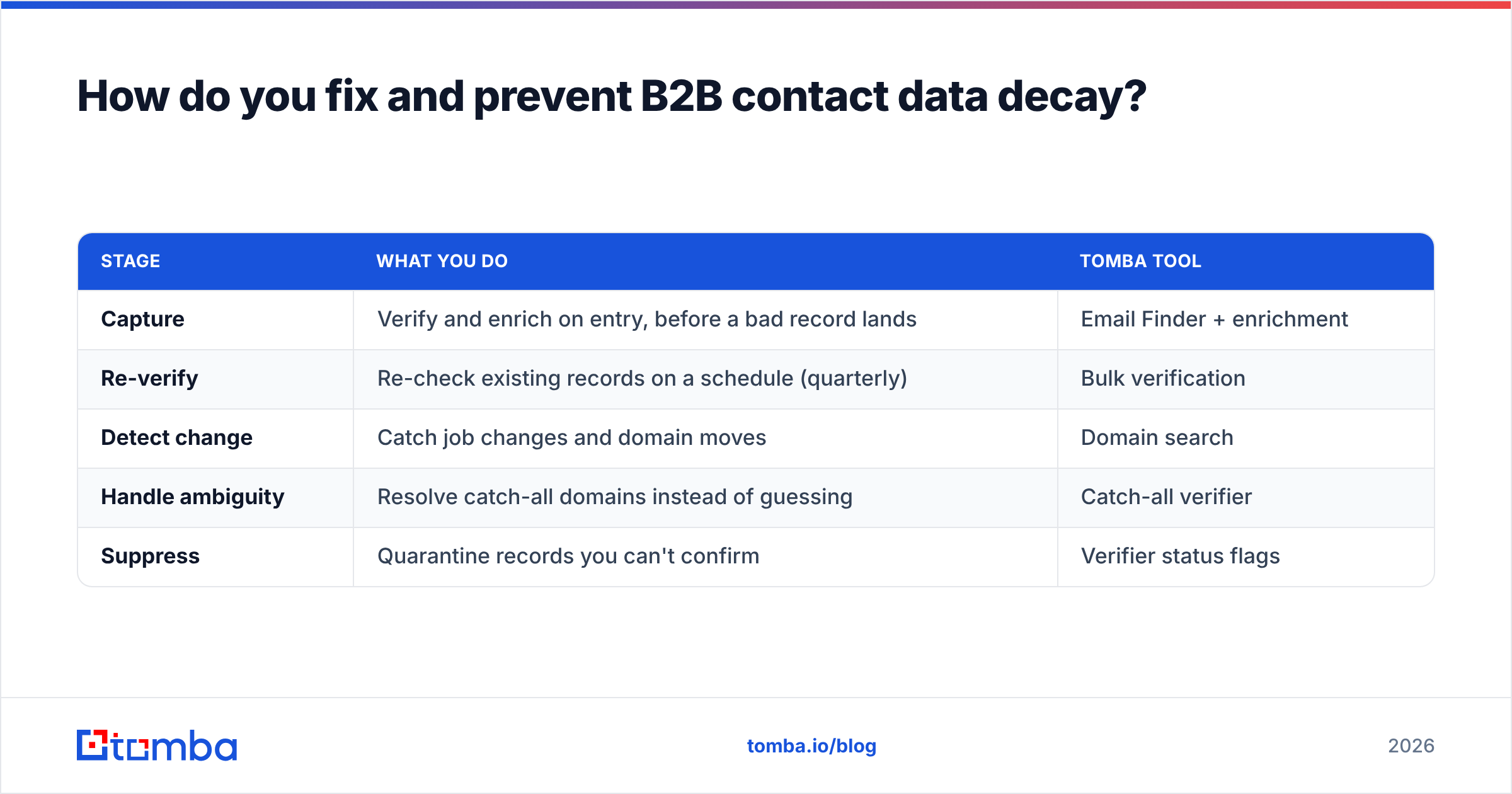
You replace the one-time "data cleanse" mindset with a continuous maintenance loop. Cleaning a database once is like mowing a lawn and expecting it to stay short forever. The grass grows back; so does the rot.
Here's the loop that works:
| Stage | What you do | Tomba tool |
|---|---|---|
| Capture | Verify and enrich on entry, before a bad record lands | Email Finder + enrichment |
| Re-verify | Re-check existing records on a schedule (quarterly) | Bulk verification |
| Detect change | Catch job changes and domain moves | Domain search |
| Handle ambiguity | Resolve catch-all domains instead of guessing | Catch-all verifier |
| Suppress | Quarantine records you can't confirm | Verifier status flags |
Verify on entry. The cheapest record to fix is the one that never enters dirty. Wire verification into your forms, imports, and CRM so a bad address is caught at capture, not six months later when it bounces in a campaign.
Re-verify on a schedule. Run your active database through bulk verify quarterly. This is the single highest-leverage habit, because it converts unknown rot into a known, actionable list before you send.
Enrich, don't just delete. When a contact changes jobs, the account is often still a target. Use data enrichment and domain search to find their replacement at the same company, so a job change becomes a new opportunity instead of a dead row.
Suppress what you can't confirm. Anything that fails verification or sits in catch-all limbo should be quarantined, not blasted. Protecting your sender reputation is worth more than one extra send.

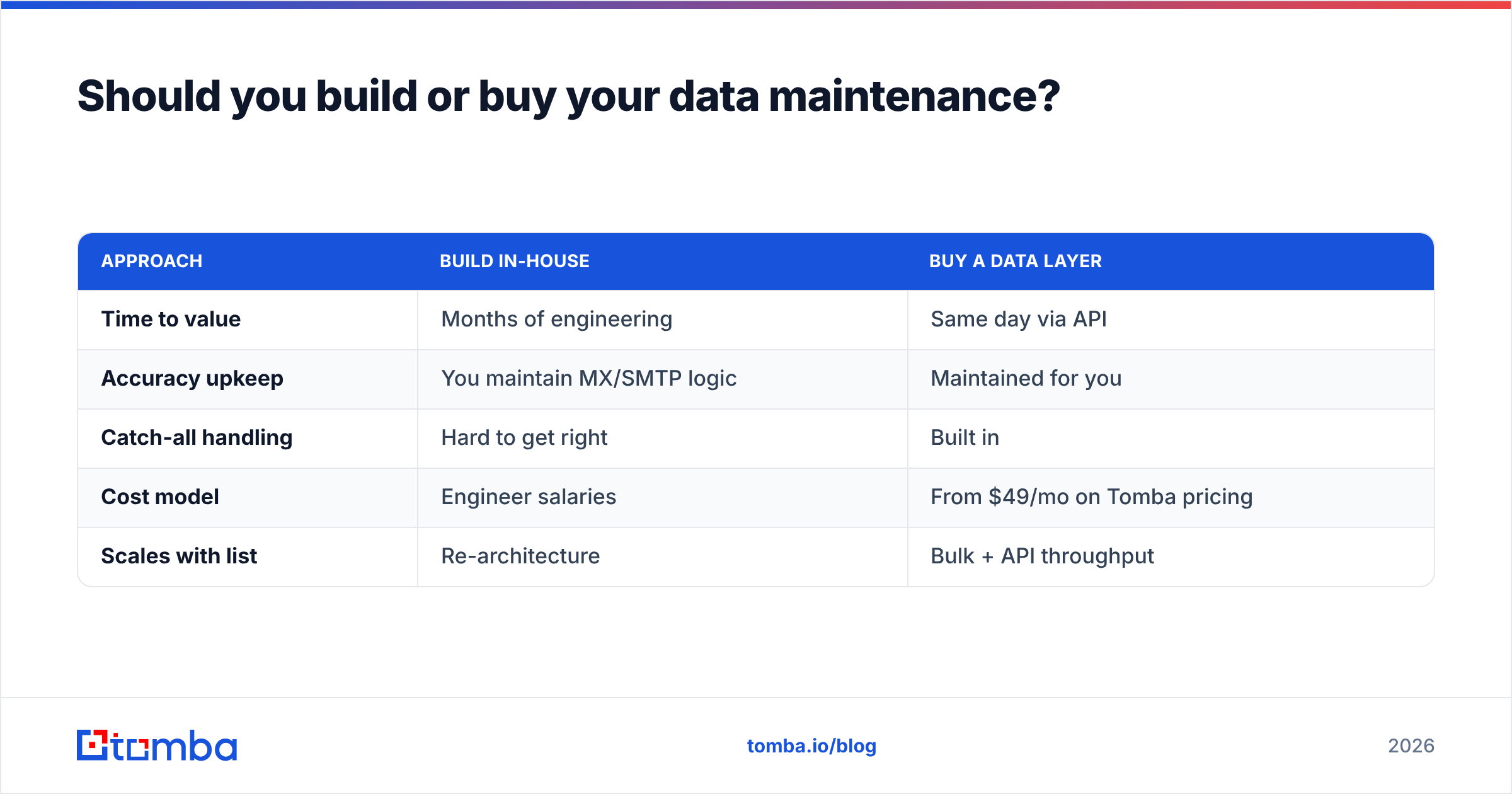
Should you build or buy your data maintenance?#
Buy the verification and enrichment layer; build the workflow around it. Maintaining MX logic, SMTP probing, catch-all detection, and a fresh contact graph in-house is a full-time data-engineering job that has nothing to do with your actual product.
| Approach | Build in-house | Buy a data layer |
|---|---|---|
| Time to value | Months of engineering | Same day via API |
| Accuracy upkeep | You maintain MX/SMTP logic | Maintained for you |
| Catch-all handling | Hard to get right | Built in |
| Cost model | Engineer salaries | From $49/mo on Tomba pricing |
| Scales with list | Re-architecture | Bulk + API throughput |
For most teams the math is obvious. A single engineer-week costs more than a year of a verification plan, and you'd still be reinventing infrastructure that vendors like Tomba, plus alternatives you can compare on G2, already run at scale. Buy the rails; spend your engineering time on what's actually differentiated.
What does a 2026 data-hygiene cadence look like?#
Keep it boring and repeatable. The teams that win against decay aren't the ones who run a dramatic annual purge — they're the ones who do small, scheduled work that never lets the rot compound.
- On every new record: verify the email and enrich the title/company before it saves.
- Weekly: verify the records touched by active sequences.
- Quarterly: bulk re-verify the entire active database and log the pass rate.
- On trigger events: re-check accounts after a known acquisition, rebrand, or layoff announcement.
- Continuously: suppress hard bounces and catch-all-unknowns from sends automatically.
Wire this into your stack once — through the Tomba API, a HubSpot integration, or a scheduled bulk job — and decay stops being a quarterly fire drill. It becomes a metric on a dashboard that you keep flat on purpose.
The bottom line#
B2B contact data decay is not a bug you fix once; it's gravity. Every database is falling toward 25% annual rot, and the only question is whether you've built a system that pushes back continuously or one that pretends the milk never expires.
Start by measuring your real decay rate, then close the loop with verification on entry and scheduled re-verification. If you want the fastest path from "I think our data is stale" to "here's exactly what's valid," run your list through the Tomba Email Finder and email verifier — find the right contacts, confirm they're reachable, and keep them that way. Your deliverability, your reps, and your forecast will all thank you.
Ready to find emails that actually work?
Join 150,000+ professionals who stopped guessing and started sending. Free credits on signup — no credit card required.
Get the Tomba newsletter
Practical outbound tactics and product updates — once every two weeks.
About the author