B2B Contact Database in 2026: Build, Buy & Verify Guide
A B2B contact database is only worth what it converts. Here's how to build, buy, and verify one in 2026 without burning budget on stale records.
TL;DR
- A b2b contact database is a structured, searchable store of business contacts (names, roles, verified emails, phone numbers, company firmographics) that powers prospecting, enrichment, and routing.
- The single biggest cost driver is decay: B2B data goes stale at roughly 20–30% per year, so freshness and verification matter more than raw record count.
- "Build" vs "buy" is the wrong framing. Most teams do both: license a vendor base, then enrich and re-verify continuously.
- Judge any database on accuracy, coverage in your ICP, refresh cadence, compliance, and cost-per-usable-record — not the headline "500M contacts" number.
- Tools like Tomba let you find, verify, and enrich contacts on demand so your database stays current instead of rotting in a CSV.
What is a B2B contact database?#
A b2b contact database is your sales and marketing team's address book on steroids. Think of it like a CRM's fuel tank: the CRM is the engine that runs your deals, but it goes nowhere without clean contact data feeding it.
Concretely, a b2b contact database stores records that combine three layers:
- Contact-level data — full name, job title, seniority, department, work email, direct dial, and LinkedIn URL.
- Company-level firmographics — company name, domain, industry, headcount, revenue band, location, and tech stack.
- Signal and intent data — funding rounds, hiring trends, technology adoption, and buying signals that tell you when to reach out, not just who to reach.
The difference between a list and a database is queryability. A list is a static export. A database lets you filter ("VP Engineering at Series B SaaS companies in the EU using AWS"), dedupe, enrich, and re-verify on a schedule. That distinction is what separates a one-time campaign from a repeatable pipeline.
)
Why does B2B contact data decay so fast?#
Because people change jobs, companies rebrand, and inboxes get deactivated. The consensus figure across the industry is that B2B contact data degrades by 20–30% per year. Gartner and most data-quality vendors put the average even higher for fast-moving sectors like tech and startups.
Here's what decay actually looks like in practice:
- Job changes: A contact gets promoted or leaves. Their old work email bounces, and your "VP of Sales" is now at a competitor.
- Company changes: Mergers, rebrands, and domain switches break every email tied to the old domain.
- Catch-all noise: Many domains accept any address at the SMTP layer, so a record looks valid but silently disappears.
- Role drift: The title is right but the responsibility moved — your message lands with someone who can no longer buy.
This is why a database you bought 12 months ago is, statistically, already a quarter wrong. The fix isn't buying more records; it's continuous verification. Running new finds through an email verifier before every send is the cheapest insurance you can buy against a trashed sender reputation.
Build vs buy: which B2B contact database approach wins?#
Neither, exclusively. The smart play is a hybrid: license a base layer for coverage, then build on top of it with first-party enrichment and re-verification so you control freshness.
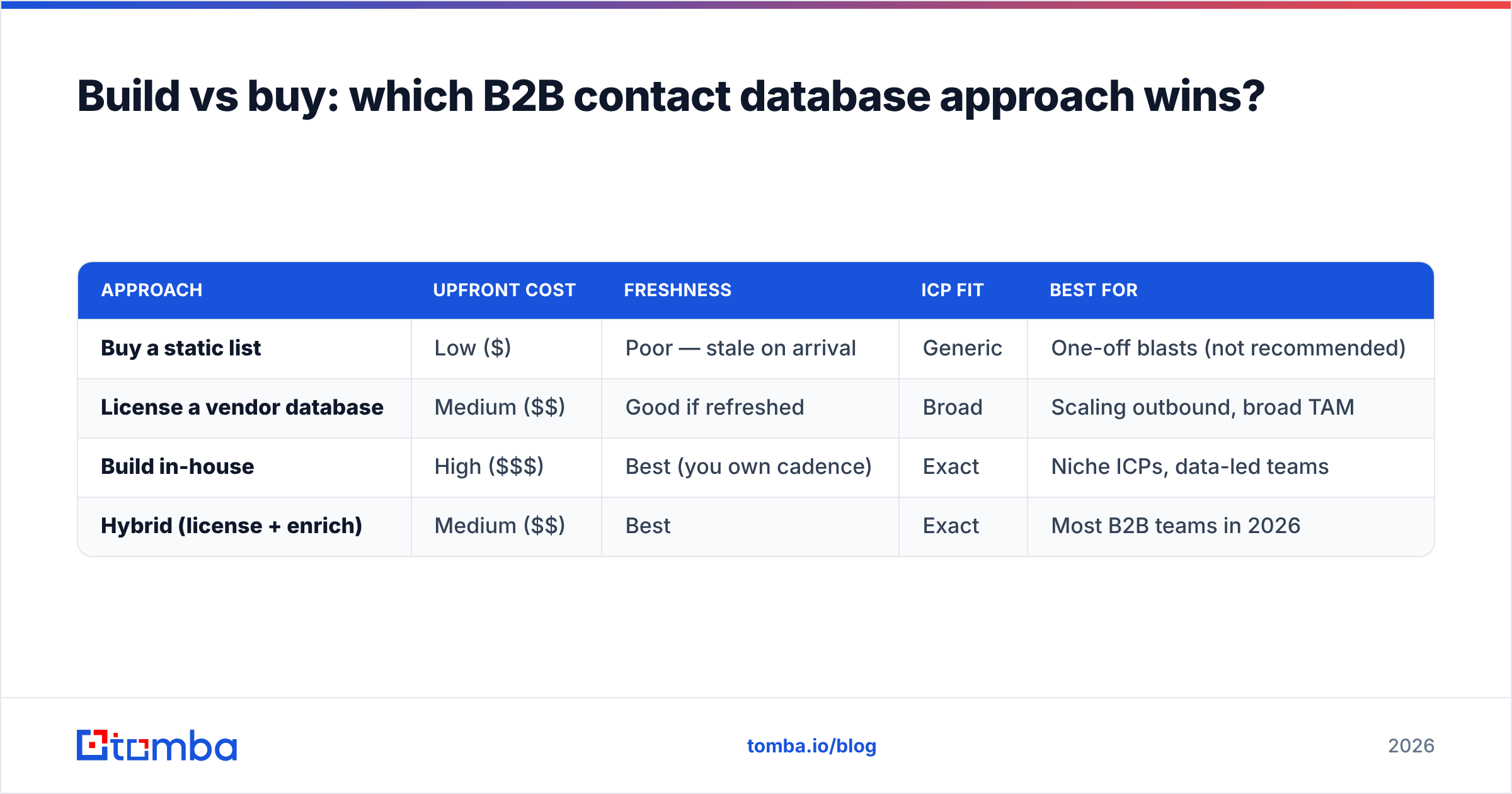
Here's how the three approaches stack up:
| Approach | Upfront cost | Freshness | ICP fit | Best for |
|---|---|---|---|---|
| Buy a static list | Low ($) | Poor — stale on arrival | Generic | One-off blasts (not recommended) |
| License a vendor database | Medium ($$) | Good if refreshed | Broad | Scaling outbound, broad TAM |
| Build in-house | High ($$$) | Best (you own cadence) | Exact | Niche ICPs, data-led teams |
| Hybrid (license + enrich) | Medium ($$) | Best | Exact | Most B2B teams in 2026 |
The hybrid model wins because it decouples coverage from freshness. You buy breadth once, then use an on-demand email finder and data enrichment to keep the records you actually touch current. You're never paying to refresh 400M contacts you'll never email — only the slice inside your ICP.
A useful gut check: if your team emails 5,000 contacts a month, you don't need a 500M-record license. You need 60,000 verified records a year and a reliable way to find and refresh them.
How do you evaluate a B2B contact database?#
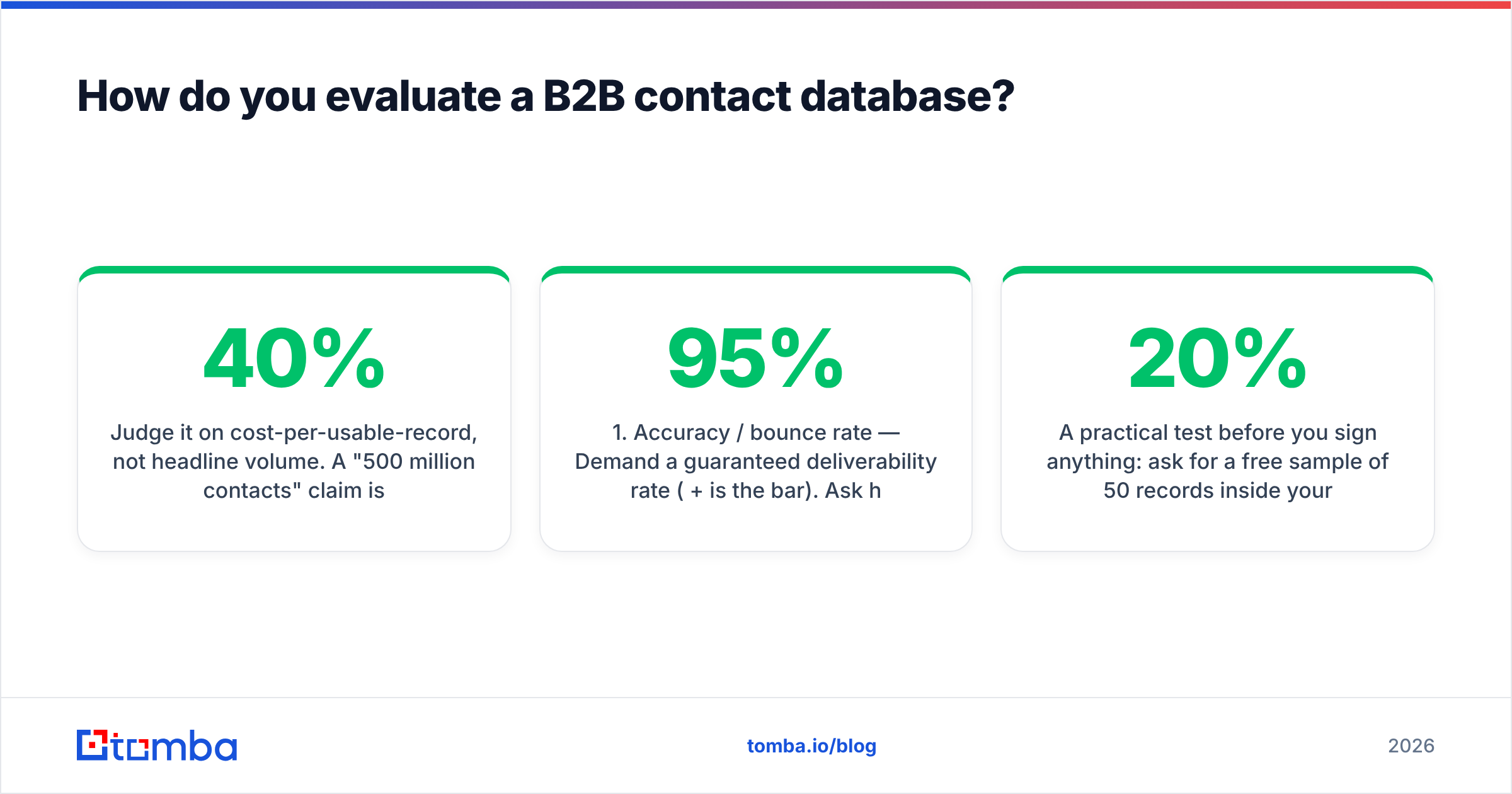
Judge it on cost-per-usable-record, not headline volume. A "500 million contacts" claim is meaningless if only 40% are in your market and a third bounce.
Use these criteria, roughly in priority order:
- Accuracy / bounce rate — Demand a guaranteed deliverability rate (95%+ is the bar). Ask how it's measured and whether catch-all domains are flagged.
- ICP coverage — Run a sample search for your exact targets. A database strong in US enterprise may be thin on EU mid-market.
- Refresh cadence — How often are records re-verified? Real-time at query time beats a quarterly batch refresh.
- Data depth — Direct dials and verified mobiles are far rarer (and more valuable) than generic info@ addresses.
- Compliance — GDPR/CCPA lawful basis, opt-out handling, and clear sourcing. Check the vendor's data sourcing policy.
- Delivery method — UI search, bulk processing, CSV, and an API so the data flows into your stack automatically.
- Integrations — Native sync to your CRM (HubSpot, Salesforce, Pipedrive) so records never go stale in transit.
A practical test before you sign anything: ask for a free sample of 50 records inside your ICP, then run every one through independent verification. If 10 bounce, that's a 20% error rate the sales deck didn't mention. Independent benchmarks on G2 are useful for sanity-checking vendor claims against real reviews.
)
What does a B2B contact database cost in 2026?#
Pricing falls into two models: credit-based (you pay per record revealed or verified) and seat/subscription-based (flat monthly access). Most modern tools blend the two.
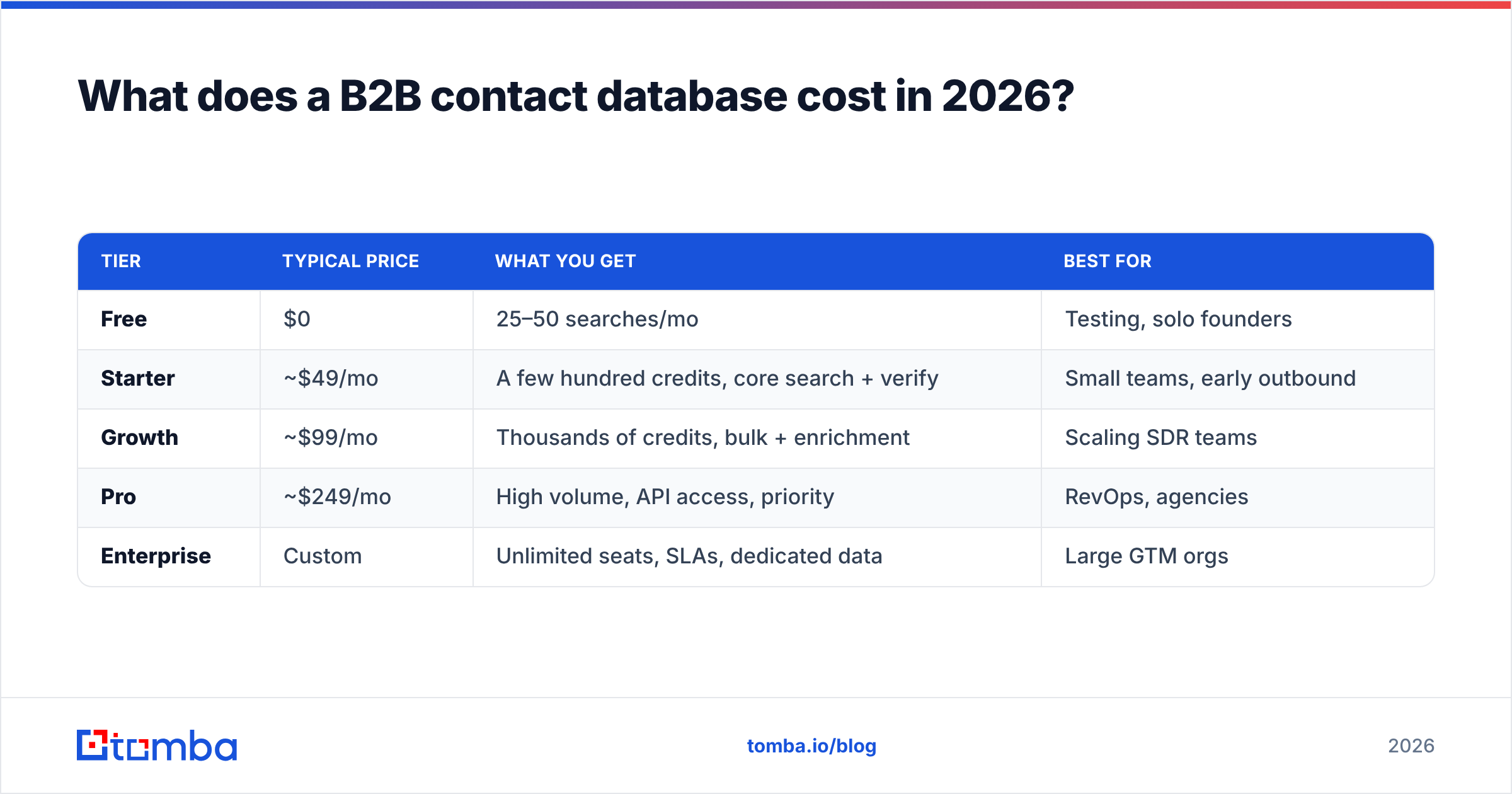
Here's a representative comparison across common tooling tiers:
| Tier | Typical price | What you get | Best for |
|---|---|---|---|
| Free | $0 | 25–50 searches/mo | Testing, solo founders |
| Starter | ~$49/mo | A few hundred credits, core search + verify | Small teams, early outbound |
| Growth | ~$99/mo | Thousands of credits, bulk + enrichment | Scaling SDR teams |
| Pro | ~$249/mo | High volume, API access, priority | RevOps, agencies |
| Enterprise | Custom | Unlimited seats, SLAs, dedicated data | Large GTM orgs |
For reference, Tomba pricing follows this shape: a free tier with 25 searches a month, Starter at $49/mo, Growth at $99/mo, Pro at $249/mo, and custom Enterprise. The lesson isn't "pick the cheapest" — it's to map your monthly verified-record need to a tier and avoid paying for a database orders of magnitude larger than your send volume.
A quick cost-per-usable-record calculation beats any sticker price. If Vendor A charges $99 for 1,000 credits but 25% bounce, your real cost is $0.13 per usable contact. Vendor B at $149 for 1,000 credits with a 4% bounce rate costs $0.155 — close, but if A's bounces also burn your domain reputation, A is the more expensive choice once you price in the deliverability damage.
How do you keep a B2B contact database fresh?#
Treat verification as a recurring process, not a one-time import. The database is a living system; left alone, it decays on the 20–30% annual curve whether you look at it or not.
A maintenance loop that actually works:
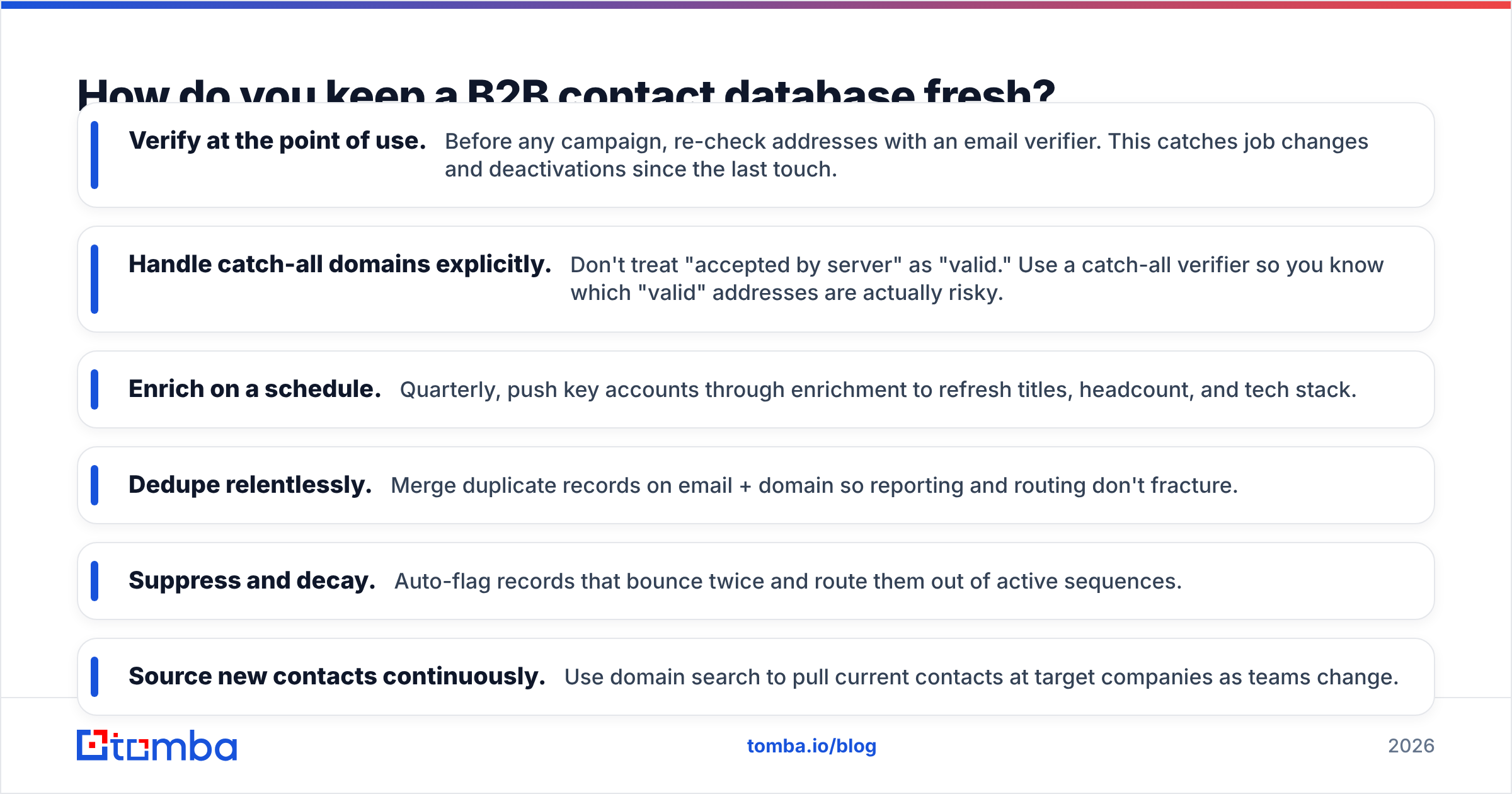
- Verify at the point of use. Before any campaign, re-check addresses with an email verifier. This catches job changes and deactivations since the last touch.
- Handle catch-all domains explicitly. Don't treat "accepted by server" as "valid." Use a catch-all verifier so you know which "valid" addresses are actually risky.
- Enrich on a schedule. Quarterly, push key accounts through enrichment to refresh titles, headcount, and tech stack.
- Dedupe relentlessly. Merge duplicate records on email + domain so reporting and routing don't fracture.
- Suppress and decay. Auto-flag records that bounce twice and route them out of active sequences.
- Source new contacts continuously. Use domain search to pull current contacts at target companies as teams change.
The teams that win at outbound aren't the ones with the biggest database — they're the ones whose database is true on the day they hit send. Clean data protects email deliverability, and deliverability is the whole game; a perfect message to a dead inbox converts at zero.
How does this connect to deliverability and reputation?#
Directly and brutally. Every invalid address you email is a vote against your sender reputation. Mailbox providers track bounce rates, spam complaints, and engagement; a dirty database drags all three in the wrong direction.
The chain reaction looks like this: stale database → high bounce rate → mailbox providers throttle you → even your valid emails land in spam → reply rates collapse → the team blames the copy. The root cause was the data the entire time.
This is why verification isn't a "nice to have" bolted onto your database — it's the load-bearing wall. A modest, well-verified database of 20,000 in-ICP contacts will out-convert a sloppy 2M-record dump every single time, because the first one protects the asset (your domain) that makes outbound possible at all.
What about phone numbers and multichannel data?#
A 2026 b2b contact database shouldn't be email-only. Buying committees ignore cold email and cold calls in roughly equal measure, so the winning motion is multichannel: email, phone, and LinkedIn touches sequenced together.
That means your database needs more than addresses. Direct dials and verified mobiles — sourced via a phone finder — let SDRs add calls to sequences without scraping numbers by hand. LinkedIn URLs let you layer social touches. The records that carry email + phone + social are the ones that actually move pipeline, because they let you reach a prospect on whatever channel they respond to.
When you evaluate vendors, weight phone coverage heavily. It's the scarcest, most expensive data type, and the gap between vendors is enormous — far wider than the gap on email coverage, which has largely commoditized.
Common B2B contact database mistakes to avoid#
- Chasing record count. "500M contacts" is a vanity metric. Coverage inside your ICP is the only number that matters.
- Importing once and forgetting. A database is a process, not a purchase. Schedule re-verification or watch it decay.
- Skipping the sample test. Always verify a free sample independently before signing. Vendor-reported accuracy is marketing.
- Ignoring catch-all risk. "Valid" from a catch-all domain is a coin flip. Flag and segment these.
- Buying email-only. Without phones and social handles, you're locked into one channel and one bounce rate.
- No suppression hygiene. Letting double-bouncers stay in active sequences quietly destroys your sender reputation.
Frequently asked questions#
What is the difference between a B2B contact database and a CRM? A CRM manages your relationships and deals in progress; a b2b contact database supplies and refreshes the raw contact data that feeds the CRM. They work together — the database keeps the CRM accurate.
How big should my B2B contact database be? Big enough to cover your ICP with room to grow, and no bigger. Size it to your monthly verified-send volume, not to a vendor's headline count. Quality and freshness beat raw scale.
Is buying a B2B contact list legal? It depends on jurisdiction and sourcing. Under GDPR/CCPA you need a lawful basis and clear opt-out handling. Use vendors that document their data sourcing and honor suppression requests, and always verify before sending.
How often should I verify my database? Verify at the point of use (before every campaign) and run a fuller re-verification at least quarterly. Given 20–30% annual decay, anything slower means you're emailing dead addresses.
The bottom line#
A b2b contact database is an asset only as long as it's true. The teams that win in 2026 stop treating data as a one-time purchase and start treating it as a maintained system — license for coverage, enrich for fit, verify for freshness, and suppress what bounces.
If you want to build and maintain a database that actually converts, start with the Tomba Email Finder. Find professional emails by domain, name, or company, verify them on the spot, enrich them with firmographics and phone data, and push clean records straight into your CRM — so your database stays current instead of rotting in a spreadsheet. Spin up the free tier, run 25 searches against your ICP, and see the accuracy for yourself before you commit a dollar.
// get started
Find, verify and enrich your first contacts today
Start on the free plan with 25 searches a month, then scale when your team is ready.
Free plan · No credit card required · GDPR & CCPA
// about the author