B2B Email List Provider: How to Choose One in 2026
Buying a B2B email list can torch your deliverability or fuel your pipeline. Here's how to vet a B2B email list provider, what to pay, and the build-vs-buy math for 2026.
Buying a B2B email list looks like the fastest shortcut to a full pipeline. It can also be the fastest way to burn your sending domain, blow your budget on dead records, and land your company in front of a GDPR regulator. The difference comes down to which B2B email list provider you trust and how you use the data.
This guide breaks down how list providers actually source data, what separates a usable list from a liability, the real cost of each model, and when you should skip the static list entirely and build your own.
TL;DR#
- A B2B email list provider sells (or lets you build) lists of business contacts; quality ranges from excellent to actively harmful.
- Pre-packaged "buy 1M emails for $99" lists are almost always scraped, stale, and a deliverability hazard. Avoid them.
- The better model is on-demand sourcing and verification: you query a live database, pull only the contacts you need, and verify before you send.
- Judge any provider on five things: accuracy rate, freshness, verification, compliance (GDPR/CAN-SPAM), and pricing transparency.
- Building targeted lists with a tool like Tomba's email finder plus an email verifier beats a bulk static list on cost, control, and deliverability almost every time.
What is a B2B email list provider?#
A B2B email list provider is a company that supplies business email addresses and related contact data so you can run outbound sales or marketing. Think of it like the difference between buying a frozen dinner and being handed a stocked kitchen: some providers sell you a finished, sealed list (frozen dinner — convenient, but you have no idea how old it is), while others give you live access to a database and tools to assemble exactly what you need (the kitchen).
Providers fall into three broad camps:
- Static list sellers — You pay once, download a CSV of thousands of contacts. Cheap, fast, and usually terrible. The data was scraped months ago and resold to everyone.
- Database + search platforms — You search a maintained database by company, role, location, or tech stack, then export verified contacts on demand. This is where most quality providers now live.
- Real-time finders and enrichment APIs — You feed in a name, domain, or LinkedIn URL and get a verified email back in real time, often via an email finder API. Best for accuracy and for keeping data fresh inside your own systems.
The trend across 2024–2026 has been a hard move away from camp 1. Mailbox providers like Google and Microsoft now weight engagement and complaint signals heavily, so a stale purchased list doesn't just underperform — it can poison your sender reputation for every campaign that follows.
)
How do B2B email list providers source their data?#
Knowing where the data comes from tells you almost everything about its quality. Providers typically blend several sources:
- Public web crawling — Company sites, team pages, press releases, and public directories.
- Email pattern detection — Inferring
first.last@company.comstyle formats from known addresses, then validating them. - Community and contributory data — Networks where users share verified contacts (used carefully, this keeps data fresh).
- Partnerships and licensed datasets — Firmographic and technographic feeds layered on top of contacts.
- Continuous re-verification — Re-checking known records on a schedule so old data decays out instead of lingering.
The providers worth paying for are transparent about this. Tomba, for example, publishes where its data comes from and runs verification at the point of search rather than shipping a months-old snapshot. Be suspicious of any vendor that won't explain sourcing — "proprietary" usually means "scraped and resold."
What makes a B2B email list provider good or bad?#
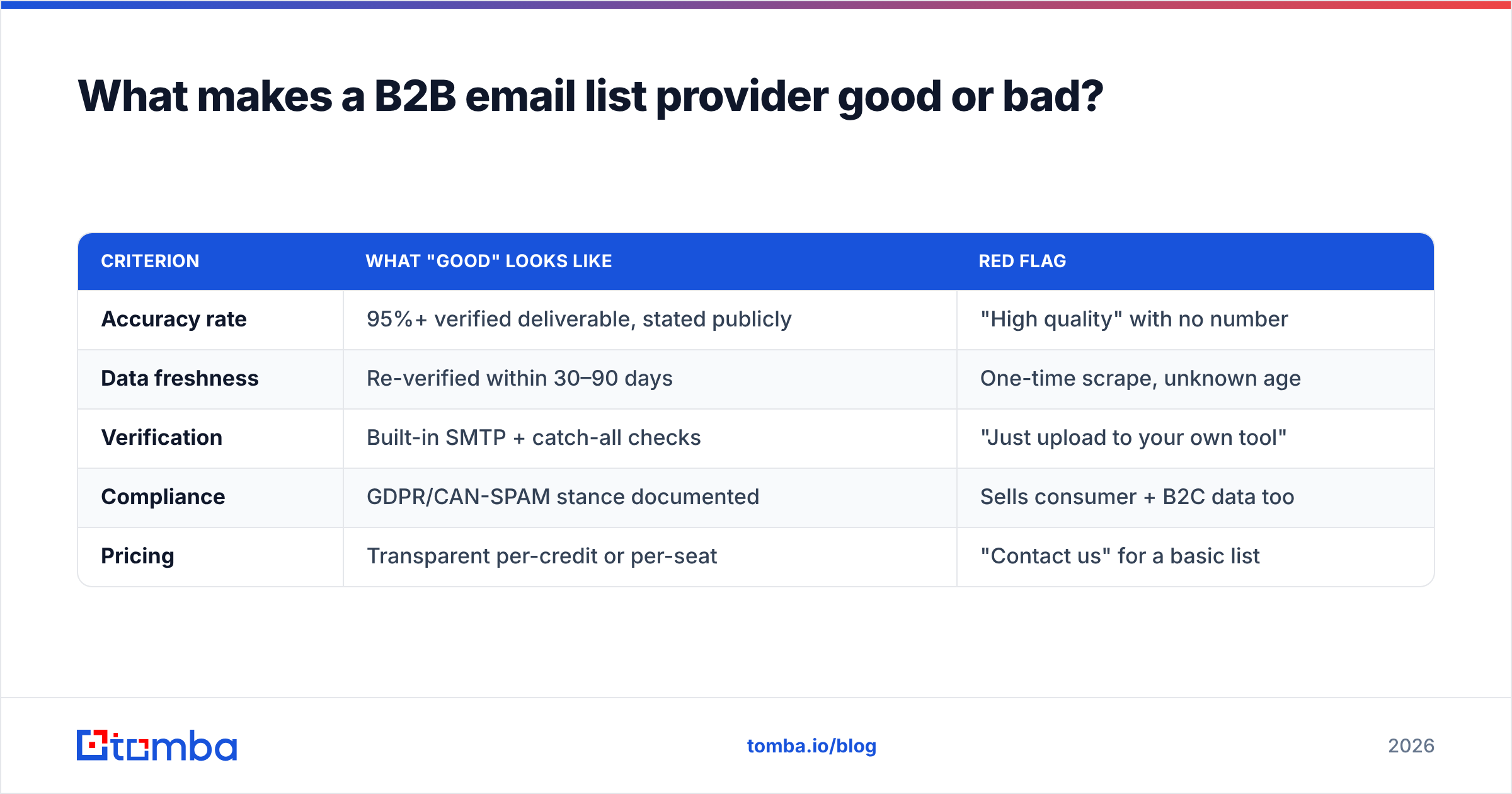
Use these five criteria as a scorecard. A provider can have a slick UI and still fail every one.
| Criterion | What "good" looks like | Red flag |
|---|---|---|
| Accuracy rate | 95%+ verified deliverable, stated publicly | "High quality" with no number |
| Data freshness | Re-verified within 30–90 days | One-time scrape, unknown age |
| Verification | Built-in SMTP + catch-all checks | "Just upload to your own tool" |
| Compliance | GDPR/CAN-SPAM stance documented | Sells consumer + B2C data too |
| Pricing | Transparent per-credit or per-seat | "Contact us" for a basic list |
Accuracy is the headline number, but freshness is the silent killer. A list that was 98% accurate when it was built six months ago might be 80% accurate today — people change jobs, companies fold, domains lapse. According to job-mobility data referenced across HR and sales sources, a meaningful share of B2B contacts change roles every year, which means any static list decays continuously from the day it's created.
Should you buy a pre-built list or build your own?#
Build your own, in almost every case. Pre-built lists optimize for the wrong thing — volume — when the metric that drives revenue is relevance multiplied by deliverability.
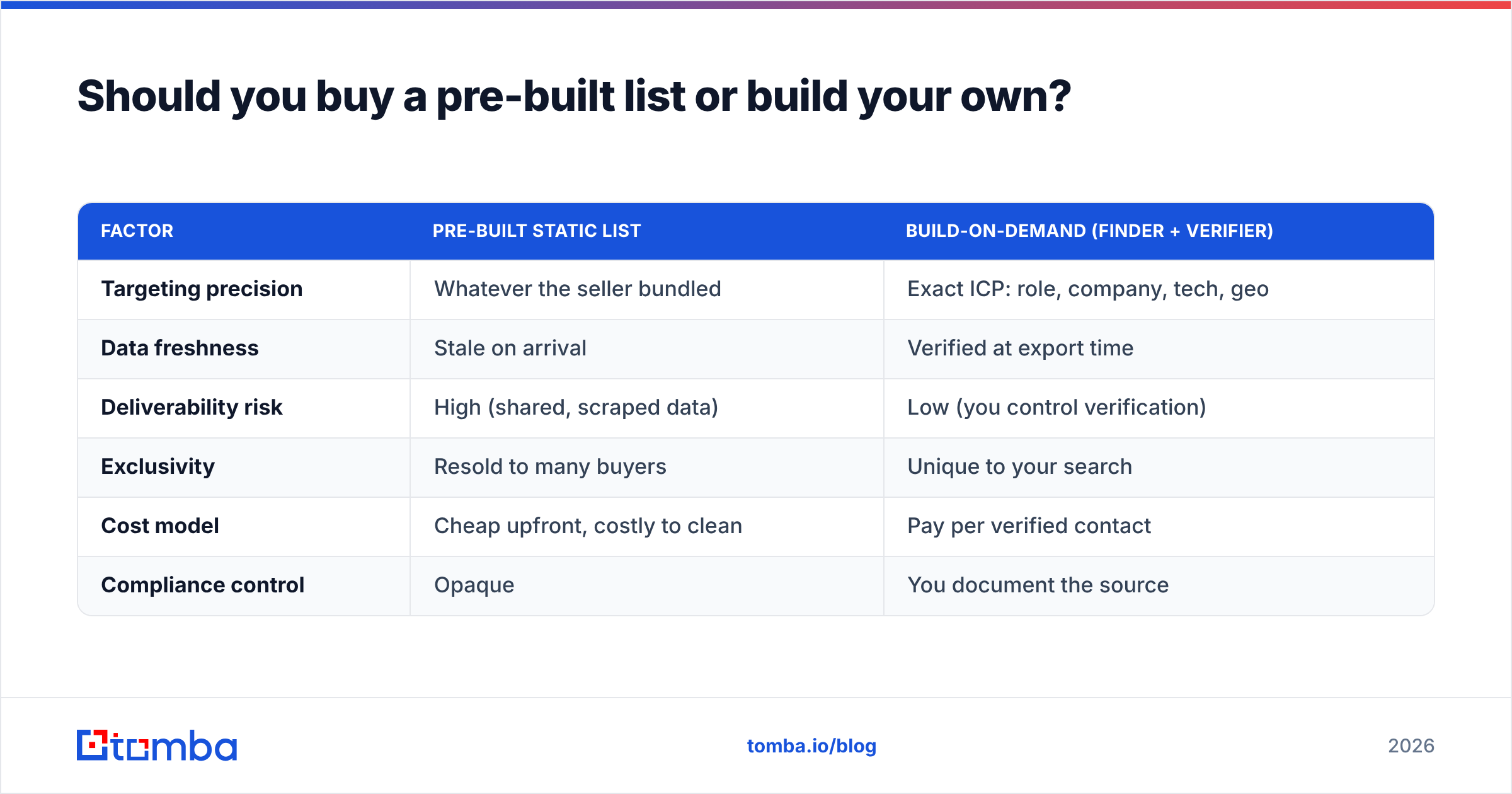
Here's the build-vs-buy comparison on the factors that actually matter:
| Factor | Pre-built static list | Build-on-demand (finder + verifier) |
|---|---|---|
| Targeting precision | Whatever the seller bundled | Exact ICP: role, company, tech, geo |
| Data freshness | Stale on arrival | Verified at export time |
| Deliverability risk | High (shared, scraped data) | Low (you control verification) |
| Exclusivity | Resold to many buyers | Unique to your search |
| Cost model | Cheap upfront, costly to clean | Pay per verified contact |
| Compliance control | Opaque | You document the source |
The hidden cost of a "cheap" purchased list is the cleanup. You'll run it through an email verifier anyway (or you should), and you'll typically discard 20–40% of it. You paid for records you then deleted — and risked your domain in the process.
)
There's a real exception: if you need broad market sizing or account-level firmographics rather than individual outreach contacts, a licensed B2B database makes sense. Just don't confuse "database access for research and targeted pulls" with "buy a giant CSV and blast it."
How much does a B2B email list provider cost in 2026?#
Pricing splits along the same lines as the sourcing models. Static lists look cheapest per-record and cost the most in damage. Credit-based platforms charge for what you actually use.
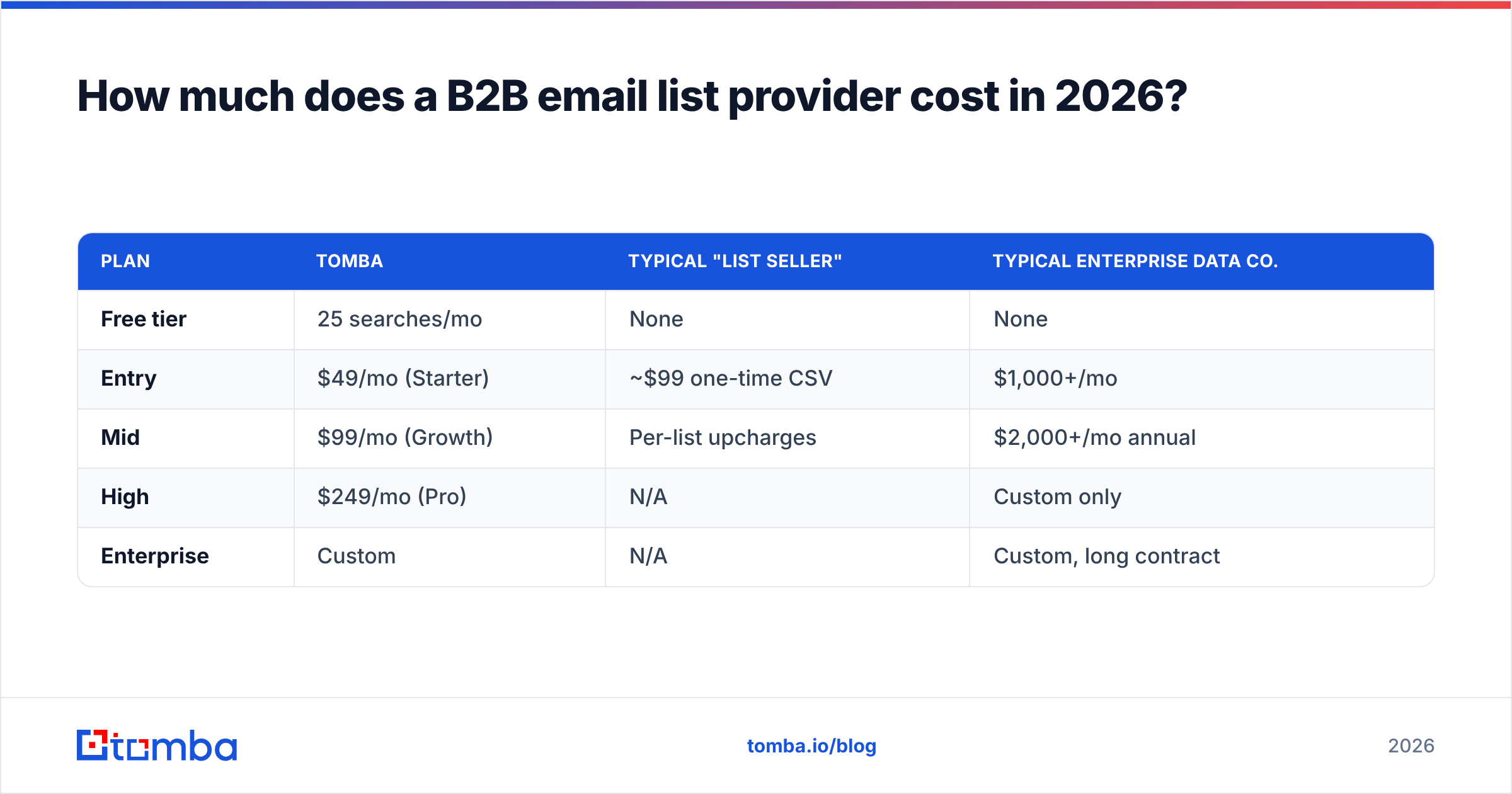
Here's how Tomba's transparent tiers compare to typical market shapes (always check the vendor's current page — this is a snapshot, not a quote):
| Plan | Tomba | Typical "list seller" | Typical enterprise data co. |
|---|---|---|---|
| Free tier | 25 searches/mo | None | None |
| Entry | $49/mo (Starter) | ~$99 one-time CSV | $1,000+/mo |
| Mid | $99/mo (Growth) | Per-list upcharges | $2,000+/mo annual |
| High | $249/mo (Pro) | N/A | Custom only |
| Enterprise | Custom | N/A | Custom, long contract |
Full, current numbers are on the Tomba pricing page. The pattern to notice: a credit/seat model lets a small team start at $49/mo and scale spend with results, while enterprise data vendors gate everything behind four-figure annual contracts and "talk to sales." For most SMB and mid-market teams, the per-credit model wins on both cost and flexibility.
When you compare quotes, normalize to cost per verified, deliverable contact — not cost per raw record. A $99 list of 50,000 emails at 60% deliverability is more expensive per usable contact than 5,000 verified contacts from a credit plan.
How do you vet a B2B email list provider before you buy?#
Run this checklist before you spend a dollar. Reputable providers pass it without friction.
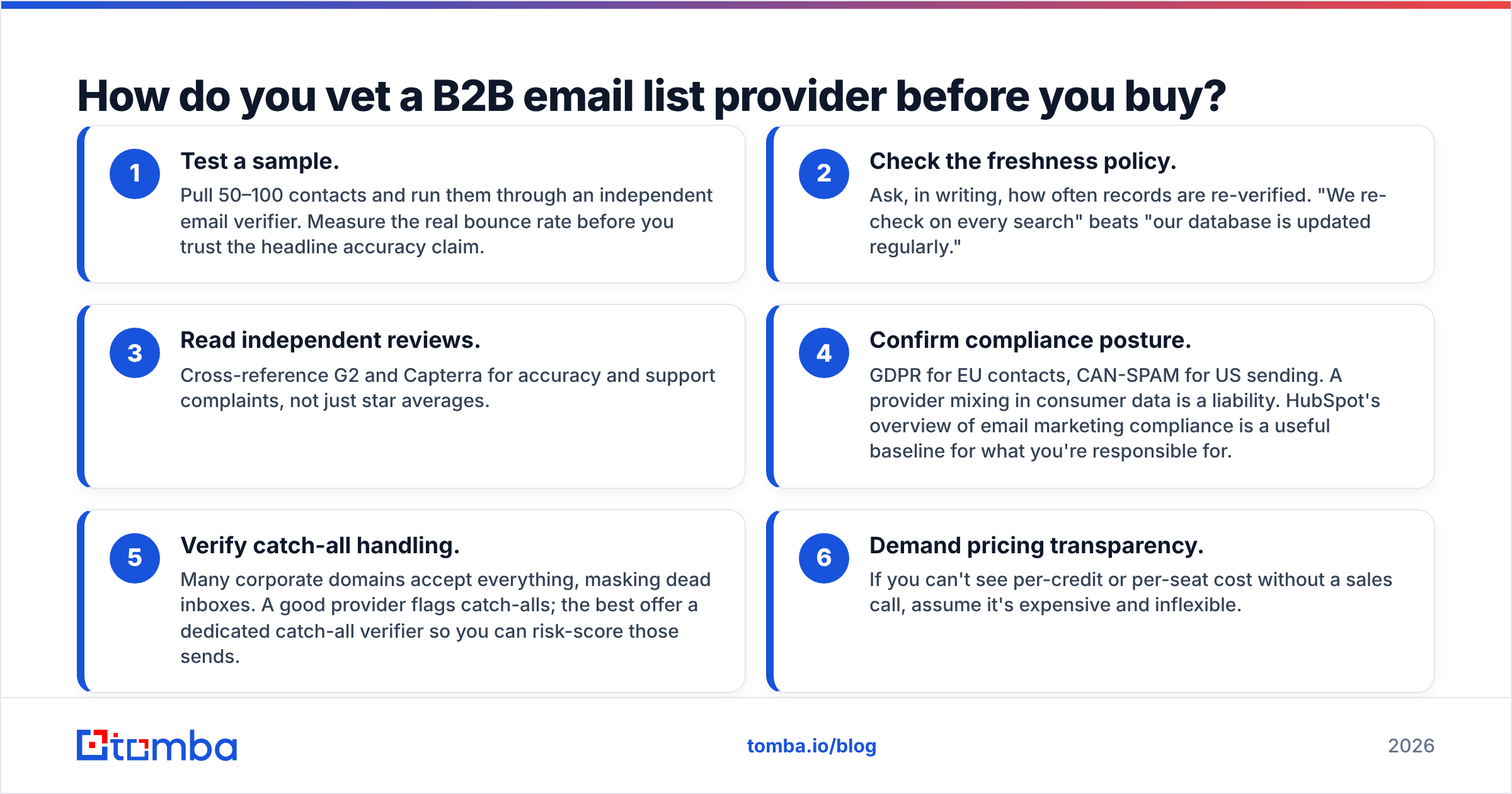
- Test a sample. Pull 50–100 contacts and run them through an independent email verifier. Measure the real bounce rate before you trust the headline accuracy claim.
- Check the freshness policy. Ask, in writing, how often records are re-verified. "We re-check on every search" beats "our database is updated regularly."
- Read independent reviews. Cross-reference G2 and Capterra for accuracy and support complaints, not just star averages.
- Confirm compliance posture. GDPR for EU contacts, CAN-SPAM for US sending. A provider mixing in consumer data is a liability. HubSpot's overview of email marketing compliance is a useful baseline for what you're responsible for.
- Verify catch-all handling. Many corporate domains accept everything, masking dead inboxes. A good provider flags catch-alls; the best offer a dedicated catch-all verifier so you can risk-score those sends.
- Demand pricing transparency. If you can't see per-credit or per-seat cost without a sales call, assume it's expensive and inflexible.
If a provider stalls on the sample test or the freshness question, walk away. Those are the two questions bad data can't survive.
How do you turn list data into deliverable campaigns?#
Sourcing is only half the job. Even great data fails if you send carelessly. A defensible workflow looks like this:
- Source narrow, not wide. Use domain search to find the right people at target companies rather than buying everyone in an industry.
- Verify before every send. Run the export through verification; suppress risky and catch-all addresses or send to them on a separate, warmed domain.
- Enrich for personalization. Add role, company size, and tech-stack fields via data enrichment so your copy isn't generic.
- Warm up and pace. New domains and big volume jumps trigger filters. Ramp gradually and watch your email deliverability signals.
- Monitor and prune. Drop non-engagers fast. Engagement is now a ranking signal, so a smaller responsive list outperforms a bloated dead one.
This is exactly why the build-on-demand model wins: every step above is something you control when you source and verify yourself, and something you're stuck reacting to when you buy a finished list.
Which B2B email list provider should you choose?#
Match the provider to your actual job:
- You need targeted outbound contacts, fast, on a real budget → a finder + verifier platform. Best precision-to-cost ratio.
- You need account research and firmographics at scale → a licensed database, used for research and targeted pulls.
- You need data inside your own app or CRM → a real-time enrichment API.
- You "just want a big cheap list" → reconsider. That's the option that costs the most after cleanup and reputation damage.
For most sales and marketing teams, the first option is the sweet spot — and it's where Tomba is built to compete.
The bottom line#
The best B2B email list provider isn't the one with the biggest list — it's the one that lets you assemble small, fresh, verified, well-targeted lists you actually own. Static bulk lists optimize for a vanity number; deliverable pipeline comes from precision and verification.
Start free: use the Tomba Email Finder to pull contacts that match your exact ICP, verify them in the same workflow, and export only the addresses worth sending to. The free tier gives you 25 searches a month to test accuracy against your own niche before you commit a cent — which is exactly the kind of proof no CSV seller will ever offer you. Build the list, don't buy the liability.
// get started
Find, verify and enrich your first contacts today
Start on the free plan with 25 searches a month, then scale when your team is ready.
Free plan · No credit card required · GDPR & CCPA
// about the author