B2B Email Scraper: How to Build a Clean Lead Pipeline in 2026
A B2B email scraper can fill your pipeline fast or torch your domain. Here's how scraping really works in 2026, where it breaks, and the compliant tools that actually deliver inbox-ready leads.
TL;DR
- A B2B email scraper pulls business email addresses from websites, directories, social profiles, and search results — but raw scraping without verification produces 20–40% bad data.
- The real risk isn't finding emails; it's the bounce rate, spam traps, and compliance exposure that come with unverified scraped lists.
- Pure HTML scrapers are cheap but messy. API-backed finders and verifiers (like Tomba Email Finder) trade raw volume for accuracy and legal defensibility.
- The winning 2026 workflow is scrape → verify → enrich → segment, not "scrape and blast."
- This guide compares the main scraper types, shows a clean pipeline, and explains how to stay on the right side of GDPR and CAN-SPAM.
If your outbound numbers look great in the spreadsheet but your replies are flat and your bounce rate is climbing, the problem usually starts at the scraping layer. Garbage in, garbage out — and in cold email, garbage in also means your sender reputation out the window.
What is a B2B email scraper?#
A B2B email scraper is software that automatically extracts business email addresses and related contact data from public sources, so you don't have to copy-paste them by hand. Think of it like a metal detector on a beach: it sweeps a huge area fast and beeps on anything that looks like a buried email. Whether what it digs up is treasure or a bottle cap is a separate question — and that question is the whole game.
Technically, scrapers crawl a target (a company website, a directory page, a search results page, a LinkedIn profile) and parse the HTML, scripts, and structured data for patterns that match an email address or a name-plus-domain combination. Some go further and guess addresses using known company patterns (firstname.lastname@domain.com), then test whether the inbox actually exists.
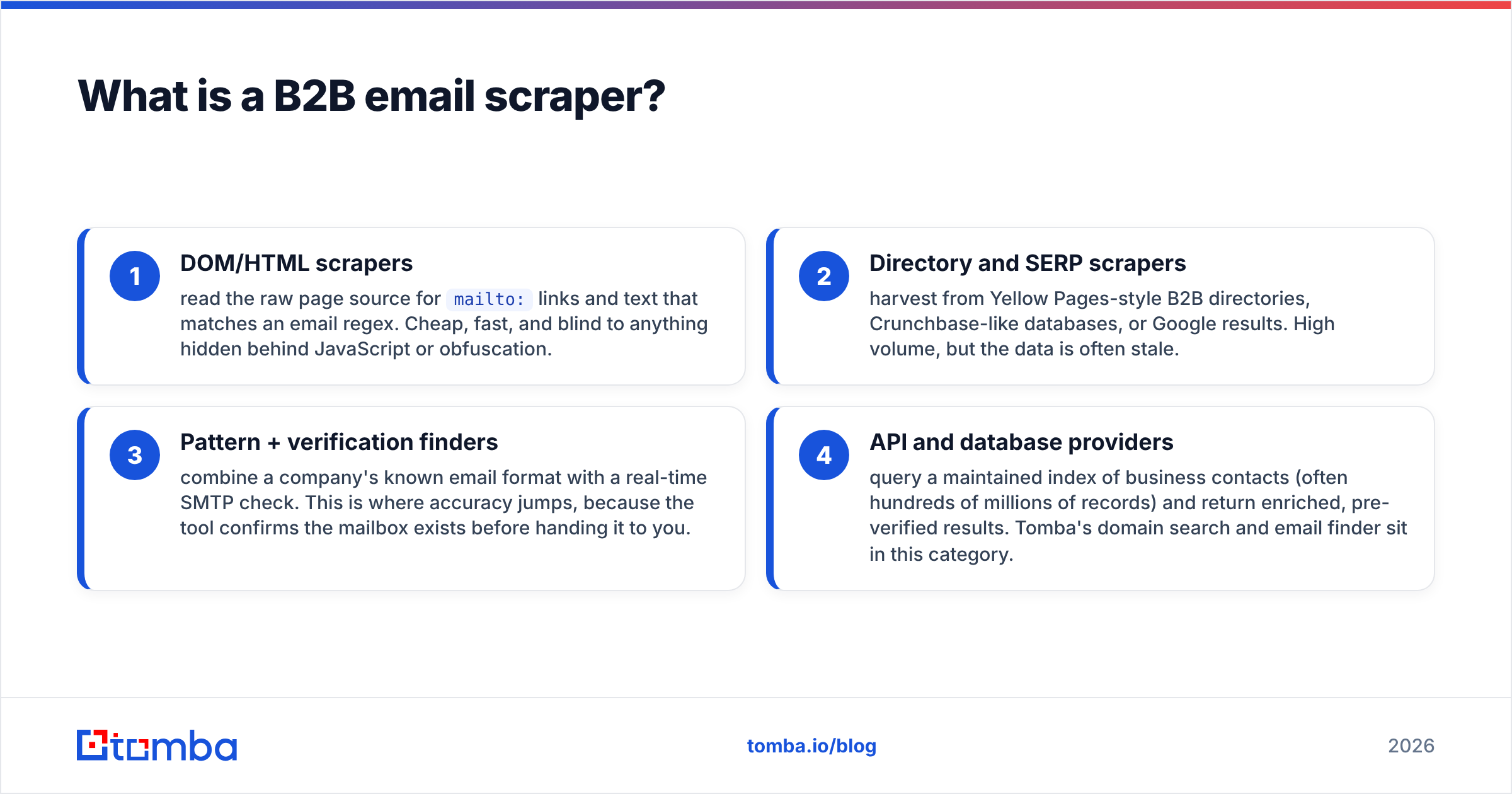
There are four broad families of scraper, and they behave very differently:
- DOM/HTML scrapers — read the raw page source for
mailto:links and text that matches an email regex. Cheap, fast, and blind to anything hidden behind JavaScript or obfuscation. - Directory and SERP scrapers — harvest from Yellow Pages-style B2B directories, Crunchbase-like databases, or Google results. High volume, but the data is often stale.
- Pattern + verification finders — combine a company's known email format with a real-time SMTP check. This is where accuracy jumps, because the tool confirms the mailbox exists before handing it to you.
- API and database providers — query a maintained index of business contacts (often hundreds of millions of records) and return enriched, pre-verified results. Tomba's domain search and email finder sit in this category.
The further down that list you go, the less you're "scraping the open web" and the more you're querying a structured, maintained dataset — which is exactly why accuracy and compliance improve.
How does B2B email scraping actually work?#
Scraping happens in three stages: discovery, extraction, and validation. Most cheap tools nail the first two and skip the third — which is precisely why their lists bounce.
During discovery, the scraper builds a list of target URLs: company domains, team pages, blog author bylines, conference attendee lists. During extraction, it parses each page for emails and names. A surprising amount of useful B2B contact data lives in author bylines and "Our Team" pages — which is why an author finder is often more productive than a generic crawler for content-led outreach.
The stage everyone underinvests in is validation. A scraped string like j.smith@acme.com is just a guess until something confirms a mailbox is listening on the other end. Real validation runs an SMTP handshake, checks MX records, screens against known spam traps and disposable domains, and flags catch-all servers that accept everything (and therefore confirm nothing). If your scraper hands you addresses without doing this, you are essentially the validation step — by sending and watching them bounce.
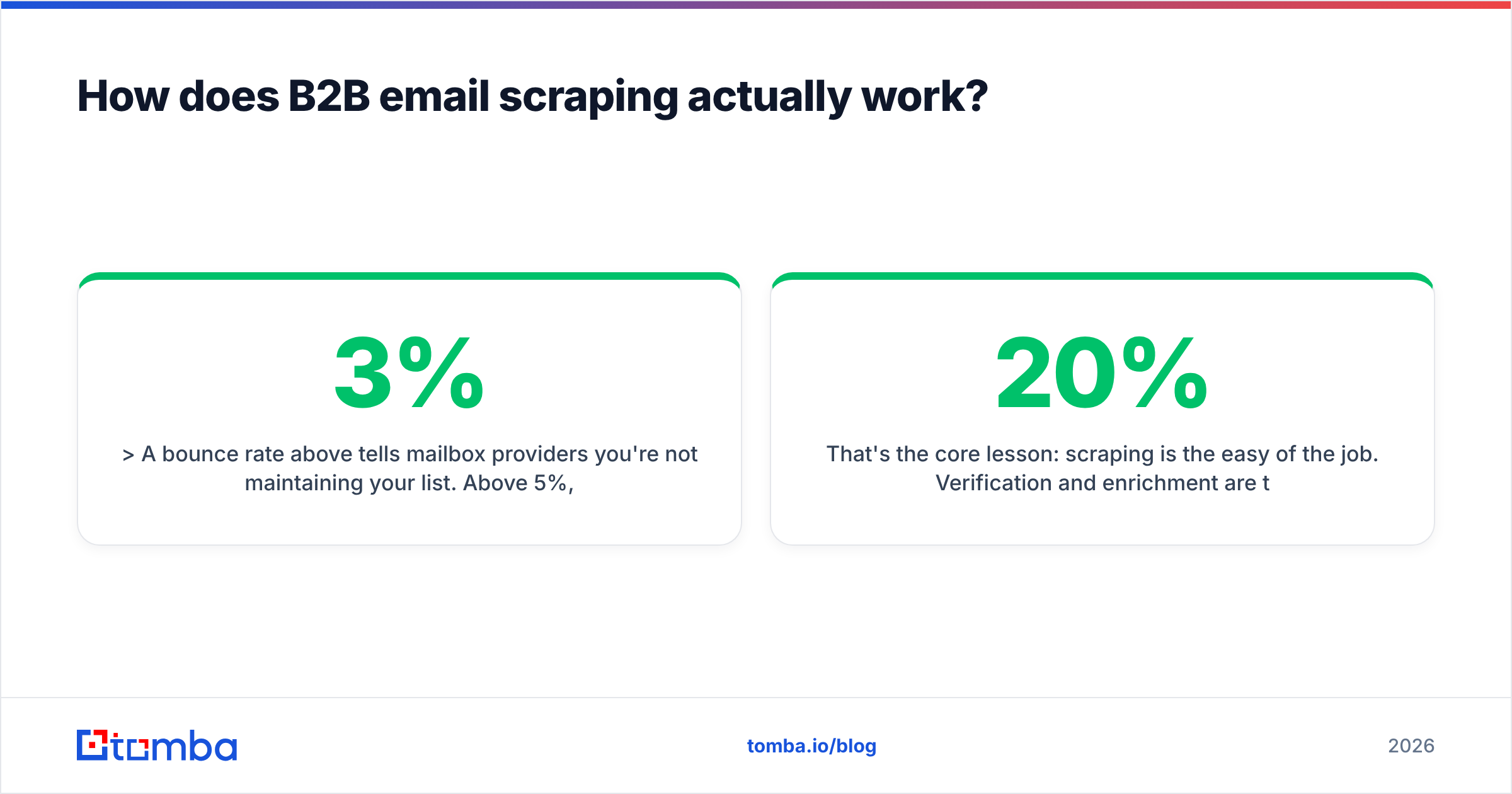
A bounce rate above 3% tells mailbox providers you're not maintaining your list. Above 5%, you risk getting throttled or blocked outright.
That's the core lesson: scraping is the easy 20% of the job. Verification and enrichment are the 80% that decide whether your campaign lands in the inbox or the void. For a deeper look at why bounces wreck your sending, see Tomba's primer on email deliverability.

Is scraping B2B emails legal?#
Short answer: scraping publicly available business contact data is generally legal, but using it for outreach is governed by separate, stricter rules — and those rules are where most teams get burned.
Two frameworks matter most:
- GDPR (EU/UK) treats a work email tied to a named person as personal data. You typically rely on "legitimate interest" for B2B outreach, which means the contact must be relevant to your offer, you must disclose where you got their data, and you must honor opt-outs immediately. Blanket scraping of every email on the internet does not meet the relevance bar.
- CAN-SPAM (US) is friendlier to cold outreach: no prior consent required, but you must include a real physical address, a working unsubscribe, and no deceptive headers or subject lines.
The practical takeaway is that how you collect matters less than how you target and send. A precise, role-relevant list of 200 prospects scraped from public company pages is far more defensible — and more effective — than 50,000 indiscriminately harvested addresses. Reputable providers also publish where their information comes from; Tomba documents its data sources so you can show provenance if a recipient ever asks. For the authoritative text, the U.S. FTC maintains a plain-English CAN-SPAM compliance guide.
None of this is legal advice — check with counsel for your jurisdiction. But "we scraped it because it was public" is not, by itself, a defense if your targeting is sloppy and your opt-out is broken.
What's the difference between a scraper and an email finder?#
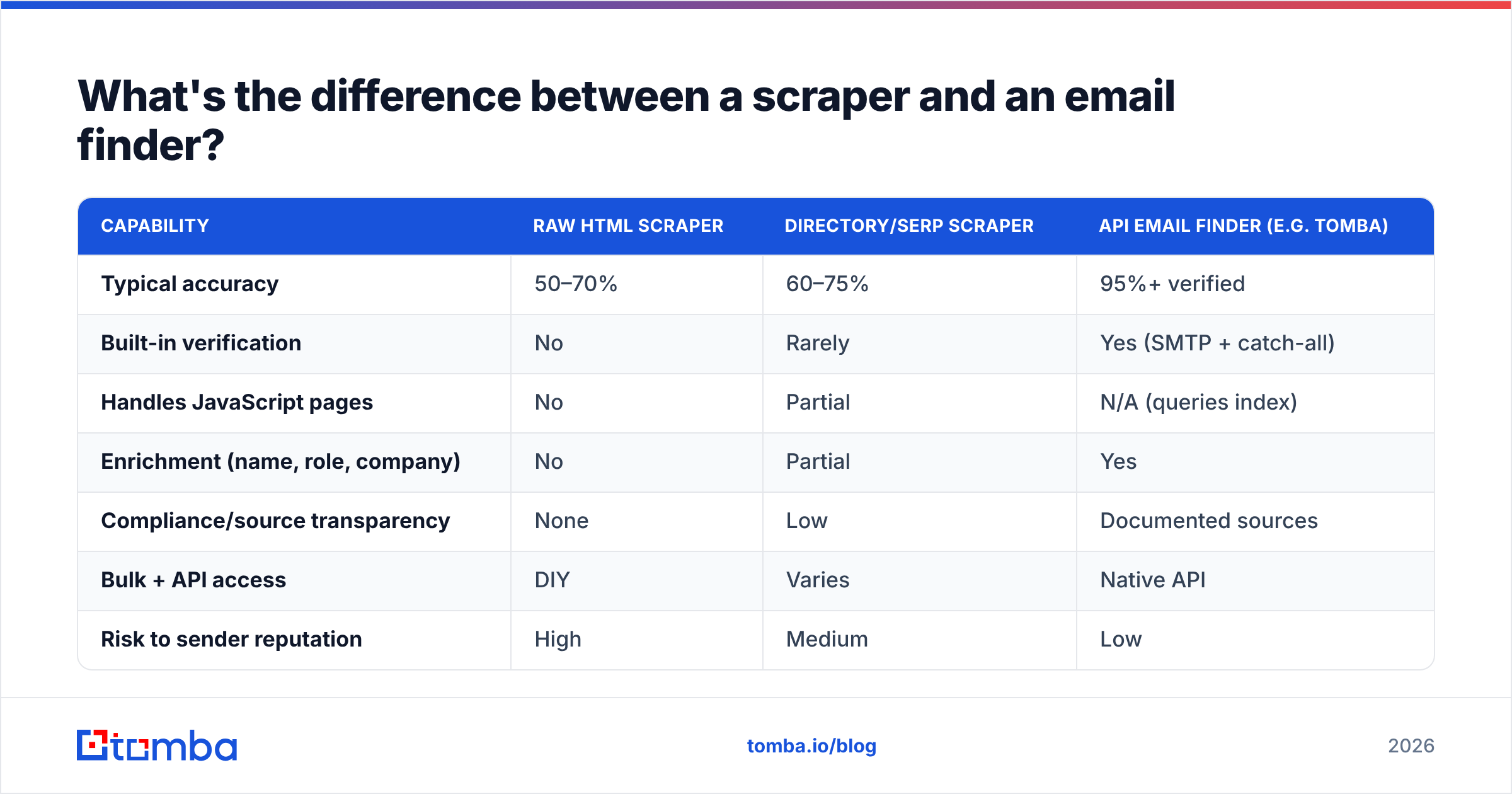
A scraper grabs whatever emails it can see; an email finder resolves a specific person to a verified address. The distinction sounds subtle but changes everything about your data quality.
| Capability | Raw HTML scraper | Directory/SERP scraper | API email finder (e.g. Tomba) |
|---|---|---|---|
| Typical accuracy | 50–70% | 60–75% | 95%+ verified |
| Built-in verification | No | Rarely | Yes (SMTP + catch-all) |
| Handles JavaScript pages | No | Partial | N/A (queries index) |
| Enrichment (name, role, company) | No | Partial | Yes |
| Compliance/source transparency | None | Low | Documented sources |
| Bulk + API access | DIY | Varies | Native API |
| Risk to sender reputation | High | Medium | Low |
| Best for | Quick one-offs | Wide net | Reliable pipelines |
The pattern is clear: raw scrapers win on cost and lose on everything that determines campaign outcomes. An email finder costs more per lookup but eliminates the hidden tax of bounces, spam-trap hits, and reputation damage. When you factor in that one blacklisting event can sideline your entire domain for weeks, the "cheap" scraper is rarely the cheap option.
If you want to verify lists you've already scraped from another tool, run them through a dedicated email verifier before sending. It's the single highest-ROI cleanup step in outbound.
What should you look for in a B2B email scraper in 2026?#
Prioritize accuracy, verification, and source transparency over raw volume. A tool that returns 1,000 emails at 60% accuracy gives you 600 usable contacts and a damaged domain; a tool that returns 700 at 96% gives you 672 usable contacts and a clean reputation.
Use this checklist when evaluating any scraper or finder:
- Real-time verification — does it run an SMTP check, or just hand you guesses? Verification is non-negotiable.
- Catch-all handling — catch-all domains accept any address, so they fool naive scrapers. Look for a dedicated catch-all verifier that scores deliverability instead of marking everything "valid."
- Enrichment depth — name, job title, company size, and LinkedIn handle let you segment and personalize. Bare emails don't.
- Bulk + API — manual lookups don't scale. You want a bulk email finder for lists and a clean API for automation.
- Integrations — the data should flow into your CRM and sequencer without CSV gymnastics. Check for native HubSpot and Salesforce connectors.
- Source transparency — can the vendor tell you where a record came from? If not, your compliance story has a hole in it.
Notice what's not on that list: "scrapes the most pages per minute." Throughput is a vanity metric. The constraint on modern outbound is never how many emails you can collect — it's how many you can collect that actually convert without burning your sender reputation.

How do you build a clean B2B email pipeline?#
The reliable 2026 workflow is scrape → verify → enrich → segment → send, with a verification gate between every collection step and your sequencer. Skipping the gate is how good campaigns die.
Here's the pipeline in practice:
- Step 1 — Define the ICP first. Decide the roles, industries, and company sizes you actually want before you collect a single address. Scraping without an ICP is just hoarding.
- Step 2 — Collect by domain, not by spray. Use domain search to pull the real contacts at target companies, then narrow by role. This beats firehose scraping on both quality and compliance.
- Step 3 — Verify everything. Push every address through verification. Drop hard bounces, quarantine catch-alls, and flag role accounts (info@, sales@) for separate handling.
- Step 4 — Enrich. Add titles, company data, and phone numbers via data enrichment so you can personalize and route leads correctly.
- Step 5 — Segment and send in batches. Warm up new domains, keep daily volume modest, and monitor bounce and complaint rates per segment.
This is the same discipline behind any healthy outbound motion: collect less, verify more, personalize hard. Tools like Apollo and Lusha bundle scraping with sequencing, while specialists like Tomba focus on getting the contact layer right and integrating with whatever sequencer you already use. There's no single correct architecture — but every working architecture has verification baked in. G2's lead intelligence category is a useful place to compare how vendors position these layers.

How much does a B2B email scraper cost?#
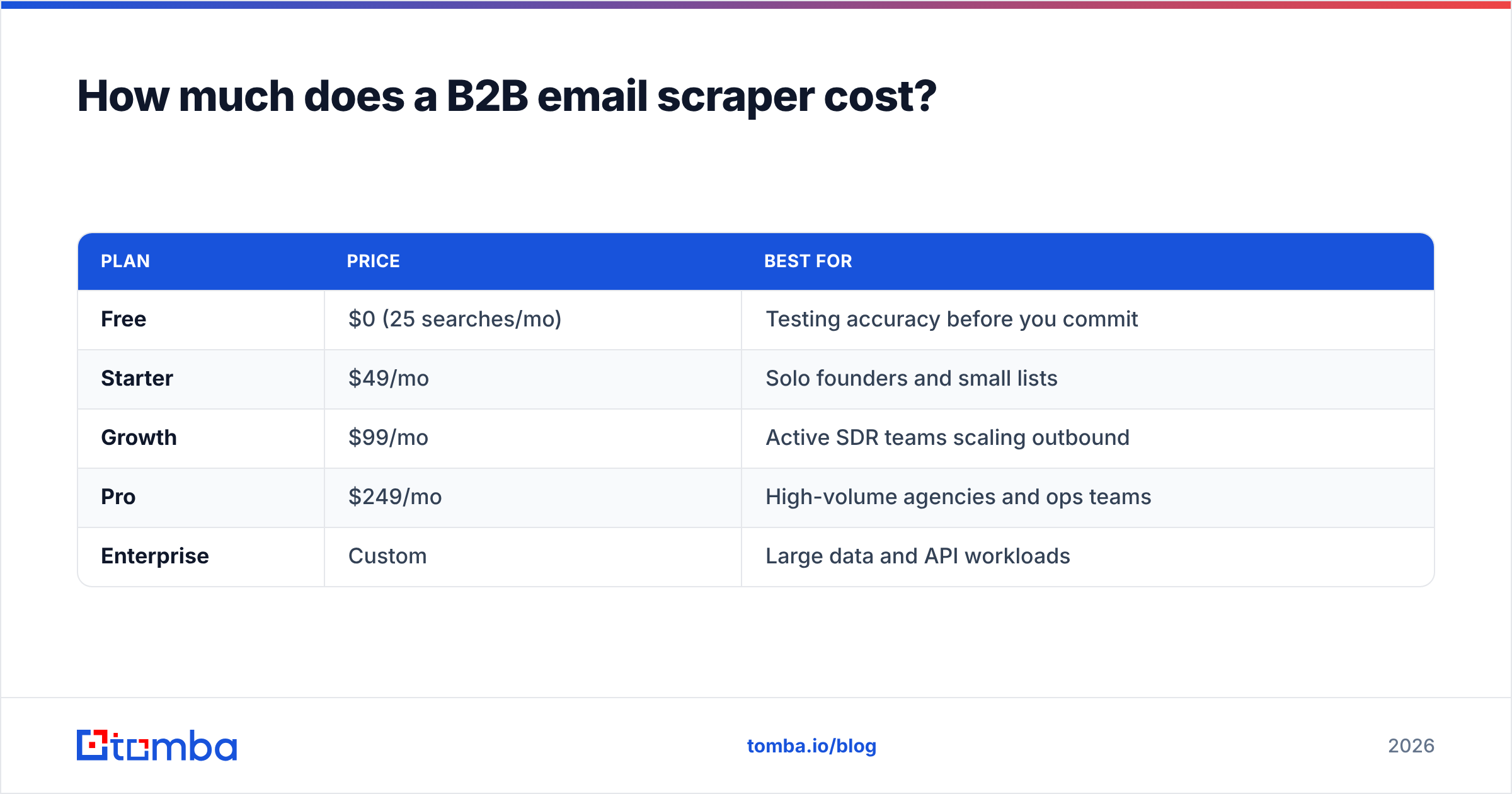
Pricing splits into two models: per-result credits (most finders and APIs) and flat monthly access (some directory tools). Credits dominate because they align cost with value — you pay for verified contacts, not for crawling effort.
Here's where Tomba lands, so you have a concrete anchor:
| Plan | Price | Best for |
|---|---|---|
| Free | $0 (25 searches/mo) | Testing accuracy before you commit |
| Starter | $49/mo | Solo founders and small lists |
| Growth | $99/mo | Active SDR teams scaling outbound |
| Pro | $249/mo | High-volume agencies and ops teams |
| Enterprise | Custom | Large data and API workloads |
Full details are on the Tomba pricing page. The free tier matters more than it looks: it lets you run a side-by-side accuracy test on your own target accounts before paying anyone. Always test on your ICP, not the vendor's demo data — accuracy varies wildly by industry and region, and a tool that's 96% accurate for SaaS contacts might be 70% accurate for local trades.
When you compare costs, calculate cost per verified, deliverable contact, not headline price. A $99 plan that yields 2,000 inbox-ready emails is cheaper per usable lead than a "$49 unlimited" scraper whose output you have to verify and clean yourself — because that cleanup costs credits and time, and the bounces cost reputation.
Common scraping mistakes that kill deliverability#
Most failed cold campaigns trace back to three avoidable scraping errors. Fix these and your reply rate often doubles without changing a word of copy.
- Sending to unverified lists. This is the cardinal sin. Every unverified address is a coin flip on a bounce, and a stack of bounces is a signal to Gmail and Outlook that you're a spammer.
- Ignoring catch-all domains. Catch-alls accept your test email, so they look valid, then silently route real sends to nowhere — or worse, to a spam-trap monitor. Score them separately with a catch-all finder.
- Treating role accounts as people. info@ and support@ inboxes don't reply to cold pitches and often feed complaint systems. Strip or segment them.
The throughline is that scraping volume is a trap when it isn't paired with hygiene. The teams winning at outbound in 2026 aren't the ones scraping the most addresses — they're the ones sending to the cleanest, most relevant lists. As a rule of thumb: if you wouldn't be comfortable explaining to a recipient how you found their address and why your offer is relevant to them, don't send.
The bottom line#
A B2B email scraper is only as good as the verification and enrichment wrapped around it. Raw HTML scrapers are fine for a quick one-off, but for any pipeline you actually depend on, you want a finder that confirms mailboxes exist, enriches the record, and tells you where the data came from. Scrape less, verify hard, and send to lists you can stand behind.
Want to test that on your own target accounts before committing a budget? Start with the Tomba Email Finder — find verified business emails by name, company, or domain, run them through built-in verification, and push clean contacts straight into your CRM. The free tier includes 25 searches a month, so you can benchmark accuracy against your real ICP before you scale. Build the pipeline right at the contact layer, and every downstream metric — deliverability, reply rate, and win rate — follows.
// get started
Find, verify and enrich your first contacts today
Start on the free plan with 25 searches a month, then scale when your team is ready.
Free plan · No credit card required · GDPR & CCPA
// about the author