B2B Email Verification in 2026: The Complete Accuracy Guide
Dirty lists quietly kill your deliverability and your numbers. Here is how B2B email verification works in 2026, what to check, and which tools actually clean your data.
TL;DR
- B2B email verification is the process of confirming an address is real, deliverable, and safe to send to before it ever hits your outbound sequence.
- A dirty list is the single fastest way to wreck sender reputation: bounce rates above 2-3% start dragging your inbox placement down for everyone on the domain.
- The hard part in B2B is catch-all domains — servers that accept every address whether the mailbox exists or not. Real verification tools score these instead of guessing.
- Expect 95%+ accuracy and sub-1% bounce rates from a good verifier; expect 10-20% bounces from a list you "eyeballed."
- Verification is cheap insurance. A few dollars per thousand checks protects a domain reputation that takes months to rebuild.
What is B2B email verification?#
B2B email verification is the process of checking whether a business email address actually exists and can receive mail — without sending a message that would bounce. Think of it like calling a phone number's carrier to confirm the line is active before you dial, instead of letting it ring and risking a "number disconnected" mark against you.
In practice, a verifier runs a chain of checks: it parses the syntax, confirms the domain has valid mail (MX) records, opens an SMTP conversation with the receiving server, and interprets the server's response to decide whether the mailbox is real. The output is a status — usually valid, invalid, accept-all (catch-all), unknown, or disposable — plus a confidence score.
The reason this matters more in B2B than in consumer marketing is simple: your lists are built from prospecting, scraping, exports, and guessed patterns like first.last@company.com. That guesswork produces a lot of plausible-but-dead addresses. Verification is the gate between "looks right" and "is right."
How does email verification actually work under the hood?#
Every serious verifier runs the same layered pipeline. Each layer is cheap to fail fast on, so the expensive checks only run on addresses that survive the earlier ones.
- Syntax check — Is the address even RFC-valid? Catches typos like
john@@acme.comor trailing spaces before you waste an SMTP call. - Domain and MX record check — Does the domain resolve, and does it publish mail-exchange records? No MX records means no mailbox can exist there.
- Disposable and role detection — Flags throwaway domains (mailinator, temp-mail) and role accounts (
info@,sales@,support@) that hurt engagement and inflate complaint rates. - SMTP handshake — The verifier connects to the mail server and issues the
RCPT TOcommand to ask, in effect, "would you accept mail for this person?" without delivering anything. - Catch-all detection — Tests whether the server accepts every address. If it does, a plain SMTP check can't confirm the specific mailbox, so the verifier scores it using historical and pattern data instead.
The first three steps are fast and deterministic. The last two are where verifiers separate themselves — handling greylisting, rate limits, and catch-all ambiguity is what you're really paying for. If you want the underlying definitions, Tomba's email deliverability glossary entry breaks down how these signals feed inbox placement.
Why does B2B email verification matter so much in 2026?#
Because mailbox providers got stricter, and the penalty for dirty data got steeper. Google and Yahoo's bulk-sender requirements now expect senders to keep spam complaints under 0.3% and bounce rates low, and a few bad sends can tank placement across your whole domain.
Here's the chain reaction a dirty list sets off:
- High bounces signal to receiving servers that you don't manage your list, so they route more of your mail to spam.
- Spam-trap hits (recycled dead addresses turned into traps) can get your sending domain or IP blacklisted outright.
- Lower inbox placement means lower open and reply rates, which your team misreads as "bad copy" and "bad targeting" — when the real problem was the list.
That last point is the expensive one. Teams spend weeks rewriting subject lines and rebuilding ICPs to fix a response rate problem that a $20 verification run would have solved. Clean data is the cheapest growth lever you're probably ignoring.

What's the difference between an email finder and an email verifier?#
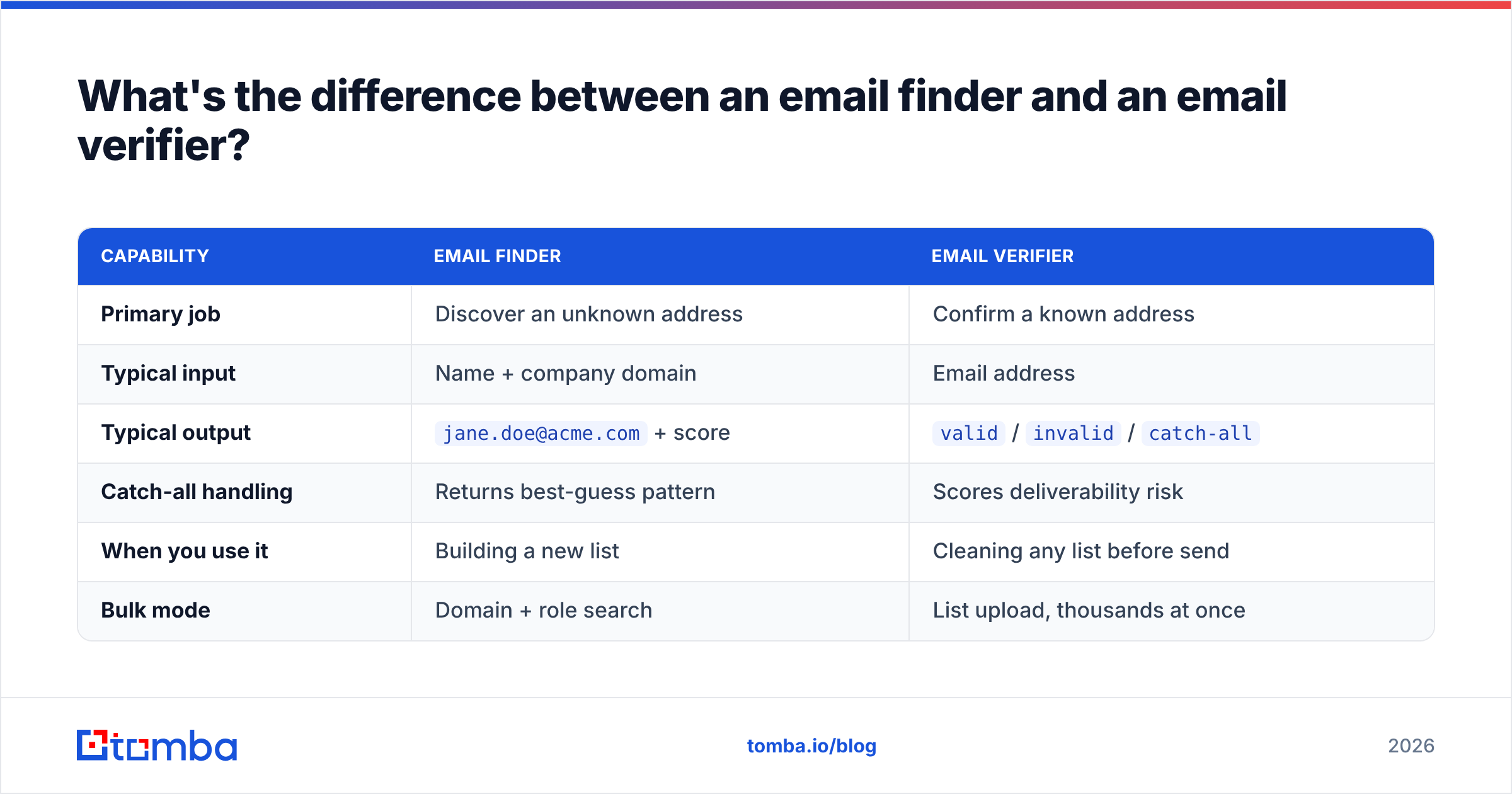
They solve adjacent problems, and you usually need both. A finder discovers an address; a verifier confirms it. An email finder takes a name and a company domain and returns the most likely address. A verifier takes that address and tells you whether it's safe to send to.
| Capability | Email finder | Email verifier |
|---|---|---|
| Primary job | Discover an unknown address | Confirm a known address |
| Typical input | Name + company domain | Email address |
| Typical output | jane.doe@acme.com + score |
valid / invalid / catch-all |
| Catch-all handling | Returns best-guess pattern | Scores deliverability risk |
| When you use it | Building a new list | Cleaning any list before send |
| Bulk mode | Domain + role search | List upload, thousands at once |
The clean workflow is finder → verifier → send. Discover the address, verify it, and only then load it into your sequence. Many platforms, including Tomba, bundle both so the address is verified at the moment it's found. If you're working from an existing CRM export instead, you skip the finder and run the whole list through the email verifier.
How do you handle catch-all domains?#
Catch-all (or "accept-all") domains are the hardest problem in B2B verification, and they're everywhere — a large share of company domains are configured this way. A catch-all server replies "yes, I'll accept that" to every RCPT TO, whether the mailbox exists or not. A naive verifier marks all of them valid, and you find out the truth only when half of them bounce.
There are three honest ways to deal with catch-alls:
- Score, don't guess. Good verifiers cross-reference the address against historical send data, known email patterns for that domain, and prior verification results to assign a real-world deliverability probability instead of a blind "valid."
- Segment and send carefully. Route catch-all addresses into a lower-volume, higher-warmth segment so a wrong guess doesn't spike your domain-wide bounce rate.
- Use a dedicated check. Tools like Tomba's catch-all verifier exist specifically to grade these domains rather than lumping them in with clean
validresults.
The wrong move is treating catch-all as either "all good" or "all bad." Both extremes cost you — one in bounces, the other in deleted-but-real prospects.
What bounce rate and accuracy should you expect?#
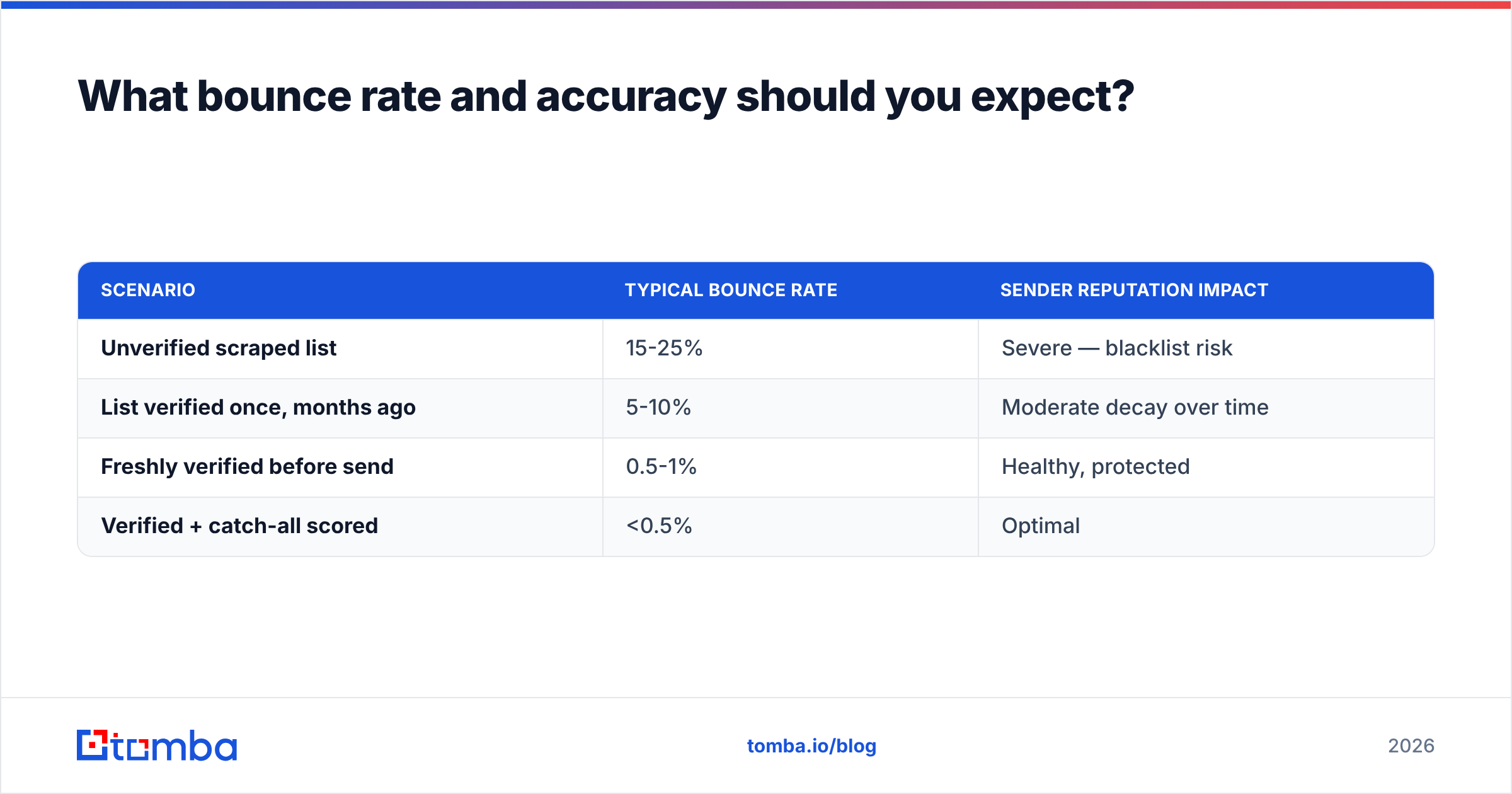
A well-verified B2B list should bounce under 1%, and the best verifiers claim 95-99% accuracy on deliverable/undeliverable classification. The gap between verified and unverified data is stark enough that it shows up in your first send.
| Scenario | Typical bounce rate | Sender reputation impact |
|---|---|---|
| Unverified scraped list | 15-25% | Severe — blacklist risk |
| List verified once, months ago | 5-10% | Moderate decay over time |
| Freshly verified before send | 0.5-1% | Healthy, protected |
| Verified + catch-all scored | <0.5% | Optimal |
Two practical takeaways. First, freshness matters — B2B data decays at roughly 2-3% per month as people change jobs, so a list verified in January is meaningfully dirty by June. Re-verify before every major campaign. Second, accuracy claims are only as good as catch-all handling; a vendor quoting 99% on clean domains but punting on catch-alls isn't really at 99% for your actual B2B list.
Which B2B email verification tools should you compare?#
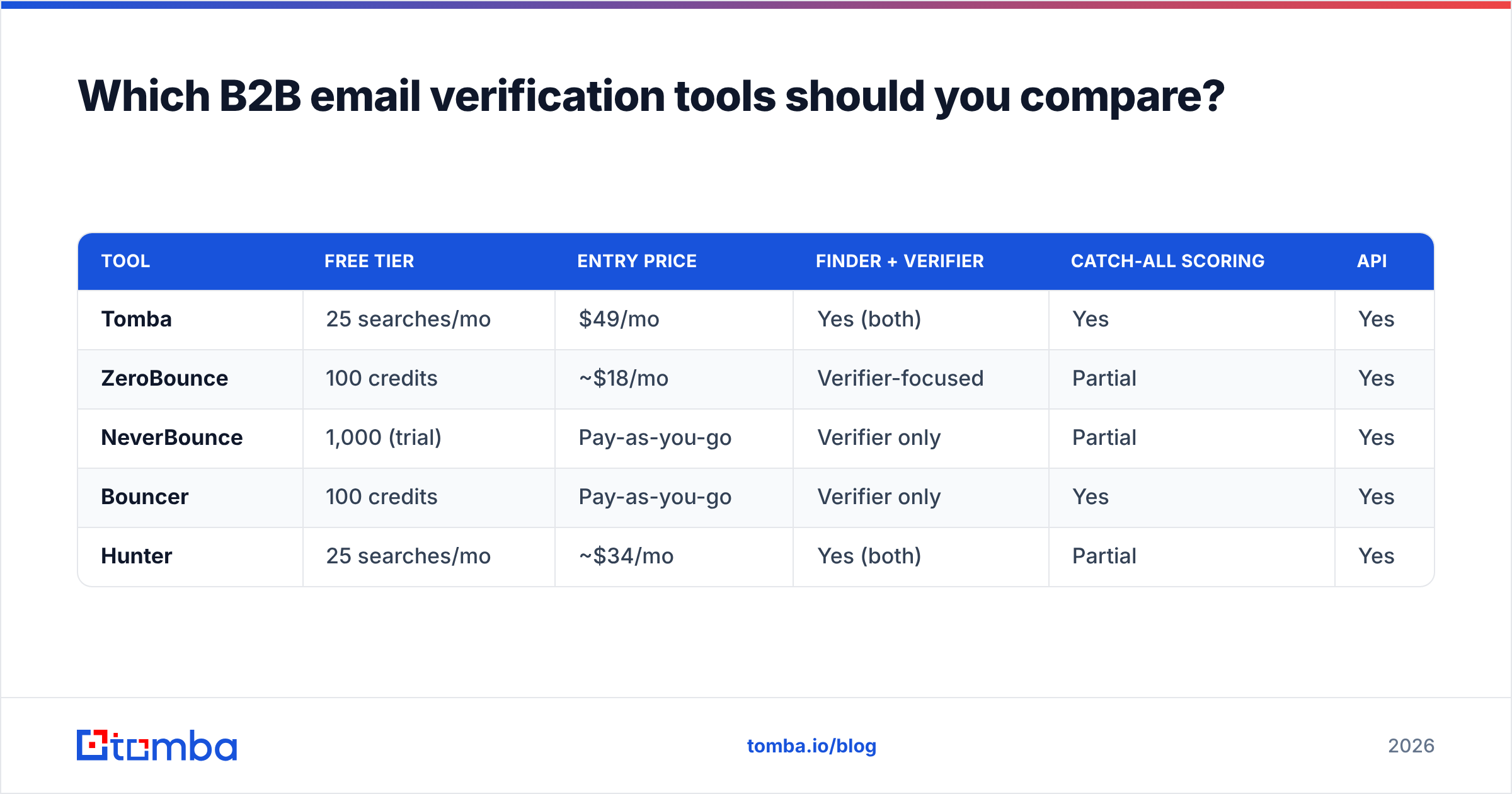
The market splits into pure verifiers and platforms that bundle finding, verifying, and enrichment. Here's how the common options line up on the attributes that actually affect cost and outcomes.
| Tool | Free tier | Entry price | Finder + verifier | Catch-all scoring | API |
|---|---|---|---|---|---|
| Tomba | 25 searches/mo | $49/mo | Yes (both) | Yes | Yes |
| ZeroBounce | 100 credits | ~$18/mo | Verifier-focused | Partial | Yes |
| NeverBounce | 1,000 (trial) | Pay-as-you-go | Verifier only | Partial | Yes |
| Bouncer | 100 credits | Pay-as-you-go | Verifier only | Yes | Yes |
| Hunter | 25 searches/mo | ~$34/mo | Yes (both) | Partial | Yes |
A few notes on reading this table. If you only ever clean lists you already own, a pure verifier is fine and pay-as-you-go pricing can be cheaper at low volume. If you're building lists as well as cleaning them, a combined platform removes a tool from your stack — you find, verify, and enrich in one place. Tomba sits in that combined camp, with a free tier to test accuracy on your own data before paying. You can see the full Tomba pricing breakdown across the Free, Starter ($49/mo), Growth ($99/mo), and Pro ($249/mo) tiers, and weigh it against credit-based competitors like a ZeroBounce alternative setup.
For independent reviews and side-by-side feature grids, G2's email verification category is a reasonable neutral starting point before you commit budget.
How do you verify a list at scale without getting throttled?#
Scale verification is mostly about batching politely so receiving servers don't rate-limit or greylist you mid-run. You rarely want to hammer one domain with hundreds of SMTP checks in a few seconds.
Three approaches, depending on volume:
- Bulk upload (UI). For one-off cleans of a CSV, a bulk email finder and verifier handles dedup, throttling, and retries for you. Best when you don't want to write code.
- API integration. For continuous verification — every new CRM lead, every form submission — wire the email verification API into your stack so addresses are checked the moment they enter your system.
- Spreadsheet add-ons. If your team lives in Google Sheets or Excel, native add-ons let analysts verify inline without exporting. Tomba ships both a Google Sheets add-on and an Excel one.
Whatever the channel, two rules hold. Deduplicate before you verify so you're not paying to check the same address twice, and re-run verification on a schedule rather than treating it as a one-time event. Data decay is continuous, so your cleaning should be too.
What should your verification workflow look like end to end?#
Put the pieces together and a healthy B2B data hygiene loop looks like this:
- Source addresses via finder, CRM, or import.
- Deduplicate to avoid wasted checks and double-sends.
- Verify every address, flagging
invalid,disposable, androlefor removal or suppression. - Score catch-alls and segment them separately rather than blindly including or excluding.
- Suppress known bouncers and unsubscribes permanently.
- Re-verify before each major campaign and on a rolling monthly basis.
This loop is the difference between a list that compounds in value and one that quietly rots. It also makes every downstream metric trustworthy — when your bounce rate is under 1%, a low reply rate is real feedback about your message, not noise from dead addresses.
Frequently asked questions#
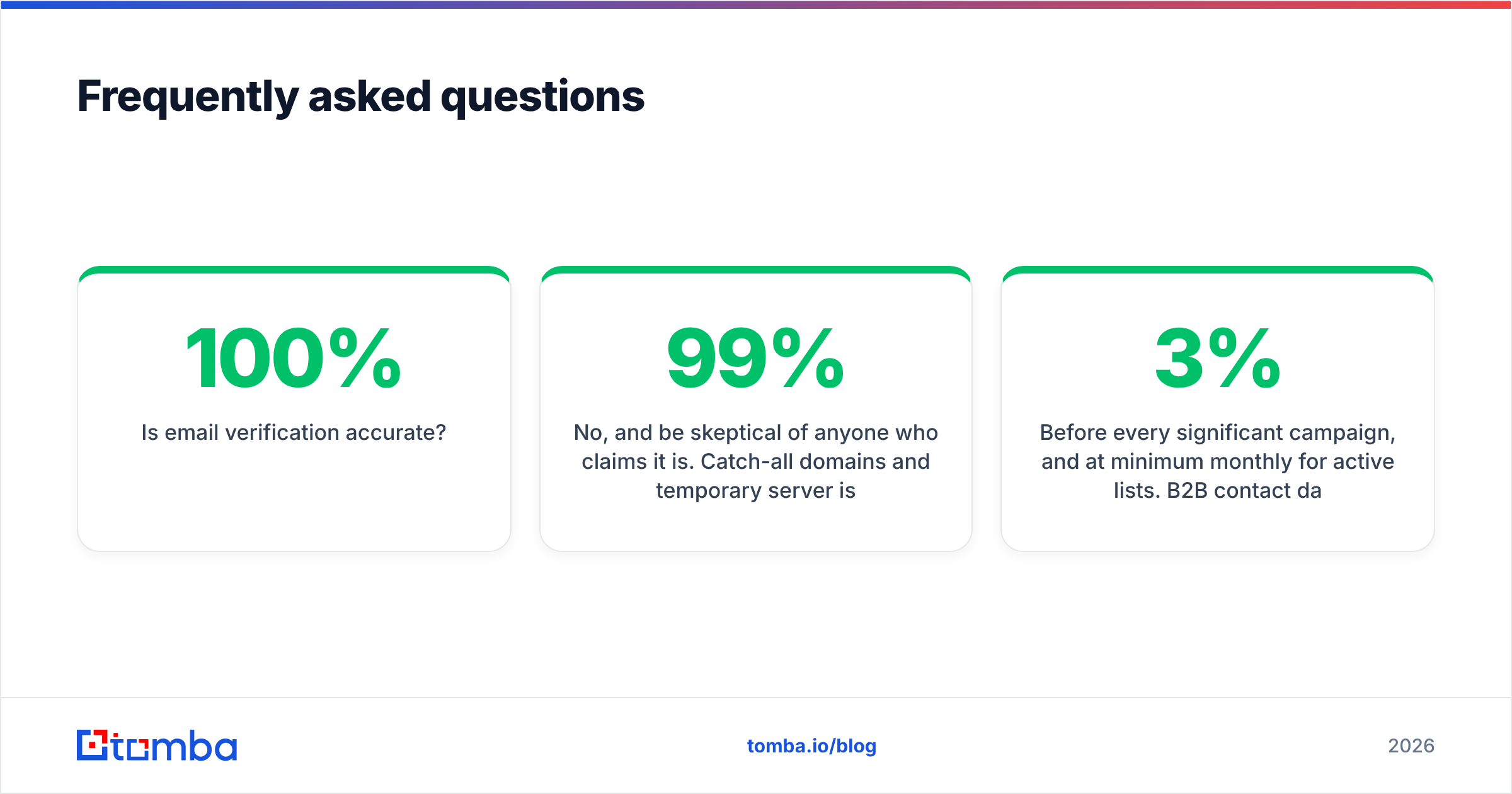
Is email verification 100% accurate?
No, and be skeptical of anyone who claims it is. Catch-all domains and temporary server issues create genuine ambiguity. The honest target is 95-99% accuracy with transparent unknown and catch-all statuses rather than false confidence.
How often should I re-verify my B2B list? Before every significant campaign, and at minimum monthly for active lists. B2B contact data decays at roughly 2-3% per month as people switch jobs and companies restructure.
Does verification hurt my sender reputation? No — done correctly it protects reputation. Verification uses SMTP handshakes that never deliver a message, so there's no send and no bounce during the check itself.
Can I just remove role accounts like info@ and sales@? Usually yes for cold outbound, since they have low engagement and higher complaint risk. Keep them only where they're a deliberate, relevant target for your offer.
Start with a clean list#
You can rewrite your cold email a dozen times, but if 15% of the addresses are dead, none of it matters. The fastest, cheapest reliability win in B2B outreach is verifying your data before it touches a sequence — clean inputs protect the sender reputation you've spent months building.
If you want one tool that both finds and confirms business addresses, start with the Tomba Email Finder. The free tier gives you 25 searches a month to test accuracy on your own domains, every result ships verified, and catch-all domains are scored instead of guessed — so the list you load into your next campaign is one you can actually trust. Find it, verify it, then send.
// get started
Find, verify and enrich your first contacts today
Start on the free plan with 25 searches a month, then scale when your team is ready.
Free plan · No credit card required · GDPR & CCPA
// about the author