B2B Introduction Email Template Examples That Convert in 2026
The right B2B introduction email template turns cold contacts into booked meetings. Here are 7 templates, subject lines, and a framework you can copy today.
TL;DR
- A strong B2B introduction email template is short (under 120 words), leads with the recipient's context, and asks for one small commitment — not a 30-minute demo.
- Personalization beats volume: a relevant first line lifts reply rates far more than a clever subject alone.
- You need a verified address before any template works — bounces wreck sender reputation faster than bad copy does.
- This guide gives you 7 copy-paste templates, a 5-part structure, subject-line options, and a comparison of when to use each.
- Pair the template with accurate contact data (use a tool like the Tomba Email Finder) so your best line actually lands in the inbox.
What is a B2B introduction email?#
A B2B introduction email is the first message you send to a business contact you have no prior relationship with, written to start a conversation rather than close a deal. Think of it like introducing yourself at a conference: you don't open with a contract, you open with a reason the other person should care about the next 30 seconds.
The mistake most reps make is treating the intro email as a pitch. It isn't. Its only job is to earn a reply. Everything — the subject line, the first sentence, the ask — should be engineered toward that single outcome. A demo request, a pricing PDF, and a calendar link all belong to later emails in the sequence.
There are three common scenarios where you'll use one:
- Cold outbound — you found the prospect through research and have no warm path in.
- Warm referral — a mutual contact gave you the name, so you can borrow their credibility.
- Inbound follow-up — someone downloaded a resource or visited your pricing page and you're reaching out to qualify them.
Each scenario changes the opening line, but the underlying structure stays the same.
What makes a B2B introduction email template convert?#
The conclusion first: relevance in the first two lines drives replies more than anything else. According to HubSpot's sales research, personalized, context-aware outreach consistently outperforms generic blasts — and the gap widens every year as buyers grow more allergic to mass email.
A converting template has five parts:
- Subject line — 3 to 6 words, specific, no hype. "Question about your Q3 hiring plan" beats "Revolutionary solution inside."
- The hook (first line) — references the recipient, their company, or a trigger event. Never start with "I hope this email finds you well."
- The relevance bridge — one sentence connecting their situation to what you do, framed as their problem, not your product.
- The proof — a single, concrete result or named customer. One stat, not a paragraph.
- The ask (CTA) — a low-friction yes/no question, not a 30-minute meeting request.
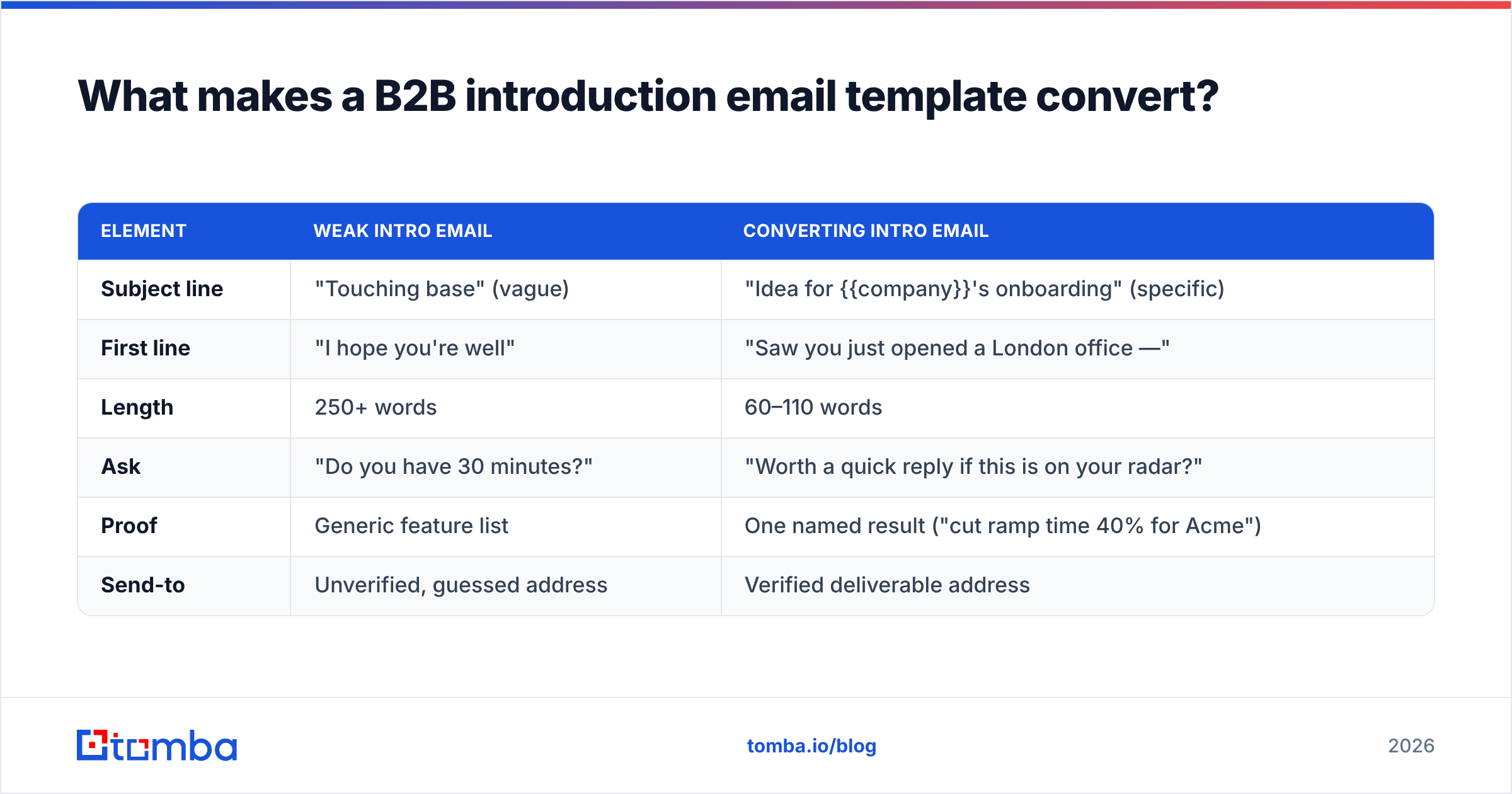
Here's how the wrong and right versions stack up on the elements that actually move reply rates:
| Element | Weak intro email | Converting intro email |
|---|---|---|
| Subject line | "Touching base" (vague) | "Idea for {{company}}'s onboarding" (specific) |
| First line | "I hope you're well" | "Saw you just opened a London office —" |
| Length | 250+ words | 60–110 words |
| Ask | "Do you have 30 minutes?" | "Worth a quick reply if this is on your radar?" |
| Proof | Generic feature list | One named result ("cut ramp time 40% for Acme") |
| Send-to | Unverified, guessed address | Verified deliverable address |
Notice the last row. Even a perfect template fails if it bounces. Run every address through an email verifier before you send — a high bounce rate signals spam filters and can quietly land your whole domain in the junk folder, dragging down your response rate across every campaign.
What is the best structure for a B2B introduction email?#
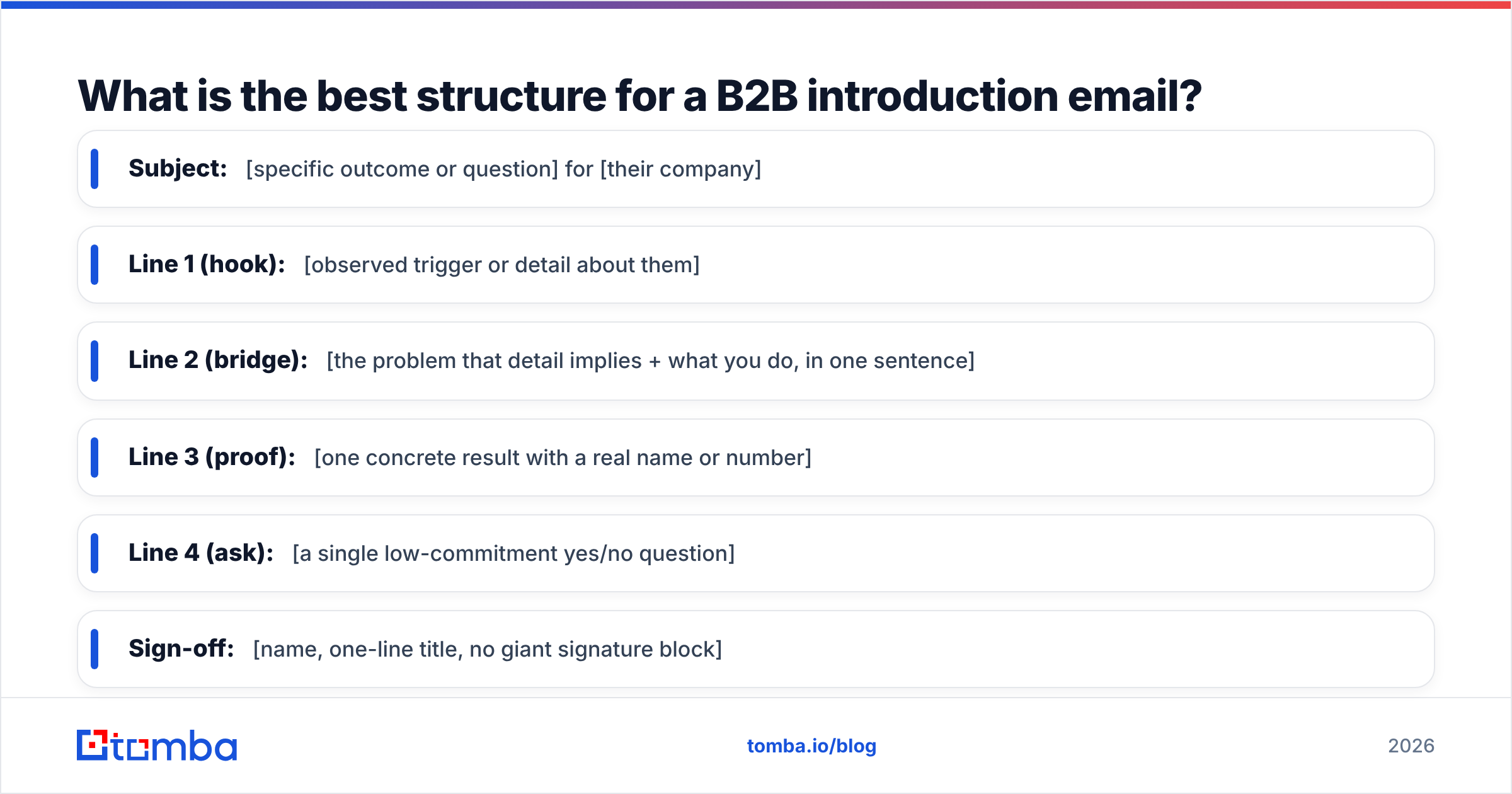
Use the five-part structure above as a fill-in-the-blank skeleton. Here it is as a reusable frame:
- Subject: [specific outcome or question] for [their company]
- Line 1 (hook): [observed trigger or detail about them]
- Line 2 (bridge): [the problem that detail implies + what you do, in one sentence]
- Line 3 (proof): [one concrete result with a real name or number]
- Line 4 (ask): [a single low-commitment yes/no question]
- Sign-off: [name, one-line title, no giant signature block]
Keep the whole thing under 120 words. On mobile — where the majority of B2B email is now first opened — a long email reads as work, and work gets archived.
7 B2B introduction email templates you can copy#
Below are seven templates mapped to common situations. Swap the bracketed variables and cut anything that doesn't apply.
1. Cold outbound — trigger-based#
Subject: Congrats on the {{round}} raise
Hi {{first_name}},
Saw {{company}} just closed your {{round}} — usually that means the GTM team is about to scale fast.
We help post-raise teams like {{similar_company}} keep pipeline data clean while headcount doubles. They cut duplicate leads by 60% in the first quarter.
Worth a quick reply if data hygiene is on your radar right now?
{{your_name}}
2. Warm referral#
Subject: {{referrer}} suggested I reach out
Hi {{first_name}},
{{referrer}} mentioned you're rethinking how {{team}} handles outbound this year and thought we should talk.
We built {{product}} specifically for that problem — {{referrer}}'s team saw {{result}}.
Open to a short note back on whether it's worth exploring?
{{your_name}}
3. Inbound follow-up#
Subject: You grabbed our {{resource}} — quick question
Hi {{first_name}},
Thanks for downloading {{resource}}. Most people who read it are wrestling with {{problem}}.
Is that what brought you to it, or something else? Happy to point you to the most relevant part either way.
{{your_name}}
4. The "I did my homework" angle#
Subject: Noticed something on {{company}}'s careers page
Hi {{first_name}},
You're hiring three SDRs — that's a lot of ramp at once. Teams usually feel the data-quality pain right around that growth stage.
We help with exactly that. Worth two minutes of your inbox?
{{your_name}}
5. The problem-first cold email#
Subject: {{problem}} at {{company}}?
Hi {{first_name}},
Quick guess: your reps spend a chunk of every week hunting for accurate contact info instead of selling.
If I'm close, that's the thing we fix. {{similar_company}} got that time back and booked 22% more meetings.
Bad guess? No worries — just reply "not us" and I'll stop.
{{your_name}}
6. The mutual-connection LinkedIn-to-email bridge#
Subject: Following up from LinkedIn
Hi {{first_name}},
We connected on LinkedIn last week around {{topic}}. Email's easier for this — I think {{product}} maps directly to what you posted about {{pain}}.
Worth a closer look?
{{your_name}}
7. The ultra-short "pattern interrupt"#
Subject: Two lines, promise
Hi {{first_name}},
Do you own {{outcome}} at {{company}}? If yes, I have one specific idea. If no, who should I talk to?
{{your_name}}
You can store and version these in a swipe file — our free cold email templates library is a good place to start if you want more variations.
When should you use each template?#
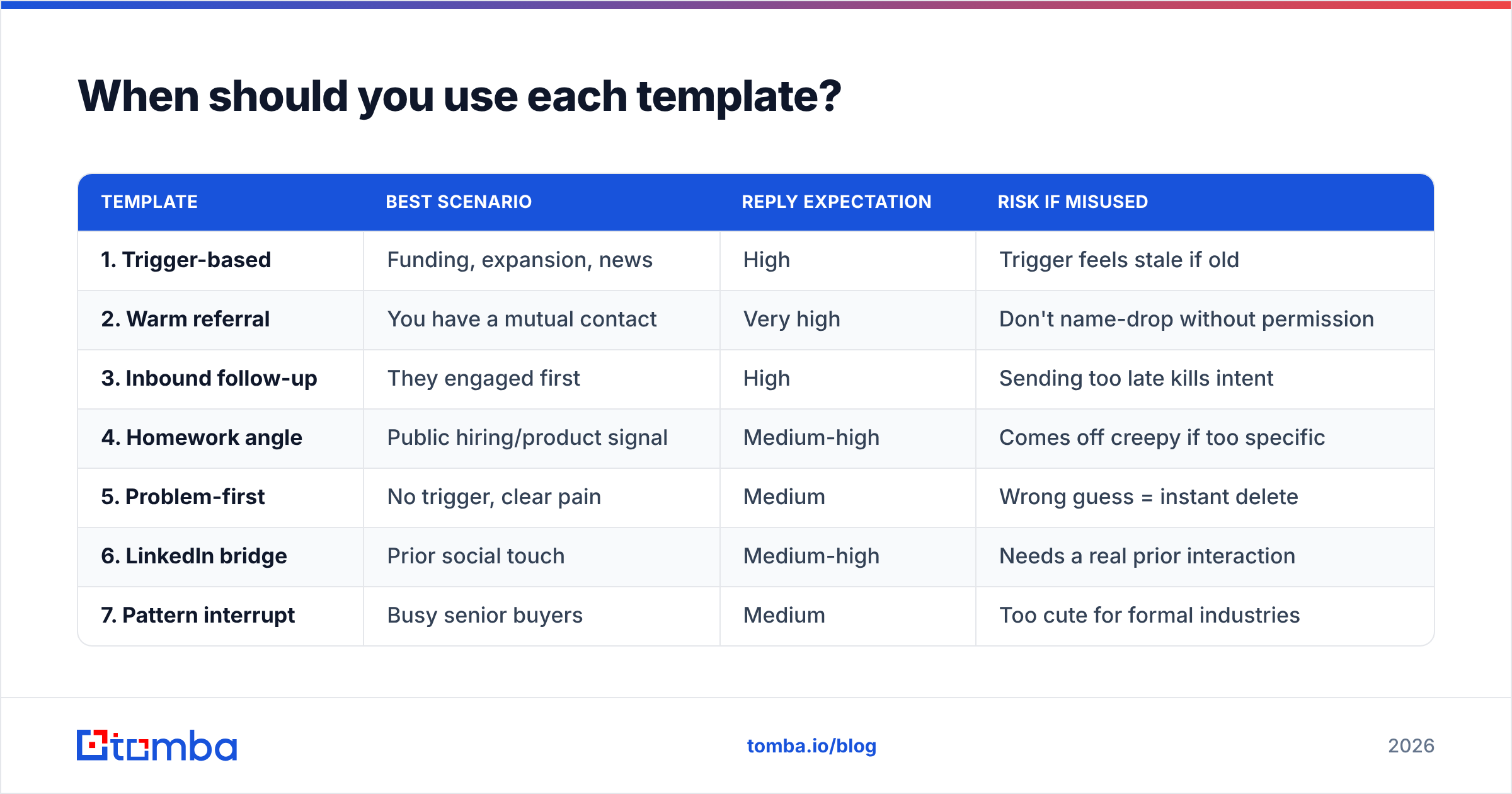
Match the template to the relationship and the trigger. Picking the wrong one is why good copy still gets ignored.
| Template | Best scenario | Reply expectation | Risk if misused |
|---|---|---|---|
| 1. Trigger-based | Funding, expansion, news | High | Trigger feels stale if old |
| 2. Warm referral | You have a mutual contact | Very high | Don't name-drop without permission |
| 3. Inbound follow-up | They engaged first | High | Sending too late kills intent |
| 4. Homework angle | Public hiring/product signal | Medium-high | Comes off creepy if too specific |
| 5. Problem-first | No trigger, clear pain | Medium | Wrong guess = instant delete |
| 6. LinkedIn bridge | Prior social touch | Medium-high | Needs a real prior interaction |
| 7. Pattern interrupt | Busy senior buyers | Medium | Too cute for formal industries |
A practical rule: the warmer the relationship, the more direct your ask can be. Cold contacts get a yes/no question; warm referrals can get a soft meeting suggestion.
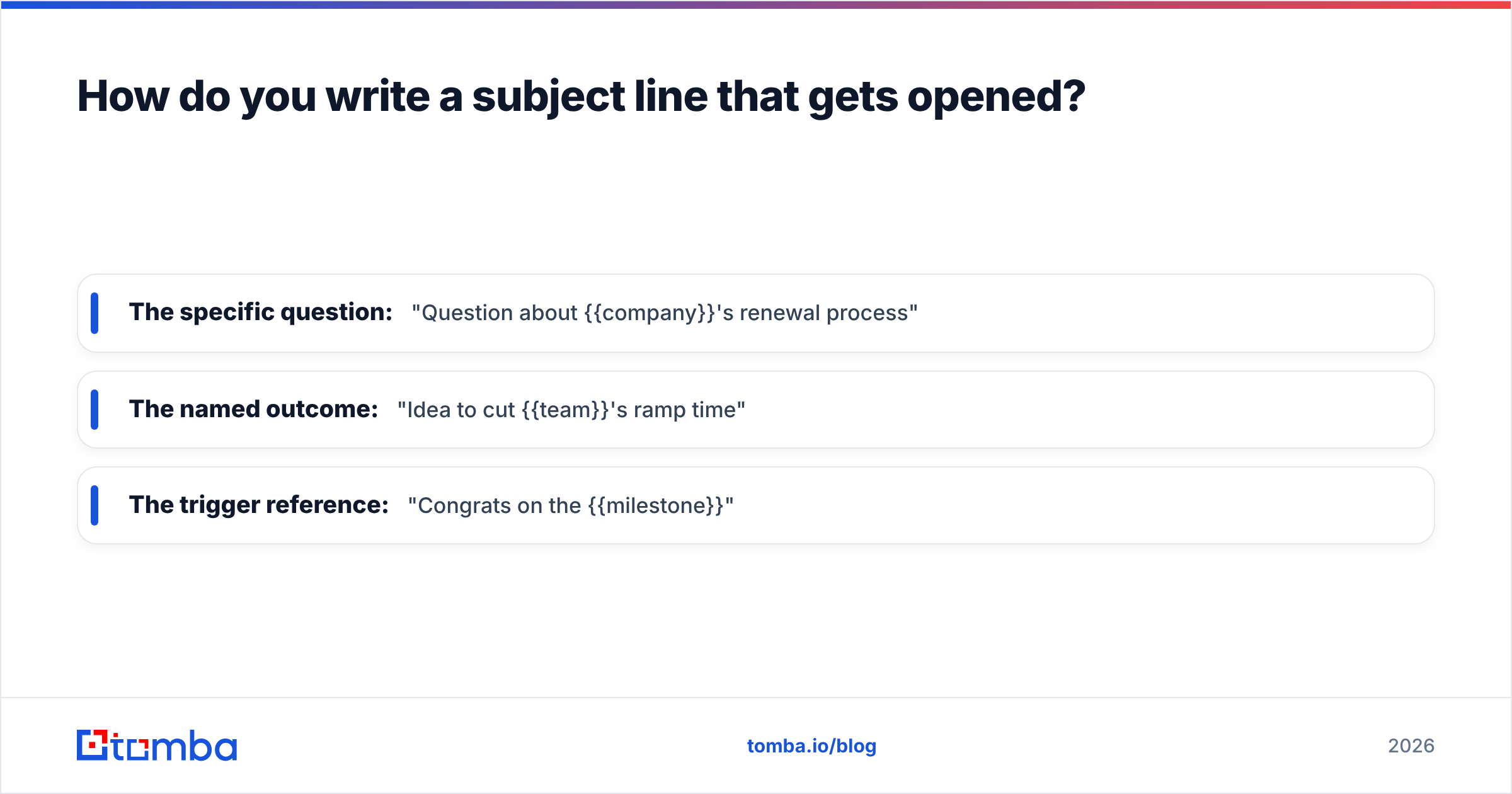
How do you write a subject line that gets opened?#
The subject line decides whether the rest of your template is ever read. Keep it short, specific, and curiosity-driven without being clickbait. Buyers can smell a fake "Re:" thread instantly, and it burns trust before they open.
Three subject-line formulas that hold up:
- The specific question: "Question about {{company}}'s renewal process"
- The named outcome: "Idea to cut {{team}}'s ramp time"
- The trigger reference: "Congrats on the {{milestone}}"
If you're testing at scale, a subject line generator gives you variations fast, but always sanity-check them against the one question that matters: would a busy stranger open this in two seconds? Independent reviews on directories like G2 consistently show that brevity and relevance — not gimmicks — separate the top-performing outreach tools and templates from the rest.
Why does your contact data matter more than your copy?#
Here's the uncomfortable truth: the best B2B introduction email template in the world is worthless if it goes to the wrong address. Three things break campaigns before copy ever gets a chance:
- Bounces — sending to dead addresses tanks your sender reputation and routes future mail to spam.
- Wrong person — a perfect message to the wrong title gets ignored or, worse, marked as spam.
- Stale data — people change jobs constantly; a contact accurate six months ago may be gone.
This is why the workflow matters as much as the words. Find the right person, confirm the address is live, then send. Skipping the middle step is the single most common reason good templates underperform. If you're working from a target account list, a domain search surfaces the right contacts at a company, and verification confirms they're reachable before your sequence ever fires.
Get the data foundation right and your reply rate stops being a coin flip. Get it wrong and you're optimizing copy on emails nobody receives.
Frequently asked questions#
How long should a B2B introduction email be? Under 120 words for cold outbound. Senior buyers skim on mobile; every extra sentence lowers your odds of a reply.
How many follow-ups should I send? Three to five total touches over two to three weeks is a healthy range. Most replies come on touch two or three, not the first email.
Should I include a calendar link in the first email? Usually no. A calendar link asks for a 30-minute commitment before you've earned attention. Lead with a yes/no question and offer the link once they reply.
What's the best send time? Tuesday through Thursday mornings in the recipient's timezone tend to perform best, but the data is noisier than vendors claim — test against your own audience.
Start with data that doesn't bounce#
Templates are the easy part — you now have seven. The hard part is getting them to a verified inbox so your best line actually lands. The Tomba Email Finder lets you find professional email addresses by name, company, or domain and confirm they're deliverable before you hit send, so your introduction email reaches a real person instead of a bounce queue. You can start on the free tier (25 searches a month), and paid plans begin at $49/mo — see the full Tomba pricing for details. Write the template once, send it to the right person, and let the reply rate climb.
// get started
Find, verify and enrich your first contacts today
Start on the free plan with 25 searches a month, then scale when your team is ready.
Free plan · No credit card required · GDPR & CCPA
// about the author