B2B Lead Generation Solution: How to Pick One in 2026
Most B2B lead generation tools sell you volume, not pipeline. Here's how to evaluate a B2B lead generation solution on data accuracy, coverage, and real cost in 2026.
TL;DR
- A B2B lead generation solution is not one product — it's a stack: a data source, a verification layer, an enrichment step, and an outreach channel that actually delivers.
- The single metric that decides ROI is data accuracy, not database size. A 700M-contact list with 30% bounce rates costs you more than a smaller, verified one.
- Buying static lead lists is the most expensive mistake in 2026. Decay (people changing jobs) eats roughly 25–30% of any list per year.
- Evaluate any solution on five axes: coverage, accuracy, freshness, workflow fit, and true cost-per-usable-lead — not headline price.
- Tomba covers the find-and-verify core of that stack with a free tier (25 searches/mo) and paid plans from $49/mo, so you can test accuracy before committing budget.
What is a B2B lead generation solution?#
A B2B lead generation solution is the system you use to turn an unknown audience into a list of real, reachable, qualified contacts you can sell to. Think of it like a water supply: the database is the reservoir, verification is the filtration plant, enrichment adds the minerals (job title, company size, tech stack), and your outreach tool is the tap. If any stage is broken, what comes out the tap is undrinkable — and you usually don't notice until the bounce reports roll in.
Most buyers shop for the reservoir alone ("how many contacts do you have?") and ignore the rest. That's the core mistake. The biggest database in the world is worthless if a third of the addresses bounce, because mailbox providers punish your sender reputation for every hard bounce — and then even your good emails stop landing.
So when we say "solution," we mean the whole pipeline:
- Data sourcing — where contacts come from (public web, opt-in, partnerships, user-contributed).
- Verification — SMTP and syntax checks that confirm a mailbox actually exists.
- Enrichment — adding firmographic and role data so you can segment and qualify.
- Activation — pushing clean records into your CRM, sequencer, or dialer.
- Refresh — re-checking data on a schedule so it doesn't rot.

Why do most B2B lead generation tools disappoint?#
Because they optimize for the demo, not the deliverable. A flashy dashboard with 700 million contacts looks impressive in a sales call. What it doesn't show you is the usable subset after you strip out duplicates, role accounts (info@, sales@), catch-all domains you can't safely verify, and contacts who left the company eight months ago.
Here's the math that vendors don't put on the pricing page. Say a tool advertises 100,000 contacts in your ICP:
- Remove ~15% duplicates and role accounts → 85,000
- Remove ~20% that are stale (job changes, ~2.5% churn per month) → 68,000
- Remove ~12% that fail verification on send → ~60,000 usable
You paid for 100,000 and can safely email 60,000. If your "cheap" tool charged $0.02/contact ($2,000) but only 60% are usable, your real cost is $0.033 per usable lead. A pricier tool at $0.04/contact with 92% usable lands at $0.043 — but those leads convert and don't torch your domain. Cheapest-per-row is almost never cheapest-per-meeting.
This is why a real evaluation starts with accuracy, then works backward to price.
How do you evaluate a B2B lead generation solution?#
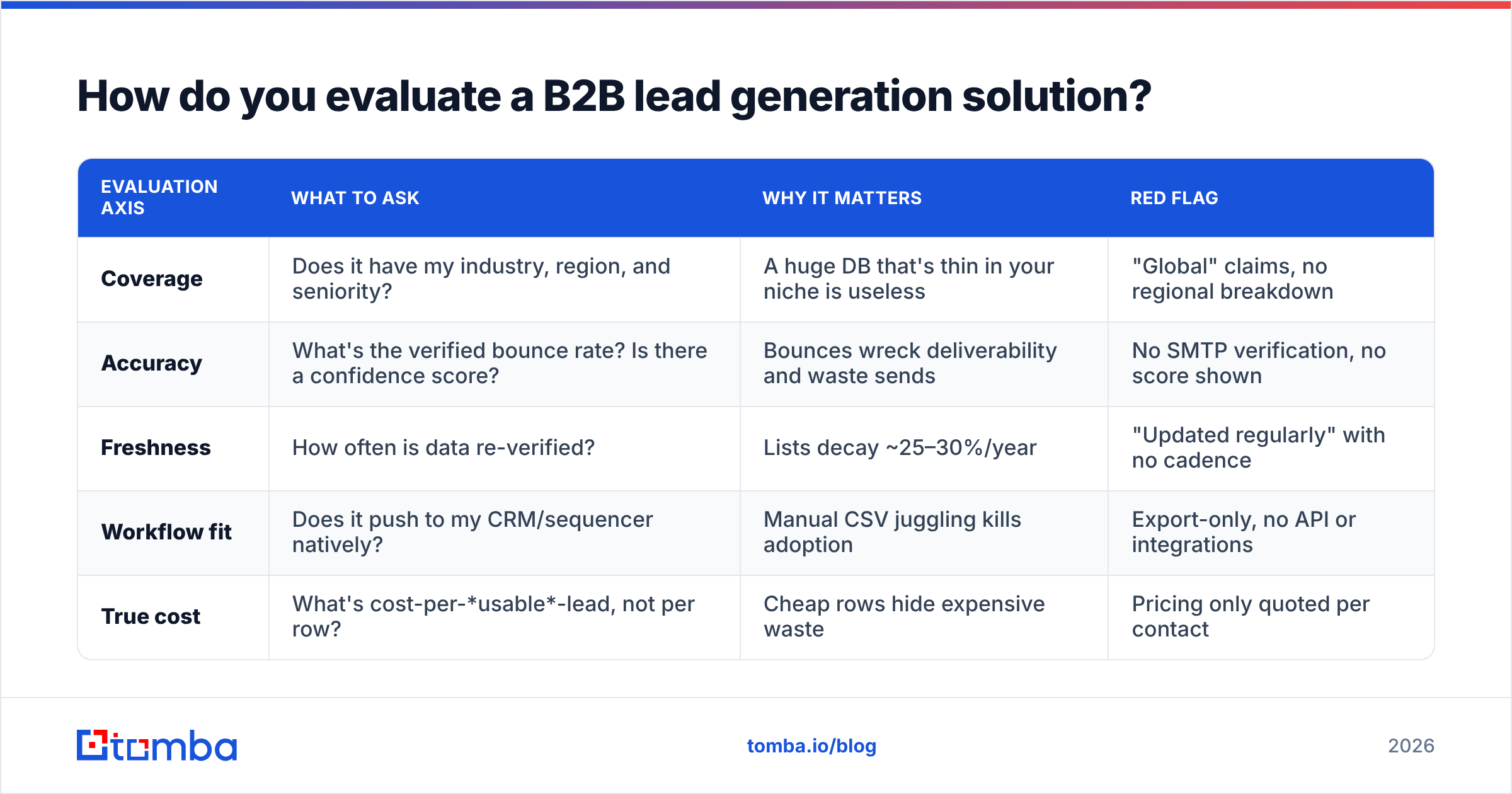
Score every candidate on these five dimensions. Weight accuracy and freshness highest — they compound.
| Evaluation axis | What to ask | Why it matters | Red flag |
|---|---|---|---|
| Coverage | Does it have my industry, region, and seniority? | A huge DB that's thin in your niche is useless | "Global" claims, no regional breakdown |
| Accuracy | What's the verified bounce rate? Is there a confidence score? | Bounces wreck deliverability and waste sends | No SMTP verification, no score shown |
| Freshness | How often is data re-verified? | Lists decay ~25–30%/year | "Updated regularly" with no cadence |
| Workflow fit | Does it push to my CRM/sequencer natively? | Manual CSV juggling kills adoption | Export-only, no API or integrations |
| True cost | What's cost-per-usable-lead, not per row? | Cheap rows hide expensive waste | Pricing only quoted per contact |
A practical test beats any spec sheet: run the same 50 target accounts through every tool's free tier and verify the output independently. Whoever returns the most valid, deliverable addresses wins — regardless of database size. You can sanity-check results with a free email checker so you're not grading vendors on their own homework.
The four-component checklist#
When you assemble your stack, make sure each layer is covered:
- A finder that maps a name + domain (or a whole company) to a working email. This is the core of any email finder workflow.
- A verifier that confirms the mailbox before you send — ideally with catch-all verification for domains that accept everything.
- An enrichment layer that appends job title, company size, and other firmographics for scoring.
- An activation path — native integrations or an email finder API so clean data flows into your existing tools without copy-paste.
Build vs. buy vs. blended: which approach wins?#
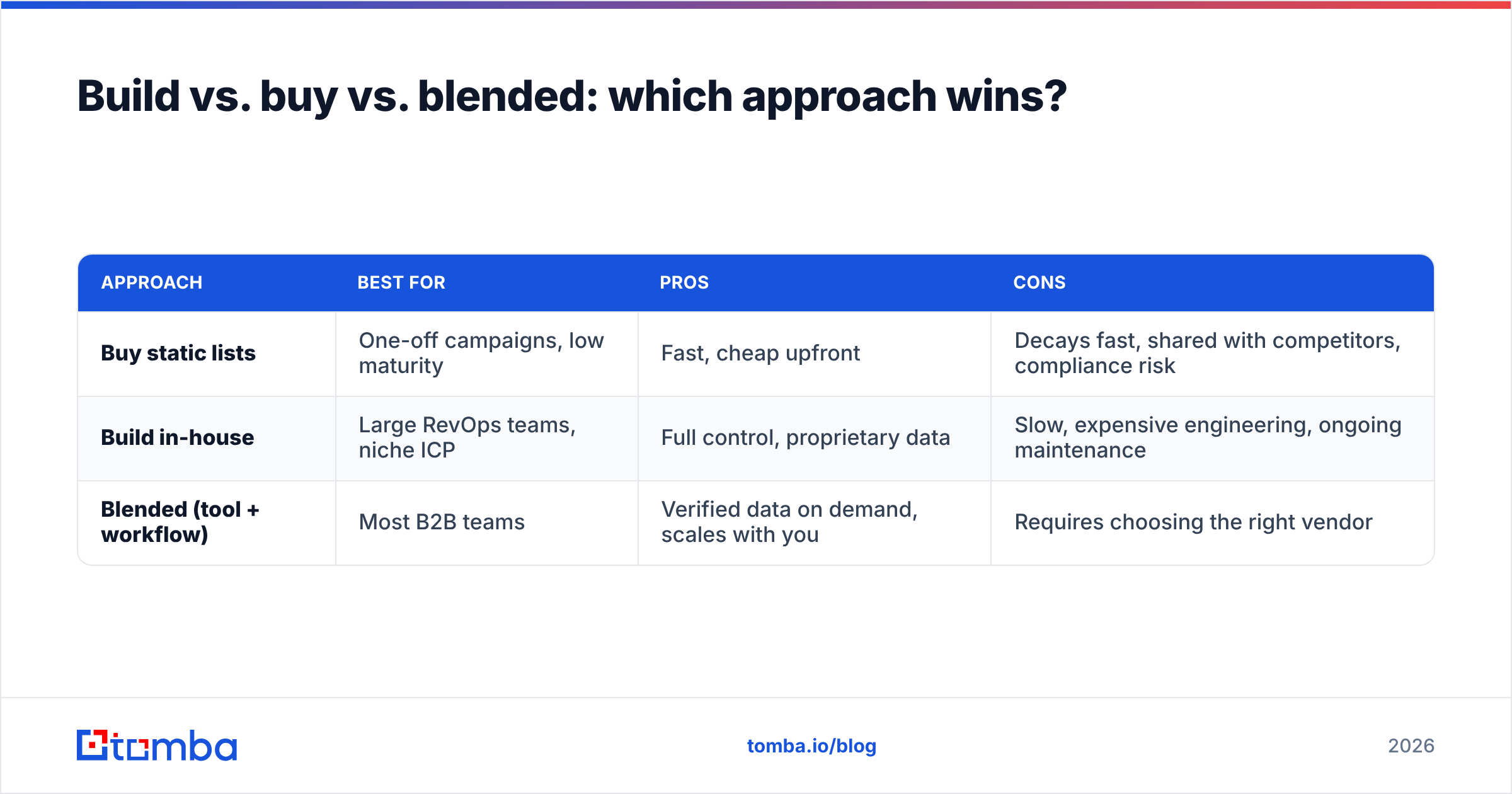
There are three ways to run B2B lead generation, and the right answer depends on volume and team maturity.
| Approach | Best for | Pros | Cons |
|---|---|---|---|
| Buy static lists | One-off campaigns, low maturity | Fast, cheap upfront | Decays fast, shared with competitors, compliance risk |
| Build in-house | Large RevOps teams, niche ICP | Full control, proprietary data | Slow, expensive engineering, ongoing maintenance |
| Blended (tool + workflow) | Most B2B teams | Verified data on demand, scales with you | Requires choosing the right vendor |
Buying static lists is the one to avoid in 2026. The same list gets resold to every competitor in your space, it's stale the day it ships, and under GDPR/CAN-SPAM the provenance is often impossible to prove. The blended model — an on-demand finder-plus-verifier wired into your CRM — wins for almost everyone because you pull fresh data at the moment you need it, not data that's been sitting in a warehouse since last year.

What does a modern lead gen workflow look like?#
Here's a concrete, repeatable flow that any team can run this week:
- Define the ICP precisely. Industry, headcount band, region, and the 2–3 job titles who actually sign. Vague ICPs produce vague lists.
- Source accounts, not contacts first. Build a target-account list, then find people inside each. A domain search returns every discoverable email at a company so you can pick the right roles.
- Find the specific people. Use a name-plus-company find emails lookup for named targets, or pull decision-makers by title.
- Verify before you load. Run every address through an email verifier. Drop hard-fails, flag risky/catch-all for a softer first touch.
- Enrich for scoring. Append firmographics with data enrichment so your routing and lead scoring have something to chew on.
- Activate in your CRM. Push clean records via the HubSpot integration or your sequencer of choice — no CSV detours.
- Refresh on a cadence. Re-verify quarterly. Job-change churn means a "clean" list at 2.5%/month is ~15% rotten in six months.
The discipline that separates teams that hit pipeline from teams that don't is step 4. Verification is boring and nobody demos it, but it's the firewall between your campaign and a blacklisted domain. If you skip it, read up on email deliverability once — you'll never skip it again.
How important is data accuracy, really?#
It's the whole game. Accuracy isn't a feature, it's the multiplier that every downstream number rides on.
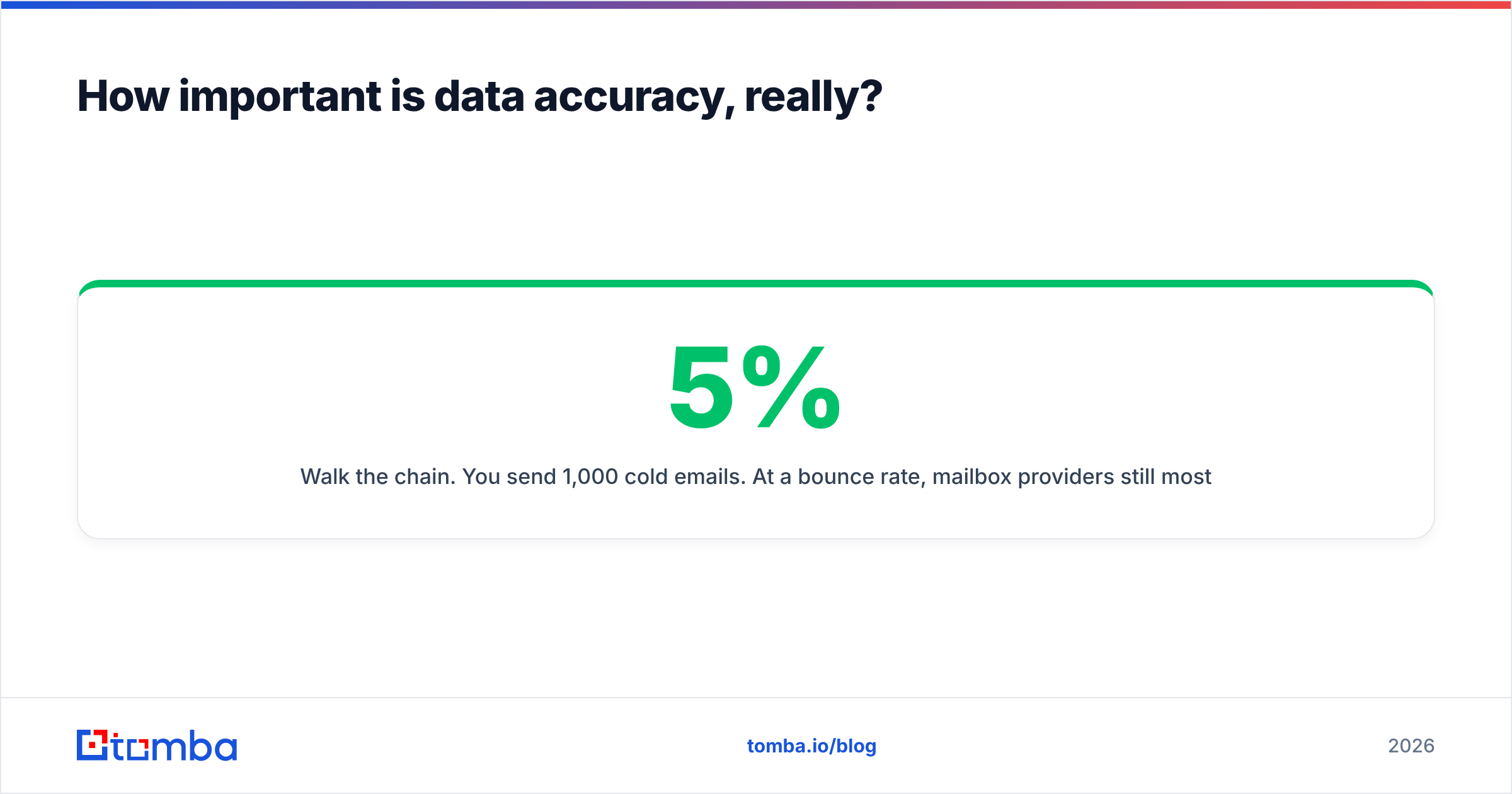
Walk the chain. You send 1,000 cold emails. At a 5% bounce rate, mailbox providers still mostly trust you and your inbox placement holds. At a 15% bounce rate, Gmail and Outlook start routing you to spam — including the emails to valid addresses. So a list that's 15% wrong doesn't cost you 15% of results; it can cost you 60–70%, because the valid contacts never see the message either. One bad list poisons the well for the whole campaign.
That's also why "number of contacts" is the wrong headline metric and verified accuracy is the right one. A provider that's transparent about where its data comes from and attaches a confidence score to each result lets you set your own risk threshold — send confidently to high-confidence hits, warm up gently to risky ones, and discard the dead. Vendors who won't show you a per-result score are asking you to trust a number they won't let you audit.
For high-volume teams, the same verification has to work in batch. A bulk email finder that verifies as it finds means you're not running a second tool over the output — the list lands clean.
What about phone and multichannel?#
Email is the backbone, but 2026 buyers don't reply to a single channel. The strongest solutions let you layer a call or a LinkedIn touch onto the same verified record without rebuilding the list.
If your motion includes outbound calling, a phone finder that returns direct dials — paired with a phone validator so you're not burning dialer minutes on dead numbers — turns one clean account list into a multichannel sequence. The point isn't to spam every channel; it's that the enrichment is done once and reused, instead of maintaining three separate, divergent lists.
How does Tomba fit as a B2B lead generation solution?#
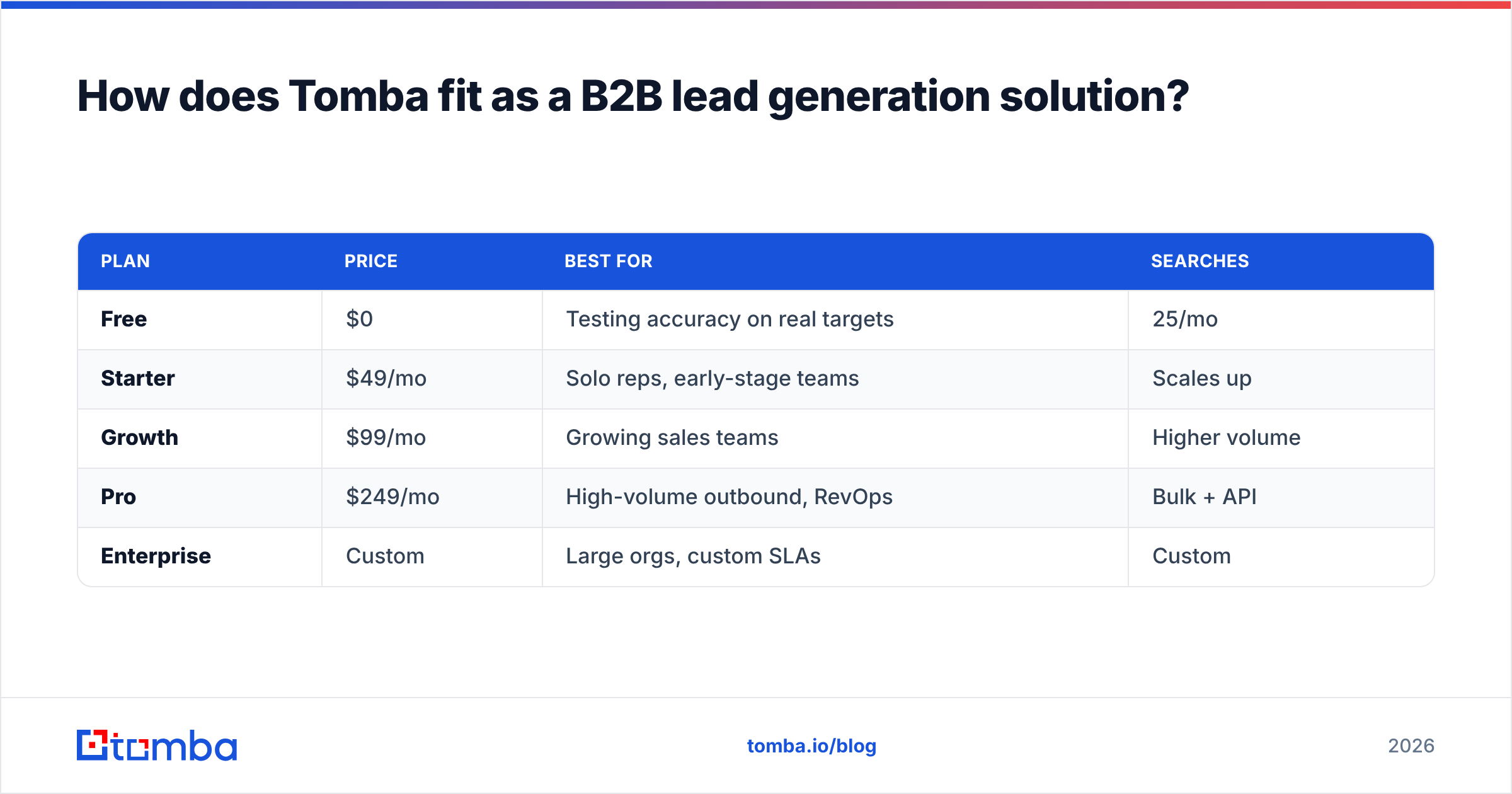
Tomba covers the find-and-verify core of the stack — the part where accuracy is won or lost. It's not pretending to be your CRM or your sequencer; it's the layer that feeds them clean data. Here's how its plans line up:
| Plan | Price | Best for | Searches |
|---|---|---|---|
| Free | $0 | Testing accuracy on real targets | 25/mo |
| Starter | $49/mo | Solo reps, early-stage teams | Scales up |
| Growth | $99/mo | Growing sales teams | Higher volume |
| Pro | $249/mo | High-volume outbound, RevOps | Bulk + API |
| Enterprise | Custom | Large orgs, custom SLAs | Custom |
The reason to start on the free tier rather than a trial-by-demo is exactly the evaluation principle above: test accuracy on your accounts before you spend. Run 25 of your real targets through the Tomba Email Finder, verify the results, and judge cost-per-usable-lead with your own eyes. Full Tomba pricing is public, and the finder, verifier, domain search, enrichment, and phone tools share one credit system — so the "blended stack" we described isn't four vendors, it's one workflow.
For independent perspective on any tool in this category, cross-reference verified reviews on G2 and Capterra before you commit — and check vendor data practices against the GDPR overview if you sell into the EU.
Common mistakes that waste lead gen budget#
- Buying on database size. Coverage in your niche and verified accuracy beat raw row count every time.
- Skipping verification to save a step. The bounces cost more than the time you saved, and the deliverability damage lingers for weeks.
- Never refreshing. A list bought in January is meaningfully decayed by summer. Re-verify quarterly.
- Quoting cost-per-row instead of cost-per-meeting. Cheap rows with 60% usability are not cheap.
- One channel, no enrichment. Without firmographics you can't score, route, or personalize — so reply rates flatline.
- Ignoring compliance provenance. If a vendor can't tell you where data came from, that's your legal exposure, not theirs.
Frequently asked questions#
What is the best B2B lead generation solution in 2026? There's no single "best" — there's best-fit. Weight data accuracy and freshness above database size, confirm it integrates with your CRM, and test cost-per-usable-lead on a free tier before committing. For the find-and-verify core, a tool with transparent data sources and per-result confidence scoring (like Tomba) is the safest starting point.
How much should a B2B lead generation solution cost? Judge it on cost-per-usable-lead, not headline price. Entry tools start free or around $49/mo; what matters is the percentage of contacts that actually deliver and convert after verification.
Can I just buy a lead list instead? You can, but it's the highest-risk option: lists decay ~25–30% per year, get resold to competitors, and often carry murky compliance provenance. On-demand finding plus verification beats static lists for almost every team.
How do I know if the data is accurate? Run a controlled test: push the same 50 target accounts through each candidate, verify the output independently, and compare valid-deliverable counts. The tool that returns the most reachable contacts wins, regardless of how big its database is.
The bottom line#
A B2B lead generation solution lives or dies on data accuracy, not database size. Pick the layer that finds and verifies contacts cleanly, wire it into your CRM, and refresh on a cadence — everything downstream (reply rates, meetings, pipeline) inherits the quality of that first step.
Start where the risk is lowest: run your real target accounts through the Tomba Email Finder on the free tier, verify the results yourself, and measure cost-per-usable-lead before you spend a dollar. If the numbers hold up on your own accounts, scaling from $49/mo is the easy part.
// get started
Find, verify and enrich your first contacts today
Start on the free plan with 25 searches a month, then scale when your team is ready.
Free plan · No credit card required · GDPR & CCPA
// about the author