B2B Lists Alternatives: 7 Better Ways to Get Data in 2026
Static B2B lists decay fast and burn your sender reputation. Here are 7 B2B lists alternatives that pull fresh, verified contacts on demand in 2026.
Buying a static B2B list feels efficient: pay once, get 50,000 rows, start emailing. Then 30% bounce, your domain reputation tanks, and half the "decision-makers" left their job last year. There are better ways to build a pipeline in 2026, and most of them cost less than the list you were about to buy.
TL;DR#
- Static purchased lists decay ~22–30% per year — titles change, people leave, domains get retired. The data is stale before the invoice clears.
- The strongest b2b lists alternatives generate contacts on demand from live sources: email finders, domain search, enrichment APIs, and intent data.
- Deliverability is the hidden cost. A cheap list with a 25% bounce rate can blacklist your sending domain — far more expensive than fresh data.
- For most teams, an email finder plus a verifier (like Tomba's email finder) beats a bulk list on accuracy, cost-per-valid-contact, and compliance.
- Match the tool to the motion: targeted ABM wants enrichment; high-volume outbound wants bulk finding with verification baked in.
What are "B2B lists" and why look for alternatives?#
A B2B list is a pre-packaged file of business contacts — names, titles, companies, emails, sometimes phone numbers — sold in bulk by data brokers. You pay for volume, download a CSV, and load it into your CRM or sequencer.
The problem is that a list is a snapshot of a moving target. Think of it like buying a printed phone book: accurate the day it was printed, wrong a little more every day after. People change roles, companies rebrand, mailboxes get deactivated, and catch-all domains hide which addresses are even real.
Three things push teams to look for B2B lists alternatives:
- Decay. Industry data consistently shows B2B contact data degrading 20–30% annually. A list bought in January is meaningfully wrong by summer.
- Deliverability risk. High bounce rates from stale lists damage your sender reputation and can land you on blocklists.
- Compliance. GDPR and CAN-SPAM scrutiny makes opaque, broker-sourced lists legally risky when you can't show where the data came from.
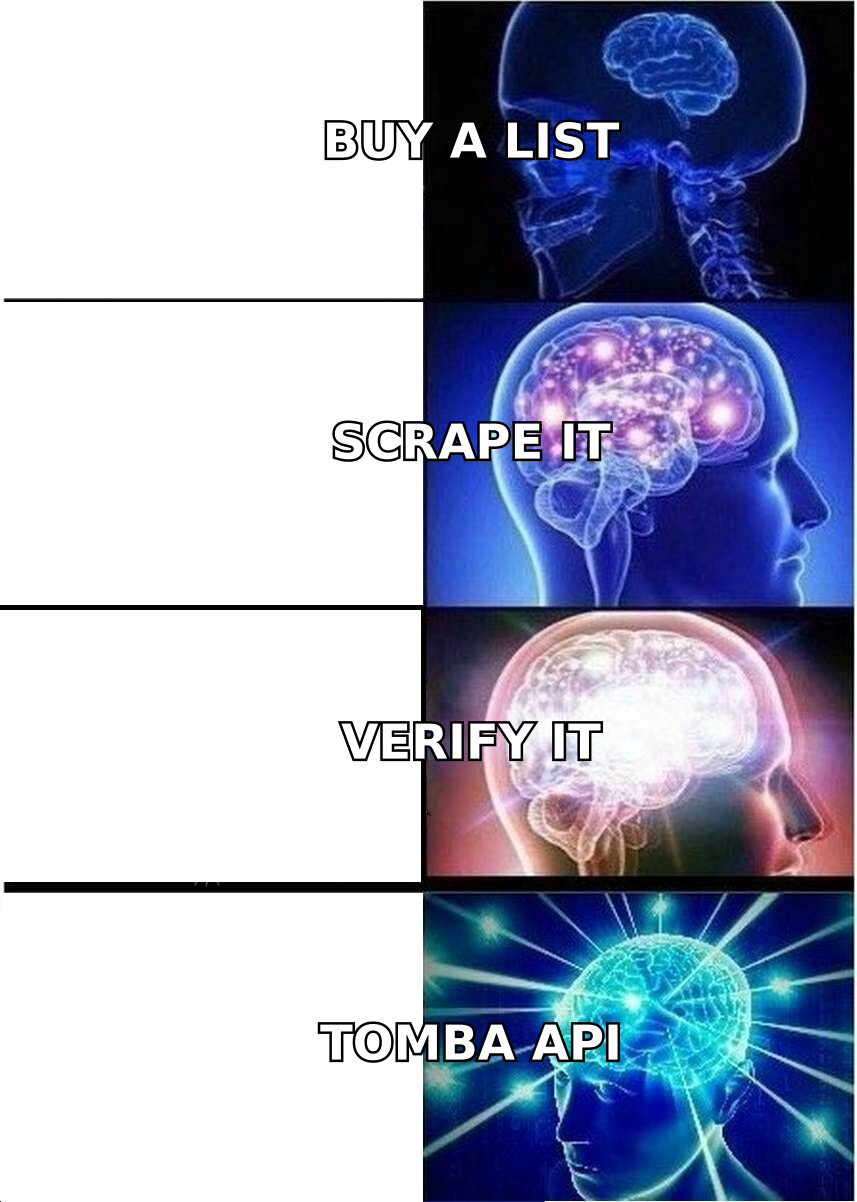
What are the main B2B lists alternatives in 2026?#
Instead of one big purchase, modern teams assemble data continuously. Here are the seven approaches that actually replace a static list.
- Email finders — Give a name and company (or domain) and get a verified work email back, one at a time or in bulk. This is the closest 1:1 replacement for a list, but the data is pulled fresh at query time.
- Domain search — Enter a company domain and retrieve every discoverable email pattern and named contact at that org. Ideal for account-based targeting where you want the whole buying committee.
- Data enrichment — Start with what you already have (a CRM, a webform signup, a LinkedIn URL) and fill in the missing fields. You enrich your records instead of buying someone else's.
- Website visitor reveal — Identify the companies (and sometimes contacts) already visiting your site, so you work warm demand instead of cold rows.
- Intent + signal data — Layer buying signals (hiring, funding, tech adoption) on top of contact data so you reach accounts when they're in-market.
- Self-serve B2B databases — Searchable, continuously refreshed contact databases you filter and export, rather than a frozen one-time file.
- APIs and integrations — Wire finding/verification directly into your stack so every new lead is enriched and validated automatically, no CSV juggling.
You can read more on the underlying concept in this domain search explainer, which covers how on-demand lookups differ from static exports.
How do B2B lists compare to on-demand data tools?#
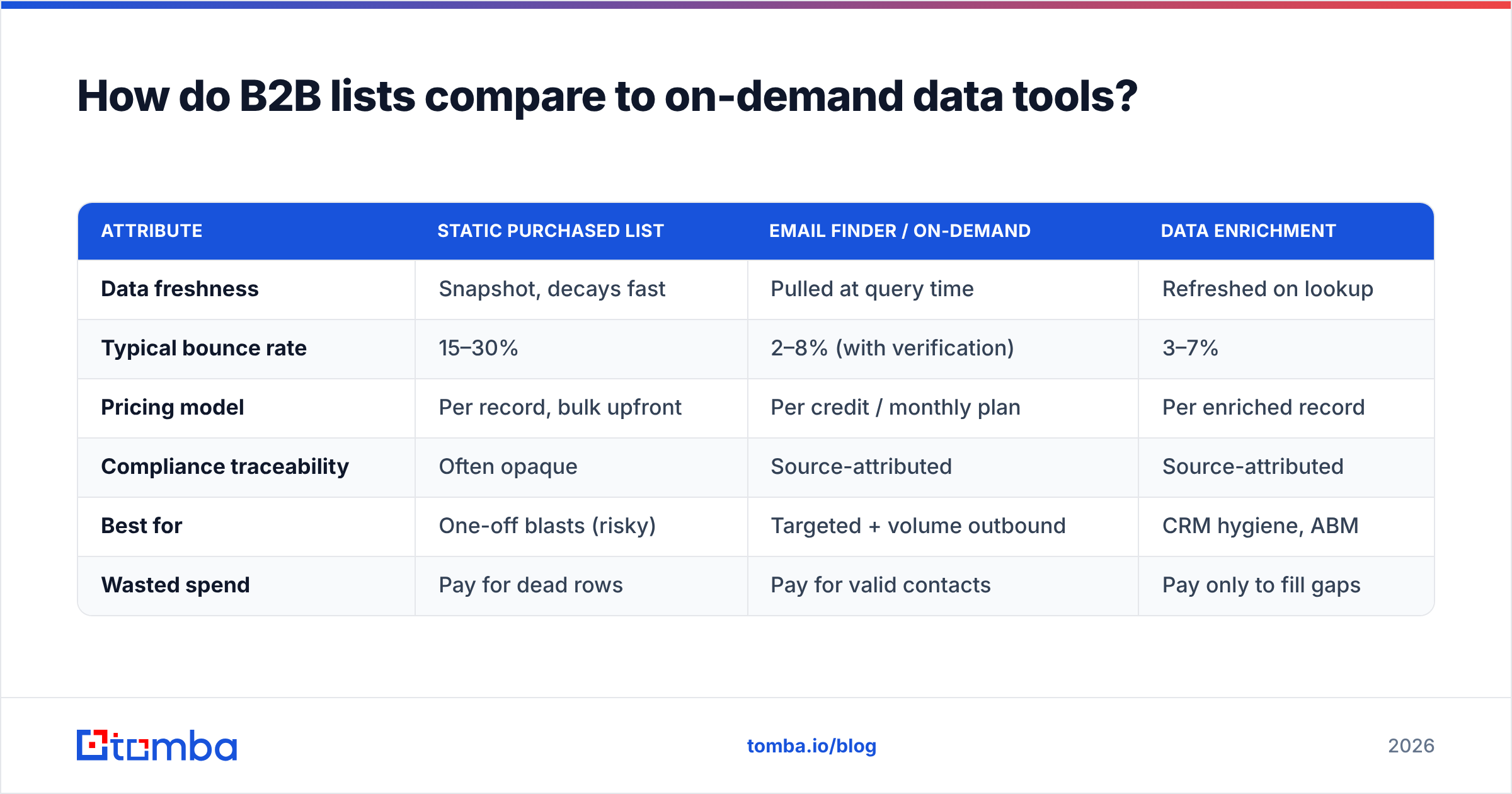
The core trade-off is freshness and accountability versus upfront convenience. Here's the honest comparison.
| Attribute | Static purchased list | Email finder / on-demand | Data enrichment |
|---|---|---|---|
| Data freshness | Snapshot, decays fast | Pulled at query time | Refreshed on lookup |
| Typical bounce rate | 15–30% | 2–8% (with verification) | 3–7% |
| Pricing model | Per record, bulk upfront | Per credit / monthly plan | Per enriched record |
| Compliance traceability | Often opaque | Source-attributed | Source-attributed |
| Best for | One-off blasts (risky) | Targeted + volume outbound | CRM hygiene, ABM |
| Wasted spend | Pay for dead rows | Pay for valid contacts | Pay only to fill gaps |
The takeaway: a list looks cheaper per row, but you pay for the dead rows too. On-demand tools let you pay for valid contacts and keep your domain reputation intact.
Is an email finder a real replacement for a purchased list?#
Yes — for most outbound and ABM motions, an email finder is the single best B2B lists alternative. Here's why.
A list gives you 50,000 rows you didn't choose and can't trust. An email finder lets you define the exact accounts and personas you want, then returns verified, current emails for those specific people. You trade raw volume for relevance and deliverability, which is the trade most pipelines actually need.
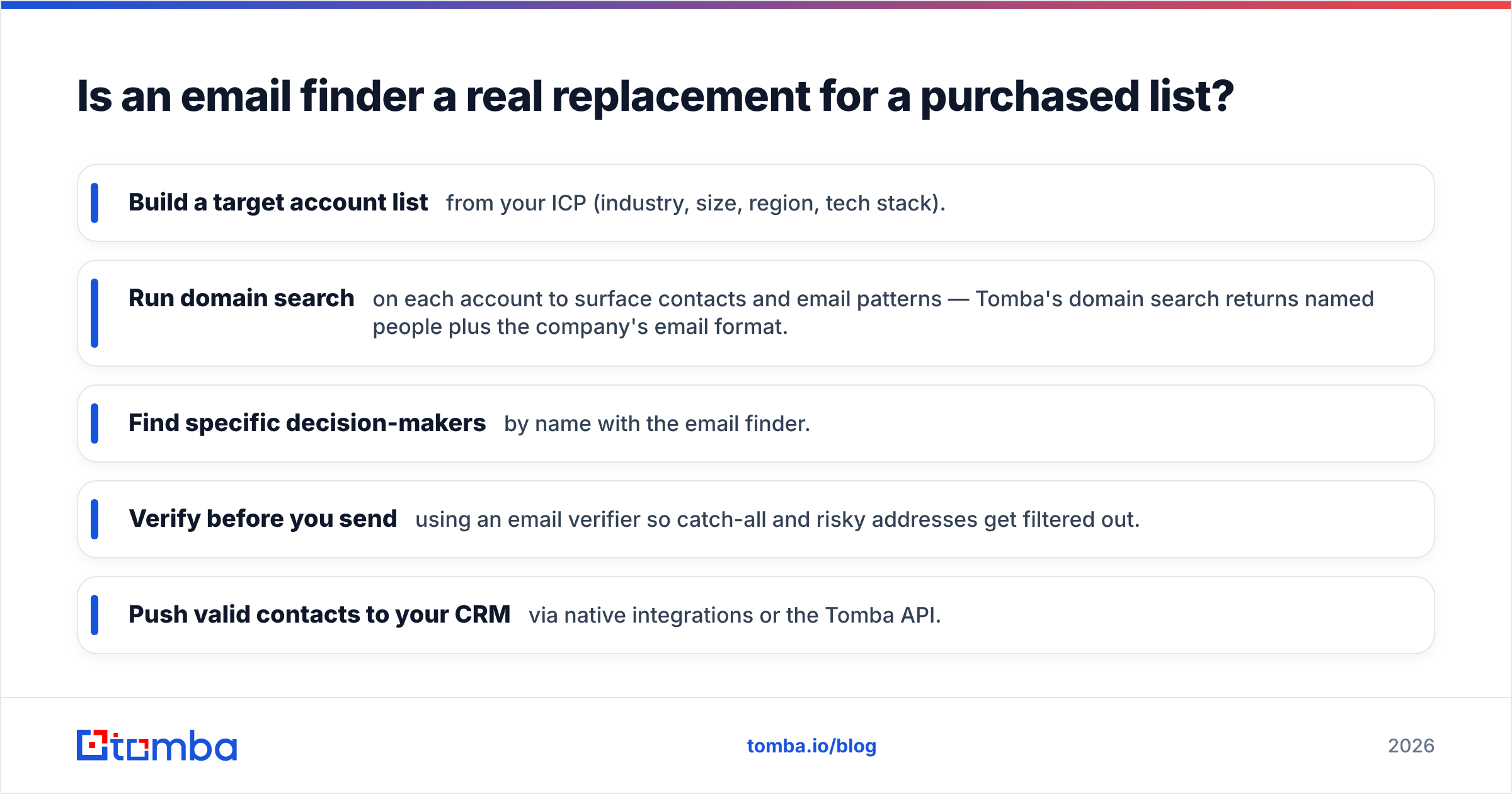
The workflow looks like this:
- Build a target account list from your ICP (industry, size, region, tech stack).
- Run domain search on each account to surface contacts and email patterns — Tomba's domain search returns named people plus the company's email format.
- Find specific decision-makers by name with the email finder.
- Verify before you send using an email verifier so catch-all and risky addresses get filtered out.
- Push valid contacts to your CRM via native integrations or the Tomba API.
The result is a list you built, not bought — current, ICP-matched, and verified. According to independent reviews on G2, the email-finder category has steadily replaced broker lists for exactly this reason: accountability over volume.
How much do B2B lists alternatives cost?#
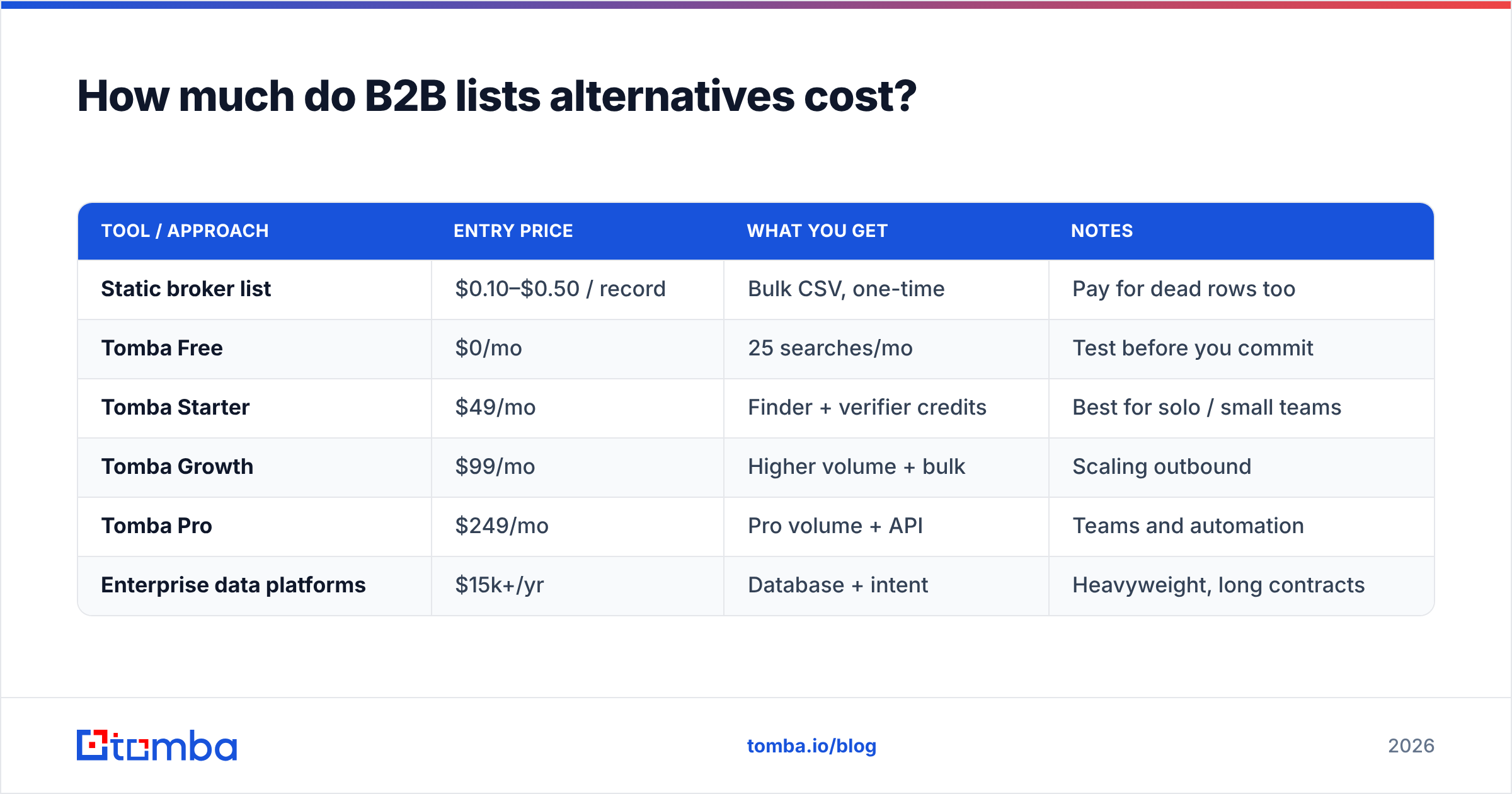
Pricing varies by motion, but the per-valid-contact math almost always favors on-demand tools once you account for bounces.
| Tool / approach | Entry price | What you get | Notes |
|---|---|---|---|
| Static broker list | $0.10–$0.50 / record | Bulk CSV, one-time | Pay for dead rows too |
| Tomba Free | $0/mo | 25 searches/mo | Test before you commit |
| Tomba Starter | $49/mo | Finder + verifier credits | Best for solo / small teams |
| Tomba Growth | $99/mo | Higher volume + bulk | Scaling outbound |
| Tomba Pro | $249/mo | Pro volume + API | Teams and automation |
| Enterprise data platforms | $15k+/yr | Database + intent | Heavyweight, long contracts |
See full Tomba pricing for credit breakdowns. The key number: if a $200 list has a 25% bounce rate, you actually paid for 25% waste and risked your domain. A $49/mo plan that returns verified contacts often costs less per usable email.

Which alternative fits your sales motion?#
Pick by how you actually go to market, not by who has the biggest database.
- High-volume cold outbound → Bulk email finding plus verification. Use a bulk email finder to process target lists, then verify in the same flow to protect deliverability.
- Account-based marketing (ABM) → Domain search plus enrichment. Map whole buying committees per account and enrich existing CRM records rather than buying new rows.
- Inbound-led / PLG → Website visitor reveal plus enrichment. Turn anonymous traffic into named accounts with visitor reveal, then enrich for routing.
- RevOps / data hygiene → Enrichment API on a schedule. Keep your CRM clean by re-validating and filling gaps automatically with data enrichment.
- Developers / automated pipelines → API-first. Wire the email finder API into your product or internal tooling so every lead is found and verified at the source.
If you're replacing a broker entirely, combine two or three of these. Domain search to map accounts, email finder to get the people, verifier to clean the output — that trio reproduces everything a list offered, minus the decay.
What about deliverability and compliance?#
This is where alternatives win decisively, and where lists quietly cost you the most.
Mailbox providers judge you on bounce rate and complaint rate. Blast a stale list and you trip spam filters, get throttled, or land on a blocklist — damage that outlasts the campaign. Microsoft and Google publicly document how bounce and complaint signals feed inbox placement; their Postmaster guidance makes clear that list hygiene is non-negotiable. Verifying contacts before you send keeps bounces low and your email deliverability healthy.
On compliance, on-demand tools give you something brokers rarely do: source attribution. When data is found and verified at query time from public and licensed sources, you can answer the "where did this come from?" question that GDPR and CAN-SPAM enforcement demands. A mystery CSV from a reseller can't.
Practical checklist before any send:
- Verify every address — drop invalid and risky ones, flag catch-alls with a catch-all verifier.
- Warm your domain if you're scaling volume — don't go from 0 to 5,000/day.
- Authenticate — confirm SPF, DKIM, and DMARC are set before the first campaign.
- Honor opt-outs instantly and keep suppression lists current.
How do I migrate off a purchased list?#
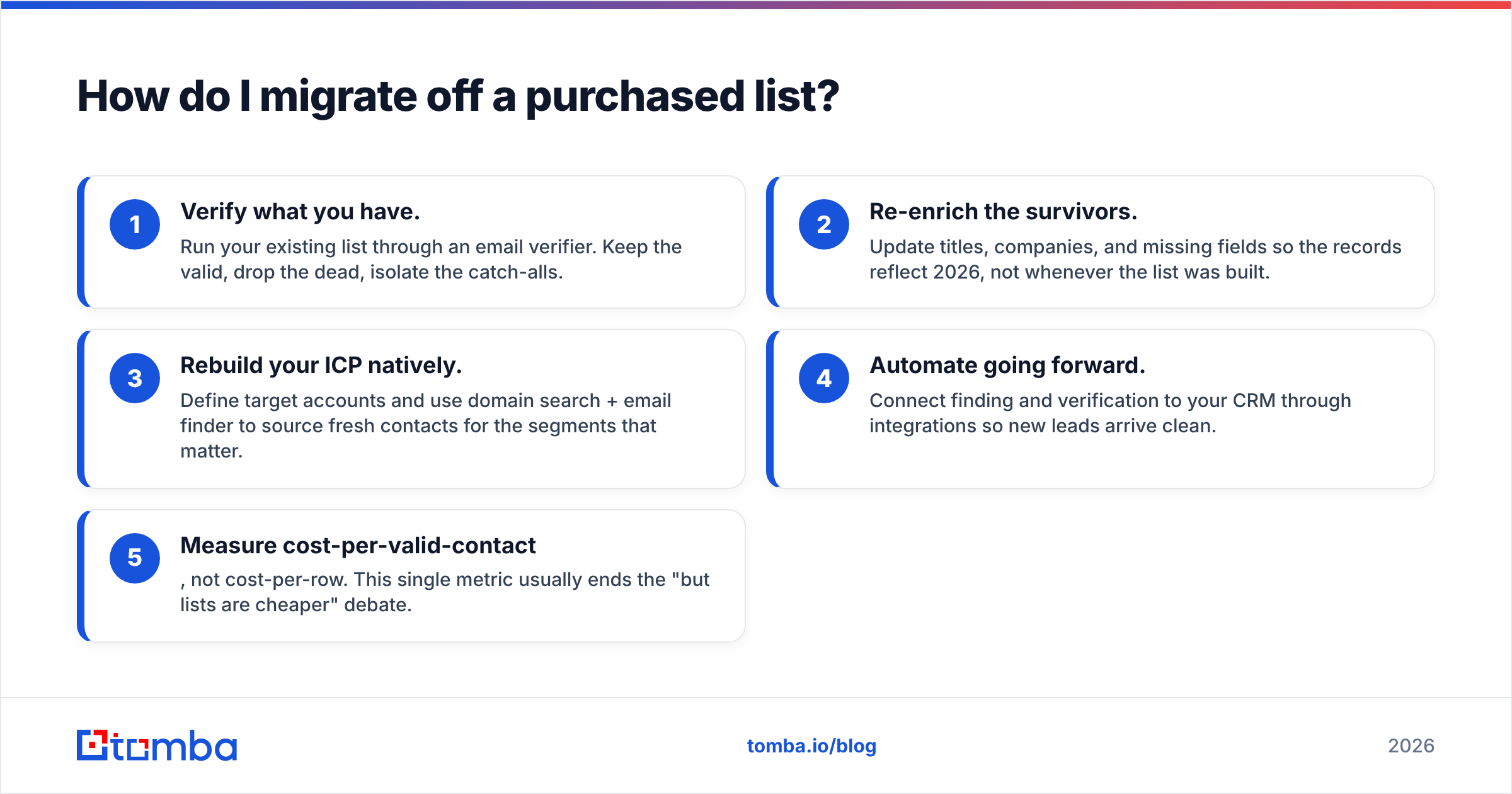
You don't need to rip everything out at once. Run this sequence:
- Verify what you have. Run your existing list through an email verifier. Keep the valid, drop the dead, isolate the catch-alls.
- Re-enrich the survivors. Update titles, companies, and missing fields so the records reflect 2026, not whenever the list was built.
- Rebuild your ICP natively. Define target accounts and use domain search + email finder to source fresh contacts for the segments that matter.
- Automate going forward. Connect finding and verification to your CRM through integrations so new leads arrive clean.
- Measure cost-per-valid-contact, not cost-per-row. This single metric usually ends the "but lists are cheaper" debate.
Within a quarter, most teams find they've replaced the broker entirely and cut bounce rates from double digits to low single digits.
Frequently asked questions#
Are purchased B2B lists illegal? Not inherently, but they carry compliance risk under GDPR and CAN-SPAM when you can't document consent or source. On-demand tools with source attribution reduce that exposure.
What's the most accurate B2B lists alternative? An email finder paired with a verifier. Finding gives you current contacts; verification confirms they're deliverable before you send, which is what keeps accuracy high in practice.
Can I still do high-volume outbound without a bought list? Yes. Bulk email finders process large target sets and verify in the same workflow, so you get volume and low bounce rates.
Is free email lookup good enough? For testing, yes — Tomba's free tier (25 searches/mo) lets you validate the approach before committing. For production volume, a paid plan with bulk and API access pays for itself by eliminating wasted sends.
The bottom line#
Static B2B lists optimize for the wrong thing: volume on day one. By day ninety, you're emailing ghosts and explaining to your deliverability team why the domain got flagged. The better play in 2026 is to build data continuously — find, verify, enrich, repeat — so every contact you touch is current and deliverable.
If you're ready to stop buying decay, start with the Tomba Email Finder. Use the free tier to source and verify your first 25 ICP contacts, compare the bounce rate against your last purchased list, and let the numbers decide. Pair it with the verifier and domain search, and you'll have replaced the broker with something that doesn't expire.
// get started
Find, verify and enrich your first contacts today
Start on the free plan with 25 searches a month, then scale when your team is ready.
Free plan · No credit card required · GDPR & CCPA
// about the author