B2B Lists vs ContactOut: Which Wins for Prospecting in 2026?
Bought B2B lists are cheap and instant but rot fast. ContactOut pulls live data from LinkedIn. Here's how the two stack up on accuracy, cost, and compliance in 2026 — and the smarter third option.
TL;DR
- Buying B2B lists is fast and cheap up front, but the data decays roughly 22–30% per year, so a list bought in January is materially wrong by summer.
- ContactOut pulls contact data live from LinkedIn profiles, which keeps it fresher — but it's priced per seat, leans on a browser extension, and raises real compliance questions around scraping.
- Neither approach verifies emails the moment you send. That gap is where bounce rates and domain reputation quietly die.
- For most outbound teams in 2026, the winning play is fresh, verified-on-demand data — find the contact, confirm it's deliverable, then enrich — instead of trusting a static file or a single LinkedIn-scraping extension.
- A verification-first finder like Tomba gives you the freshness of live lookup with the deliverability guardrails that bought lists and extensions skip.
What are we actually comparing?#
"B2B lists vs ContactOut" pits two very different ways of getting contact data into your CRM.
A B2B list is a static file — a CSV or a database export — that someone compiled and sold you. Vendors like ZoomInfo, Apollo, or a thousand smaller list brokers package thousands of names, titles, companies, and emails into a single download. You pay, you get the file, you import it. The data is frozen at the moment it was compiled.
ContactOut is a tool, not a file. It's a Chrome extension and web platform that surfaces personal and work emails (plus phone numbers) when you view a LinkedIn profile or search its database. Instead of handing you a frozen list, it resolves contacts one profile at a time, pulling from a cache that's refreshed against LinkedIn activity.
Think of it like the difference between buying a printed phone book and using a live directory app. The phone book is comprehensive the day it ships and slowly turns into fiction. The app is only as good as the last sync, but that sync happens far more often.
The real question isn't "which is better" in the abstract — it's which failure mode you can live with. Lists fail by going stale silently. Tools like ContactOut fail at coverage gaps and seat-based cost ceilings. Let's break down where each one actually hurts.
How do B2B lists and ContactOut compare head-to-head?#
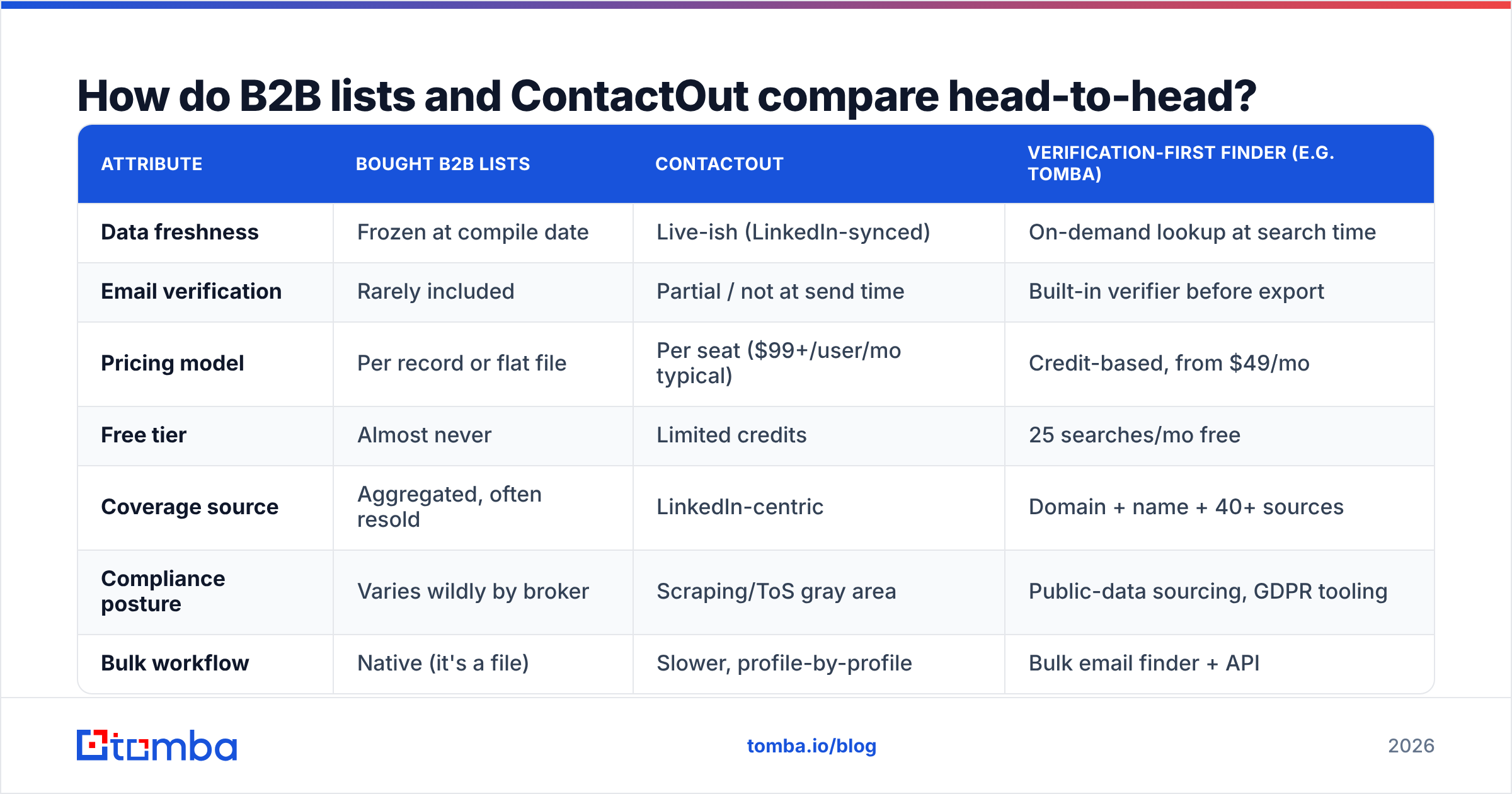
Here's the practical breakdown across the attributes that decide whether your cold outreach lands or bounces.
| Attribute | Bought B2B Lists | ContactOut | Verification-first finder (e.g. Tomba) |
|---|---|---|---|
| Data freshness | Frozen at compile date | Live-ish (LinkedIn-synced) | On-demand lookup at search time |
| Email verification | Rarely included | Partial / not at send time | Built-in verifier before export |
| Pricing model | Per record or flat file | Per seat ($99+/user/mo typical) | Credit-based, from $49/mo |
| Free tier | Almost never | Limited credits | 25 searches/mo free |
| Coverage source | Aggregated, often resold | LinkedIn-centric | Domain + name + 40+ sources |
| Compliance posture | Varies wildly by broker | Scraping/ToS gray area | Public-data sourcing, GDPR tooling |
| Bulk workflow | Native (it's a file) | Slower, profile-by-profile | Bulk email finder + API |
| Decay risk | High (22–30%/yr) | Lower but uneven | Lowest (re-resolved per use) |
Two things jump out. First, bought lists win on raw upfront volume and price-per-record, and nothing else. Second, ContactOut closes the freshness gap but introduces seat-based pricing and a dependency on LinkedIn that can break when a profile is private or LinkedIn changes its terms.
Why do bought B2B lists go bad so fast?#
Because people change jobs, and B2B contact data has a brutal half-life.
HubSpot's research and broader industry consensus put marketing database decay at roughly 22.5% per year — and in high-churn sectors like tech and SaaS it runs higher. Every quarter, a chunk of your list quietly becomes wrong: the contact left, the company rebranded its email format, the domain got consolidated after an acquisition.
When you blast a decayed list, three things happen:
- Bounces spike. Mailbox providers read high bounce rates as a spammer signal.
- Sender reputation drops. Your sender reputation is the trust score that decides whether you hit the inbox or the spam folder. A bad list torches it.
- Deliverability collapses for everyone. Once your domain is flagged, even your accurate emails stop landing.
That's the hidden cost of a "cheap" list. The $0.10-per-record file can cost you weeks of email deliverability recovery. Bought lists are also frequently resold across multiple buyers, so the same prospect gets hammered by ten vendors using the same stale file — which is exactly why response rates on purchased lists keep falling.
Is ContactOut better than buying a list?#
For most modern outbound, yes — but with caveats that matter.
ContactOut's strength is that it resolves contacts against live LinkedIn profiles, so the title and company are usually current. If someone changed jobs last month, you're more likely to catch it than you would with a six-month-old CSV. Its reviews on G2 consistently praise personal-email coverage and the convenience of the in-browser extension for one-off prospecting.
But weigh these limits:
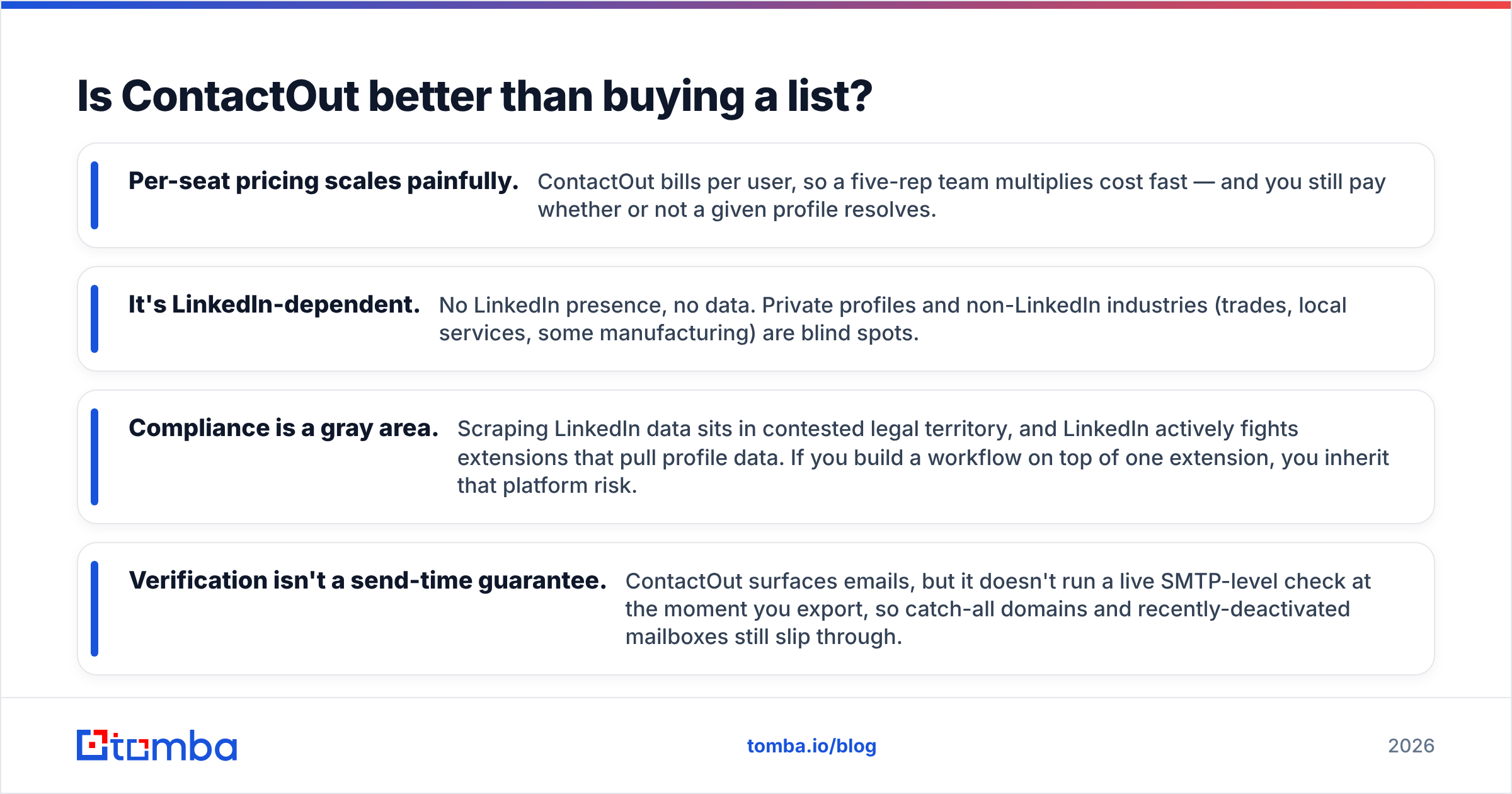
- Per-seat pricing scales painfully. ContactOut bills per user, so a five-rep team multiplies cost fast — and you still pay whether or not a given profile resolves.
- It's LinkedIn-dependent. No LinkedIn presence, no data. Private profiles and non-LinkedIn industries (trades, local services, some manufacturing) are blind spots.
- Compliance is a gray area. Scraping LinkedIn data sits in contested legal territory, and LinkedIn actively fights extensions that pull profile data. If you build a workflow on top of one extension, you inherit that platform risk.
- Verification isn't a send-time guarantee. ContactOut surfaces emails, but it doesn't run a live SMTP-level check at the moment you export, so catch-all domains and recently-deactivated mailboxes still slip through.
So ContactOut beats a bought list on freshness and beats it badly on resale spam — but it's not a complete data layer. You still need a verification step, and you still need coverage beyond LinkedIn. If ContactOut's pricing or LinkedIn dependency is your sticking point, a ContactOut alternative that works from domain and name rather than profile scraping closes both gaps.
What does "verification-first" actually mean — and why does it beat both?#
It means you find the contact, confirm the email is deliverable, and only then add it to your sequence. Find, verify, enrich — in that order, every time.
Bought lists skip verification entirely. ContactOut surfaces data but leaves verification as your problem. A verification-first workflow folds the check into the find step, so the contact that reaches your CRM is one you've actually confirmed can receive mail.
Here's the difference in practice:
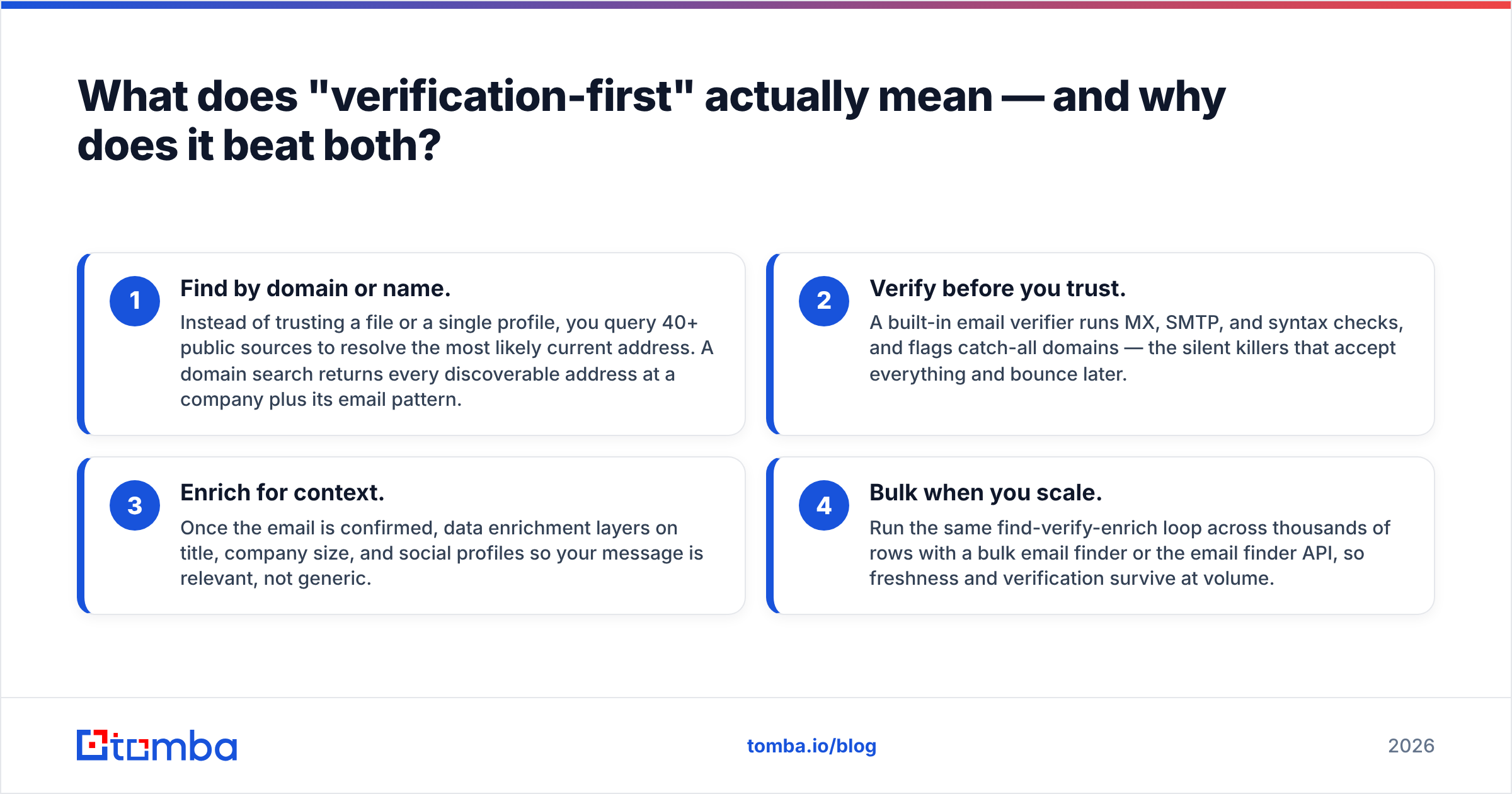
- Find by domain or name. Instead of trusting a file or a single profile, you query 40+ public sources to resolve the most likely current address. A domain search returns every discoverable address at a company plus its email pattern.
- Verify before you trust. A built-in email verifier runs MX, SMTP, and syntax checks, and flags catch-all domains — the silent killers that accept everything and bounce later.
- Enrich for context. Once the email is confirmed, data enrichment layers on title, company size, and social profiles so your message is relevant, not generic.
- Bulk when you scale. Run the same find-verify-enrich loop across thousands of rows with a bulk email finder or the email finder API, so freshness and verification survive at volume.
This is the model that sidesteps both failure modes. You get ContactOut's freshness (because you're resolving at search time, not reading a frozen file) and you get the verification that neither a bought list nor a LinkedIn extension guarantees.
How do the three approaches score on cost over a year?#
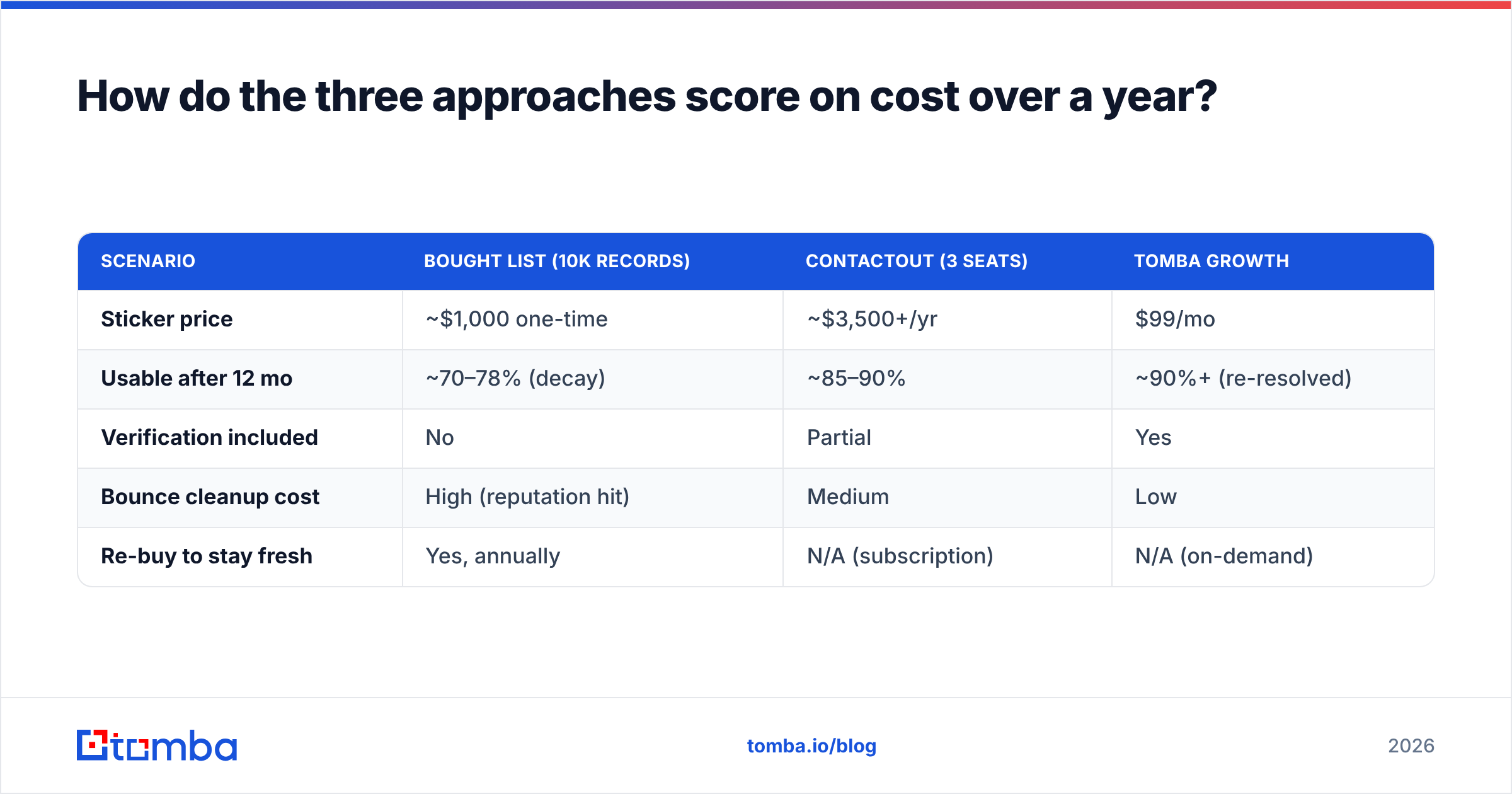
Up-front price is misleading. The number that matters is cost per usable, deliverable contact after decay and bounces.
| Scenario | Bought list (10k records) | ContactOut (3 seats) | Tomba Growth |
|---|---|---|---|
| Sticker price | ~$1,000 one-time | ~$3,500+/yr | $99/mo |
| Usable after 12 mo | ~70–78% (decay) | ~85–90% | ~90%+ (re-resolved) |
| Verification included | No | Partial | Yes |
| Bounce cleanup cost | High (reputation hit) | Medium | Low |
| Re-buy to stay fresh | Yes, annually | N/A (subscription) | N/A (on-demand) |
A bought list looks cheapest until you add the re-buy cycle and the deliverability cleanup. ContactOut's subscription is predictable but climbs with headcount. A credit-based verification-first tool tends to land lowest on cost-per-deliverable-contact because you're not paying for records you'll never use or addresses that bounce.
If you want the exact numbers for your volume, compare Tomba pricing tiers against your current list spend — the Free tier (25 searches/mo) is enough to A/B test data quality before you commit a dollar.
When does each option still make sense?#
No tool is universally right. Match the source to the job:
- Buy a list only when you need a one-time, low-stakes volume play in a stable industry, you have a verification step downstream, and you accept the resale-spam risk. Always run a free email checker pass before importing.
- Use ContactOut when your entire ICP lives on LinkedIn, you prospect one profile at a time, and per-seat cost fits a small team. It's a strong individual-rep tool.
- Use a verification-first finder when deliverability is non-negotiable, you operate beyond LinkedIn, you need bulk and API workflows, or you want one system that finds and verifies without bolting on a second vendor.
The honest take: bought lists are a declining strategy because resale and decay have eroded their ROI. ContactOut is a genuine upgrade for LinkedIn-native prospecting. But if you're optimizing for inbox placement and cost-per-deliverable-contact across all channels, the verification-first model wins on the metrics that actually move pipeline.
What's the bottom line on B2B lists vs ContactOut?#
Freshness and verification beat volume and convenience. A bought list is the cheapest way to fill a CRM with addresses that are already 20%+ wrong. ContactOut fixes the freshness problem for LinkedIn-centric teams but leaves verification and coverage gaps — and ties you to one platform's terms of service.
If you'd rather not choose between "stale but cheap" and "fresh but seat-locked," resolve contacts on demand and verify them before they ever enter a sequence. Start free with the Tomba Email Finder: search by domain, name, or company, confirm every address with the built-in verifier, and enrich what's left — 25 searches a month at no cost, scaling to bulk and API when you're ready. Your bounce rate, your sender reputation, and your reply rate will all thank you for skipping the frozen file.
// get started
Find, verify and enrich your first contacts today
Start on the free plan with 25 searches a month, then scale when your team is ready.
Free plan · No credit card required · GDPR & CCPA
// about the author