B2B Lists vs FinalScout: Which Wins for Leads in 2026?
Pre-built B2B lists promise instant volume; FinalScout pulls emails from LinkedIn on demand. Here's how the two stack up on accuracy, cost, and deliverability in 2026 — and the third option most teams miss.
You have a quota to hit, an empty pipeline, and two ways to fill it: buy a pre-built B2B list, or run a LinkedIn-based finder like FinalScout. Both get contacts into your CRM. Only one of them keeps them deliverable three months from now.
This guide breaks down b2b lists vs FinalScout on the metrics that actually move reply rates — accuracy, freshness, deliverability, cost per usable contact, and compliance — then shows where each fits and where a finder-plus-verifier stack beats both.
TL;DR#
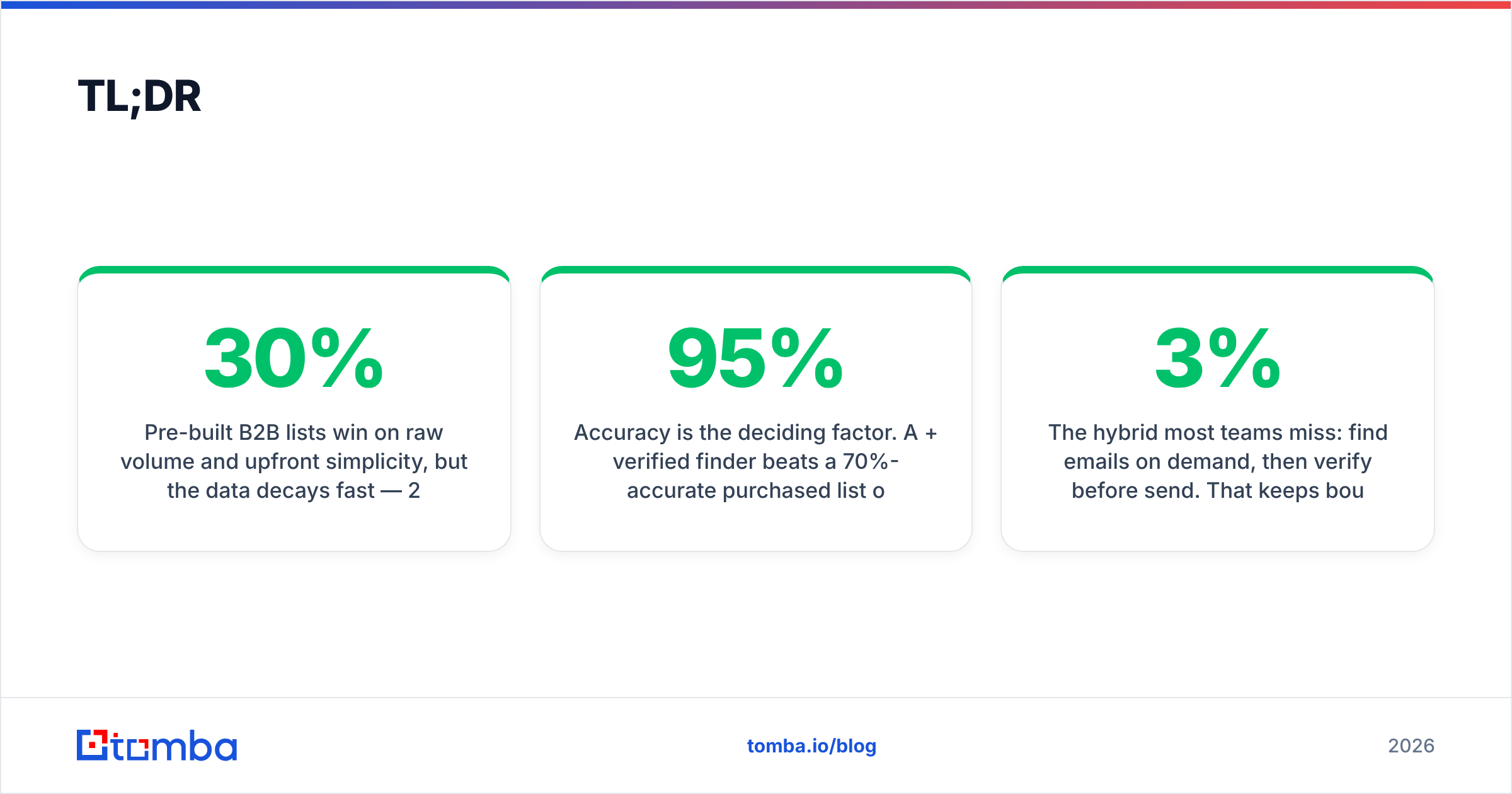
- Pre-built B2B lists win on raw volume and upfront simplicity, but the data decays fast — 22–30% of B2B contacts go stale every year — so you pay for bounces.
- FinalScout is a LinkedIn-centric email finder: great when your targeting starts from LinkedIn profiles or Sales Navigator searches, weaker when you need domain-wide or non-LinkedIn coverage.
- Accuracy is the deciding factor. A 95%+ verified finder beats a 70%-accurate purchased list on cost-per-meeting every time.
- The hybrid most teams miss: find emails on demand, then verify before send. That keeps bounce rates under 3% and protects sender reputation.
- For broad, multi-source coverage with built-in verification, Tomba Email Finder is the option we'd put against both — details below.
What are pre-built B2B lists?#
A pre-built B2B list is a static file (CSV or CRM import) of contacts — names, titles, companies, emails, sometimes phone numbers — that a vendor compiled in advance and sells or licenses to you. Think of it like buying a bag of pre-cut vegetables: convenient today, wilting by next week.
List providers source data from public records, data co-ops, web scraping, and partner exchanges. You filter by industry, company size, geography, and seniority, then export thousands of rows in minutes. The appeal is obvious: instant volume with zero research.
The catch is decay. People change jobs, companies rebrand, and email formats shift. A list that was 90% accurate when it was assembled can be 65% accurate by the time it reaches your outbox. You don't see the rot until your bounce rate spikes and your domain reputation tanks.

What is FinalScout?#
FinalScout is an email-finding tool built around LinkedIn. You browse profiles, a Sales Navigator search, or a LinkedIn group, and FinalScout extracts professional email addresses for those people — often with AI-assisted outreach drafting layered on top.
Instead of buying a frozen snapshot, you generate contacts at the moment you need them, scoped to the exact people you just qualified on LinkedIn. That makes it a finder rather than a list: the data is pulled fresh against your live targeting.
The trade-off is coverage shape. FinalScout is strongest when your prospecting workflow lives inside LinkedIn. If you start from a domain, a CSV of company names, or industries where decision-makers aren't active on LinkedIn, a LinkedIn-anchored finder leaves gaps. You also depend on LinkedIn's terms and scraping limits, which tighten regularly.
B2B lists vs FinalScout: how do they compare?#
Here's the head-to-head on the attributes that decide cost-per-meeting, not just cost-per-row.
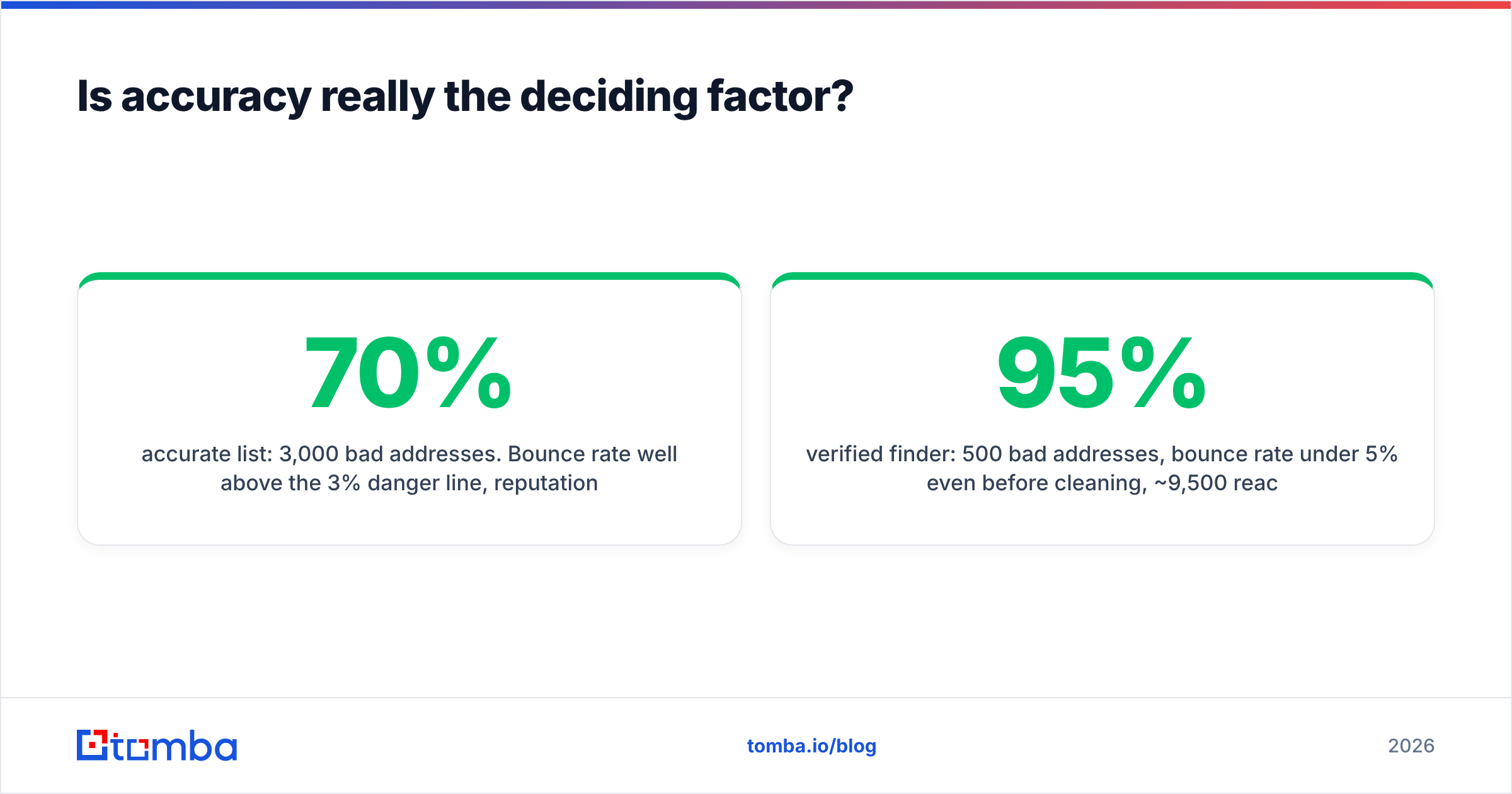
| Attribute | Pre-built B2B Lists | FinalScout | Tomba (for reference) |
|---|---|---|---|
| Data model | Static snapshot | On-demand, LinkedIn-anchored | On-demand, multi-source |
| Freshness | Decays 22–30%/yr | Fresh at lookup | Fresh at lookup |
| Coverage source | Vendor database | LinkedIn profiles | Domain + name + LinkedIn + DB |
| Built-in verification | Rarely | Limited | Yes (verifier included) |
| Typical accuracy | 60–80% | ~80–90% | 95%+ verified |
| Best starting point | Filters (industry/size) | LinkedIn search | Domain, name, or LinkedIn |
| Compliance control | You inherit vendor's | Tied to LinkedIn ToS | Source transparency |
| Entry price | Often $$$ upfront | Mid subscription | Free tier, then $49/mo |
The pattern: lists optimize for volume now, FinalScout optimizes for LinkedIn-scoped freshness, and a verification-first finder optimizes for deliverable contacts at scale.
Five questions to ask before you pick#
- Where does your targeting start? If it begins on LinkedIn, a finder anchored there fits. If it begins from a domain or account list, you need domain search and multi-source coverage.
- How fast does your data go stale? High-churn segments (startups, tech) punish static lists hardest.
- Who owns deliverability risk? Bought lists hand you the bounce liability. Verified, on-demand data keeps it low.
- What's your true cost per usable contact? Divide spend by verified, reachable rows — not total rows.
- Can you prove your sourcing? Regulators and inbox providers increasingly reward transparent, consent-aware data.
Is accuracy really the deciding factor?#
Yes — accuracy quietly dictates everything downstream. A bounce isn't just a wasted send; it's a signal to Gmail and Outlook that you might be a spammer. Stack up enough bounces and even your valid emails start landing in spam. That's how a cheap list ends up costing you your whole domain.

Run the math. Say you import 10,000 contacts:
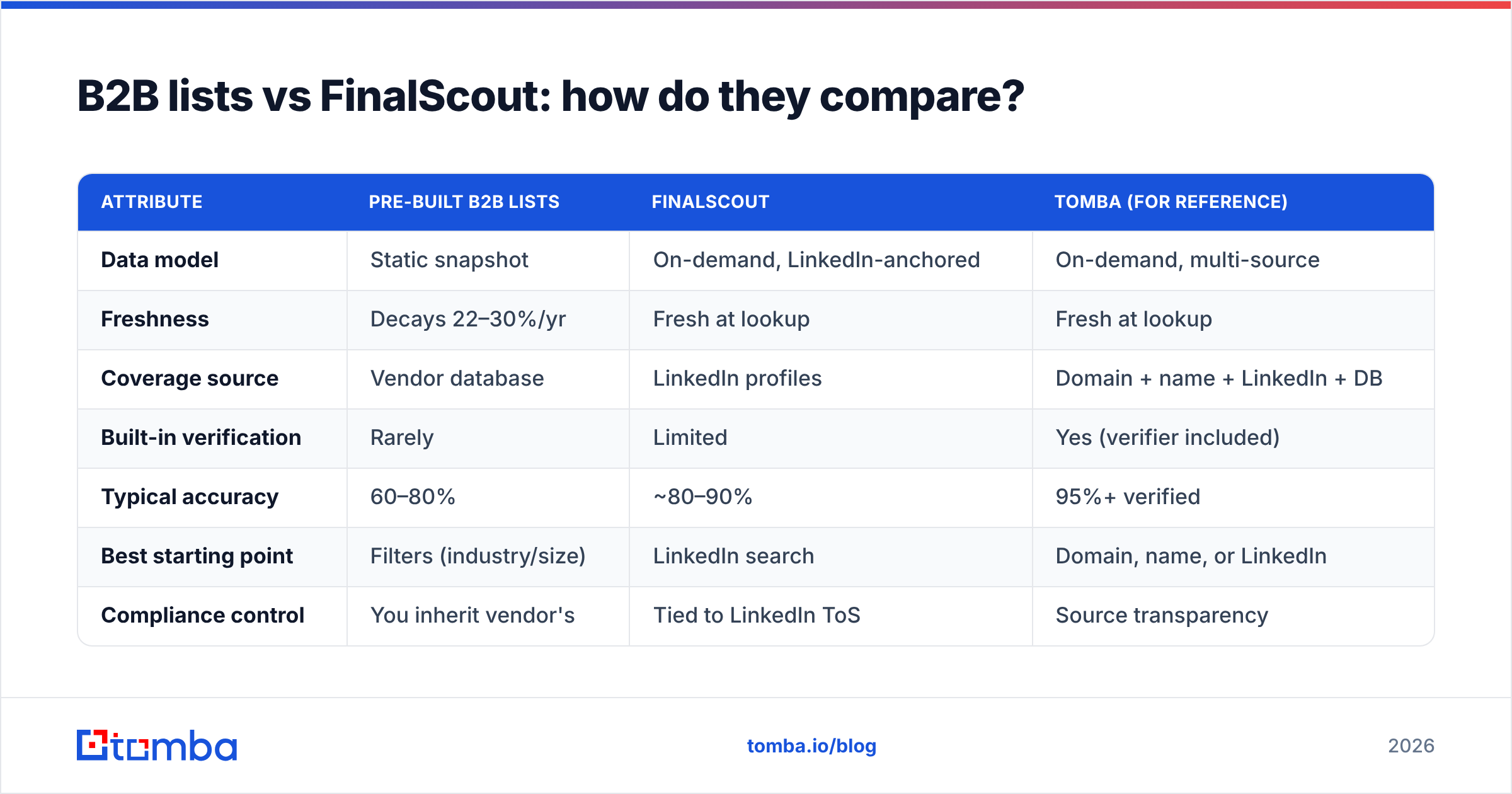
- 70%-accurate list: 3,000 bad addresses. Bounce rate well above the 3% danger line, reputation damage, and maybe 7,000 truly reachable people.
- 95%-verified finder: 500 bad addresses, bounce rate under 5% even before cleaning, ~9,500 reachable.
You paid for 10,000 either way, but the verified source delivers 2,500 more real conversations and protects the inbox placement of every future campaign. This is why pairing any finder with an email verifier — or choosing a tool that bundles one — beats chasing the biggest raw list.
If you want the deliverability mechanics in depth, see Tomba's primer on email deliverability and how sender reputation compounds over time.
When should you buy a pre-built list?#
Lists aren't always wrong. Reach for them when:
- You need TAM sizing or market mapping, not outreach — you just want to count and segment accounts.
- You're enriching an existing account list with firmographics rather than cold-emailing strangers.
- Your motion is ABM with heavy human review, where a researcher validates every contact before it's used.
- Speed of a one-time export matters more than ongoing freshness.
Even then, treat the file as a starting hypothesis, not a send-ready asset. Push it through verification and dedupe it first. A quick pass through a bulk verify step before import will tell you fast whether the vendor sold you 2024's data in a 2026 wrapper.
When should you use FinalScout instead?#
FinalScout earns its place when LinkedIn is your prospecting surface:
- You build target lists from Sales Navigator searches and want emails for exactly those profiles.
- Your ICP lives on LinkedIn — software, SaaS, marketing, recruiting, and most VP-and-above B2B roles.
- You value fresh-at-lookup data over a frozen file and accept LinkedIn-shaped coverage.
- You want AI outreach drafting attached to the find step.
It's a clean workflow for LinkedIn-native SDRs. The ceiling shows up when you need contacts outside LinkedIn's graph, want to sweep an entire company domain at once, or need a B2B database you can query without a profile in hand.
Is there a better third option?#
For most teams, the strongest play isn't lists or a single-source finder — it's a multi-source finder with verification built in. That's where Tomba sits relative to both.
Instead of one input (a LinkedIn profile) or one frozen output (a CSV), Tomba lets you find emails by domain, by name, or from LinkedIn, then verifies each result before it ever reaches your sequencer. You can also pull from a LinkedIn finder when your workflow does start on LinkedIn — so you don't lose FinalScout's main strength while gaining domain-wide coverage.
How the three approaches map to a real workflow:
- Discovery: Lists hand you a static block; FinalScout starts from a LinkedIn search; Tomba starts from a domain, a name, or LinkedIn.
- Coverage: Lists are as broad as the vendor's stale DB; FinalScout is as broad as LinkedIn; Tomba blends public web, domain patterns, and database signals.
- Quality control: Lists rarely verify; FinalScout verifies lightly; Tomba runs verification as a built-in step.
- Scale: Lists scale by buying more rows; FinalScout scales per LinkedIn lookup; Tomba scales via bulk email finder and an email finder API.
What does it cost?#
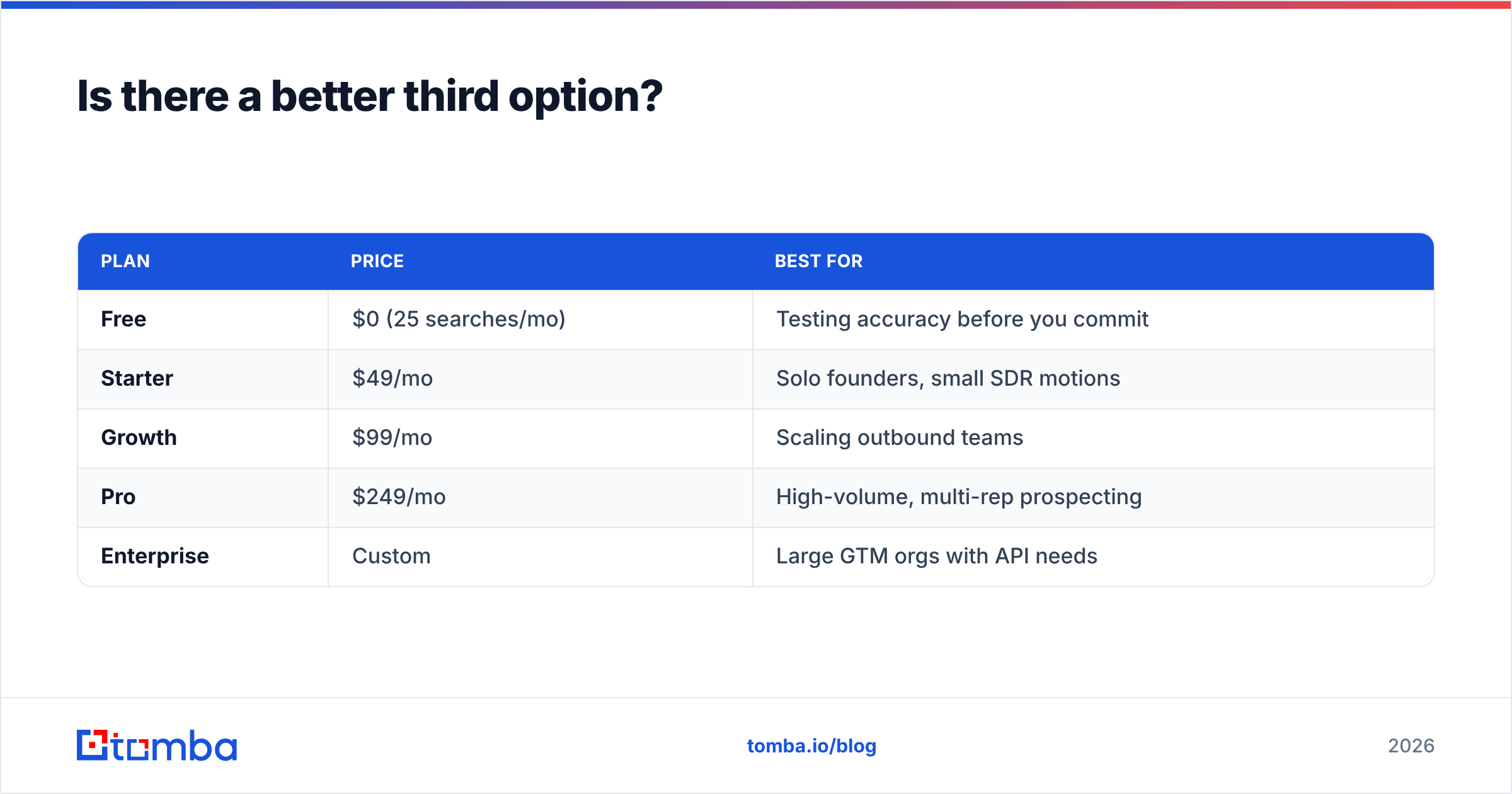
Pricing decides whether accuracy is affordable. Tomba's published pricing is straightforward:
| Plan | Price | Best for |
|---|---|---|
| Free | $0 (25 searches/mo) | Testing accuracy before you commit |
| Starter | $49/mo | Solo founders, small SDR motions |
| Growth | $99/mo | Scaling outbound teams |
| Pro | $249/mo | High-volume, multi-rep prospecting |
| Enterprise | Custom | Large GTM orgs with API needs |
The free tier matters here: you can validate accuracy on your own ICP before spending a dollar, which you can't do with a purchased list (you find out it's stale after you pay) and can only partly do with a LinkedIn finder.
How do you decide for your team?#
Match the tool to where your data problem actually lives. According to analyst coverage of the data space on sites like G2, buyer satisfaction tracks far more closely to deliverability and freshness than to raw record count — which is exactly the axis where static lists lose.
- Choose a pre-built list if you need fast market sizing or firmographic enrichment and have a human-review step before any send.
- Choose FinalScout if LinkedIn is your prospecting home base and you want fresh, profile-scoped emails with AI drafting.
- Choose a multi-source verified finder (Tomba) if you prospect across domains and LinkedIn, care about bounce rate, and want one tool that finds and verifies.
For background on how vendors source and structure this data, HubSpot's sales resources and Tomba's own data sources page are worth reading before you commit budget.
The bottom line#
Pre-built lists sell you volume and quietly bill you in bounces. FinalScout sells you freshness, scoped to LinkedIn. The real winner is whichever option gets the most deliverable contacts into your sequence per dollar — and that almost always means finding on demand and verifying before you send.
If you want one stack that covers domain, name, and LinkedIn lookups with verification baked in, start with Tomba Email Finder. Run your toughest 25 target accounts through the free tier, check the bounce rate yourself, and compare it against your last bought list or LinkedIn export. Let the deliverability numbers — not the row count — make the call.
// get started
Find, verify and enrich your first contacts today
Start on the free plan with 25 searches a month, then scale when your team is ready.
Free plan · No credit card required · GDPR & CCPA
// about the author