B2B Lists vs Hunter: Which Lead Data Wins in 2026?
Bought B2B lists or an on-demand finder like Hunter? Compare accuracy, freshness, pricing, and compliance to see which contact-data approach actually books meetings in 2026.
Buying a pre-built B2B list feels efficient: pay once, get 10,000 contacts, start sending. Using a finder like Hunter feels slower: you search domain by domain. But by the time you account for bounce rates, stale records, and wasted SDR hours, the "slow" option almost always wins. This guide breaks down b2b lists vs Hunter on the metrics that decide whether your pipeline grows or your domain gets blacklisted.
TL;DR#
- Static B2B lists decay fast. Roughly 22–30% of B2B contact data goes stale every year, so a list you bought in January is meaningfully wrong by summer.
- Hunter (and finders like it) pull data on demand, so records are verified closer to the moment you actually email them — fewer bounces, better sender reputation.
- Bought lists win on raw upfront volume; finders win on accuracy, compliance, and cost-per-usable-contact.
- Hunter is solid but credit-limited and domain-centric. Tomba covers the same workflow with a free tier, a 25-search free plan, and finder + verifier + enrichment in one place.
- The real answer is rarely "lists vs a tool." It's "stop buying decayed CSVs and generate verified contacts when you need them."
What does "B2B lists vs Hunter" actually mean?#
These are two different ways to solve the same problem — getting decision-maker contact details into your outreach.
A B2B list is a static export you buy or scrape: a CSV or database dump of names, titles, companies, and emails sold by a data broker (think ZoomInfo-style downloads, marketplace lists, or scraped exports). You own a snapshot frozen at the moment of purchase.
Hunter is a self-serve email finder that returns contacts on demand. You give it a domain or a name + company, and it returns the most likely professional email plus a confidence score, sourced and re-checked when you query it. Hunter.io popularized the domain-search workflow and is one of the better-known tools in the category.
The core trade-off in one line: a list gives you volume today that rots over time; a finder gives you smaller, fresher batches that stay accurate.
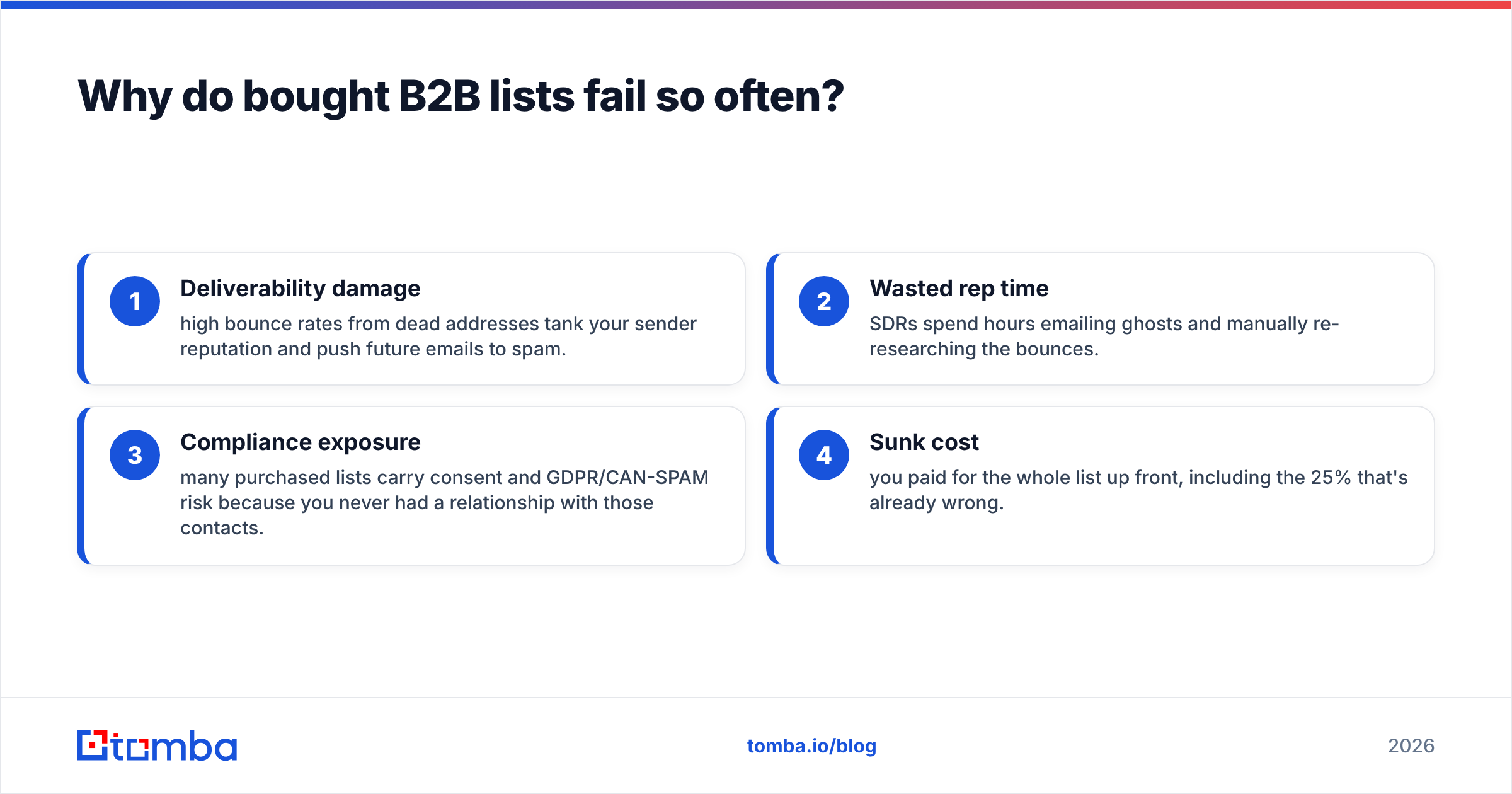
Why do bought B2B lists fail so often?#
Because data decay is brutal and invisible until you hit send.
People change jobs, companies rebrand, domains migrate, and roles get eliminated constantly. Industry estimates put B2B data decay at around 2–2.5% per month — so a "fresh" list loses roughly a quarter of its accuracy within a year. You don't see the rot. You just see bounce rates climb and replies dry up.
That creates four compounding problems:
- Deliverability damage — high bounce rates from dead addresses tank your sender reputation and push future emails to spam.
- Wasted rep time — SDRs spend hours emailing ghosts and manually re-researching the bounces.
- Compliance exposure — many purchased lists carry consent and GDPR/CAN-SPAM risk because you never had a relationship with those contacts.
- Sunk cost — you paid for the whole list up front, including the 25% that's already wrong.
The volume looks great in a spreadsheet. The usable volume — contacts who exist, still work there, and can legally be emailed — is far smaller than the row count suggests.
How does Hunter's approach fix that?#
By pulling and re-verifying data at query time instead of selling you a frozen snapshot.
When you run a domain or name search in Hunter (or any modern finder), the tool checks current sources and runs SMTP/format validation right then. You're emailing a record that was confirmed days ago, not one that was accurate eighteen months ago when the list was compiled. That alone is the single biggest lever on bounce rate.
Finders also let you scope tightly. Instead of buying 50,000 generic contacts, you pull the 300 people who match your ICP this week, verify them, and send. Smaller batches, higher hit rate, healthier domain.
The trade-offs with Hunter specifically:
- Credit-based pricing can get expensive at volume, and credits expire monthly.
- Domain-centric workflow is excellent for company-by-company prospecting but less suited to "give me everyone in this segment" discovery.
- Coverage gaps exist for smaller companies and certain regions, same as every finder.
This is where evaluating alternatives matters — the workflow is the same across finders, but accuracy, pricing model, and bundled features differ.
How accurate are email finders compared to lists?#
On a freshly compiled list, accuracy can look high for a few weeks — then it falls off a cliff. A good finder holds accuracy because it re-checks at query time and pairs finding with verification.

The accuracy multiplier most teams ignore is verification. Finding an address and confirming it's deliverable are two jobs. Running every result through an email verifier before it enters your sequence is what keeps bounce rates under the ~2–3% threshold mailbox providers reward. A bought list rarely comes verified, and even when it does, that verification is as stale as the list itself.
Tomba bundles both steps: the finder returns a confidence score and source, and the verifier confirms deliverability — including a dedicated catch-all verifier for the domains that accept everything and trip up most tools.
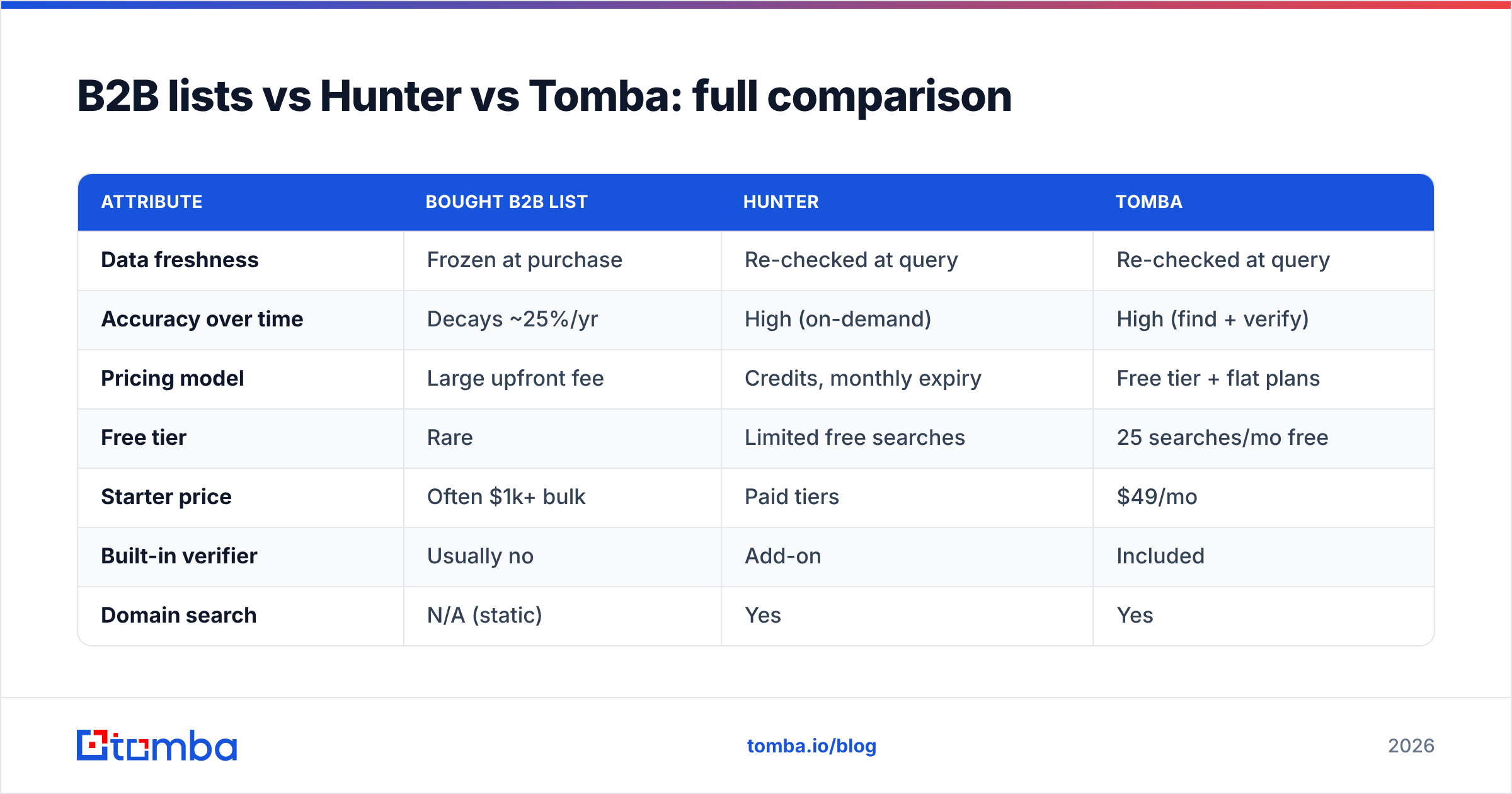
B2B lists vs Hunter vs Tomba: full comparison#
Here's the head-to-head on the attributes that decide ROI.

| Attribute | Bought B2B List | Hunter | Tomba |
|---|---|---|---|
| Data freshness | Frozen at purchase | Re-checked at query | Re-checked at query |
| Accuracy over time | Decays ~25%/yr | High (on-demand) | High (find + verify) |
| Pricing model | Large upfront fee | Credits, monthly expiry | Free tier + flat plans |
| Free tier | Rare | Limited free searches | 25 searches/mo free |
| Starter price | Often $1k+ bulk | Paid tiers | $49/mo |
| Built-in verifier | Usually no | Add-on | Included |
| Domain search | N/A (static) | Yes | Yes |
| Enrichment | Static fields | Limited | Included |
| Compliance posture | Higher risk | Sourced + scored | Sourced + scored |
| Best for | One-time bulk dump | Per-company prospecting | Prospecting + verify + enrich |
A few honest notes: bought lists still make sense for a genuinely one-time, high-volume play where freshness barely matters (event lists, broad awareness blasts you'll never repeat). Hunter is a strong, mature product with a clean UI. Tomba covers the same finder workflow while folding in verification, data enrichment, and a more forgiving pricing model. Compare current numbers on the Tomba pricing page and on G2 before you commit.
Which costs less per usable contact?#
Finders almost always win on cost-per-usable-contact, even when the sticker price on a list looks cheaper per row.
Run the math the way it actually plays out:
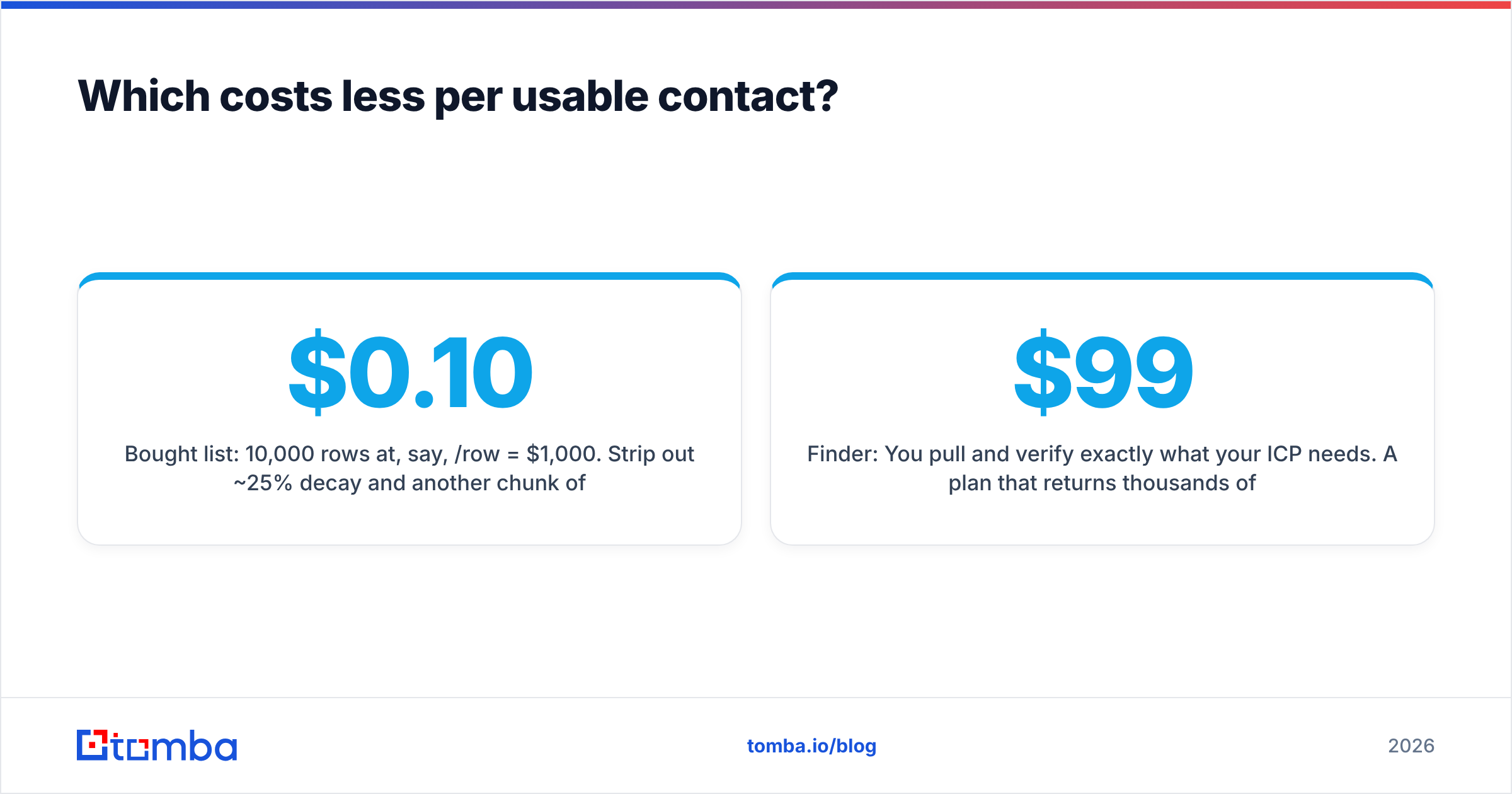
- Bought list: 10,000 rows at, say, $0.10/row = $1,000. Strip out ~25% decay and another chunk of catch-alls and role accounts, and you're left with maybe 6,000 emailable contacts. Real cost: ~$0.17 per usable contact — before the deliverability damage from the dead 25%.
- Finder: You pull and verify exactly what your ICP needs. A $99/mo plan that returns thousands of verified contacts you'll actually email lands well under $0.05 per usable contact, with no reputation hit.
The list's "cheap per row" pricing hides the tax: the bad rows don't just waste money, they actively harm your domain. For volume work, a bulk email finder lets you upload a company list and pull verified contacts at scale without buying decayed data you'll have to clean anyway.
When should you still buy a list?#
Rarely — but there are legitimate cases.
- True one-shot campaigns where you'll never email these contacts again and freshness is irrelevant.
- Markets with thin online footprints where finders genuinely can't source data and a specialist broker can.
- Speed over everything for a single time-boxed push, accepting the bounce and compliance risk knowingly.
Even then, treat the list as raw material: run the entire thing through verification before it touches your sending domain, and segment out anything that smells like a role account or catch-all. A dead list isn't free — it's a deferred deliverability bill.
For everything ongoing — your repeatable outbound motion — generate fresh, verified contacts on demand. It's cheaper per booked meeting and it protects the asset that matters most: your ability to land in the inbox.
How do you switch from lists to a finder workflow?#
Make it a repeatable loop instead of a one-time purchase.
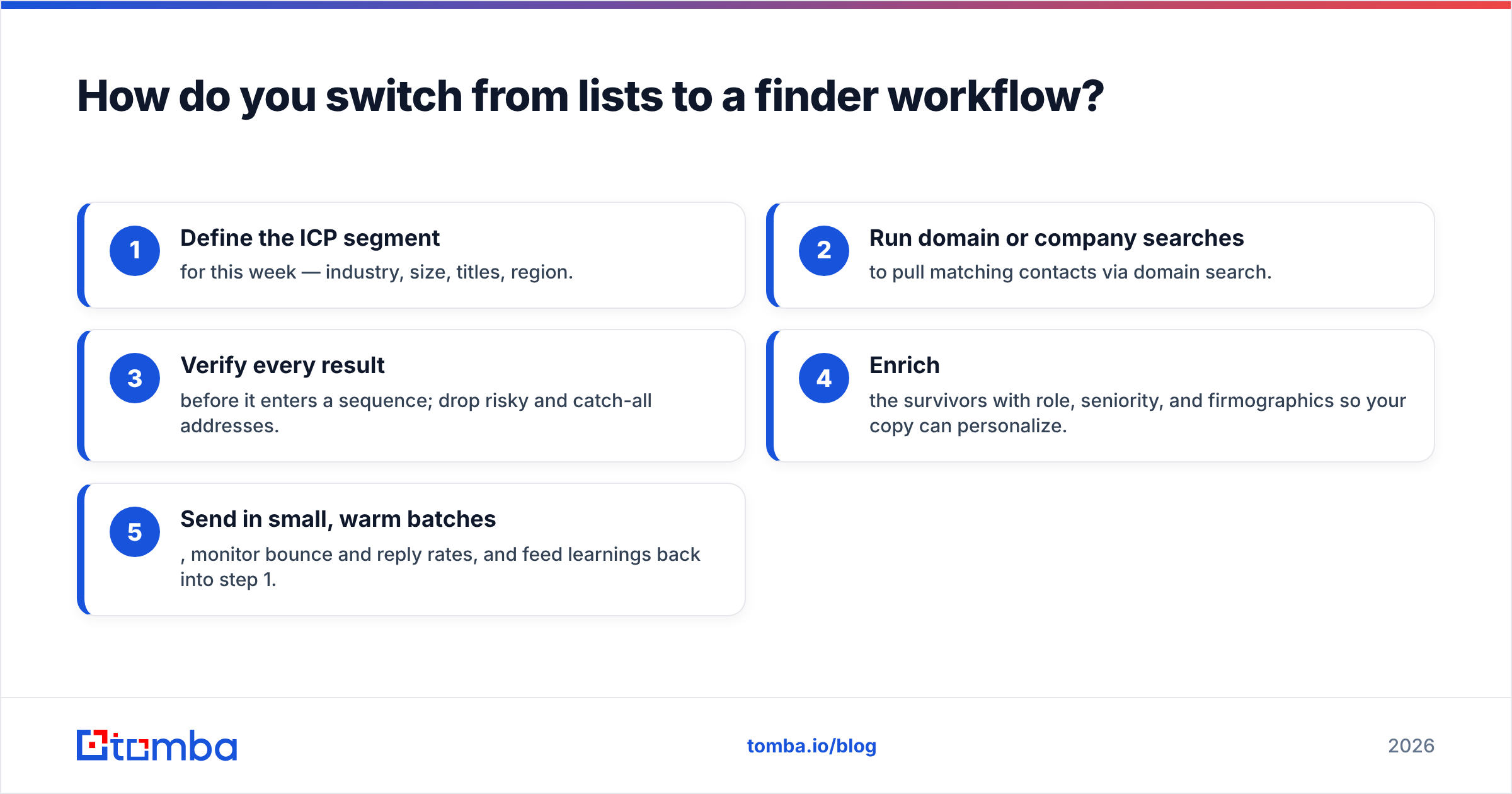
- Define the ICP segment for this week — industry, size, titles, region.
- Run domain or company searches to pull matching contacts via domain search.
- Verify every result before it enters a sequence; drop risky and catch-all addresses.
- Enrich the survivors with role, seniority, and firmographics so your copy can personalize.
- Send in small, warm batches, monitor bounce and reply rates, and feed learnings back into step 1.
This loop keeps your data perpetually fresh because you never reuse a stale snapshot — you regenerate. It's the difference between owning a fish and owning a rod.
The verdict on b2b lists vs Hunter#
Stop framing it as "list vs tool" and start framing it as "stale vs fresh." Bought B2B lists win a spreadsheet-volume contest and lose every contest that matters once you send — accuracy, deliverability, compliance, and cost per booked meeting. An on-demand finder like Hunter solves the decay problem structurally, and that's the right category to be shopping in.
Hunter is a capable, well-regarded option. If you want the same find-on-demand workflow with verification, enrichment, a real free tier, and flat pricing in one place, give the Tomba Email Finder a run. Start free with 25 searches a month, find and verify your next 300 ICP contacts, and compare the bounce rate against your last bought list — the gap is the whole argument.
// get started
Find, verify and enrich your first contacts today
Start on the free plan with 25 searches a month, then scale when your team is ready.
Free plan · No credit card required · GDPR & CCPA
// about the author