B2B Mailing List: How to Build a Clean One in 2026
A bought B2B mailing list looks like a shortcut and ends like a spam folder. Here's how to build, verify, and segment a list that actually converts in 2026.
B2B Mailing List: How to Build a Clean One in 2026
A B2B mailing list is only as valuable as it is accurate. You can have 100,000 contacts, but if 40% bounce, your sender reputation tanks, your emails land in spam, and the 60% that are valid never see your message. The list isn't an asset at that point — it's a liability with a row count.
This guide covers how to build, source, verify, and segment a B2B mailing list that actually reaches inboxes in 2026 — and why the "buy 2 million leads for $99" offers in your LinkedIn DMs are a trap.
TL;DR#
- Build, don't buy. Purchased B2B mailing lists are stale, non-consented, and shared across hundreds of buyers — they wreck deliverability and risk GDPR/CAN-SPAM fines.
- Verify every address before sending. A clean list keeps bounce rates under 2% and protects your sender reputation.
- Segment by ICP, not by volume. A 2,000-contact list matched to your ideal customer profile beats a 200,000-contact spray every time.
- Enrich, don't just collect. Job title, company size, tech stack, and intent signals turn a flat email list into a targeting machine.
- Tools like Tomba's email finder + verifier let you source addresses by domain and confirm them in one workflow instead of gambling on a vendor's CSV.
What is a B2B mailing list?#
A B2B mailing list is a structured collection of business contacts — typically professional email addresses paired with attributes like name, job title, company, industry, and company size — that you use for outbound marketing, cold email, or newsletter distribution.
Think of it like a guest list for a private event. A good guest list isn't the biggest one; it's the one where every name belongs in the room. Invite 50 perfectly-matched decision-makers and you have a productive evening. Invite 5,000 random strangers and security (your email service provider's spam filter) shuts the whole thing down.
A B2B mailing list usually contains:
- Identity fields — full name, professional email address, job title.
- Company fields — company name, domain, industry, employee count, revenue band.
- Segmentation fields — seniority, department, geography, tech stack.
- Engagement fields — opt-in source, last activity, verification status.
- Compliance fields — consent basis, opt-in date, suppression flags.
The difference between a list that converts and one that bounces lives in those last two categories. Most cheap lists ignore them entirely.
Should you build or buy a B2B mailing list?#
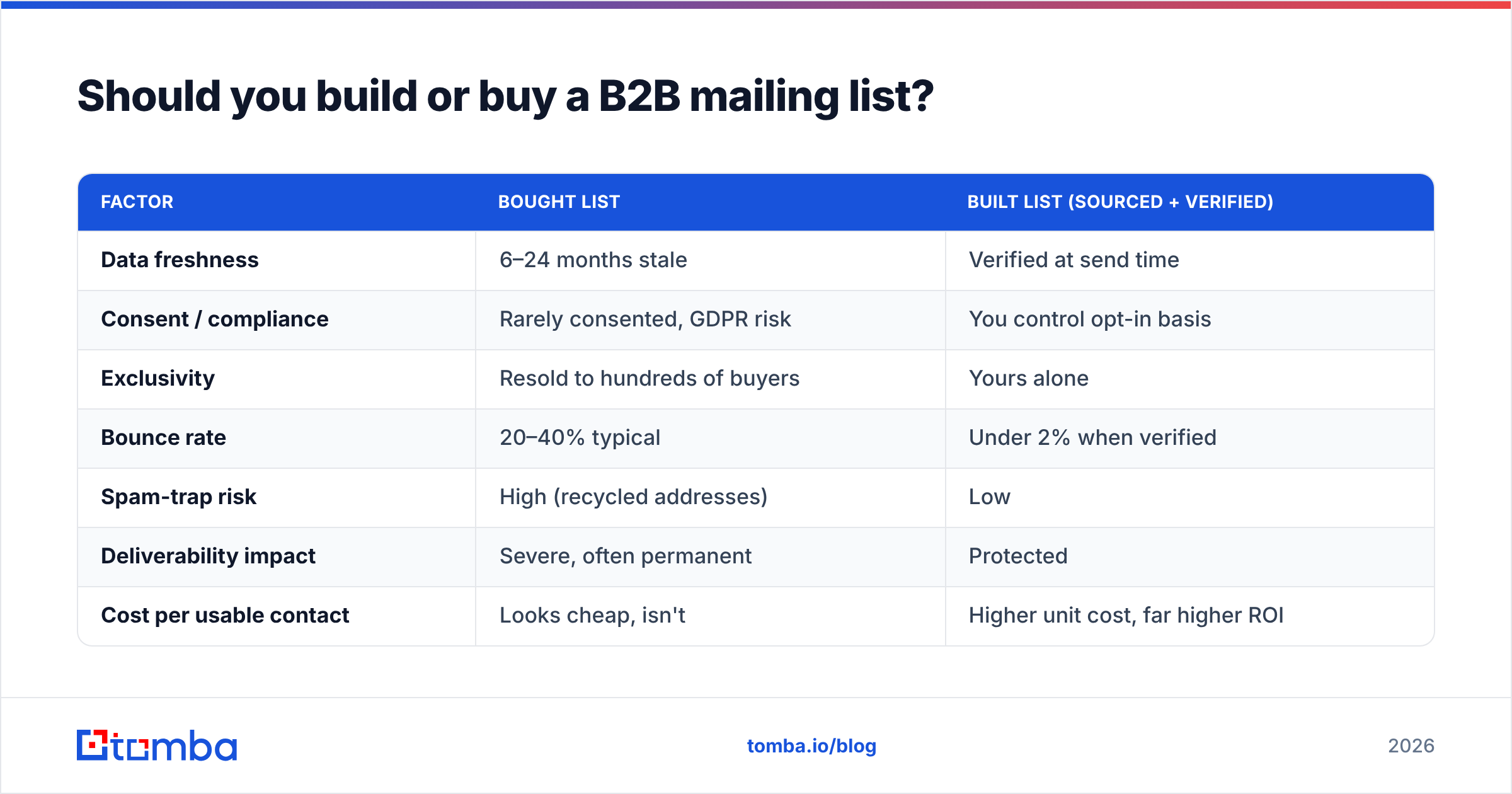
Build it. Buying a B2B mailing list is the single fastest way to destroy your email program. Here's the honest comparison.
| Factor | Bought list | Built list (sourced + verified) |
|---|---|---|
| Data freshness | 6–24 months stale | Verified at send time |
| Consent / compliance | Rarely consented, GDPR risk | You control opt-in basis |
| Exclusivity | Resold to hundreds of buyers | Yours alone |
| Bounce rate | 20–40% typical | Under 2% when verified |
| Spam-trap risk | High (recycled addresses) | Low |
| Deliverability impact | Severe, often permanent | Protected |
| Cost per usable contact | Looks cheap, isn't | Higher unit cost, far higher ROI |
Purchased lists fail for a structural reason: the moment a list is for sale, it has been sold many times before. Those addresses have been hammered with cold email, the engaged people have unsubscribed everywhere, and the dead addresses have been repurposed by mailbox providers into spam traps. Hit a few traps and Spamhaus or your ESP flags you.
There's also the legal side. Under GDPR, a purchased list almost never carries valid consent, and CAN-SPAM still requires accurate headers and working opt-outs. The Federal Trade Commission's CAN-SPAM guidance is worth reading before you send anything cold. Buying a list doesn't transfer consent — it transfers risk.
How do you build a B2B mailing list the right way?#
Building a list is a sourcing problem, not a purchasing problem. You define who you want, find their addresses programmatically, verify them, and enrich them. Here's the workflow.
1. Define your ICP first. Before sourcing a single address, write down the firmographics: industry, company size, region, and the specific job titles that hold budget for your product. A precise ideal customer profile turns "find emails" into "find these 1,500 emails."
2. Source by domain, not by guesswork. Once you have target companies, use a domain search to pull the professional email addresses associated with each company and its email pattern. This scales far better than manually hunting LinkedIn profiles one at a time.
3. Find individual decision-makers. For named prospects, an email finder resolves a person + company into a verified business address. For volume, a bulk email finder processes a whole CSV of names and domains at once.
4. Verify before you store. Run every address through an email verifier to catch invalid, role-based, and risky addresses before they ever touch your sending platform. Catch-all domains need a dedicated catch-all verifier because standard checks return "unknown" on them.
5. Enrich for segmentation. Layer on job title, seniority, company size, and tech stack with data enrichment so you can segment and personalize later.
This is slower than downloading a 2-million-row CSV. It's also the difference between a 35% open rate and a blocked domain.
How do you keep a B2B mailing list clean over time?#
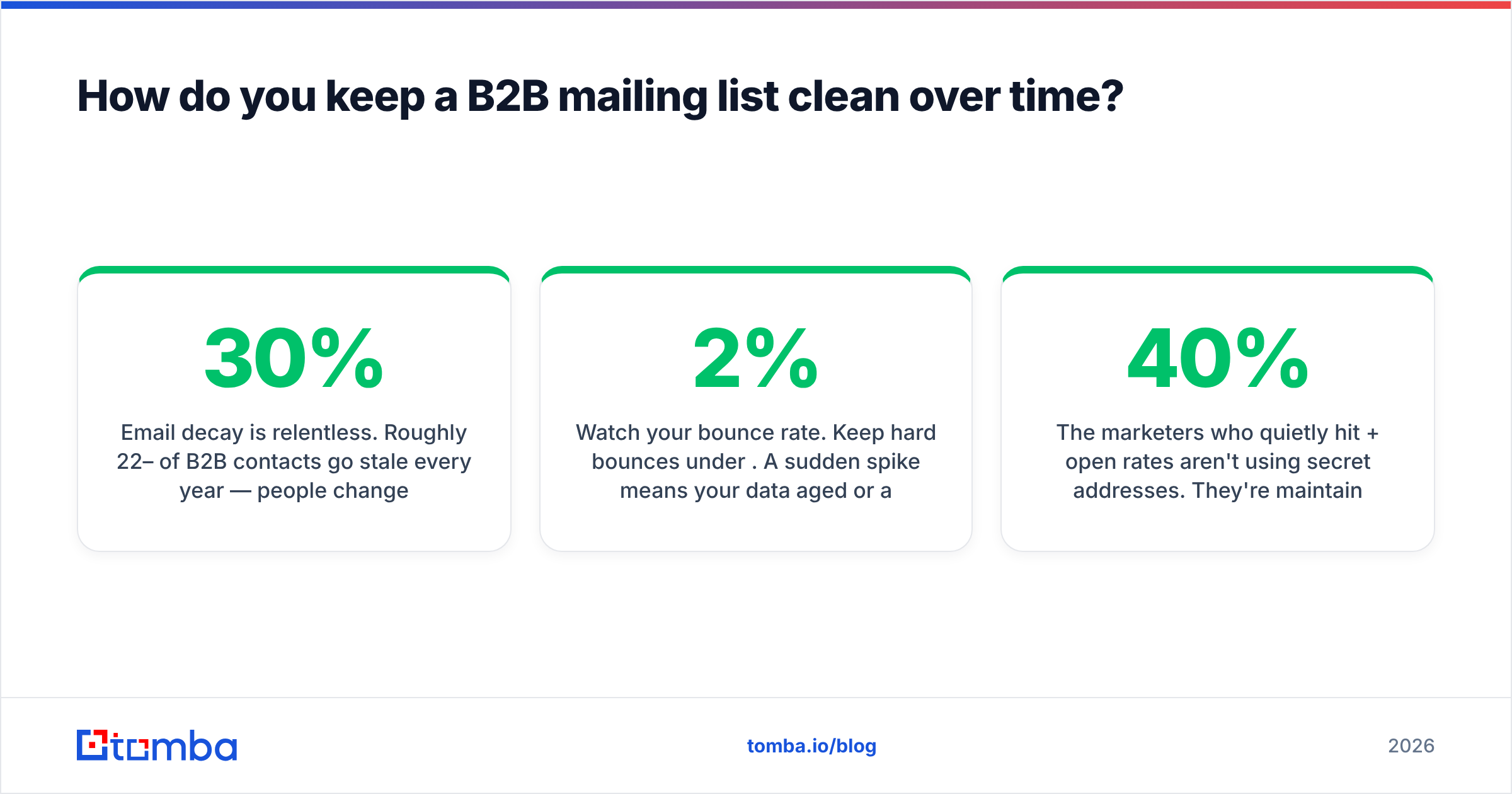
Email decay is relentless. Roughly 22–30% of B2B contacts go stale every year — people change jobs, companies rebrand, domains get retired. A list you verified in January is measurably worse by June.
Keep it healthy with a maintenance routine:
- Re-verify quarterly. Run the full list back through verification every 90 days and suppress anything that flips to invalid.
- Watch your bounce rate. Keep hard bounces under 2%. A sudden spike means your data aged or a segment was bad — pause and re-verify.
- Honor suppressions instantly. Unsubscribes and complaints get permanently suppressed, never re-imported.
- Segment by engagement. Stop emailing contacts who haven't opened in 6+ months; they drag down your sender reputation.
- Monitor deliverability signals. Track email deliverability metrics per domain so a Gmail or Outlook reputation dip doesn't go unnoticed.
The marketers who quietly hit 40%+ open rates aren't using secret addresses. They're maintaining clean lists obsessively while everyone else blames "the algorithm."
How should you segment a B2B mailing list?#
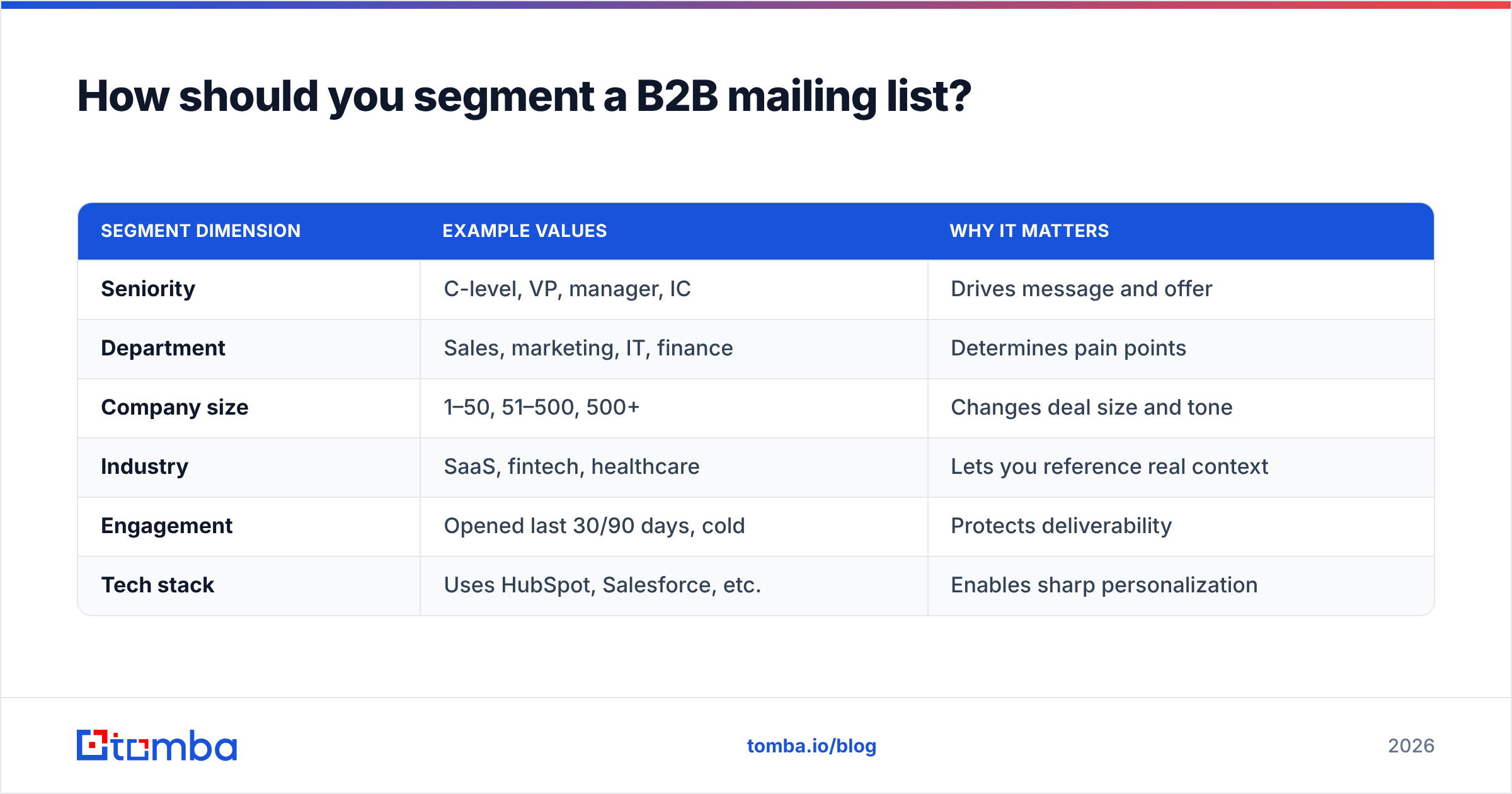
Segmentation is where a flat list becomes a revenue engine. Sending the same message to a CFO and a junior engineer wastes both. Slice your list along these axes:
| Segment dimension | Example values | Why it matters |
|---|---|---|
| Seniority | C-level, VP, manager, IC | Drives message and offer |
| Department | Sales, marketing, IT, finance | Determines pain points |
| Company size | 1–50, 51–500, 500+ | Changes deal size and tone |
| Industry | SaaS, fintech, healthcare | Lets you reference real context |
| Engagement | Opened last 30/90 days, cold | Protects deliverability |
| Tech stack | Uses HubSpot, Salesforce, etc. | Enables sharp personalization |
A well-segmented 2,000-contact list will out-earn a 50,000-contact blast because each message can speak to one specific reader. Tools like G2 catalog the platforms that handle this segmentation downstream, but segmentation is only as good as the underlying data quality — garbage attributes produce garbage segments.
For deeper personalization, enrich each segment with role context and recent triggers (funding, hiring, product launches). That's the input cold email needs to feel one-to-one instead of one-to-everyone.
What does a B2B mailing list cost?#
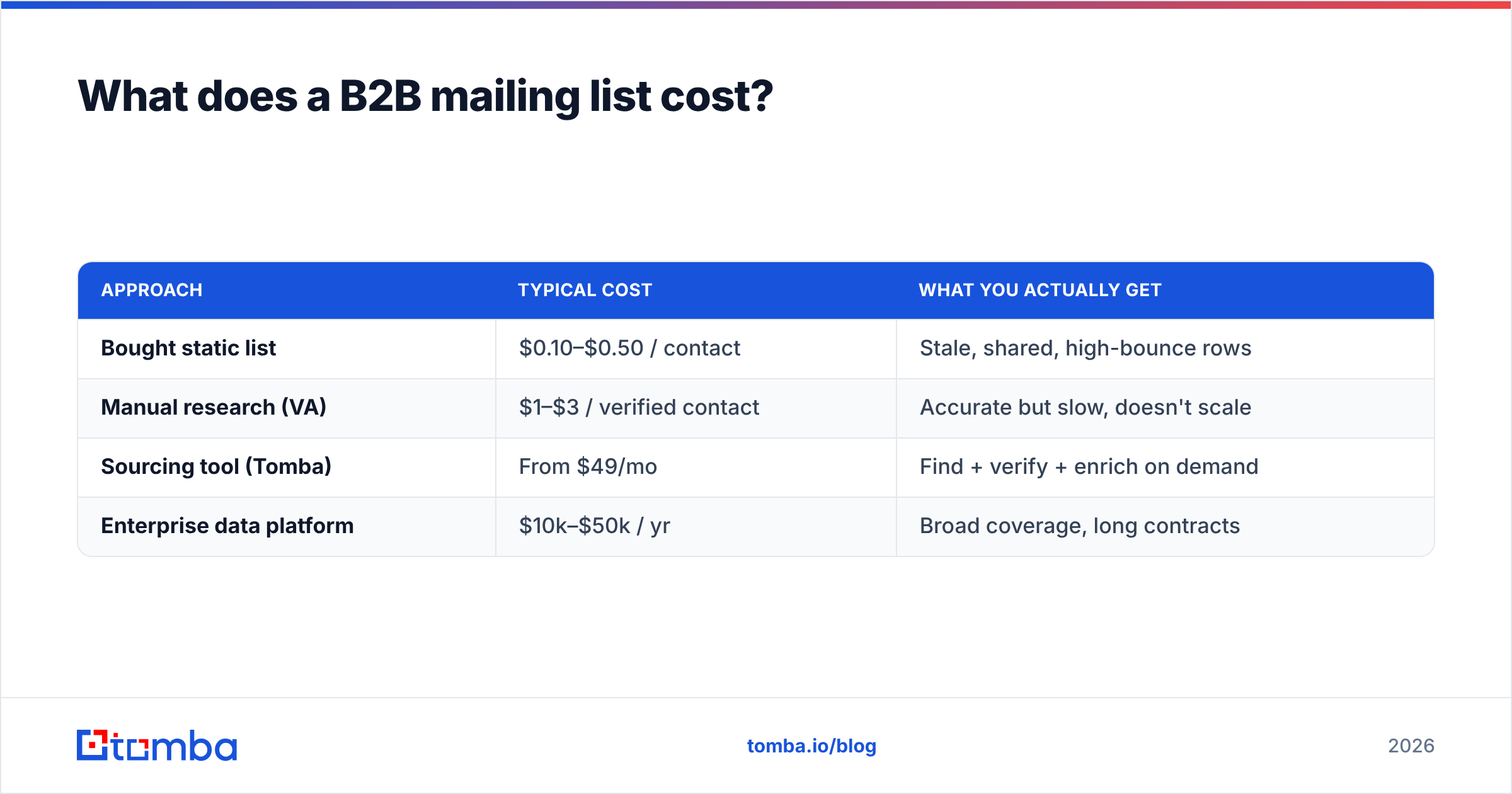
Pricing depends on whether you're buying access to a data tool or buying a static list. Building with a sourcing tool is the model that holds up.
| Approach | Typical cost | What you actually get |
|---|---|---|
| Bought static list | $0.10–$0.50 / contact | Stale, shared, high-bounce rows |
| Manual research (VA) | $1–$3 / verified contact | Accurate but slow, doesn't scale |
| Sourcing tool (Tomba) | From $49/mo | Find + verify + enrich on demand |
| Enterprise data platform | $10k–$50k / yr | Broad coverage, long contracts |
Tomba's pricing starts with a free tier (25 searches/month), then Starter at $49/mo, Growth at $99/mo, and Pro at $249/mo — so you can test the build-your-own approach before committing. The math favors building: a $99/month tool that produces 1,500 verified, exclusive contacts beats a $500 list of 50,000 shared, decaying ones once you account for deliverability damage.
For the full feature picture, vendor-neutral directories like Capterra and G2 let you compare data tools on coverage and accuracy claims before you commit.
Common B2B mailing list mistakes to avoid#
- Buying "verified" lists — verification at the seller's send time means nothing at yours.
- Skipping catch-all handling — catch-all domains accept everything, so they look valid and bounce later. Use a dedicated catch-all check.
- Emailing role addresses — info@, sales@, and support@ inflate complaint rates; suppress them.
- Ignoring warmup — a fresh domain blasting a new list looks exactly like a spammer. Ramp volume gradually.
- No suppression hygiene — re-importing unsubscribed contacts is a fast path to a blocklist.
Each of these is cheap to prevent and expensive to recover from. A blocked sending domain can take months to rehabilitate.
Build a B2B mailing list that reaches the inbox#
A great B2B mailing list isn't bought — it's built, verified, and maintained. Define your ideal customer, source addresses by domain and name, verify every contact before it touches your sending platform, enrich for segmentation, and re-verify on a schedule. That discipline is what separates a 35% open rate from a spam-folder graveyard.
Start by replacing guesswork with verified data. The Tomba Email Finder finds professional email addresses by domain, name, or company, and pairs with Tomba's verifier and enrichment so you build a clean, segmented, exclusive list from the first contact — not a recycled CSV. Spin up the free tier, source your first 25 contacts, and see the bounce rate difference for yourself.
// get started
Find, verify and enrich your first contacts today
Start on the free plan with 25 searches a month, then scale when your team is ready.
Free plan · No credit card required · GDPR & CCPA
// about the author