B2B Sales Leads List: How to Build One That Converts in 2026
Stop buying stale contact dumps. Here's how to build a B2B sales leads list in 2026 that's accurate, segmented, and actually converts — plus what to skip.
A B2B sales leads list is only as good as the work behind it. Most teams treat the list as a one-time purchase, then wonder why their bounce rates climb and reply rates crater. The list is not the finish line — it's the foundation, and a shaky foundation collapses the entire outbound motion.
This guide walks through how to build a B2B sales leads list in 2026 that holds up: accurate, segmented to your ideal customer, verified before send, and refreshed on a schedule. We'll compare buying versus building, show you the filters that matter, and give you a verification workflow that protects your sender reputation.
TL;DR#
- Build beats buy. Purchased lists are stale, non-exclusive, and often violate consent rules. A targeted, self-built list converts several times better.
- Define the ICP first. Industry, company size, role, and trigger events should filter every contact before it enters your list.
- Verify every address. Even fresh data decays ~2-3% per month. Run the list through an email verifier before the first send.
- Enrich, don't just collect. Phone, LinkedIn, and firmographic data turn a flat list into a multi-channel sequence.
- Treat the list as a living asset. Re-verify quarterly, prune dead contacts, and log every interaction back into your CRM.
What is a B2B sales leads list?#
A B2B sales leads list is a structured set of business contacts — names, job titles, company details, and contact channels — that match your target buyer and are ready for outreach. Think of it like a guest list for a dinner party: inviting 1,000 random strangers guarantees a chaotic night, while inviting 100 people who actually want to be there guarantees good conversations.
The technical definition matters less than the practical one. A usable list has four things:
- Identity — first name, last name, and current job title.
- Reachability — a verified work email, and ideally a direct phone or LinkedIn profile.
- Context — company name, industry, headcount, and tech stack so you can personalize.
- Permission posture — a defensible basis for contacting them under GDPR, CAN-SPAM, and similar rules.
Lists that skip context become spray-and-pray campaigns. Lists that skip verification torch your domain reputation. Both fail quietly until your email deliverability tanks.

Should you buy a B2B leads list or build your own?#
Build your own. A purchased list looks like a shortcut, but the math rarely works in 2026.
Bought lists are sold to many buyers, so the same contacts get hammered by competitors. They're scraped months or years ago, so titles and companies are wrong. And because the recipient never engaged with you, every send is cold in the worst sense — no consent, no context, high spam-complaint risk. One bad list can blacklist your sending domain for weeks.
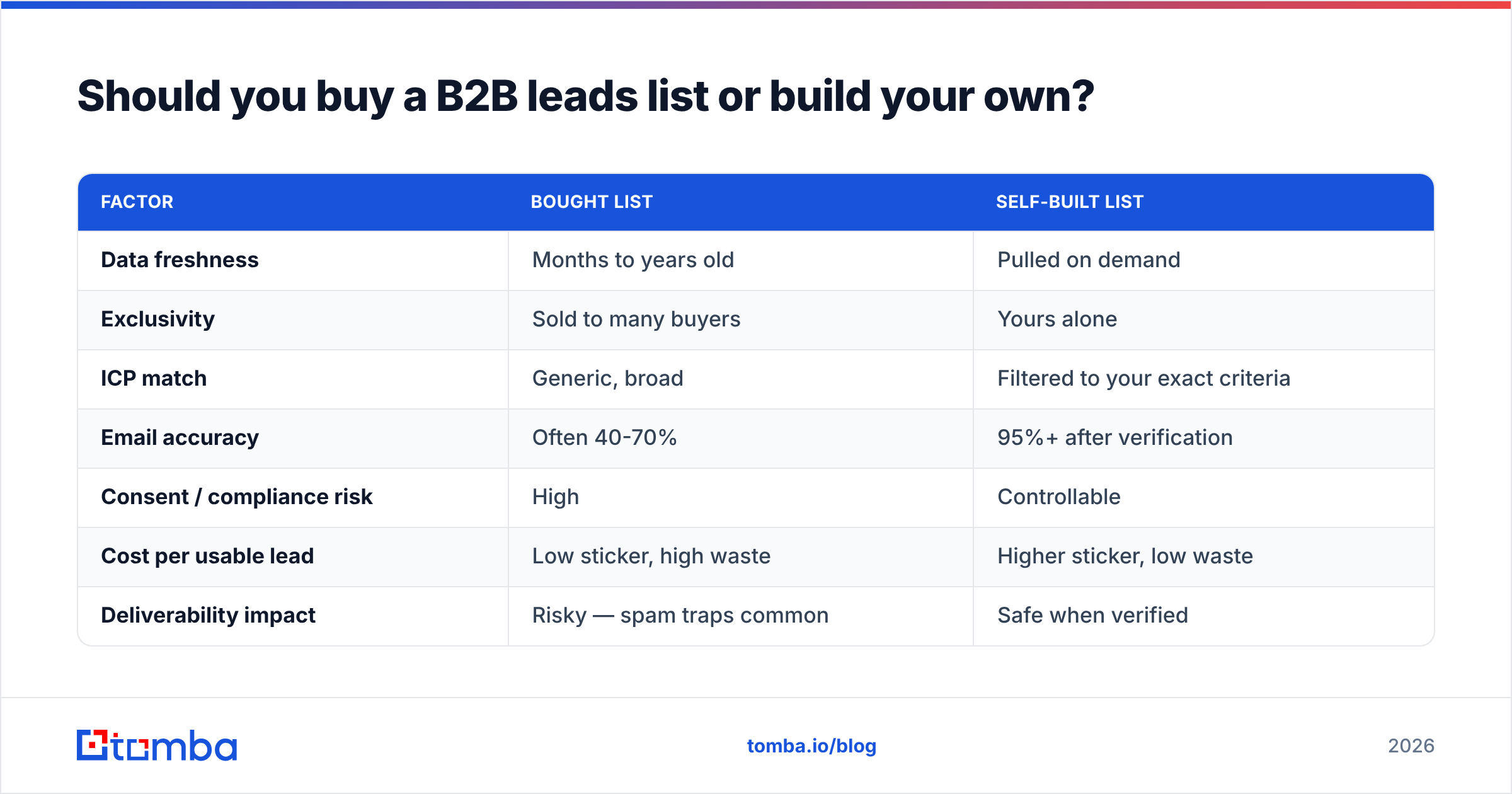
Building your own list takes more effort up front but produces an asset you control. You decide the criteria, you verify the data, and you own the exclusivity. Here's the head-to-head:
| Factor | Bought List | Self-Built List |
|---|---|---|
| Data freshness | Months to years old | Pulled on demand |
| Exclusivity | Sold to many buyers | Yours alone |
| ICP match | Generic, broad | Filtered to your exact criteria |
| Email accuracy | Often 40-70% | 95%+ after verification |
| Consent / compliance risk | High | Controllable |
| Cost per usable lead | Low sticker, high waste | Higher sticker, low waste |
| Deliverability impact | Risky — spam traps common | Safe when verified |
The "low cost" of a bought list is an illusion once you account for bounces, wasted SDR hours, and reputation damage. A self-built list of 500 verified, on-ICP contacts will out-perform a bought list of 50,000 nearly every time.
How do you define your ideal customer profile (ICP)?#
Define your ICP before you collect a single contact, because the ICP is the filter that everything else runs through. A list assembled without an ICP is just a phone book.
Start with your best existing customers and reverse-engineer the pattern. Pull your closed-won deals from the last 12 months and look for what they share:
- Firmographics — industry, company size (headcount and revenue), geography, and growth stage.
- Technographics — the tools they already run (a CRM, a specific cloud provider, a competing product you replace).
- Role and seniority — who signs, who champions, and who blocks. You usually need all three.
- Trigger events — recent funding, a new hire in a key role, a product launch, or expansion into a new market.
Once you can describe your ICP in a sentence — "Series B SaaS companies with 50-200 employees, using HubSpot, where the VP of Marketing started in the last six months" — you have a query you can actually run against a data source. Tools like G2 and intent platforms can help you spot trigger events before competitors do.
What data sources build the best B2B leads list?#
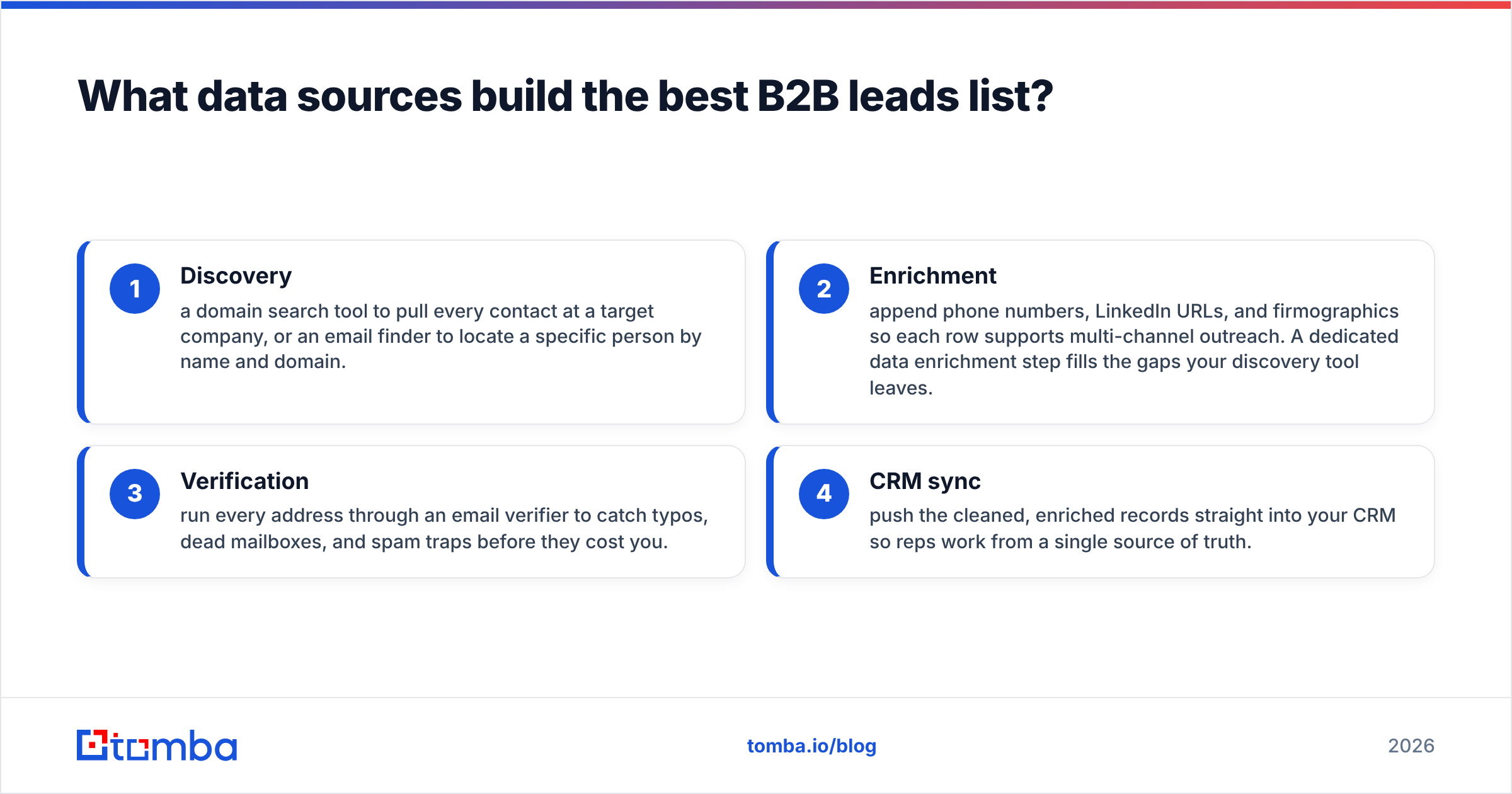
The best lists combine a primary contact-data source with enrichment and verification layers. No single tool does everything well, so think in stacks, not silver bullets.
A practical 2026 stack looks like this:
- Discovery — a domain search tool to pull every contact at a target company, or an email finder to locate a specific person by name and domain.
- Enrichment — append phone numbers, LinkedIn URLs, and firmographics so each row supports multi-channel outreach. A dedicated data enrichment step fills the gaps your discovery tool leaves.
- Verification — run every address through an email verifier to catch typos, dead mailboxes, and spam traps before they cost you.
- CRM sync — push the cleaned, enriched records straight into your CRM so reps work from a single source of truth.
The order matters. Discover broadly, enrich selectively, verify ruthlessly, then sync. Skipping verification is the single most common mistake — and the most expensive one.

How do you keep a B2B sales leads list accurate?#
Re-verify on a schedule, because B2B data decays fast. People change jobs, companies rebrand, and mailboxes get deactivated. Industry estimates put B2B data decay at roughly 30% per year — meaning a list you built in January is meaningfully wrong by summer if you never touch it.
A maintenance rhythm that works:
- Before every campaign: re-verify the segment you're about to email. This is non-negotiable for any list older than 30 days.
- Quarterly: run a full bulk verify pass across the whole database and prune hard bounces.
- On trigger: when a contact bounces or replies "I've left the company," update or remove the record immediately and look for their replacement.
- Continuously: log every open, click, reply, and call outcome back into the CRM so the list reflects reality, not last quarter's snapshot.
Accuracy also protects your sender reputation. Mailbox providers track your bounce and complaint rates; a clean list keeps both low, which keeps you in the inbox. According to HubSpot's research on email marketing, list hygiene is one of the strongest predictors of deliverability — sloppy lists land in spam regardless of how good the copy is.
What does a high-converting leads list look like in practice?#
A high-converting list is small, specific, and segmented — not large and generic. Quality compounds; quantity dilutes.
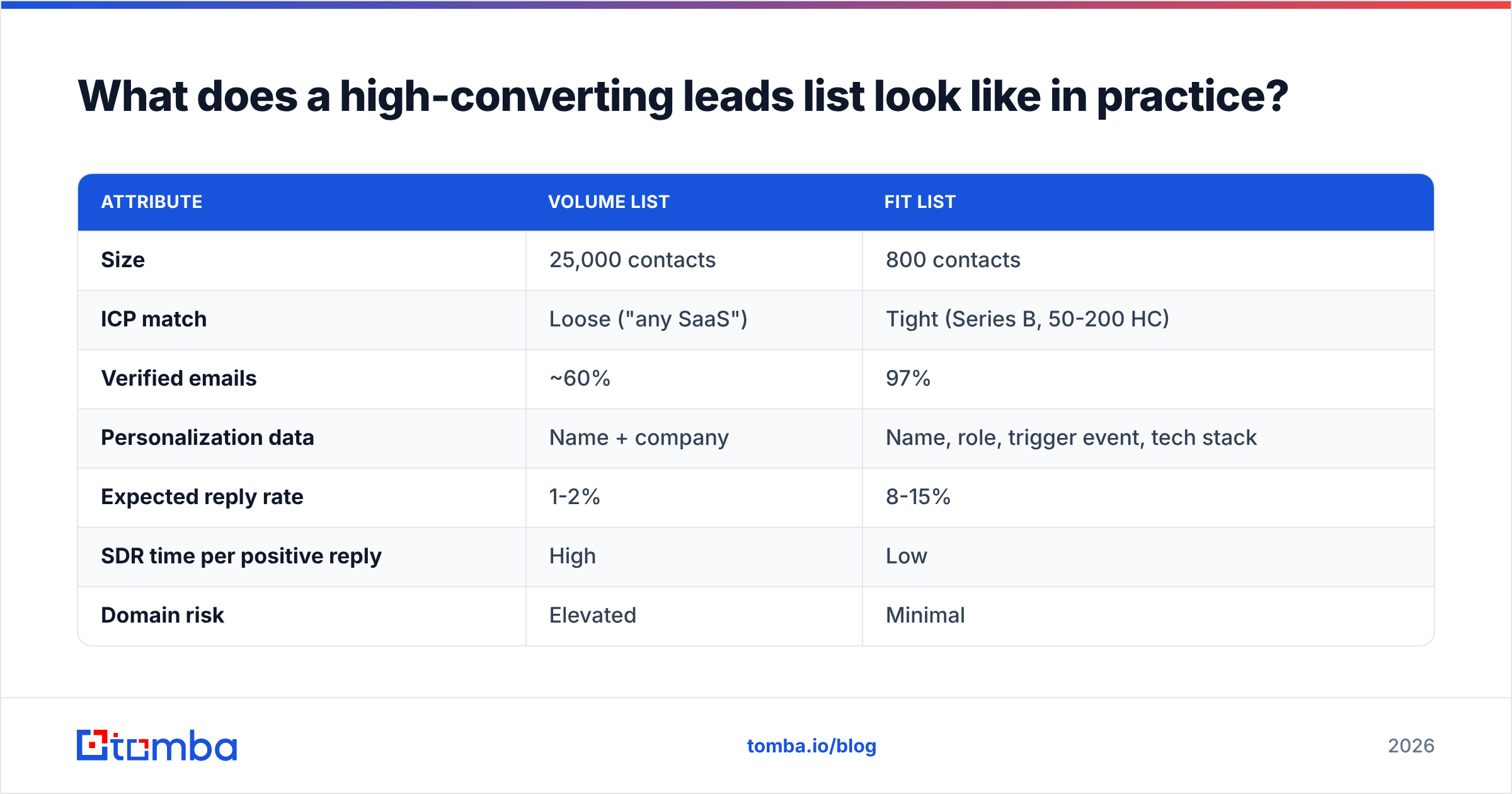
Here's a comparison of two lists targeting the same market, one built for volume and one built for fit:
| Attribute | Volume List | Fit List |
|---|---|---|
| Size | 25,000 contacts | 800 contacts |
| ICP match | Loose ("any SaaS") | Tight (Series B, 50-200 HC) |
| Verified emails | ~60% | 97% |
| Personalization data | Name + company | Name, role, trigger event, tech stack |
| Expected reply rate | 1-2% | 8-15% |
| SDR time per positive reply | High | Low |
| Domain risk | Elevated | Minimal |
The fit list wins on every metric that affects revenue. Eight hundred well-researched contacts produce more booked meetings than 25,000 strangers, and they do it without putting your domain at risk. This is the core argument for building over buying, made concrete.
How do you segment a B2B leads list for outreach?#
Segment by persona and trigger, then write to the segment instead of the individual. Segmentation is what turns a static list into sequences that feel relevant.
Useful segmentation axes:
- By persona — a VP of Sales and an SDR Manager have different pains; send each a different message.
- By trigger — recently funded companies hear a "scale fast" message; companies that just hired your champion hear a "you finally have budget" message.
- By engagement — contacts who opened twice but never replied get a different touch than cold ones.
- By channel fit — some segments respond to email, others to a phone-first approach using verified B2B phone numbers.
Segmentation also feeds your response rate. The tighter the segment, the more specific the message, the higher the reply. A single generic blast to the whole list almost always underperforms three targeted sequences to three segments.
What tools and pricing should you expect in 2026?#
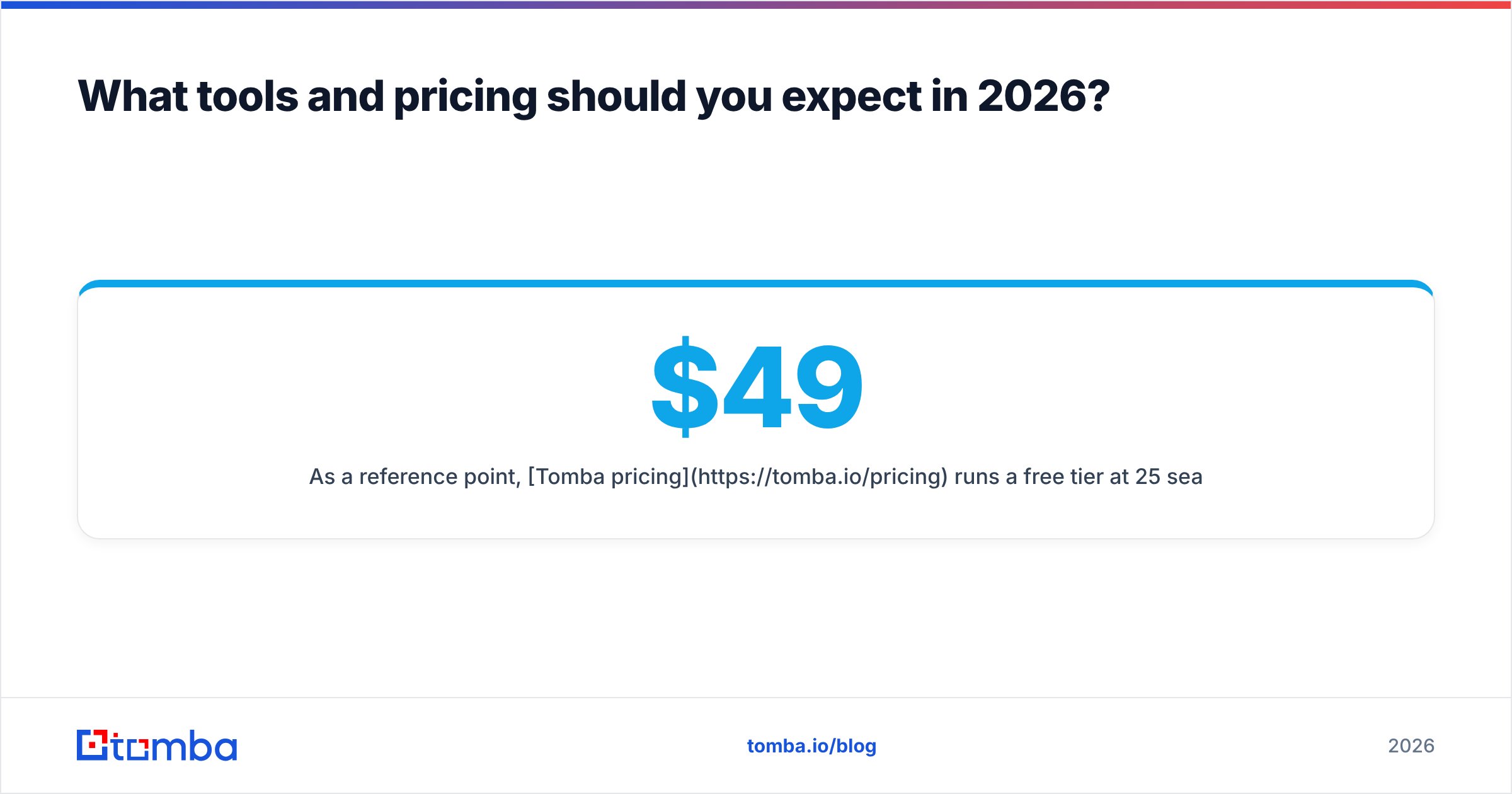
Expect to pay per credit or per monthly search volume, with most platforms offering a free tier to test data quality. Pricing scales with how many lookups, verifications, and enrichments you run.
As a reference point, Tomba pricing runs a free tier at 25 searches per month, then Starter at $49/mo, Growth at $99/mo, Pro at $249/mo, and custom Enterprise plans. That covers email finding, verification, domain search, and enrichment under one roof, with a Tomba API for teams that want to build list-generation into their own workflows.
When you evaluate any vendor, test the free tier against contacts you already know. Run 20 lookups, then check the results against reality — accuracy claims on a pricing page mean nothing until you've verified them yourself. Look for transparent data sources and a verification step built into the product, not sold as a separate add-on.
Common mistakes that kill a B2B leads list#
Avoid these and you'll already be ahead of most outbound teams:
- Buying instead of building. Covered above, but it's the number-one killer.
- Skipping verification. A 10% bounce rate can suspend your sending privileges.
- No ICP filter. Broad lists feel productive and convert terribly.
- Letting the list rot. Data decay is relentless; a list is a subscription, not a purchase.
- Ignoring multi-channel. Email-only lists leave meetings on the table. Add phone and LinkedIn for the contacts that matter most.
- Not syncing to the CRM. A list trapped in a spreadsheet can't be tracked, scored, or improved.
Build your B2B sales leads list with Tomba#
A converting list starts with accurate contact data, and that's exactly what the Tomba Email Finder is built for. Search by domain, name, or company to pull verified professional emails that match your ICP — then enrich them with phone numbers and LinkedIn profiles, verify every address, and push the clean records into your CRM. Start on the free tier with 25 searches a month, confirm the accuracy against contacts you already know, and scale up only once the data proves itself. Build the list once, maintain it well, and let it compound into a pipeline you actually own.
// get started
Find, verify and enrich your first contacts today
Start on the free plan with 25 searches a month, then scale when your team is ready.
Free plan · No credit card required · GDPR & CCPA
// about the author