The Best B2B Sales Tools in 2026: A Complete Stack Guide
A no-fluff breakdown of the B2B sales tools that actually move pipeline in 2026 — what each category does, what to pay, and how to assemble a stack that fits your team.
TL;DR
- The best B2B sales tools in 2026 fall into six jobs: find data, engage prospects, automate outreach, manage the pipeline, coach reps, and report on revenue. You need one strong tool per job, not twelve overlapping ones.
- Data quality is the foundation. A flashy sequencer is worthless if 30% of your emails bounce — start with an accurate email finder and verifier.
- Mid-market teams overspend by stacking redundant platforms. Audit for overlap before you renew anything.
- Budget roughly $50–$250 per rep per month for a lean, effective stack. Enterprise suites cost far more and often duplicate what point tools do better.
- Tomba covers the data layer — finding and verifying contact details — for a fraction of what all-in-one suites charge.
What are B2B sales tools?#
B2B sales tools are the software your team uses to turn a stranger into a customer. Think of your sales process like a kitchen: you need someone to source ingredients (data and leads), someone to cook (outreach and engagement), and someone to plate and serve (closing and account management). No single appliance does all three well, which is why "sales stack" is the right mental model rather than "sales app."
In 2026, the category has split into specialists. The era of paying one mega-suite to do everything passably is fading, because point tools now integrate cleanly through Zapier, native APIs, and CRM connectors. You can assemble a best-of-breed stack that outperforms a bloated suite and costs less.
Here are the six core jobs every revenue team needs to staff with tools:
- Sales intelligence and data — finding the right companies and the right people inside them, with accurate contact details. This is where an email finder and verification live.
- Engagement and sequencing — multi-channel cadences across email, phone, and LinkedIn so no lead falls through the cracks.
- Sales automation — removing manual data entry, follow-up reminders, and list cleanup so reps sell instead of administrate.
- CRM and pipeline management — the single source of truth for every deal, stage, and forecast.
- Conversation intelligence — recording, transcribing, and analyzing calls to coach reps and surface risk.
- Revenue analytics and forecasting — turning activity data into predictable numbers leadership can trust.
Which categories of B2B sales tools matter most in 2026?#
Conclusion first: data and engagement are non-negotiable; everything else is leverage on top of those two. If your contact data is wrong, your sequencer just helps you fail faster and your CRM just stores garbage neatly.
The shift this year is that AI moved from a marketing bullet point to a working feature. AI now drafts first-touch emails, scores leads by fit and intent, summarizes calls, and recommends next steps. The tools that win are the ones where AI quietly removes busywork, not the ones that bolt a chatbot onto an old interface and raise the price.
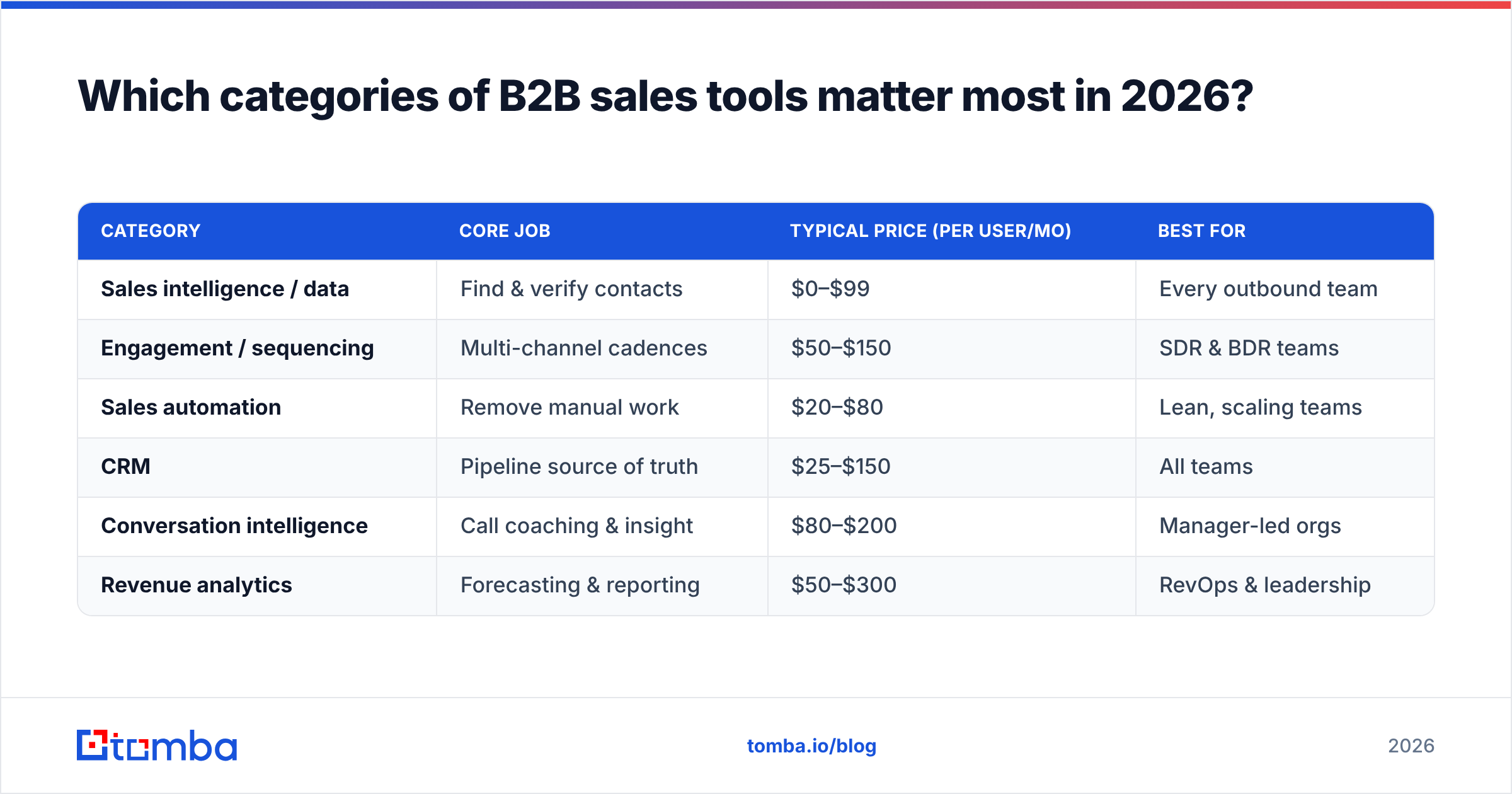
Here is how the major categories compare on what they do, who they serve, and what they typically cost.
| Category | Core job | Typical price (per user/mo) | Best for |
|---|---|---|---|
| Sales intelligence / data | Find & verify contacts | $0–$99 | Every outbound team |
| Engagement / sequencing | Multi-channel cadences | $50–$150 | SDR & BDR teams |
| Sales automation | Remove manual work | $20–$80 | Lean, scaling teams |
| CRM | Pipeline source of truth | $25–$150 | All teams |
| Conversation intelligence | Call coaching & insight | $80–$200 | Manager-led orgs |
| Revenue analytics | Forecasting & reporting | $50–$300 | RevOps & leadership |
Notice the data layer is the cheapest line item and the one with the highest leverage. A $49/month email finder that lifts your connect rate by 15% pays for a $150/month sequencer many times over. Spend where accuracy compounds.
How do you choose the right sales data tool?#
Pick on accuracy and verification first, integrations second, and price third. A data tool's only job is to be right, and most "we have 200M contacts" claims hide a brutal truth: a huge database full of stale records is worse than a smaller, freshly verified one, because every bad send erodes your sender reputation.
When you evaluate a data vendor, run a real test. Pull 100 contacts you can independently confirm and measure three things:
- Match rate — how many of your target people did the tool actually find?
- Accuracy rate — of the emails it returned, how many are genuinely valid and deliverable?
- Catch-all handling — does it flag risky catch-all domains, or pass them off as "valid"?
That last point catches a lot of teams. Catch-all servers accept every address, so a naive tool reports them as good and your bounce rate spikes weeks later. A proper email verifier and a dedicated catch-all check separate the safe sends from the gambles before you ever hit send.
This is the layer where Tomba focuses. Instead of charging suite prices for features you won't touch, it does the unglamorous data work well: domain search, email finding by name and company, verification, phone discovery, and enrichment. You can read more about where Tomba gets its data and how it scores confidence on every result, which matters when you're staking a quarter's pipeline on a list.
Is an all-in-one suite better than best-of-breed tools?#
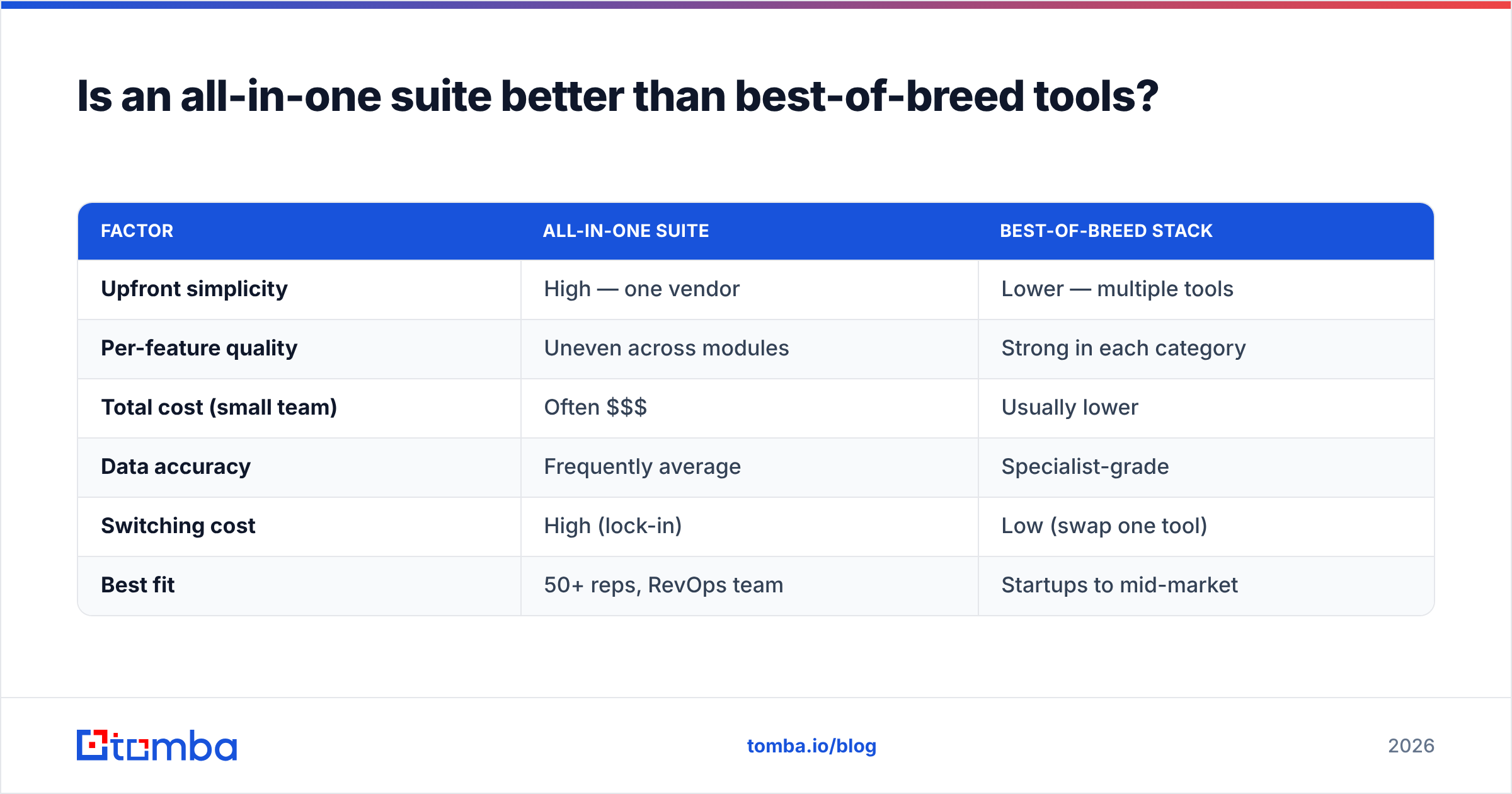
It depends on team size and complexity, but for most teams under 50 reps, best-of-breed wins on both quality and cost. All-in-one suites sell convenience — one login, one invoice, one vendor to call. That's genuinely valuable for large orgs with procurement overhead and a RevOps team to manage integrations. It's often a poor trade for everyone else.
The hidden cost of a suite is that you pay premium pricing for the one or two modules you actually use, while the rest sit idle. Worse, suite vendors rarely build every module to the same standard. The data might be mediocre, the dialer clunky, and only the CRM truly polished — but you're locked into all of it.
| Factor | All-in-one suite | Best-of-breed stack |
|---|---|---|
| Upfront simplicity | High — one vendor | Lower — multiple tools |
| Per-feature quality | Uneven across modules | Strong in each category |
| Total cost (small team) | Often $$$ | Usually lower |
| Data accuracy | Frequently average | Specialist-grade |
| Switching cost | High (lock-in) | Low (swap one tool) |
| Best fit | 50+ reps, RevOps team | Startups to mid-market |
The pragmatic middle path most winning teams use in 2026: a solid CRM as the hub, plus two or three specialist point tools for data, engagement, and call intelligence, all wired together through native integrations. You get suite-level cohesion without suite-level bills or compromises. Tomba, for example, plugs into HubSpot, Salesforce, and Pipedrive so the data layer feeds your CRM automatically instead of living in a silo.
What does a lean B2B sales stack actually look like?#
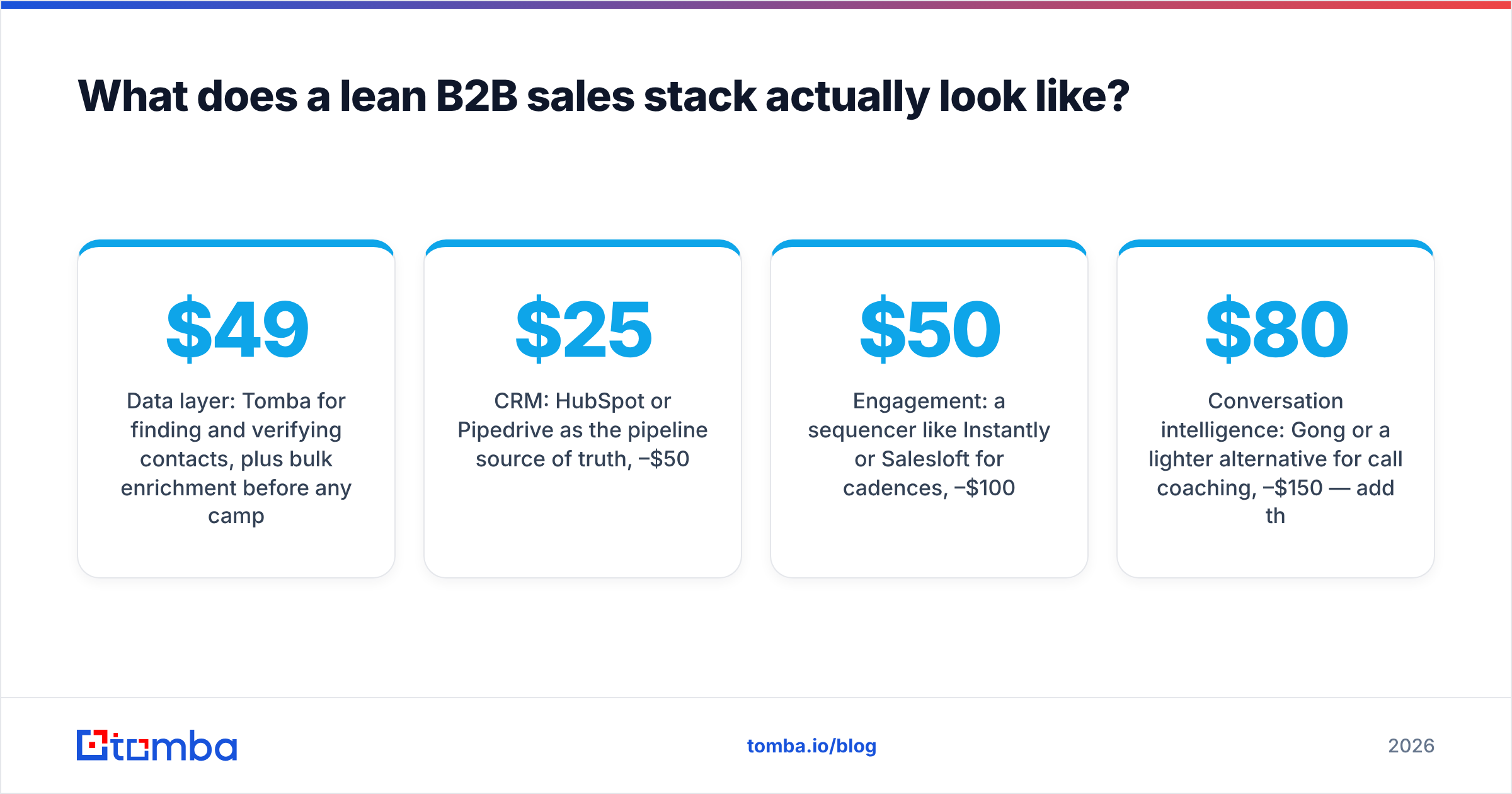
Here's a concrete, real-world stack for a mid-market outbound team of around ten reps, built best-of-breed and kept deliberately tight.
- Data layer: Tomba for finding and verifying contacts, plus bulk enrichment before any campaign. Roughly $49–$99/month for the team depending on volume.
- CRM: HubSpot or Pipedrive as the pipeline source of truth, $25–$50 per user/month.
- Engagement: a sequencer like Instantly or Salesloft for cadences, $50–$100 per user/month.
- Conversation intelligence: Gong or a lighter alternative for call coaching, $80–$150 per user/month — add this once you have managers actively coaching.
- Automation glue: Zapier or Make to connect the pieces, $20–$80/month total.
The deliberate choice here is to spend the least on data tooling relative to its impact, because the data feeds everything downstream. Compare that to a wall-to-wall enterprise suite charging $1,000+ per seat per year for overlapping capabilities, and the savings fund another rep.
A quick reality check on sequencing volume: more sends is not the goal. A clean list of 500 verified contacts will out-perform a dirty list of 5,000 every time, because your email deliverability stays intact and your replies come from real people. Verify first, then send.
How do you avoid overpaying for sales software?#
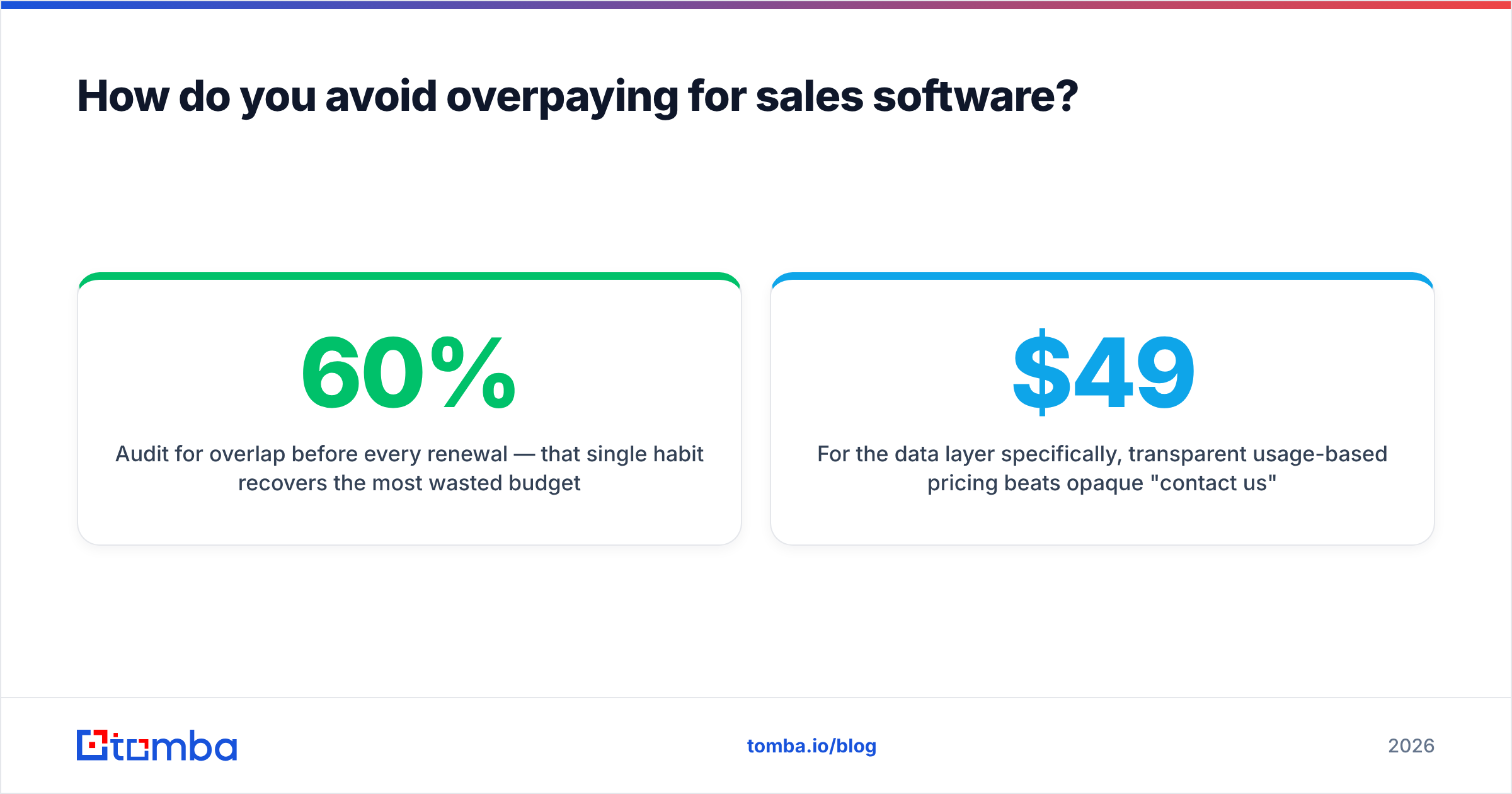
Audit for overlap before every renewal — that single habit recovers the most wasted budget. Sales tooling sprawl creeps in quietly: a rep trials a tool, it gets expensed, nobody cancels it, and a year later you're paying for three things that each do 60% of the same job.
Run this short audit quarterly:
- List every active subscription and its annual cost. Most teams are surprised by the total.
- Map each tool to one of the six core jobs. If two tools claim the same job, one is probably redundant.
- Check actual usage, not seats purchased. Pull login data — dormant seats are pure waste.
- Test data accuracy on overlapping vendors. Keep the one that's genuinely more accurate; cut the other.
- Renegotiate at renewal. Annual commitments and team bundles cut per-seat costs, and vendors discount to avoid churn.
For the data layer specifically, transparent usage-based pricing beats opaque "contact us" enterprise quotes when you're a small or mid-sized team. You can see exactly what you'll pay on the Tomba pricing page: a free tier with 25 searches a month to test accuracy, Starter at $49/month, Growth at $99/month, and Pro at $249/month. No annual lock-in required to start, which means you can validate match and accuracy rates on your own list before committing a budget line.
One more cost trap: per-credit pricing on enrichment. Some vendors charge a credit for every lookup, valid or not, so you pay for bounces. Tools that only charge for verified results — or that bundle generous monthly searches — protect your budget from the noise.
How is AI changing B2B sales tools?#
AI's biggest 2026 contribution is removing the unpaid administrative tax reps carry, not replacing the selling itself. The useful applications are concrete and unglamorous:
- Lead scoring by fit and intent — ranking your list so reps work the warmest 20% first instead of dialing top to bottom.
- First-draft personalization — generating a researched opening line so reps edit instead of stare at a blank screen.
- Call summaries and next steps — auto-logging what was said and what to do, so the CRM stays current without manual notes.
- Data enrichment and cleanup — filling missing fields and flagging stale records continuously rather than in painful quarterly purges.
What AI still can't do is invent accurate data it never had. An AI sales assistant that drafts a perfect email to a wrong or unverified address is just a faster way to bounce. That's why the data foundation matters more, not less, in an AI-heavy stack: every downstream AI feature inherits the quality of the contacts you feed it. Garbage in, confident garbage out.
The teams getting real returns treat AI as a co-pilot on top of clean data, verified contacts, and a disciplined process — not as a magic substitute for any of those. According to analyst coverage from firms like Gartner and peer reviews on G2, buyer sentiment in 2026 rewards tools that prove accuracy and ROI over those that lead with AI buzzwords. Vendor reputation and verified reviews on platforms like HubSpot's app marketplace are worth more than any feature list.
How should you start building your stack today?#
Start with the foundation and build up — data first, then engagement, then everything else. Trying to buy all six categories at once leads to shelfware and a blown budget. Sequence your purchases the same way the funnel flows:
- Lock down accurate data. Get an email finder, verifier, and enrichment in place. This is the cheapest, highest-leverage move and it improves every tool you add later.
- Add a CRM if you don't have one, so every contact and deal has a home.
- Layer in engagement once you have clean lists to send to.
- Add coaching and analytics as the team grows past the point where the manager can listen to every call personally.
If you only fix one thing this quarter, fix your data. Run a free test on your real target list, measure the match and accuracy rates, and watch what happens to your bounce rate and reply rate. Tomba's Email Finder gives you 25 free searches a month to do exactly that — no card, no sales call — and pairs with a built-in verifier so you're not sending to addresses that were never going to land.
Build the stack your team will actually use, keep each tool earning its line item, and let accurate data carry the rest. Start free with Tomba, prove the numbers on your own list, and scale up only when the results are sitting in your pipeline.
// get started
Find, verify and enrich your first contacts today
Start on the free plan with 25 searches a month, then scale when your team is ready.
Free plan · No credit card required · GDPR & CCPA
// about the author