B2B Technographics in 2026: The Complete Data Guide
Technographics tell you what tools a company already runs—so you can pitch the right integration to the right buyer. Here's how B2B technographics work in 2026, and how to use them without wasting budget.

You can know a prospect's industry, headcount, and revenue and still pitch them a tool they already bought last quarter. B2B technographics close that blind spot: they tell you what software a company actually runs, so your outreach speaks to the stack instead of guessing at it.
TL;DR#
- B2B technographics are data about the technologies a company uses—CRMs, payment processors, analytics tools, cloud providers, marketing platforms, and more.
- They turn cold outreach into relevant outreach: pitch an integration, a replacement, or a complement to a tool the buyer already owns.
- Data is collected via website crawls, DNS/HTML fingerprinting, job-post mining, BuiltWith-style tag detection, and self-reported sources—each with different accuracy.
- Accuracy varies widely (often 60–85% on detectable tags, lower for back-office tools), so treat technographics as a prioritization signal, not gospel.
- Pair technographics with accurate contact data—verified emails and direct dials—or the best targeting in the world dies at a bounced send.
What are B2B technographics?#
B2B technographics are firmographic data's technical cousin. Where firmographics describe who a company is (industry, size, location, revenue), technographics describe what they run—the actual products in their technology stack.
Think of it like reading a kitchen before you sell to a restaurant. Firmographics tell you it's a 40-seat Italian place doing $2M a year. Technographics tell you they're already using a specific POS system, a specific reservation app, and an espresso machine from a brand you integrate with. One of those facts changes your pitch; the other just fills a CRM field.
A typical technographic profile for a target account includes:
- CRM and sales stack — Salesforce, HubSpot, Pipedrive, and the tools bolted onto them.
- Marketing and analytics — Google Analytics, Marketo, Segment, Hotjar, ad pixels.
- Infrastructure and cloud — AWS, Azure, GCP, CDNs, hosting providers.
- Commerce and payments — Shopify, Stripe, Adyen, subscription billing tools.
- Productivity and collaboration — Slack, Microsoft 365, Google Workspace, Zoom.
- Security and compliance — SSO providers, WAFs, cookie-consent platforms.
Each detected technology is a conversation starter, a disqualifier, or a trigger—depending on what you sell.

Why do technographics matter for B2B sales and marketing?#
Because relevance beats volume, and technographics are the cheapest path to relevance. A rep who opens with "I saw you're running HubSpot Marketing but Salesforce Sales Cloud—how's that handoff going?" earns a reply that "Hi {FirstName}, hope you're well" never will.
Here's where technographic targeting pays off:
- Integration plays. If you build a Slack app, the only accounts worth your time are the ones running Slack. Technographics hand you that list directly.
- Competitive displacement. Selling against Zendesk? Filter for accounts that already run Zendesk and you've found a room full of people with switching costs and renewal dates.
- Account scoring. Combine a detected stack with marketing qualified lead signals to rank which accounts your SDRs touch first.
- Personalized sequences. Stack data lets you branch a sequence: one message for AWS shops, another for Azure shops, zero generic blasts.
- Total addressable market sizing. Want to know how many companies run a competitor's product? That's a technographic query, and it sharpens your whole GTM motion.
The result is a tighter funnel. According to research summarized by Gartner, buyers complete most of their journey before talking to sales—so the rep who shows up already understanding the buyer's stack starts the conversation ahead.
How is technographic data collected?#
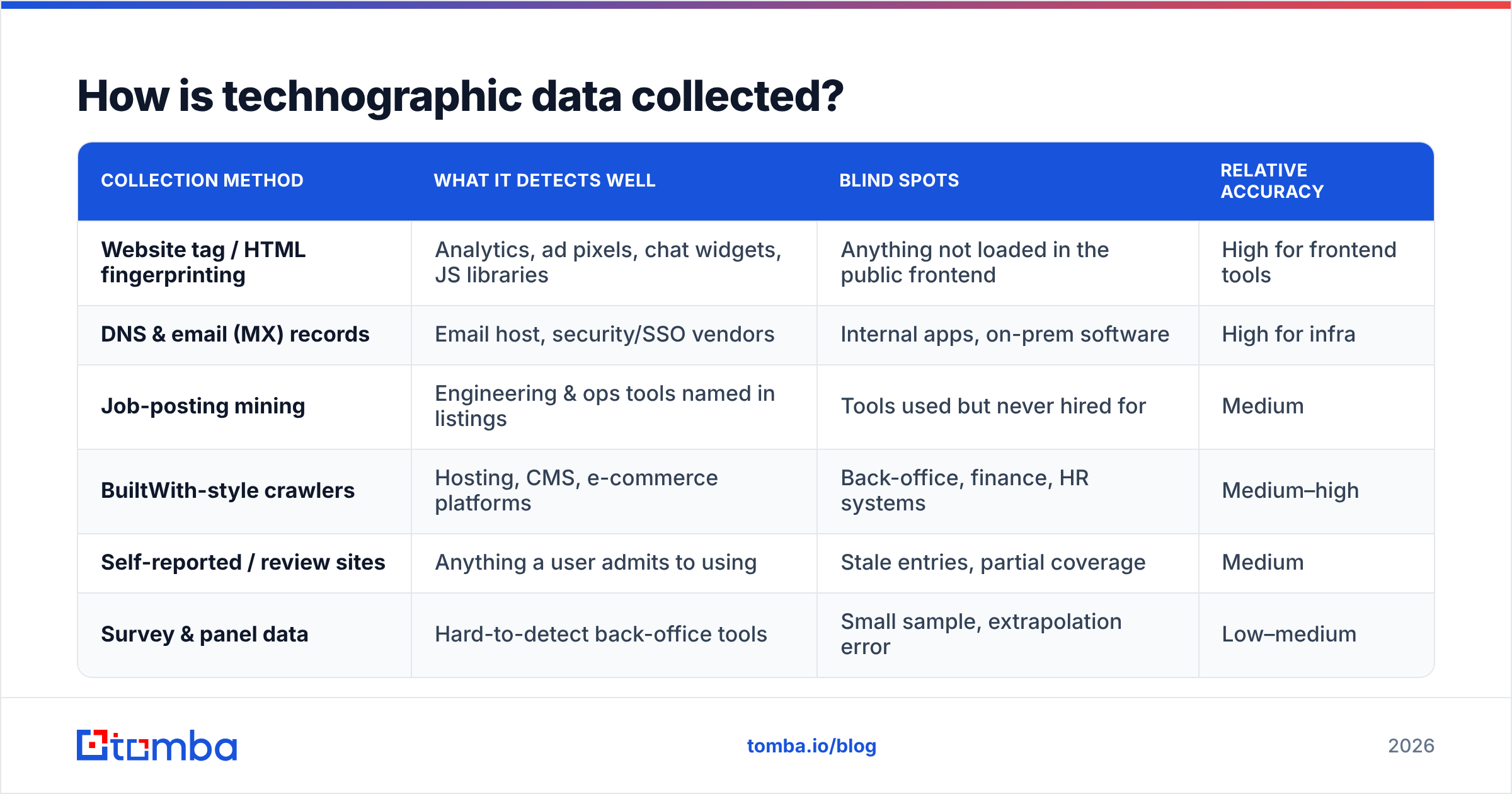
Most technographic data comes from detecting digital footprints, not from companies volunteering their stack. Each collection method has a different reliability profile, and knowing the source tells you how much to trust the signal.
| Collection method | What it detects well | Blind spots | Relative accuracy |
|---|---|---|---|
| Website tag / HTML fingerprinting | Analytics, ad pixels, chat widgets, JS libraries | Anything not loaded in the public frontend | High for frontend tools |
| DNS & email (MX) records | Email host, security/SSO vendors | Internal apps, on-prem software | High for infra |
| Job-posting mining | Engineering & ops tools named in listings | Tools used but never hired for | Medium |
| BuiltWith-style crawlers | Hosting, CMS, e-commerce platforms | Back-office, finance, HR systems | Medium–high |
| Self-reported / review sites | Anything a user admits to using | Stale entries, partial coverage | Medium |
| Survey & panel data | Hard-to-detect back-office tools | Small sample, extrapolation error | Low–medium |
The honest takeaway: anything that runs in a browser tab is easy to detect, and anything that runs behind the firewall is hard. A vendor claiming 95% accuracy on a company's accounting software is selling you confidence, not data. Tools like BuiltWith are transparent about detecting frontend technologies precisely because that's where fingerprinting works best.
How accurate are B2B technographics?#
Plan for 60–85% accuracy on detectable, frontend-facing tools and much lower on internal systems. Accuracy degrades with three things: how deep in the stack a tool sits, how recently it changed, and how the provider sources its data.
The decay problem is the one most teams underestimate. A company that swapped CRMs in Q1 might not show the change in a technographic dataset until Q3—data gets crawled and refreshed on a schedule, not in real time. So a "current" stack is really a snapshot from weeks or months ago.
That doesn't make technographics useless. It makes them a prioritization layer, not a fact layer. Use them to decide who to research and reach, then confirm the live stack in the conversation. The mistake is treating a detected tag as a guaranteed truth and writing a hyper-specific opener around a tool the prospect ripped out two months ago.
A practical accuracy hygiene checklist:
- Cross-reference two sources before betting a campaign on a single signal.
- Weight by detectability — trust the analytics-tool flag more than the ERP flag.
- Check the refresh date if your provider exposes it.
- Verify in-conversation rather than asserting; "Are you still on X?" beats "I know you use X."

What's the difference between firmographics, technographics, and intent data?#
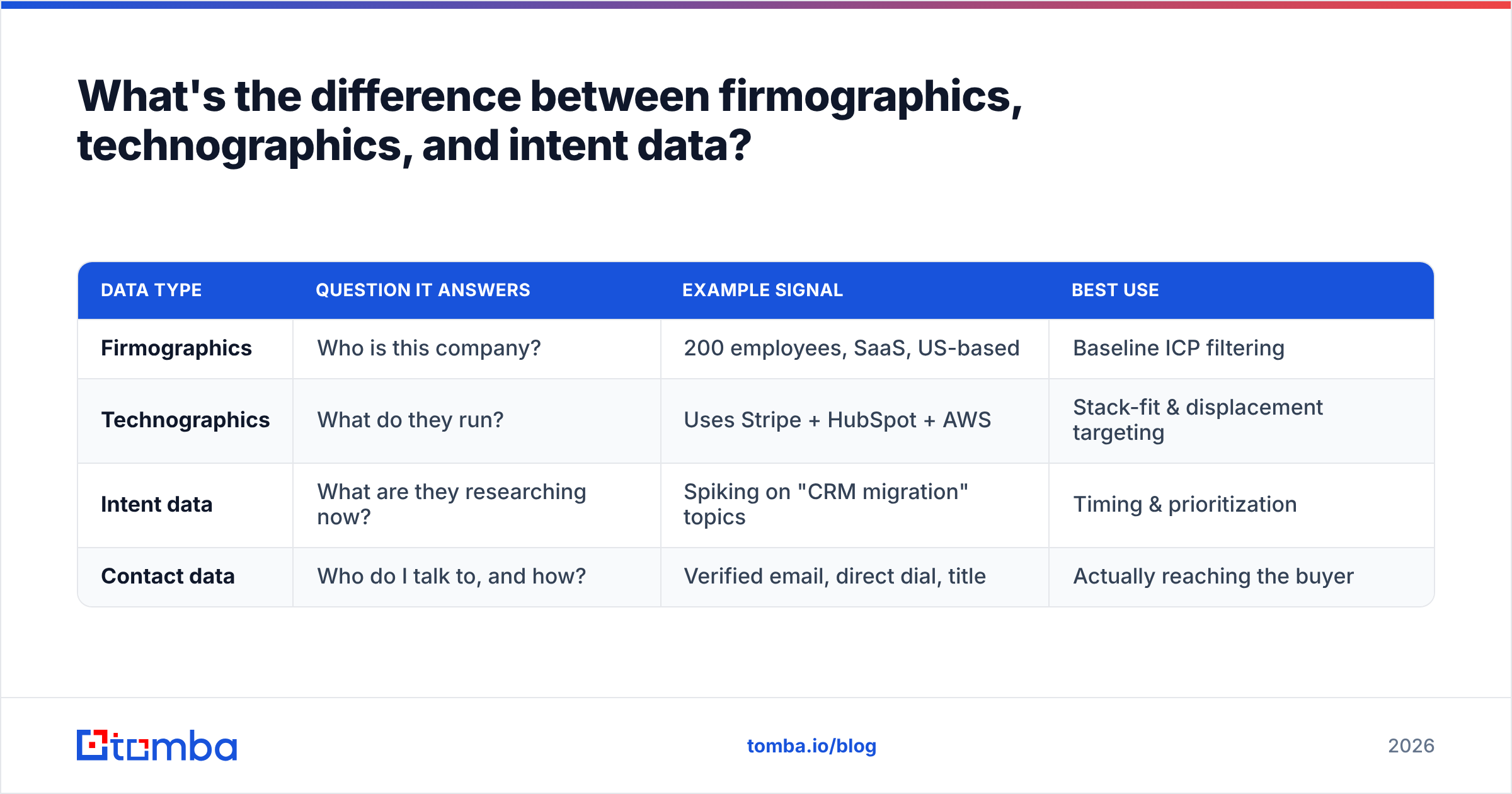
They answer three different questions, and a strong B2B database blends all three. Confusing them leads to muddy targeting, so keep the lanes clear.
| Data type | Question it answers | Example signal | Best use |
|---|---|---|---|
| Firmographics | Who is this company? | 200 employees, SaaS, US-based | Baseline ICP filtering |
| Technographics | What do they run? | Uses Stripe + HubSpot + AWS | Stack-fit & displacement targeting |
| Intent data | What are they researching now? | Spiking on "CRM migration" topics | Timing & prioritization |
| Contact data | Who do I talk to, and how? | Verified email, direct dial, title | Actually reaching the buyer |
The magic is in the overlap. Firmographics narrow the universe to your ICP. Technographics flag accounts with a stack that fits your value prop. Intent data tells you which of those accounts are in-market this week. And contact data—the part teams forget until the sequence fails—is what turns the whole analysis into a reply. You can read more on how these layers feed pipeline in our breakdown of revenue operations.
How do you turn technographics into pipeline?#
Build the list with stack signals, then enrich it with contacts you can actually reach. Targeting and activation are two separate jobs, and most teams nail the first and fumble the second.
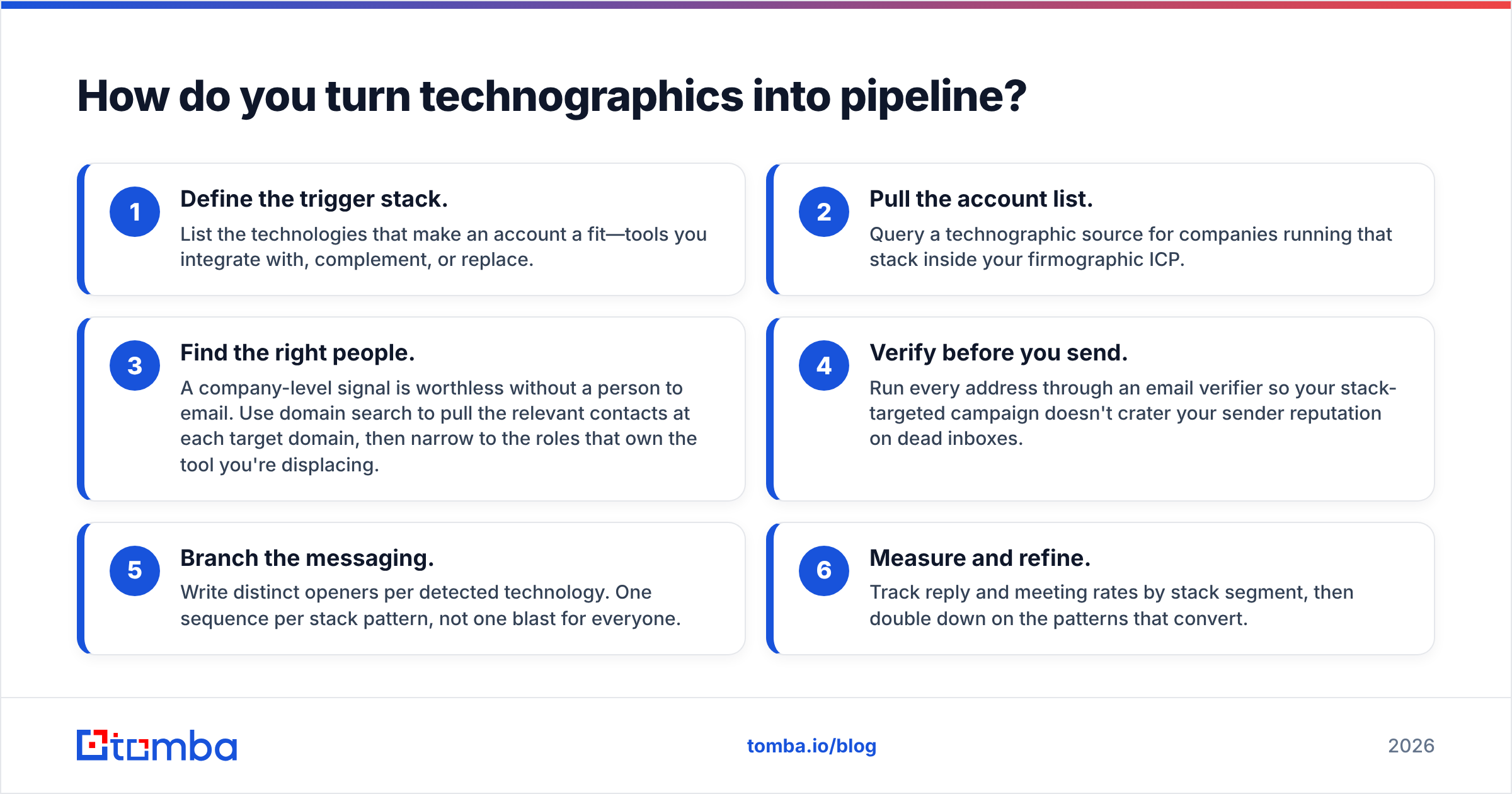
A repeatable workflow:
- Define the trigger stack. List the technologies that make an account a fit—tools you integrate with, complement, or replace.
- Pull the account list. Query a technographic source for companies running that stack inside your firmographic ICP.
- Find the right people. A company-level signal is worthless without a person to email. Use domain search to pull the relevant contacts at each target domain, then narrow to the roles that own the tool you're displacing.
- Verify before you send. Run every address through an email verifier so your stack-targeted campaign doesn't crater your sender reputation on dead inboxes.
- Branch the messaging. Write distinct openers per detected technology. One sequence per stack pattern, not one blast for everyone.
- Measure and refine. Track reply and meeting rates by stack segment, then double down on the patterns that convert.
The failure mode is obvious once you name it: a perfectly targeted technographic list with no verified contact data is just a spreadsheet. The accounts are right, but the emails bounce, the dials go nowhere, and the campaign reports "low engagement" when the real problem was activation.
What should you look for in a technographics provider?#
Coverage, freshness, accuracy transparency, and—critically—how the data connects to reachable contacts. Many providers are strong on one axis and silent on the rest.
Evaluate on these dimensions:
- Detection breadth. How many technologies and categories do they track? Frontend-only, or do they attempt infra and back-office?
- Refresh cadence. Weekly recrawls beat quarterly. Ask, and be skeptical of vague answers.
- Accuracy disclosure. Good vendors tell you where their data is weak. Run from anyone claiming uniform high accuracy across every category.
- Contact linkage. Does the technographic record connect to verified emails, B2B phone numbers, and titles—or do you have to source contacts separately?
- Pricing fit. Per-credit, per-seat, or flat? Match it to your actual query volume so you're not paying enterprise rates for SMB usage. Compare against transparent options like Tomba pricing before committing.
- API access. If you want technographics inside your CRM or scoring model, a clean email finder API and enrichment endpoint matter more than a pretty dashboard.
Independent review sites like G2 are useful for sanity-checking vendor claims against real user feedback—especially the accuracy complaints that marketing pages bury.
Where does Tomba fit?#
Tomba is the activation layer that makes technographic targeting actually convert. You can source stack signals from a dedicated technographics vendor, but the moment you have your target-account list, the bottleneck becomes contacts—and that's exactly the gap Tomba fills.
Once you know which accounts run the stack you care about, point the Tomba Email Finder at those domains to pull verified, decision-maker emails, layer in data enrichment for titles and firmographics, and verify every address before your sequence goes live. Plans start with a free tier (25 searches a month) and scale to Starter at $49/mo, Growth at $99/mo, and Pro at $249/mo—so you can test the workflow on a real account list before you commit budget. Your technographics tell you who to chase; Tomba makes sure the email lands. Start free and turn your target stack into a reachable pipeline.
Ready to find emails that actually work?
Join 150,000+ professionals who stopped guessing and started sending. Free credits on signup — no credit card required.
Get the Tomba newsletter
Practical outbound tactics and product updates — once every two weeks.
About the author