BatchDialer Pricing Reviews Pros and Cons (2026 Guide)
A neutral 2026 breakdown of BatchDialer pricing, real user reviews, and the honest pros and cons — plus how to feed it clean, verified contact data so your dialer actually connects.
BatchDialer Pricing Reviews Pros and Cons
TL;DR
- BatchDialer is a cloud predictive and multi-line dialer aimed at outbound call centers, real-estate teams, and high-volume SDR floors — it competes on dialing speed and built-in data, not on price.
- Pricing sits in the premium tier (roughly $159–$199 per seat per month depending on dialing mode and contract), with no permanent free plan — only a trial. Always confirm current numbers on the vendor site.
- Reviewers praise the multi-line predictive dialer, clean interface, and live monitoring; the most common complaints are call quality on weak connections, occasional billing friction, and a learning curve for admins.
- The dialer is only as good as the list you load. Garbage numbers burn dial minutes and torch your caller reputation faster than any feature can fix.
- Pair BatchDialer (or any dialer) with verified contact data so reps spend minutes talking, not listening to dead lines.
A predictive dialer is like a restaurant host who seats your table the moment it opens. You never stand at the door waiting. That speed is the whole pitch behind BatchDialer. But a host can only seat you if the reservations are real. This guide covers BatchDialer pricing reviews pros and cons in plain terms, then shows where the data layer fits.
What is BatchDialer?#
BatchDialer is a cloud-based outbound calling platform. It is built for teams that make a lot of calls — real-estate wholesalers, insurance, solar, debt, and B2B sales floors. It bundles a single-line and multi-line (predictive) dialer, local caller ID, call recording, and live agent monitoring. A built-in contact database lets you buy and dial lists in one place.
It belongs to the BatchService family of real-estate and data products. That is why its marketing leans toward property investors. But the core engine is generic enough for any high-volume cold calling operation. It dials more numbers per hour and routes live answers to open agents.
The competitive promise is throughput. A manual dialer might get a rep 8–12 conversations a day. A well-tuned predictive dialer can multiply connect rates. It dials several numbers at once and passes only live humans to your reps. (For background on how that engine works, see Wikipedia's overview of the predictive dialer.)
How much does BatchDialer cost?#
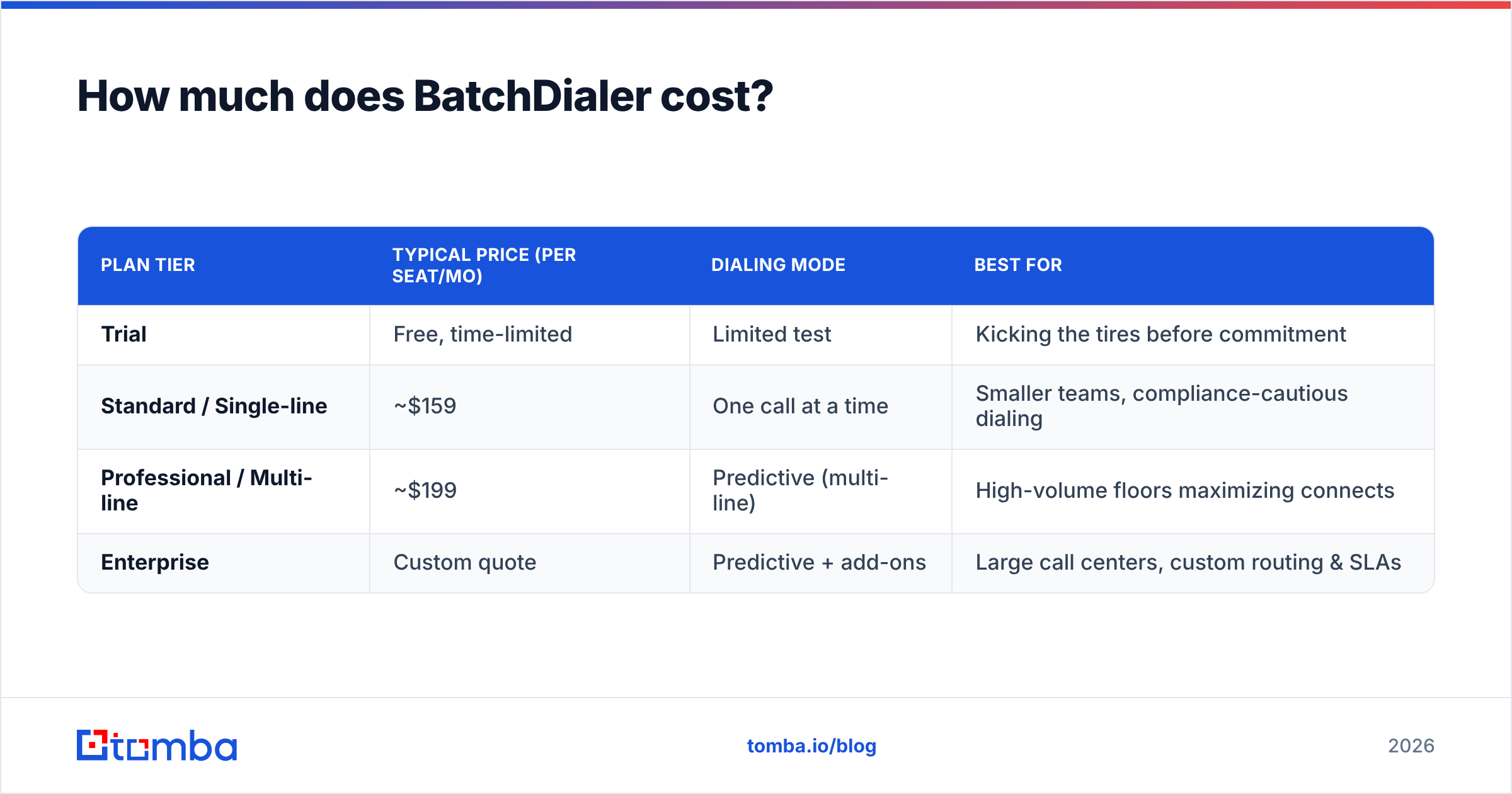
BatchDialer is a premium-priced dialer with no permanent free tier. Public pricing has historically landed around $159 per seat per month for the single-line dialer. The multi-line predictive dialer runs roughly $199 per seat per month. It is often billed annually, with add-ons for extra data, numbers, and minutes. Pricing and packaging change often. Treat the table below as a planning estimate, and confirm live figures on batchdialer.com before you buy.
| Plan tier | Typical price (per seat/mo) | Dialing mode | Best for |
|---|---|---|---|
| Trial | Free, time-limited | Limited test | Kicking the tires before commitment |
| Standard / Single-line | ~$159 | One call at a time | Smaller teams, compliance-cautious dialing |
| Professional / Multi-line | ~$199 | Predictive (multi-line) | High-volume floors maximizing connects |
| Enterprise | Custom quote | Predictive + add-ons | Large call centers, custom routing & SLAs |
A few cost realities that don't show up on the headline price:
- Per-seat math scales fast. Ten reps on the multi-line plan is roughly $2,000/month before add-ons. Budget for the team, not the demo seat.
- Data and minutes are often separate. Built-in list buying and call minutes can be billed on top of the seat license. Ask exactly what's included.
- Annual commitments lower the monthly rate but raise switching cost if the tool doesn't stick. Pilot on the shortest term you can.
- Phone numbers and caller-ID presence may carry their own line items, especially if you want many local area codes.
Compared with broad sales platforms, BatchDialer is narrow and deep. If you only need outbound dialing, that focus is a feature. If you want dialing plus email sequencing plus a CRM, you'll likely stitch tools together — which is normal, and where your data enrichment and contact sourcing live anyway.
What do BatchDialer reviews say?#
Aggregate sentiment on review sites is generally positive. The pattern is typical for high-volume calling software. Power users love the speed. The friction shows up around connectivity and billing. Check current ratings yourself on G2 and Capterra — scores move over time and vendor responses tell you a lot.
Recurring themes from public reviews:
- What reviewers like: the multi-line predictive dialer noticeably lifts conversations per hour; the interface is clean and quick to learn for agents; live monitoring and whisper/barge features help managers coach in real time; built-in lists mean you can start dialing without a separate data contract.
- What reviewers flag: call/audio quality can degrade on weak internet; some report billing or contract disputes and slow refunds; the admin side has a learning curve; and — the universal one — the included or imported data quality varies, which kills connect rates regardless of how fast the dialer is.
That last point is the one most teams underestimate. A predictive dialer punishes bad data twice. First, it wastes the dial attempt. Second, a wall of wrong numbers drags down your answer rate and caller reputation. That spikes spam-likely flagging on the carrier side.
What are the pros and cons of BatchDialer?#
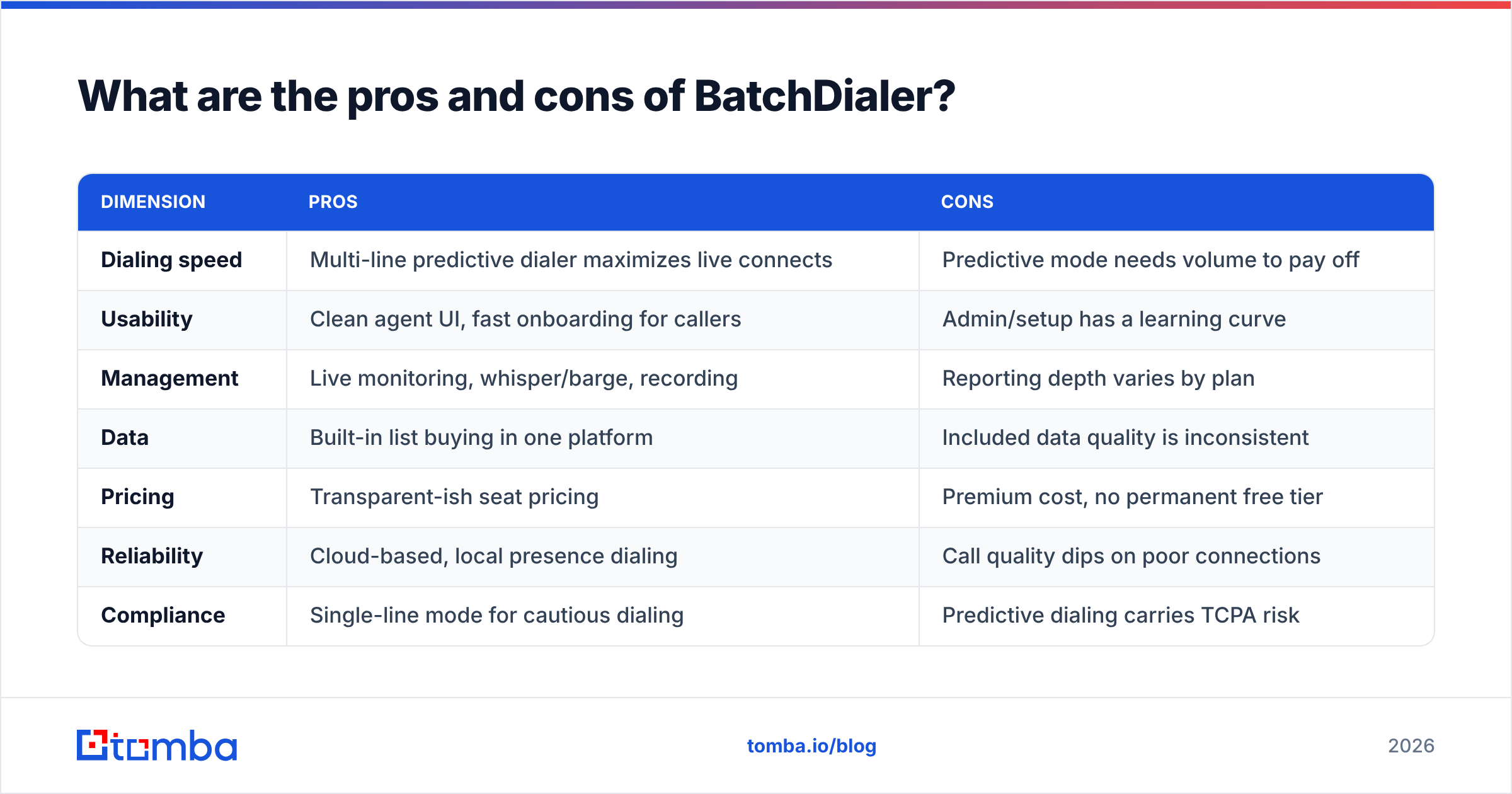
Here's the balanced view. Conclusion first: BatchDialer is a strong, purpose-built dialer for high-volume outbound teams that have the budget and the list volume to justify it. It is overkill for a rep making a handful of targeted calls a day.
| Dimension | Pros | Cons |
|---|---|---|
| Dialing speed | Multi-line predictive dialer maximizes live connects | Predictive mode needs volume to pay off |
| Usability | Clean agent UI, fast onboarding for callers | Admin/setup has a learning curve |
| Management | Live monitoring, whisper/barge, recording | Reporting depth varies by plan |
| Data | Built-in list buying in one platform | Included data quality is inconsistent |
| Pricing | Transparent-ish seat pricing | Premium cost, no permanent free tier |
| Reliability | Cloud-based, local presence dialing | Call quality dips on poor connections |
| Compliance | Single-line mode for cautious dialing | Predictive dialing carries TCPA risk |
Pros in plain terms: if your business model is "more conversations equals more revenue" and you have lists in the thousands, the throughput is real and the coaching tools are genuinely useful.
Cons in plain terms: it's expensive per seat. You're paying for an engine you must keep fed with volume. And predictive dialing brings regulatory duties you have to manage (consent, calling windows, do-not-call scrubbing). None of these are dealbreakers. They're reasons to pilot before you commit a full floor.
How does BatchDialer compare to alternatives?#
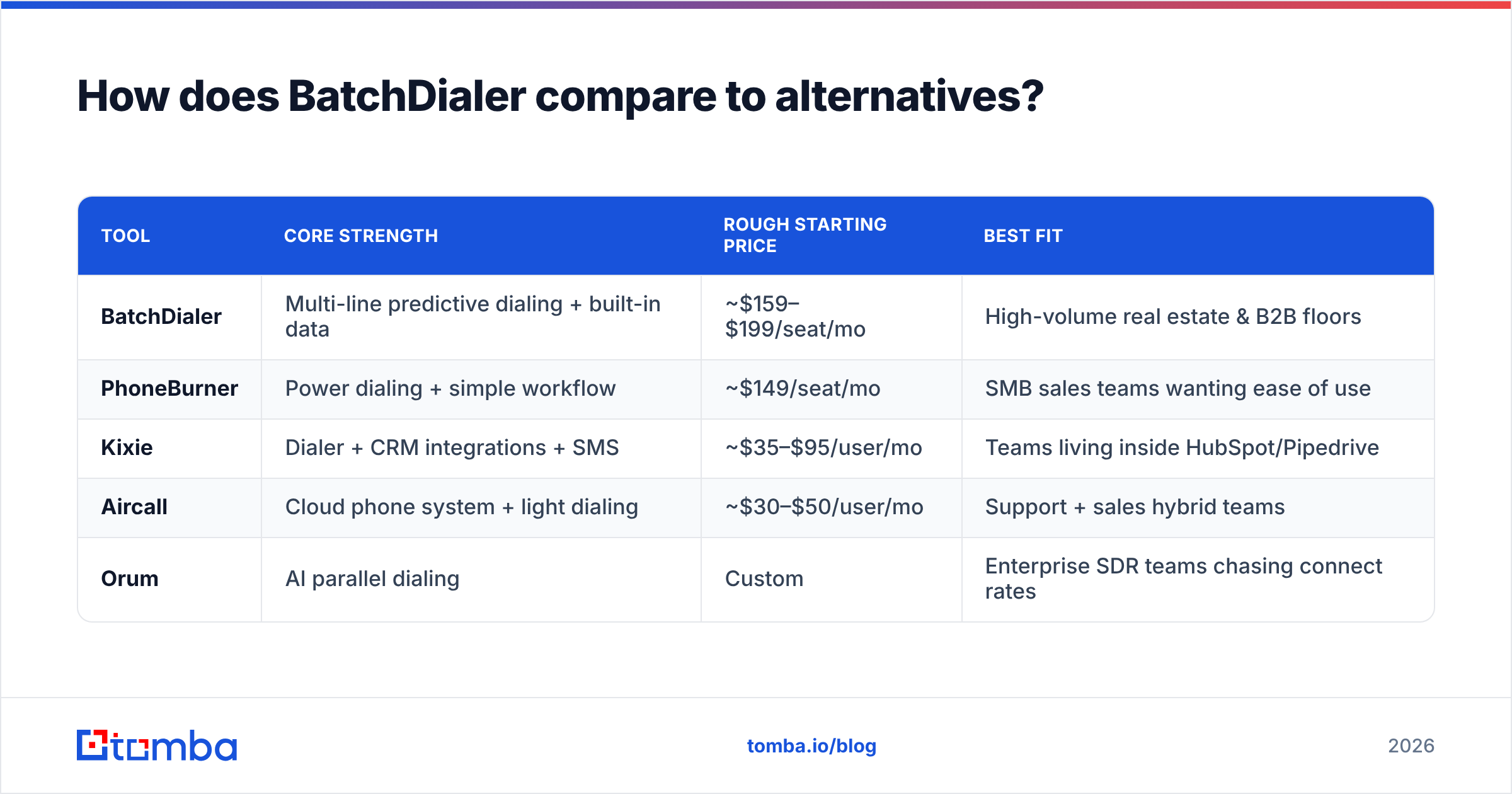
BatchDialer isn't the only predictive dialer. The right pick depends on whether you want a pure dialer or a wider sales engagement suite. Here's a high-level comparison to frame your shortlist.
| Tool | Core strength | Rough starting price | Best fit |
|---|---|---|---|
| BatchDialer | Multi-line predictive dialing + built-in data | ~$159–$199/seat/mo | High-volume real estate & B2B floors |
| PhoneBurner | Power dialing + simple workflow | ~$149/seat/mo | SMB sales teams wanting ease of use |
| Kixie | Dialer + CRM integrations + SMS | ~$35–$95/user/mo | Teams living inside HubSpot/Pipedrive |
| Aircall | Cloud phone system + light dialing | ~$30–$50/user/mo | Support + sales hybrid teams |
| Orum | AI parallel dialing | Custom | Enterprise SDR teams chasing connect rates |
Two takeaways. First, BatchDialer sits at the premium, dialer-first end of the market. You pay for throughput and bundled data. Second, every tool on this list shares the same dependency: the phone numbers and contacts you load. Switching dialers won't fix a list problem. That's why the smartest teams treat sourcing and verification as a separate, deliberate layer.
If you're cost-comparing, build your own apples-to-apples sheet. Include seats, minutes, numbers, and data add-ons. The sticker price rarely tells the whole story.
Why does data quality decide your dialer ROI?#
Your connect rate is capped by your list, not your dialer. You can buy the fastest predictive engine on the market. But if 30% of your numbers are wrong or disconnected, you have pre-paid to waste a third of every rep's day.
Think of it like fuel. A race car (the dialer) is only fast if the fuel (your data) is clean. Cheap, contaminated fuel ruins an expensive engine. Three concrete ways data quality moves the number that matters:
- Right person, right number. Reaching a verified decision-maker beats spraying a generic mainline. Sourcing direct contacts with a phone finder gets reps to humans who can actually say yes.
- Validated lines before you dial. Scrubbing numbers with a phone validator removes dead and invalid lines so predictive pacing doesn't burn attempts on noise.
- Enriched context on the screen. When a call connects, role, company, and email on the same record let the rep open with relevance instead of "is this the owner?" That's what a solid B2B database and enrichment layer provide.
This is also why many teams run a multi-channel motion: dial the verified number, and follow up by email to the contact you found and confirmed. The dialer handles voice; your data stack handles accuracy and the email channel. For where that contact data comes from and how it's checked, see Tomba's notes on data accuracy.
Who should buy BatchDialer in 2026?#
Buy it if you run a genuine high-volume outbound operation. That means real-estate acquisition, insurance, solar, or a B2B SDR floor pushing thousands of dials a week. You also need the budget for premium per-seat pricing. And you need the list volume to keep a predictive engine busy. The throughput and coaching tools will pay for themselves.
Skip it if you're a small team making targeted, research-heavy calls. Skip it too if you want one platform that also handles email sequencing and CRM. In those cases a lighter dialer or an all-in-one engagement tool will cost less and waste fewer features.
Either way, decide your data strategy first. The dialer is the megaphone; the contacts are the message. A premium megaphone aimed at the wrong numbers is just expensive noise.
Frequently asked questions#
Does BatchDialer have a free plan? No permanent free tier — only a time-limited trial. Use the trial to test call quality and predictive pacing with your own list before committing to annual seats.
Is BatchDialer worth the price? For high-volume floors, the connect-rate lift usually justifies the premium. For low-volume, targeted calling, cheaper power dialers deliver most of the value.
Is predictive dialing legal? Predictive and auto-dialing are regulated (TCPA in the US and similar rules elsewhere). You're responsible for consent, calling windows, and DNC scrubbing. Single-line manual mode reduces some of that exposure.
What's the biggest hidden cost? Wasted dials on bad data. The seat price is visible; the connect-rate tax of dirty lists is not — and it's usually larger.
BatchDialer pricing reviews pros and cons: the bottom line#
Here's the verdict on BatchDialer pricing reviews pros and cons. BatchDialer is a capable, premium predictive dialer. It earns its keep on busy outbound floors. It is hard to justify for low-volume, targeted calling. The pricing is fair for what it is. The reviews are solid with predictable gripes. The pros and cons come down to one question: do you have the volume and the data to keep the engine fed?
Fix the data half before you spend a dollar on the dialer half. Start by building a clean, verified contact list: use the Tomba Email Finder to pull accurate professional emails for the same accounts you're calling, layer in verified phone numbers and enrichment, and feed your dialer contacts that actually connect. Better data turns any dialer — BatchDialer included — into a revenue engine instead of a minute-burner. Check Tomba pricing (free tier with 25 searches, Starter at $49/mo) and load your first verified list today.
// get started
Find, verify and enrich your first contacts today
Start on the free plan with 25 searches a month, then scale when your team is ready.
Free plan · No credit card required · GDPR & CCPA
// about the author