BDR Contact Data in 2026: Build Lists That Actually Convert
Most BDR pipelines stall on bad data, not bad scripts. Here's how to source, verify, and maintain BDR contact data in 2026 so reps spend time selling, not scrubbing CSVs.
BDR Contact Data in 2026: Build Lists That Actually Convert
Your BDRs are not missing quota because their cold emails are weak. They are missing quota because half the contacts on their list are wrong — wrong email, wrong title, wrong company, or a person who left 14 months ago. Fix the data layer and everything downstream gets cheaper.
TL;DR#
- BDR contact data is the raw fuel of outbound: names, verified emails, direct phones, titles, and company firmographics your reps use to start conversations.
- Data decays at roughly 25–30% per year, so a "fresh" list bought in January is materially stale by Q4.
- Bounce rates above 3–5% damage sender reputation and quietly tank deliverability for your whole domain — verification is not optional.
- The cheapest fix is rarely "buy more contacts." It is verify, enrich, and refresh what you already target.
- A waterfall approach (multiple sources + verification) beats any single provider, and tools like the Tomba Email Finder plug directly into that flow.
What is BDR contact data, exactly?#
BDR contact data is the structured information a business development rep needs to reach a buying decision-maker: the person's full name, job title, work email, direct dial or mobile, LinkedIn URL, plus the company context around them (industry, size, location, tech stack, revenue band).
Think of it like a delivery address. A great pitch is the package; the contact record is the address label. If the label is wrong, it does not matter how good the package is — it never arrives, or it arrives at the wrong door and annoys a stranger. BDRs who skip data hygiene are mailing thousands of packages to addresses they never checked.
The record usually breaks into three layers:
- Identity — who the person is: name, title, seniority, department.
- Reachability — how you contact them: verified email, direct phone, LinkedIn profile.
- Context — why they might buy: company size, industry, funding, technologies, recent triggers (new role, hiring, expansion).
A list that only has identity and a guessed email pattern is not BDR contact data. It is a guess with a logo next to it.
Why does BDR contact data decay so fast?#
People change jobs. Companies rebrand, merge, and relocate. Email providers retire catch-all domains and tighten spam filters. According to widely cited B2B data benchmarks, contact databases degrade by roughly 25–30% annually — that is one in four records going bad every year, or about 2% every single month.
The decay is not evenly spread, either. It clusters in exactly the segments BDRs care about most: high-growth startups (constant role changes), recently funded companies (rapid hiring and reorgs), and senior titles (the people most likely to get promoted or poached). So the contacts with the highest deal value are also the ones rotting fastest.
This is why "we bought a database last year" is a warning sign, not a flex. The half-life of a purchased list is short, and an unverified list you reuse for two quarters can have a real bounce rate north of 15%.
How do you source BDR contact data in 2026?#
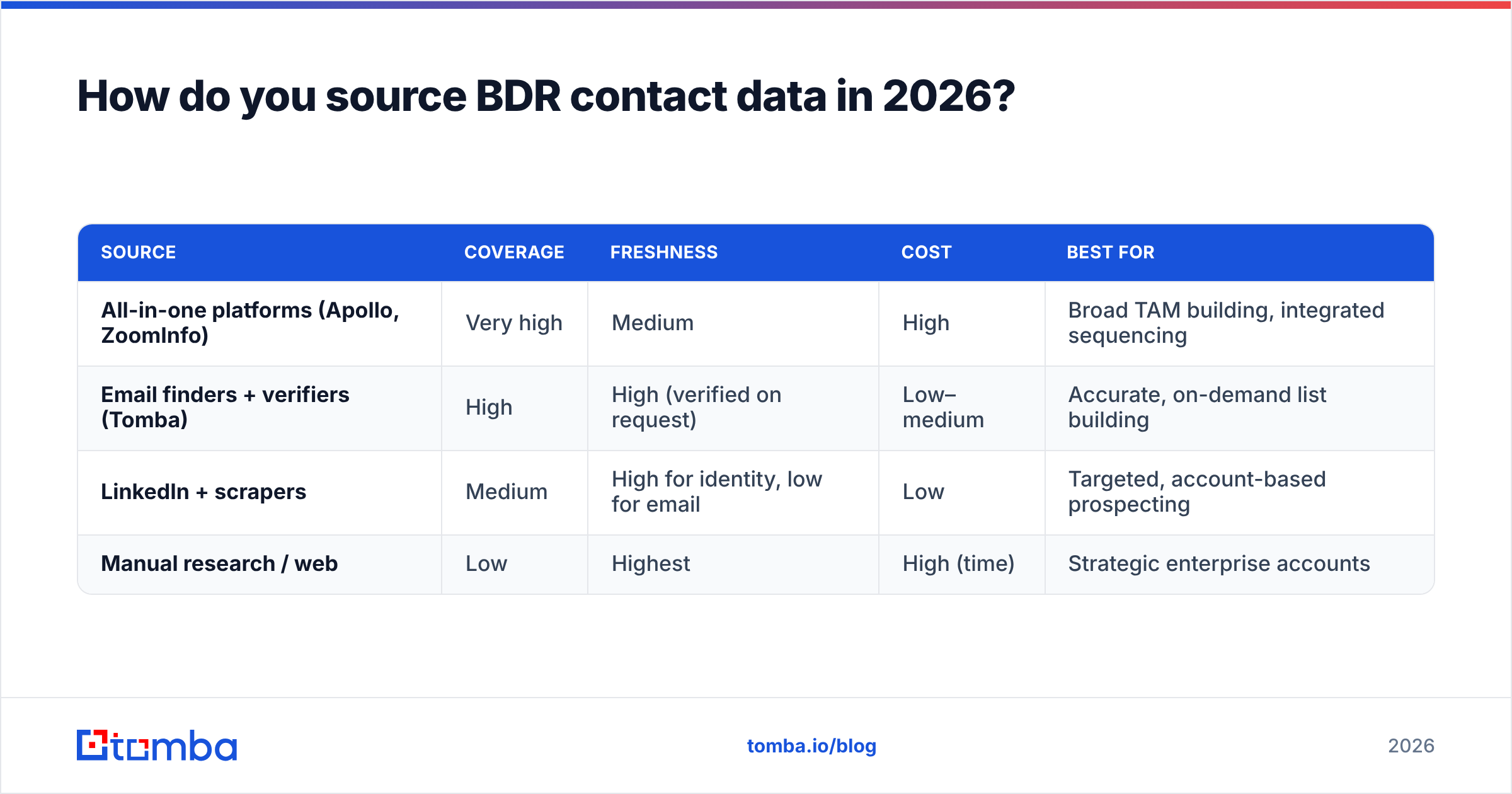
There are four practical sources, and serious teams blend them rather than betting on one. Here is how they compare.
| Source | Coverage | Freshness | Cost | Best for |
|---|---|---|---|---|
| All-in-one platforms (Apollo, ZoomInfo) | Very high | Medium | High | Broad TAM building, integrated sequencing |
| Email finders + verifiers (Tomba) | High | High (verified on request) | Low–medium | Accurate, on-demand list building |
| LinkedIn + scrapers | Medium | High for identity, low for email | Low | Targeted, account-based prospecting |
| Manual research / web | Low | Highest | High (time) | Strategic enterprise accounts |
The mistake teams make is treating these as either/or. The winning pattern is a waterfall: start with a broad source for identity and firmographics, then route every email through a dedicated finder and email verifier before it ever touches a sequence. You get the coverage of a big database with the accuracy of a verification-first tool.
A common, concrete workflow:
- Define the ICP — title, seniority, company size, industry, region.
- Pull the account and people list from a database or LinkedIn search.
- Find emails by domain with a domain search to grab every known contact and the company's email pattern in one pass.
- Verify every address, and flag catch-all domains for separate handling.
- Enrich the survivors with direct phones and LinkedIn URLs so reps have a multichannel path.
What does bad data actually cost a BDR team?#
It costs more than wasted credits — it costs your domain reputation. Every hard bounce is a signal to mailbox providers that you are sending to addresses you did not vet. Stack up enough of those and your good emails start landing in spam too. That is why poor email deliverability is usually a data problem wearing a copywriting costume.
Run the math on a typical 30-rep org:
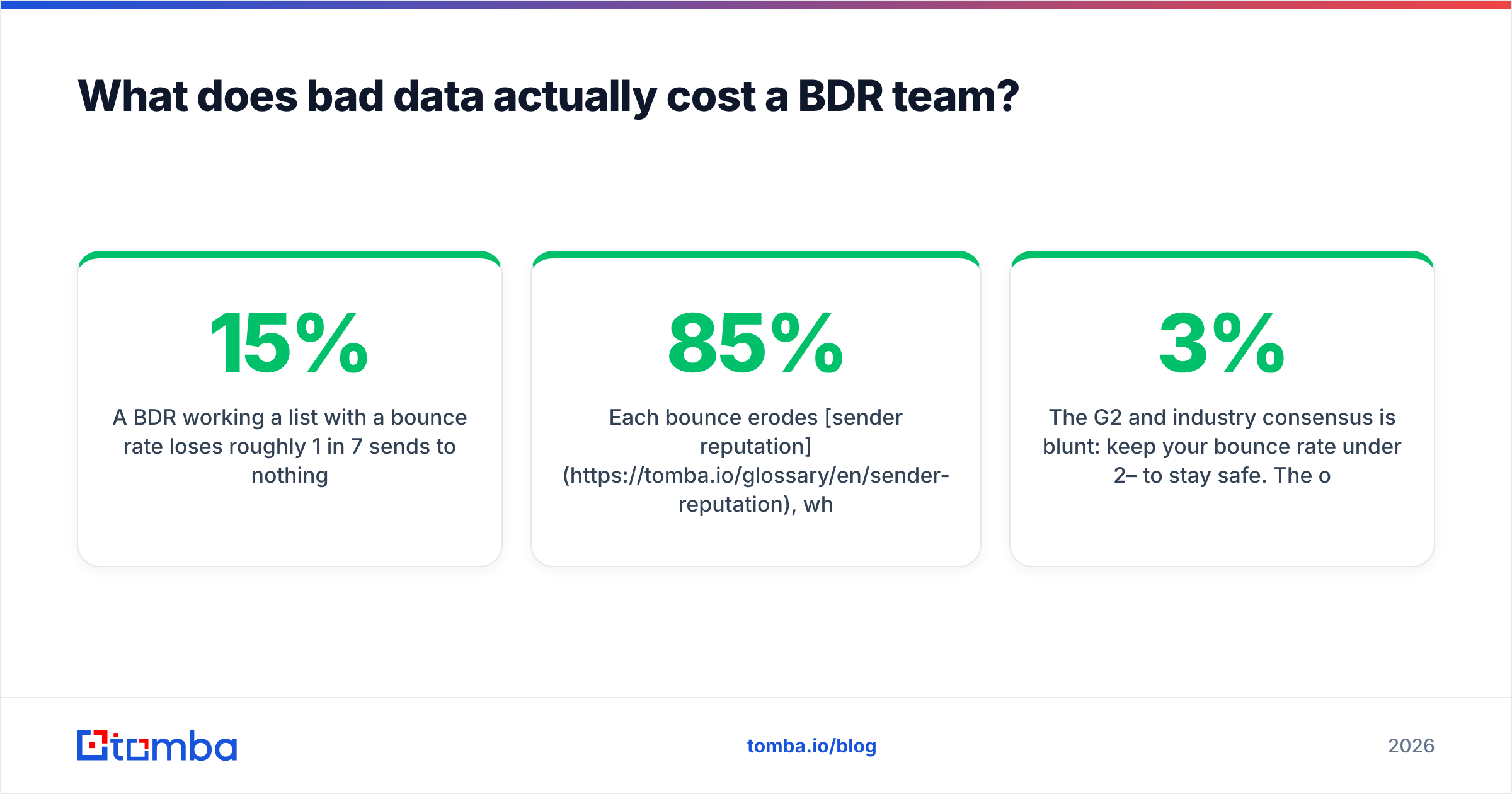
- A BDR working a list with a 15% bounce rate loses roughly 1 in 7 sends to nothing.
- Each bounce erodes sender reputation, which lowers inbox placement for the other 85%.
- Reps then "fix" the symptom by sending more volume, which accelerates the damage.
The G2 and industry consensus is blunt: keep your bounce rate under 2–3% to stay safe. The only reliable way to do that at scale is to verify before you send, not after you get burned. Mailbox providers like Google publish their own sending guidelines that effectively penalize sloppy lists — and they keep getting stricter.
Is buying a database better than building lists on demand?#
Short answer: building on demand wins for most BDR teams, because freshness beats volume.
A purchased database is a photograph — accurate the moment it was taken, slowly going out of date from then on. On-demand finding and verification is a live feed — you pull and confirm the contact right before you use it. For outbound, where one bad send hurts the next hundred, the live feed is almost always the better trade.
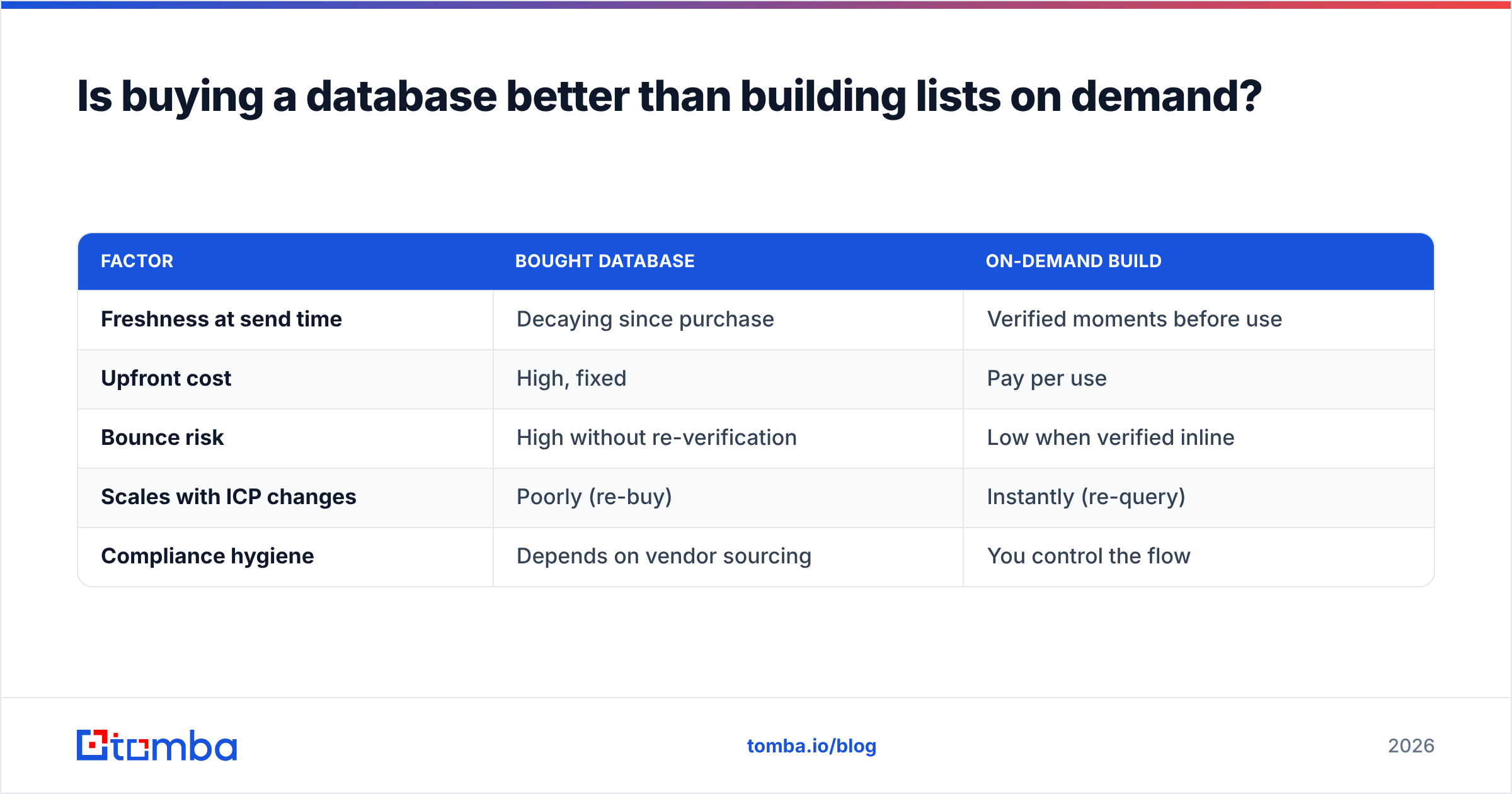
| Factor | Bought database | On-demand build |
|---|---|---|
| Freshness at send time | Decaying since purchase | Verified moments before use |
| Upfront cost | High, fixed | Pay per use |
| Bounce risk | High without re-verification | Low when verified inline |
| Scales with ICP changes | Poorly (re-buy) | Instantly (re-query) |
| Compliance hygiene | Depends on vendor sourcing | You control the flow |
There is a place for a standing B2B database — it is great for sizing your TAM and planning territories. Just do not treat it as a send-ready list. Re-verify before any campaign, every time.
How do you keep BDR contact data clean over time?#
Treat data hygiene as a recurring process, not a one-time purchase. The teams that hit quota consistently run a maintenance loop.
- Verify at the point of use. Re-check emails right before a campaign, not just at import. A record verified in March is not automatically valid in September.
- Handle catch-all domains separately. Catch-all servers accept everything, so a standard check returns "valid" for addresses that do not exist. Route them through a dedicated catch-all verifier and treat the rest as lower-confidence.
- Enrich, don't just collect. Add direct phones and LinkedIn so reps have a fallback when email fails. Multichannel sequences convert better than email-only ones.
- Deduplicate ruthlessly. The same human appears three times with three title variants and your reps look amateurish. Clean it.
- Automate the boring parts. Wire finding and verification into your stack with the Tomba API or a HubSpot integration so records get checked and enriched without a human babysitting a spreadsheet.
A quick framework for prioritizing which records to refresh first:
- Open opportunities — anyone in an active deal. Bad data here costs revenue today.
- Recently engaged — opened, clicked, or replied in the last 90 days.
- High-fit, untouched — perfect ICP match you have not contacted yet.
- Cold and old — everyone else, refreshed in bulk on a schedule.
What about phone data and multichannel BDR motions?#
Email is the workhorse, but the best BDR teams in 2026 run email, phone, and social in parallel — and that requires phone data as clean as your email data. A direct dial that rings a disconnected line wastes the same rep-minute as a bounced email, just more visibly.
Pair your email workflow with a phone finder to attach direct numbers and mobiles to your highest-priority accounts, and validate them so reps are not burning call blocks on dead numbers. For social touches, a LinkedIn finder ties the profile to the verified work email, so the same person is reachable across channels without three separate research passes.
The point is not to do more channels for their own sake. It is that a verified, multi-touch record converts dramatically better than an email-only guess, and the data layer is what makes that possible.
How much should BDR contact data cost?#
Pricing varies wildly, and the headline number is less important than cost-per-usable-contact. A "cheap" provider that returns 40% unverified junk is more expensive than a pricier one that returns clean, verified records.
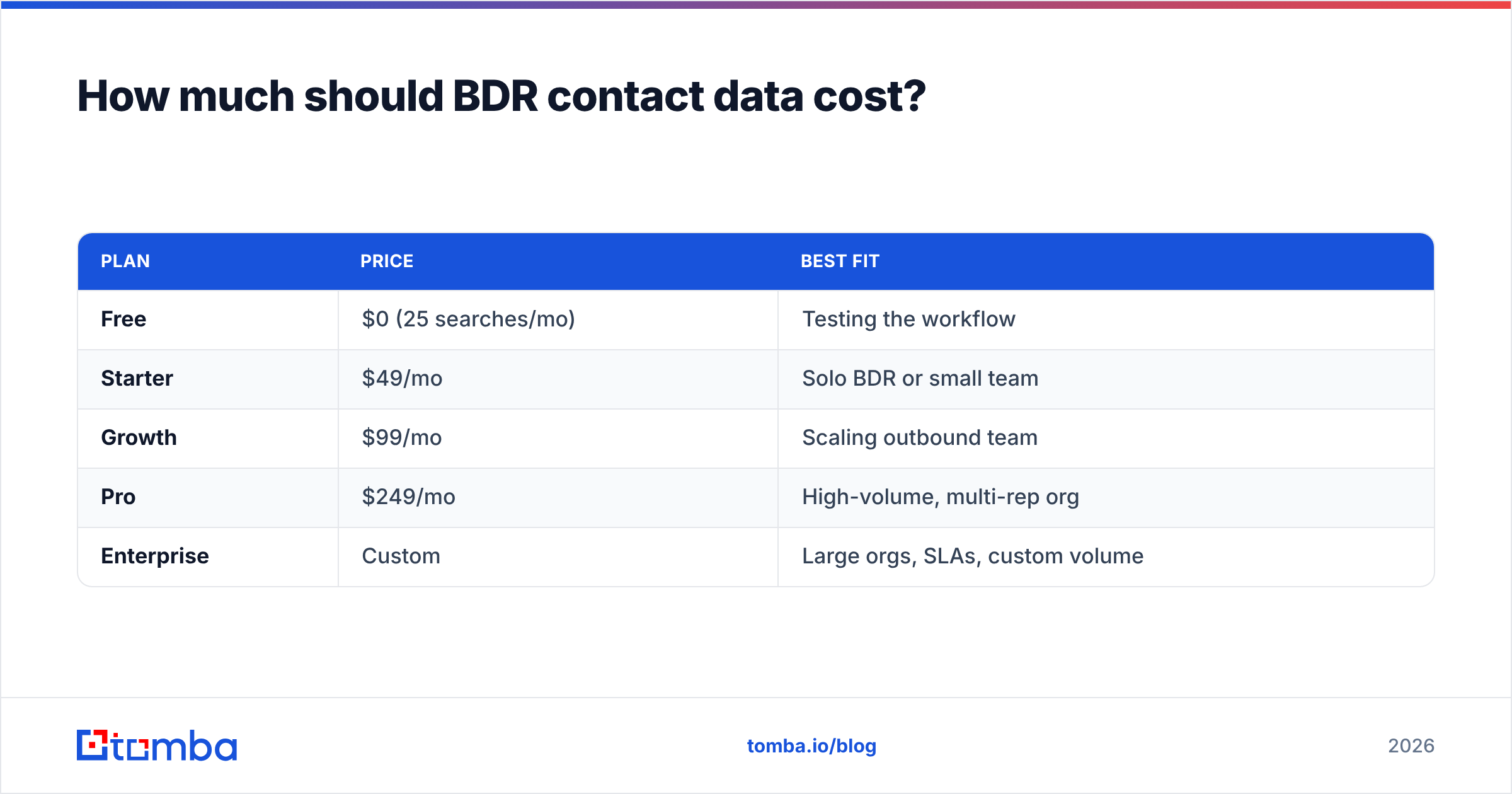
For reference, Tomba pricing runs:
| Plan | Price | Best fit |
|---|---|---|
| Free | $0 (25 searches/mo) | Testing the workflow |
| Starter | $49/mo | Solo BDR or small team |
| Growth | $99/mo | Scaling outbound team |
| Pro | $249/mo | High-volume, multi-rep org |
| Enterprise | Custom | Large orgs, SLAs, custom volume |
When you compare vendors — and you should, on sites like G2 — score them on verification quality and freshness, not just raw record counts. A database that brags about "275M contacts" but verifies none of them is selling you decay.
The bottom line#
BDR contact data is the foundation everything else stands on. You can A/B test subject lines forever, but if a quarter of your list is wrong, you are optimizing the paint job on a car with no engine. Source from multiple places, verify before every send, enrich for multichannel, and refresh on a schedule.
If you want a single tool to anchor that flow, start with the Tomba Email Finder. Find emails by name or domain, verify them inline to keep bounces under control, and push clean records straight into your CRM through the API or native integrations. Spin up the free tier, run your next list through it, and let your reps go back to doing the one thing they are actually paid for — booking meetings.
Ready to find emails that actually work?
Join 150,000+ professionals who stopped guessing and started sending. Free credits on signup — no credit card required.
Get the Tomba newsletter
Practical outbound tactics and product updates — once every two weeks.
About the author