BDR Customer Sample Email: 9 Templates That Book Meetings in 2026
Steal 9 proven BDR customer sample email templates for 2026 — first-touch, follow-up, breakup, and referral scripts with subject lines and reply rates you can copy today.
Your BDRs are sending hundreds of emails a week. The difference between a 2% reply rate and a 12% reply rate is rarely volume — it is the words inside a repeatable, well-structured template. This guide gives you a working BDR customer sample email library you can paste into your sequencer today.
TL;DR#
- A great bdr customer sample email is short (under 120 words), references one specific trigger, and asks for one low-friction next step.
- Below are 9 copy-paste templates: first-touch, value-add, case-study, follow-up, breakup, referral, re-engagement, event, and inbound-lead replies.
- Subject lines matter more than body copy for opens — keep them under 6 words and lowercase-casual.
- Templates only work if the email actually reaches the inbox. Verified addresses and clean deliverability do more for reply rates than clever copy.
- Personalization tokens (role, company trigger, recent news) lift replies 2–3x over generic merge fields.
What Is a BDR Customer Sample Email?#
A BDR customer sample email is a template a Business Development Representative uses to open a conversation with a prospect who has never spoken to your company. Think of it like a doctor's first two questions: not "buy my treatment," but "where does it hurt, and can I take a quick look?" The job of the email is not to close — it is to earn 15 minutes.
Most BDR emails fail for one of three reasons: they talk about the seller instead of the buyer, they ask for too much too soon, or they never reach the inbox because the address was guessed and bounced. Fix those three and your numbers move.
A strong template has five parts:
- Subject line — 2 to 6 words, curiosity or relevance, no clickbait.
- Opening line — about the prospect, never "I hope this email finds you well."
- Relevance hook — one trigger: a funding round, a new hire, a job posting, a tech-stack signal.
- Value bridge — one sentence on the outcome you create for similar companies.
- Single CTA — an interest-based ask ("worth a look?"), not a calendar demand.

How Is a BDR Email Different From a Marketing Email?#
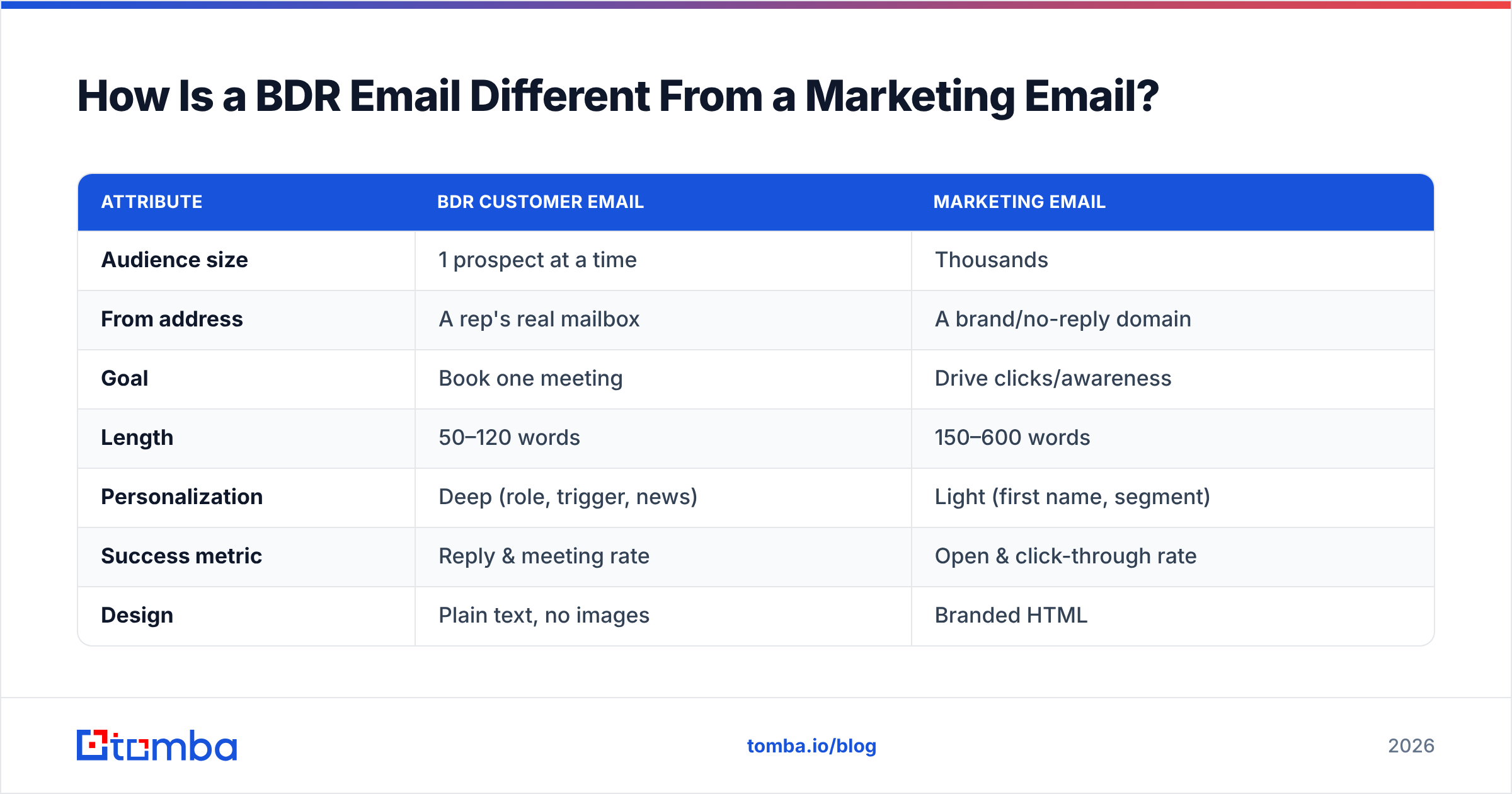
Marketing emails go to a list. BDR emails go to a person. That single difference changes everything — tone, length, personalization, and how you measure success.
| Attribute | BDR Customer Email | Marketing Email |
|---|---|---|
| Audience size | 1 prospect at a time | Thousands |
| From address | A rep's real mailbox | A brand/no-reply domain |
| Goal | Book one meeting | Drive clicks/awareness |
| Length | 50–120 words | 150–600 words |
| Personalization | Deep (role, trigger, news) | Light (first name, segment) |
| Success metric | Reply & meeting rate | Open & click-through rate |
| Design | Plain text, no images | Branded HTML |
The takeaway: a BDR email should read like it was typed by a human five minutes ago, because deliverability and reply rates both reward plain-text, one-to-one messages. If you want to go deeper on the writing mechanics, the cold email templates library is a good next stop.
What Are the Best BDR Customer Sample Email Templates?#
Below are nine templates. Replace the bracketed tokens with real data — and make sure the email address is real before you hit send. A clever template sent to j.smith@company.com that should have been john.smith@company.com earns you a bounce, not a reply.
1. The First-Touch Trigger Email#
Subject: quick question, [First Name]
Hi [First Name],
Saw [Company] just [trigger — opened a Denver office / posted 4 SDR roles / raised a Series B]. Usually when teams scale that fast, [pain — onboarding ramp slows pipeline].
We helped [similar company] cut ramp time by [X%] in their first quarter.
Worth a quick look at whether the same applies to you?
[Your name]
2. The Value-Add (No Ask) Email#
Subject: thought of [Company]
Hi [First Name],
Not pitching anything — I put together a 2-minute teardown of how [competitor of theirs] handles [process], and a few ideas that might apply to [Company].
Want me to send it over?
[Your name]
3. The Case-Study Proof Email#
Subject: [their metric] like [peer company]?
Hi [First Name],
[Peer company], also in [industry], was stuck at [metric]. After [change], they hit [result] in [timeframe].
Happy to share exactly how. Open to a 15-min walkthrough next week?
[Your name]
4. The Follow-Up (Bump) Email#
Subject: (reply to your first thread — leave it blank)
Hi [First Name],
Floating this back up in case it slipped. Still worth a look?
[Your name]
Keep follow-ups in the same thread. Three to four bumps over two weeks is the sweet spot before you switch tactics.
5. The Breakup Email#
Subject: should I close your file?
Hi [First Name],
Haven't heard back, so I'll assume the timing is off and stop reaching out. If [pain] becomes a priority later, I'm one reply away.
All the best,
[Your name]
Breakup emails routinely outperform first touches — loss aversion does the work.

6. The Referral / Wrong-Person Email#
Subject: are you the right person?
Hi [First Name],
I may have the wrong contact — who on your team owns [function]? Happy to take this off your plate with a quick intro.
Thanks,
[Your name]
7. The Re-Engagement Email#
Subject: circling back, [First Name]
Hi [First Name],
We spoke [timeframe] ago about [topic] and the timing wasn't right. A lot's changed on our side — [new feature/result]. Worth a fresh look?
[Your name]
8. The Event / Trigger-News Email#
Subject: [event name] takeaway
Hi [First Name],
Caught [Company]'s session at [event]. Your point on [topic] lined up with what we're seeing across [industry]. I'd love to compare notes — 15 minutes next week?
[Your name]
9. The Inbound-Lead Reply#
Subject: re: your [resource] download
Hi [First Name],
Thanks for grabbing [resource]. Most people who download it are wrestling with [pain]. Is that what brought you in, or something else?
[Your name]
How Do You Personalize a BDR Email at Scale?#
Personalization is the multiplier. According to HubSpot's sales research, personalized outreach consistently outperforms generic blasts on reply rate — but reps can't research 300 prospects a day by hand. The fix is structured data, not more hours.
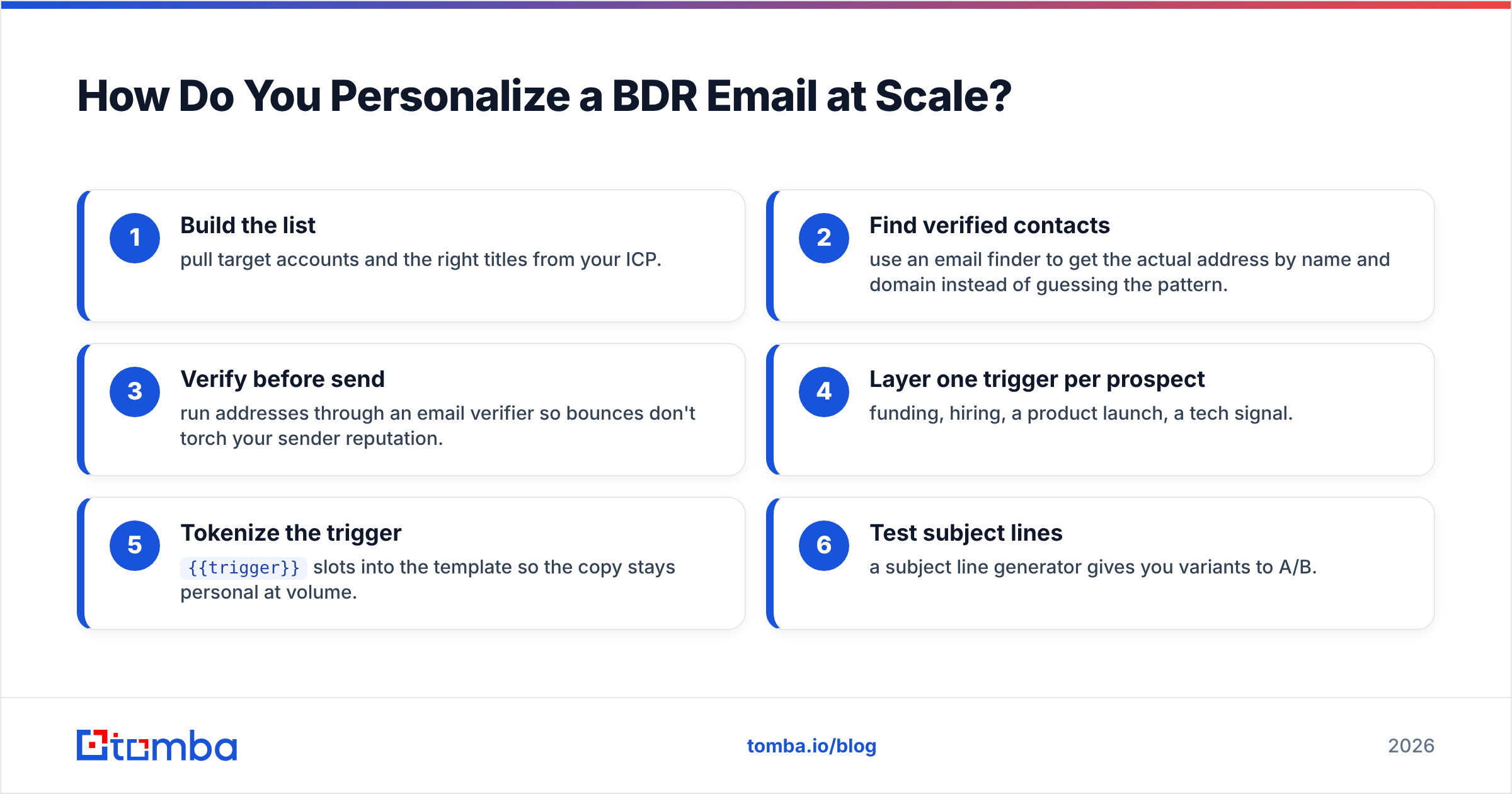
Here is the workflow that keeps personalization fast:
- Build the list — pull target accounts and the right titles from your ICP.
- Find verified contacts — use an email finder to get the actual address by name and domain instead of guessing the pattern.
- Verify before send — run addresses through an email verifier so bounces don't torch your sender reputation.
- Layer one trigger per prospect — funding, hiring, a product launch, a tech signal.
- Tokenize the trigger —
{{trigger}}slots into the template so the copy stays personal at volume. - Test subject lines — a subject line generator gives you variants to A/B.
The order matters: find and verify first, personalize second. A perfectly personalized email to a dead address is worth exactly zero meetings.
How Do You Measure BDR Email Performance?#
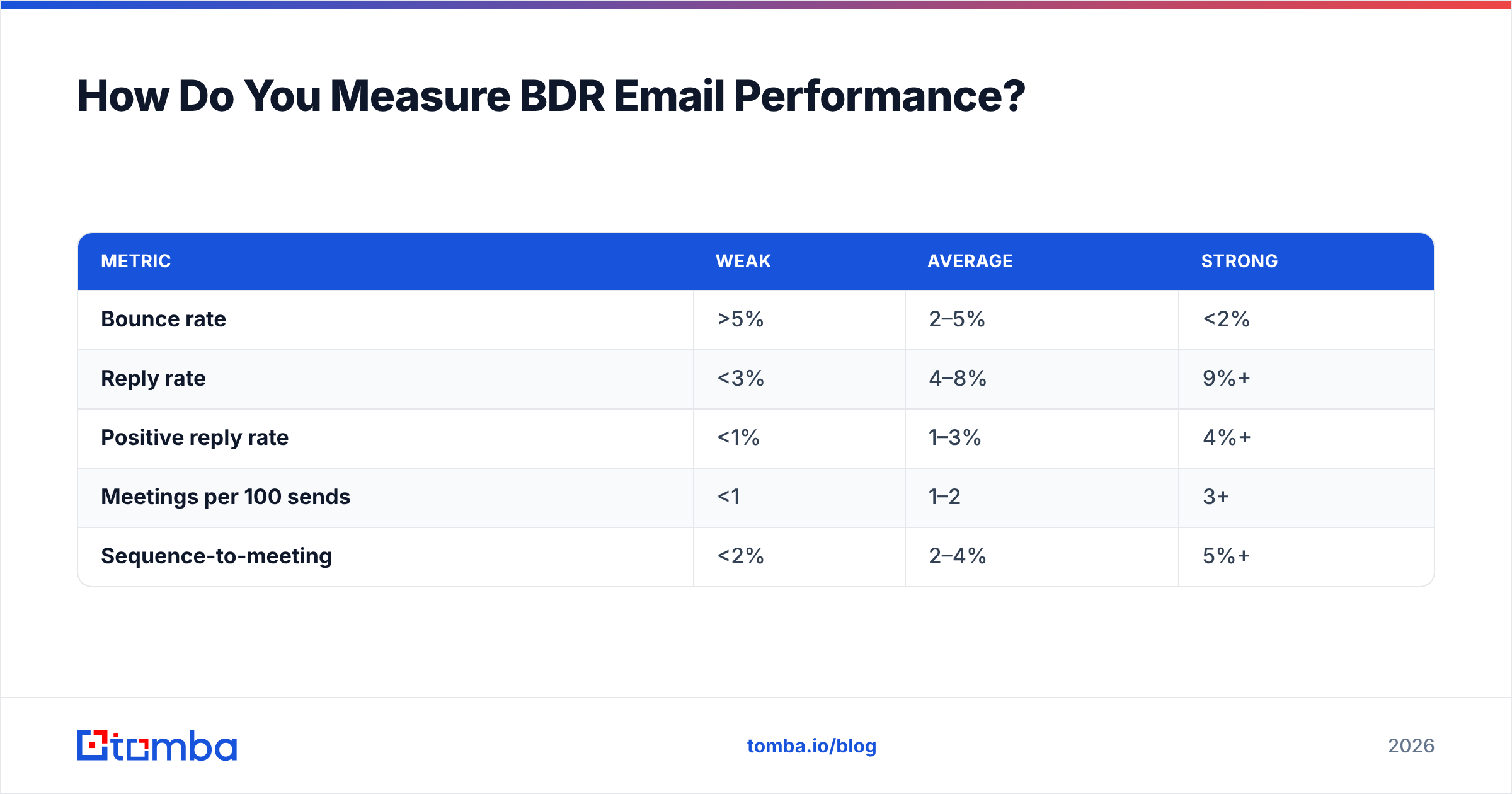
Reply rate and meetings booked are the only metrics that pay rent. Open rate is a vanity number now that Apple Mail Privacy inflates it. Track these instead:
| Metric | Weak | Average | Strong |
|---|---|---|---|
| Bounce rate | >5% | 2–5% | <2% |
| Reply rate | <3% | 4–8% | 9%+ |
| Positive reply rate | <1% | 1–3% | 4%+ |
| Meetings per 100 sends | <1 | 1–2 | 3+ |
| Sequence-to-meeting | <2% | 2–4% | 5%+ |
If your bounce rate sits above 5%, stop optimizing copy — your data is the problem. Mailbox providers like Google Postmaster Tools will throttle a domain that keeps hitting invalid addresses, and no template survives a spam folder. Clean your list, then iterate on the words.
A practical loop: ship a template to 100 verified prospects, wait a week, measure reply and positive-reply rate, then change one variable (subject, hook, or CTA) and run it again. Single-variable testing is the only way to know what actually moved the number. For a broader vendor view of sales-engagement tooling, G2's category grid is a useful reference.
What Mistakes Kill BDR Email Reply Rates?#
- Two CTAs. "Book a demo or download our guide" splits attention and gets neither. One ask.
- Talking about yourself first. The first sentence must be about the prospect.
- Sending to guessed addresses. Pattern-guessing (
first.last@) bounces constantly. Verify first. - Walls of text. If it scrolls on mobile, it gets archived. Stay under 120 words.
- No follow-up. Roughly half of replies come from the second and third touch — one-and-done leaves money on the table.
- Over-automation tells. Broken merge fields like "Hi {FirstName}" or "your company at [Company]" instantly signal a blast.
Frequently Asked Questions#
How long should a BDR cold email be? 50 to 120 words. Long enough to land one relevant point, short enough to read on a phone in under 15 seconds.
How many follow-ups should a BDR send? Three to four over 10–14 days, kept in the same thread. After the breakup email, move the contact to a nurture track rather than deleting them.
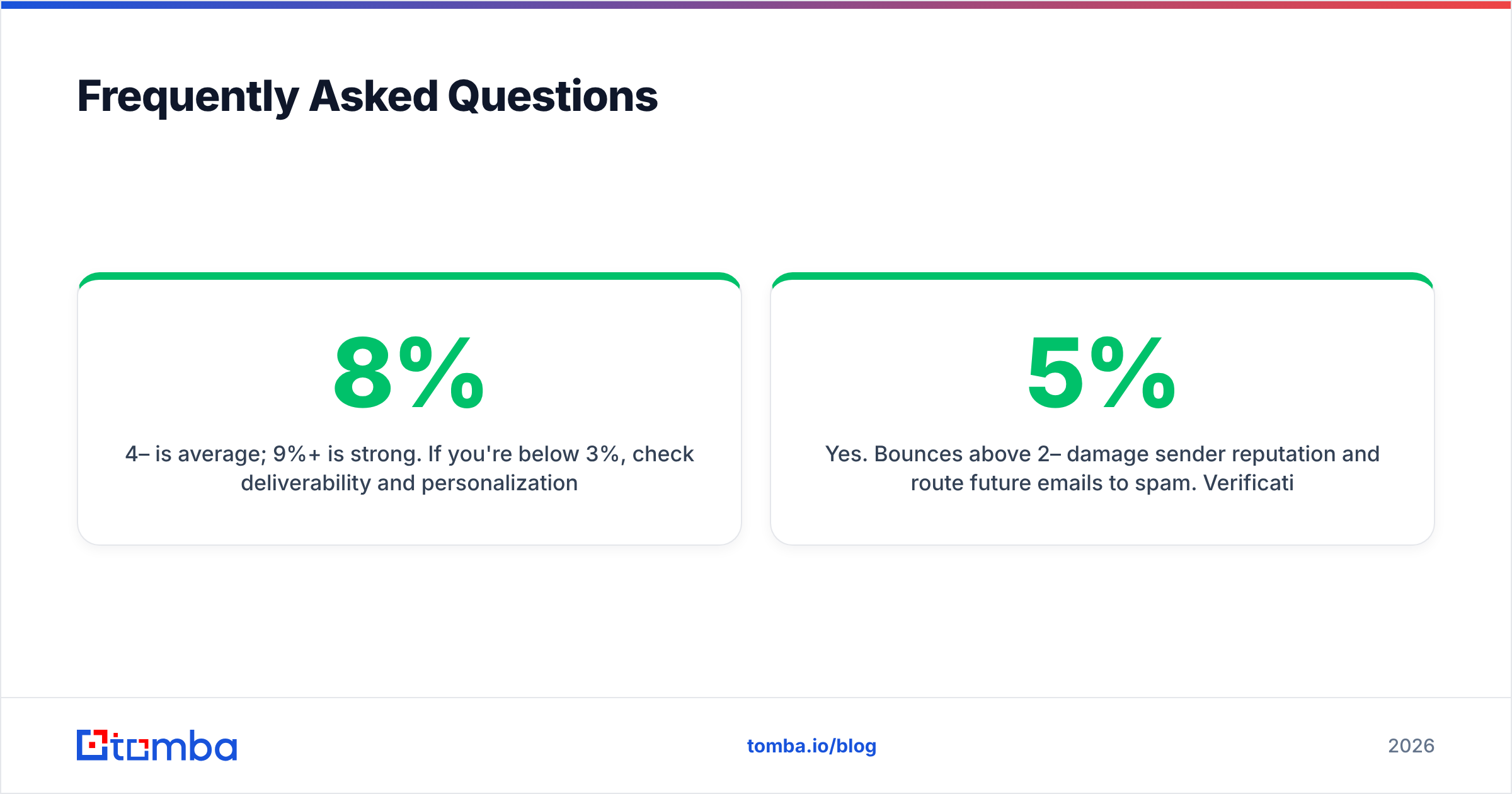
What is a good reply rate for BDR emails? 4–8% is average; 9%+ is strong. If you're below 3%, check deliverability and personalization before rewriting copy.
Do I need to verify emails before sending? Yes. Bounces above 2–5% damage sender reputation and route future emails to spam. Verification is the cheapest insurance you can buy.
Put These Templates to Work#
Templates are only as good as the inbox they reach. Before your reps send a single one of these scripts, make sure every address is real and reply-ready: use the Tomba Email Finder to pull verified professional emails by name and domain, then layer your trigger personalization on top. Start free with 25 searches a month, scale to the Starter plan at $49/mo when your pipeline demands it, and see the full breakdown on the Tomba pricing page. Get the data right, paste in the right template, and let your BDRs spend their time on conversations instead of guessing addresses.
// get started
Find, verify and enrich your first contacts today
Start on the free plan with 25 searches a month, then scale when your team is ready.
Free plan · No credit card required · GDPR & CCPA
// about the author