Best CRM for Sales Teams in 2026: 9 Top Picks Compared
Comparing the best CRM for sales teams in 2026 across price, pipeline tools, automation, and data quality — so you pick the right platform the first time.
Picking a CRM is one of those decisions that quietly shapes the next three years of your sales motion. Get it right and reps actually log activity, forecasts mean something, and follow-ups stop slipping through cracks. Get it wrong and you pay for seats nobody opens.
This guide ranks the best CRM for sales teams in 2026 the way a buyer should — by what the platform does for revenue, not by which vendor has the loudest marketing.
TL;DR#
- Best all-around for growing teams: HubSpot Sales Hub — generous free tier, clean UX, strong automation as you scale.
- Best for enterprise + customization: Salesforce Sales Cloud — unmatched flexibility, but you pay in money and admin time.
- Best for pure pipeline simplicity: Pipedrive — visual, fast to adopt, priced for SMBs.
- The real differentiator isn't the CRM — it's the data inside it. A clean pipeline full of stale or missing contacts forecasts nothing. Pair any CRM with reliable contact data.
- Budget reality: plan for $25–$150 per seat per month, plus data and enrichment costs on top.
What makes a CRM "best" for a sales team?#
The short answer: a CRM is best when reps use it without being nagged, and managers can trust what it reports.
Think of a CRM like a kitchen. A beautiful kitchen with no ingredients still produces nothing. The cabinets (pipeline stages), the appliances (automation), and the recipe book (reporting) all matter — but the ingredients are your contact data. Most CRM buyers obsess over the cabinets and forget the groceries.
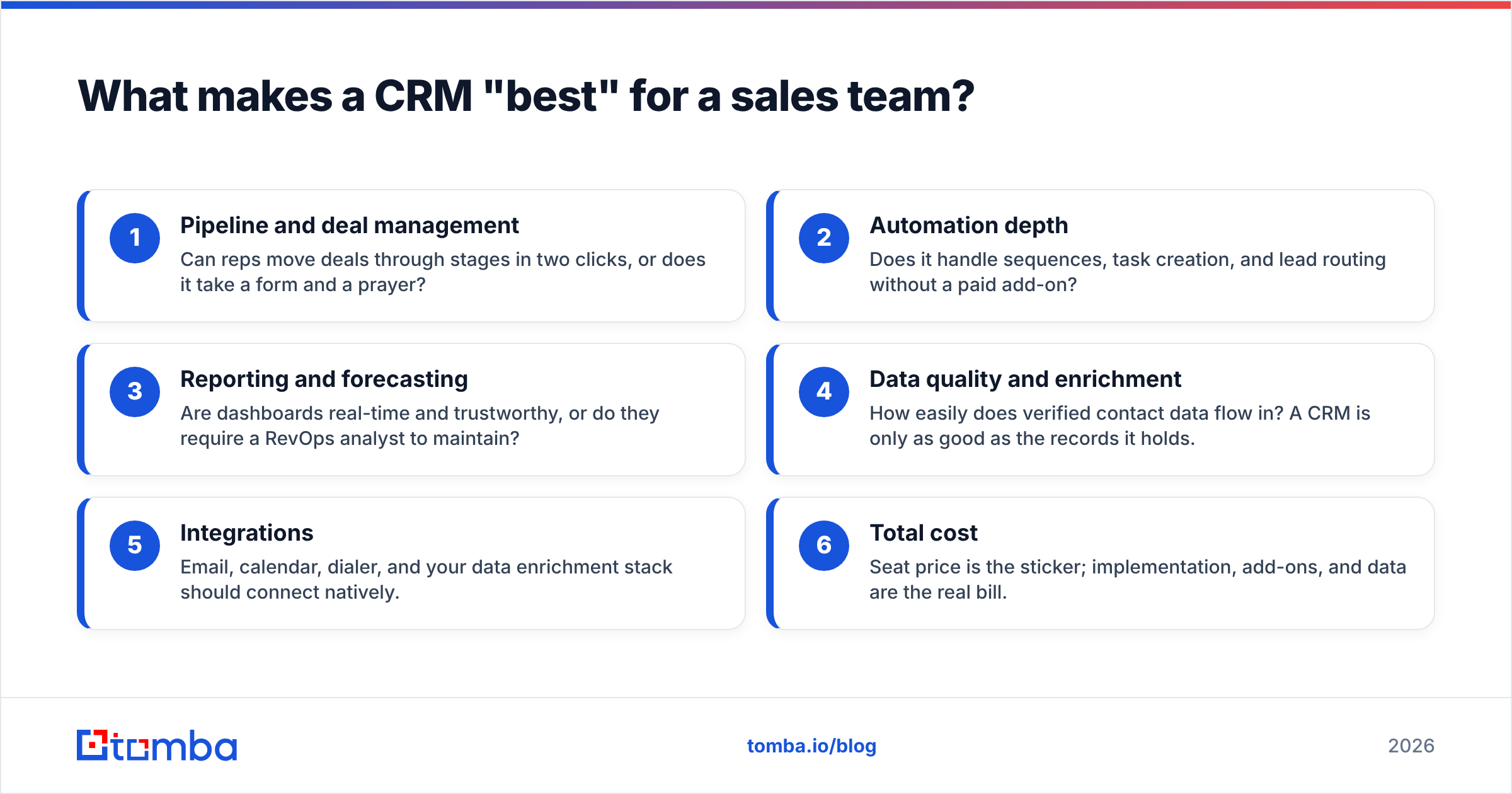
When evaluating the best CRM for sales teams, weigh these six dimensions:
- Pipeline and deal management — Can reps move deals through stages in two clicks, or does it take a form and a prayer?
- Automation depth — Does it handle sequences, task creation, and lead routing without a paid add-on?
- Reporting and forecasting — Are dashboards real-time and trustworthy, or do they require a RevOps analyst to maintain?
- Data quality and enrichment — How easily does verified contact data flow in? A CRM is only as good as the records it holds.
- Integrations — Email, calendar, dialer, and your data enrichment stack should connect natively.
- Total cost — Seat price is the sticker; implementation, add-ons, and data are the real bill.
Which CRMs are the top picks for 2026?#
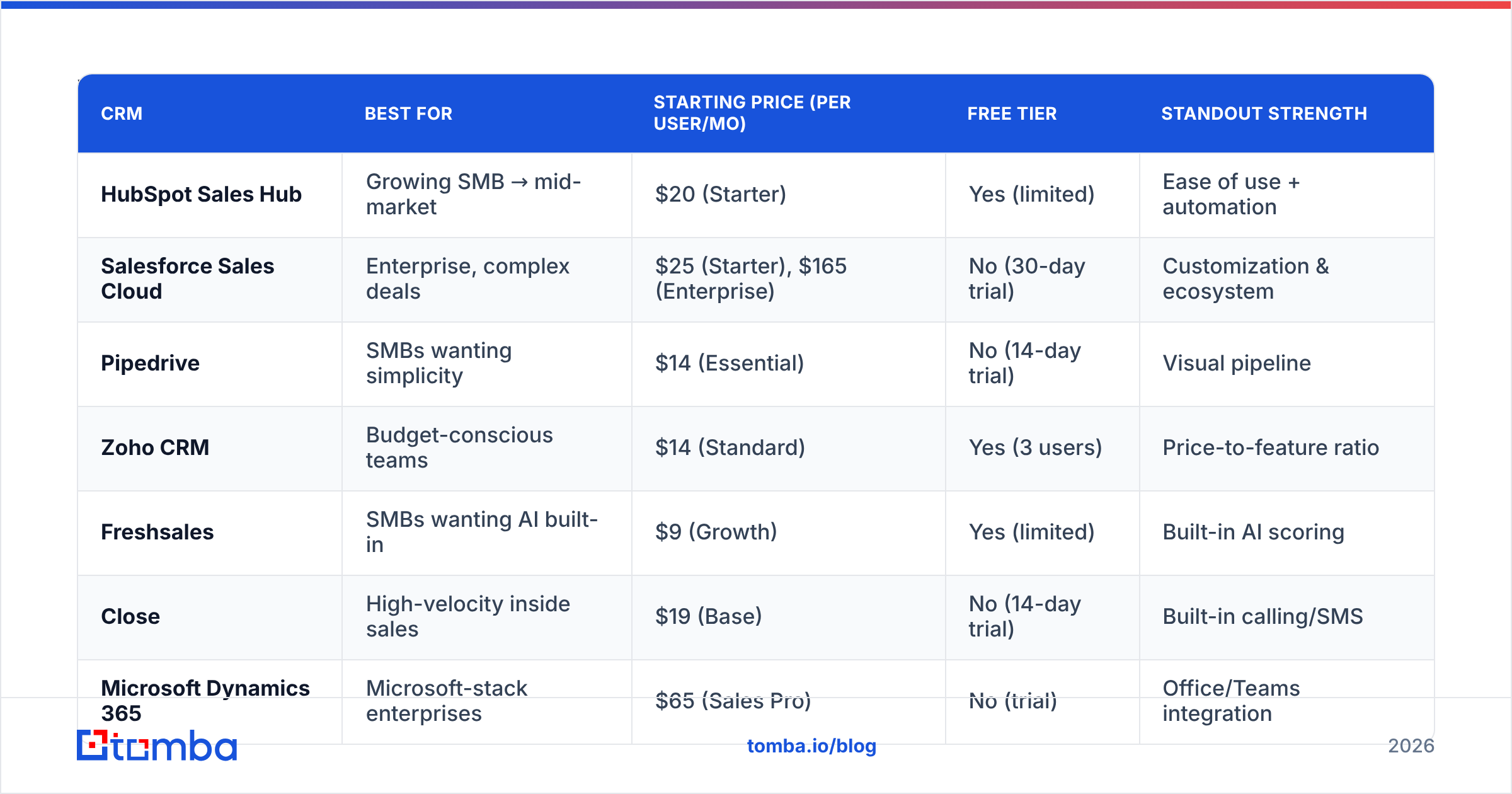
Here's the shortlist that consistently shows up at the top of buyer reviews on G2 and Capterra, plus where each one actually fits.
| CRM | Best for | Starting price (per user/mo) | Free tier | Standout strength |
|---|---|---|---|---|
| HubSpot Sales Hub | Growing SMB → mid-market | $20 (Starter) | Yes (limited) | Ease of use + automation |
| Salesforce Sales Cloud | Enterprise, complex deals | $25 (Starter), $165 (Enterprise) | No (30-day trial) | Customization & ecosystem |
| Pipedrive | SMBs wanting simplicity | $14 (Essential) | No (14-day trial) | Visual pipeline |
| Zoho CRM | Budget-conscious teams | $14 (Standard) | Yes (3 users) | Price-to-feature ratio |
| Freshsales | SMBs wanting AI built-in | $9 (Growth) | Yes (limited) | Built-in AI scoring |
| Close | High-velocity inside sales | $19 (Base) | No (14-day trial) | Built-in calling/SMS |
| Microsoft Dynamics 365 | Microsoft-stack enterprises | $65 (Sales Pro) | No (trial) | Office/Teams integration |
| Copper | Google Workspace teams | $12 (Starter) | No (14-day trial) | Native Gmail experience |
| Salesflare | Automated B2B follow-up | $35 (Growth) | No (trial) | Auto-logging activity |
Prices shift; confirm current numbers on each vendor's pricing page before you buy. The relative positioning, though, has been stable for years.
Is HubSpot the best CRM for most sales teams?#
For most teams between 5 and 200 reps, yes — HubSpot is the safest default.
The reason is adoption. Reps actually log into HubSpot because the interface doesn't fight them. The free tier lets you start without procurement, and you can layer on Sales Hub automation as the team grows. Email tracking, meeting links, sequences, and reporting all live in one place.
The catch: HubSpot's pricing scales steeply once you need advanced automation, custom reporting, and more contacts. Teams often start free and are surprised by the Professional tier bill. Read the fine print on HubSpot's pricing page — marketing contacts and seat minimums add up fast.
Where HubSpot shines:
- Onboarding speed — a rep is productive in a day, not a quarter.
- Native sequences — multi-step email follow-up without a third-party tool.
- Reporting — dashboards your VP can read without training.
Where it strains: deeply custom sales processes (complex CPQ, multi-entity deals) push you toward Salesforce.
When should you choose Salesforce instead?#
Choose Salesforce when your sales process is too complex for guardrails — and you have the admin capacity to run it.
Salesforce Sales Cloud is the most customizable CRM on the market. If your deals involve custom quoting, territory hierarchies, multiple business units, or heavy revenue operations workflows, nothing else bends as far. The AppExchange ecosystem means almost any integration already exists.
But Salesforce is a platform, not a turnkey product. Budget for an admin (or a consultancy), a longer rollout, and per-seat costs that climb with every add-on — CPQ, Inbox, Einstein AI, and more are separate line items. For a 10-person startup, that's overkill. For a 500-person org with a dedicated RevOps function, it's the standard for a reason. You can read Salesforce's own breakdown on salesforce.com.
What about Pipedrive, Zoho, and the simpler tools?#
If you want a pipeline you can set up over coffee, look at Pipedrive, Zoho, or Freshsales.
- Pipedrive nails the visual deal board. Drag a card from "Demo Booked" to "Proposal Sent" and you're done. It's built for outbound SMB teams who live in the pipeline, not in reports.
- Zoho CRM gives you the most features per dollar. If you're already in the Zoho ecosystem (Books, Desk, Campaigns), it's a no-brainer on cost.
- Freshsales bakes AI lead scoring and a built-in phone into lower tiers, which suits teams that want intelligence without a Salesforce-sized bill.
These tools trade ceiling for simplicity. You'll outgrow their reporting before you outgrow HubSpot's — but for many teams, that day never comes, and the savings are real.
Why does CRM data quality matter more than the CRM itself?#
Because a CRM doesn't generate pipeline — it organizes it. Garbage in, garbage forecast.
Here's the pattern every sales leader eventually hits: you buy a great CRM, reps adopt it, and six months later 30% of your contact records have a bounced email, a missing phone number, or a job title from two roles ago. Your "clean" pipeline is quietly rotting. B2B data decays at roughly 22–30% per year as people change jobs — that's a documented industry baseline, not a vendor scare tactic.
This is where the CRM decision and the data decision separate. The best CRM for sales teams is only as effective as the contacts flowing into it. Two practical fixes:
- Verify before you import. Run lists through an email verifier so bounces never enter the CRM in the first place. Every bounced send chips away at your sender reputation.
- Enrich on creation. When a new lead lands, automatically fill in the missing email, phone, and company fields instead of leaving reps to hunt manually.
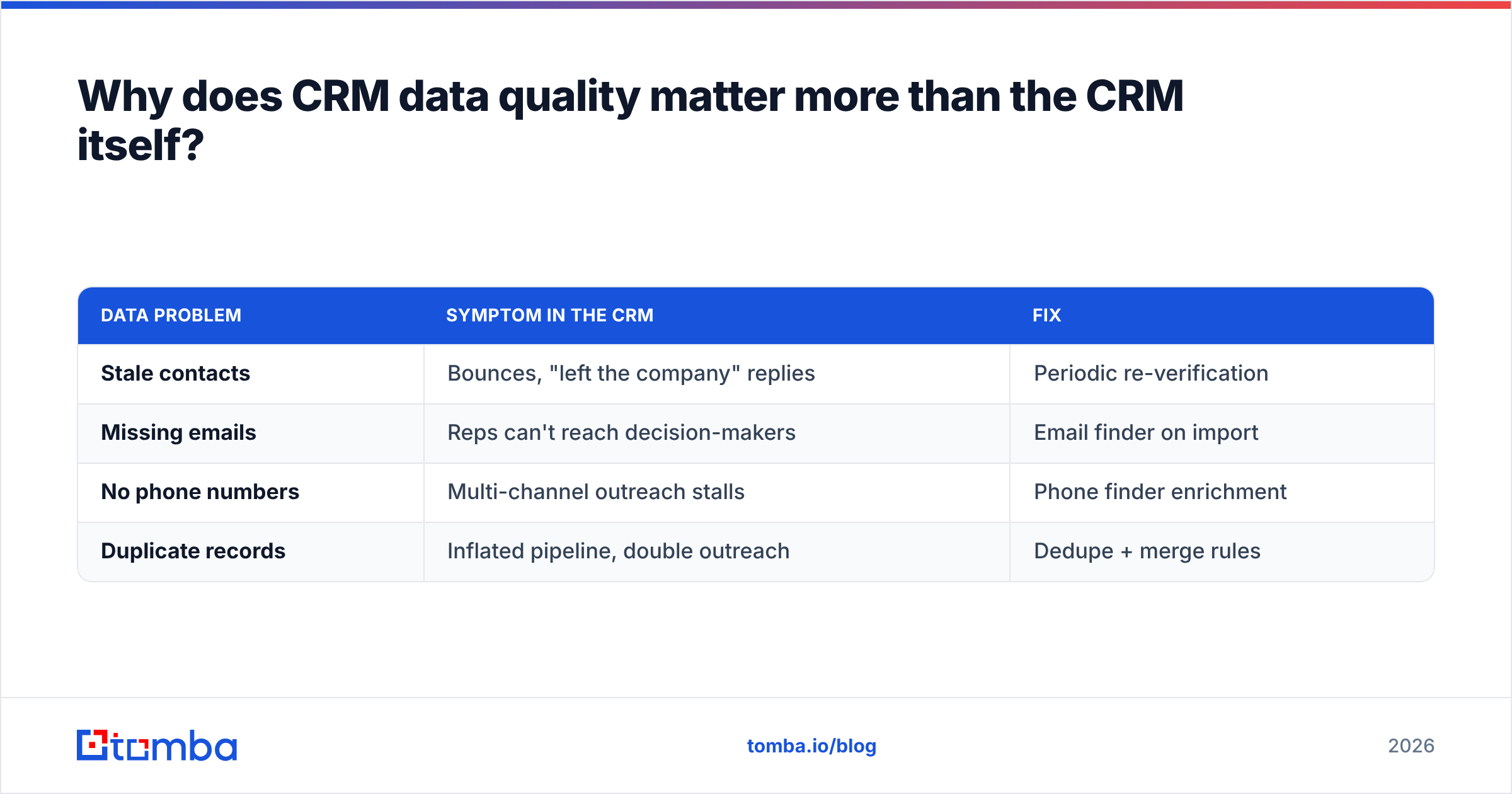
| Data problem | Symptom in the CRM | Fix |
|---|---|---|
| Stale contacts | Bounces, "left the company" replies | Periodic re-verification |
| Missing emails | Reps can't reach decision-makers | Email finder on import |
| No phone numbers | Multi-channel outreach stalls | Phone finder enrichment |
| Duplicate records | Inflated pipeline, double outreach | Dedupe + merge rules |
A CRM with native or API-driven enrichment turns this from a quarterly cleanup chore into an automatic background process. That's the difference between a database you trust and one you apologize for.
How do you fill a new CRM with good contacts fast?#
Connect a contact-data source directly to your CRM so records arrive complete, not half-empty.
Most teams populate a fresh CRM in one of three ways, and the best ones combine all three:
- Migrate and clean existing records — dedupe, then verify every email before import.
- Prospect net-new accounts — use domain search to pull verified contacts at target companies, then push them into deal stages.
- Enrich continuously — wire an enrichment API into your CRM so any thin record auto-completes.
This is exactly where Tomba fits alongside whichever CRM you choose. The Tomba API and native integrations connect to HubSpot, Pipedrive, Salesforce, and Sheets, so verified emails and phone numbers flow into your records without copy-paste. You keep your CRM of choice; you just stop feeding it bad data. For teams loading large lists, the bulk email finder handles thousands of records at once.
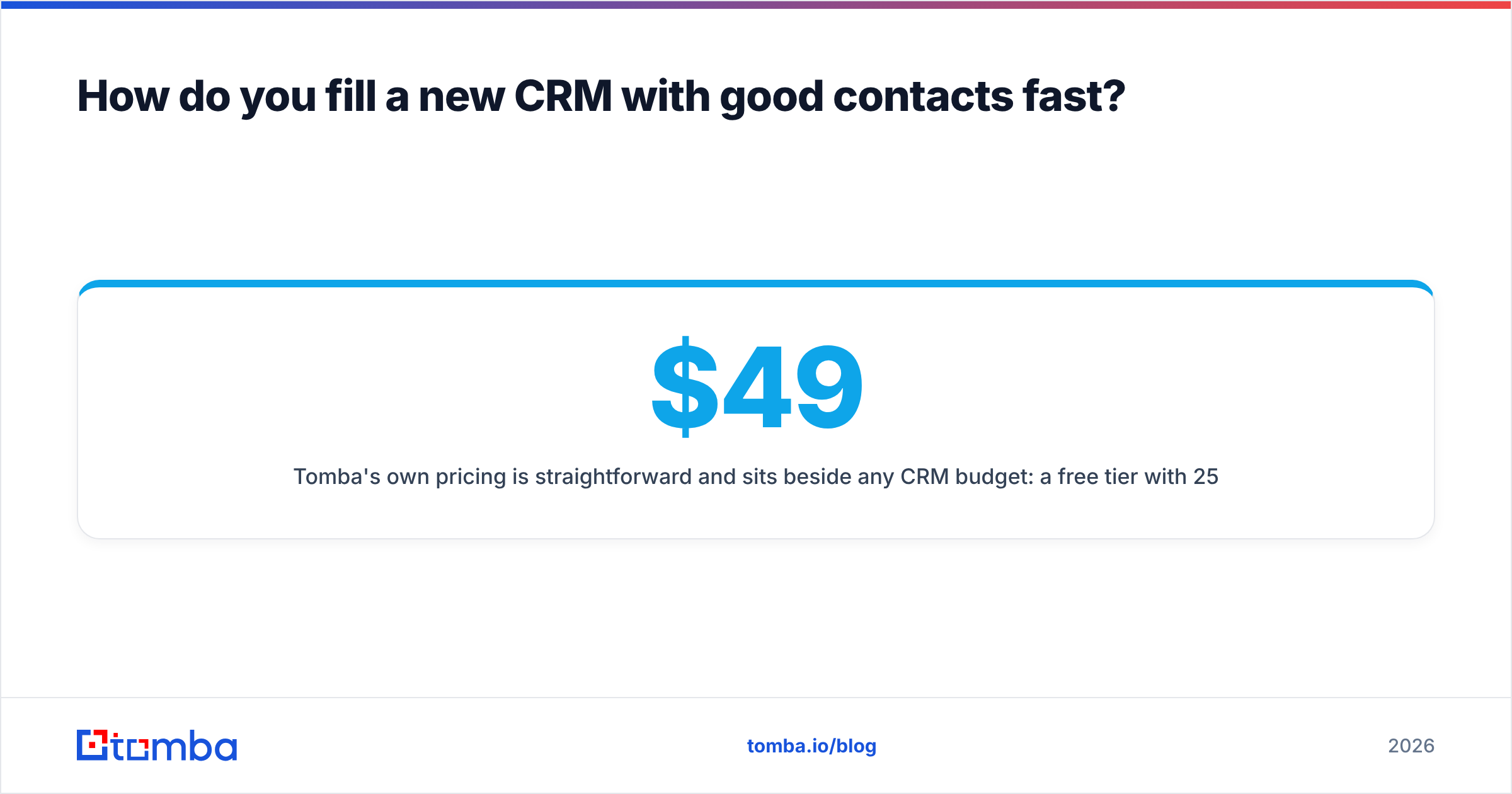
Tomba's own pricing is straightforward and sits beside any CRM budget: a free tier with 25 searches/month, Starter at $49/mo, Growth at $99/mo, and Pro at $249/mo — see full Tomba pricing for details. Compared to bolting an enterprise data add-on onto Salesforce, it's a fraction of the cost.
CRM buying checklist for 2026#
Before you sign anything, run through this:
- Adoption test: Have two reps trial it for a week. If they avoid it, no feature list will save you.
- Real total cost: Add seats + required add-ons + data/enrichment + implementation. Compare that number, not the sticker.
- Data plan: Decide how contacts get verified and enriched on day one, not month six.
- Integration audit: Confirm native links to your email, calendar, dialer, and enrichment tools.
- Reporting fit: Can a manager build the forecast view they need without an admin?
- Exit clarity: Can you export all your data cleanly if you leave? (Test this before you're locked in.)
So which CRM should you actually pick?#
The honest conclusion: there's no single best CRM for sales teams — there's a best fit for your size, process, and budget.
- Under 50 reps, want speed: HubSpot or Pipedrive.
- Enterprise, complex deals, have RevOps: Salesforce or Dynamics 365.
- Tight budget, feature-hungry: Zoho or Freshsales.
- High-velocity inside sales: Close.
- Google or Microsoft shop: Copper or Dynamics, respectively.
Whatever you choose, the platform is only half the equation. The teams that win aren't the ones with the fanciest CRM — they're the ones whose CRM is full of accurate, reachable contacts.
That's the gap Tomba closes. Start with the Tomba Email Finder to populate and enrich your new CRM with verified professional emails, then layer in phone numbers and enrichment as you scale. Try it free with 25 searches a month, connect it to your CRM in minutes, and let your reps spend their time selling instead of fixing data. Your forecast will thank you.
// get started
Find, verify and enrich your first contacts today
Start on the free plan with 25 searches a month, then scale when your team is ready.
Free plan · No credit card required · GDPR & CCPA
// about the author