Best Email Domain for Business in 2026: How to Choose
Your email domain quietly decides whether you land in the inbox or in spam. Here's how to choose the best email domain for business and cold outreach in 2026.

Your email domain is the part after the @. It looks like a cosmetic choice, but it quietly controls how many of your messages reach the inbox, how much recipients trust you, and how fast your replies come back. Pick the wrong one and even perfect copy lands in spam.
This guide breaks down what the best email domain actually means in 2026, how domain choice affects deliverability, and the exact setup that protects your main brand while you scale outreach.
TL;DR#
- The best email domain is a custom domain you own (
you@company.com) — never a free@gmail.comor@outlook.comaddress for business sending. - Extension matters less than reputation. A clean
.comis safest, but.io,.co, and country domains work fine when authentication and warmup are done right. - For cold outreach, use a separate sending domain (like
getcompany.com) so a bad campaign never burns your primary domain's reputation. - Authentication is non-negotiable. SPF, DKIM, and DMARC must be set before you send a single email.
- Verify recipients before sending. A clean domain still gets throttled if you blast invalid addresses, so pair your domain with an email verifier.
What does "best email domain" actually mean?#
The phrase "best email domain" gets used three different ways, and conflating them causes most of the confusion:
- The domain you send from — the brand identity in your address (
@stripe.com). This is the one that affects trust and B2B credibility. - The domain extension (TLD) —
.com,.io,.co,.ai,.org. This is a small piece of the trust signal. - The mailbox provider behind it — Google Workspace, Microsoft 365, or a niche host that actually moves the mail.
When people ask for the "best email domain," they usually want all three to work together: a credible custom domain, on a sensible extension, hosted by a provider mailbox servers trust. Get any one wrong and your email deliverability suffers.
)
Does your email domain affect deliverability?#
Yes — directly and heavily. Mailbox providers like Gmail and Outlook score the domain, not just the individual message. Two factors dominate:
- Domain reputation. Every domain accumulates a reputation based on bounce rate, spam complaints, and engagement. A brand-new domain has no history, so it starts neutral and must be warmed up. For the mechanics behind this, see sender reputation.
- Authentication alignment. SPF, DKIM, and DMARC records prove you're allowed to send from the domain. Since 2024, Google and Yahoo require DMARC for bulk senders — missing records mean automatic spam folder placement.
This is why a free address fails for business sending. You can't add DMARC to @gmail.com, you share reputation with millions of strangers, and recipients' filters treat firstname.lastname.sales@gmail.com as a red flag.
Which email domain extension is best (.com vs .io vs .co)?#
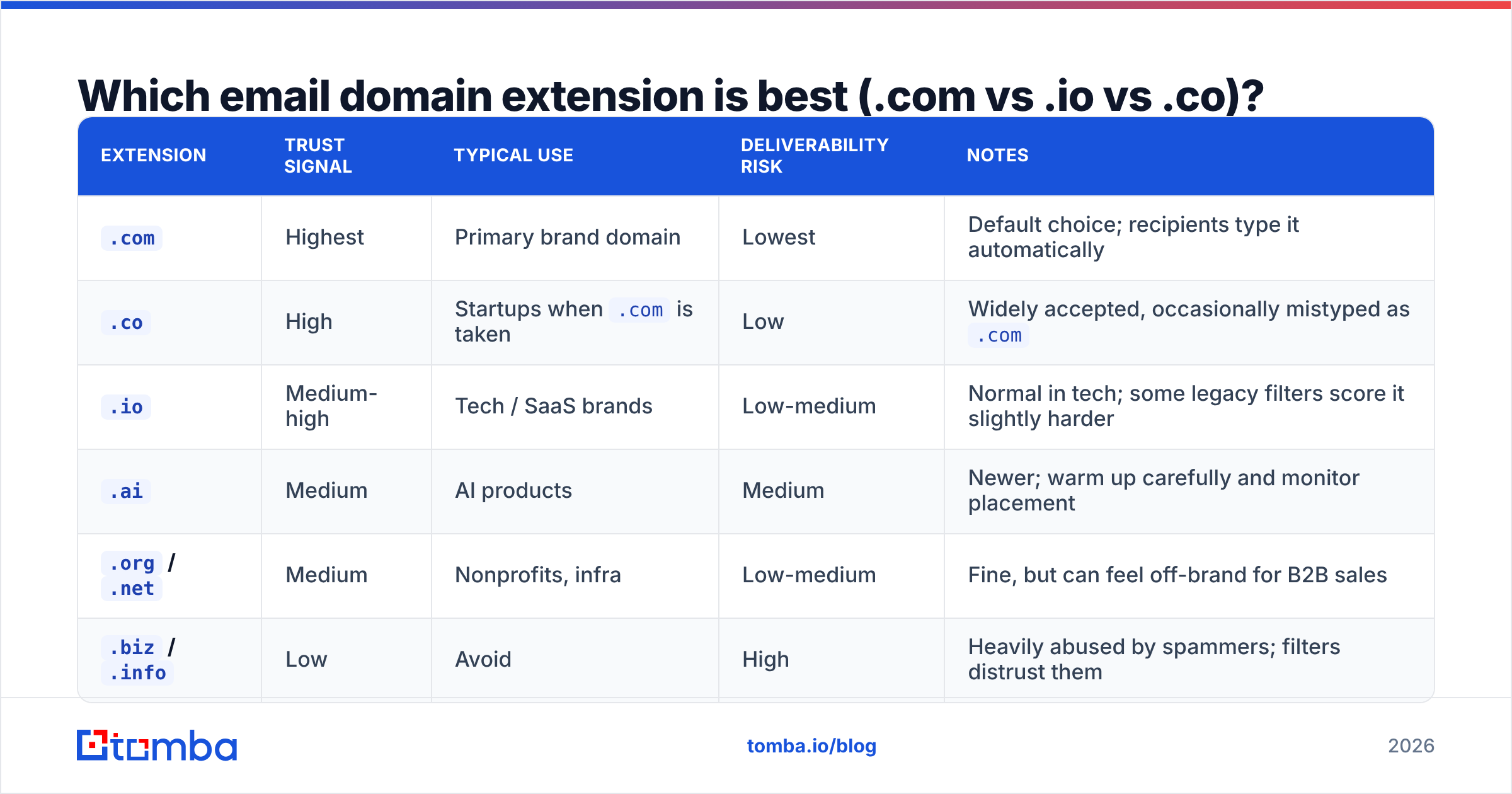
A .com remains the safest default because it's the most familiar and least associated with throwaway spam. But the gap is smaller than people think — extension is a minor trust signal compared to authentication and warmup. Here's how the common options compare for B2B sending:
| Extension | Trust signal | Typical use | Deliverability risk | Notes |
|---|---|---|---|---|
.com |
Highest | Primary brand domain | Lowest | Default choice; recipients type it automatically |
.co |
High | Startups when .com is taken |
Low | Widely accepted, occasionally mistyped as .com |
.io |
Medium-high | Tech / SaaS brands | Low-medium | Normal in tech; some legacy filters score it slightly harder |
.ai |
Medium | AI products | Medium | Newer; warm up carefully and monitor placement |
.org / .net |
Medium | Nonprofits, infra | Low-medium | Fine, but can feel off-brand for B2B sales |
.biz / .info |
Low | Avoid | High | Heavily abused by spammers; filters distrust them |
The rule: pick a .com if you can get it. If not, .co and .io are perfectly safe when you authenticate properly and warm up. Avoid the cheap, spam-saturated TLDs entirely. For background on how registries classify these, the list of internet top-level domains on Wikipedia is a useful reference.
Should you use Gmail or a custom domain for business email?#
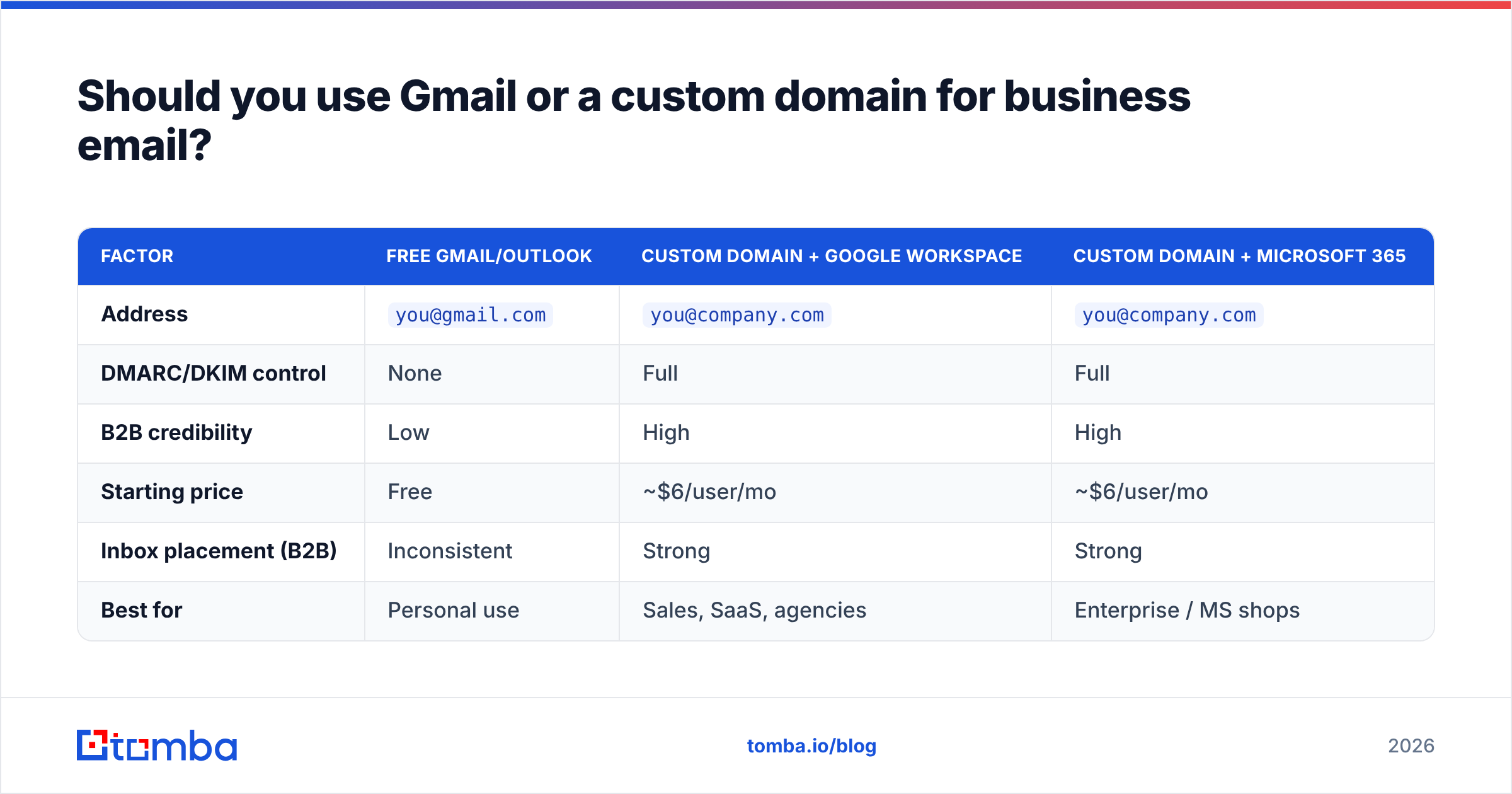
Use a custom domain — full stop. The only question is which provider hosts the mailbox behind it. The two heavyweights are Google Workspace and Microsoft 365. Both let you run you@company.com on infrastructure that other mail servers trust.
| Factor | Free Gmail/Outlook | Custom domain + Google Workspace | Custom domain + Microsoft 365 |
|---|---|---|---|
| Address | you@gmail.com |
you@company.com |
you@company.com |
| DMARC/DKIM control | None | Full | Full |
| B2B credibility | Low | High | High |
| Starting price | Free | ~$6/user/mo | ~$6/user/mo |
| Inbox placement (B2B) | Inconsistent | Strong | Strong |
| Best for | Personal use | Sales, SaaS, agencies | Enterprise / MS shops |
The takeaway: a free address signals "hobby project" to buyers and "spam risk" to filters. A custom domain on a reputable provider signals a real business. The provider choice between Google and Microsoft mostly comes down to which productivity suite your team already lives in.
Do you need a separate domain for cold email?#
If you send cold outreach at any volume, yes. This is the single most important domain decision most teams get wrong.
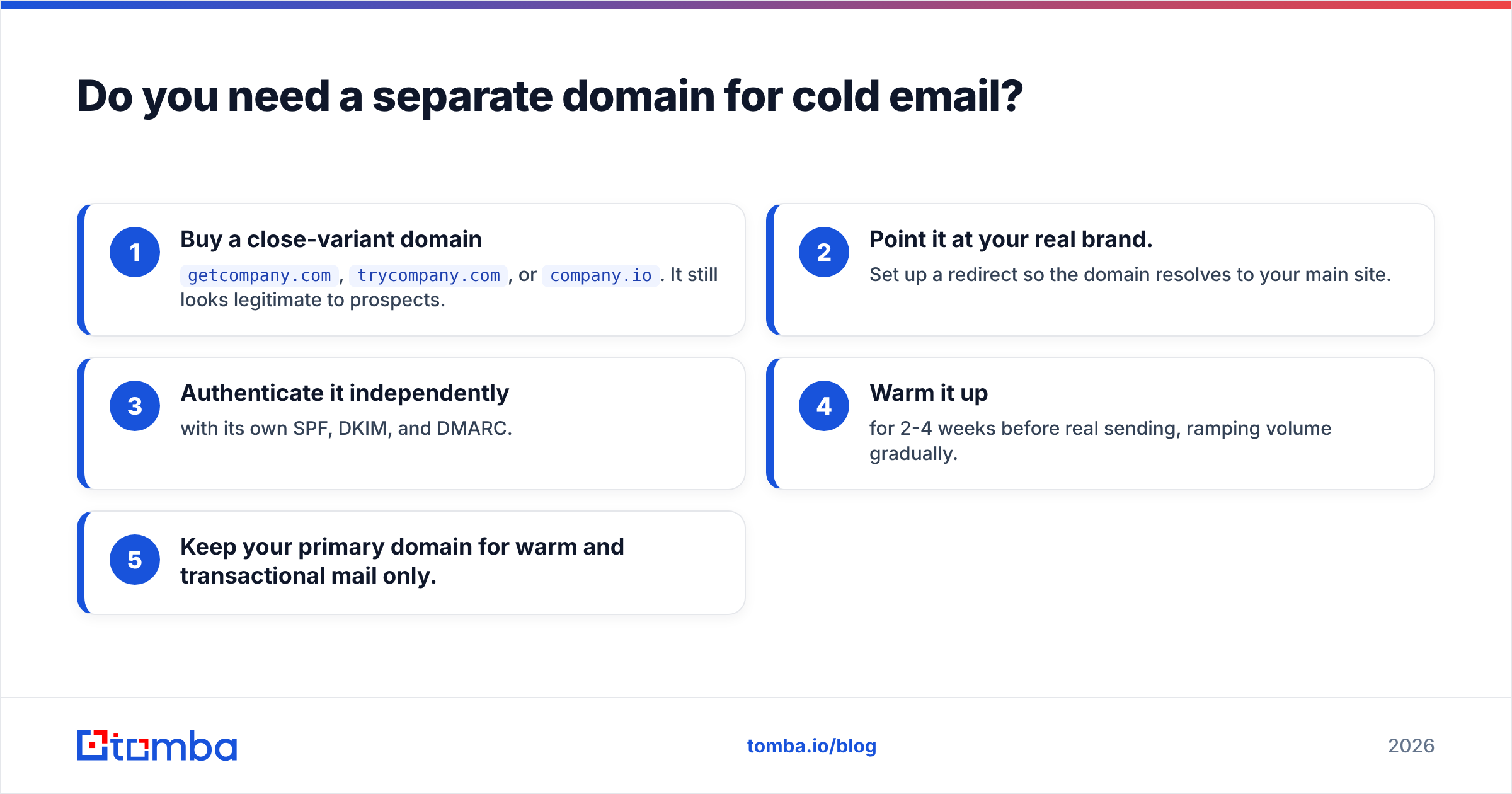
Cold campaigns inevitably generate some bounces and spam complaints, even with good targeting. If those signals hit your primary domain (company.com), you risk damaging the deliverability of your invoices, support replies, and warm-relationship emails. The fix is a dedicated sending domain:
- Buy a close-variant domain —
getcompany.com,trycompany.com, orcompany.io. It still looks legitimate to prospects. - Point it at your real brand. Set up a redirect so the domain resolves to your main site.
- Authenticate it independently with its own SPF, DKIM, and DMARC.
- Warm it up for 2-4 weeks before real sending, ramping volume gradually.
- Keep your primary domain for warm and transactional mail only.
This "burner-but-legit" strategy isolates risk. If a campaign domain gets throttled, your core business email is untouched. Many teams run two or three sending domains in parallel to spread volume — a standard pattern documented in most cold email deliverability playbooks.
)
How do you pick and set up the best email domain?#
Work through these steps in order. Skipping any one of them is how clean domains end up in spam.
- Choose the domain. Prefer
.com; fall back to.coor.io. Keep it short, brandable, and free of hyphens or numbers. - Pick a provider. Google Workspace or Microsoft 365 for the mailbox. Avoid obscure hosts with poor IP reputation.
- Add authentication records. Configure SPF, DKIM, and a DMARC policy in your DNS. Start DMARC at
p=noneto monitor, then tighten toquarantine. - Warm up the domain. Send low volumes to engaged contacts first, increasing gradually over 3-4 weeks so reputation builds organically.
- Separate your streams. Primary domain for relationships and transactions; dedicated domain(s) for cold outreach.
- Verify every list before you send. Even the best domain gets penalized for hitting dead mailboxes. Run lists through an email verification step to strip invalids and reduce bounces.
That last step is where most reputation damage actually originates. Domains rarely "go bad" on their own — they go bad because someone sent 5,000 emails to a list full of typos, traps, and abandoned inboxes.
How does Tomba fit into your email domain strategy?#
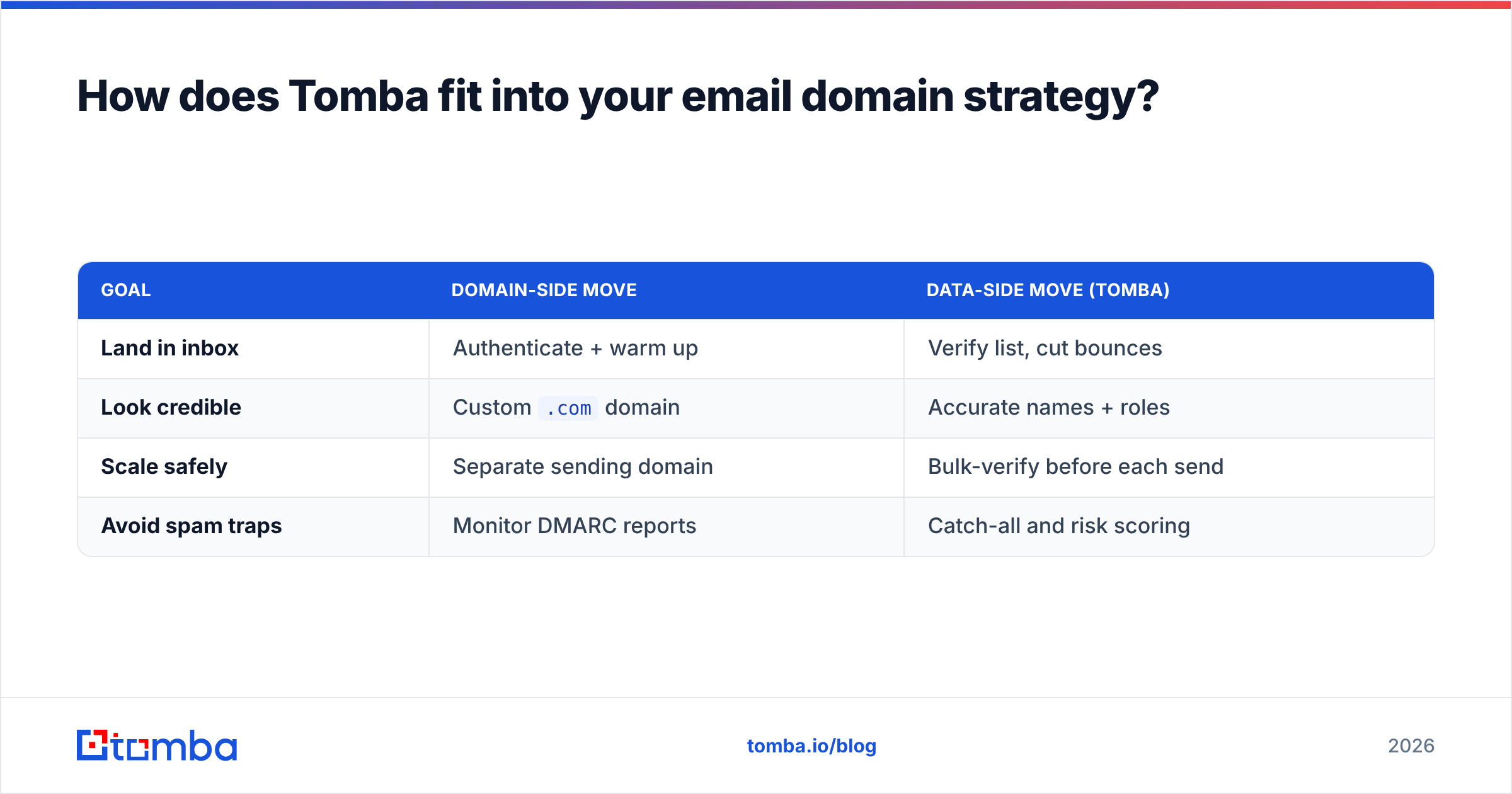
Your domain decides where you can send from; your data decides whether you should. Tomba sits on the data side of that equation.
- Find verified addresses by domain. Use domain search to pull the real, deliverable contacts at a target company instead of guessing patterns.
- Confirm an address before it costs you reputation. The email finder returns a confidence score, and the verifier checks syntax, MX records, and mailbox status.
- Protect your warm-up work. A clean list keeps bounce rates low, which is exactly what keeps your shiny new sending domain in good standing.
Think of it like building a house: the domain is the address, authentication is the foundation, and verified data is making sure you only knock on doors that actually exist. Skip the data step and the best address in the world still gets you ignored — or flagged.
| Goal | Domain-side move | Data-side move (Tomba) |
|---|---|---|
| Land in inbox | Authenticate + warm up | Verify list, cut bounces |
| Look credible | Custom .com domain |
Accurate names + roles |
| Scale safely | Separate sending domain | Bulk-verify before each send |
| Avoid spam traps | Monitor DMARC reports | Catch-all and risk scoring |
What's the bottom line on choosing an email domain?#
The best email domain is a custom domain you control, on a trusted extension (ideally .com), hosted by Google Workspace or Microsoft 365, fully authenticated with SPF/DKIM/DMARC, and — for cold outreach — separated from your primary brand domain. Extension is a minor factor; reputation, authentication, and list hygiene are the real levers.
Get the domain architecture right once and it pays off on every campaign afterward. Get it wrong and you'll spend months wondering why great copy keeps disappearing into spam.
Ready to pair the right domain with the right data? Start with the Tomba Email Finder to source verified, deliverable contacts by name, company, or domain — then send from your clean, authenticated domain with confidence. The free tier gives you 25 searches a month to test it, and paid Tomba pricing starts at $49/mo when you're ready to scale outreach without torching your reputation.
// get started
Find, verify and enrich your first contacts today
Start on the free plan with 25 searches a month, then scale when your team is ready.
Free plan · No credit card required · GDPR & CCPA
// about the author