Best Email Finder Chrome Extension in 2026: Top 7 Compared
Which email finder Chrome extension actually pulls verified addresses from LinkedIn and company sites? We tested 7 on accuracy, price, and bulk limits.
You install five "email finder" Chrome extensions, scrape the same 100 LinkedIn profiles, and get five different answers. Some return guesses. Some return verified, deliverable addresses. The gap between those two outcomes is the difference between a 2% bounce rate and a domain reputation that's on fire by Friday.
This guide ranks the best email finder Chrome extension options for 2026 on the only metrics that matter: accuracy, verification, free credits, price, and how fast they break when you push past 50 lookups.
TL;DR — Which Chrome Extension Wins?#
- Best overall accuracy + verification: Tomba — real-time SMTP checks baked into every lookup, 25 free searches/mo, Starter at $49/mo.
- Best if you already live in a sales engagement tool: Apollo, but credits get throttled fast on cheap tiers.
- Best lightweight domain scraper: Hunter, clean UI, weaker on personal/LinkedIn emails.
- Avoid: any extension that returns an email without a deliverability status — you're paying to send to guesses.
- Rule of thumb: if the extension can't tell you why it thinks an address is valid, treat every result as a bounce risk.
What Does an Email Finder Chrome Extension Actually Do?#
Think of it like a name-tag scanner at a conference. You're already standing in front of someone's profile — a LinkedIn page, a company team page, a personal site. The extension reads the page, grabs the name and company domain, then either looks the address up in a database or constructs and tests it on the spot.
There are three things happening under the hood, and the best tools do all three:
- Pattern detection — it figures out the company's email format (first.last@, f.last@, first@) from known addresses on that domain.
- Database match — it checks a stored index of previously found and verified addresses for that person.
- Real-time verification — it pings the mail server over SMTP to confirm the inbox actually accepts mail before handing you the result.
The weak extensions stop at step one. They run an email permutator, generate john.smith@acme.com, and present it as fact. The strong ones run all three and attach a confidence score. That's the entire ballgame.

The non-negotiable feature checklist#
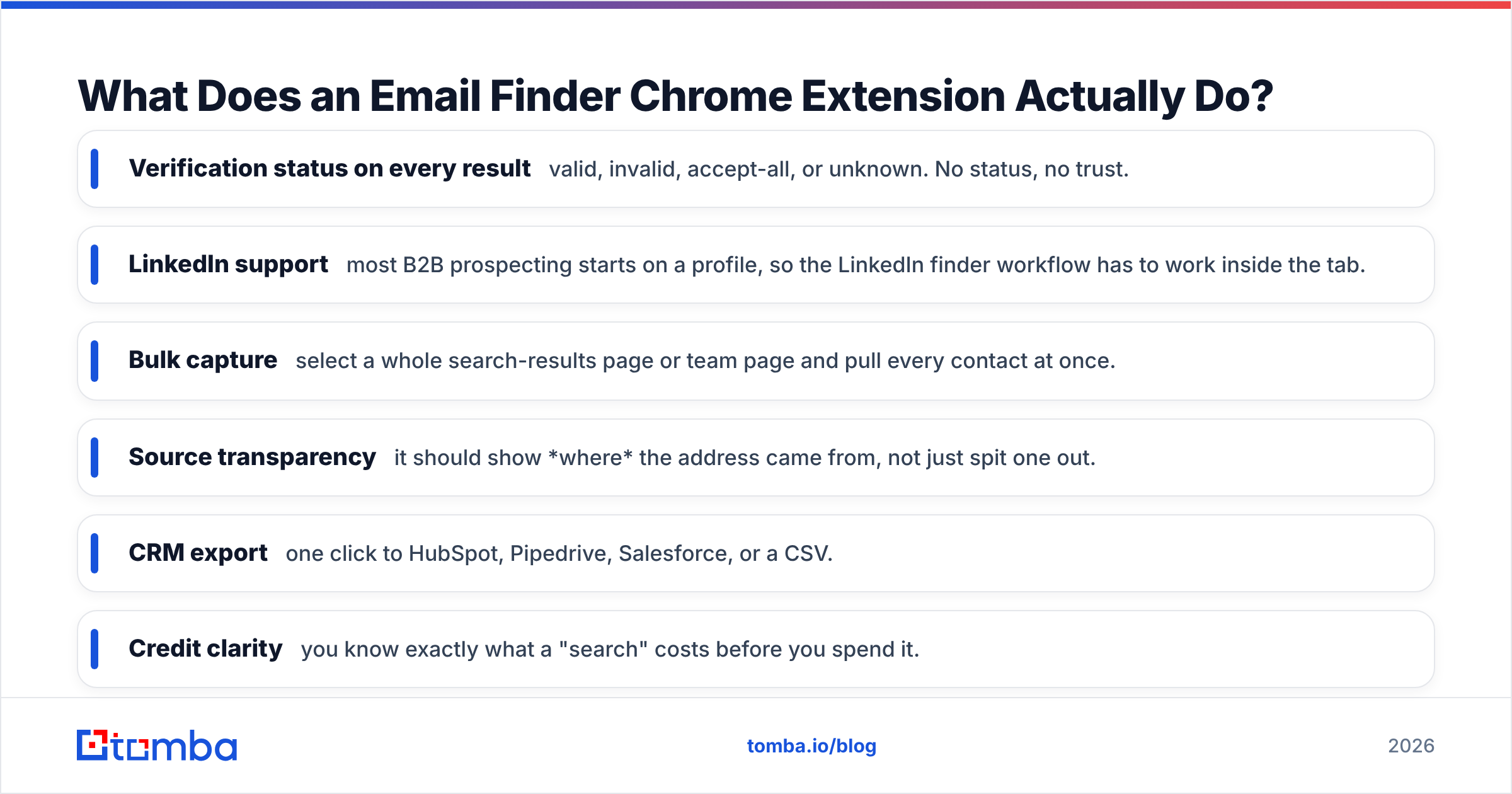
- Verification status on every result — valid, invalid, accept-all, or unknown. No status, no trust.
- LinkedIn support — most B2B prospecting starts on a profile, so the LinkedIn finder workflow has to work inside the tab.
- Bulk capture — select a whole search-results page or team page and pull every contact at once.
- Source transparency — it should show where the address came from, not just spit one out.
- CRM export — one click to HubSpot, Pipedrive, Salesforce, or a CSV.
- Credit clarity — you know exactly what a "search" costs before you spend it.
Which Is the Best Email Finder Chrome Extension in 2026?#
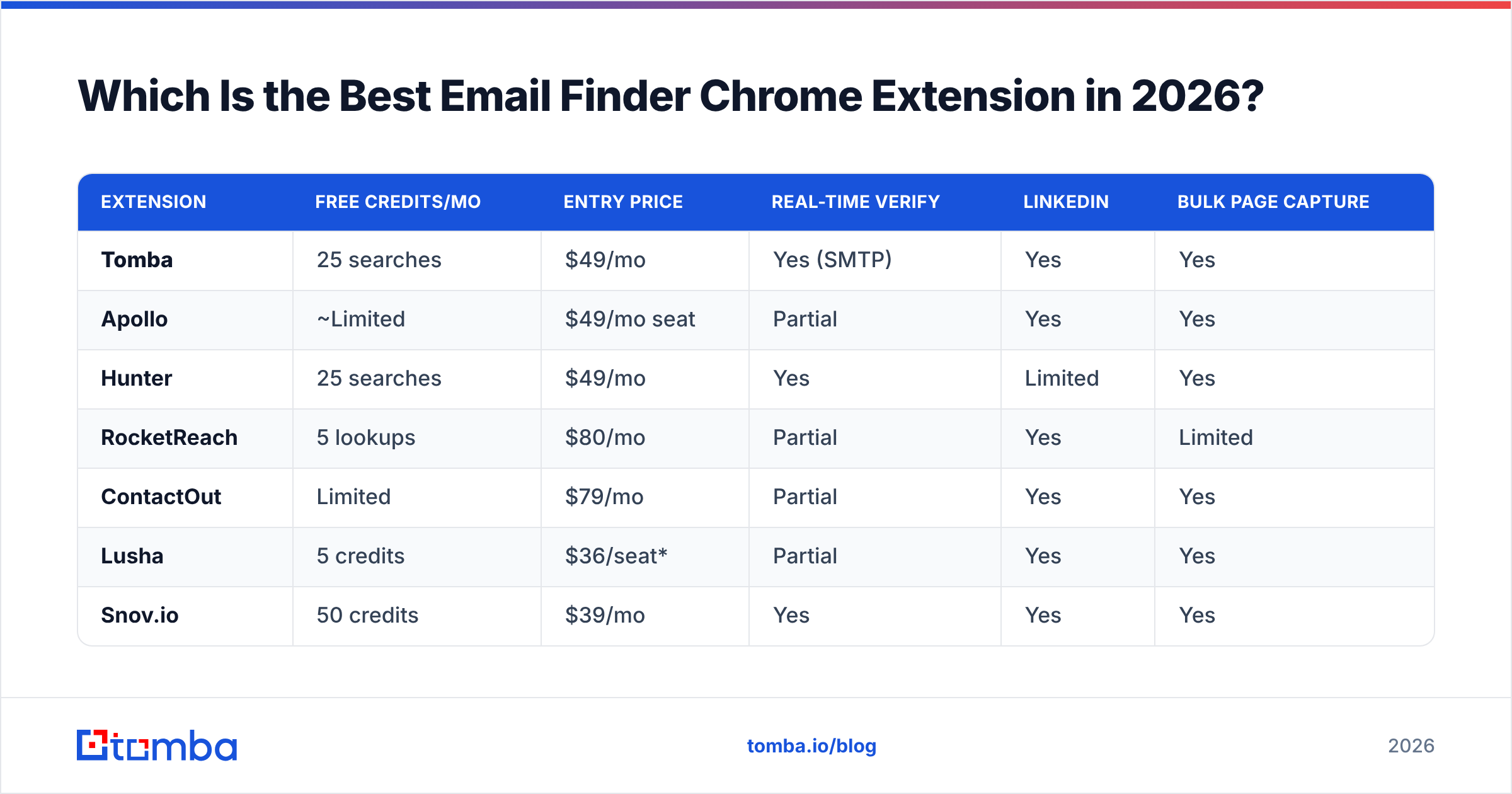
Here's the head-to-head. Prices are entry-paid-tier monthly; free credits are the recurring monthly allowance, not a one-time trial.
| Extension | Free credits/mo | Entry price | Real-time verify | Bulk page capture | |
|---|---|---|---|---|---|
| Tomba | 25 searches | $49/mo | Yes (SMTP) | Yes | Yes |
| Apollo | ~Limited | $49/mo seat | Partial | Yes | Yes |
| Hunter | 25 searches | $49/mo | Yes | Limited | Yes |
| RocketReach | 5 lookups | $80/mo | Partial | Yes | Limited |
| ContactOut | Limited | $79/mo | Partial | Yes | Yes |
| Lusha | 5 credits | $36/seat* | Partial | Yes | Yes |
| Snov.io | 50 credits | $39/mo | Yes | Yes | Yes |
*Lusha's headline seat price excludes the volume you actually need for outbound; real cost climbs with credit packs.
A few honest takeaways from the table:
- Snov.io has the most generous free credits, but those credits cover both finding and verifying, so they drain in half the time you'd expect.
- RocketReach and Lusha look cheap until you count lookups — 5 free credits is a demo, not a workflow.
- Apollo is excellent if you've bought the whole platform; as a standalone finder extension it's overkill and the credit throttling on lower seats is real.
- Tomba and Hunter are the closest match on price and free tier. The tiebreaker is data coverage on personal and LinkedIn-sourced emails, where Tomba's data sources pull ahead.
For the full credit math across plans, the Tomba pricing page lists exactly what each search and verification costs — no per-seat surprises.
How Accurate Are These Extensions, Really?#
Accuracy is the whole reason this category exists, and it's where marketing copy lies the most. "98% accuracy" usually means of the emails we chose to return — after silently dropping every lookup they weren't sure about. The honest metric is coverage-adjusted accuracy: of 100 real people, how many correct, deliverable addresses did you get?

The single best predictor of low bounce rates is whether the extension runs a live SMTP check at the moment you click — not a cached check from six months ago. Catch-all domains are where most tools quietly fail: the server accepts everything, so a naive verifier marks every guess "valid." A proper catch-all verifier uses additional signals to grade those domains instead of rubber-stamping them.
Three accuracy traps to watch for:
- Stale database matches — a "verified" flag from a year-old crawl is not verification. People change jobs.
- Catch-all false positives — accept-all domains inflate accuracy claims. Demand a distinct "accept-all" status, not a green checkmark.
- No re-verify before export — always run a fresh check before a send. Pair the finder with a standalone email verifier on your final list.

What's the Catch With "Free" Email Finder Extensions?#
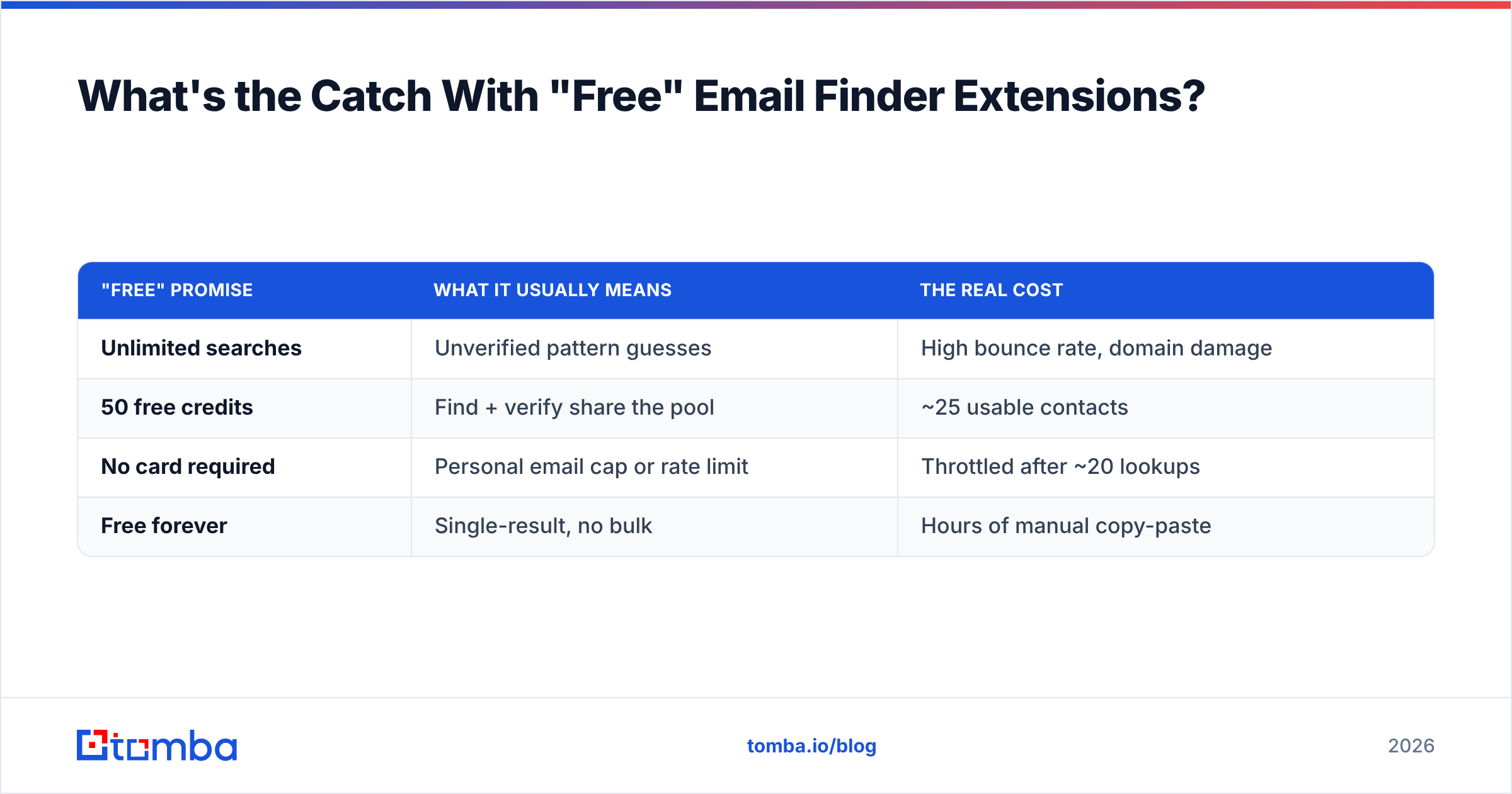
The catch is almost always the verification step. A free extension will happily find (read: guess) an address, but charge you — or simply refuse — to verify it. So you export a list that looks full, send to it, and discover the bounce rate the expensive way.
| "Free" promise | What it usually means | The real cost |
|---|---|---|
| Unlimited searches | Unverified pattern guesses | High bounce rate, domain damage |
| 50 free credits | Find + verify share the pool | ~25 usable contacts |
| No card required | Personal email cap or rate limit | Throttled after ~20 lookups |
| Free forever | Single-result, no bulk | Hours of manual copy-paste |
The sustainable model is a real free tier with verified results, then transparent paid scaling. Tomba's free plan gives you 25 verified searches a month — enough to test accuracy on your own target accounts before paying a cent. When you outgrow it, the bulk email finder handles whole lists, and the Tomba API drops finding-and-verifying straight into your own product or workflow.
How Do You Use an Email Finder Extension Without Wrecking Deliverability?#
Finding the address is half the job. The other half is not torching your sender reputation with the list you just built. A clean extension feeds a clean pipeline; a sloppy one feeds bounces.
- Verify twice. Find with the extension, then re-verify the consolidated list before import. Inboxes change between your scrape and your send.
- Segment catch-all domains. Don't blast accept-all addresses in the same batch as confirmed ones — isolate and warm them separately.
- Enrich before you write. Pull role, company size, and location so the email earns a reply. The data enrichment step turns a raw address into a reason to send.
- Respect the format. Use the company email pattern tool to sanity-check the format the extension inferred before trusting it at scale.
- Watch your bounce rate like a hawk. Anything over 3% means your finding-or-verifying step is broken. Fix the tool, not the copy.
For the deliverability side of this — SPF, DKIM, sender reputation — the broader principles of email deliverability matter as much as the data quality. The best address in the world bounces if your domain isn't authenticated.
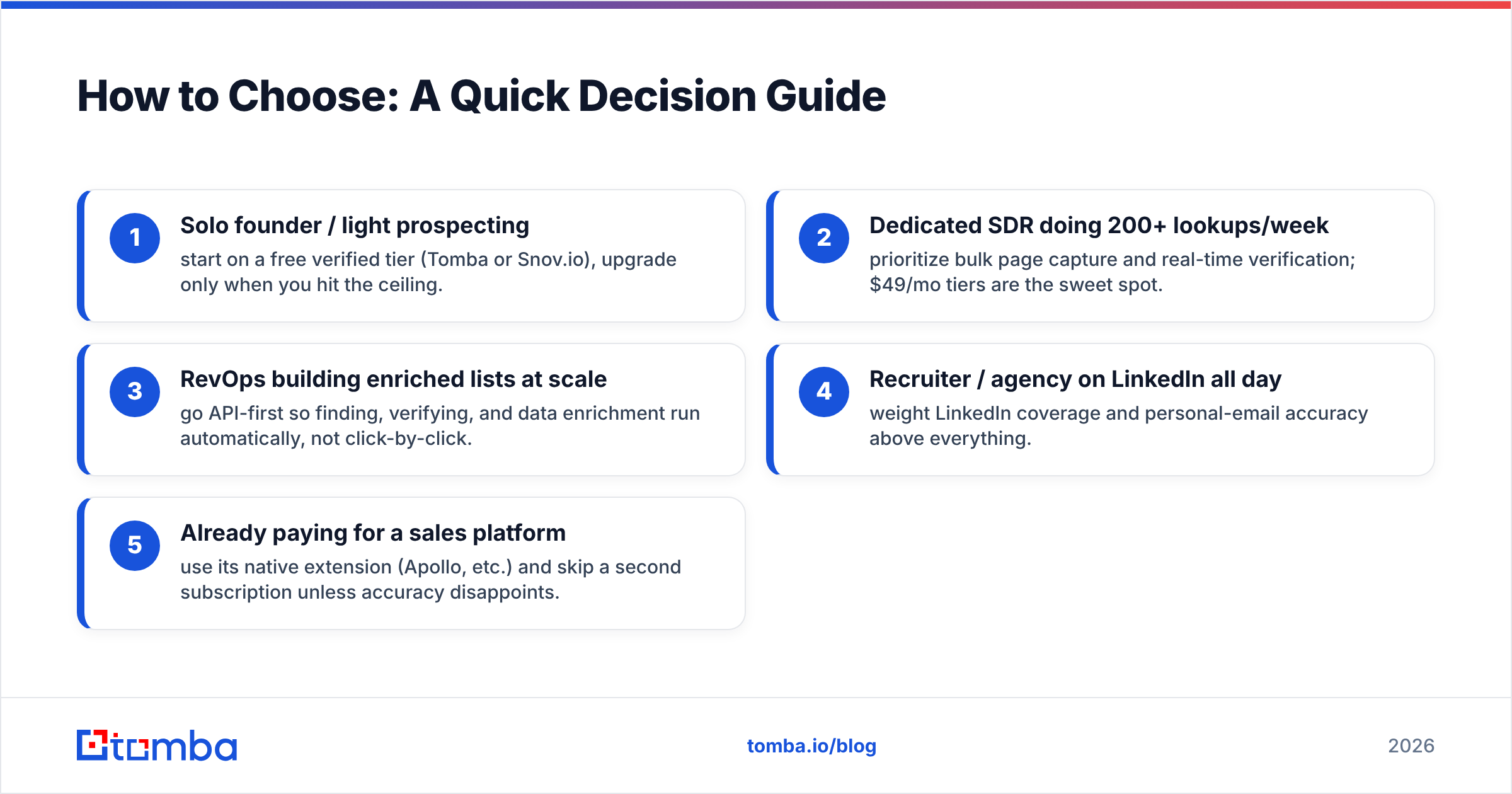
How to Choose: A Quick Decision Guide#
Match the tool to the job instead of chasing the longest feature list:
- Solo founder / light prospecting — start on a free verified tier (Tomba or Snov.io), upgrade only when you hit the ceiling.
- Dedicated SDR doing 200+ lookups/week — prioritize bulk page capture and real-time verification; $49/mo tiers are the sweet spot.
- RevOps building enriched lists at scale — go API-first so finding, verifying, and data enrichment run automatically, not click-by-click.
- Recruiter / agency on LinkedIn all day — weight LinkedIn coverage and personal-email accuracy above everything.
- Already paying for a sales platform — use its native extension (Apollo, etc.) and skip a second subscription unless accuracy disappoints.
Cross-check any shortlist against independent reviews on G2 and the vendor's own docs — for example Hunter's official site is transparent about its domain-search bias, which tells you it's strong on company emails and weaker on personal ones.
The Bottom Line#
The best email finder Chrome extension isn't the one that returns the most addresses — it's the one that returns the most deliverable ones and tells you which is which. Verification on every lookup, honest catch-all handling, and clear credit pricing beat a longer feature list every time.
If you want to test that claim on your own target accounts, the Tomba Email Finder gives you 25 verified searches a month free — no card — with the same SMTP verification running inside the extension and the domain search for whole-company pulls. Install it, scrape 25 of your real prospects, and check the bounce rate against whatever you're using now. The numbers will pick the winner for you.
// get started
Find, verify and enrich your first contacts today
Start on the free plan with 25 searches a month, then scale when your team is ready.
Free plan · No credit card required · GDPR & CCPA
// about the author