Best Email Finder Extension in 2026: Top 9 Compared
A no-fluff comparison of the best email finder extension options in 2026 — accuracy, pricing, LinkedIn support, and which Chrome add-on actually earns a spot on your toolbar.
A browser email finder is the difference between researching a prospect for five minutes and grabbing their verified address in two clicks. The right extension lives on your toolbar, reads the company site or LinkedIn profile you're already looking at, and hands you a deliverable email without breaking your flow. The wrong one burns credits on guesses that bounce.
This guide ranks the best email finder extension options in 2026 by what actually matters: accuracy, verification, LinkedIn coverage, free-tier generosity, and price. No vendor fluff — just where each tool wins and where it falls down.
TL;DR — Which Email Finder Extension Should You Install?#
- Best overall accuracy + value: Tomba — real-time SMTP verification, a 25-search free tier, and a Chrome extension that works on company sites and LinkedIn.
- Best for high-volume sales teams: Apollo, if you can stomach the seat pricing and database upsell.
- Best LinkedIn-first scraping: Wiza and ContactOut, though accuracy drops on smaller domains.
- Avoid any extension that doesn't verify in real time — unverified "found" emails are just educated guesses that hurt your sender reputation.
- Rule of thumb: pick a tool whose extension and API share the same data, so what you find while browsing matches what you pull in bulk.
What Is an Email Finder Extension?#
An email finder extension is a browser add-on (usually Chrome, sometimes Edge or Firefox) that finds and verifies professional email addresses from the page you're viewing. Think of it like a business-card scanner that never sleeps: instead of squinting at a website footer, you click the toolbar icon and the extension reads the domain, matches it against a contact database, and tests whether the address actually accepts mail.
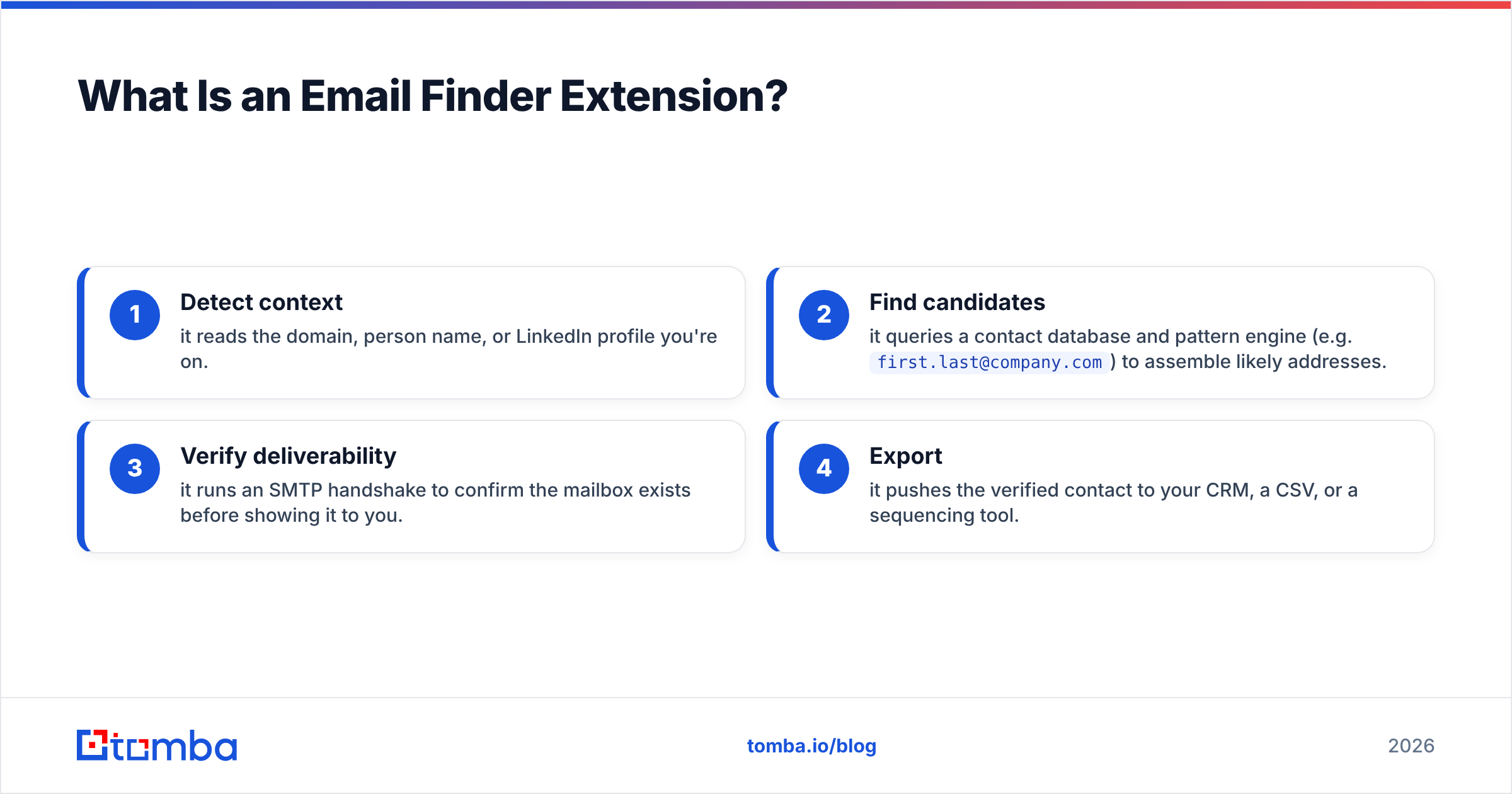
Under the hood, a good extension does four jobs in sequence:
- Detect context — it reads the domain, person name, or LinkedIn profile you're on.
- Find candidates — it queries a contact database and pattern engine (e.g.
first.last@company.com) to assemble likely addresses. - Verify deliverability — it runs an SMTP handshake to confirm the mailbox exists before showing it to you.
- Export — it pushes the verified contact to your CRM, a CSV, or a sequencing tool.
The verification step is what separates a professional tool from a toy. A scraper that returns a "pattern guess" with no check behind it will quietly feed your cold campaigns bounces — and bounces wreck email deliverability faster than any subject line can save it.

What Makes the Best Email Finder Extension? (Buying Criteria)#
Before the rankings, here's the scorecard. Weight these by your own workflow, but ignore any of them at your peril.
- Verification, not just discovery. The extension must verify in real time. "Found 1 email" means nothing if it bounces.
- Accuracy on small domains. Anyone can find
ceo@microsoft.com. The test is a 30-person startup with a custom domain. - LinkedIn coverage. If your prospecting starts on LinkedIn, you need an extension that reads profiles, not just company homepages.
- Free tier you can actually evaluate. A real free tier (not a 24-hour trial) tells you the vendor trusts its own accuracy.
- Credit honesty. Some tools charge a credit even when they return nothing. Look for "pay only for verified results."
- CRM + bulk parity. The single-lookup extension and the bulk email finder should draw from the same data so your numbers are consistent.
- Price per verified contact. Headline monthly price is a vanity metric. Divide by usable contacts.
Which Email Finder Extensions Are Best in 2026? (Comparison Table)#
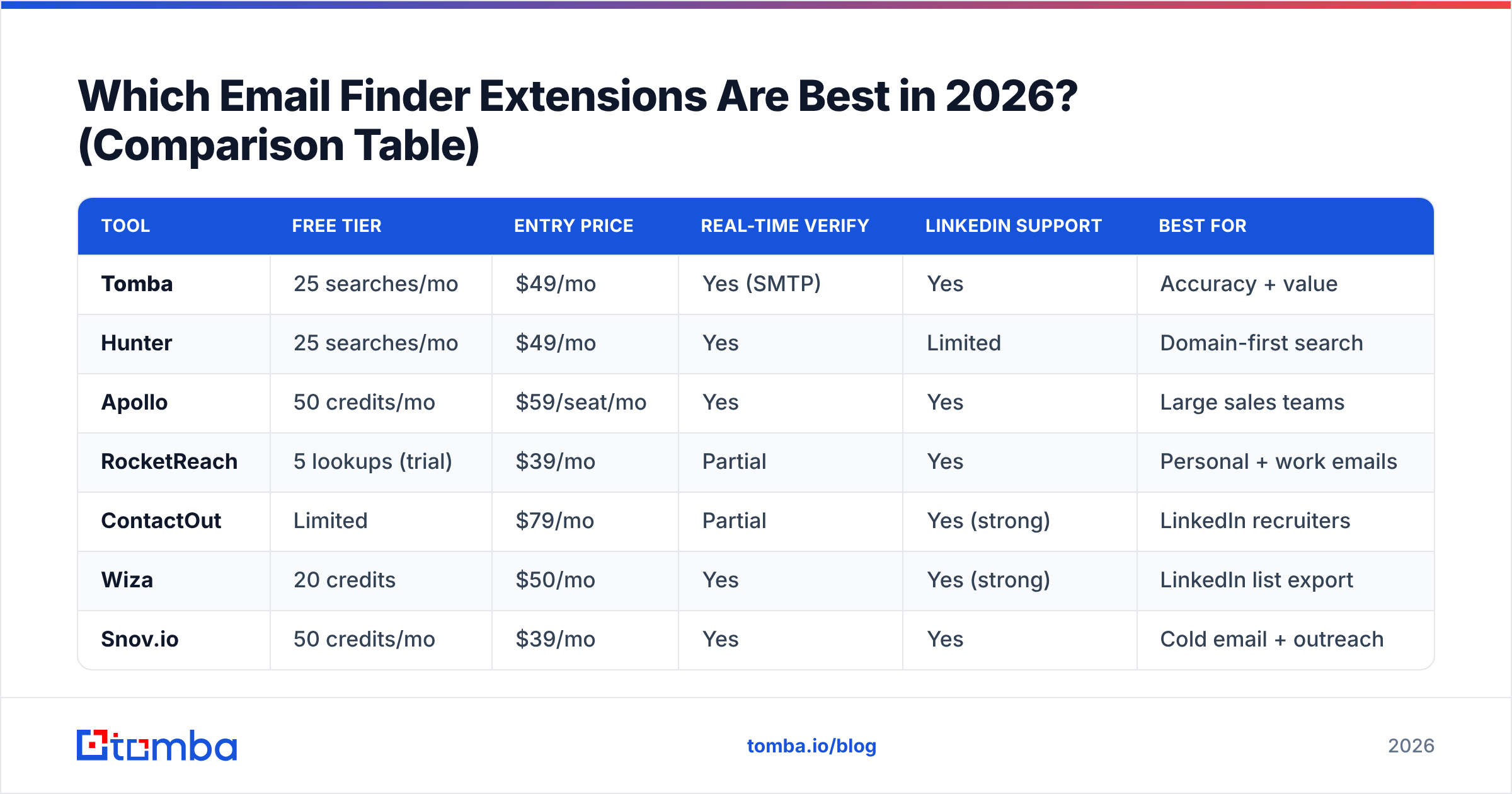
Here's how the leading browser extensions stack up. Prices are entry paid tier as of 2026; verification and LinkedIn columns reflect what the extension does natively.
| Tool | Free tier | Entry price | Real-time verify | LinkedIn support | Best for |
|---|---|---|---|---|---|
| Tomba | 25 searches/mo | $49/mo | Yes (SMTP) | Yes | Accuracy + value |
| Hunter | 25 searches/mo | $49/mo | Yes | Limited | Domain-first search |
| Apollo | 50 credits/mo | $59/seat/mo | Yes | Yes | Large sales teams |
| RocketReach | 5 lookups (trial) | $39/mo | Partial | Yes | Personal + work emails |
| ContactOut | Limited | $79/mo | Partial | Yes (strong) | LinkedIn recruiters |
| Wiza | 20 credits | $50/mo | Yes | Yes (strong) | LinkedIn list export |
| Snov.io | 50 credits/mo | $39/mo | Yes | Yes | Cold email + outreach |
| Lusha | 5 credits/mo | $49/seat/mo | Yes | Yes | Phone + email combo |
| Skrapp | 100 searches/mo | $49/mo | Partial | Yes | Budget LinkedIn finds |
A few honest notes on this table. Apollo and Lusha price per seat, so a three-person team triples the cost the table implies. RocketReach and ContactOut shine on personal-email coverage but their real-time verification is weaker, so plan to run results through a dedicated email verifier before you send. Skrapp's free tier is generous on volume but lighter on verification depth.
For email-finder accuracy specifically, independent re-tests in 2026 continue to show a wide spread between tools that verify every result and tools that return pattern guesses:

Is Tomba the Best Email Finder Extension for Accuracy?#
For most B2B users, yes — Tomba lands at the top because it pairs broad discovery with SMTP verification on every result, and it doesn't punish you with an enterprise-only paywall to get there.
What the Tomba extension does well:
- Finds on the page you're already on. Open a company site or a LinkedIn profile, click the toolbar, and the Tomba Chrome extension returns verified contacts with confidence scores.
- Verifies before it shows. Every address runs through a real SMTP check, so a "valid" result means the mailbox accepts mail — not that the pattern looked plausible.
- Handles catch-all domains. Catch-all servers accept every address, which fools weaker tools. Tomba's catch-all verifier flags these so you don't mistake "accepted" for "deliverable."
- Shares data with the API and bulk tools. What you find in the browser matches what you pull through the Tomba API or a CSV bulk run — no surprise discrepancies between channels.
Pricing is the other half of the story. Tomba's pricing starts with a genuine free tier of 25 searches per month, then Starter at $49/mo, Growth at $99/mo, and Pro at $249/mo. You can evaluate real accuracy on your own domains before paying a cent — which is exactly how you should test any tool on this list.

How Do Email Finder Extensions Handle LinkedIn?#
LinkedIn is where most prospecting starts, so extension behavior on profiles matters as much as behavior on company sites.
There are two patterns:
- Profile-reading finders (Tomba, Apollo, Wiza, ContactOut) detect the person and company from the open profile, then resolve a verified work email. Tomba's LinkedIn finder is built for exactly this — turning a profile into a deliverable address without manual copy-paste.
- Scraper-style tools pull bulk lists from LinkedIn search results. These are fast for volume but lean heavily on pattern guessing, so verification afterward is non-negotiable.
A practical workflow: prospect on LinkedIn, capture with the extension, then run anything you're unsure about through a domain search to confirm the company's real email pattern. That two-step approach catches the edge cases — recently rebranded domains, contractors on a different mail server, and aliases — that trip up single-click scraping. If you want the full picture on LinkedIn-based outreach, the mechanics of LinkedIn outreach reward accuracy over raw list size every time.
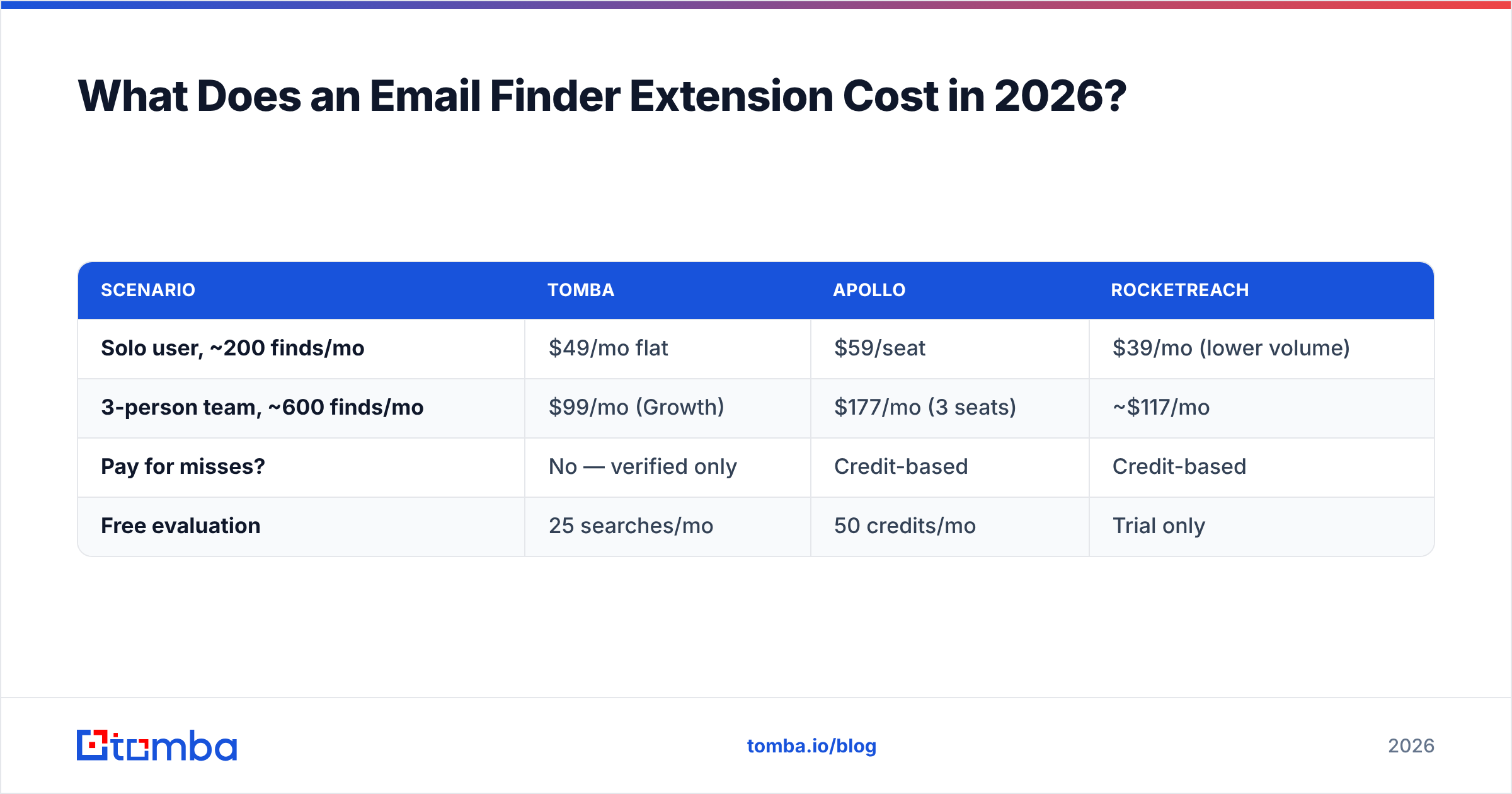
What Does an Email Finder Extension Cost in 2026?#
The headline price hides the real cost, which is price per verified contact. Here's how the math shifts once you account for free tiers, seat pricing, and wasted credits on bounces.
| Scenario | Tomba | Apollo | RocketReach |
|---|---|---|---|
| Solo user, ~200 finds/mo | $49/mo flat | $59/seat | $39/mo (lower volume) |
| 3-person team, ~600 finds/mo | $99/mo (Growth) | $177/mo (3 seats) | ~$117/mo |
| Pay for misses? | No — verified only | Credit-based | Credit-based |
| Free evaluation | 25 searches/mo | 50 credits/mo | Trial only |
Two takeaways. First, flat-rate beats per-seat the moment you add teammates — a three-person team on Tomba Growth costs roughly half a comparable Apollo setup. Second, tools that charge for unverified guesses inflate your real cost invisibly: every bounce is a paid credit and a hit to your sender reputation. For a deeper breakdown of plans and what each credit buys, the full Tomba plans page lays out the tiers.
For the side-by-side feature view many buyers ask for, here's the condensed comparison grid:

How to Choose and Set Up Your Email Finder Extension#
Skip the marketing pages and run a five-step bake-off. It takes 20 minutes and tells you more than any review.
- Install two or three on the free tier. Tomba, plus whichever LinkedIn-heavy option fits your motion.
- Test on hard targets. Pick five small companies with custom domains — not Fortune 500s. The spread between tools shows up here.
- Check the verification claim. Cross-test "valid" results in a standalone email verifier. If a tool's "valid" addresses fail an independent check, drop it.
- Measure catch-all handling. Find a domain with a catch-all server and see which tool flags it honestly versus which one claims a confident "valid."
- Confirm CRM export. Push a contact into your CRM through the extension. If it's a manual copy-paste, that friction adds up over hundreds of leads.
Whatever you pick, treat the extension as your front line and a verification step as your safety net. The best workflow finds fast in the browser and confirms deliverability before anything hits a sequence — because one clean send beats ten bounced ones. Industry directories like G2 and verification guidance from senders like HubSpot reinforce the same point: list hygiene, not list size, drives reply rates.
FAQ#
Is there a free email finder extension? Yes. Tomba, Hunter, Snov.io, and Skrapp all offer real free tiers (not just trials). Tomba's gives 25 verified searches per month, which is enough to evaluate accuracy on your own domains before committing.
Do email finder extensions work on LinkedIn? The good ones do. Tools like Tomba, Apollo, and Wiza read the open profile and resolve a verified work email. Always verify scraped LinkedIn results, since profile-based pattern guesses bounce more often than domain-confirmed addresses.
Are email finder extensions accurate? Accuracy varies widely. Tools that run real-time SMTP verification (Tomba, Hunter, Snov.io) are far more reliable than scrapers that return pattern guesses. The honest test is a small company with a custom domain, not a household-name enterprise.
Will using an email finder hurt my deliverability? Only if you skip verification. Sending to unverified addresses causes bounces, and bounces damage sender reputation. Use an extension that verifies before it shows results, and you avoid the problem entirely.
The Bottom Line#
The best email finder extension is the one that finds and verifies in the same click, gives you a real free tier to test it, and charges a flat rate instead of nickel-and-diming you per seat. On all three counts, Tomba is the one to install first.
Put it on your toolbar, point it at your hardest prospects, and watch the verified-versus-guessed gap close. Start free with the Tomba Email Finder — 25 searches a month, real SMTP verification, and a Chrome extension that works wherever you prospect. Find the address, confirm it's deliverable, and send with confidence.
// get started
Find, verify and enrich your first contacts today
Start on the free plan with 25 searches a month, then scale when your team is ready.
Free plan · No credit card required · GDPR & CCPA
// about the author