Best Email List Providers in 2026: Compared & Ranked
A neutral 2026 breakdown of the best email list providers — pricing, data accuracy, compliance, and which one actually fits your outbound motion.
Buying an email list feels like a shortcut. You pay, you download a CSV, you start sending. Then half the addresses bounce, your domain reputation tanks, and the "10,000 verified contacts" you bought turn out to be three years stale. The provider you choose decides whether that happens to you.
This guide ranks the best email list providers for 2026 by the only metrics that matter for outbound: data freshness, verification accuracy, compliance posture, and real cost per usable contact — not headline credit counts.
TL;DR — Quick Takeaways#
- There are two categories of "email list provider": pre-built static lists (fast, risky, often stale) and live data platforms that build lists on demand (slower to set up, far more accurate).
- Accuracy beats volume every time. A 2,000-contact list at 95% deliverability outperforms a 50,000-contact dump at 60%.
- ZoomInfo and Apollo lead on database size; Tomba, Lusha, and Cognism win on per-contact accuracy and price flexibility.
- Never send to an unverified purchased list. Always run it through an email verifier before your first campaign.
- Best overall value for SMB and mid-market outbound: an on-demand finder like the Tomba Email Finder plus verification, instead of a static bought list.
What Is an Email List Provider?#
An email list provider is a service that sells or generates B2B contact data — names, job titles, company info, and email addresses — that you use for sales and marketing outreach.
Think of it like buying produce. A static, pre-built list is the bin of pre-cut fruit at the gas station: convenient, but you have no idea how long it's been sitting there. A live data platform is the farmers' market — you tell them what you want, and they pull it fresh. Both sell you "fruit," but freshness is the whole game.
Providers fall into two buckets:
- Static list sellers — You buy a fixed file (often by industry or title). Cheapest upfront, highest bounce risk, and frequently non-compliant because you can't prove how consent or sourcing was handled.
- Live data / finder platforms — You search a maintained database or generate emails on demand by domain and name. Higher accuracy, usage-based pricing, and an audit trail for where the data came from.
- Enrichment-first platforms — You bring a list of names or domains and the tool fills in verified emails, phones, and firmographics. Best when you already have a target account list.
The line between these blurs in 2026 — most serious vendors now do all three. But how a provider sources and refreshes data still separates the reliable ones from the bounce factories.
)
Which Are the Best Email List Providers in 2026?#
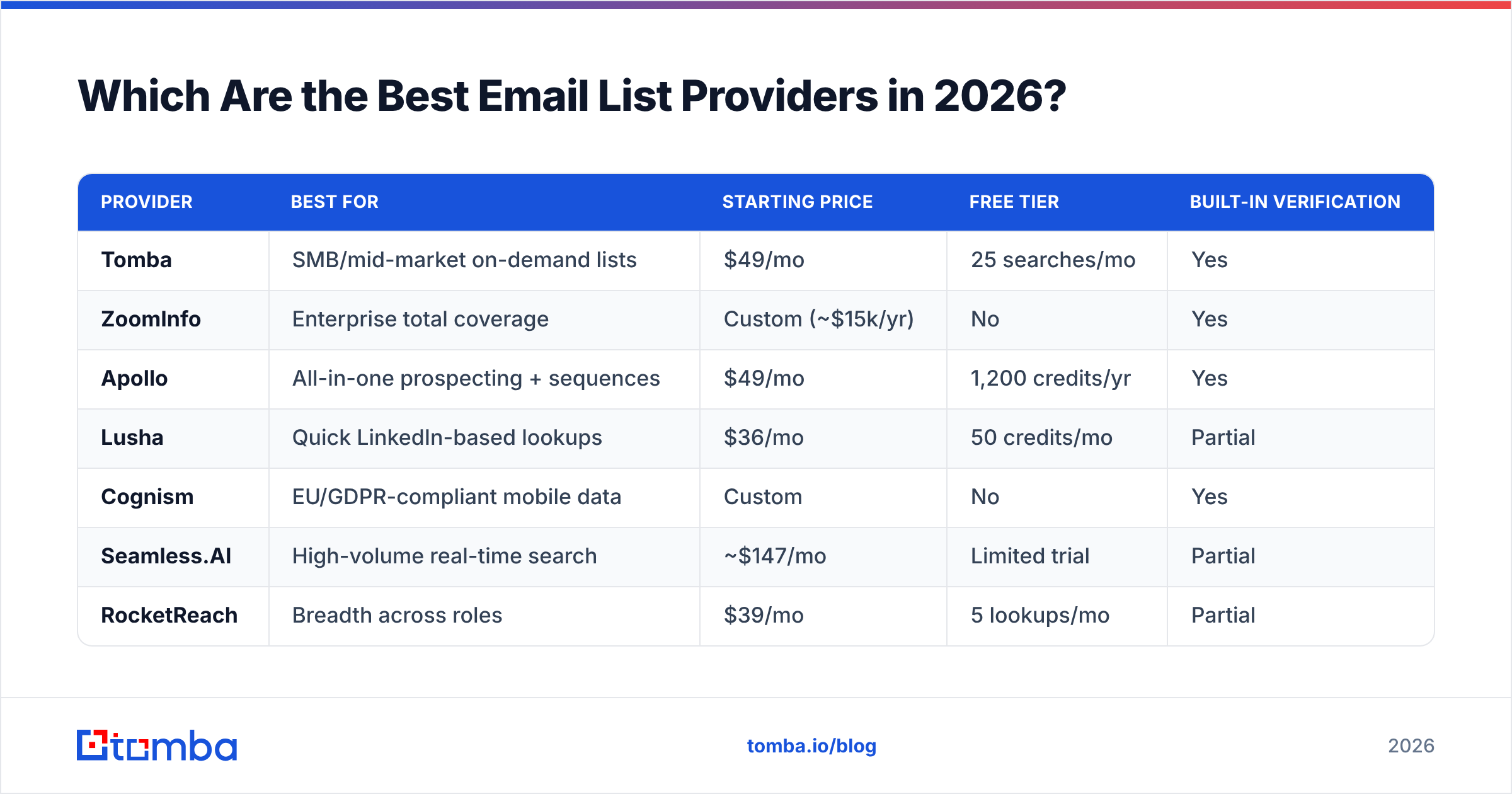
Here's the shortlist, judged on database coverage, verification quality, compliance, and pricing transparency. No single tool wins every category — the right pick depends on your motion and budget.
| Provider | Best for | Starting price | Free tier | Built-in verification |
|---|---|---|---|---|
| Tomba | SMB/mid-market on-demand lists | $49/mo | 25 searches/mo | Yes |
| ZoomInfo | Enterprise total coverage | Custom (~$15k/yr) | No | Yes |
| Apollo | All-in-one prospecting + sequences | $49/mo | 1,200 credits/yr | Yes |
| Lusha | Quick LinkedIn-based lookups | $36/mo | 50 credits/mo | Partial |
| Cognism | EU/GDPR-compliant mobile data | Custom | No | Yes |
| Seamless.AI | High-volume real-time search | ~$147/mo | Limited trial | Partial |
| RocketReach | Breadth across roles | $39/mo | 5 lookups/mo | Partial |
| UpLead | Verified lists with guarantees | $99/mo | 5 credits trial | Yes |
| Clearbit (Breeze) | Enrichment inside HubSpot | Bundled | No | Yes |
A few notes on reading this table. "Starting price" is the entry paid plan, not the realistic spend for a full team — enterprise tools like ZoomInfo and Cognism quote annually and land well into five figures. "Free tier" is what you get to test accuracy before paying, which matters more than most buyers realize.
If your primary need is comparing the underlying email data engines, the accuracy gap between vendors is the deciding factor:

How Accurate Is the Data, Really?#
Data accuracy is the single biggest predictor of campaign ROI — and the number every provider inflates the most.
Vendors love to advertise "95% accuracy," but accuracy claims mean nothing without a definition. Ask two questions before you trust any of them:
- Is the email verified in real time, or against a cached result? A finder that re-checks the mail server at lookup time beats one returning a verification from six months ago.
- How is a catch-all domain handled? Many providers count catch-all addresses as "valid" because the server accepts everything. That inflates accuracy on paper and bounces in practice. A proper catch-all verifier flags these honestly.
Independent buyer reviews on G2 consistently show real-world deliverability landing 10–20 points below advertised numbers across the category. The providers that hold up best pair a large database with live SMTP verification rather than relying on a static snapshot.
This is why buying a pre-built static list is the riskiest path: by the time it reaches your inbox, roughly 22–30% of B2B contacts have changed jobs or companies annually, so a year-old file is already a quarter rotten. Generating and verifying on demand sidesteps that decay entirely.
Static Bought Lists vs. On-Demand Generation — Which Wins?#
On-demand generation wins for almost everyone, with one narrow exception.
A static list makes sense only when you need a one-time, broad market snapshot and you've budgeted to verify the entire file before sending. For repeatable outbound, generating lists from a live source is cheaper per usable contact and protects your sender reputation.
Here's the practical difference in cost-per-result. Say you need 1,000 contacts for a campaign:
- Bought static list: Pay for 1,000 contacts. Expect ~650 to be deliverable after decay and catch-alls. Effective cost per usable contact is ~54% higher than the sticker price, plus the reputation hit from the bounces you didn't catch.
- On-demand finder + verification: Search and verify 1,000, discard the ~150 that fail verification before sending, and send only to 850 confirmed addresses. You pay slightly more per lookup but waste zero sends and protect email deliverability.
The math almost always favors the second approach once you factor in domain reputation. One blacklisting event from a bad list costs more than a year of credits.
)
What About Compliance and GDPR?#
Compliance is non-negotiable, and it's where cheap list sellers expose you to the most legal risk.
Under GDPR (EU) and CAN-SPAM (US), the burden is on you, the sender, to prove a lawful basis for contacting someone — not on the provider who sold you the data. If a vendor can't tell you where a contact was sourced or how it's kept current, you inherit that liability.
When evaluating the best email list providers for a regulated market, check:
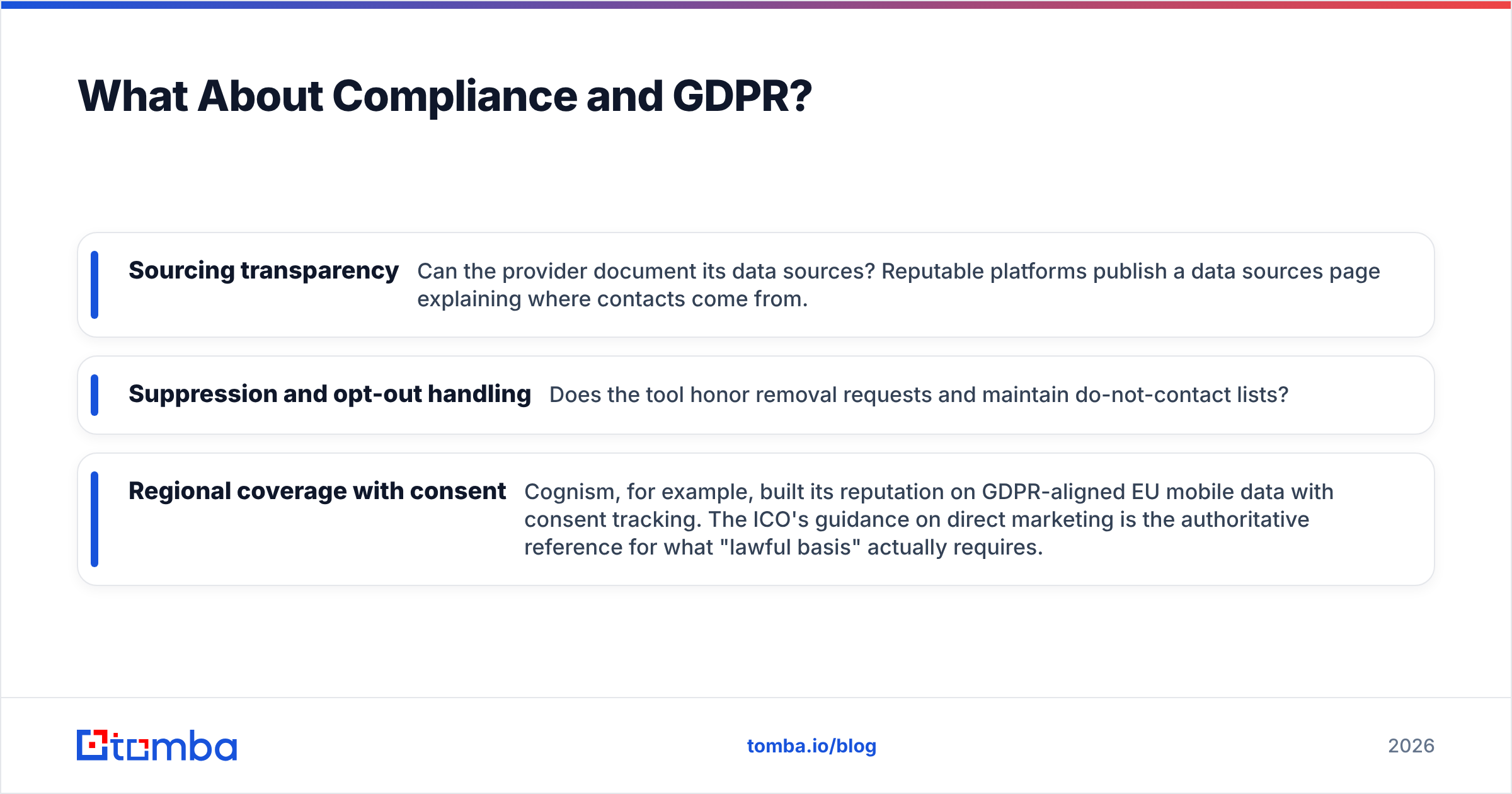
- Sourcing transparency — Can the provider document its data sources? Reputable platforms publish a data sources page explaining where contacts come from.
- Suppression and opt-out handling — Does the tool honor removal requests and maintain do-not-contact lists?
- Regional coverage with consent — Cognism, for example, built its reputation on GDPR-aligned EU mobile data with consent tracking. The ICO's guidance on direct marketing is the authoritative reference for what "lawful basis" actually requires.
Legitimate interest can cover B2B outreach in many EU cases, but only if your targeting is relevant and you offer easy opt-out. A scraped, unconsented bulk list rarely clears that bar.
How Much Should You Pay?#
Price per usable, verified contact is the only number worth comparing — and it rarely matches the headline plan price.
Entry pricing across the category clusters in two tiers. SMB-friendly tools (Tomba, Apollo, Lusha, RocketReach) start in the $36–$99/month range with usage-based credits. Enterprise platforms (ZoomInfo, Cognism, Seamless.AI at scale) move to annual contracts that routinely exceed $15,000/year once you add seats and intent data.
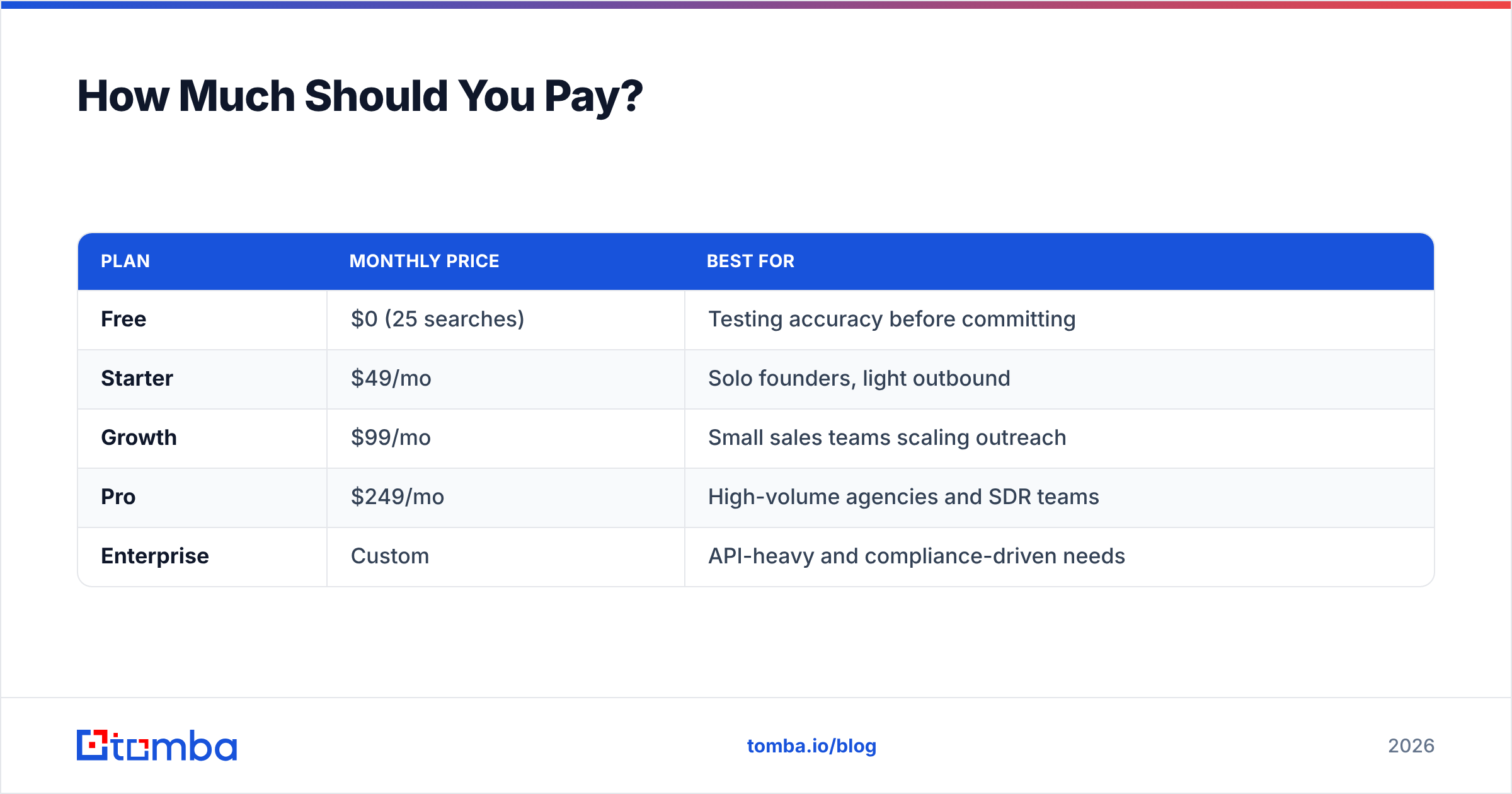
For most teams, the sweet spot is a transparent usage-based plan you can scale up or down. Tomba's tiers illustrate the model clearly — see full Tomba pricing:
| Plan | Monthly price | Best for |
|---|---|---|
| Free | $0 (25 searches) | Testing accuracy before committing |
| Starter | $49/mo | Solo founders, light outbound |
| Growth | $99/mo | Small sales teams scaling outreach |
| Pro | $249/mo | High-volume agencies and SDR teams |
| Enterprise | Custom | API-heavy and compliance-driven needs |
The lesson: start on a free or low tier, measure your real deliverability on a sample, and only then commit to volume. Any provider that won't let you test accuracy before signing an annual contract is hiding something.
Here's how the leading options compare side by side on the factors that drive real outbound results:

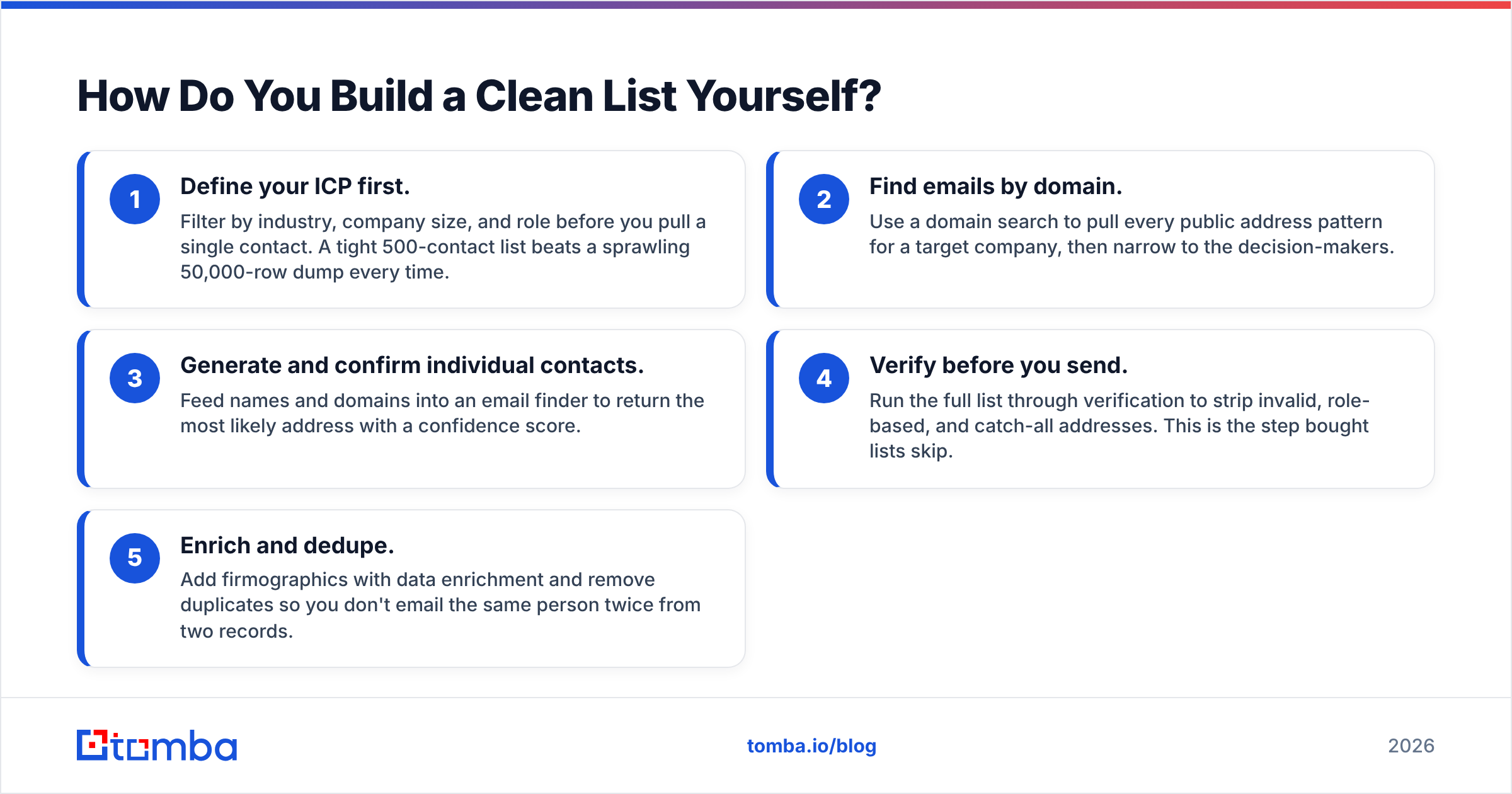
How Do You Build a Clean List Yourself?#
You can assemble a higher-quality list than most vendors sell, in five steps, using a finder plus a verifier.
- Define your ICP first. Filter by industry, company size, and role before you pull a single contact. A tight 500-contact list beats a sprawling 50,000-row dump every time.
- Find emails by domain. Use a domain search to pull every public address pattern for a target company, then narrow to the decision-makers.
- Generate and confirm individual contacts. Feed names and domains into an email finder to return the most likely address with a confidence score.
- Verify before you send. Run the full list through verification to strip invalid, role-based, and catch-all addresses. This is the step bought lists skip.
- Enrich and dedupe. Add firmographics with data enrichment and remove duplicates so you don't email the same person twice from two records.
This workflow takes more effort than downloading a CSV, but it produces a list you actually own, can prove the sourcing of, and trust enough to send to. For teams doing this at scale, the bulk email finder and the email finder API automate the whole pipeline.
Which Provider Should You Choose?#
Match the tool to your motion, not to the longest feature list.
- Enterprise with budget and a need for total US coverage + intent data: ZoomInfo, accepting the annual contract and onboarding.
- All-in-one prospecting where you also want sequences in the same tool: Apollo.
- GDPR-first EU outbound with heavy mobile-number reliance: Cognism.
- SMB or mid-market teams who want high accuracy, transparent usage pricing, and an API: Tomba — start free, scale on the Growth or Pro plan.
- Quick, occasional LinkedIn lookups: Lusha or RocketReach.
The providers fail in predictable ways: enterprise tools overshoot SMB budgets, and bottom-tier list sellers undershoot on accuracy and compliance. The middle — verified, on-demand, usage-priced data — is where most teams get the best return.
The Bottom Line#
The "best email list provider" isn't the one with the biggest database or the lowest sticker price — it's the one whose data still bounces the least after the decay, catch-alls, and compliance gaps are accounted for. For the majority of B2B teams in 2026, that means skipping static bought lists in favor of generating and verifying contacts on demand.
If you want to test that approach without spending a dollar, start with the Tomba Email Finder. The free tier gives you 25 searches a month — enough to pull a real sample, verify it, and compare the deliverability against whatever list you're considering buying. Run that test before you sign any annual contract; the difference in bounce rate usually makes the decision for you.
// get started
Find, verify and enrich your first contacts today
Start on the free plan with 25 searches a month, then scale when your team is ready.
Free plan · No credit card required · GDPR & CCPA
// about the author