Best Email Verification Tools in 2026: Ranked & Tested
Bounce rates wreck deliverability. Here's how the top email verification tools stack up on accuracy, catch-all handling, and price in 2026.

Sending cold outreach to a list you haven't cleaned is like mailing letters to addresses you copied off a whiteboard from across the room. Some land. Many bounce. And every bounce quietly chips away at your sender reputation until even your good emails start hitting spam.
This guide ranks the best email verification tools in 2026 on the only things that matter: how accurately they catch bad addresses, how they handle catch-all domains, how fast they process a list, and what you actually pay.
TL;DR — Which email verification tool wins?#
- Best overall accuracy + value: Tomba, because verification is baked into the same platform that finds the addresses, so you clean data at the source instead of patching it later.
- Best dedicated bulk cleaner: ZeroBounce and Bouncer both excel at large one-off list scrubs.
- Cheapest pay-as-you-go: MillionVerifier and EmailListVerify win on raw cost per check.
- Catch-all domains are the real test: most tools punt on them; only a few give a usable verdict — check this before you buy.
- Don't verify in a vacuum: pair verification with a free email checker for spot checks and a real email verifier for production lists.
What is email verification?#
Email verification is the process of confirming that an email address actually exists and can receive mail — without sending a message to it. Think of it as knocking on a door to see if anyone's home, except the tool listens for the right "hello" instead of physically delivering anything.
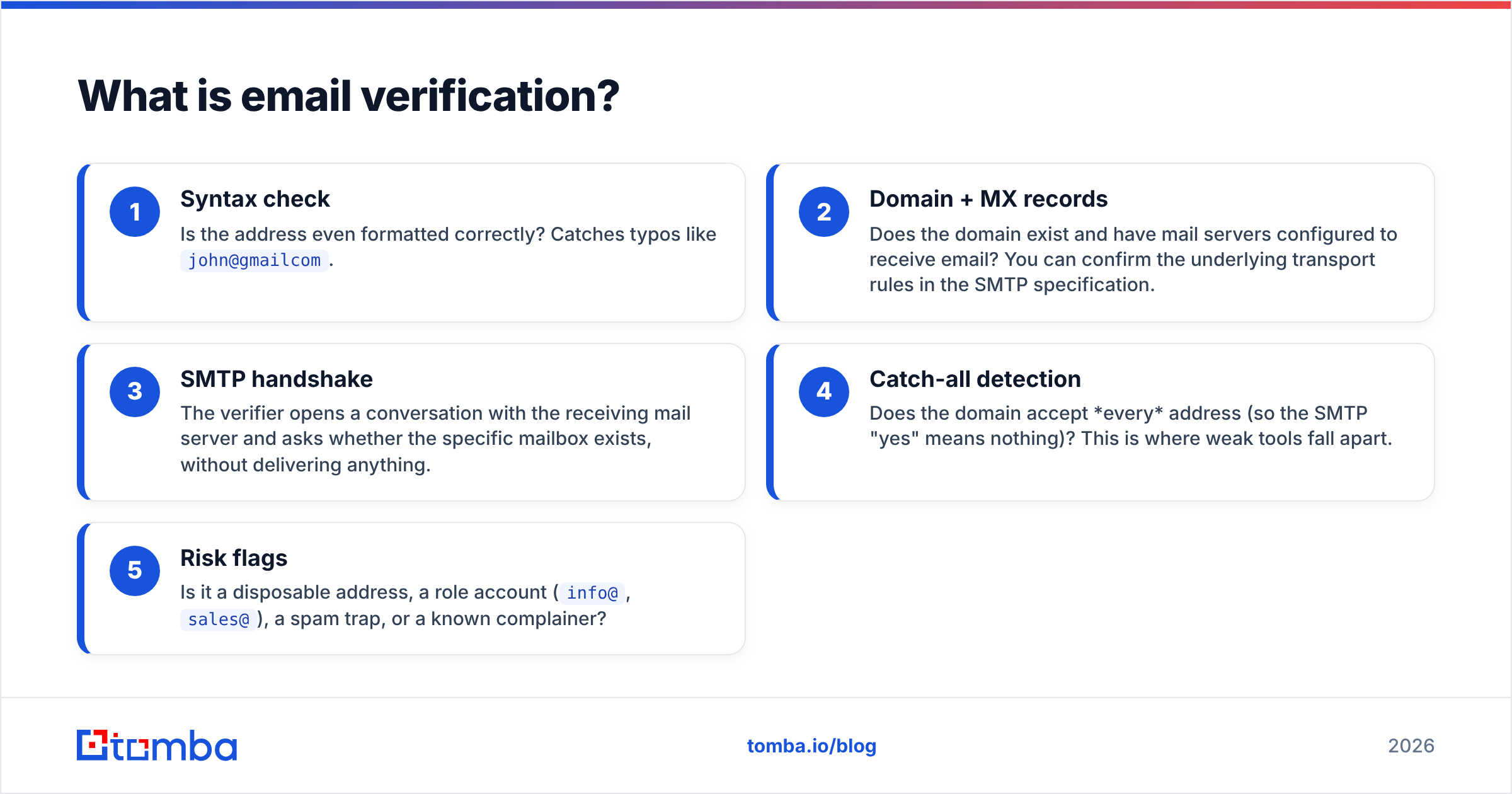
A solid verifier runs a short ladder of checks, and the quality of a tool comes down to how many rungs it climbs and how honestly it reports the result:
- Syntax check — Is the address even formatted correctly? Catches typos like
john@gmailcom. - Domain + MX records — Does the domain exist and have mail servers configured to receive email? You can confirm the underlying transport rules in the SMTP specification.
- SMTP handshake — The verifier opens a conversation with the receiving mail server and asks whether the specific mailbox exists, without delivering anything.
- Catch-all detection — Does the domain accept every address (so the SMTP "yes" means nothing)? This is where weak tools fall apart.
- Risk flags — Is it a disposable address, a role account (
info@,sales@), a spam trap, or a known complainer?
)
The output you want is a clean verdict — valid, invalid, catch-all/accept-all, or risky — plus a confidence score. Tools that only return "valid/invalid" with no middle category are hiding their uncertainty, and that uncertainty becomes your bounce rate.
Why does email verification matter in 2026?#
Because mailbox providers got stricter, and the penalty for a dirty list is now immediate. A one-line conclusion: high bounce rates don't just waste sends — they actively train Gmail, Outlook, and Yahoo to distrust your domain.
Here's the chain reaction. You send to 1,000 contacts. 120 bounce because the list was never cleaned. That 12% bounce rate signals to receiving servers that you don't maintain your data — so your next campaign, even to valid addresses, gets throttled or routed to spam. Verification breaks that cycle. Most teams that clean before sending pull bounce rates under 2%, which is the threshold inbox providers reward.
It also protects spend. If your sending platform or email verifier charges per send or per active contact, every dead address is money lit on fire. Cleaning first is cheaper than paying to email ghosts. For a deeper view of how bounces feed into reputation, the concept of email deliverability ties it all together.
How did we rank the best email verification tools?#
We weighted five criteria, in order of impact on your results:
- Accuracy — How often the verdict matches reality (lowest false "valid" rate wins).
- Catch-all handling — Whether the tool gives an actionable answer on accept-all domains instead of a shrug.
- Speed — Throughput on a 50k-row list; slow tools stall campaigns.
- Pricing transparency — Pay-as-you-go vs subscription, and cost per verification.
- Workflow fit — API, bulk upload, integrations, and whether finding and verifying live in one place.
What are the best email verification tools in 2026?#
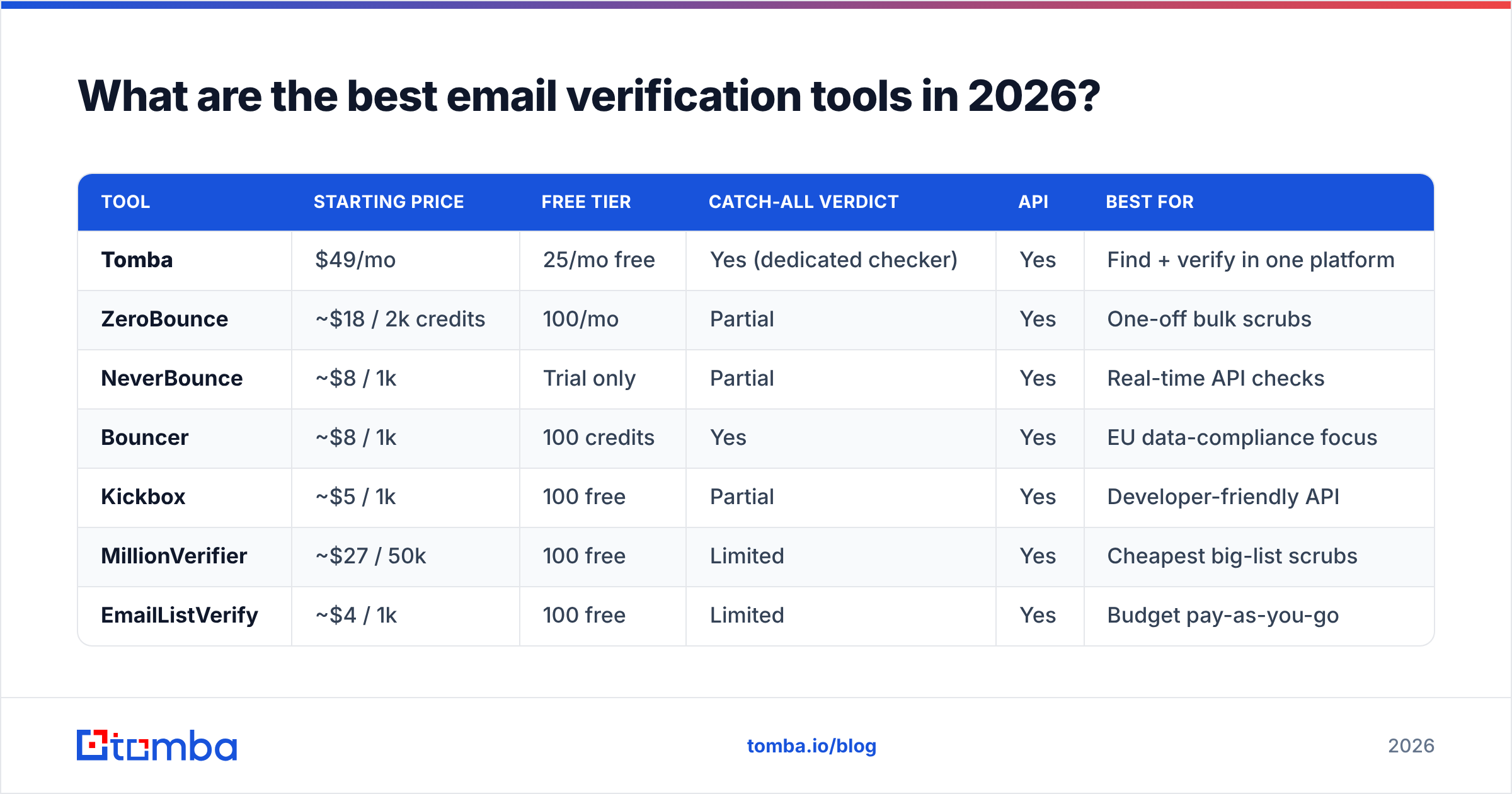
The short version: if you're already finding emails, verify on the same platform; if you only need to scrub an existing list, a dedicated cleaner is fine. Here's how the leading options compare.
| Tool | Starting price | Free tier | Catch-all verdict | API | Best for |
|---|---|---|---|---|---|
| Tomba | $49/mo | 25/mo free | Yes (dedicated checker) | Yes | Find + verify in one platform |
| ZeroBounce | ~$18 / 2k credits | 100/mo | Partial | Yes | One-off bulk scrubs |
| NeverBounce | ~$8 / 1k | Trial only | Partial | Yes | Real-time API checks |
| Bouncer | ~$8 / 1k | 100 credits | Yes | Yes | EU data-compliance focus |
| Kickbox | ~$5 / 1k | 100 free | Partial | Yes | Developer-friendly API |
| MillionVerifier | ~$27 / 50k | 100 free | Limited | Yes | Cheapest big-list scrubs |
| EmailListVerify | ~$4 / 1k | 100 free | Limited | Yes | Budget pay-as-you-go |
Pricing moves often — treat these as directional and confirm on each vendor's page. You can sanity-check reputations on a third-party hub like G2's email verification category before committing.
Tomba#
Tomba's edge isn't a single verification trick — it's that verification lives next to the email finder, domain search, and a dedicated catch-all verifier. You find an address and confirm it in the same motion, so dirty data never enters your CRM in the first place. Plans run from a Free tier (25 searches/month) up through Starter at $49/mo, Growth at $99/mo, and Pro at $249/mo — full Tomba pricing is public. For large jobs, bulk verify processes uploaded lists in one pass.
ZeroBounce#
A mature, dedicated cleaner with extras like activity-data scoring and a generous 100 free monthly credits. Strong for periodic large-list scrubs; less relevant if you also need to find the addresses. See the ZeroBounce site for current credit bundles.
NeverBounce, Bouncer, and Kickbox#
This trio is built around clean APIs and real-time, point-of-entry verification — ideal if you're validating signups as they happen on a form. Bouncer leans into EU data handling, Kickbox is a favorite for developers, and NeverBounce integrates widely. All three handle standard mailboxes well; catch-all is where they get cautious.
MillionVerifier and EmailListVerify#
The budget champions. If you have a giant static list and just need the cheapest possible scrub, these win on raw cost per check. The trade-off is thinner catch-all logic and fewer risk signals.
Single, bulk, or API: which verification method fits?#
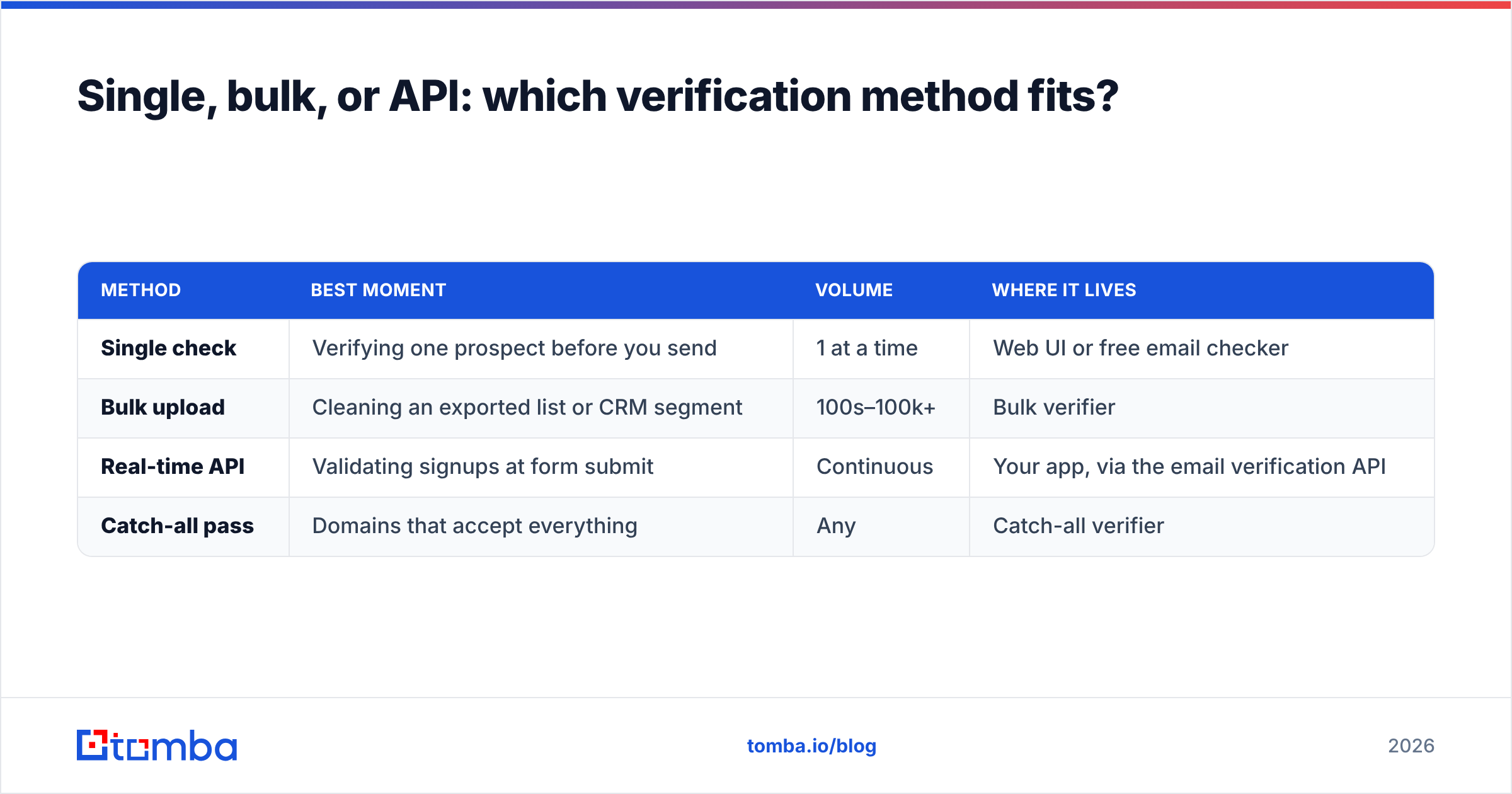
Match the method to the moment, not the other way around. A quick spot-check before a one-off email is a different job than cleaning a 200k-row database.
| Method | Best moment | Volume | Where it lives |
|---|---|---|---|
| Single check | Verifying one prospect before you send | 1 at a time | Web UI or free email checker |
| Bulk upload | Cleaning an exported list or CRM segment | 100s–100k+ | Bulk verifier |
| Real-time API | Validating signups at form submit | Continuous | Your app, via the email verification API |
| Catch-all pass | Domains that accept everything | Any | Catch-all verifier |
Most teams use two of these together: a real-time API to keep new data clean, and a periodic bulk pass to scrub what's already in the system.
)
How accurate is email verification, really?#
Honest answer: very accurate on normal mailboxes, genuinely hard on catch-all domains — and a tool's quality is defined entirely by how it handles that second case.
For a standard mailbox (most Gmail, Outlook, and self-hosted business addresses), a good verifier's SMTP handshake gets a definitive answer, and accuracy sits in the high-90s percent. The false-positive rate on these is low enough that you can trust the "valid" verdict.
Catch-all domains are the trap. A catch-all (or "accept-all") server says "yes" to every address you ask about, because it's configured to receive anything and sort it later. A lazy verifier reports all of those as "valid," and you discover the truth only when half of them bounce. A serious tool flags them separately as catch-all so you can decide your own risk tolerance — and the best ones run extra heuristics to estimate whether the specific mailbox is real. This is exactly why a standalone catch-all verifier exists as its own product rather than a checkbox.
The practical takeaway: don't trust any tool that reports a flat valid/invalid with no catch-all category. The absence of that category isn't confidence — it's a blind spot. Quality of source data matters too; if you're curious where the underlying records come from, Tomba documents its data sources openly.
How much should email verification cost?#
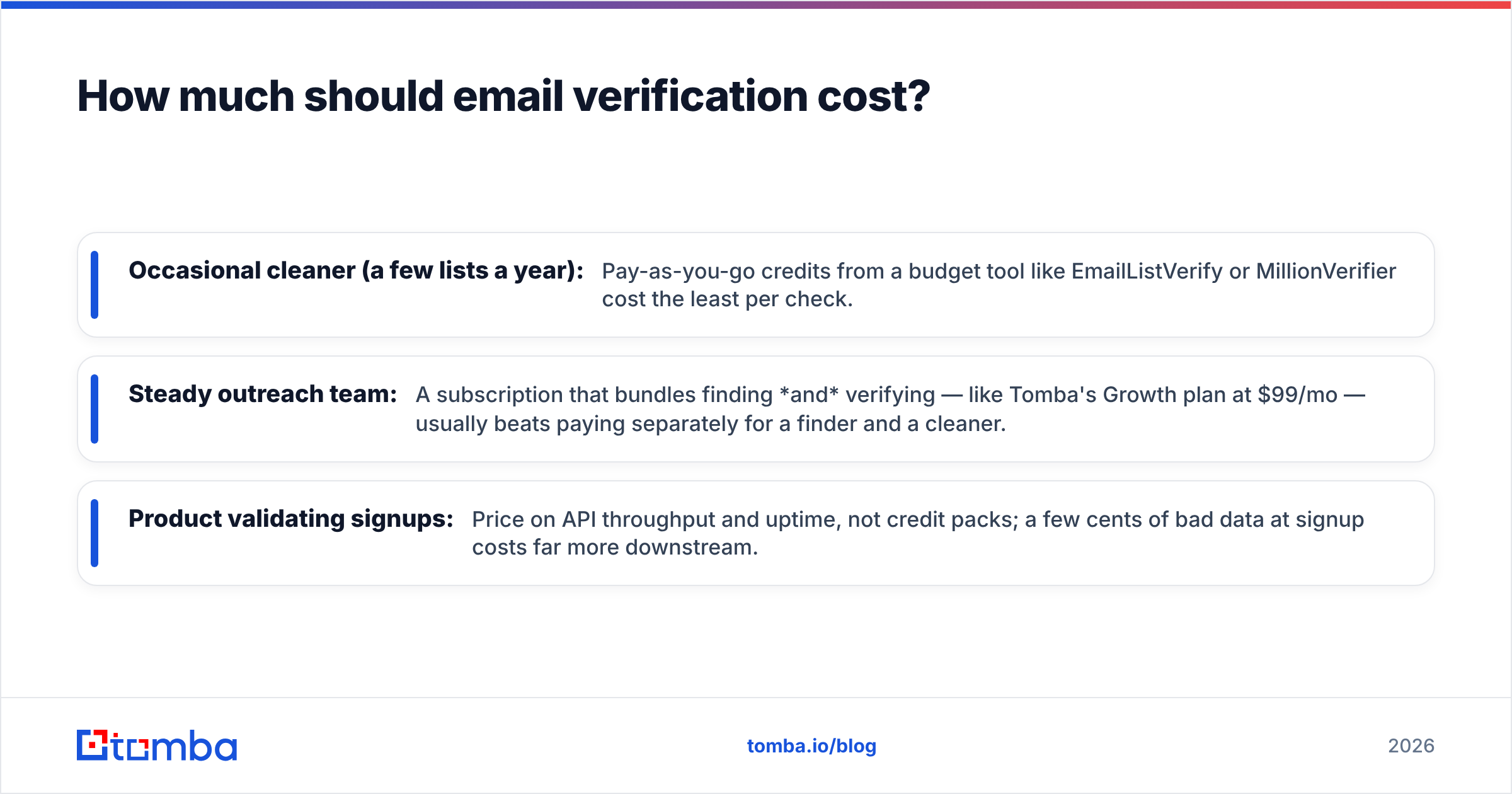
Budget by your actual pattern, not the headline price.
- Occasional cleaner (a few lists a year): Pay-as-you-go credits from a budget tool like EmailListVerify or MillionVerifier cost the least per check.
- Steady outreach team: A subscription that bundles finding and verifying — like Tomba's Growth plan at $99/mo — usually beats paying separately for a finder and a cleaner.
- Product validating signups: Price on API throughput and uptime, not credit packs; a few cents of bad data at signup costs far more downstream.
A rough rule: if you're paying for an email-finding tool and a separate verifier, you're probably overpaying and fragmenting your workflow. Consolidating the two is the single easiest cost win for most teams.
Frequently asked questions#
Does email verification guarantee zero bounces? No tool guarantees zero. Mailboxes get deleted between your verification and your send, and catch-all domains stay genuinely ambiguous. A good verifier gets you under a 2% bounce rate, which is what inbox providers reward — perfection isn't the goal, sustainability is.
Is free email verification good enough? Free tiers (100/month from most vendors, 25 searches/month on Tomba's free plan) are perfect for spot checks and testing accuracy before you commit. For production lists in the thousands, you'll need a paid plan — but use the free tier first to compare verdicts on addresses you already know are good or bad.
Should I verify before or after finding emails? Both, ideally in one step. Verifying at the moment you find an address — rather than exporting, then re-importing into a separate cleaner — keeps bad data out of your CRM entirely and saves a full workflow round-trip.
How often should I re-verify my list? Re-verify any list older than 3–6 months before a major send, and validate new signups in real time. Email addresses decay at roughly 2–3% per month as people change jobs.
The bottom line: where to start#
If you only need to scrub one old list and never think about it again, a budget pay-as-you-go cleaner does the job. But if you're actively prospecting — finding addresses and sending to them — the smart move is to verify at the source so dirty data never enters your pipeline.
That's where Tomba's Email Finder earns its place: it locates professional email addresses by name, domain, or company and confirms them on the same platform, with a dedicated verifier and catch-all checker behind it. Start on the free tier, run your known-good and known-bad addresses through it to judge the accuracy yourself, then scale up only when the verdicts have earned your trust. Clean data in, fewer bounces out — that's the whole game.
// get started
Find, verify and enrich your first contacts today
Start on the free plan with 25 searches a month, then scale when your team is ready.
Free plan · No credit card required · GDPR & CCPA
// about the author