Best Follow Up Email Templates for 2026 (15 Proven Examples)
Steal 15 follow-up email templates that actually get replies in 2026 — plus the cadence, timing, and subject lines that make them work.
Best Follow Up Email Templates for 2026
Most replies don't come from your first email. They come from the third, fourth, or fifth — the ones most reps never send. If you stop after one touch, you're leaving the majority of your pipeline on the table.
This guide gives you 15 follow-up email templates you can paste in today, the cadence that strings them together, and the timing data that decides whether they land or rot in an archive folder.
TL;DR#
- 80% of deals need five or more follow-ups, but nearly half of reps quit after one. The gap is your opportunity.
- Space follow-ups 2–4 days apart, vary the angle each time (value, social proof, case study, breakup), and never just "bump" the thread with "just checking in."
- Use the 15 templates below across a 5–7 touch sequence covering cold outreach, post-demo, quote, no-show, and breakup scenarios.
- Deliverability beats cleverness — a verified address and a warm domain matter more than the subject line. Clean your list with an email verifier first.
- Personalize the first line, templatize the rest. That's how you scale without sounding like a robot.
Why do follow-up emails matter so much?#
Think of a follow-up like watering a plant you already bought. The first email is the purchase; without follow-up, it just dies on the windowsill. The value was always in the maintenance, not the one-time act.
The data backs this up. According to research compiled by HubSpot, the majority of sales require multiple touchpoints before a prospect responds, yet most reps send a single email and move on. Buyers are busy, your message gets buried, and silence almost never means "no." It usually means "not right now, and I forgot."
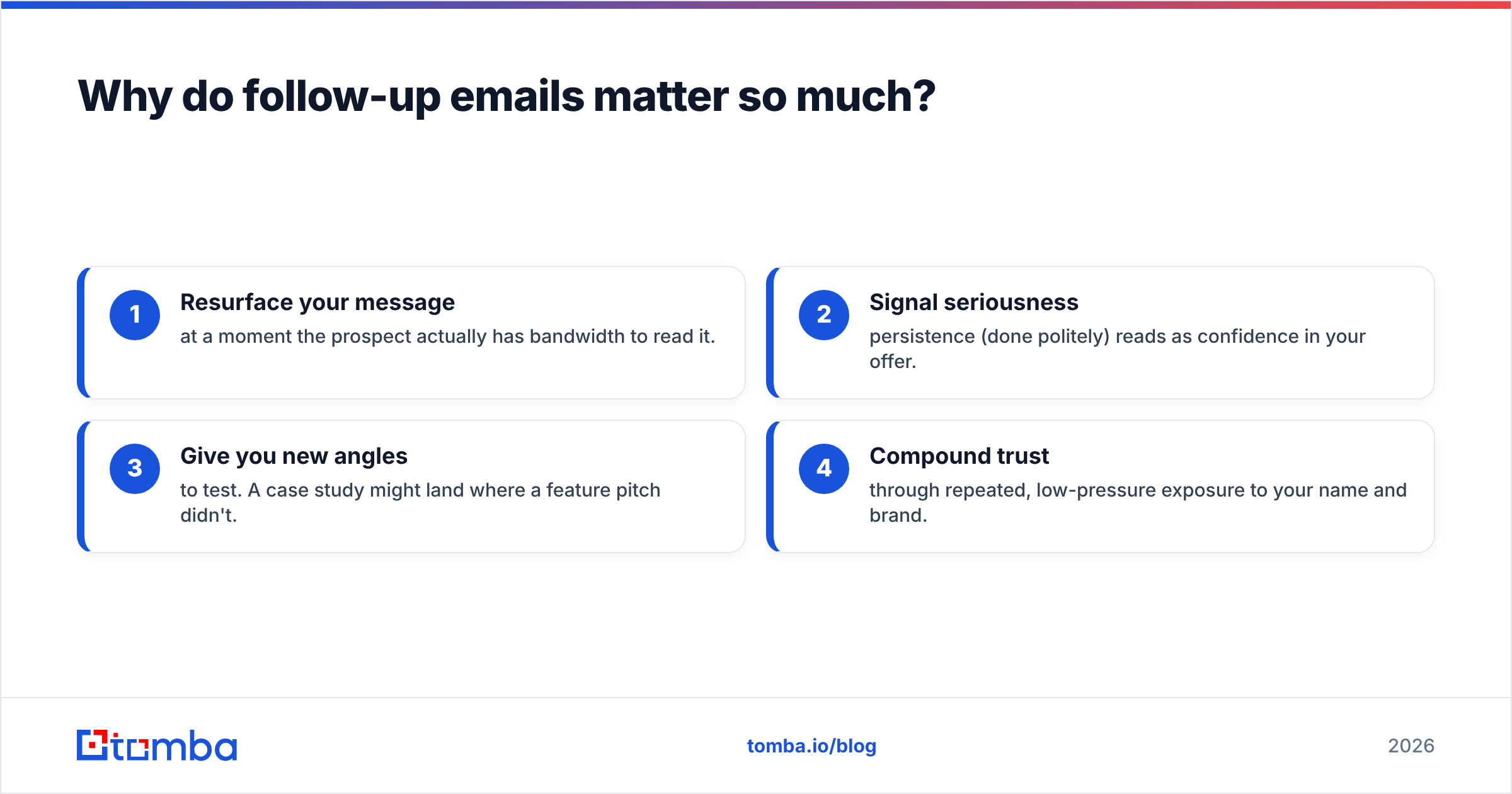
Follow-ups work because they:
- Resurface your message at a moment the prospect actually has bandwidth to read it.
- Signal seriousness — persistence (done politely) reads as confidence in your offer.
- Give you new angles to test. A case study might land where a feature pitch didn't.
- Compound trust through repeated, low-pressure exposure to your name and brand.
What makes a follow-up email actually get replies?#
Five things separate a follow-up that converts from one that gets ignored:
- A standalone reason to exist. "Just bumping this up" adds zero new value. Every touch should carry a fresh insight, resource, or question.
- Tight length. Under 90 words. Mobile readers skim; a wall of text gets swiped away.
- One clear ask. Pick a single call to action — a meeting, a reply, a yes/no — not three competing ones.
- The original thread or context. Reply within the same thread so the prospect has history at a glance.
- A verified, deliverable address. The best copy in the world fails if it bounces. Run prospects through an email verifier and confirm sender reputation before you send at volume.
The follow-up cadence at a glance#
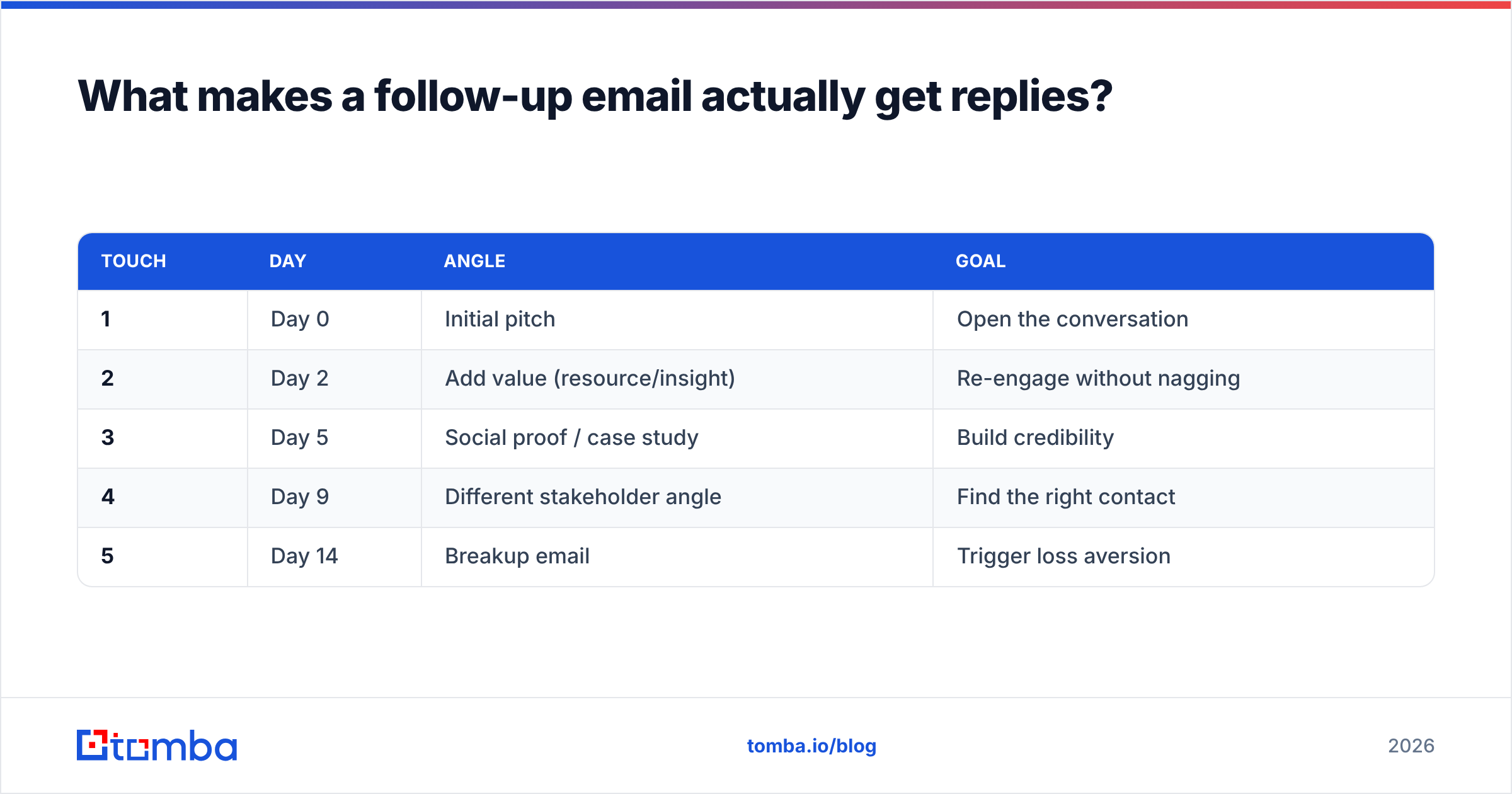
| Touch | Day | Angle | Goal |
|---|---|---|---|
| 1 | Day 0 | Initial pitch | Open the conversation |
| 2 | Day 2 | Add value (resource/insight) | Re-engage without nagging |
| 3 | Day 5 | Social proof / case study | Build credibility |
| 4 | Day 9 | Different stakeholder angle | Find the right contact |
| 5 | Day 14 | Breakup email | Trigger loss aversion |
Stick to this rhythm and you cover the "five-plus touch" threshold without becoming an inbox pest. Now the templates.
What are the best cold follow-up email templates?#
These follow a cold first email when the prospect hasn't replied yet.
Template 1 — The value-add bump (Day 2)
Subject: Re: [original subject]
Hi [First name],
Quick follow-up — I put together a one-pager on how [similar company] cut [metric] by [number]% using [approach]. Want me to send it over?
No worries if the timing's off.
[Your name]
Template 2 — The pattern interrupt (Day 5)
Subject: Wrong person?
Hi [First name],
I might be barking up the wrong tree. Are you the right person to talk to about [problem], or should I reach out to someone else on your team?
Happy to take it off your plate either way.
Template 3 — The case study drop (Day 5)
Subject: How [competitor of theirs] solved [problem]
Hi [First name],
Thought this was relevant: [Company] was dealing with the same [challenge] and fixed it in [timeframe]. Short write-up here: [link].
Worth a 15-minute call to see if the same applies to [their company]?
Template 4 — The breakup (Day 14)
Subject: Closing the loop
Hi [First name],
I haven't heard back, so I'll assume [problem] isn't a priority right now. I'll stop reaching out — but if anything changes, my door's open.
All the best,
[Your name]
The breakup email is the highest-performing template in most sequences. Loss aversion is real: people respond to "I'm going away" far more than "I'm still here." For the full sequence framework, see our guide to cold email templates.
What follow-up templates work after a meeting or demo?#
Template 5 — The same-day recap
Subject: Recap + next steps from today
Hi [First name],
Great talking through [topic]. Quick recap:
- [Pain point you confirmed]
- [Solution you proposed]
- Next step: [action] by [date]
Did I miss anything?
Template 6 — The stalled-deal nudge
Subject: Still a fit?
Hi [First name],
When we spoke, [goal] was on your radar for this quarter. Is that still the case, or have priorities shifted? Happy to adjust the plan either way.
Template 7 — The multi-threading move
Subject: Looping in [colleague]
Hi [First name],
Since [project] touches [their team], would it help to bring [role] into the conversation? I can keep it to 20 minutes.
Multi-threading — reaching more than one stakeholder — is one of the most reliable ways to revive a quiet deal. A phone finder helps when email alone isn't getting traction.
What about quote, proposal, and no-show follow-ups?#
Template 8 — Post-quote check-in
Subject: Questions on the proposal?
Hi [First name],
Sent the proposal on [date]. Anything unclear or that you'd like adjusted? Happy to hop on a quick call to walk through it.
Template 9 — The deadline anchor
Subject: [Offer] valid through [date]
Hi [First name],
Wanted to flag that the [pricing/terms] we discussed hold through [date]. Want to lock it in before then?
Template 10 — The no-show reschedule
Subject: Missed you today
Hi [First name],
Looks like we got our wires crossed for [time]. No problem at all — here's my calendar to grab a new slot: [link].
Template 11 — The referral pivot
Subject: Better fit on your team?
Hi [First name],
If this isn't your area, could you point me to whoever owns [function]? I'll take it from there.
How do you template follow-ups without sounding robotic?#
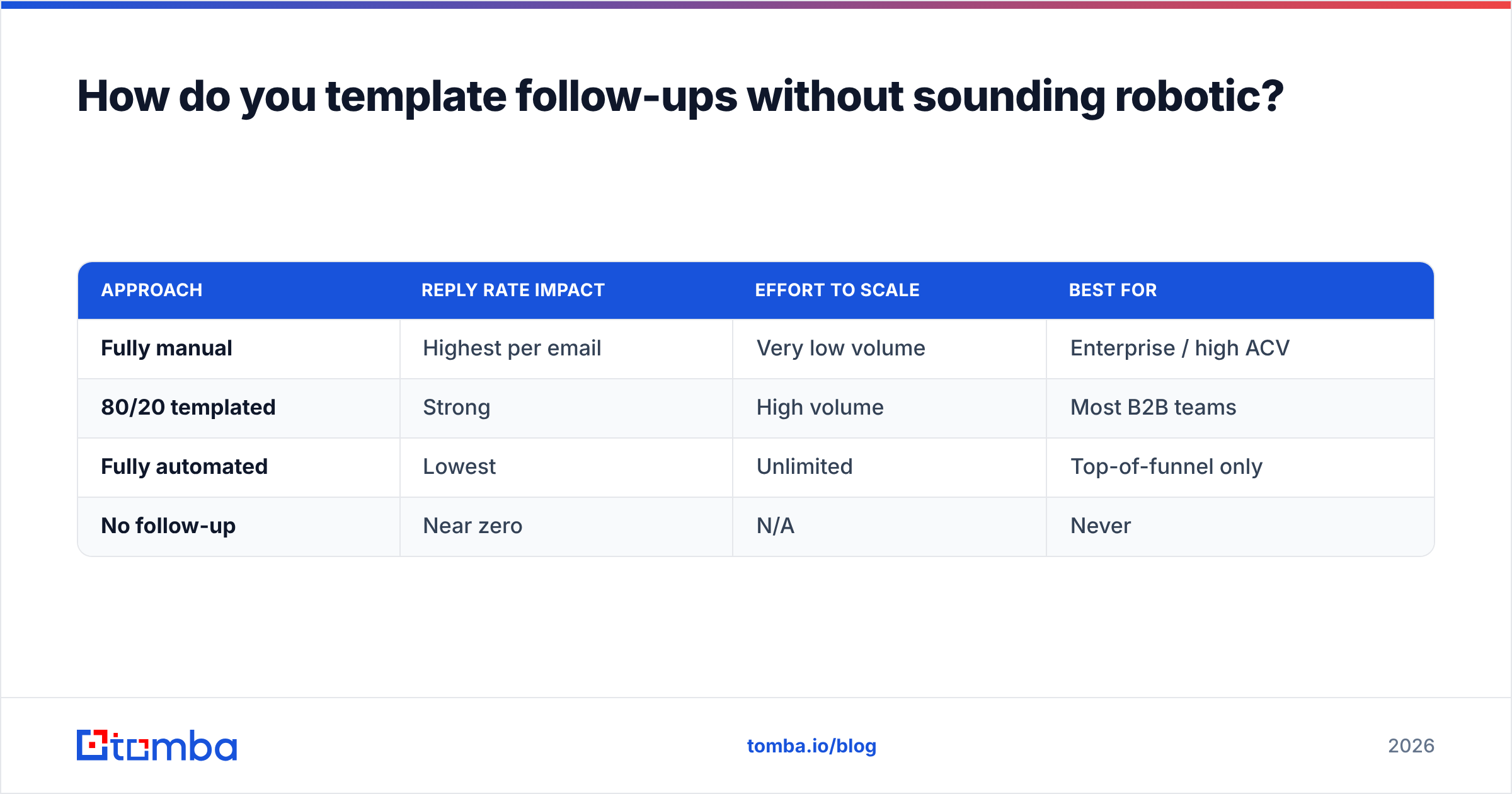
The trick is the 80/20 personalization rule: templatize 80% of the email and hand-write the 20% that proves you did your homework.
- Personalize the opening line. Reference a recent post, funding round, product launch, or shared connection. Generic openers ("Hope you're well!") get deleted.
- Keep the body templated. Your value prop and CTA don't need to change per prospect.
- Use merge fields correctly. Always test for the dreaded "Hi [First name]," misfire before a blast.
- Match the channel to the angle. Stuck deals often move on LinkedIn or phone — check our notes on LinkedIn outreach.
| Approach | Reply rate impact | Effort to scale | Best for |
|---|---|---|---|
| Fully manual | Highest per email | Very low volume | Enterprise / high ACV |
| 80/20 templated | Strong | High volume | Most B2B teams |
| Fully automated | Lowest | Unlimited | Top-of-funnel only |
| No follow-up | Near zero | N/A | Never |
The 80/20 row is the sweet spot for almost every team: near-manual reply rates at near-automated scale.
What timing and tools maximize follow-up reply rates?#
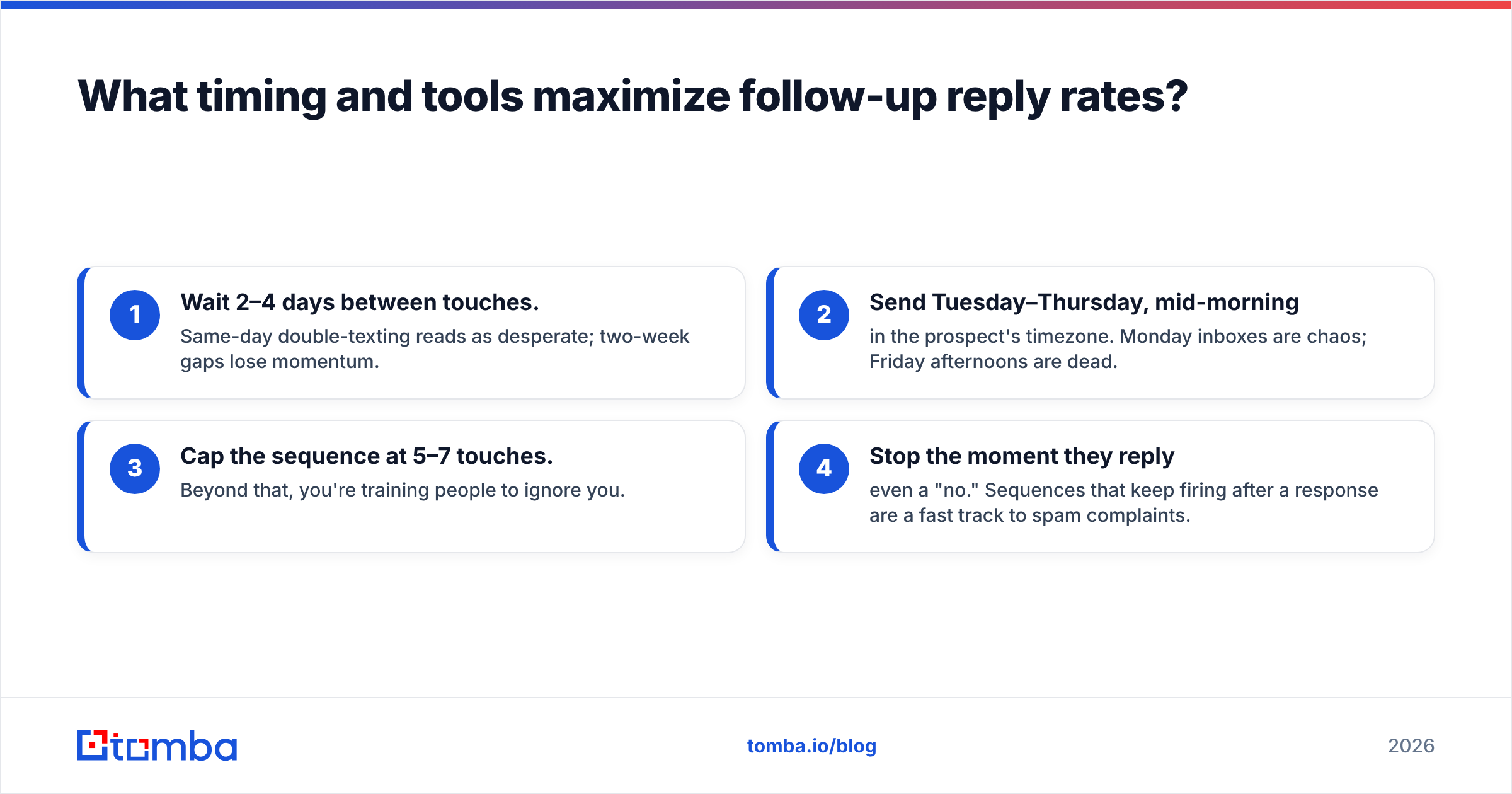
Timing rules that hold up across 2026 testing:
- Wait 2–4 days between touches. Same-day double-texting reads as desperate; two-week gaps lose momentum.
- Send Tuesday–Thursday, mid-morning in the prospect's timezone. Monday inboxes are chaos; Friday afternoons are dead.
- Cap the sequence at 5–7 touches. Beyond that, you're training people to ignore you.
- Stop the moment they reply — even a "no." Sequences that keep firing after a response are a fast track to spam complaints.
Tools that make it work:
- A clean prospect list. Bad data sinks the best cadence — start by finding accurate contacts with an email finder, then verify them.
- Deliverability hygiene. Warm your domain, set up authentication, and monitor email deliverability so your follow-ups reach the inbox.
- A sequencer or CRM to automate timing. Most connect through Tomba's HubSpot integration and other native links.
- Third-party validation of any tool you adopt — comparison sites like G2 are useful for sanity-checking reply-rate claims before you commit.
For teams running outreach at scale, accurate data is the multiplier. A perfectly written five-touch sequence sent to stale, unverified addresses still produces nothing. That's why the highest-performing teams pair their templates with a reliable data layer rather than buying ever-more-clever copy.
Quick reference: which template for which scenario?#
- Cold, no reply → Templates 1–4 (value, pattern interrupt, case study, breakup)
- After a demo → Templates 5–7 (recap, stalled nudge, multi-thread)
- Quote sent → Templates 8–9 (check-in, deadline anchor)
- No-show → Template 10 (reschedule)
- Wrong contact → Templates 2 & 11 (wrong person, referral pivot)
Mix and match by deal stage, keep each email under 90 words, and always leave the prospect an easy yes.
Start sending follow-ups that actually reach the inbox#
Great templates only convert when they land in front of a real, verified person. Before your next sequence goes out, build your list with the Tomba Email Finder — find accurate professional emails by name, company, or domain, verify them in the same workflow, and feed them straight into your CRM. The free tier gives you 25 searches a month to test it, with paid plans starting at $49/mo when you're ready to scale. Pair these 15 templates with clean data, and your reply rate takes care of itself.
// get started
Find, verify and enrich your first contacts today
Start on the free plan with 25 searches a month, then scale when your team is ready.
Free plan · No credit card required · GDPR & CCPA
// about the author