The Best Lead Scraping Tools in 2026: Top 10 Picks Compared
Not every lead scraper is worth the legal risk or the bounce rate. Here's how the best lead scraping tools of 2026 compare on data quality, price, and compliance.
Lead scraping has a reputation problem. Half the tools sold as "scrapers" hand you raw, unverified rows that bounce the moment you load them into a sequence — and the other half quietly walk you into a compliance mess. The good news: a small set of tools in 2026 actually balance extraction speed, data accuracy, and legal hygiene. This guide ranks them honestly.
TL;DR — Which Lead Scraping Tool Should You Use?#
- For verified B2B email data at scale: Tomba pairs scraping-style domain search with built-in verification, so leads arrive clean instead of needing a second cleanup pass.
- For raw web/HTML scraping: Apify and Bright Data win on flexibility, but you supply your own enrichment and verification.
- For LinkedIn-based scraping: PhantomBuster and Wiza extract profile data fast — watch the ToS and rate limits.
- The hidden cost of "cheap" scrapers is bounce rate. A list that's 30% invalid burns your sender reputation faster than any per-lead price saves you.
- Compliance is not optional in 2026. GDPR/CCPA enforcement and platform anti-scraping defenses mean your tool choice is now a risk decision, not just a feature decision.
What Is a Lead Scraping Tool?#
A lead scraping tool is software that extracts contact and company data — names, job titles, emails, phone numbers, company size — from public web sources, then structures it into a usable list. Think of it like a metal detector on a beach: the sand (the open web) is full of useful signal, but you need the right device to find it, dig it out, and tell the bottle caps from the coins.
There are really three families of tool hiding under the single word "scraper":
- Raw web scrapers — extract any HTML from any page (Apify, Bright Data, Octoparse). Maximum flexibility, zero enrichment.
- Platform scrapers — pull structured data from one source like LinkedIn or Google Maps (PhantomBuster, Wiza). Fast, but tied to one platform's defenses and terms.
- Data providers with scraping-grade coverage — combine crawling, pattern detection, and verification so the output is already clean (Tomba, Apollo, Clearbit-style enrichment). You trade some flexibility for accuracy.
The mistake most teams make is buying a family-1 tool when they needed a family-3 tool. They wanted leads they can email tomorrow, and instead bought the ability to extract HTML. Those are not the same purchase.
Why Does Data Quality Matter More Than Scrape Volume?#
Conclusion first: a scraper that returns 10,000 unverified rows is worth less than one that returns 3,000 verified ones. Volume is vanity; deliverability is the bill.
Here's the math. If you scrape 10,000 emails and 30% are invalid (a normal rate for unverified public scraping), you've got 3,000 hard bounces waiting to happen. Mailbox providers read a high bounce rate as a spam signal. Cross roughly a 2–3% bounce threshold and your email deliverability collapses — even your good emails stop landing. So the "free" extra volume actively damages the campaign you scraped it for.
This is why the strongest workflow in 2026 isn't scrape-then-blast. It's scrape, then verify emails, then segment, then send. Tools that bundle verification into the extraction step save you an entire pipeline stage and protect your sender reputation by default.
A quick way to judge any tool on this axis:
- Does it verify SMTP-level, or just check syntax? Syntax-only "validation" is theater.
- Does it flag catch-all domains? Catch-alls accept everything and tell you nothing — you need a catch-all verifier to handle them.
- Does it report a confidence score per email? A number lets you set a sending threshold; a green checkmark doesn't.
- Can it run in bulk without melting? A bulk email finder that chokes at 5,000 rows isn't built for real lead-gen.
What Are the Best Lead Scraping Tools in 2026?#
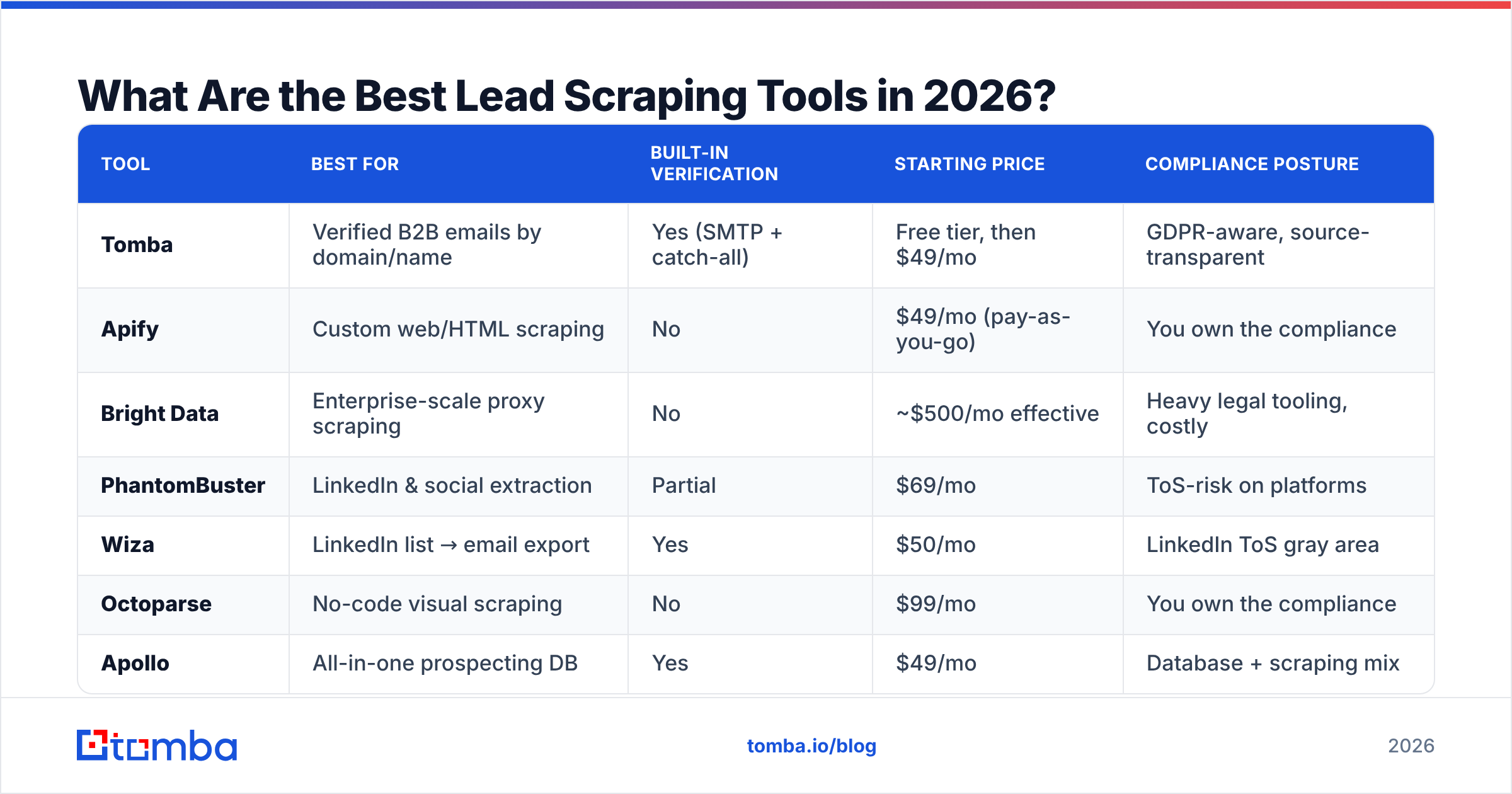
Below is a side-by-side comparison of the tools we see most often in real B2B stacks, scored on the attributes that actually move pipeline: data type, built-in verification, pricing entry point, and primary use case.
| Tool | Best for | Built-in verification | Starting price | Compliance posture |
|---|---|---|---|---|
| Tomba | Verified B2B emails by domain/name | Yes (SMTP + catch-all) | Free tier, then $49/mo | GDPR-aware, source-transparent |
| Apify | Custom web/HTML scraping | No | $49/mo (pay-as-you-go) | You own the compliance |
| Bright Data | Enterprise-scale proxy scraping | No | ~$500/mo effective | Heavy legal tooling, costly |
| PhantomBuster | LinkedIn & social extraction | Partial | $69/mo | ToS-risk on platforms |
| Wiza | LinkedIn list → email export | Yes | $50/mo | LinkedIn ToS gray area |
| Octoparse | No-code visual scraping | No | $99/mo | You own the compliance |
| Apollo | All-in-one prospecting DB | Yes | $49/mo | Database + scraping mix |
A few honest notes on this table:
- Tomba is the most "leads-ready" of the set because extraction and verification are the same product. You can search a company domain, get the people and patterns, and have verified addresses without a second tool. Pricing is transparent — Free (25 searches/mo), Starter $49/mo, Growth $99/mo, Pro $249/mo — which you can confirm on the Tomba pricing page.
- Apify and Bright Data are genuinely excellent at raw scraping. If you need to extract a non-standard data source — a niche directory, a marketplace, a job board — they're the right call. Just budget for a separate verification step. See their capabilities on the Apify site.
- PhantomBuster and Wiza live or die on LinkedIn. They're fast, but you're operating inside a platform that actively fights automated extraction, so account-safety practices matter.
- Apollo blends a static database with scraping-style enrichment. Coverage is broad; freshness varies by region, which is the usual trade-off for big aggregated databases (independent reviews on G2 are useful here).
How Do You Choose the Right Scraper for Your Use Case?#
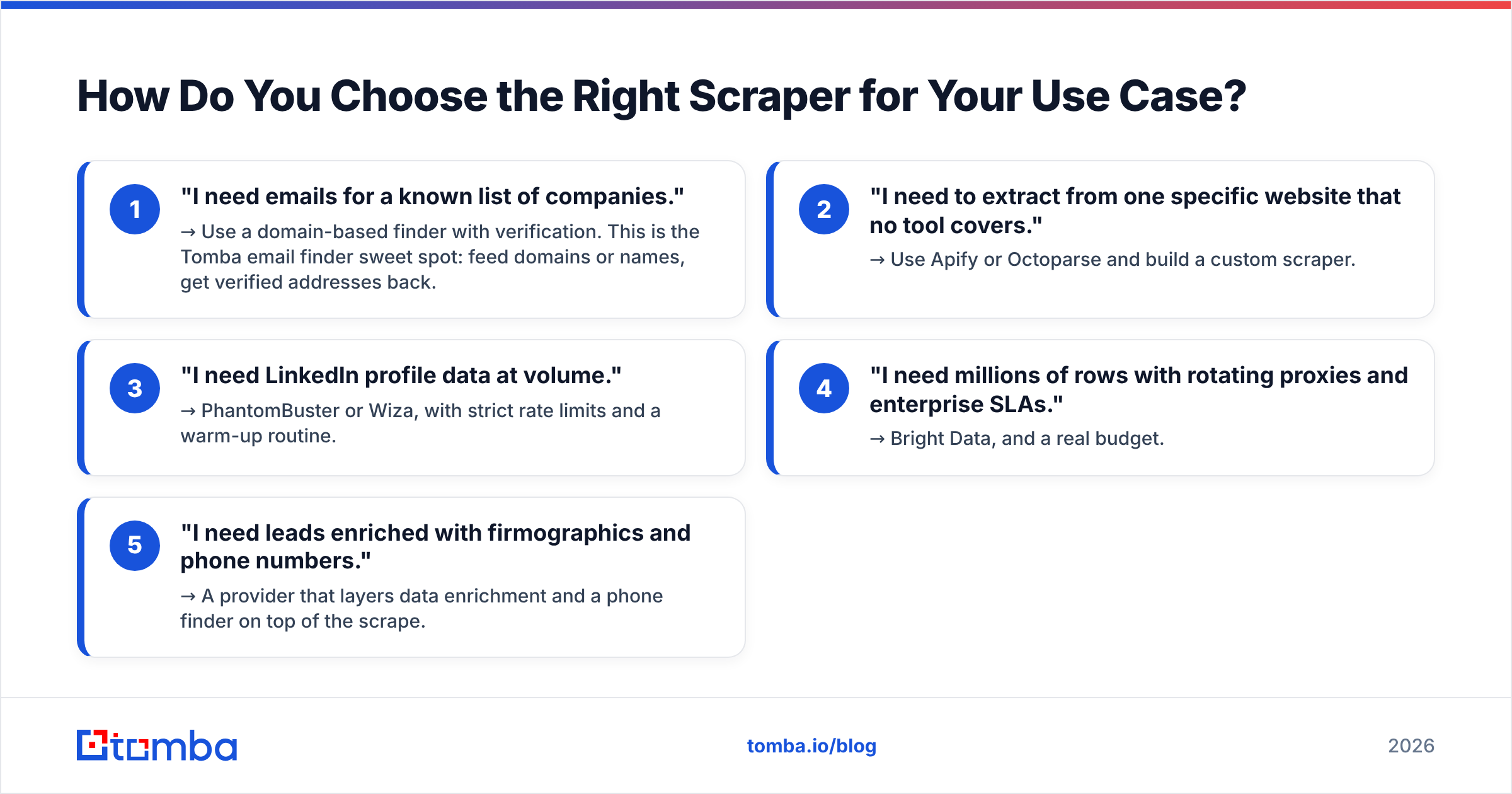
Match the tool to the job, not the hype. Use this decision shortlist:
- "I need emails for a known list of companies." → Use a domain-based finder with verification. This is the Tomba email finder sweet spot: feed domains or names, get verified addresses back.
- "I need to extract from one specific website that no tool covers." → Use Apify or Octoparse and build a custom scraper.
- "I need LinkedIn profile data at volume." → PhantomBuster or Wiza, with strict rate limits and a warm-up routine.
- "I need millions of rows with rotating proxies and enterprise SLAs." → Bright Data, and a real budget.
- "I need leads enriched with firmographics and phone numbers." → A provider that layers data enrichment and a phone finder on top of the scrape.
Notice that four of the five jobs end with the same hidden requirement: the data has to be usable, not just extracted. That's the realization most teams reach the hard way.
Is Lead Scraping Legal in 2026?#
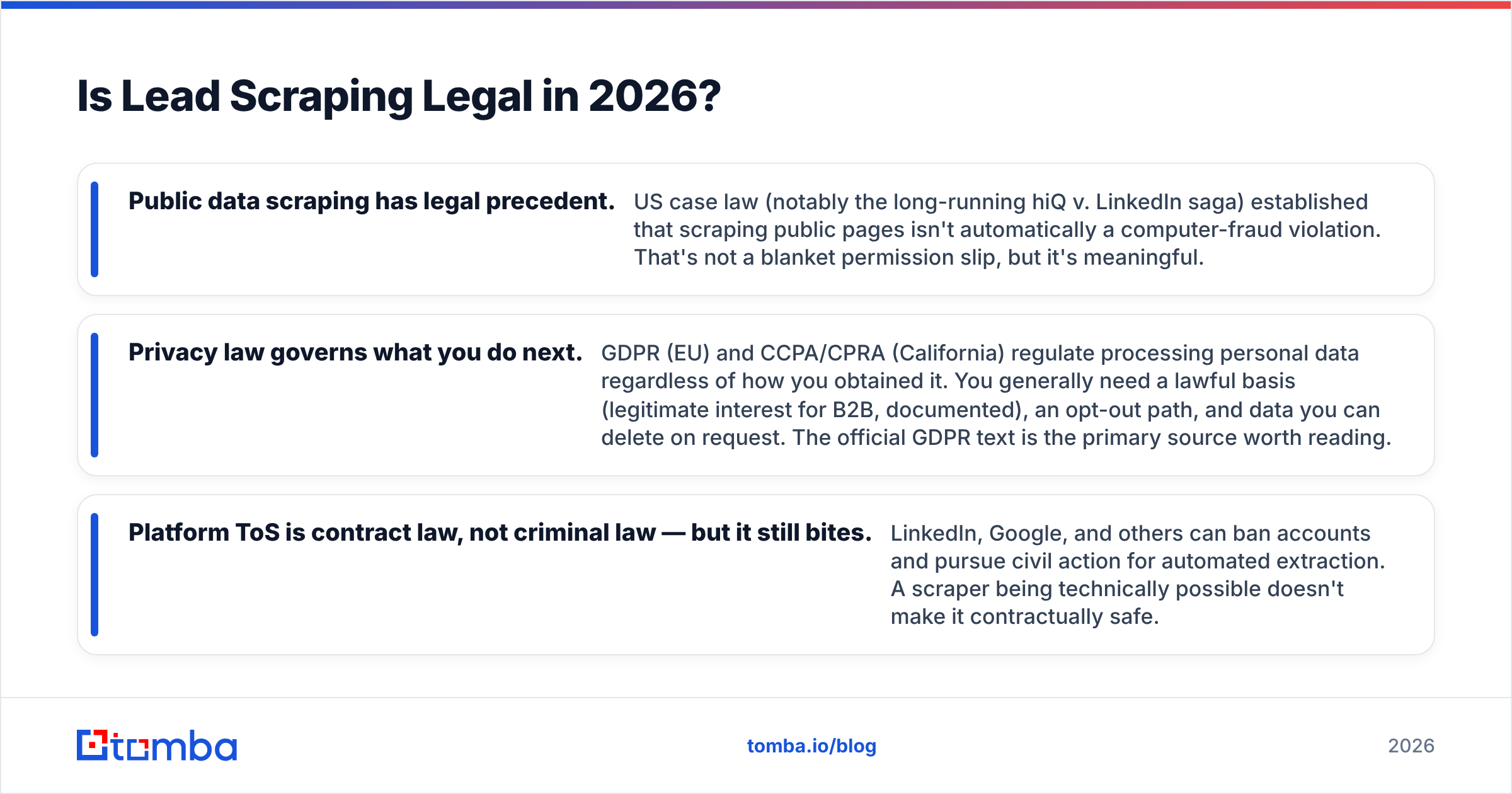
Short answer: scraping publicly available data is broadly legal in the US, but how you store, process, and contact people is heavily regulated — and platform terms of service add a second layer of risk.
Three things are true at once in 2026, and you need to hold all three:
- Public data scraping has legal precedent. US case law (notably the long-running hiQ v. LinkedIn saga) established that scraping public pages isn't automatically a computer-fraud violation. That's not a blanket permission slip, but it's meaningful.
- Privacy law governs what you do next. GDPR (EU) and CCPA/CPRA (California) regulate processing personal data regardless of how you obtained it. You generally need a lawful basis (legitimate interest for B2B, documented), an opt-out path, and data you can delete on request. The official GDPR text is the primary source worth reading.
- Platform ToS is contract law, not criminal law — but it still bites. LinkedIn, Google, and others can ban accounts and pursue civil action for automated extraction. A scraper being technically possible doesn't make it contractually safe.
The practical takeaway: prefer tools that are transparent about where their data comes from and that give you compliance controls (opt-out handling, deletion, source attribution). A scraper that won't tell you its sources is a liability you're renting.
This is also where bundled verification quietly helps compliance: verified, deduplicated, opt-out-respecting lists are simply lower-risk to operate than giant raw dumps you can't account for. If you can't explain how a contact got into your CRM, that's a problem regardless of the tool's price.
What Does Lead Scraping Actually Cost?#
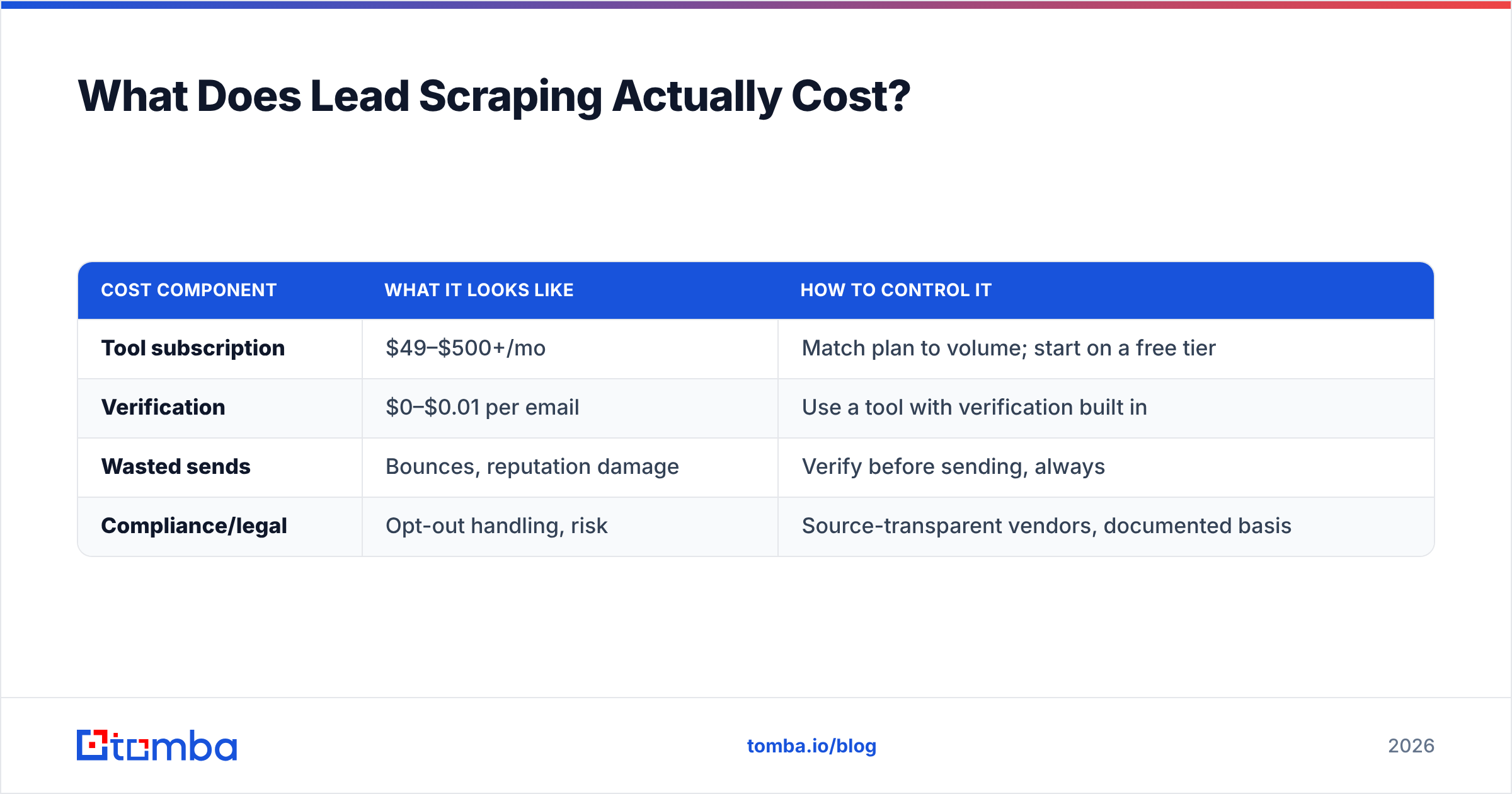
The sticker price is the small number. The real cost has four parts:
| Cost component | What it looks like | How to control it |
|---|---|---|
| Tool subscription | $49–$500+/mo | Match plan to volume; start on a free tier |
| Verification | $0–$0.01 per email | Use a tool with verification built in |
| Wasted sends | Bounces, reputation damage | Verify before sending, always |
| Compliance/legal | Opt-out handling, risk | Source-transparent vendors, documented basis |
The cheapest subscription is rarely the cheapest outcome. A $30/mo scraper that produces 35% invalid data costs you far more in deliverability damage and rep-cleanup than a $49/mo tool that hands you verified rows. When you compare options, price the whole pipeline, not the first line item — the full breakdown on Tomba pricing is structured around finished, verified leads rather than raw extraction credits, which is the comparison that actually matters.
For teams automating this, an email finder API lets you fold both extraction and verification into your own systems, so the cost per usable lead stays predictable as you scale.
How Do You Build a Reliable Lead Scraping Workflow?#
A workflow that survives contact with reality looks like this:
- Define the ICP first. Scraping without a tight ideal-customer profile just produces expensive noise. Know the titles, company sizes, and geographies before you extract a single row.
- Pick the narrowest tool that covers the job. A domain-based finder beats a general web scraper when you already know the companies.
- Verify in the same pass. Don't separate extraction and verification into different weeks — clean data while context is fresh.
- Deduplicate and enrich. Strip duplicates, then add firmographics and phone numbers so reps have a reason to call.
- Document the source and lawful basis. One column in your CRM noting where each contact came from saves you during an audit or an opt-out request.
- Cap volume to deliverability, not to scraper capacity. Send what your domain reputation can carry, not what the tool can produce.
Teams that follow this sequence consistently outperform teams that simply scrape larger lists. The bottleneck in B2B outbound was never how many contacts you could extract — it was how many you could email without burning your domain. Solve for clean, and volume takes care of itself.
The Bottom Line#
The best lead scraping tools in 2026 aren't the ones that extract the most rows — they're the ones that hand you rows you can actually use. Raw scrapers like Apify and Bright Data are powerful when you genuinely need custom extraction, but for the common job (verified B2B emails from companies you've already targeted), a verification-first tool wins on every metric that ends up on your invoice: bounce rate, sender reputation, and cost per booked meeting.
If your goal is verified, ready-to-send B2B contacts rather than a pile of raw HTML, start with the Tomba Email Finder. Find emails by domain, name, or company; get SMTP-level verification in the same step; and keep your deliverability intact while your competitors are still cleaning bounces. Try it free — 25 searches a month, no card — and see how clean lead data changes your numbers before you ever pay.
// get started
Find, verify and enrich your first contacts today
Start on the free plan with 25 searches a month, then scale when your team is ready.
Free plan · No credit card required · GDPR & CCPA
// about the author