Best Mass Emailing Service in 2026: Top Picks Compared
Not all bulk email platforms are equal. Here's how the top mass emailing services compare on price, deliverability, and list hygiene in 2026 — plus the one factor most buyers ignore.
(title rendered separately)
Choosing the best mass emailing service is less about who has the prettiest drag-and-drop editor and more about who actually lands your message in the inbox. You can send 100,000 emails a month on the cheapest plan and still lose money if half of them bounce or get filtered to spam. This guide compares the leading bulk email platforms for 2026 on the things that move revenue — deliverability, pricing, automation, and list hygiene — and shows you the one input that quietly decides whether any of them work.
TL;DR#
- There is no single "best" mass emailing service — the right pick depends on whether you're sending marketing newsletters, transactional emails, or cold outreach.
- Brevo and Mailchimp win for marketing teams; Amazon SES and SendGrid win for developers sending high-volume transactional mail; Instantly and Smartlead win for cold outbound.
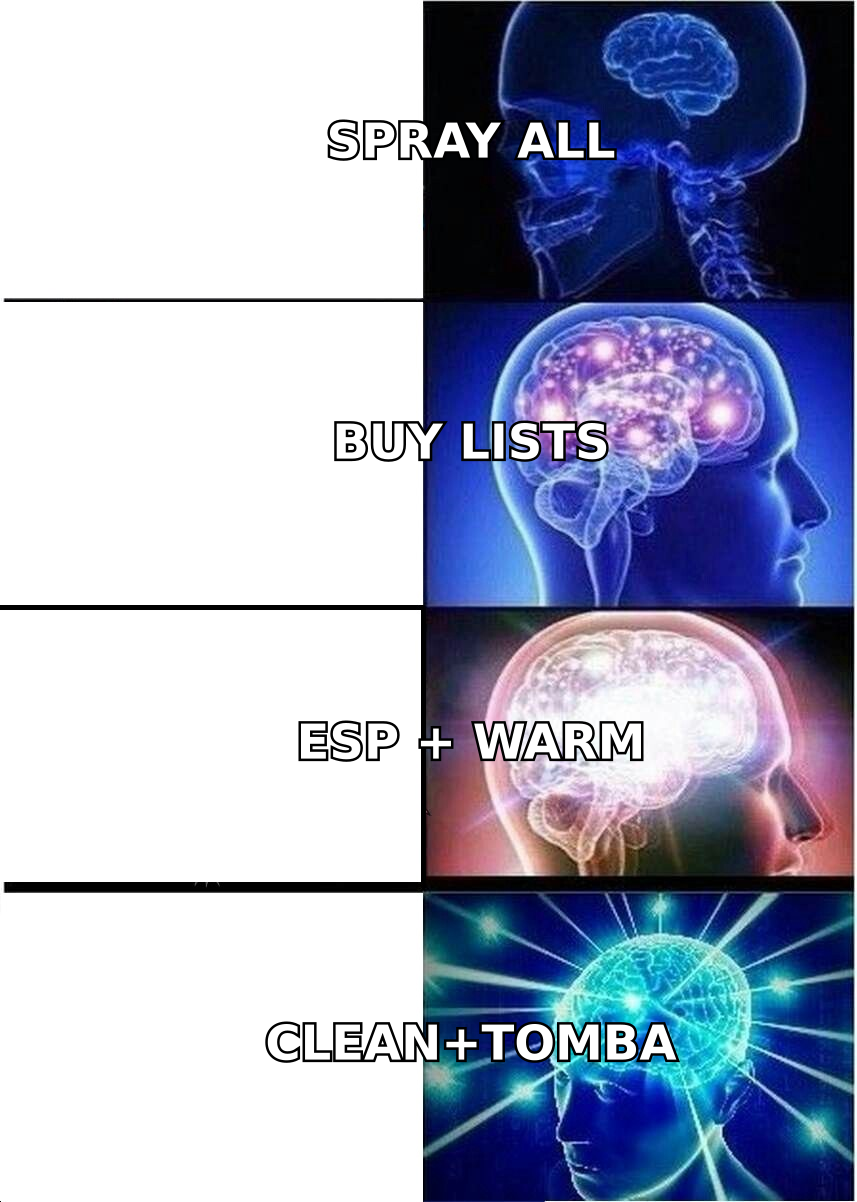
- Deliverability is decided before you hit send — a clean, verified recipient list matters more than the platform you choose.
- Pricing scales by contacts or by emails sent, and the cheap headline tiers almost always exclude the features (dedicated IPs, automation, support) you'll actually need.
- Verify your list first. Run it through an email verifier before any campaign — dirty data sinks sender reputation faster than bad copy.
What is a mass emailing service?#
A mass emailing service is a platform built to send large volumes of email — newsletters, promotions, product updates, or transactional receipts — to many recipients at once, while managing the unglamorous infrastructure that makes those emails arrive.
Think of it like a shipping company. You could drive every package to every customer yourself, but you'd spend all day stuck in traffic and half your parcels would get lost. A mass emailing service is the logistics network: it handles the trucks (sending servers), the routes (IP reputation), the customs paperwork (SPF, DKIM, DMARC authentication), and the tracking (opens, clicks, bounces). Your job is just to write the message and hand over a clean address list.
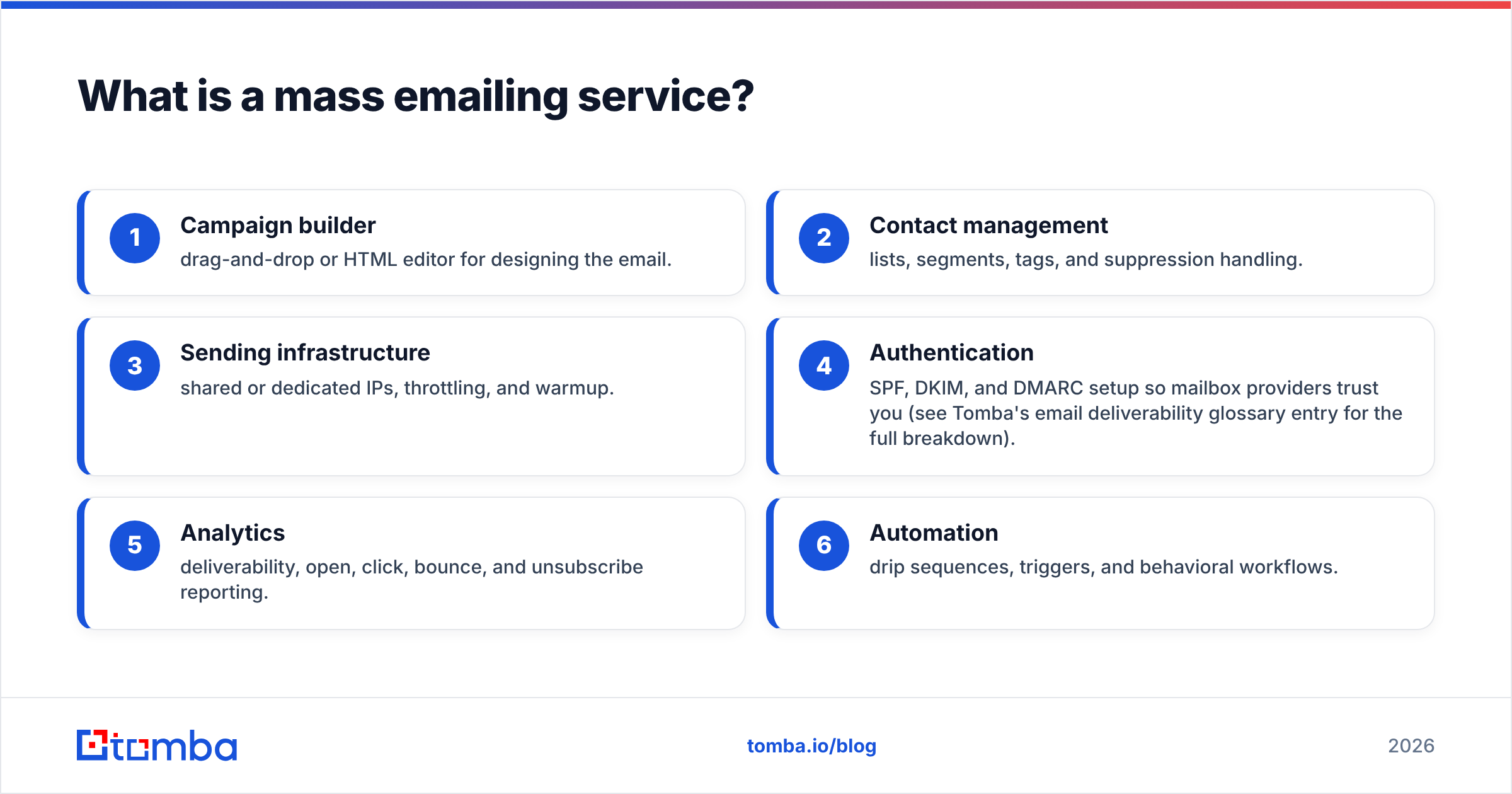
Most platforms bundle these capabilities:
- Campaign builder — drag-and-drop or HTML editor for designing the email.
- Contact management — lists, segments, tags, and suppression handling.
- Sending infrastructure — shared or dedicated IPs, throttling, and warmup.
- Authentication — SPF, DKIM, and DMARC setup so mailbox providers trust you (see Tomba's email deliverability glossary entry for the full breakdown).
- Analytics — deliverability, open, click, bounce, and unsubscribe reporting.
- Automation — drip sequences, triggers, and behavioral workflows.
The category splits into three lanes that often get confused: marketing email (newsletters and promotions), transactional email (receipts, password resets, alerts), and cold outreach (B2B prospecting at scale). A tool optimized for one is usually a poor fit for another.
How do the best mass emailing services compare in 2026?#
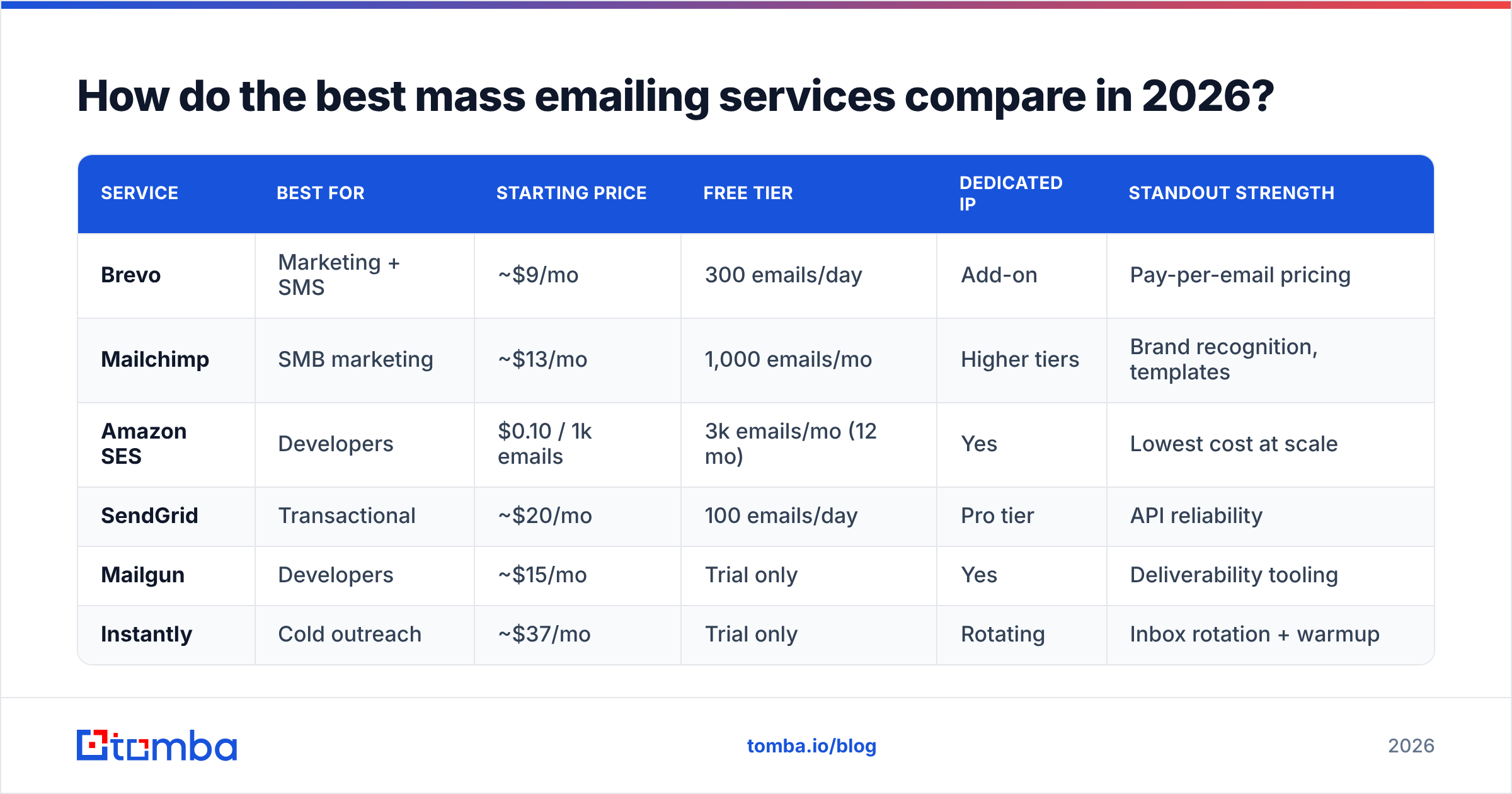
Here's a side-by-side look at the platforms most teams shortlist. Prices reflect entry paid tiers as of 2026 and round to typical published rates — always confirm on the vendor's own pricing page before committing.
| Service | Best for | Starting price | Free tier | Dedicated IP | Standout strength |
|---|---|---|---|---|---|
| Brevo | Marketing + SMS | ~$9/mo | 300 emails/day | Add-on | Pay-per-email pricing |
| Mailchimp | SMB marketing | ~$13/mo | 1,000 emails/mo | Higher tiers | Brand recognition, templates |
| Amazon SES | Developers | $0.10 / 1k emails | 3k emails/mo (12 mo) | Yes | Lowest cost at scale |
| SendGrid | Transactional | ~$20/mo | 100 emails/day | Pro tier | API reliability |
| Mailgun | Developers | ~$15/mo | Trial only | Yes | Deliverability tooling |
| Instantly | Cold outreach | ~$37/mo | Trial only | Rotating | Inbox rotation + warmup |
A few things this table makes obvious. The "cheapest" option depends entirely on your sending model: Amazon SES is almost unbeatable on raw cost per email but ships with no campaign UI, so you pay in engineering time. Brevo bills by emails sent rather than contacts stored, which rewards large-but-infrequent senders. Mailchimp bills by contacts, which punishes you for keeping inactive subscribers — another reason to prune your list aggressively.
For cold B2B outreach specifically, neither traditional ESPs nor transactional APIs are designed for the job; tools like Instantly and Smartlead exist precisely because marketing platforms will suspend you for cold sending. If that's your use case, compare dedicated options in our Instantly alternative breakdown.
Which mass emailing service is best for your use case?#
Conclusion first: match the tool to the job, not to the marketing.
- Newsletters and promotions to opted-in subscribers → Brevo or Mailchimp. You get templates, segmentation, and automation without touching code. Brevo wins on price as your list grows; Mailchimp wins on ecosystem and ease.
- Transactional email at high volume → Amazon SES or SendGrid. These prioritize speed, uptime, and API reliability. SES is cheapest; SendGrid is friendlier to integrate.
- Developer-controlled sending with deliverability tooling → Mailgun. Strong logs, validation, and inbound parsing.
- Cold B2B outreach → A dedicated outreach platform with inbox rotation and warmup. Standard ESPs will flag cold campaigns.
- Hybrid (marketing + light transactional) → Brevo handles both reasonably under one roof.
According to independent review aggregators like G2, the satisfaction gap between these tools narrows once you control for use case — meaning teams that pick the wrong category, not the wrong brand, are the ones who churn.
Why does deliverability matter more than features?#
Because an email that never reaches the inbox has a 0% open rate no matter how good your subject line is. Deliverability is the whole ballgame, and it's mostly determined by factors the platform can't fix for you.
Mailbox providers like Gmail and Outlook score every sender on reputation: your authentication setup, your complaint rate, your bounce rate, and how recipients engage. Send to a list full of dead or fake addresses and your bounce rate spikes, your sender reputation tanks, and even your good emails start landing in spam. Google's own Postmaster Tools documentation is blunt about this: list hygiene and low spam-complaint rates are prerequisites, not nice-to-haves.
This is the factor most buyers ignore while obsessing over editor features. The platform handles SPF, DKIM, and throttling. You are responsible for who's on the list.
The 2024 Gmail and Yahoo bulk-sender requirements made this non-negotiable: senders above 5,000 messages per day must authenticate with DMARC, offer one-click unsubscribe, and keep spam complaints under 0.3%. Miss those and even the "best mass emailing service" can't save you. You can read the official requirements straight from Google before your next campaign.
How do you keep your list clean before sending?#
Verify and enrich before you import, not after you get blocked. Three steps:
- Verify every address. Run your full list through an email verification pass to remove invalid, role-based, and risky addresses. This single step cuts bounce rates the most.
- Check catch-all domains. Many B2B domains accept all mail at the server, hiding dead addresses. A catch-all verifier flags these so you can throttle or exclude them.
- Enrich and dedupe. Remove duplicates, fill missing fields, and standardize formats so personalization tokens don't break mid-campaign.
If you're building lists from scratch rather than cleaning existing ones, sourcing accurate contacts up front saves the verification headache later. A bulk email finder pulls verified business addresses by domain or company, so the list you import is closer to clean from day one.
Here's the workflow most successful senders follow:
- Source verified contacts (don't buy scraped lists).
- Verify the full list and drop anything risky.
- Warm up new sending domains gradually — never blast from a cold domain.
- Segment by engagement and suppress chronic non-openers.
- Monitor Postmaster reputation and bounce rates weekly.
What does a mass emailing service actually cost?#
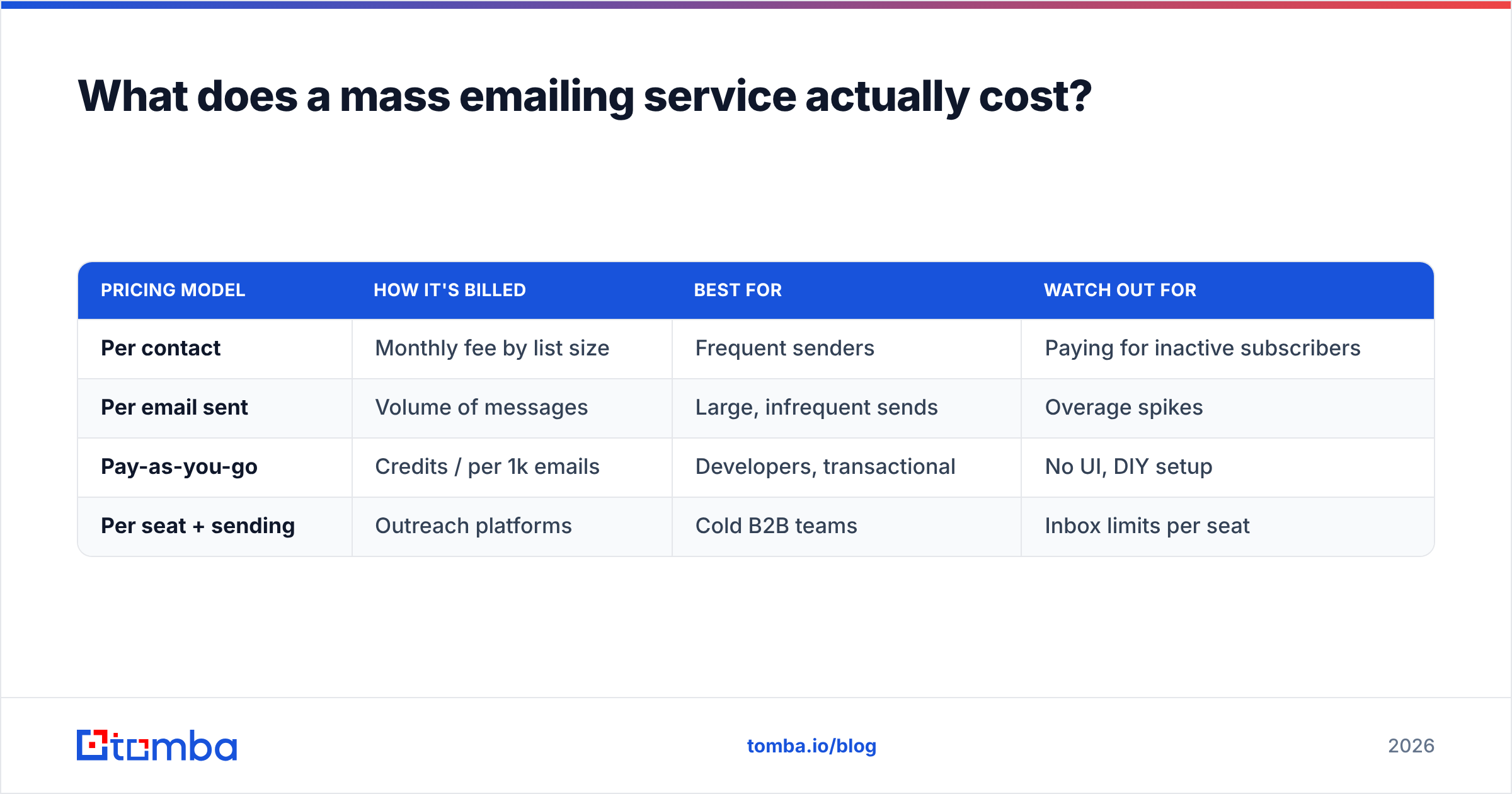
The headline price is rarely the real price. Pricing models split three ways, and the cheapest model for you depends on behavior:
| Pricing model | How it's billed | Best for | Watch out for |
|---|---|---|---|
| Per contact | Monthly fee by list size | Frequent senders | Paying for inactive subscribers |
| Per email sent | Volume of messages | Large, infrequent sends | Overage spikes |
| Pay-as-you-go | Credits / per 1k emails | Developers, transactional | No UI, DIY setup |
| Per seat + sending | Outreach platforms | Cold B2B teams | Inbox limits per seat |
A marketing list of 50,000 contacts you email twice a month is cheapest on a per-email model like Brevo. The same list emailed daily might be cheaper on a flat per-contact plan. Transactional senders pushing millions of messages should be on Amazon SES and nothing else — the per-1,000 rate is an order of magnitude lower than UI-first tools.
One cost nobody lists on the pricing page: wasted sends. If 20% of your list is invalid, you're paying to email nobody — and damaging reputation while you do it. Verification pays for itself by shrinking the list you pay to send to.
How does Tomba fit into a mass emailing workflow?#
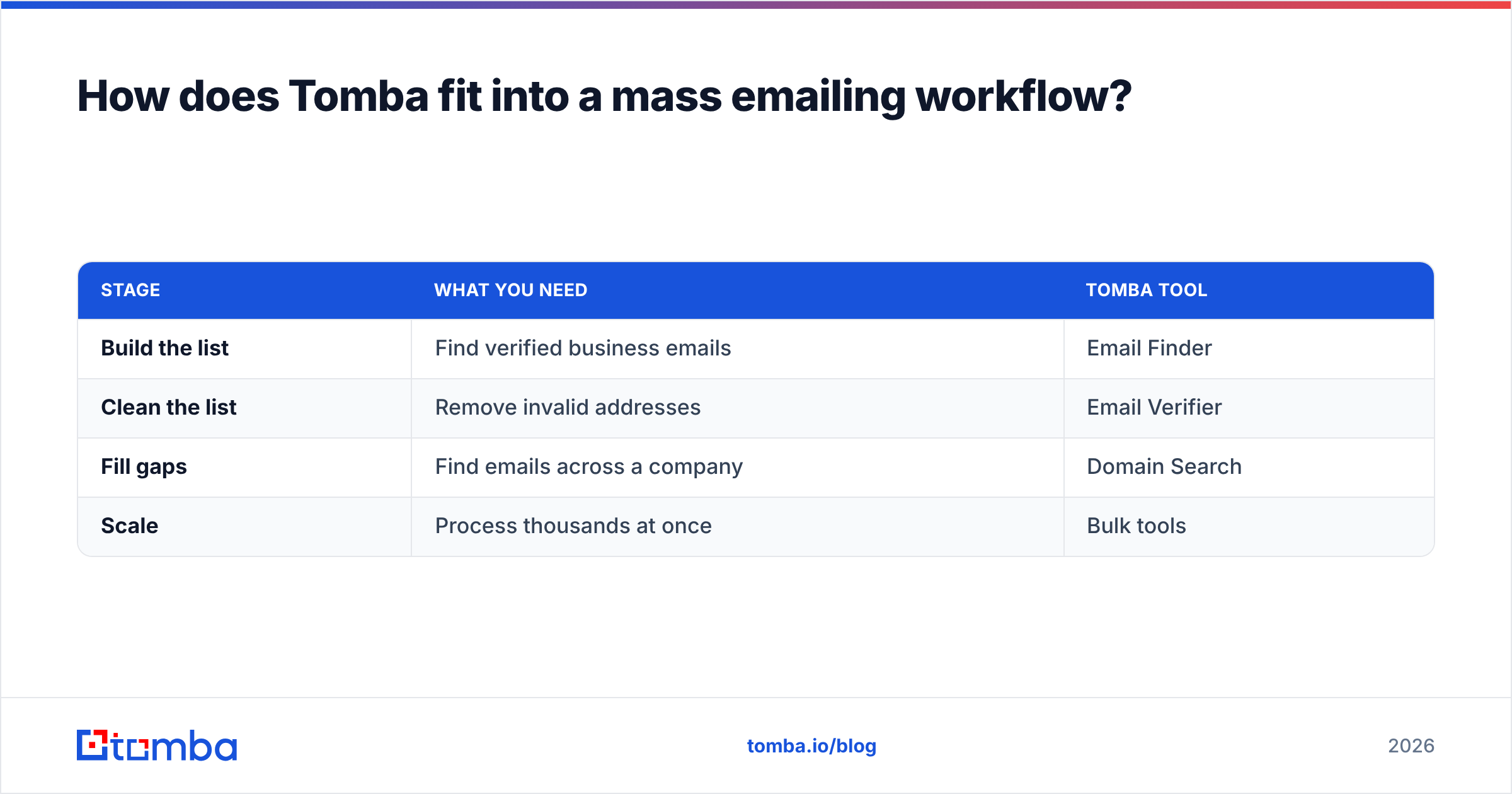
Tomba isn't a mass-sending platform — it's the data layer that makes whichever platform you choose actually perform. You bring the sending tool; Tomba makes sure the list feeding it is real.
| Stage | What you need | Tomba tool |
|---|---|---|
| Build the list | Find verified business emails | Email Finder |
| Clean the list | Remove invalid addresses | Email Verifier |
| Fill gaps | Find emails across a company | Domain Search |
| Scale | Process thousands at once | Bulk tools |
Tomba's pricing starts with a free tier (25 searches/month), then Starter at $49/mo, Growth at $99/mo, and Pro at $249/mo — so you can verify and source before you commit budget to any sending platform. Whether you land on Brevo, Mailchimp, SES, or a cold outreach tool, the verified list is the part that decides your results.
Frequently asked questions#
What is the best mass emailing service for small businesses? For most small businesses sending newsletters and promotions, Brevo and Mailchimp are the strongest picks — Brevo for cost efficiency as your volume grows, Mailchimp for templates and ease of use. The decision should follow your use case, not the brand name.
Can I use a marketing platform for cold outreach? No. Platforms like Mailchimp explicitly prohibit cold emailing and will suspend accounts that do it. Use a dedicated outreach tool with inbox rotation and warmup instead, and always verify the list first.
How many emails can I send for free? It varies: Brevo allows ~300/day, Mailchimp ~1,000/month, and Amazon SES offers a generous free tier in the first year. Free tiers are fine for testing but rarely include dedicated IPs or full automation.
Why are my emails going to spam? Usually list quality and authentication, not content. Unverified addresses, missing DMARC, sending from a cold domain, and high complaint rates are the top culprits. Clean your list and authenticate before blaming the copy.
The bottom line#
The best mass emailing service is the one that matches your sending model — marketing, transactional, or cold — and your budget. But every platform on this list lives or dies by the same input: the quality of your recipient list. Pick the right category, authenticate properly, and never send to an unverified address.
Start with the data. Use the Tomba Email Finder to build accurate, verified contact lists, then run them through Tomba's verifier before they ever touch your sending platform. A clean list turns any decent mass emailing service into a high-performing one — and no editor feature can do that for you. Try Tomba's free tier today and send your next campaign to addresses that actually exist.
// get started
Find, verify and enrich your first contacts today
Start on the free plan with 25 searches a month, then scale when your team is ready.
Free plan · No credit card required · GDPR & CCPA
// about the author