The Best Way to Verify an Email Address in 2026 (Tested Guide)
Bounce rates kill sender reputation fast. Here is the best way to verify an email address in 2026 — from free manual checks to SMTP and API-grade validation.
TL;DR
- The best way to verify an email address is to combine syntax checks, MX/domain checks, and an SMTP-level mailbox probe — not just eyeball the format.
- Manual methods (free tools, test sends) work for one-off checks; bulk and API verification is the only sane option above a few hundred addresses.
- A clean list keeps bounce rates under 2%, which protects your sender reputation and inbox placement.
- Catch-all domains are the hardest case — you need a verifier that scores them instead of guessing.
- For accuracy, speed, and price, an API-grade verifier like the email verifier from Tomba beats manual checks at any real volume.
Why does verifying an email address even matter?#
Think of your email list like a delivery route. Every dead address is a house that no longer exists — and every time your mail carrier knocks on a demolished door, the post office trusts your route a little less. Send to enough dead addresses and the post office (the mailbox provider) starts dumping all your mail in spam, even the deliverable stuff.
That is exactly how email works. Mailbox providers like Gmail and Outlook watch your bounce rate as a signal of list quality. A bounce rate above 2–3% tells them you are not maintaining your list, and your sender reputation drops. Once reputation falls, your open rates fall with it — not because your copy got worse, but because fewer people ever see it.
So verifying an email address is not a nice-to-have. It is the cheapest insurance you can buy for every campaign that follows.
What does it actually mean to "verify" an email address?#
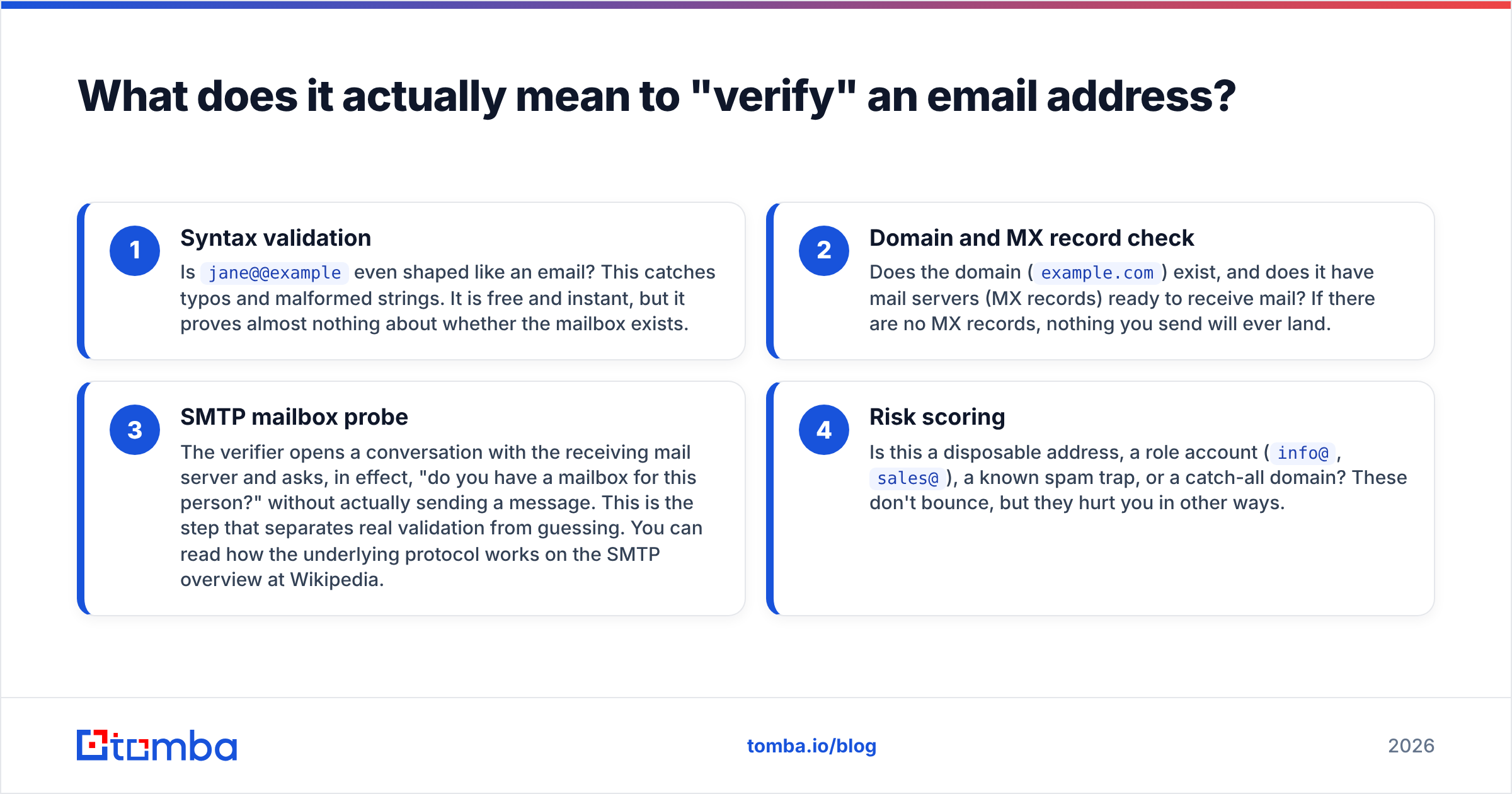
Verifying an email is really four checks stacked on top of each other, from cheapest to most reliable:
- Syntax validation — Is
jane@@exampleeven shaped like an email? This catches typos and malformed strings. It is free and instant, but it proves almost nothing about whether the mailbox exists. - Domain and MX record check — Does the domain (
example.com) exist, and does it have mail servers (MX records) ready to receive mail? If there are no MX records, nothing you send will ever land. - SMTP mailbox probe — The verifier opens a conversation with the receiving mail server and asks, in effect, "do you have a mailbox for this person?" without actually sending a message. This is the step that separates real validation from guessing. You can read how the underlying protocol works on the SMTP overview at Wikipedia.
- Risk scoring — Is this a disposable address, a role account (
info@,sales@), a known spam trap, or a catch-all domain? These don't bounce, but they hurt you in other ways.
The "best way to verify an email address" is simply the method that runs all four checks reliably without you doing them by hand.
What is the single best way to verify an email address?#
Run an SMTP-level check with risk scoring — through a dedicated verifier — and never rely on syntax alone. That is the short answer. Everything else is a trade-off between volume, budget, and how much manual work you can stomach.
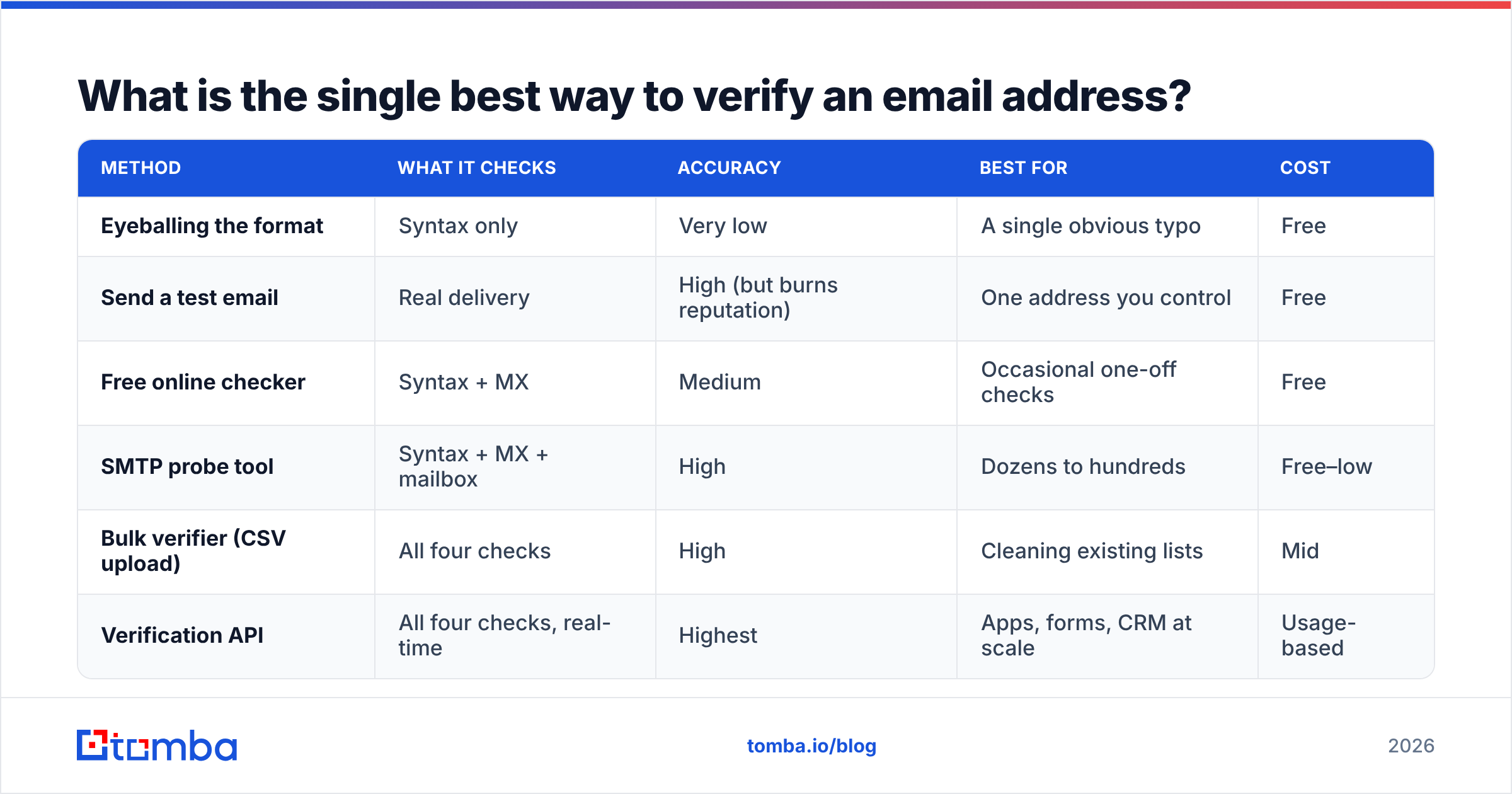
Here is how the realistic options compare:
| Method | What it checks | Accuracy | Best for | Cost |
|---|---|---|---|---|
| Eyeballing the format | Syntax only | Very low | A single obvious typo | Free |
| Send a test email | Real delivery | High (but burns reputation) | One address you control | Free |
| Free online checker | Syntax + MX | Medium | Occasional one-off checks | Free |
| SMTP probe tool | Syntax + MX + mailbox | High | Dozens to hundreds | Free–low |
| Bulk verifier (CSV upload) | All four checks | High | Cleaning existing lists | Mid |
| Verification API | All four checks, real-time | Highest | Apps, forms, CRM at scale | Usage-based |
Notice the pattern: the more of the four checks a method runs, the more reliable it gets. A free email checker is perfect when you have one address and thirty seconds. But the moment you have a spreadsheet, manual methods collapse.
How do you verify a single email address for free?#
If you only need to check one or two addresses, you do not need to pay for anything. Use this order:
- Check the syntax by eye. Look for double
@, missing dots, or obvious fat-finger domains likegmial.com. - Run it through a free checker. A tool like the free email checker confirms syntax and that the domain can receive mail.
- Confirm the domain has a website. A live company site at the domain is a good sign the mail server is real.
- Avoid the "just send a test" trap. Sending a probe email does tell you if it bounces — but if you do this across many unknown addresses, you are generating bounces with your own sending domain, which is the exact reputation damage you were trying to avoid.
Free manual checking is fine for a handful of addresses. It does not scale, and it cannot detect spam traps or score catch-all domains. That is where you graduate to tooling.
How do you verify thousands of emails at once?#
You batch them. Manually checking a 10,000-row list is not "tedious" — it is impossible to do accurately, because you cannot perform an SMTP handshake by hand.
For volume, you have two paths:
- Bulk upload. Drop a CSV into a bulk verify tool, let it run every check on every row, and download a scored file. Each address comes back tagged as deliverable, undeliverable, risky, or unknown. You then suppress everything that isn't "deliverable" before importing to your sender.
- API verification. Wire a email verification API directly into your signup form, CRM, or data pipeline so addresses are validated the moment they enter your system. This is the gold standard because bad data never reaches your database in the first place.
The difference is timing. Bulk cleaning is reactive — you fix a list you already have. API verification is proactive — you stop bad addresses at the door. Most teams use both: API on intake, periodic bulk re-verification on the existing database (emails decay roughly 22–30% per year as people change jobs).

What about catch-all domains and risky addresses?#
This is where cheap verifiers quietly fail you.
A catch-all (or "accept-all") domain is configured to accept mail for any address at that domain, real or not. Ask its server "do you have a mailbox for nobody123@company.com?" and it says "sure, send it" — even though that mailbox doesn't exist. A naive verifier marks every catch-all address as valid, and you find out the truth only when it bounces.
The fix is a verifier that explicitly handles this case. A dedicated catch-all verifier uses additional signals — historical data, pattern analysis, and confidence scoring — to tell you whether a catch-all address is likely real instead of blindly trusting the server. It will not always be 100% certain (no tool can be, by definition), but a scored "85% likely deliverable" is far more useful than a flat "valid."
The other risky categories worth scoring:
- Role accounts —
info@,support@,admin@. They're real, but they route to teams, not people, and often have low engagement. - Disposable addresses — temporary inboxes from services that self-destruct. Almost never worth keeping.
- Spam traps — addresses planted specifically to catch spammers. Hitting one is the fastest way to torch your reputation.
A serious verifier flags all of these, not just hard bounces.
How do free, bulk, and API verification compare on price?#
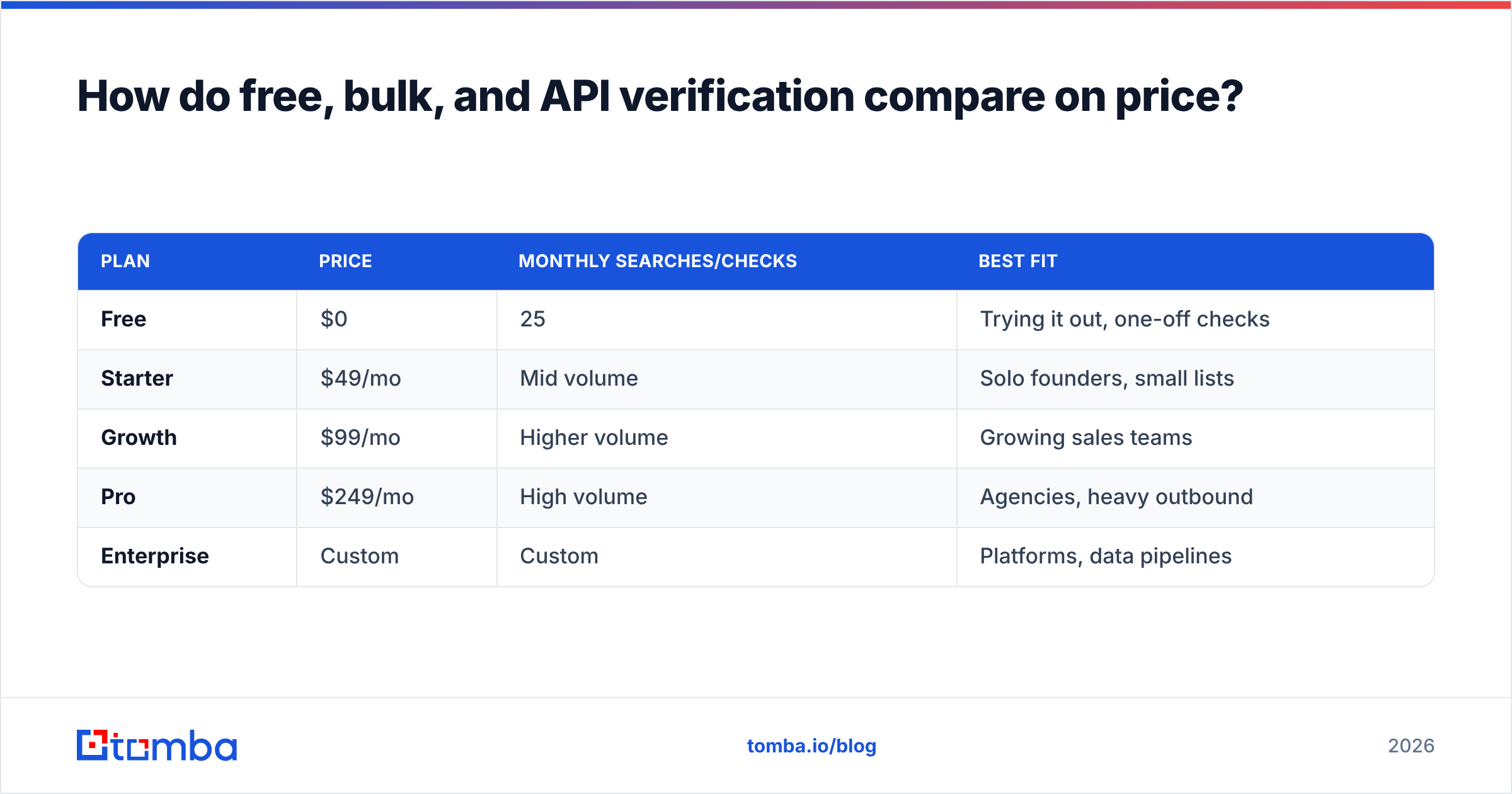
Cost scales with how the work is done. Here is a realistic breakdown using Tomba's published tiers as the reference point:
| Plan | Price | Monthly searches/checks | Best fit |
|---|---|---|---|
| Free | $0 | 25 | Trying it out, one-off checks |
| Starter | $49/mo | Mid volume | Solo founders, small lists |
| Growth | $99/mo | Higher volume | Growing sales teams |
| Pro | $249/mo | High volume | Agencies, heavy outbound |
| Enterprise | Custom | Custom | Platforms, data pipelines |
You can see the full Tomba pricing breakdown before committing — the free tier is enough to verify a small list and see the accuracy for yourself. The takeaway: per-address verification gets cheaper the more you do, which is the opposite of manual checking, where every additional address costs you more of your own time.
For an independent view of how verification vendors stack up on accuracy and support, third-party review sites like G2 are a good neutral reference before you pick a tool.
What does a good verification workflow look like end to end?#
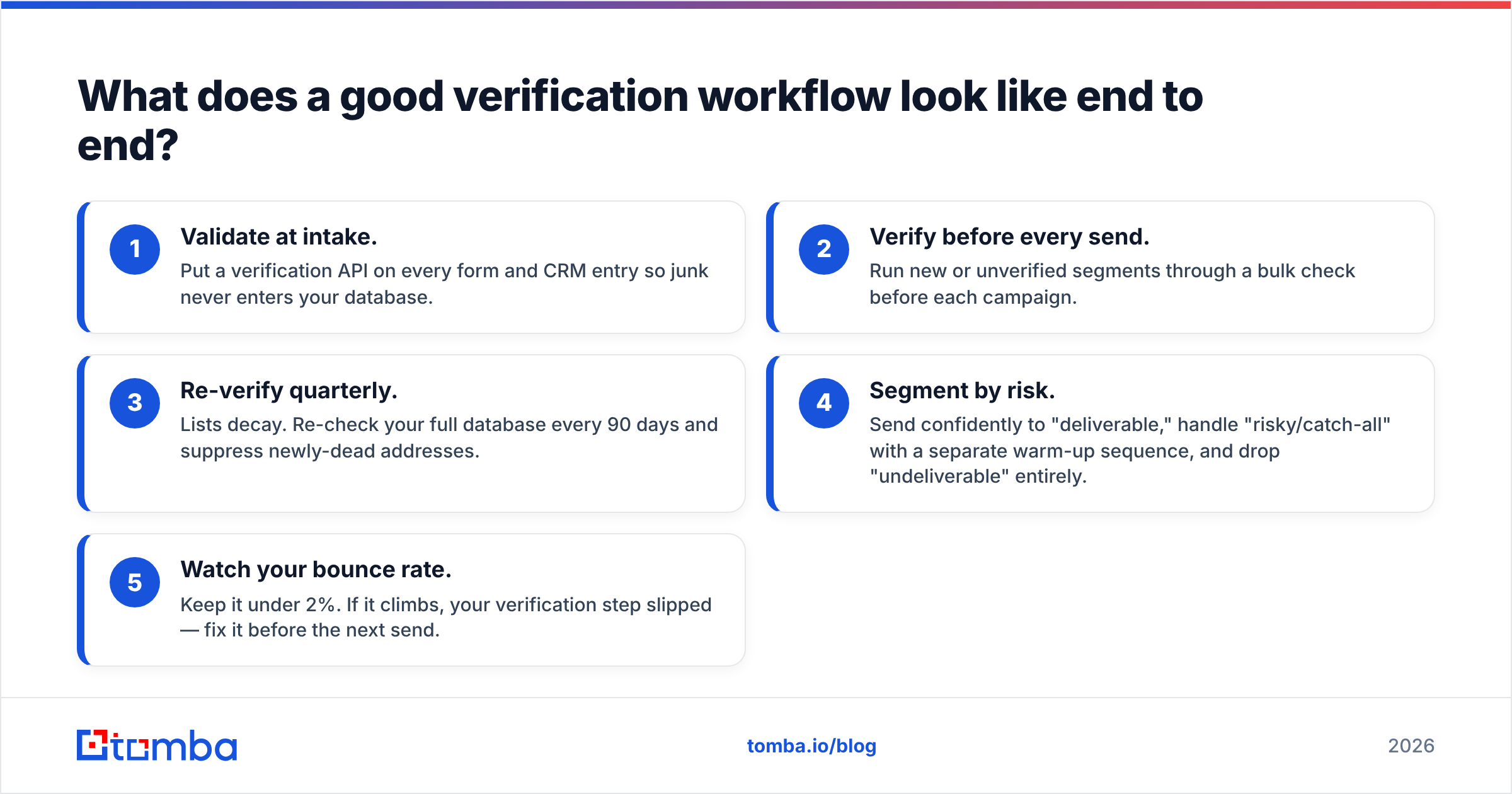
Here is the workflow most high-deliverability teams converge on. You do not need every step on day one, but this is the target:
- Validate at intake. Put a verification API on every form and CRM entry so junk never enters your database.
- Verify before every send. Run new or unverified segments through a bulk check before each campaign.
- Re-verify quarterly. Lists decay. Re-check your full database every 90 days and suppress newly-dead addresses.
- Segment by risk. Send confidently to "deliverable," handle "risky/catch-all" with a separate warm-up sequence, and drop "undeliverable" entirely.
- Watch your bounce rate. Keep it under 2%. If it climbs, your verification step slipped — fix it before the next send.
This is also where verification connects to the rest of your stack. If you are finding new contacts, pairing an email finder with verification means every address you collect is already validated when it lands in your sequence — no separate cleaning pass needed.
Frequently asked questions#
Can you verify an email without sending one? Yes — that is the whole point of an SMTP probe. A verifier opens a connection with the mail server and checks for the mailbox without delivering a message, so you learn whether it exists without generating a bounce.
Is 100% accuracy possible? No, and be skeptical of any tool that claims it. Catch-all domains and greylisting make some addresses genuinely unknowable in real time. The best verifiers are honest about this and return a confidence score instead of a false "valid."
How often should I clean my list? Every 90 days for active lists, and always before a major campaign. B2B emails decay 22–30% per year as people change jobs.
Does verification improve deliverability by itself? It removes the biggest cause of poor deliverability — bounces — but it works alongside proper authentication (SPF, DKIM, DMARC) and good sending habits, not instead of them.
The bottom line#
The best way to verify an email address is to stop treating it as a one-time chore and bake it into your data flow: check syntax, domain, mailbox, and risk on every address, and let software do the SMTP work you physically can't do by hand. Free tools cover the occasional lookup; for anything at real volume, an API-grade verifier is the only approach that keeps your bounce rate low and your reputation intact.
If you want a verifier that runs all four checks, scores catch-all domains instead of guessing, and starts free, run your next list through Tomba's email verifier. Verify the first 25 on the free tier, watch your bounce rate drop, then scale up only when the results have already paid for themselves.
// get started
Find, verify and enrich your first contacts today
Start on the free plan with 25 searches a month, then scale when your team is ready.
Free plan · No credit card required · GDPR & CCPA
// about the author