BetterMerge Pricing, Reviews, Pros and Cons (2026 Guide)
BetterMerge promises simple Gmail mail merge, but is it worth it in 2026? Here's the real pricing, honest pros and cons, user reviews, and the alternatives worth testing before you commit.

This BetterMerge pricing and reviews guide keeps it simple. We cover the plans, the real pros and cons, what users say, and the alternatives worth a look. Read it before you buy.
TL;DR
- BetterMerge is a Gmail-native mail merge tool built for sending personalized bulk emails straight from your inbox using Google Sheets as the data source.
- Pricing is its biggest selling point — a usable free tier plus low monthly plans make it attractive for solos and small teams. But the limits get tight fast as you scale.
- The honest pros: dead-simple setup, no separate sending domain, and tight Google Workspace integration. The honest cons: Gmail sending caps, weak list-hygiene tools, and limited deliverability controls.
- Reviews are mostly positive for ease of use, mixed on support and advanced features. It is a starter tool, not a full outbound platform.
- The thing BetterMerge does not do is find or verify contact data. So pairing it with a email verifier and a finder is non-negotiable if you want replies instead of bounces.
What is BetterMerge?#
BetterMerge is a mail merge app that lives inside Gmail and Google Sheets. You build a spreadsheet of recipients and write a template with merge tags like {{first_name}} or {{company}}. BetterMerge then sends each person an individual, personalized email from your own Gmail address.
Think of it like a printer's mail-merge feature, but for your inbox. One template becomes many personalized copies, sent one at a time so each lands as a normal-looking email.
That "sent from your real inbox" detail is the whole pitch. Messages go through Gmail's standard pipeline, not a third-party SMTP relay. So you skip the work of warming a separate domain and setting up an external sender. For a freelancer pitching 80 prospects or a recruiter emailing a shortlist, that simplicity is the main draw.
It is not, however, a cold-outreach platform in the same league as Instantly or Saleshandy. BetterMerge focuses on the send. It assumes you already have clean, accurate contact data — and that assumption is where most campaigns quietly fail.

BetterMerge pricing and reviews: how the plans work in 2026#
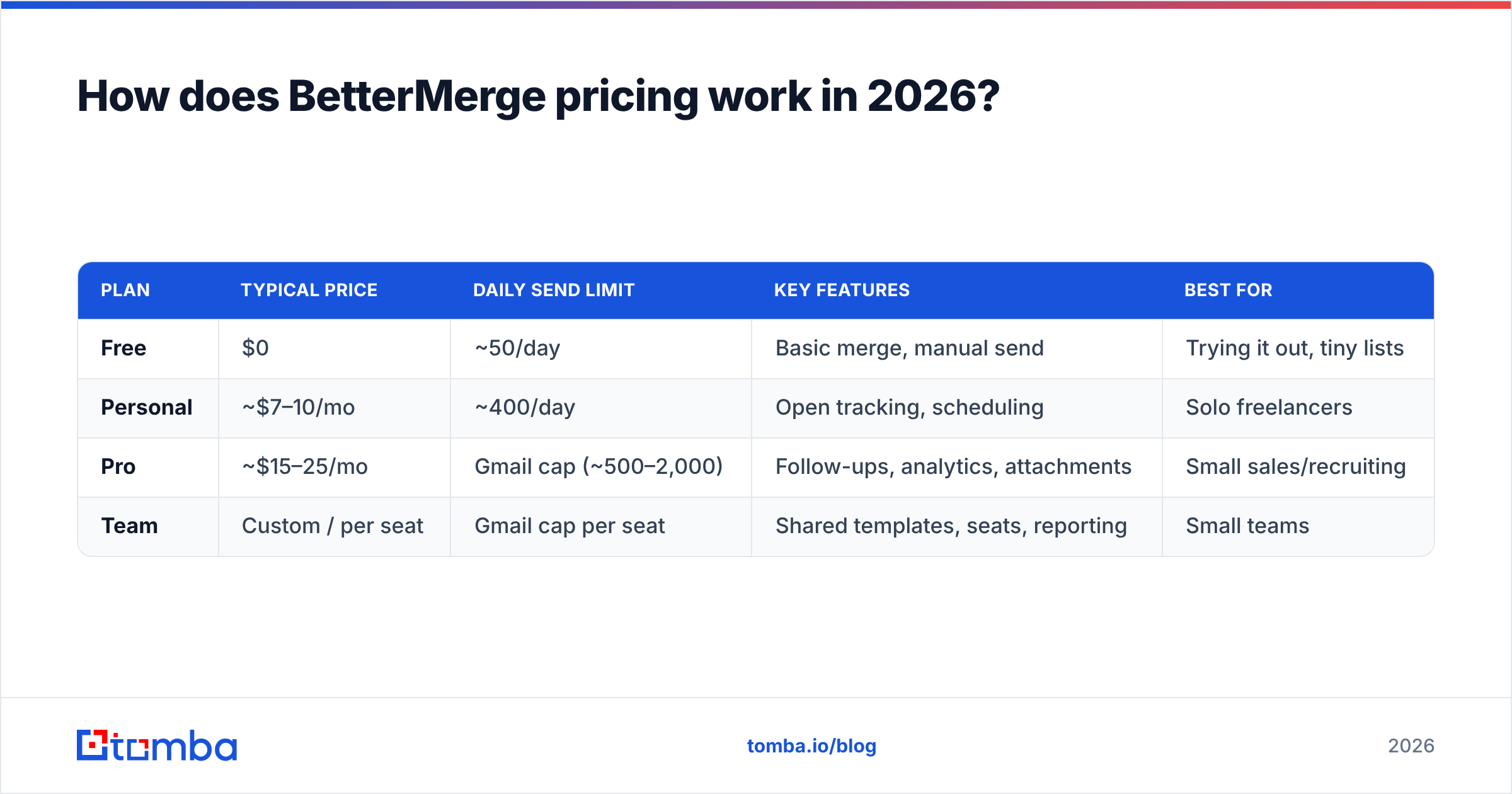
BetterMerge follows the classic freemium model. A free tier hooks you, then monthly plans raise your daily send limit and unlock tracking, scheduling, and follow-ups. Exact numbers shift over time. Treat the table below as a structural guide and confirm current rates on the vendor's site before you buy.
| Plan | Typical price | Daily send limit | Key features | Best for |
|---|---|---|---|---|
| Free | $0 | ~50/day | Basic merge, manual send | Trying it out, tiny lists |
| Personal | ~$7–10/mo | ~400/day | Open tracking, scheduling | Solo freelancers |
| Pro | ~$15–25/mo | Gmail cap (~500–2,000) | Follow-ups, analytics, attachments | Small sales/recruiting |
| Team | Custom / per seat | Gmail cap per seat | Shared templates, seats, reporting | Small teams |
A few things stand out. First, the free tier is genuinely usable for one-off sends, which is rare in this category. Second, your real ceiling is Gmail itself, not the plan. A standard Gmail account caps around 500 external recipients per day. Google Workspace accounts go up to roughly 2,000.
No mail merge tool can lift that cap, because the send still flows through Google. Check the current limits in the Google Workspace documentation before you plan a big blast.
Compared with dedicated outbound platforms that start at $30–$97/month, BetterMerge is cheap. But "cheap to send" is not the same as "cheap to get results." If half your list bounces, the lowest price in the world is a bad deal.
What are the pros of BetterMerge?#
Here is where BetterMerge earns its reviews, broken into the points that actually matter:
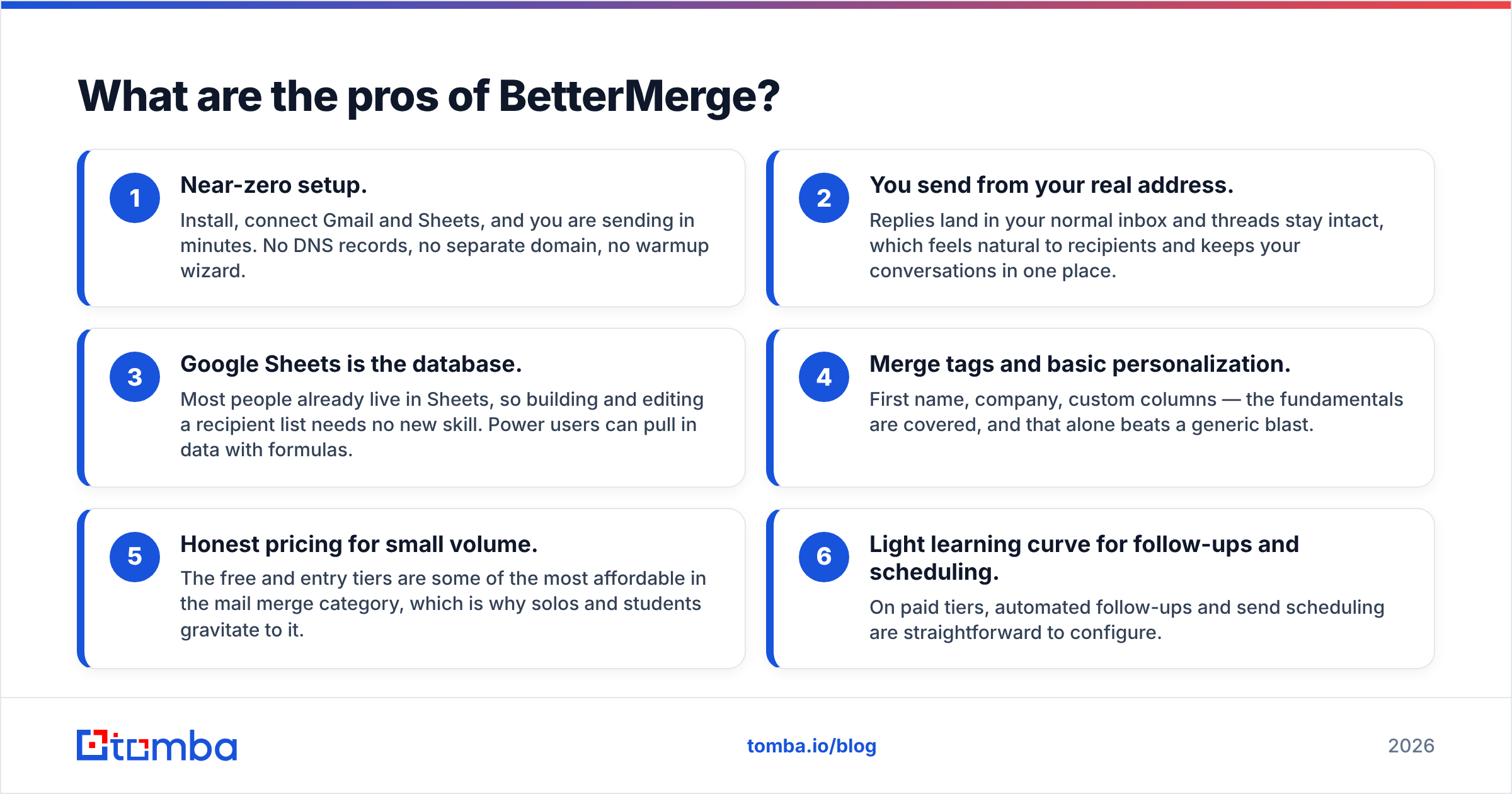
- Near-zero setup. Install, connect Gmail and Sheets, and you are sending in minutes. No DNS records, no separate domain, no warmup wizard.
- You send from your real address. Replies land in your normal inbox and threads stay intact. That feels natural to recipients and keeps your conversations in one place.
- Google Sheets is the database. Most people already live in Sheets, so building and editing a recipient list needs no new skill. Power users can pull in data with formulas.
- Merge tags and basic personalization. First name, company, custom columns — the fundamentals are covered, and that alone beats a generic blast.
- Honest pricing for small volume. The free and entry tiers are some of the most affordable in the category, which is why solos and students gravitate to it.
- Light learning curve for follow-ups and scheduling. On paid tiers, automated follow-ups and send scheduling are easy to set up.
For low-volume, relationship-driven outreach — recruiting, partnerships, light sales — those strengths are real and the value is good.
What are the cons of BetterMerge?#
No tool is all upside. The recurring complaints in BetterMerge reviews cluster around a few themes:
- Gmail sending limits cap your scale. You will hit Google's daily ceiling long before BetterMerge's features run out. Serious outbound at 1,000+ sends/day needs multiple inboxes or a dedicated platform.
- Deliverability controls are thin. There is no built-in inbox rotation, no native warmup, and limited spam-risk analysis. Send carelessly and your domain reputation suffers. Run your copy through a spam checker before launch to cut that risk.
- No data quality layer. BetterMerge sends to whatever you paste into the sheet. It does not find missing emails and it does not verify them, so bad rows become bounces.
- Reporting is basic. Opens and clicks, yes — but not the pipeline-grade analytics a revenue team expects.
- Support is hit or miss. Smaller tool, smaller team. Complex issues can sit in the queue.
- Not built for teams at scale. Shared assets and seat management exist but feel bolted on next to purpose-built sales platforms.
The pattern is clear. BetterMerge is excellent at the last mile (the send) and silent on the first mile (the data). That gap is the single biggest reason cold campaigns underperform.
Is BetterMerge worth it? Honest verdict#
Yes, if you are a solo or small team sending personalized emails to a clean, modest list — and no, if you need scale, deliverability tooling, or built-in data. BetterMerge is a sharp, affordable tool for what it is. It is not trying to be Outreach or Apollo, and you should not buy it expecting that.
The deciding factor is almost never the merge feature itself. Every tool in this space merges fine. The real deciding factor is the quality of the list you feed it. That point sits at the heart of any honest BetterMerge pricing and reviews verdict.
Here is the pattern that holds year after year. Campaigns sent to unverified lists routinely see bounce rates north of 15–20%. That trashes sender reputation and lands future sends in spam. Mailbox providers read high bounce rates as a spammer signal. So the tool that sends your email matters far less than whether the address exists in the first place.
That is why experienced senders treat the mail merge tool and the data engine as two separate purchases. BetterMerge can be the merge half. Something built for accuracy has to be the data half.

How does BetterMerge compare to alternatives?#
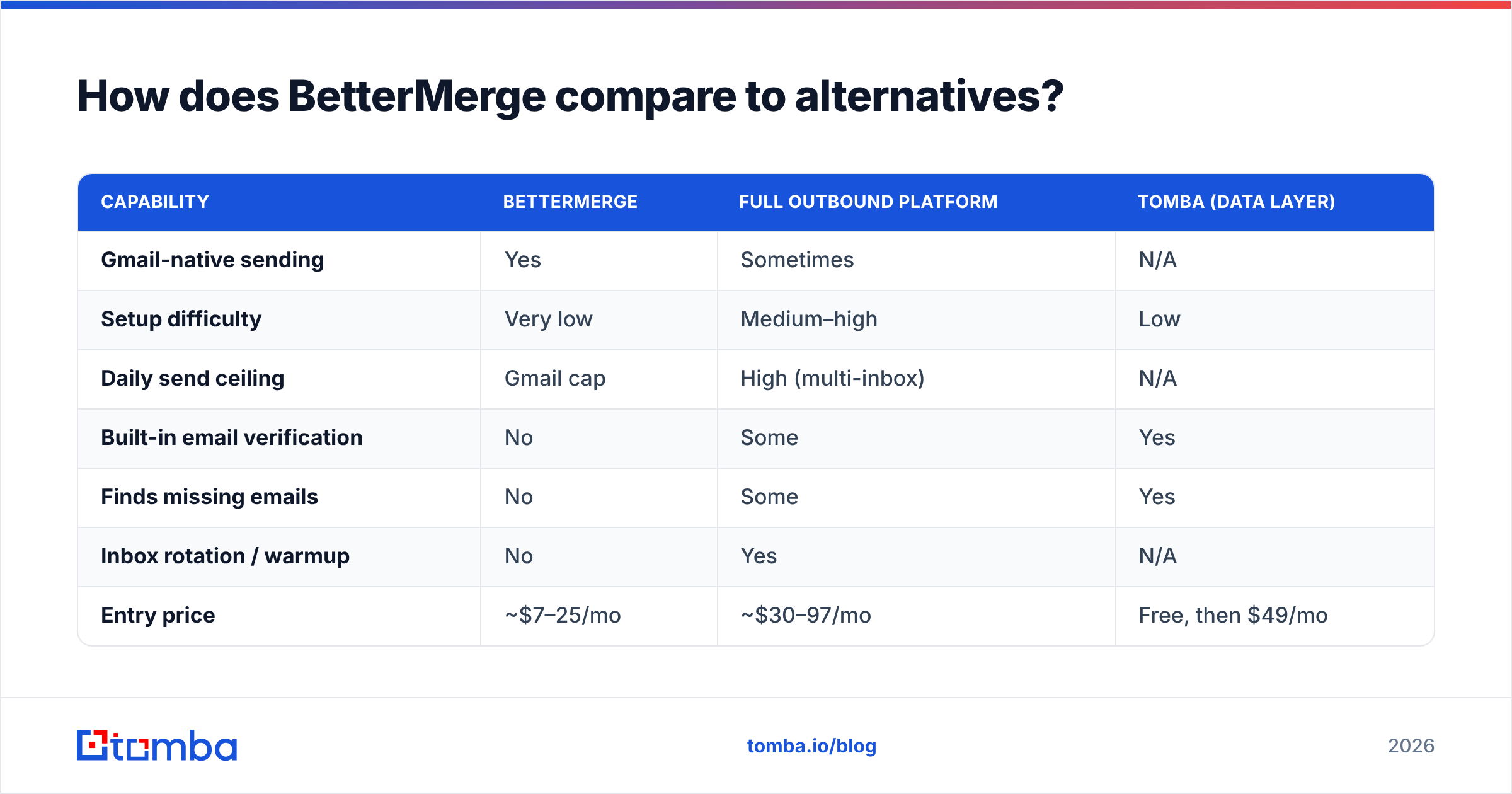
BetterMerge competes in two overlapping markets: simple Gmail mail merge tools and heavier cold-email platforms. Here is how the categories stack up, including where a data tool like Tomba fits.
| Capability | BetterMerge | Full outbound platform | Tomba (data layer) |
|---|---|---|---|
| Gmail-native sending | Yes | Sometimes | N/A |
| Setup difficulty | Very low | Medium–high | Low |
| Daily send ceiling | Gmail cap | High (multi-inbox) | N/A |
| Built-in email verification | No | Some | Yes |
| Finds missing emails | No | Some | Yes |
| Inbox rotation / warmup | No | Yes | N/A |
| Entry price | ~$7–25/mo | ~$30–97/mo | Free, then $49/mo |
| Best use case | Small personalized sends | Scaled cold outreach | Building & cleaning lists |
The takeaway: these are complementary, not competing, purchases. BetterMerge handles the send for small volumes. A platform like Instantly or Saleshandy handles scaled sending with deliverability tooling. And a data engine handles the part neither of them does well — getting verified, accurate contacts into the sheet to begin with.
Want a third-party view beyond marketing pages? Cross-check user reviews on G2 and Capterra before committing. Pay attention to recent ones that mention support response times and deliverability.
How do you fix BetterMerge's biggest weakness?#
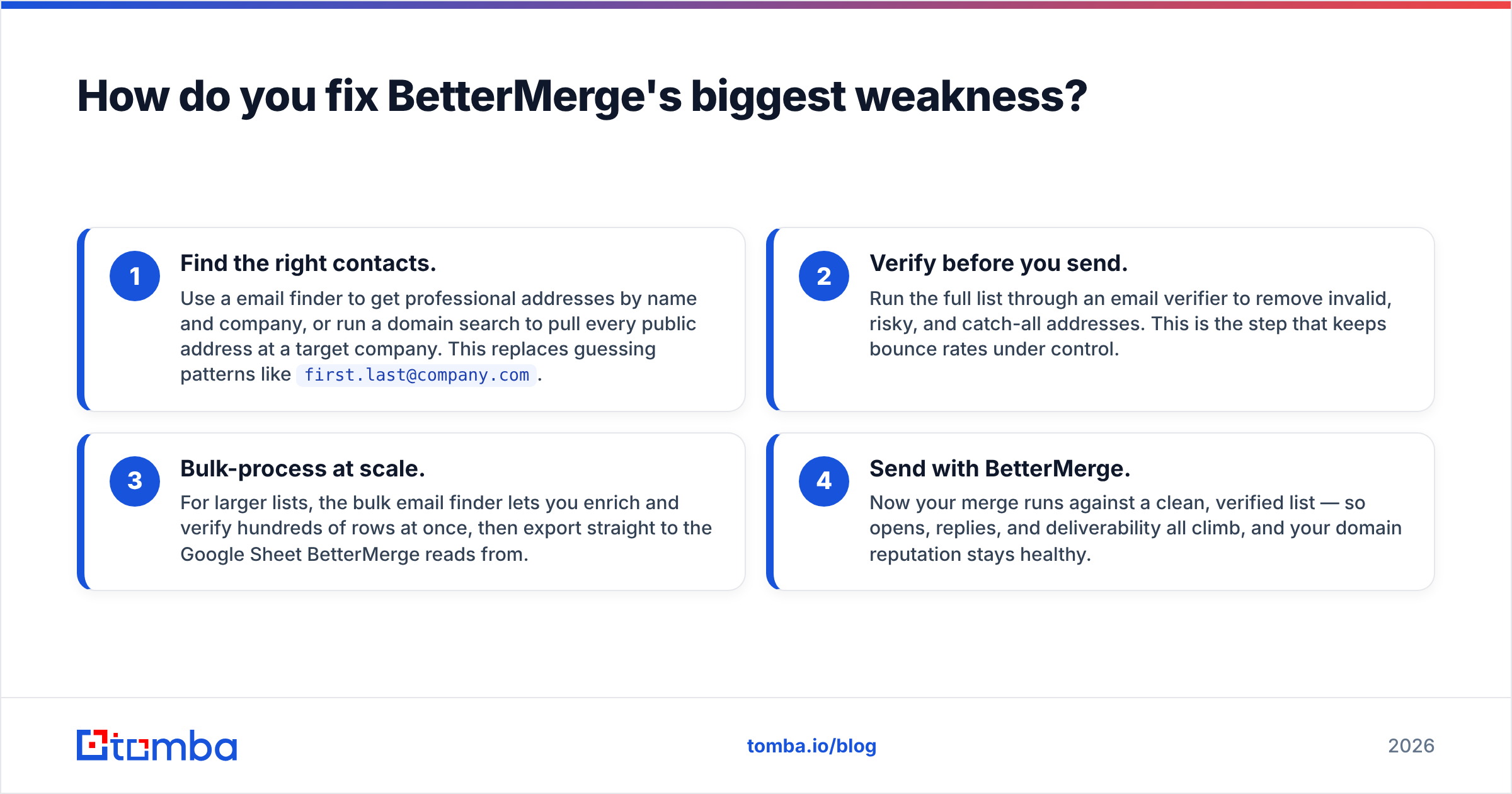
Add a data layer in front of it. BetterMerge's one structural gap is that it sends to whatever you give it. Close that gap and the tool performs far above its price. Here is the workflow that makes BetterMerge actually convert:
- Find the right contacts. Use a email finder to get professional addresses by name and company, or run a domain search to pull every public address at a target company. This replaces guessing patterns like
first.last@company.com. - Verify before you send. Run the full list through an email verifier to remove invalid, risky, and catch-all addresses. This is the step that keeps bounce rates under control.
- Bulk-process at scale. For larger lists, the bulk email finder lets you enrich and verify hundreds of rows at once, then export straight to the Google Sheet BetterMerge reads from.
- Send with BetterMerge. Now your merge runs against a clean, verified list. Opens, replies, and deliverability all climb, and your domain reputation stays healthy.
This split — accurate data first, simple send second — is what separates a 2% reply rate from a 10% one. The merge tool you pick is a rounding error next to the quality of the list. Tomba's data sources are built for this first-mile job, and the free tier (25 searches/month) lets you test the difference before paying for anything.
Frequently asked questions#
Does BetterMerge have a free plan? Yes. BetterMerge offers a free tier suitable for low-volume, occasional sends — typically around 50 emails per day. It is a genuine free option for trying mail merge, though daily limits and advanced features are reserved for paid plans.
Will BetterMerge improve my deliverability? Not directly. BetterMerge sends through your real Gmail account, which helps messages look natural, but it has no built-in warmup, inbox rotation, or list verification. Deliverability depends mostly on your list quality and sending habits, not the merge tool.
Can BetterMerge find email addresses for me? No. BetterMerge only sends to the addresses you already have in your spreadsheet. To find and verify those addresses, you need a dedicated tool like the Tomba email finder and verifier.
Is BetterMerge good for cold email at scale? Not really. Gmail's daily sending cap (roughly 500 for personal accounts, up to ~2,000 for Workspace) limits volume. For high-volume cold outreach with inbox rotation and warmup, a dedicated platform paired with verified data is the better fit.
How much does BetterMerge cost? Pricing typically ranges from a free tier up to roughly $25/month for individual pro plans, with custom team pricing above that. Confirm current rates on the vendor's site, since freemium tools adjust pricing and limits regularly.
The bottom line#
This BetterMerge pricing and reviews verdict comes down to one thing. BetterMerge is a solid, affordable Gmail mail merge tool for solos and small teams who send personalized emails to modest, clean lists. Its pricing is friendly, its setup is effortless, and its Gmail-native send feels natural to recipients. Its limits — Gmail's send caps, thin deliverability tooling, and zero data quality features — are real but manageable once you understand them.
The single biggest lever on your results is not the merge tool. It is whether the addresses you send to actually exist and belong to the right person. BetterMerge will never do that part for you.
That is where Tomba comes in. Before your next merge, build and clean your list with the Tomba Email Finder — find verified professional emails by name, company, or domain, then export straight into the Google Sheet BetterMerge reads from. Start free with 25 searches, and watch your bounce rate fall and your reply rate climb. The send is the easy part. Getting the data right is the win.
// get started
Find, verify and enrich your first contacts today
Start on the free plan with 25 searches a month, then scale when your team is ready.
Free plan · No credit card required · GDPR & CCPA
// about the author