Bettermerge vs FindThatLead (2026): Which Tool Wins?
Bettermerge vs FindThatLead compared head-to-head for 2026: data accuracy, pricing, mail merge, and outreach. See which tool fits your cold pipeline — and where a dedicated finder beats both.
placeholder
TL;DR
- Bettermerge is a Gmail/Google Sheets mail-merge tool built for sending personalized cold and warm email campaigns at low cost — it does not find or verify emails for you.
- FindThatLead is an all-in-one prospecting suite: email finder, verifier, and a basic sender/drip module rolled into one dashboard.
- They overlap less than the "vs" suggests. Bettermerge is a sender; FindThatLead is a data + sender hybrid. Many teams end up using one for sending and a separate, more accurate source for the data.
- If your bottleneck is deliverable, accurate contact data, neither tool is purpose-built for it — a dedicated email finder like Tomba feeds cleaner lists into whichever sender you prefer.
- Pricing is close at the entry level, but the real cost difference shows up in wasted sends to bad addresses.
If you are comparing Bettermerge vs FindThatLead, you are really asking two questions at once: how do I get good contact data, and how do I send to it without burning my domain. This guide separates those questions, scores each tool on what it actually does well, and shows where a specialist finder beats a generalist.
What is Bettermerge?#
Bettermerge is a mail-merge and cold-email sending tool that lives inside Gmail and Google Sheets. You drop your contacts into a spreadsheet, write a templated email with merge fields like {{first_name}} and {{company}}, and Bettermerge sends individualized copies from your own Google account. It tracks opens, handles follow-ups, and keeps everything in the Google Workspace ecosystem you already use.
Think of it like a printing press that knows each reader's name. You supply the paper (your contact list) and the template; Bettermerge stamps a personalized copy for everyone and mails it. What it deliberately does not do is find the names and addresses in the first place — you bring those.
That design keeps Bettermerge cheap and simple, but it pushes the hardest part of cold outreach — sourcing accurate emails — back onto you.
What is FindThatLead?#
FindThatLead is an older, broader prospecting platform. It bundles three jobs:
- Email finder — search by domain, name, or company to get candidate addresses.
- Email verifier — check whether an address is likely to bounce before you send.
- Sender / drip — a lightweight campaign module for cold sequences.
So FindThatLead tries to be the whole pipeline in one tab: find → verify → send. That breadth is its main selling point against a sender-only tool like Bettermerge. The trade-off is that a jack-of-all-trades rarely matches a specialist on any single axis — finder accuracy, verification depth, or sender deliverability controls all tend to be "good enough" rather than best-in-class.
If you want a deeper look at how dedicated tools score on data quality, our breakdown of data accuracy and sources explains why coverage and freshness matter more than raw database size.
Bettermerge vs FindThatLead: how do they compare?#
Here is the head-to-head on the attributes that actually change your results. Prices reflect publicly listed entry tiers at time of writing; always confirm on each vendor's site.
| Attribute | Bettermerge | FindThatLead |
|---|---|---|
| Primary job | Mail merge / sending | Find + verify + send |
| Finds emails for you | No | Yes |
| Email verification | No (bring your own) | Built-in |
| Sends from | Your Gmail / Workspace | Its own sender + SMTP |
| Best for | Personalized low-volume sends | All-in-one starter prospecting |
| Free tier | Limited free merges | Limited monthly credits |
| Entry paid price | ~$5–$10/mo range | ~$49/mo range |
| Learning curve | Very low (lives in Sheets) | Moderate (multi-module UI) |
| Deliverability risk | Tied to your Gmail limits | Shared sender reputation risk |
The pattern is clear: Bettermerge wins on simplicity and cost-per-send, FindThatLead wins on breadth. Neither one is engineered first and foremost around contact-data accuracy, which is the variable that most often decides whether a cold campaign lands or bounces.
Where each tool is strongest#
- Pick Bettermerge when you already have a clean, verified list and you just need personalized emails to go out from your own inbox at a friendly price.
- Pick FindThatLead when you want one login that covers finding, checking, and sending, and you are comfortable trading top-tier accuracy for convenience.
- Pick a dedicated finder + your favorite sender when bounce rates, sender reputation, and reply rates are the metrics your boss actually watches.
Is data accuracy the real deciding factor?#
Yes — and it is the factor both tools under-serve. A mail merge sent to a stale list is just a faster way to hit spam traps. FindThatLead's built-in finder helps, but bundled finders typically trade accuracy for the convenience of staying in one tool.
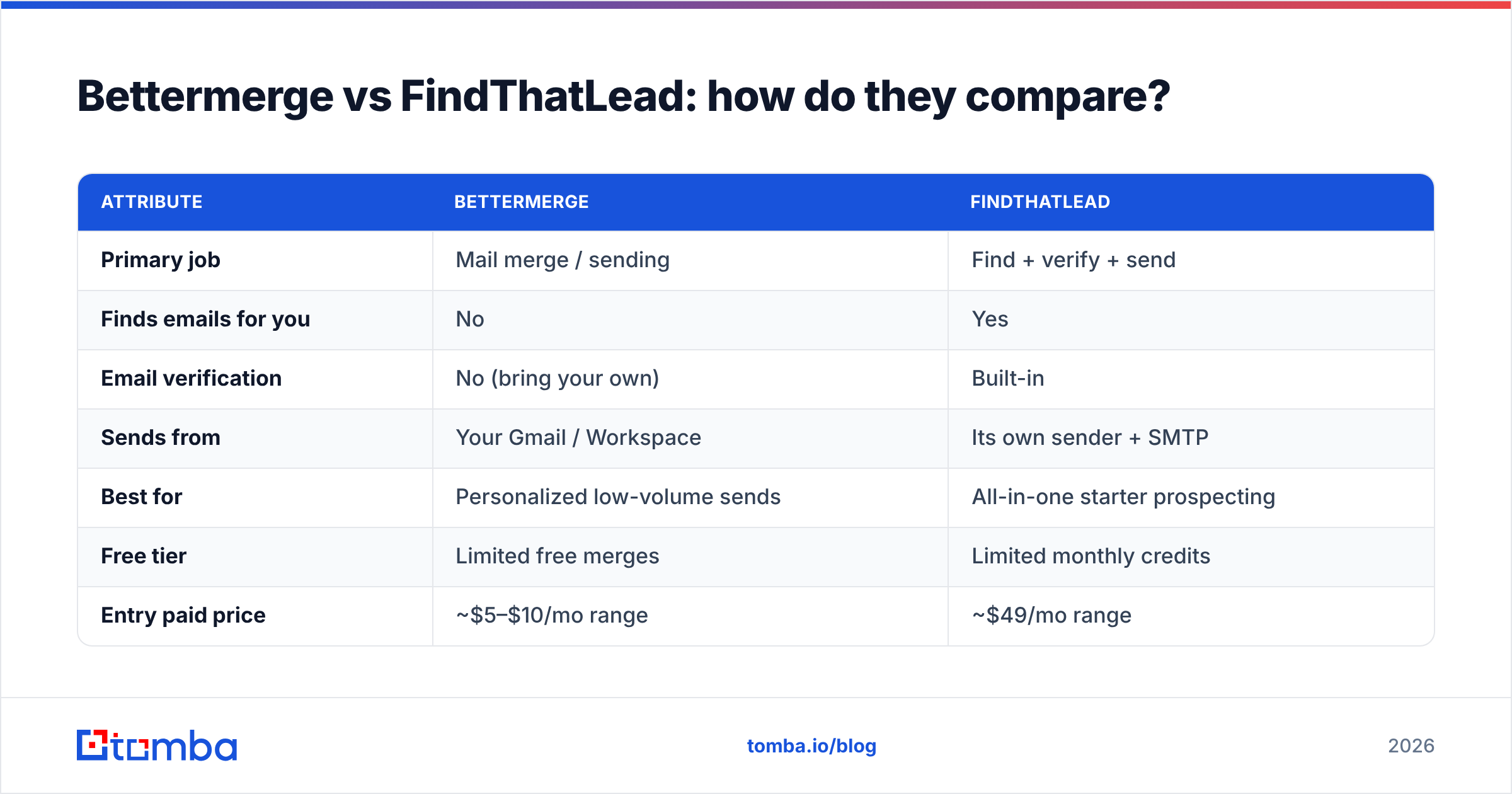
Accuracy compounds. If 20% of your list is wrong, you are not only wasting 20% of sends — you are training your domain's email deliverability downward with every bounce, which quietly suppresses the good 80% too. That is why teams obsessed with reply rates separate data sourcing from sending.
This is the gap a specialist fills. A purpose-built finder with multi-source validation and a real-time email verifier produces lists that any sender — Bettermerge, FindThatLead, or otherwise — can mail safely.
How does Tomba fit into the picture?#
Tomba is not trying to replace your sender — it is the accuracy layer that should sit before it. Where Bettermerge skips finding entirely and FindThatLead bundles a "good enough" finder, Tomba focuses on one job: returning deliverable, source-cited B2B emails.
A few ways teams wire it in:
- Build the list in Tomba, send in Bettermerge. Use domain search to pull every public address at a target company, verify them, export to Google Sheets, and let Bettermerge handle the personalized merge.
- Replace FindThatLead's finder, keep your sender. If you like FindThatLead's workflow but bounce rates are high, swap the data source: feed verified Tomba contacts in and let the sender do what it does.
- Automate it. The Tomba API and native Google Sheets add-on push verified contacts straight into the spreadsheet your merge tool reads from — no manual CSV juggling.
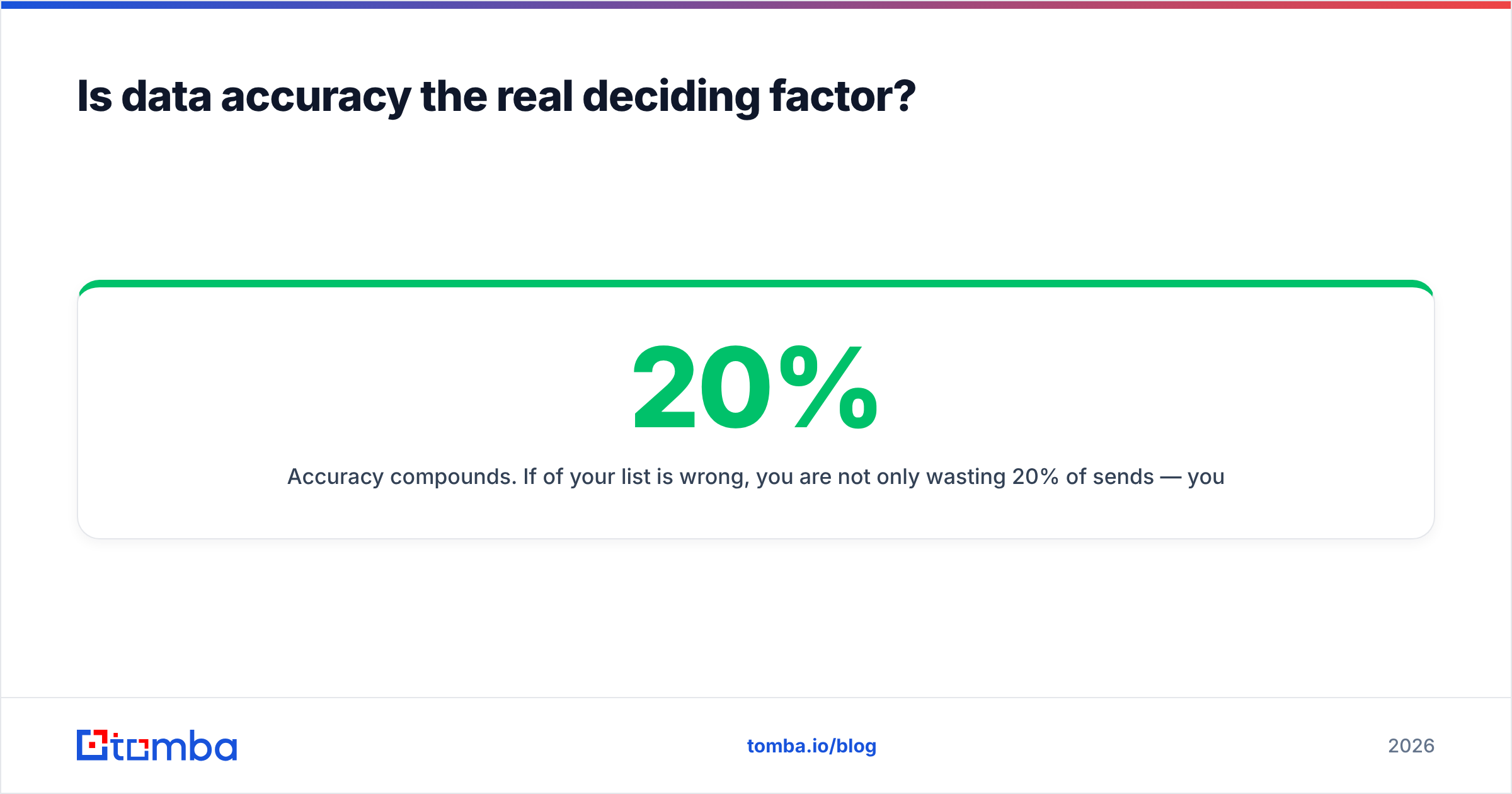
Here is how the three stack up on the data side specifically:
| Capability | Bettermerge | FindThatLead | Tomba |
|---|---|---|---|
| Find email by name + company | No | Yes | Yes |
| Domain-wide email search | No | Partial | Yes |
| Real-time verification | No | Basic | Yes |
| Catch-all detection | No | Limited | Yes (catch-all verifier) |
| Source citations for each email | No | No | Yes |
| Bulk processing | Via Sheets | Yes | Yes (bulk finder) |
| Native Sheets / API workflow | Sheets-native | API | API + Sheets + Excel |
For catch-all domains — the ones that accept everything and bounce later — Tomba's catch-all verifier gives you a confidence signal that generalist tools usually skip, which is exactly where surprise bounce spikes come from.
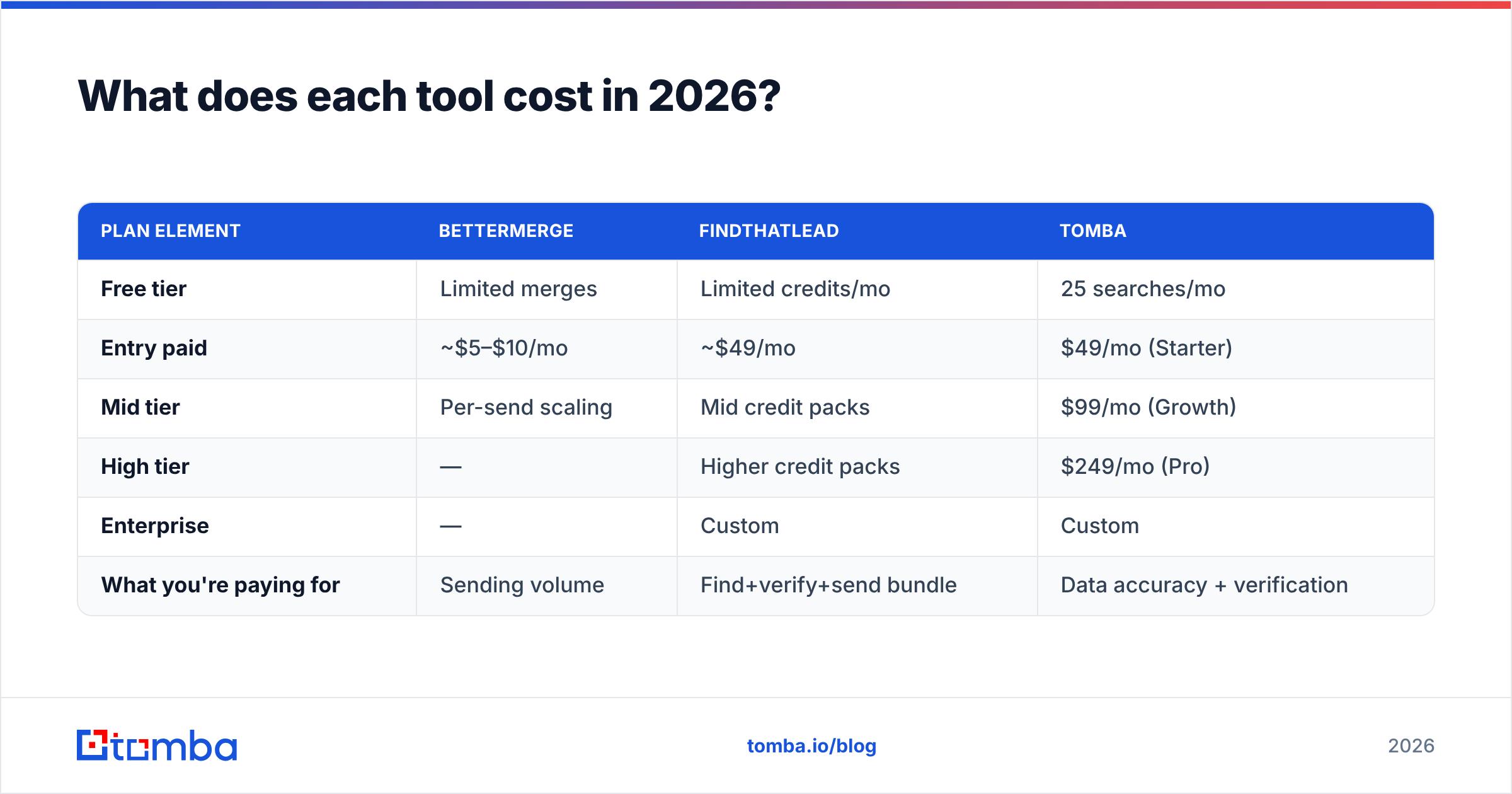
What does each tool cost in 2026?#
Sticker price is the easy part; cost-per-useful-send is what matters. A $5 merge tool that mails a 30%-stale list is more expensive than it looks once you price in reputation damage.
| Plan element | Bettermerge | FindThatLead | Tomba |
|---|---|---|---|
| Free tier | Limited merges | Limited credits/mo | 25 searches/mo |
| Entry paid | ~$5–$10/mo | ~$49/mo | $49/mo (Starter) |
| Mid tier | Per-send scaling | Mid credit packs | $99/mo (Growth) |
| High tier | — | Higher credit packs | $249/mo (Pro) |
| Enterprise | — | Custom | Custom |
| What you're paying for | Sending volume | Find+verify+send bundle | Data accuracy + verification |
Two honest notes. First, Bettermerge is genuinely cheap because it offloads data and infrastructure to you and Google — fair trade if you value simplicity. Second, Tomba and FindThatLead overlap at the $49 entry point, but they are not buying the same thing: one is a focused accuracy engine, the other is a bundle. Full Tomba pricing is public if you want to map credits to your volume.
The recurring lesson from teams that have run both: paying separately for great data and simple sending usually beats paying once for a bundle that is mediocre at both.
Which should you choose?#
Decide by your actual bottleneck, not by feature-count:
- "I have a clean list and just need to send." Bettermerge is the lean, low-cost pick. Pair it with a verified source so you do not poison your own domain.
- "I want everything in one tab and accuracy is secondary." FindThatLead's all-in-one is the path of least resistance.
- "My bounce and reply rates are the problem." Fix the data layer first. Use Tomba to find and verify, then send with whichever tool you already like.
- "I'm scaling outbound across a team." Standardize on a reliable data source via API, then let reps use the sender they prefer — data quality is the thing that must not vary.
For most outbound teams in 2026, the winning configuration is not "Bettermerge or FindThatLead" at all. It is a dedicated finder for the data + a simple sender for delivery. That keeps each layer best-in-class and makes your whole pipeline easier to debug when numbers dip.
You can sanity-check any list against authoritative deliverability guidance from sources like HubSpot's email research or peer reviews on G2, and compare vendor methodology on each tool's own site — FindThatLead documents its finder publicly.
The bottom line#
Bettermerge and FindThatLead solve different halves of cold outreach. Bettermerge is a clean, cheap sender that assumes you bring good data. FindThatLead is a bundle that does a bit of everything and excels at none. The variable both leave exposed — accurate, verified contact data — is the one most likely to make or break your campaign.
That is the gap to close first. Start with the Tomba Email Finder to build deliverable, source-cited lists, verify them in seconds, and export straight into whatever sender you prefer — Bettermerge, FindThatLead, or your own Gmail. Your domain reputation, and your reply rate, will thank you. Spin up the free tier with 25 searches and feed your next campaign data it can actually trust.
// get started
Find, verify and enrich your first contacts today
Start on the free plan with 25 searches a month, then scale when your team is ready.
Free plan · No credit card required · GDPR & CCPA
// about the author