Bettermerge vs Saleshandy: Which Cold Email Tool Wins in 2026?
Bettermerge vs Saleshandy compared on deliverability, sending limits, personalization, and price — plus the data layer that decides whether either one actually books meetings in 2026.
Bettermerge vs Saleshandy: Which Cold Email Tool Wins in 2026?
Choosing between Bettermerge and Saleshandy comes down to one question: do you want a lightweight Gmail mail-merge add-on, or a full cold-email sending platform with sequences, inbox rotation, and deliverability tooling? Both put email in front of prospects, but they sit at different ends of the outbound stack.
TL;DR
- Bettermerge is a Google Workspace mail-merge tool — fast, cheap, and tied to your Gmail/Sheets workflow. Best for low-volume, manual outreach.
- Saleshandy is a dedicated cold-email platform built for multi-step sequences, unlimited email accounts, sender rotation, and deliverability controls. Best for scaled, repeatable outbound.
- Deliverability is where Saleshandy pulls ahead: it has warmup, spam-test tooling, and inbox rotation that a mail-merge add-on simply doesn't.
- Neither tool finds or verifies contacts — feed them a bad list and both burn your domain. Your data source matters more than the sender.
- Pick Bettermerge for simple, occasional sends from one inbox; pick Saleshandy when outbound is a system, not a side task.
What is Bettermerge?#
Bettermerge is a mail-merge utility that lives inside Google Workspace. You build a list in Google Sheets, write a template in Gmail, map {{first_name}}-style fields to columns, and fire personalized emails straight from your own inbox. There's no separate sending infrastructure — every message goes through Gmail, so it inherits your Gmail sending limits (roughly 500 recipients/day on a free account, 2,000 on Workspace).
That tight Gmail coupling is the whole pitch. There's almost nothing to learn, no new inbox to manage, and tracking (opens, clicks) layers on top of your normal email. For a founder sending 40 intro emails a week, that simplicity is a feature, not a limitation.
What you give up is everything that turns sending into a campaign: automated multi-step follow-ups, multiple sending accounts, deliverability tooling, and reply detection at scale. Bettermerge is a better envelope-stuffer, not an outbound engine.
What is Saleshandy?#
Saleshandy is a purpose-built cold-email platform. Instead of riding on one Gmail inbox, you connect many sending accounts, rotate sends across them, and run automated sequences that pause when a prospect replies. It includes email warmup, a unified master inbox, spam-score testing, and analytics designed around reply rates rather than newsletter opens.
The mental model is different. Bettermerge answers "how do I send this one merge?" Saleshandy answers "how do I send 5,000 cold emails a month without torching my domain?" That means sender rotation, custom tracking domains, throttling, and bounce handling are first-class, not afterthoughts. You can read more about why those controls matter in any primer on email deliverability.
The trade-off is overhead. You're managing inboxes, warmup schedules, and domain reputation — work that only pays off when you're sending enough volume to justify it.
Wait — that image is a meme placeholder. Here it is properly embedded:
)

Bettermerge vs Saleshandy: how do they compare?#
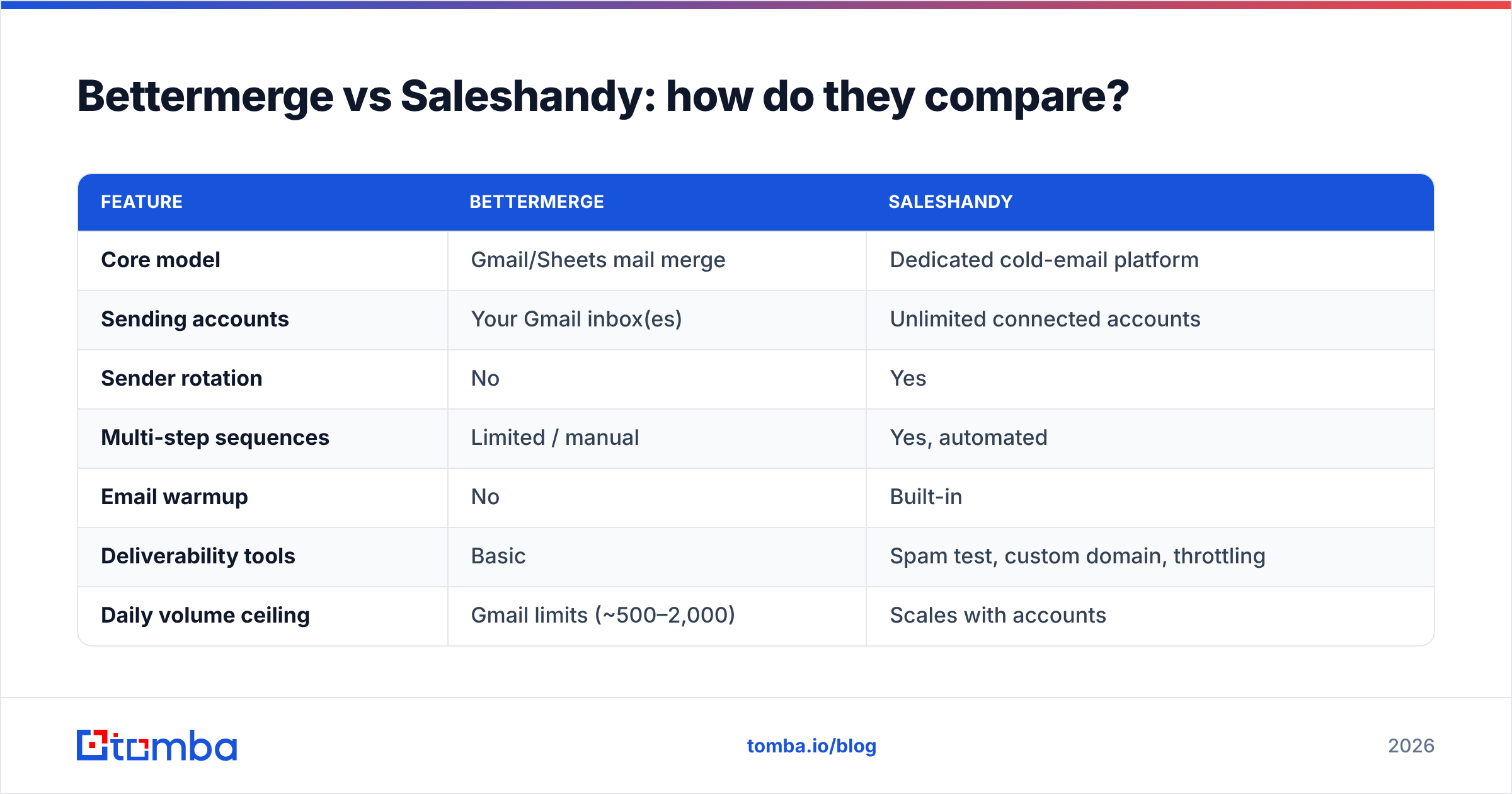
Here's the head-to-head on the attributes that actually change your results.
| Feature | Bettermerge | Saleshandy |
|---|---|---|
| Core model | Gmail/Sheets mail merge | Dedicated cold-email platform |
| Sending accounts | Your Gmail inbox(es) | Unlimited connected accounts |
| Sender rotation | No | Yes |
| Multi-step sequences | Limited / manual | Yes, automated |
| Email warmup | No | Built-in |
| Deliverability tools | Basic | Spam test, custom domain, throttling |
| Daily volume ceiling | Gmail limits (~500–2,000) | Scales with accounts |
| Reply / bounce handling | Manual | Automated, unified inbox |
| Built-in contact data | No | No |
| Best for | Low-volume, manual sends | Scaled, repeatable outbound |
| Starting price | Low / freemium add-on | Mid-tier SaaS |
The pattern is clear: Bettermerge wins on simplicity and cost-of-entry; Saleshandy wins on scale, automation, and deliverability. Neither one solves the data problem — and that's the gap most teams underestimate.
Which one has better deliverability?#
Saleshandy, and it isn't close once you cross a few hundred sends a week. Three reasons:
- Sender rotation. Spreading volume across multiple inboxes keeps any single account under provider thresholds. Bettermerge funnels everything through one Gmail inbox, so volume spikes land on a single reputation.
- Built-in warmup. Saleshandy ramps new inboxes with automated warmup traffic before you send cold. Bettermerge has no warmup concept — a fresh domain sending merges is asking for the spam folder.
- Spam and domain testing. Saleshandy includes placement tests and custom tracking domains, which protect your root domain's sender reputation. Bettermerge leans on Gmail's defaults.
But here's the catch both tools share: deliverability starts with your list, not your sender. The fastest way to wreck a domain is to email addresses that bounce. Every hard bounce signals to mailbox providers that you don't know who you're emailing. That's why running addresses through an email verifier before the first send matters more than any rotation setting. Clean inputs, clean reputation.
What about personalization and templates?#
Both tools handle merge-tag personalization — {{first_name}}, {{company}}, custom fields from your spreadsheet or CRM. The difference is depth.
- Bettermerge gives you straightforward field substitution inside a Gmail draft. Great for "Hi {{first_name}}, I saw {{company}} just…" lines, as long as the data is already in your sheet.
- Saleshandy adds spintax (randomized phrasing to vary each send), conditional fields, and A/B tested variants across a sequence — the kind of variation that keeps bulk sends from looking templated.
If you want to sharpen the copy itself before it hits either tool, a cold email AI writer and a subject line generator will move your reply rate more than another merge field. Personalization only works when the underlying fact is true — and that, again, traces back to data quality. A spintax-rich email to the wrong person is still the wrong email.
How do they price out?#
Bettermerge sits at the freemium / low-cost end, billed per user, because it's a thin layer over infrastructure Google already gives you. Saleshandy is mid-tier SaaS, priced by email accounts, active prospects, and sending volume — you pay more because you're getting warmup, rotation, and sequencing.
A rough way to think about it:
- Under ~500 sends/month, one inbox: Bettermerge's pricing wins, and the feature gap barely matters.
- Thousands of sends, multiple inboxes, follow-up sequences: Saleshandy's per-account model is the cost of doing scaled outbound safely.
Whatever you spend on the sender, budget for the data layer too. You can compare that side separately on the Tomba pricing page, where a free tier covers 25 searches a month and the Starter plan runs $49/mo. For most teams, the contact-data line item is smaller than the sending tool — and it's the one that protects the rest of the spend.
Where does contact data fit in?#
This is the part neither Bettermerge nor Saleshandy covers, and it's the part that decides whether outbound works at all. A sender is a delivery mechanism. It assumes you already have correct, verified email addresses. Most teams don't — they have exported lists, scraped contacts, or guessed patterns, and a meaningful chunk of those bounce.
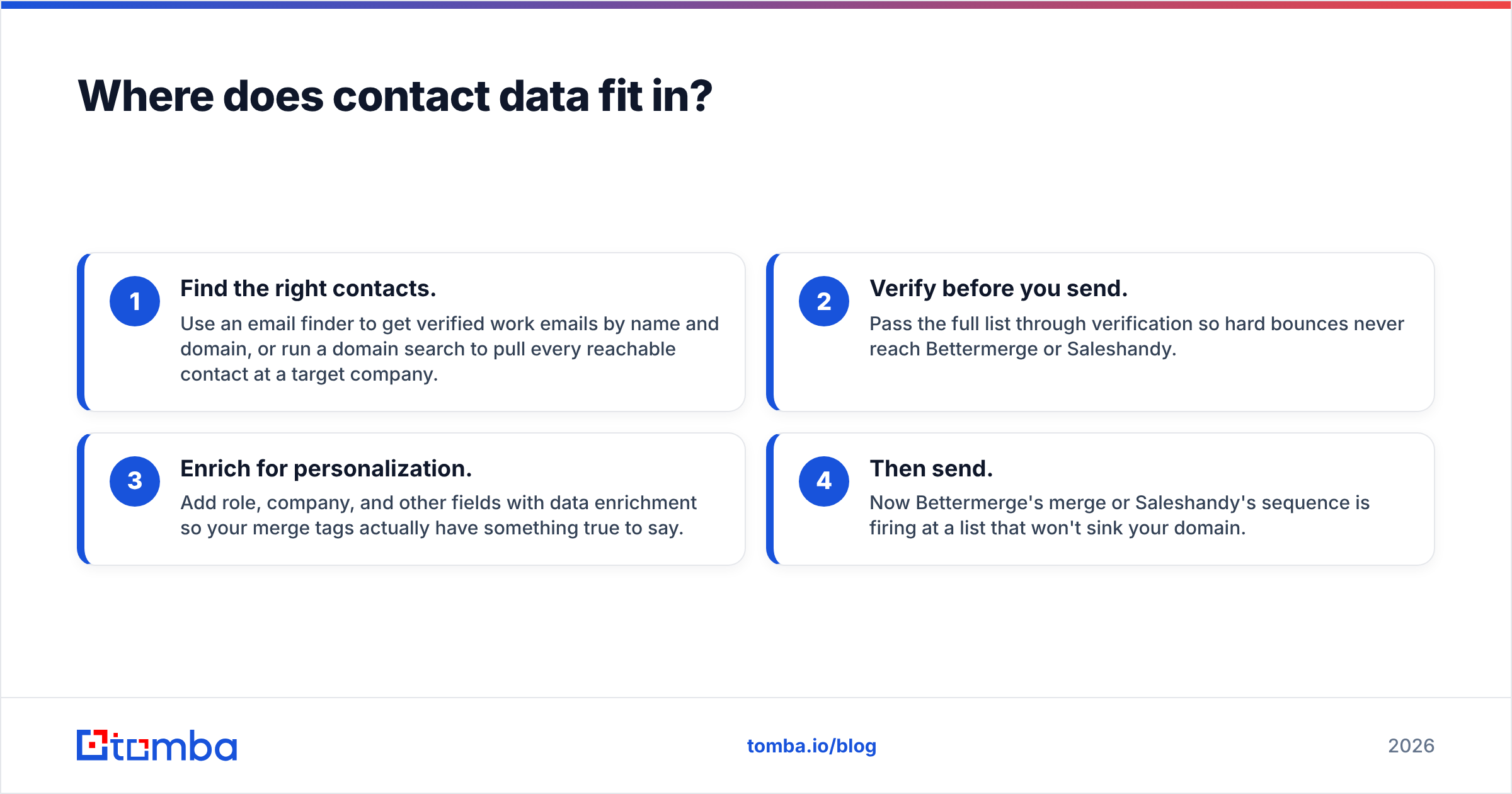
That's the workflow gap to close before you commit to either tool:
- Find the right contacts. Use an email finder to get verified work emails by name and domain, or run a domain search to pull every reachable contact at a target company.
- Verify before you send. Pass the full list through verification so hard bounces never reach Bettermerge or Saleshandy.
- Enrich for personalization. Add role, company, and other fields with data enrichment so your merge tags actually have something true to say.
- Then send. Now Bettermerge's merge or Saleshandy's sequence is firing at a list that won't sink your domain.
Do steps 1–3 well and your choice of sender becomes a preference, not a make-or-break decision. Skip them and even the best deliverability tooling is polishing a doomed campaign.
So which should you pick?#
Conclusion first: Bettermerge if outbound is occasional and you live in Gmail; Saleshandy if outbound is a repeatable system you intend to scale.
- Choose Bettermerge when you send low volume from a single inbox, want zero learning curve, and value cost over automation. Founders, recruiters, and solo operators doing targeted, manual outreach are the sweet spot.
- Choose Saleshandy when you run multi-step campaigns, need multiple sending accounts with rotation, and care about warmup and deliverability at volume. Sales teams and agencies running outbound as a channel belong here.
For a fuller view of the sending-tool landscape, G2's sales engagement category and HubSpot's guide to cold email are useful neutral references. Saleshandy's own feature docs spell out the platform side in detail.
But remember what neither comparison page will tell you: the tool is the smaller half of the decision. Outbound that books meetings starts with a verified, enriched list — then the sender just delivers it.
Start with the data, not the sender#
Before you pay for Bettermerge or Saleshandy, fix the input. Tomba's Email Finder gives you verified, deliverable work emails by name, domain, or company — the clean foundation that keeps your sending reputation intact no matter which platform pushes the send button. Pair it with built-in verification and enrichment, start free with 25 searches a month, and feed your cold-email tool a list it can actually deliver. Find the right people first; the sender is the easy part.
// get started
Find, verify and enrich your first contacts today
Start on the free plan with 25 searches a month, then scale when your team is ready.
Free plan · No credit card required · GDPR & CCPA
// about the author