Bettermerge vs UpLead 2026: Which B2B Data Tool Wins?
Bettermerge runs waterfall enrichment across many providers; UpLead sells access to one big contact database. Here is how they actually compare in 2026.
Bettermerge vs UpLead: Which B2B Data Tool Should You Trust in 2026?
TL;DR
- Bettermerge is a waterfall enrichment tool: you feed it partial records and it queries multiple data vendors in sequence until a field is filled. You pay per successful match.
- UpLead is a single-database contact platform: you search one large prospect database, apply filters, and export verified contacts. You pay per credit on a subscription.
- Pick Bettermerge if you already have a list and want to fill gaps cheaply across many sources. Pick UpLead if you need to build lists from scratch with firmographic filters.
- Neither one is a complete prospecting stack. Most teams pair an enrichment layer with a dedicated email finder and email verifier to keep bounce rates low.
- On raw cost-per-valid-record at scale, a developer-friendly API like Tomba's often undercuts both — more on that below.
If you have been comparing Bettermerge vs UpLead, you have probably noticed they barely belong in the same review. One is plumbing; the other is a warehouse. This guide breaks down what each actually does, where each wins, and how to avoid paying twice for the same contact.
What is Bettermerge?#
Bettermerge is a waterfall enrichment service. Think of it like calling three plumbers in a row: you ring the first, and if they cannot fix the leak you ring the second, then the third — and you only pay the one who actually shows up. Bettermerge does the same with data vendors. You send a record that is missing an email or phone number, and it queries provider A, then B, then C until one returns a hit.
The model has two real advantages:
- Higher fill rates. No single vendor covers every contact. Chaining sources catches records that any one database would miss.
- Pay-for-results pricing. You are typically billed only on successful matches, so dead queries do not burn budget.
The trade-off is that Bettermerge is an enrichment tool, not a discovery tool. It assumes you already have a list of names and companies. If you do not have anyone to enrich yet, it has nothing to work with.
What is UpLead?#
UpLead is a B2B contact database. You log in, filter by industry, company size, location, job title, technology used, and similar firmographics, and UpLead returns matching contacts you can export. It markets a 95% data-accuracy guarantee and verifies emails in real time at the point of export, so you are not paying credits for addresses that bounce. You can read user reviews on G2 and feature breakdowns on Capterra to see how that holds up across thousands of accounts.
UpLead is a list-building tool. Its strength is starting from zero: you describe your ideal customer profile and it hands you a list. That is the opposite starting point from Bettermerge.

Bettermerge vs UpLead: the core difference#
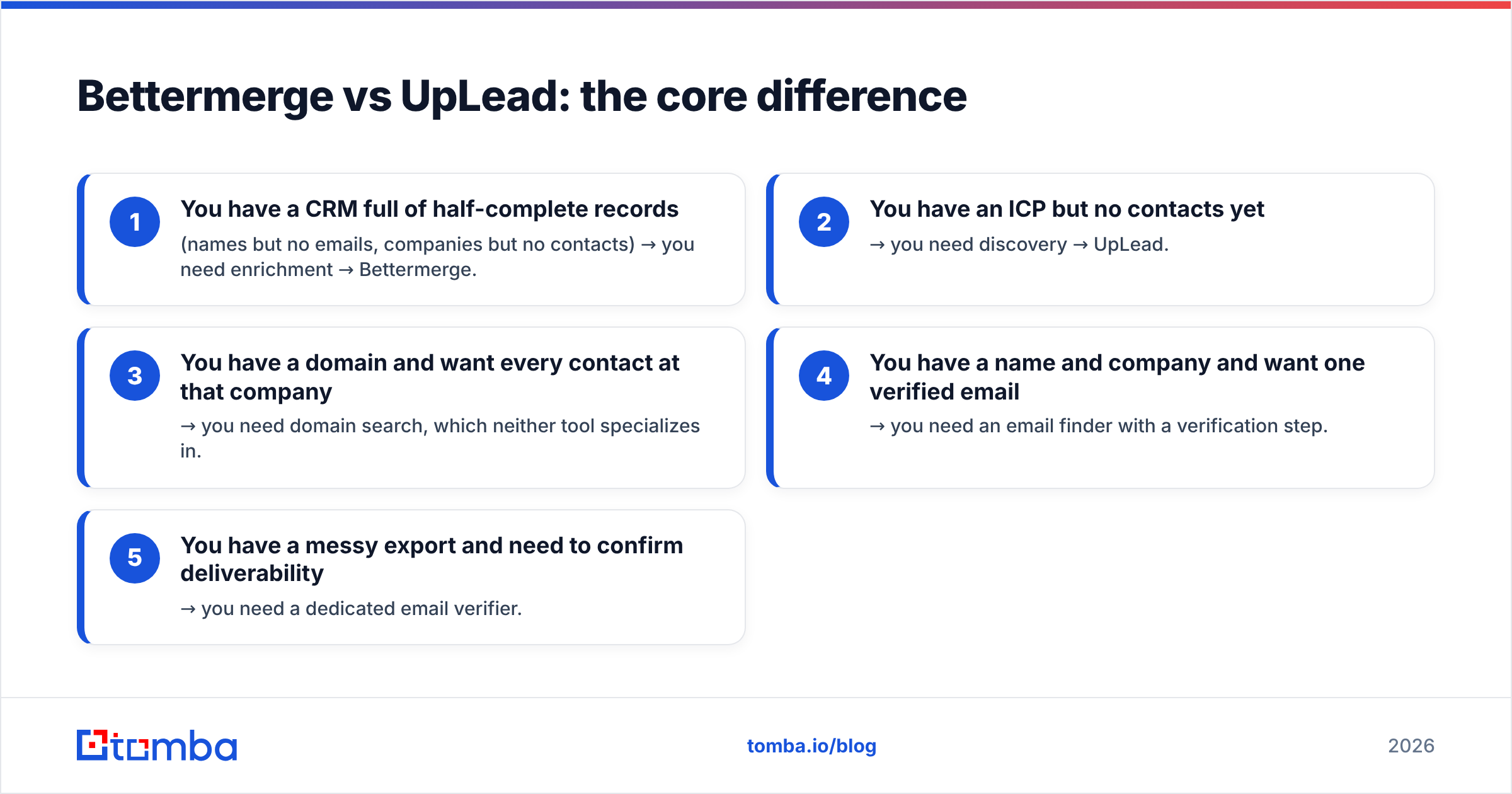
Here is the distinction in one line: Bettermerge fills gaps in lists you already have; UpLead creates lists you do not. Confusing the two is the single most common mistake in this comparison.
A quick way to decide which problem you have:
- You have a CRM full of half-complete records (names but no emails, companies but no contacts) → you need enrichment → Bettermerge.
- You have an ICP but no contacts yet → you need discovery → UpLead.
- You have a domain and want every contact at that company → you need domain search, which neither tool specializes in.
- You have a name and company and want one verified email → you need an email finder with a verification step.
- You have a messy export and need to confirm deliverability → you need a dedicated email verifier.
Most growth teams hit two or three of those needs at once, which is why a single tool rarely covers the whole workflow.
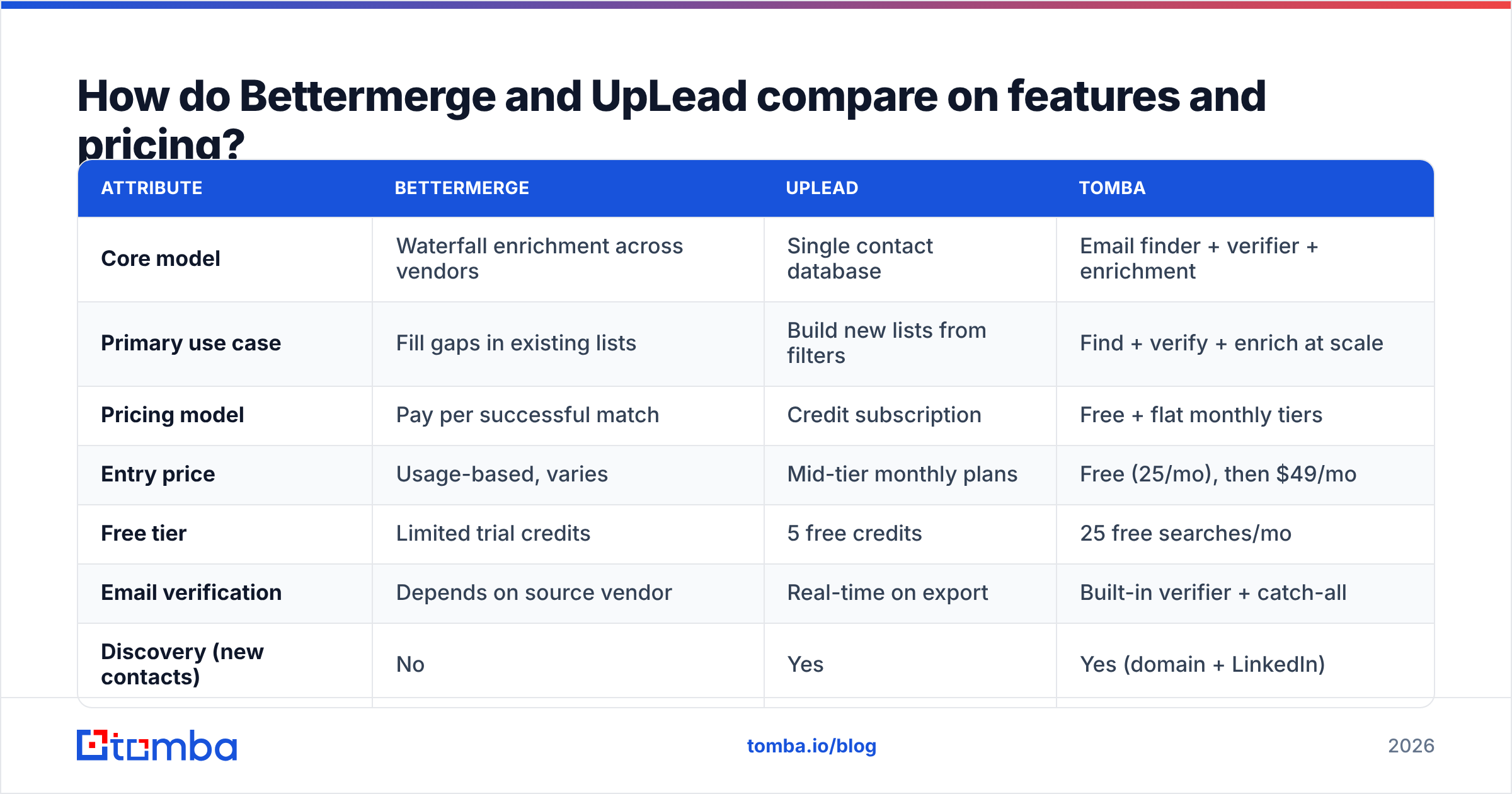
How do Bettermerge and UpLead compare on features and pricing?#
| Attribute | Bettermerge | UpLead | Tomba |
|---|---|---|---|
| Core model | Waterfall enrichment across vendors | Single contact database | Email finder + verifier + enrichment |
| Primary use case | Fill gaps in existing lists | Build new lists from filters | Find + verify + enrich at scale |
| Pricing model | Pay per successful match | Credit subscription | Free + flat monthly tiers |
| Entry price | Usage-based, varies | Mid-tier monthly plans | Free (25/mo), then $49/mo |
| Free tier | Limited trial credits | 5 free credits | 25 free searches/mo |
| Email verification | Depends on source vendor | Real-time on export | Built-in verifier + catch-all |
| Discovery (new contacts) | No | Yes | Yes (domain + LinkedIn) |
| Phone numbers | Via vendors | Yes | Yes (phone finder) |
| API access | Yes | Yes | Yes (REST, CLI, MCP) |
| Best for | Ops teams cleaning data | SDRs building lists | Dev + sales teams end-to-end |
A few notes on reading this table. Bettermerge's "varies" pricing is a feature, not a dodge — usage-based billing genuinely suits spiky, list-cleaning workloads. UpLead's credit model is more predictable but penalizes you when a search returns nothing useful. And both leave you assembling a stack: enrichment plus discovery plus verification rarely live under one roof at either vendor.
For transparent flat pricing you can model in a spreadsheet before you commit, compare against Tomba pricing: a free tier with 25 searches a month, then $49/mo Starter, $99/mo Growth, $249/mo Pro, and custom Enterprise.
Which one is more accurate?#
Accuracy depends on how each tool sources data, and the two approaches fail in different ways.
Bettermerge's waterfall design tends to win on coverage — because it chains multiple vendors, it finds records a single database misses. But coverage is not the same as accuracy. If three vendors all return a stale email for the same contact, the waterfall returns it confidently. Waterfall fills the field; it does not always confirm the field is correct.
UpLead leans on a real-time verification step at export and publishes a 95% accuracy target. That catches obvious bounces, but you are still limited to one database's view of the world. If a contact changed jobs last month and UpLead's source has not caught up, the verified-but-wrong record still ships.
The honest takeaway: neither model removes the need for a verification pass before you send. Coverage tools over-include; database tools lag reality. This is why teams that care about deliverability run every list through a standalone email verifier and a catch-all verifier regardless of where the data came from. Verification is a step, not a vendor feature you can assume is airtight.

When should you choose Bettermerge?#
Choose Bettermerge when:
- You already own a large list of contacts with missing fields and want maximum fill rate.
- Your spend is spiky — big one-off cleanups rather than steady daily prospecting — so pay-per-match beats a fixed subscription.
- You are an ops or RevOps team and the workflow is "ingest CRM export, enrich, push back," not "find net-new prospects."
- You want vendor redundancy and do not want to bet your data quality on a single source.
Bettermerge is a poor fit if you have no list to start with, or if you need predictable monthly costs for budgeting.
When should you choose UpLead?#
Choose UpLead when:
- You are starting from an ideal customer profile, not an existing list, and need discovery.
- Your SDRs live in firmographic filters — industry, headcount, tech stack, geography — and want to self-serve targeted lists.
- You value a published accuracy guarantee and real-time verification baked into the export flow.
- You prefer a predictable credit subscription over usage-based billing.
UpLead is a weak fit if your main job is cleaning data you already have, since you would be paying credits to re-discover contacts that already sit in your CRM.
Where does Tomba fit between them?#
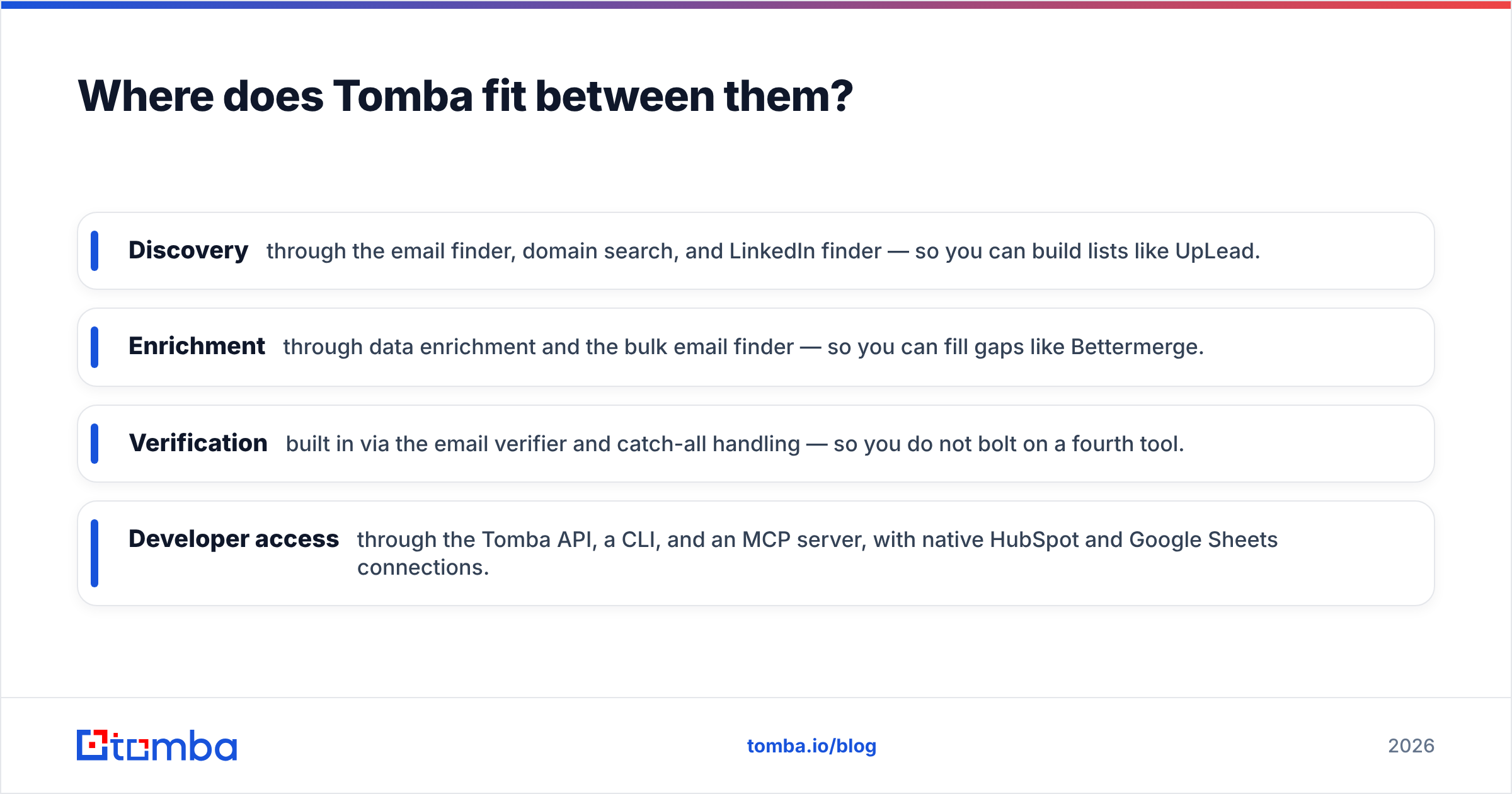
Tomba sits across both jobs, which is why teams comparing Bettermerge vs UpLead often end up evaluating it as a third option. Instead of forcing you to pick "enrichment" or "database," Tomba covers the full find → verify → enrich loop:
- Discovery through the email finder, domain search, and LinkedIn finder — so you can build lists like UpLead.
- Enrichment through data enrichment and the bulk email finder — so you can fill gaps like Bettermerge.
- Verification built in via the email verifier and catch-all handling — so you do not bolt on a fourth tool.
- Developer access through the Tomba API, a CLI, and an MCP server, with native HubSpot and Google Sheets connections.
The pricing model is the part teams notice most. Both Bettermerge's per-match billing and UpLead's credit packs can spike unpredictably as you scale. Tomba's flat tiers — free up to 25 searches a month, then $49/mo — make cost-per-valid-record easy to forecast. You can see exactly where the data comes from on the data sources page, which matters when you are auditing accuracy rather than taking a percentage on faith.
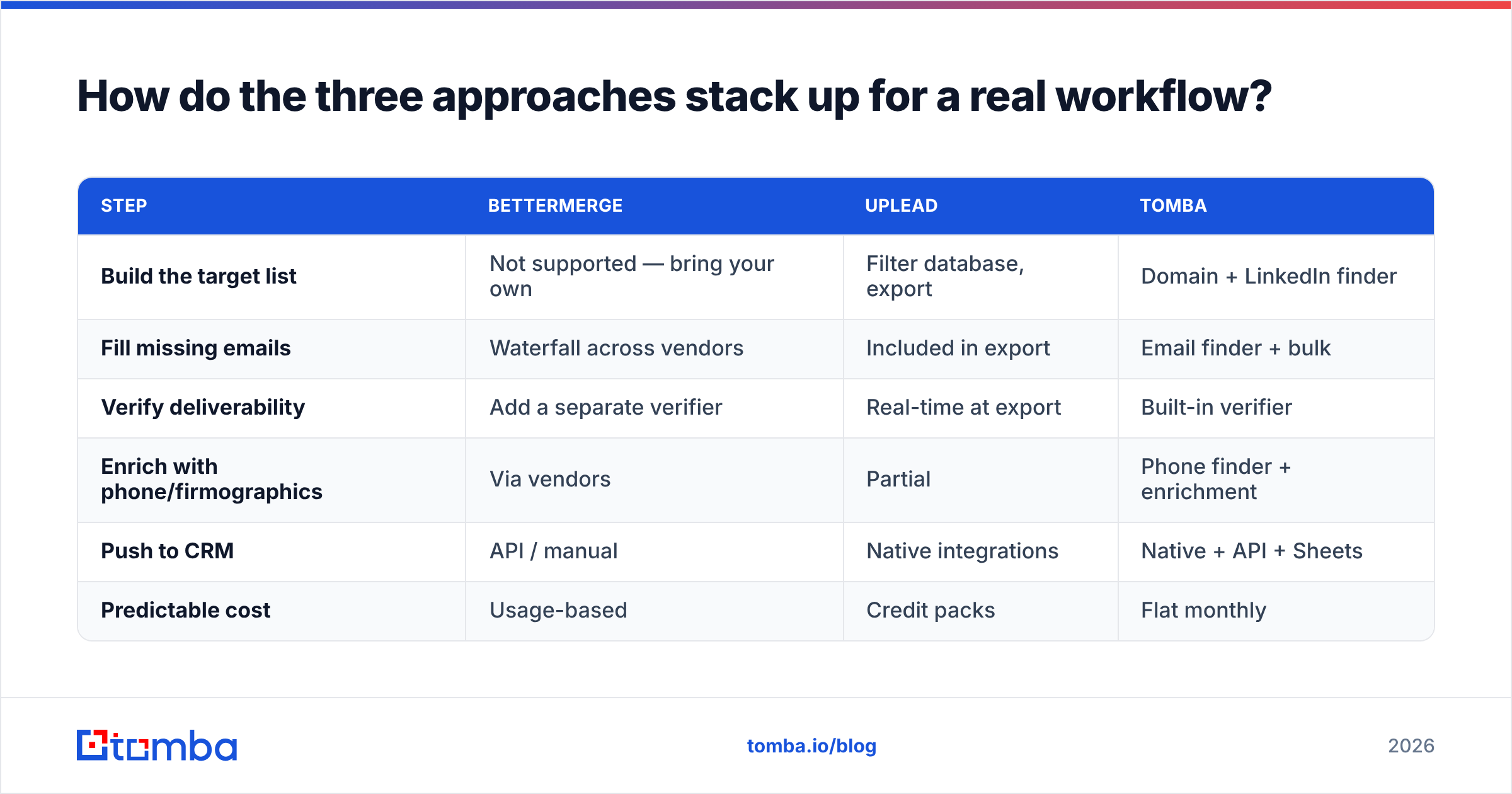
How do the three approaches stack up for a real workflow?#
Say you want 1,000 verified decision-maker emails at SaaS companies in the US.
| Step | Bettermerge | UpLead | Tomba |
|---|---|---|---|
| Build the target list | Not supported — bring your own | Filter database, export | Domain + LinkedIn finder |
| Fill missing emails | Waterfall across vendors | Included in export | Email finder + bulk |
| Verify deliverability | Add a separate verifier | Real-time at export | Built-in verifier |
| Enrich with phone/firmographics | Via vendors | Partial | Phone finder + enrichment |
| Push to CRM | API / manual | Native integrations | Native + API + Sheets |
| Predictable cost | Usage-based | Credit packs | Flat monthly |
The pattern is clear: Bettermerge handles step two well and skips step one entirely. UpLead handles steps one and two but leaves you topping up credits. A unified tool collapses the workflow into one bill and one API, which is the practical reason to look past a straight two-way fight.
Common mistakes when comparing these tools#
- Treating them as direct substitutes. They solve different halves of the funnel. Buying Bettermerge to build lists, or UpLead to clean a CRM, wastes money on both.
- Skipping verification. Both can hand you a confidently wrong email. Always run a final email verification pass before a campaign.
- Ignoring catch-all domains. A huge share of B2B domains accept everything at the server, so a "valid" result means little without a catch-all verifier.
- Underpricing at scale. Per-match and per-credit models look cheap at 100 records and expensive at 100,000. Model your real volume before committing.
- Forgetting the API. If you plan to automate, check whether the email finder API supports the throughput and endpoints you need — retrofitting later is painful.
Frequently asked questions#
Is Bettermerge better than UpLead? Neither is universally better. Bettermerge wins for enriching lists you already have; UpLead wins for building new lists from filters. The "better" tool is the one that matches the job in front of you.
Can I use both Bettermerge and UpLead together? Yes — some teams discover with UpLead and enrich gaps with Bettermerge. But running two vendors plus a separate verifier means three bills and three integrations. A unified platform is usually cheaper and simpler.
Do either of them replace an email verifier? Not reliably. UpLead verifies at export and Bettermerge inherits whatever its source vendors return, but both can ship stale or catch-all addresses. Run an independent verification pass to protect sender reputation.
Which has a free option? UpLead offers a small number of free credits; Bettermerge offers limited trial usage. Tomba offers 25 free searches every month on an ongoing basis.
The bottom line#
Bettermerge vs UpLead is really a question about which half of the funnel you are solving. Bettermerge is the better enrichment engine for lists you already own. UpLead is the better discovery engine for lists you need to build. Both leave you assembling the rest of the stack — and paying for verification separately.
If you would rather find, verify, and enrich contacts in one place with flat, forecastable pricing, start with the Tomba Email Finder. You get 25 free searches a month to test accuracy on your own domains, a built-in verifier so you are not bolting on a fourth tool, and a clean API when you are ready to automate the whole pipeline. Build your list, confirm it is deliverable, and push it to your CRM — without juggling three vendors to do it.
// get started
Find, verify and enrich your first contacts today
Start on the free plan with 25 searches a month, then scale when your team is ready.
Free plan · No credit card required · GDPR & CCPA
// about the author