BigDBM vs ContactOut: Which B2B Data Tool Wins in 2026?
BigDBM sells bulk identity data; ContactOut mines LinkedIn for emails and phones. Here's which one fits your pipeline in 2026 — and where a finder like Tomba beats both.
TL;DR
- BigDBM is a wholesale identity-data provider: huge B2B and B2C datasets, intent signals, and licensing built for high-volume marketers, lenders, and platforms. It is not a self-serve "look up one email" tool.
- ContactOut is a LinkedIn-first contact finder: a Chrome extension plus search portal that pulls personal and work emails and phone numbers off profiles, aimed at recruiters and SDRs.
- They overlap less than the name pairing suggests — one sells data by the file, the other finds contacts one profile at a time.
- On price transparency and self-serve speed, both have friction: BigDBM requires sales conversations and minimums; ContactOut gates volume behind steep annual tiers.
- If you mainly need accurate work emails by domain or name without minimums, a focused email finder like Tomba starts free and scales at $49/mo.
If you searched "BigDBM vs ContactOut," you are usually deciding one thing: where should your contact data come from this year? This guide compares both on coverage, accuracy, pricing, compliance, and the jobs each one actually does well — then shows where a dedicated finder fits.
What is BigDBM?#
BigDBM is a US-focused big-data provider. Think of it less like a search box and more like a wholesale warehouse: you tell them the audience, and they license you a dataset. Their catalog spans consumer (B2C) identity graphs, B2B firmographics, property and mortgage data, and intent signals, with hundreds of millions of records and a heavy emphasis on data append and identity resolution.
The typical BigDBM buyer is a performance marketer, a martech platform, a lender, or an enterprise that wants to enrich or match records at scale — not an SDR hunting for one prospect's email. Delivery is usually via API, file transfer, or data licensing agreements rather than a point-and-click app.
That positioning matters. BigDBM competes with data brokers and identity vendors, and its strength is breadth and append depth across both consumer and business records. The trade-off is that it is not designed for a rep who wants to verify a single address before hitting send.

What is ContactOut?#
ContactOut is a contact-finding tool built around LinkedIn. Its core is a Chrome extension that overlays profiles and surfaces work emails, personal emails, and phone numbers, backed by a web "Search Portal" and an AI prospecting layer. It markets itself heavily to recruiters and sales teams who already live inside LinkedIn and Recruiter.
Where BigDBM sells you a haystack, ContactOut hands you needles one at a time: you find a person, the extension reveals their contact details, and you export to your ATS or CRM. ContactOut claims coverage of a large share of professionals and emphasizes "triple-verified" emails and personal-email coverage, which recruiters value because candidates ignore work inboxes.
The limitation is the same as its strength. ContactOut is profile-centric. If you want every reachable contact at a domain, or a clean bulk pull keyed off company rather than person, you are working against the grain of the product.
BigDBM vs ContactOut: how do they compare?#
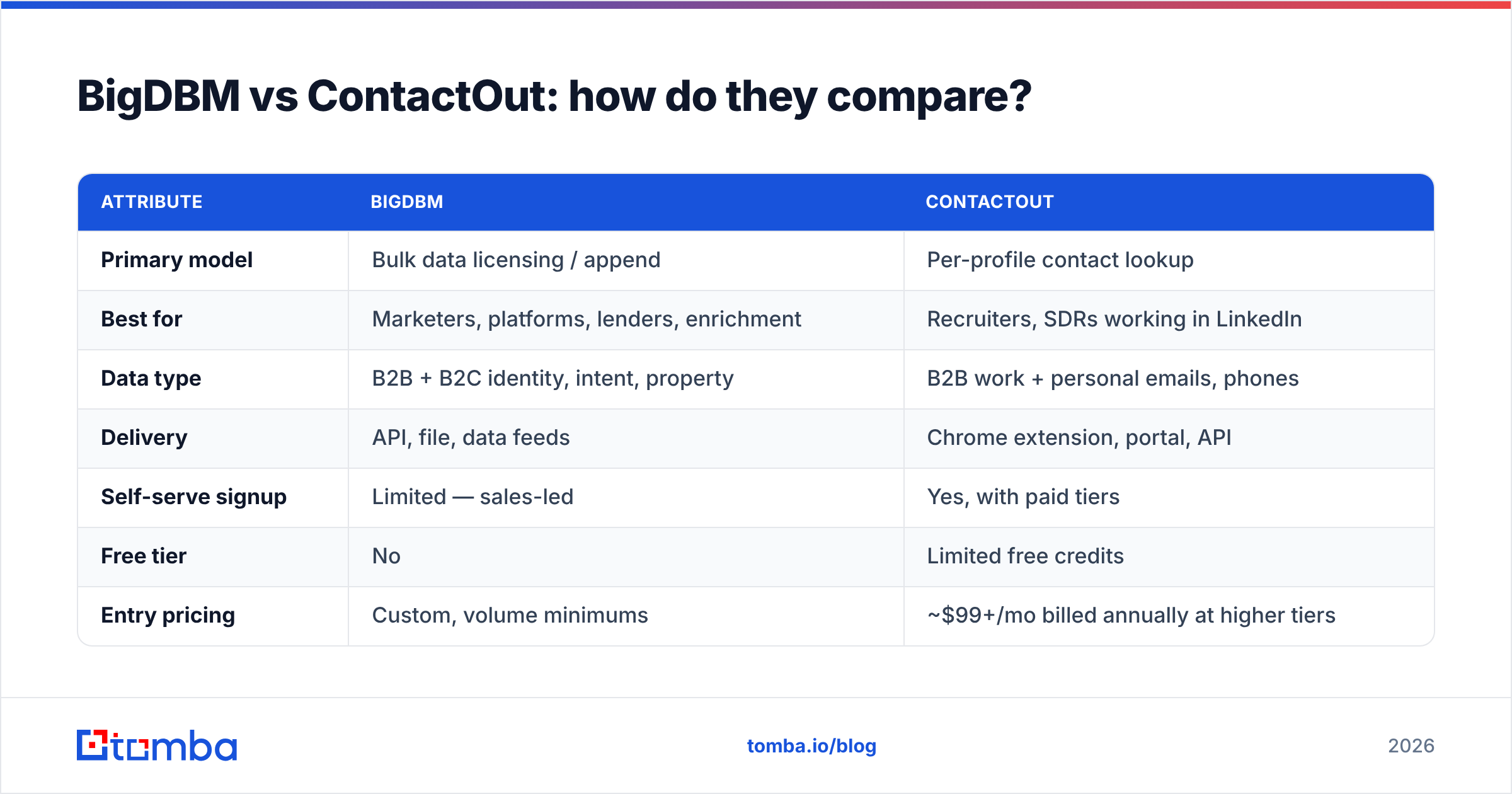
Here is the head-to-head on the attributes that actually change your decision. Treat the pricing rows as directional — both vendors negotiate and rarely publish flat self-serve rates.
| Attribute | BigDBM | ContactOut |
|---|---|---|
| Primary model | Bulk data licensing / append | Per-profile contact lookup |
| Best for | Marketers, platforms, lenders, enrichment | Recruiters, SDRs working in LinkedIn |
| Data type | B2B + B2C identity, intent, property | B2B work + personal emails, phones |
| Delivery | API, file, data feeds | Chrome extension, portal, API |
| Self-serve signup | Limited — sales-led | Yes, with paid tiers |
| Free tier | No | Limited free credits |
| Entry pricing | Custom, volume minimums | ~$99+/mo billed annually at higher tiers |
| Verification | Append/match focused | "Triple-verified" emails |
| Compliance posture | CCPA/identity-graph framing | GDPR/CCPA, opt-out handling |
| Weak spot | Not single-lookup friendly | Profile-bound, weak domain pulls |
The pattern is clear: these tools are answering different questions. BigDBM answers "give me a million matched records," ContactOut answers "give me this one person's cell." Few teams genuinely need both, and many teams need neither — they need accurate work emails by company and name.

Which one is more accurate?#
Accuracy depends on the job, so judge it by failure mode, not by a single headline percentage.
- BigDBM wins on coverage and match rate for append jobs. If you hand it a list of names and domains, it resolves identities and fills gaps better than a profile scraper because its whole business is identity resolution across many sources.
- ContactOut wins on personal contactability. Its personal-email and mobile coverage is genuinely useful for recruiting, where a work email gets you nowhere with a passive candidate.
- Both degrade on the thing cold-email teams care about most: a deliverable, currently-valid work email. Scraped and appended data ages fast, and neither tool's headline number tells you the bounce rate on your specific segment.
That last point is why a verification step is non-negotiable regardless of source. Run any list through an email verifier before you send, and check whether a domain is a catch-all with a catch-all verifier so you are not fooled by servers that accept everything. Strong email deliverability starts with clean inputs, not with the warmup tool you bolt on afterward.
Wait — that is the meme slot. Here it is:
)

How does pricing compare?#
Neither vendor makes pricing easy, which is itself a buying signal.
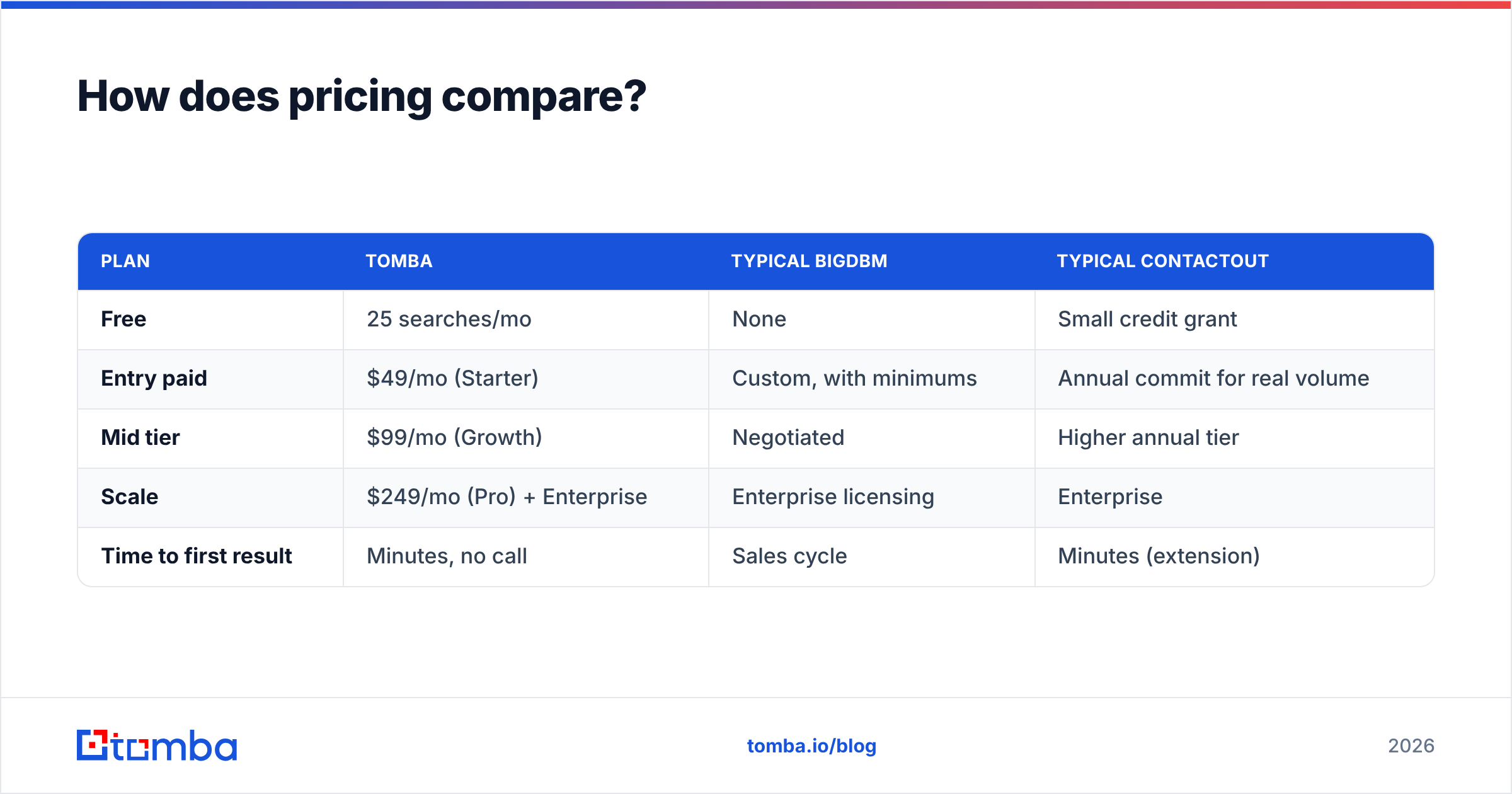
BigDBM is sales-led with volume minimums. That is normal for data licensing, but it means a small team cannot swipe a card and start tonight, and you will commit before you can test the data against your own segment. ContactOut publishes tiers, but meaningful credit volume sits in higher annual plans, and the cheapest useful tier still assumes you are a steady, heavy user.
Compare that to a transparent self-serve finder:
| Plan | Tomba | Typical BigDBM | Typical ContactOut |
|---|---|---|---|
| Free | 25 searches/mo | None | Small credit grant |
| Entry paid | $49/mo (Starter) | Custom, with minimums | Annual commit for real volume |
| Mid tier | $99/mo (Growth) | Negotiated | Higher annual tier |
| Scale | $249/mo (Pro) + Enterprise | Enterprise licensing | Enterprise |
| Time to first result | Minutes, no call | Sales cycle | Minutes (extension) |
You can see full Tomba pricing without a discovery call. The point is not that cheaper is always better — it is that a team validating a new motion should not sign an annual contract or a data-licensing minimum to find out whether the data even matches its ICP.
Which should you choose for your use case?#
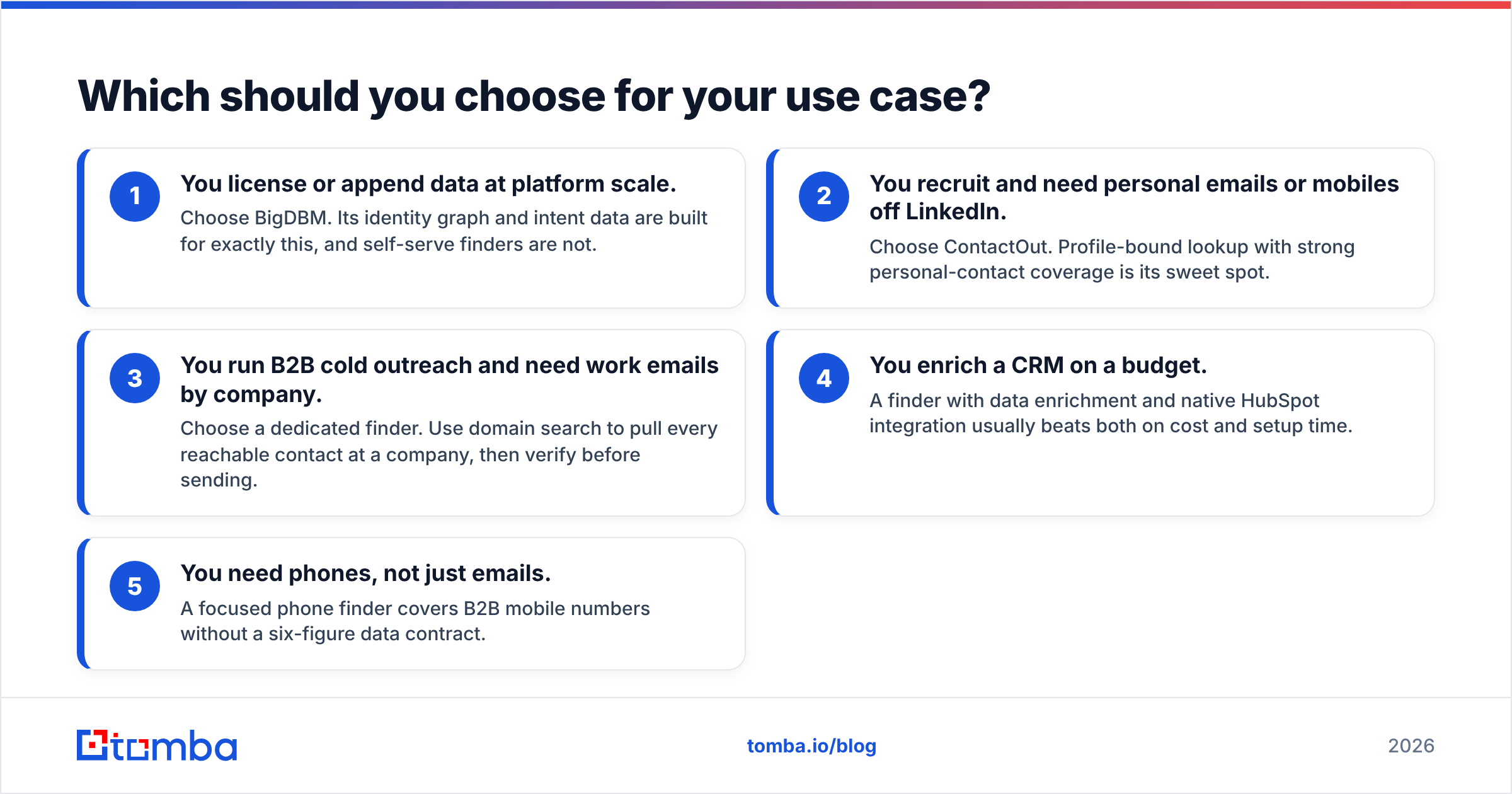
Match the tool to the job, in plain terms:
- You license or append data at platform scale. Choose BigDBM. Its identity graph and intent data are built for exactly this, and self-serve finders are not.
- You recruit and need personal emails or mobiles off LinkedIn. Choose ContactOut. Profile-bound lookup with strong personal-contact coverage is its sweet spot.
- You run B2B cold outreach and need work emails by company. Choose a dedicated finder. Use domain search to pull every reachable contact at a company, then verify before sending.
- You enrich a CRM on a budget. A finder with data enrichment and native HubSpot integration usually beats both on cost and setup time.
- You need phones, not just emails. A focused phone finder covers B2B mobile numbers without a six-figure data contract.
Most SDR and growth teams fall into buckets 3 through 5 — which is exactly where neither BigDBM's licensing model nor ContactOut's profile-by-profile flow is the cleanest fit.

What about compliance and data sourcing?#
Both vendors operate under US and EU privacy regimes, and both publish opt-out and data-handling language. BigDBM, dealing in consumer identity data, leans on CCPA-style framing and identity-resolution governance. ContactOut, scraping and matching professional profiles, leans on GDPR/CCPA handling and honoring deletion requests.
Two practical takeaways:
- Ask where the data comes from. For any B2B source, you want a clear answer on collection method and refresh cadence. Tomba documents its data sources for this reason — sourcing transparency is a legitimate selection criterion, not a footnote.
- Verify consent-sensitive fields. Personal emails and mobile numbers carry more risk than work emails. If your outreach is regulated, that changes which tool is even usable.
For a deeper primer on the underlying mechanics, the domain search glossary entry explains how company-level email discovery works without scraping individuals.
Is there a better alternative to both?#
For most B2B outbound and enrichment teams, yes — a purpose-built finder is the better default, and you can layer specialist data only when you actually hit its limits.
Tomba sits in that middle lane: more accurate and current than appended bulk files for work emails, more flexible than a profile-bound extension, and transparent on price. You get an email finder, verification, domain search, bulk lead generation, phone lookup, and a documented email finder API under one account, starting free.
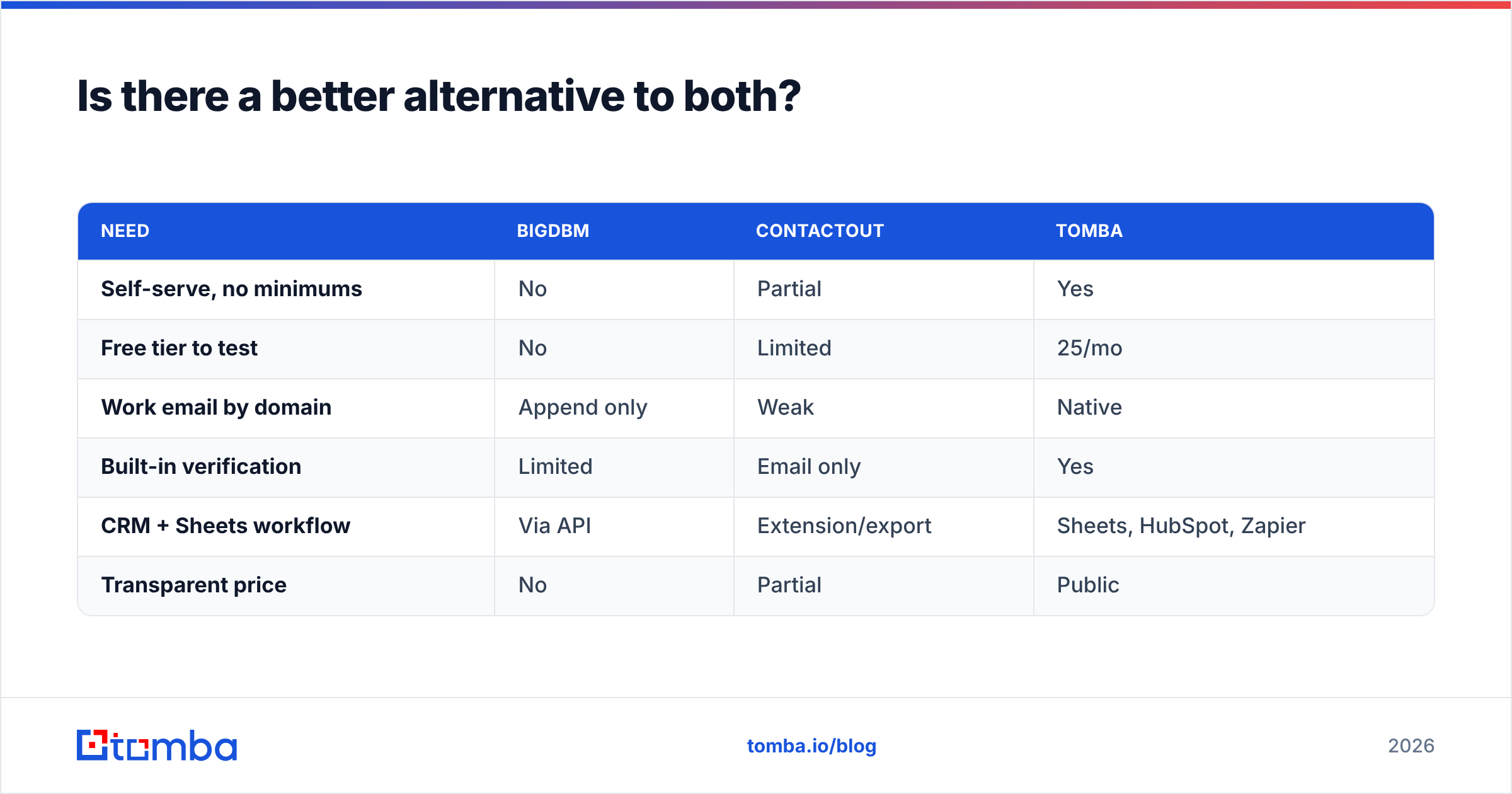
How it stacks up against the two tools here:
| Need | BigDBM | ContactOut | Tomba |
|---|---|---|---|
| Self-serve, no minimums | No | Partial | Yes |
| Free tier to test | No | Limited | 25/mo |
| Work email by domain | Append only | Weak | Native |
| Built-in verification | Limited | Email only | Yes |
| CRM + Sheets workflow | Via API | Extension/export | Sheets, HubSpot, Zapier |
| Transparent price | No | Partial | Public |
None of this means BigDBM or ContactOut are bad tools — they are strong at the narrow jobs they were built for. It means the default choice for everyday B2B contact data should be the one you can test today, verify in place, and scale without a sales cycle.
For independent reviews of all three categories, cross-check ratings on G2 and Capterra, and read each vendor's own docs — ContactOut publishes coverage claims worth pressure-testing against your segment.
The bottom line#
Pick BigDBM when you license data at scale, ContactOut when you live in LinkedIn and need personal contactability, and a focused finder when you need accurate, verifiable work emails without a contract. Start with the Tomba Email Finder free tier, run a sample of your real ICP through it, and let the bounce rate — not the marketing page — make the call. If the data holds up, scaling to Starter at $49/mo is a card swipe, not a quarter-long procurement.
// get started
Find, verify and enrich your first contacts today
Start on the free plan with 25 searches a month, then scale when your team is ready.
Free plan · No credit card required · GDPR & CCPA
// about the author