BigDBM vs Finderio (2026): Which B2B Data Tool Truly Wins?
BigDBM and Finderio take opposite paths to B2B contact data. Here's an honest 2026 breakdown of accuracy, pricing, and the best fit for cold outreach.
The BigDBM vs Finderio choice comes down to one question. Do you need a raw data firehose? Or a lead-finding workflow that hands reps verified contacts? The two tools sit on opposite ends of the B2B data spectrum. Pick the wrong one and you waste budget on records you can't actually email.
This guide breaks down both tools. We cover accuracy, coverage, pricing, and real use cases. Then we show where a verified email finder like Tomba fits when deliverability is the metric that pays your salary.
TL;DR#
- BigDBM is a bulk B2B/consumer data licensing provider — huge record volume, identity-graph enrichment, best for large-scale data ops and audience building, not point-and-click prospecting.
- Finderio (by 500apps) is an email-finder and lead-intelligence app aimed at SDRs who want emails by domain, name, or list inside a simple UI.
- Accuracy is the real differentiator. Volume means nothing if 30% of records bounce — always pair any data source with email verification.
- Pricing models differ sharply: BigDBM leans toward licensing/volume deals; Finderio bundles into 500apps' subscription suite.
- If you want verified emails with transparent per-search pricing, Tomba ($49/mo Starter, free tier of 25 searches) is the neutral middle ground worth testing.
What are BigDBM and Finderio?#
BigDBM is a US-focused data provider that licenses B2B and consumer datasets — contact records, identity graphs, intent signals, and enrichment APIs. Think of it less as a tool you log into. It is more a data supplier you pipe into a CRM, CDP, or ad platform. Its strength is scale and identity resolution across hundreds of millions of records.
Finderio is part of the 500apps bundle — an email finder and lead-intelligence app. You search by company domain, person name, or upload a list. It returns business emails plus basic firmographics. It is built for sales reps and small teams. They get a fast, in-browser way to find email addresses without managing data pipelines.
The mental model: BigDBM is the wholesale warehouse; Finderio is the retail shelf. One supplies bulk data you process yourself. The other gives you finished leads on demand.

BigDBM vs Finderio: how do they compare at a glance?#
Here is the core BigDBM vs Finderio comparison across the attributes that affect a real buying decision.
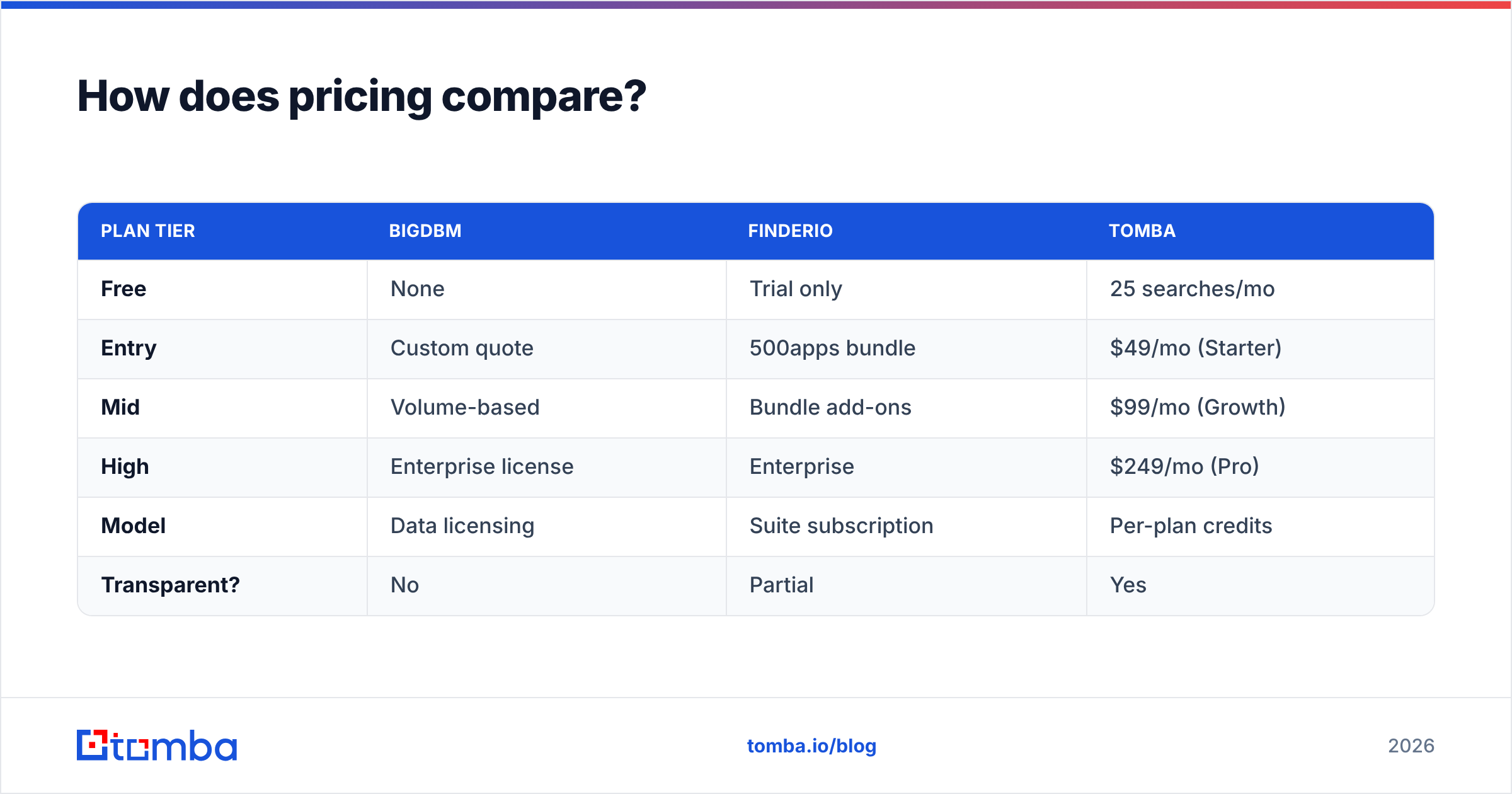
| Attribute | BigDBM | Finderio (500apps) | Tomba |
|---|---|---|---|
| Primary use case | Bulk data licensing & enrichment | Email finding for SDRs | Verified email finding + verification |
| Delivery model | API / data feeds / bulk files | Web app + extension | Web app, API, extension, add-ins |
| Best for | Data teams, ad audiences, RevOps | Small sales teams | SMB to mid-market outbound |
| Built-in verification | Limited / external | Basic | Real-time verifier + catch-all |
| Free tier | No public free tier | Trial via 500apps | 25 searches/mo free |
| Entry pricing | Custom / volume-based | Bundled subscription | $49/mo Starter |
| Pricing transparency | Quote-based | Suite pricing | Public per-plan |
| Coverage focus | US B2B + consumer | B2B business emails | Global B2B |
The headline is simple. BigDBM wins on raw volume and identity data. Finderio wins on simplicity. For most outbound teams, the deciding factor is which one feeds your sequences emails that don't bounce.
Which tool is more accurate?#
Accuracy beats volume every time. A list of 100,000 contacts where 30% bounce is worse than 20,000 verified ones. Bounces wreck your sender reputation and push future emails to spam.

BigDBM's accuracy depends on how fresh the licensed dataset is. Large aggregated databases drift as people change jobs. Finderio relies on pattern matching plus its lookup index. That works for common corporate domains. It is weaker on catch-all servers and smaller companies.
Neither tool's raw output should hit your outbound sequence unverified. The non-negotiable step is simple. Run every address through a verifier that performs real SMTP checks and flags risky catch-all domains. Tomba builds this into the workflow. The finder returns a confidence score. The verifier confirms deliverability before you send. That is the difference between a 2% bounce rate and a blocked domain.
A practical rule for any of these tools:
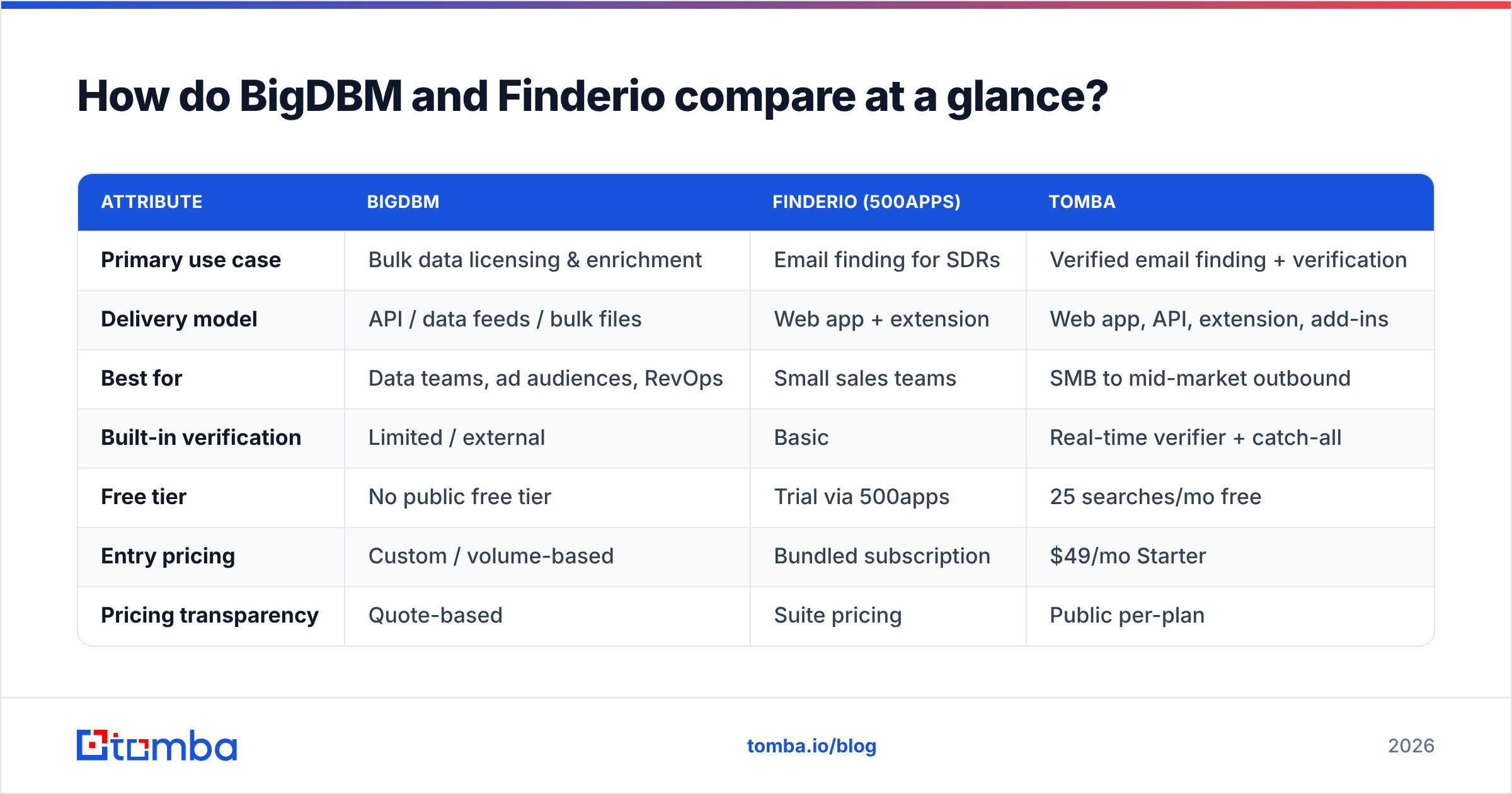
- Find the address (BigDBM, Finderio, or Tomba).
- Verify every result with real-time SMTP validation.
- Segment catch-all and risky addresses into a separate, slower track.
- Suppress anything that fails — never "send and hope."
How does pricing compare?#
Pricing is where the two tools diverge most. It is also where it gets hard to compare apples to apples.
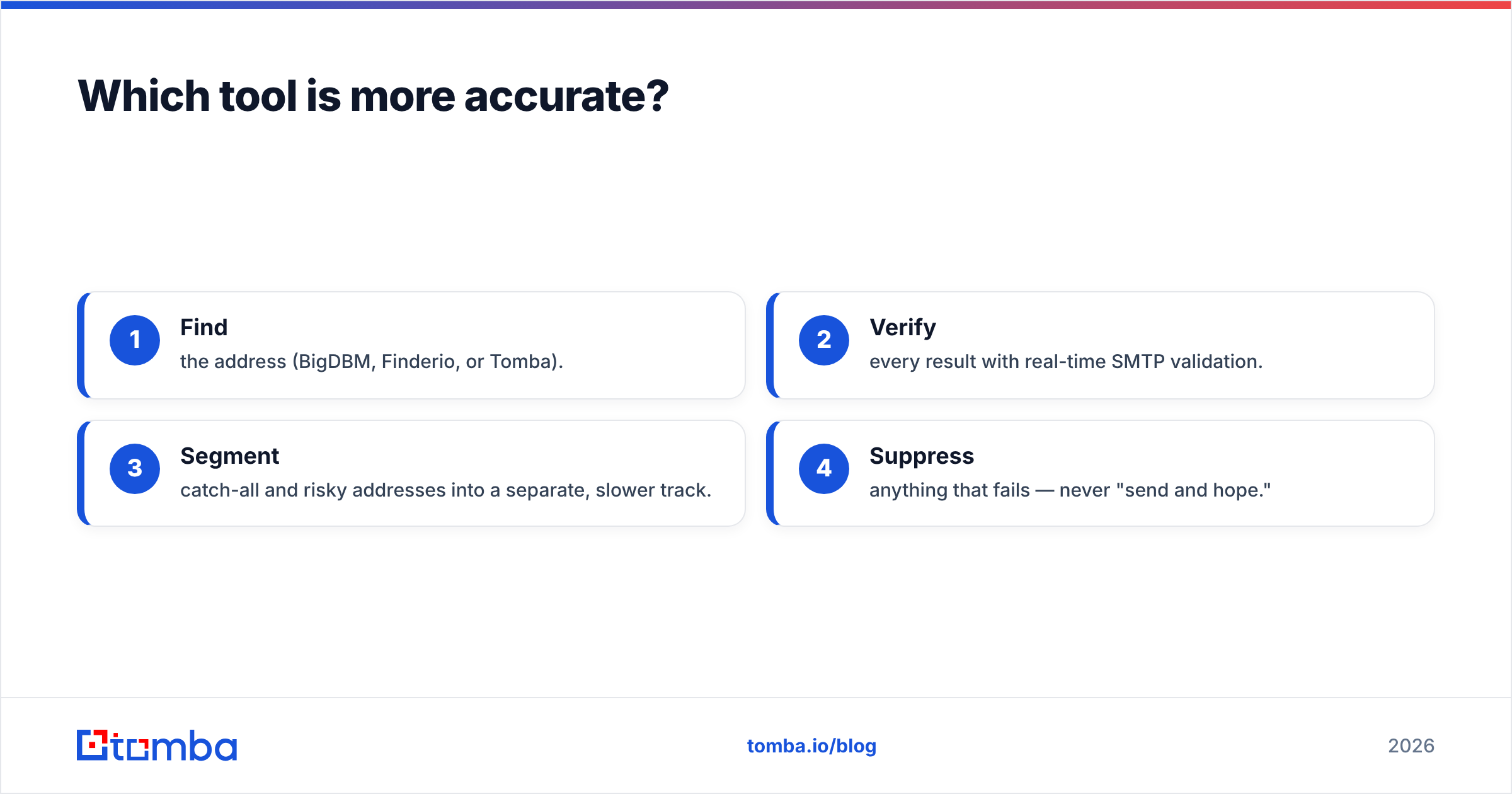
| Plan tier | BigDBM | Finderio | Tomba |
|---|---|---|---|
| Free | None | Trial only | 25 searches/mo |
| Entry | Custom quote | 500apps bundle | $49/mo (Starter) |
| Mid | Volume-based | Bundle add-ons | $99/mo (Growth) |
| High | Enterprise license | Enterprise | $249/mo (Pro) |
| Model | Data licensing | Suite subscription | Per-plan credits |
| Transparent? | No | Partial | Yes |
BigDBM's quote-based licensing makes sense at scale. But you can't self-serve or predict cost without a sales call. Finderio's value hinges on whether you'll use the rest of the 500apps suite. Paying for a bundle to get one email finder is rarely efficient. Tomba sits in between with public Tomba pricing. You get a free tier to test, then $49/mo for active prospecting, with credits you can predict.

Which should you choose for cold outreach?#
For most SDR and founder-led outbound teams, neither extreme is ideal. That's the honest answer.
Pick BigDBM if you're a data or RevOps team that needs to license large datasets, build ad audiences, or enrich an existing database at scale through an API. You have engineering resources. You're buying data as raw material, not finished leads. You'll still need a verification layer on top.
Pick Finderio if you're already inside the 500apps ecosystem. You want a no-friction email finder bundled with your other tools. And your targets are mostly well-known corporate domains where pattern matching works.
Pick a dedicated verified finder if your single metric is "emails that land in the inbox." Tomba combines domain search, real-time verification, and a bulk email finder for list work. It covers the same ground as both tools without a licensing contract or a half-used bundle. You can also wire it into your stack through the Tomba API or pull contacts straight into your sheets and CRM.
A quick fit summary:
- Largest raw volume, engineering-heavy: BigDBM
- Simple finder inside an app suite: Finderio
- Verified emails, transparent pricing, fast setup: Tomba
What about data compliance and sources?#
Where data comes from matters as much as how much of it there is. Aggregated consumer datasets are a BigDBM strength. They raise more GDPR/CCPA questions for cold B2B outreach than business-contact data sourced from public professional profiles. Always confirm a provider's compliance posture and opt-out handling before you scale sends. G2 reviews and a vendor's own documentation are the fastest way to vet this.
Tomba is transparent about where its data comes from. That makes it easier to defend your process if a prospect asks how you got their address. For deliverability fundamentals — SPF, DKIM, and warmup — pair any finder with solid email deliverability hygiene. Reference authoritative guides like HubSpot's sales resources when building your playbook.
Frequently asked questions#
Is BigDBM better than Finderio? Not universally. BigDBM is better for bulk data licensing and enrichment at scale; Finderio is better for simple, in-app email finding. They serve different buyers.
Do I still need to verify emails from these tools? Yes. Always verify every address with real-time SMTP checks before sending. Unverified lists drive bounces that damage your sender reputation.
What's a good alternative to both? A dedicated, verified email finder. Tomba combines finding and verification with public pricing and a free tier, which suits most SMB and mid-market outbound teams.
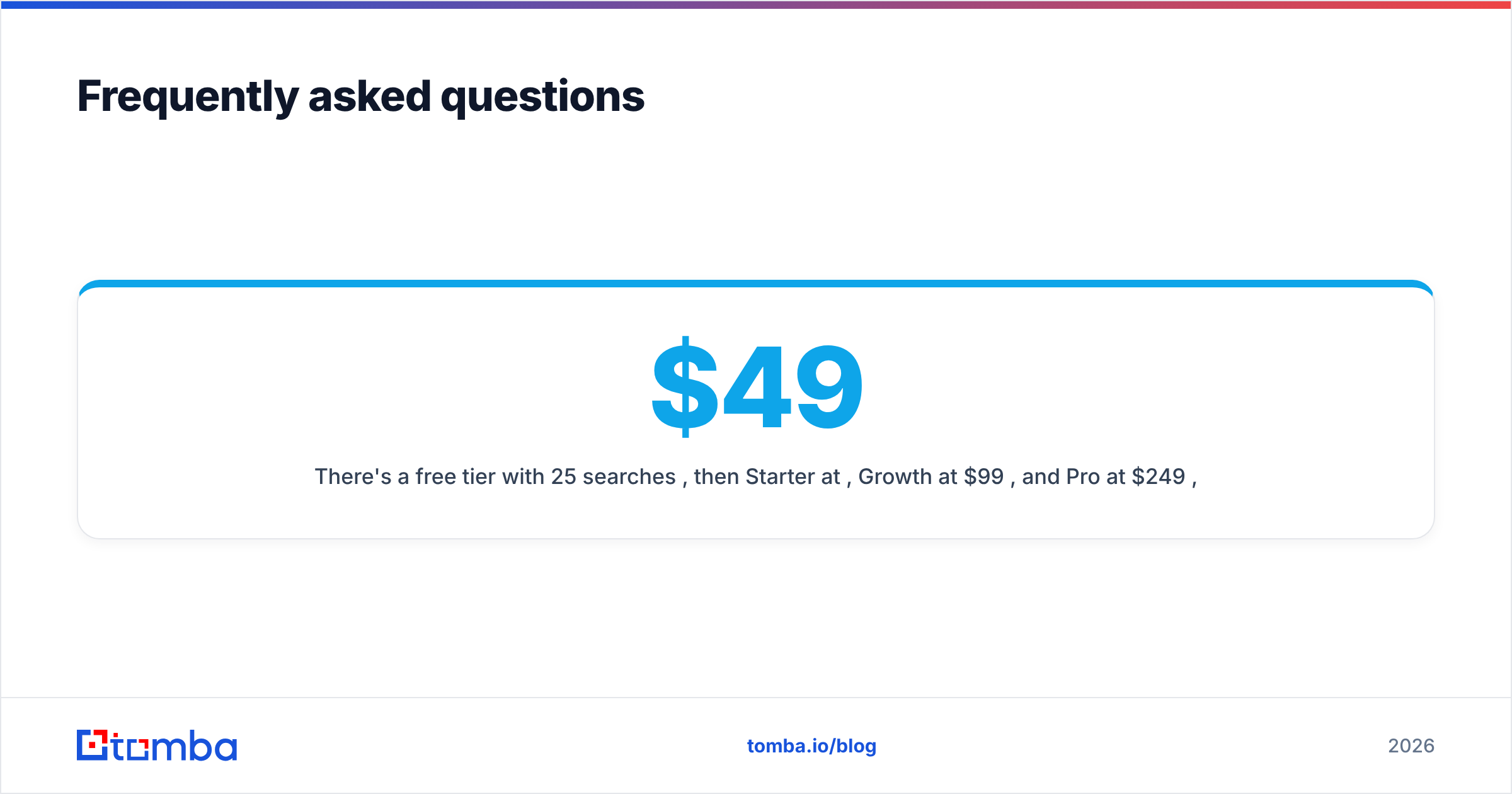
How much does Tomba cost? There's a free tier with 25 searches per month, then Starter at $49/mo, Growth at $99/mo, and Pro at $249/mo, with Enterprise pricing on request.
The bottom line#
BigDBM vs Finderio is really a choice between two different problems. One supplies bulk data for teams who process it themselves. The other offers a simple finder for reps inside an app suite. Both leave the hardest part up to you — making sure the email actually lands.
If your goal is verified contacts you can email today, start with the Tomba Email Finder. Skip the licensing contract and the bundle you barely use. Find emails by name, domain, or company. Verify them in the same workflow. Keep your bounce rate low enough to protect every campaign that follows. Spin up the free 25-search tier, test it against your toughest target accounts, and upgrade only when the results prove themselves.
Ready to find emails that actually work?
Join 150,000+ professionals who stopped guessing and started sending. Free credits on signup — no credit card required.
Get the Tomba newsletter
Practical outbound tactics and product updates — once every two weeks.
About the author