BigDBM vs LeadsForge 2026: B2B Data Provider Compared
BigDBM and LeadsForge both promise accurate B2B contact data, but they solve different problems. Here's how their coverage, pricing, and compliance compare in 2026 — and where a verification-first workflow fits.
You are choosing between two B2B data vendors, and both decks look identical: billions of records, "industry-leading accuracy," intent signals, an API. BigDBM and LeadsForge sit in that exact spot. The hard part is that the marketing pages do not tell you what actually breaks once the data hits your CRM.
This is a direct, vendor-neutral comparison of BigDBM vs LeadsForge for 2026 — what each one is built for, where the data comes from, how pricing really works, and the compliance questions you need to ask before signing. At the end, you will see where a verification-first layer like Tomba changes the math no matter which provider you pick.
TL;DR: BigDBM vs LeadsForge at a glance#
- BigDBM is a data-licensing and identity-resolution company. It sells large, raw datasets (consumer + B2B, intent, property, demographic) intended to be piped into your own systems. Strong for data teams and platforms.
- LeadsForge is an AI-driven lead-list builder aimed at SMB sales and agencies. It packages targeting + list generation into a simpler UI. Strong for reps who want a finished list, fast.
- Accuracy is the real battleground. Both quote high match rates; neither erases the need to verify emails before you send. Stale and catch-all addresses are the silent killer.
- Pricing models differ. BigDBM leans toward licensing/volume deals; LeadsForge leans toward subscription/credit tiers. Compare cost-per-verified-contact, not cost-per-record.
- Best practice: treat any provider's export as a raw input, then run email verification and enrichment before it touches your sequences.
What is BigDBM?#
BigDBM is a US-based data provider focused on identity resolution and large-scale data licensing. Think of it less as a "find me a lead" app and more as a data warehouse you tap into. Its catalog spans B2B firmographics, consumer demographics, property data, and various intent and behavioral signals, often sold for use inside ad platforms, data co-ops, and enrichment pipelines.
The customer profile is telling: BigDBM tends to land with engineering-heavy teams, martech vendors, and performance marketers who can ingest a feed and resolve it against their own records. You get scale and raw breadth. What you do not get is a hand-holding interface — the value assumes you have somewhere to put the data and someone to model it.
If your use case is "enrich 2 million records with phone and address attributes," BigDBM is in its element. If your use case is "give my three SDRs a clean list of CFOs at Series B SaaS companies by Friday," it is heavier than you need.
What is LeadsForge?#
LeadsForge is an AI lead-generation tool that builds targeted prospect lists from a plain-language description of your ideal customer. You describe who you want — role, industry, company size, geography — and it returns a list with contact details you can export or push to outreach.
The pitch is speed and simplicity for smaller teams. Instead of querying a database with boolean filters, you tell it what you want in a sentence and it assembles the list. That makes it attractive to founders, agencies, and SMB sales teams that do not have a RevOps function to run a data pipeline.
The trade-off is control and transparency. AI list-building is convenient, but you have less visibility into where each record came from and when it was last validated. That is exactly where deliverability problems start — which is why your verification step matters more, not less, with tools like this.

BigDBM vs LeadsForge: side-by-side comparison#
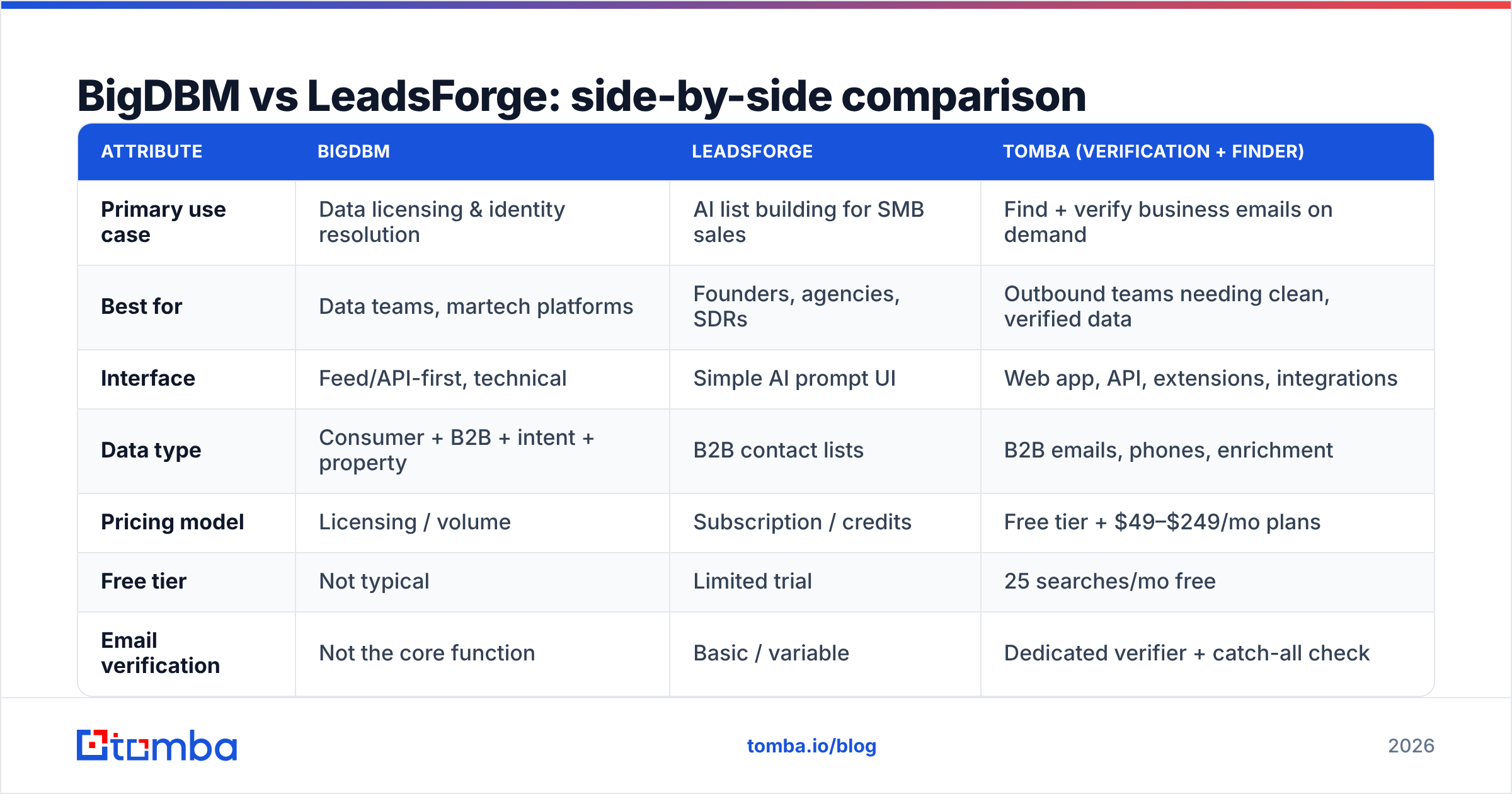
Here is the honest breakdown. Treat specific pricing as directional — both vendors quote custom or tiered deals, so confirm current numbers directly.
| Attribute | BigDBM | LeadsForge | Tomba (verification + finder) |
|---|---|---|---|
| Primary use case | Data licensing & identity resolution | AI list building for SMB sales | Find + verify business emails on demand |
| Best for | Data teams, martech platforms | Founders, agencies, SDRs | Outbound teams needing clean, verified data |
| Interface | Feed/API-first, technical | Simple AI prompt UI | Web app, API, extensions, integrations |
| Data type | Consumer + B2B + intent + property | B2B contact lists | B2B emails, phones, enrichment |
| Pricing model | Licensing / volume | Subscription / credits | Free tier + $49–$249/mo plans |
| Free tier | Not typical | Limited trial | 25 searches/mo free |
| Email verification | Not the core function | Basic / variable | Dedicated verifier + catch-all check |
| Compliance posture | Identity-data focus (US) | Aggregated sources | Source transparency, opt-out support |
The pattern: BigDBM optimizes for scale and raw attributes, LeadsForge optimizes for speed and ease, and neither is primarily a verification engine. That gap is the recurring theme of any data-provider comparison.
Is BigDBM more accurate than LeadsForge?#
Neither vendor is automatically "more accurate" — it depends on the segment and how fresh the underlying source is. Accuracy is not one number; it is three:
- Match rate — what percentage of your input records the provider can resolve. Big databases win here on raw coverage.
- Field accuracy — whether the returned title, company, and email are currently correct. This decays fast; B2B email data goes stale at roughly 25–30% per year as people change jobs.
- Deliverability — whether the email actually accepts mail. This is where catch-all domains and abandoned inboxes wreck open rates even when the record "looks" valid.
A provider can ace step 1 and fail step 3. That is why measuring "accuracy" by database size is a trap. The only number that protects your sender reputation is the share of contacts that pass a real SMTP-level check at send time.
Independent reviews on platforms like G2 are useful for sentiment, but they rarely test deliverability head-to-head on your niche. Run your own bounce test: pull 200 records from each provider, verify them, and compare the pass rate. That 20-minute experiment beats any vendor benchmark slide.
For more on why list hygiene drives results, the fundamentals of email deliverability are worth a refresher before you blame the provider.
How does pricing compare?#
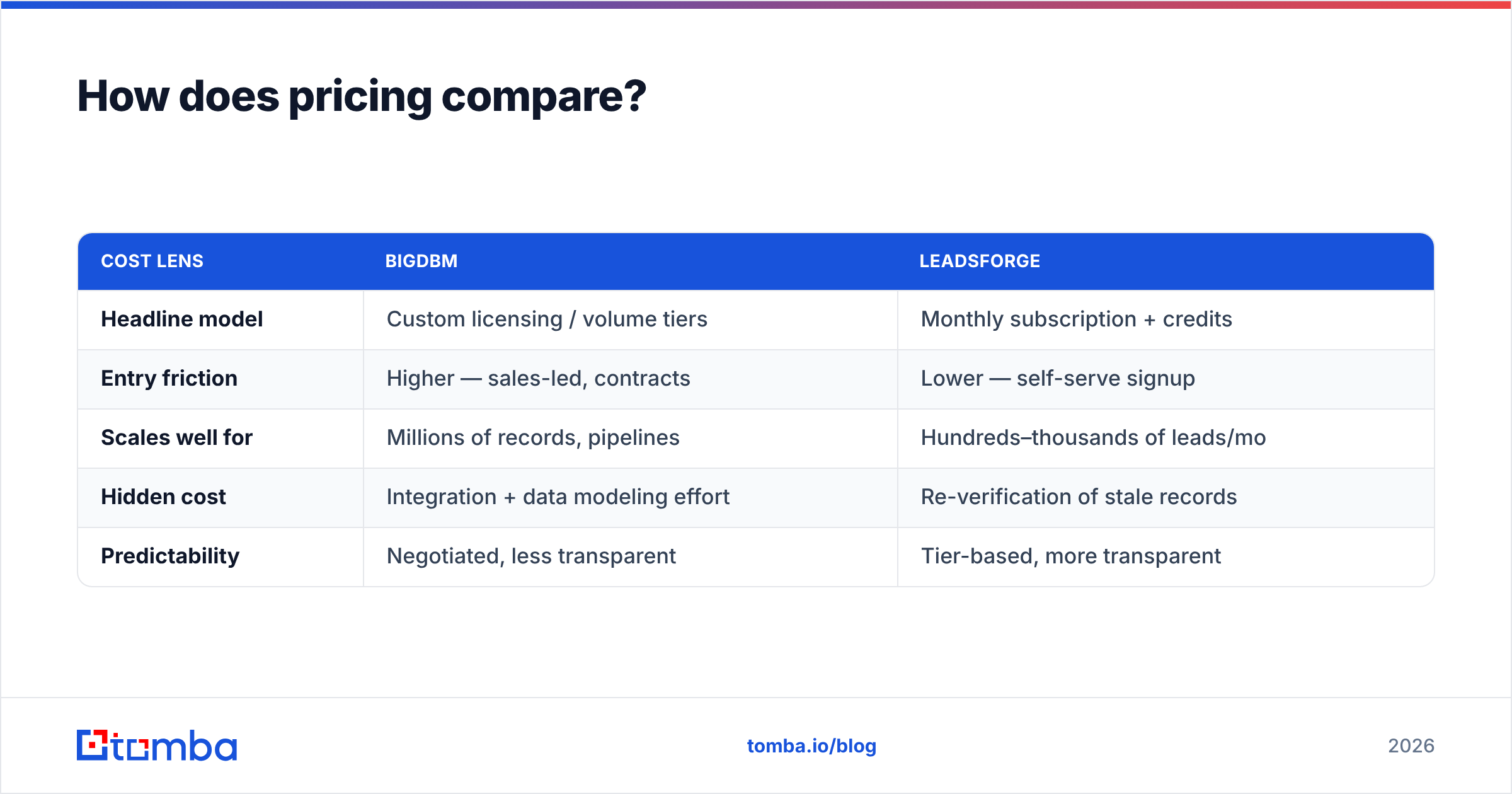
Cost-per-record is the wrong metric. Cost-per-verified-contact is the right one. A cheap list with a 35% bounce rate is more expensive than a pricier list that actually lands, once you count burned domains and rep time.
| Cost lens | BigDBM | LeadsForge |
|---|---|---|
| Headline model | Custom licensing / volume tiers | Monthly subscription + credits |
| Entry friction | Higher — sales-led, contracts | Lower — self-serve signup |
| Scales well for | Millions of records, pipelines | Hundreds–thousands of leads/mo |
| Hidden cost | Integration + data modeling effort | Re-verification of stale records |
| Predictability | Negotiated, less transparent | Tier-based, more transparent |
BigDBM's model rewards volume and assumes you have the engineering to extract value. LeadsForge's model is friendlier to a small team's budget but can get expensive per usable contact if a large share needs re-verifying.
Whichever you choose, budget a line for verification. Compare against transparent Tomba pricing — a Free tier (25 searches/mo), Starter at $49/mo, Growth at $99/mo, and Pro at $249/mo — so you know the all-in cost of getting a clean contact, not just a record.
What about data sourcing and compliance?#
This is the question that should worry you most, and it is the one vendor decks gloss over. Where does the data come from, and can you legally use it for outbound in your region?
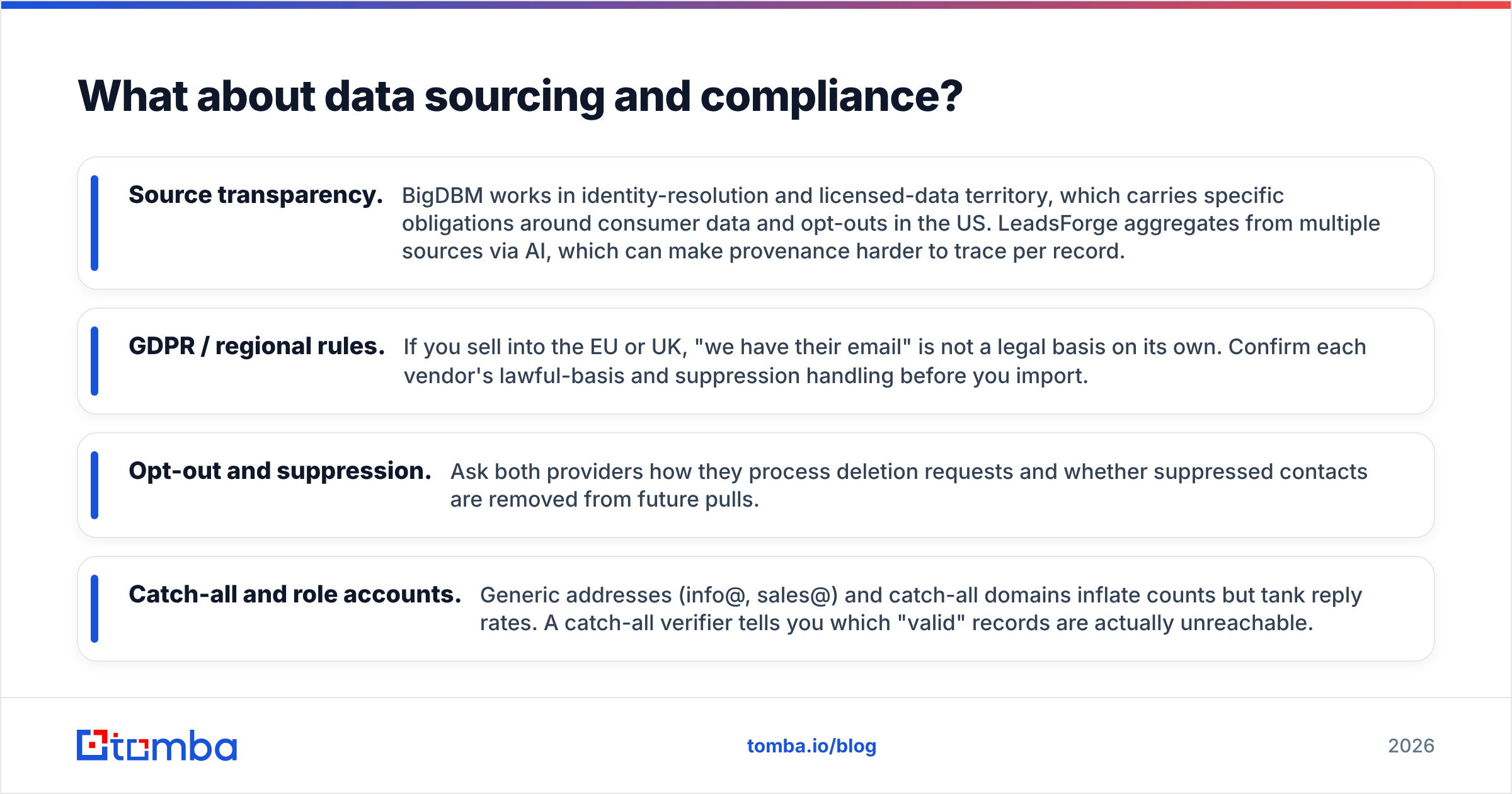
- Source transparency. BigDBM works in identity-resolution and licensed-data territory, which carries specific obligations around consumer data and opt-outs in the US. LeadsForge aggregates from multiple sources via AI, which can make provenance harder to trace per record.
- GDPR / regional rules. If you sell into the EU or UK, "we have their email" is not a legal basis on its own. Confirm each vendor's lawful-basis and suppression handling before you import.
- Opt-out and suppression. Ask both providers how they process deletion requests and whether suppressed contacts are removed from future pulls.
- Catch-all and role accounts. Generic addresses (info@, sales@) and catch-all domains inflate counts but tank reply rates. A catch-all verifier tells you which "valid" records are actually unreachable.
Compliance is not a checkbox; it is the difference between a sustainable outbound motion and a domain that gets blacklisted. Reading a vendor's data documentation — and comparing it to how a provider like Tomba describes its data sources — tells you more than any feature list.

Which should you choose: BigDBM or LeadsForge?#
Match the tool to your actual operating model, not to the biggest number on the homepage.
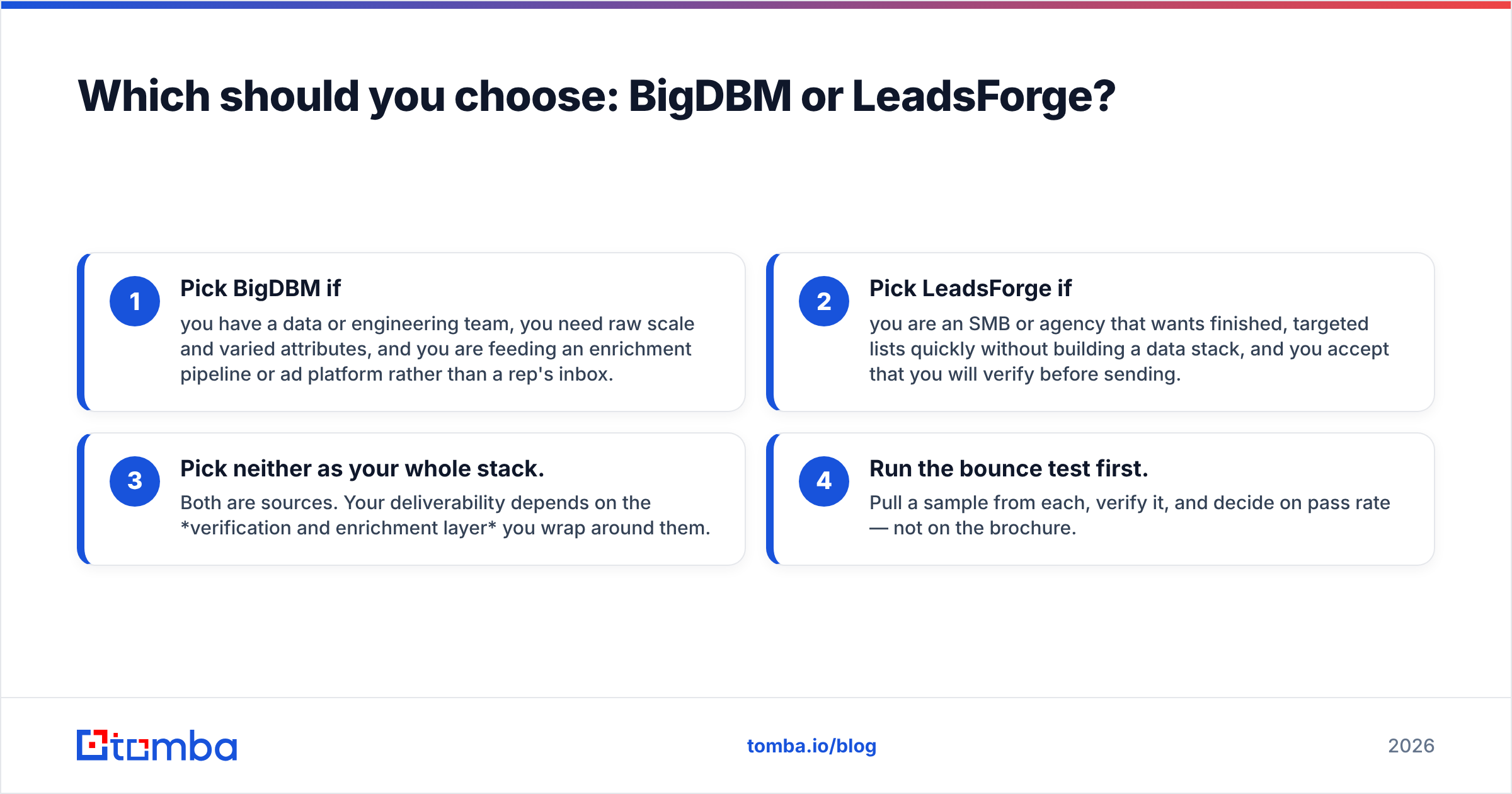
- Pick BigDBM if you have a data or engineering team, you need raw scale and varied attributes, and you are feeding an enrichment pipeline or ad platform rather than a rep's inbox.
- Pick LeadsForge if you are an SMB or agency that wants finished, targeted lists quickly without building a data stack, and you accept that you will verify before sending.
- Pick neither as your whole stack. Both are sources. Your deliverability depends on the verification and enrichment layer you wrap around them.
- Run the bounce test first. Pull a sample from each, verify it, and decide on pass rate — not on the brochure.
The smartest 2026 setup is not "BigDBM vs LeadsForge" as an either/or. It is: choose the source that fits your team, then standardize on one verification + finding layer so every contact — regardless of origin — meets the same quality bar before it hits a sequence.
Where Tomba fits in either workflow#
Whichever provider you land on, the failure mode is the same: records that look valid but bounce. Tomba is built to close that gap. Use the email verifier to score every imported address before sending, the bulk email finder and domain search to fill gaps your provider missed, and data enrichment to add the firmographic and contact fields your list is missing.
It plugs into the tools you already use — HubSpot, Salesforce, Google Sheets, and the Tomba API — so verification becomes a step in your pipeline, not a separate chore.
Start with the Tomba Email Finder and free verifier. Run your next BigDBM or LeadsForge export through it, check the real pass rate, and you will know — with evidence, not a vendor claim — exactly how clean your data is before you spend a single send on it. The free tier gives you 25 searches a month to prove it on your own list today.
// get started
Find, verify and enrich your first contacts today
Start on the free plan with 25 searches a month, then scale when your team is ready.
Free plan · No credit card required · GDPR & CCPA
// about the author