BigDBM vs ListKit 2026: B2B Data Provider Comparison
BigDBM sells licensed identity data at scale; ListKit ships verified cold-email lists. Here's which B2B data provider fits your 2026 outbound stack — and where a dedicated email finder beats both.
Choosing between BigDBM and ListKit comes down to one question: do you need raw licensed data at scale, or ready-to-send verified contact lists? They sound similar, but they solve different problems for different teams.
TL;DR — BigDBM vs ListKit at a glance#
- BigDBM is a licensed data provider: huge US consumer + B2B identity graph, sold via API, file delivery, and data licensing. Built for data resellers, RevOps, and enterprise enrichment.
- ListKit is a cold-email-first lead platform: triple-verified contacts, native pushes to Smartlead and Instantly, and a credit model built for agencies running outbound at volume.
- BigDBM wins on raw scale, identity resolution, and intent signals. ListKit wins on speed-to-send and email deliverability for cold campaigns.
- Neither is a true on-demand email finder. If your real need is "find and verify the email for this person at this company right now," a dedicated tool like Tomba is cheaper and more accurate.
- Pick by workflow: licensing/enrichment at scale → BigDBM; agency cold email → ListKit; targeted prospecting → an email finder.
What is BigDBM?#
BigDBM is a US-based data provider that licenses a large identity graph spanning consumer and B2B records. Think of it less like a prospecting app and more like a data wholesaler — you license access to records, then plug them into your own systems through an API or bulk file delivery.
Its strength is breadth and resolution. BigDBM maps identities across emails, phone numbers, postal addresses, and online behavior, which makes it attractive for data enrichment, audience modeling, and intent-based targeting. Teams that build their own lead-scoring or marketing-data infrastructure tend to license from providers like BigDBM rather than buy a polished UI.
The trade-off: you're buying data at scale, not a guided workflow. There's less hand-holding, and you're responsible for verification, compliance hygiene, and deduplication on your side.
What is ListKit?#
ListKit was built by people who ran cold email agencies, and it shows. The product is opinionated around one outcome: get verified B2B contacts into a sending tool fast.
Its core selling points are triple-verified emails (to protect email deliverability), a filter-driven list builder, and native integrations that push lists straight into Smartlead and Instantly. For an agency spinning up 20 campaigns a week, that "build list → verify → push to sequencer" loop is the entire value.
ListKit uses a credit model: you spend credits to unlock contacts. That's predictable for high-volume senders but can get expensive if you're enriching the same accounts repeatedly or burning credits on contacts you never email.
BigDBM vs ListKit: how do they actually differ?#
The cleanest way to think about it: BigDBM sells the raw material, ListKit sells the finished product for one specific use case.
- Primary buyer — BigDBM targets data resellers, RevOps, and enterprise enrichment teams. ListKit targets cold-email agencies and founder-led sales.
- Delivery — BigDBM leans on API and file/licensing. ListKit leans on an in-app builder plus sequencer integrations.
- Verification — ListKit verifies emails before you export. With BigDBM, verification is largely on you.
- Data scope — BigDBM includes consumer + B2B identity and intent. ListKit is B2B-contact focused.
- Pricing logic — BigDBM is licensing/volume-negotiated. ListKit is credit-based and self-serve.
- Time to first send — ListKit is minutes. BigDBM assumes you have your own pipeline to ingest data.
)
Side-by-side comparison table#
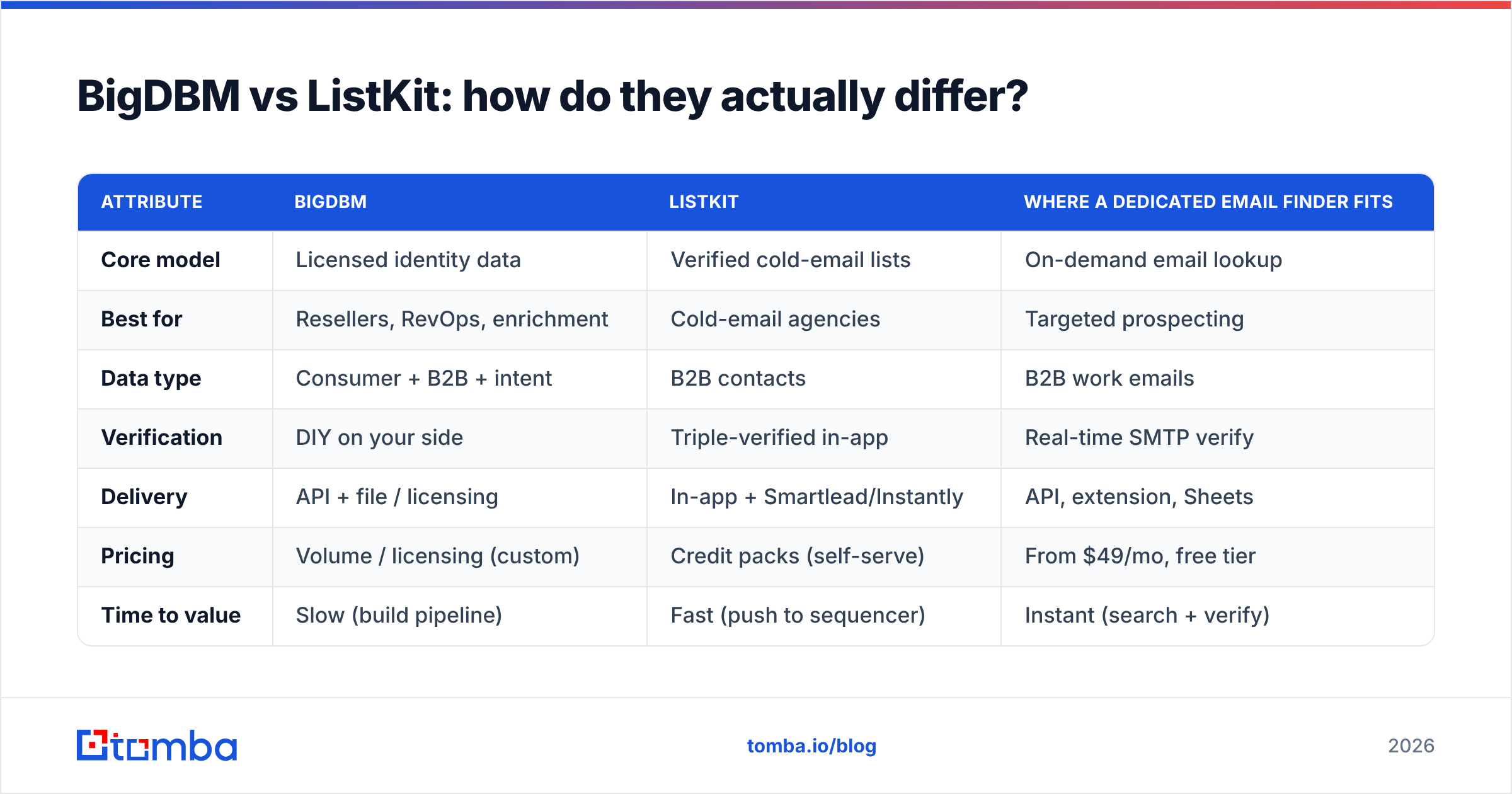
| Attribute | BigDBM | ListKit | Where a dedicated email finder fits |
|---|---|---|---|
| Core model | Licensed identity data | Verified cold-email lists | On-demand email lookup |
| Best for | Resellers, RevOps, enrichment | Cold-email agencies | Targeted prospecting |
| Data type | Consumer + B2B + intent | B2B contacts | B2B work emails |
| Verification | DIY on your side | Triple-verified in-app | Real-time SMTP verify |
| Delivery | API + file / licensing | In-app + Smartlead/Instantly | API, extension, Sheets |
| Pricing | Volume / licensing (custom) | Credit packs (self-serve) | From $49/mo, free tier |
| Time to value | Slow (build pipeline) | Fast (push to sequencer) | Instant (search + verify) |
| Free trial | Limited / sales-led | Limited credits | 25 free searches/mo |
For the deliverability-minded, the verification column is the one that matters most. Sending to unverified records tanks your sender reputation fast — which is why pairing any data source with an email verifier is non-negotiable.
Which has better data accuracy?#
Accuracy depends on what you're measuring. BigDBM's identity graph is strong on coverage and matching — useful when you want to resolve a partial record into a full profile. But coverage is not the same as a deliverable email. A record can be "matched" and still bounce.
ListKit's triple-verification is built specifically to reduce bounces, so for raw cold-email send rates it often feels more reliable out of the box. The catch is freshness: any list-based product is a snapshot, and B2B contacts churn 25–30% per year. A contact verified last quarter may have changed jobs.
This is the structural weakness of both list-and-license models versus real-time lookup. When you query an email finder at the moment of outreach, you get a fresh result rather than a cached one. That's why many teams use BigDBM or ListKit for breadth, then re-verify the specific contacts they're about to email — using a catch-all verifier for the tricky domains that block standard SMTP checks.
)
How do BigDBM and ListKit price compare?#
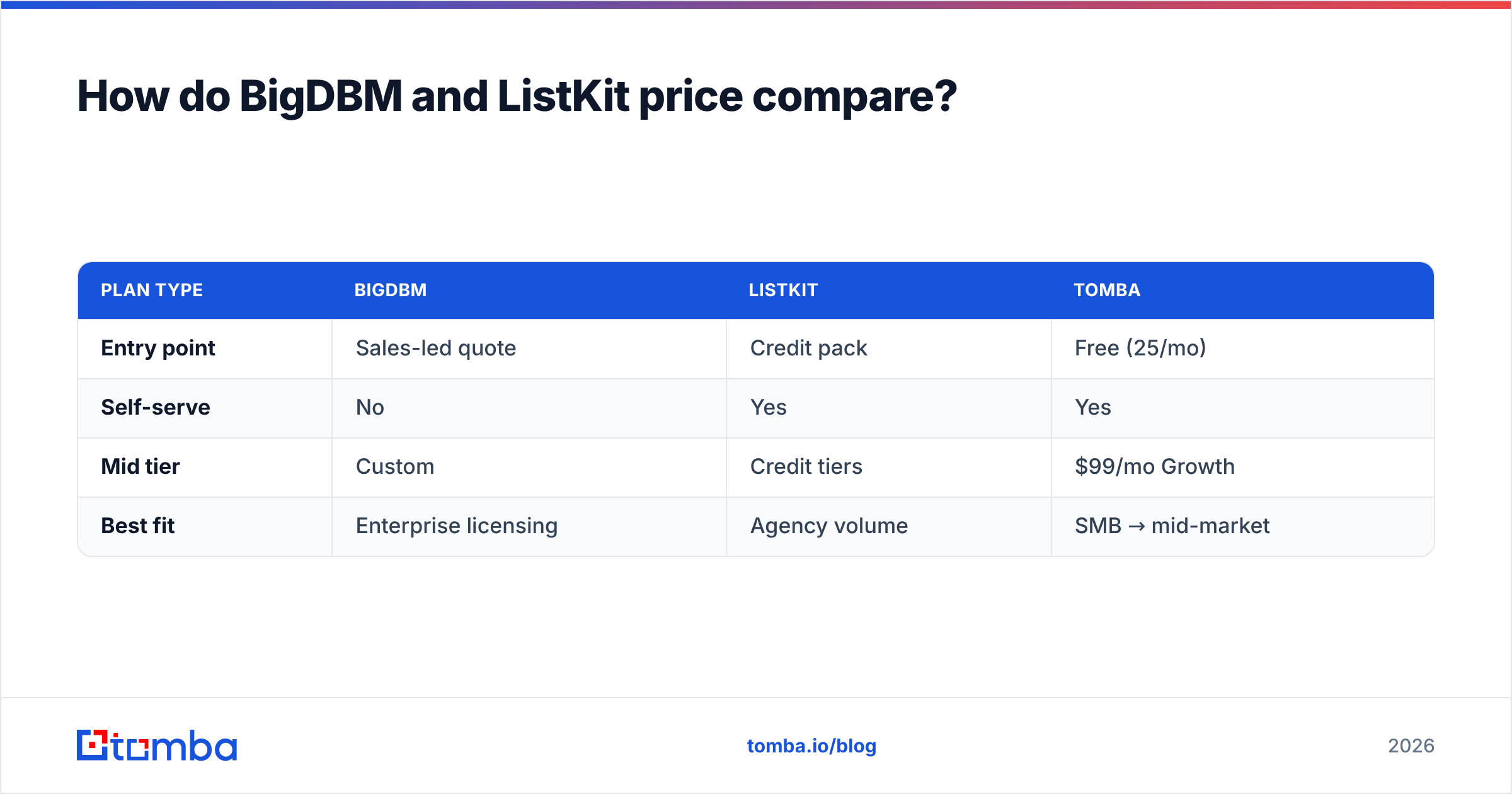
BigDBM pricing is sales-led and volume-negotiated — typical for data licensing. You won't find a public self-serve checkout; cost scales with record volume, data fields, and refresh frequency. That's efficient at enterprise scale and overkill for a two-person sales team.
ListKit is self-serve and credit-based, which makes budgeting easy: you buy credits, you spend them unlocking contacts. The risk is credit burn — re-pulling the same accounts, or unlocking leads that never get worked.
Compare that to a flat email-finder subscription. Tomba's pricing runs a Free tier (25 searches/month), Starter at $49/month, Growth at $99/month, and Pro at $249/month. For teams that need targeted lookups rather than million-record licenses, a predictable monthly plan is usually the cheaper path — and you can validate the model on G2 reviews before committing (see G2's data provider category).
| Plan type | BigDBM | ListKit | Tomba |
|---|---|---|---|
| Entry point | Sales-led quote | Credit pack | Free (25/mo) |
| Self-serve | No | Yes | Yes |
| Mid tier | Custom | Credit tiers | $99/mo Growth |
| Best fit | Enterprise licensing | Agency volume | SMB → mid-market |
Is BigDBM or ListKit better for cold email?#
For pure cold email, ListKit is the more natural fit. It was designed for it: verified contacts, native Smartlead/Instantly pushes, and a workflow that gets you sending the same day. BigDBM can absolutely power cold outreach, but you'll do more plumbing to get there.
That said, "better for cold email" also means protecting deliverability end to end. No data source fixes a cold domain with no warmup, missing SPF, or a spammy template. Before you blame the data, run the basics: check your SPF record, warm your domain, and keep bounce rates under 2–3%. Tools like Instantly handle warmup well (see Instantly's docs), and ListKit's integrations lean into that ecosystem.
If your outbound is more targeted — named accounts, specific decision-makers — neither bulk product is ideal. You don't need a million records; you need the right 200 emails, verified. That's the find emails by domain workflow, where you pull every contact at a target company and verify on the spot.
When should you skip both and use an email finder?#
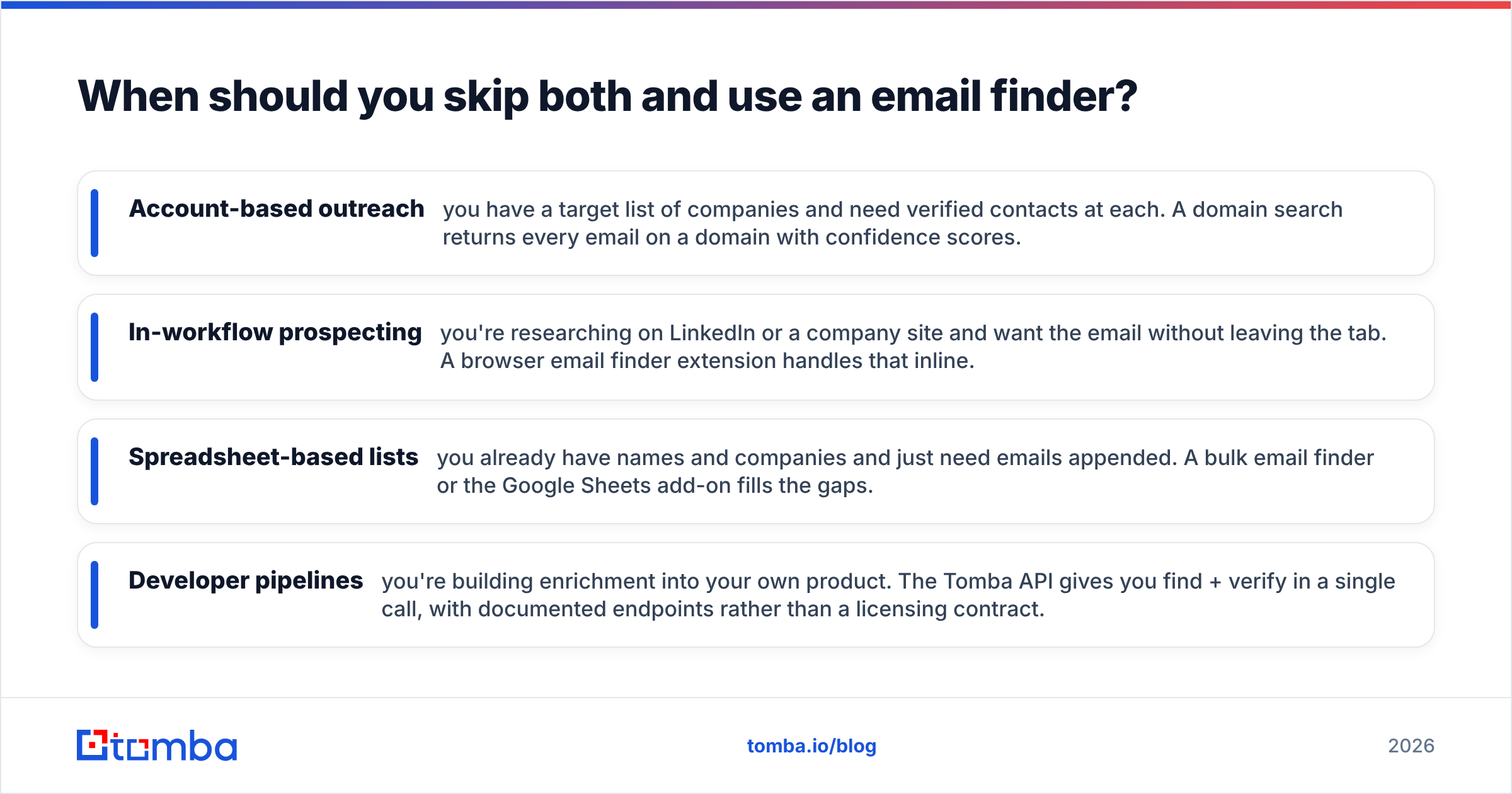
Skip the data-license/list-buy model entirely when your motion is precision over volume. Specifically:
- Account-based outreach — you have a target list of companies and need verified contacts at each. A domain search returns every email on a domain with confidence scores.
- In-workflow prospecting — you're researching on LinkedIn or a company site and want the email without leaving the tab. A browser email finder extension handles that inline.
- Spreadsheet-based lists — you already have names and companies and just need emails appended. A bulk email finder or the Google Sheets add-on fills the gaps.
- Developer pipelines — you're building enrichment into your own product. The Tomba API gives you find + verify in a single call, with documented endpoints rather than a licensing contract.
The common thread: you pay for what you actually search, results are fresh at query time, and verification is built in. For a lot of teams evaluating "bigdbm vs listkit," the honest answer is that a focused email finder covers 80% of the need at a fraction of the cost — and you bolt on a heavier data provider only when you genuinely need consumer-scale identity or intent data.
Final verdict: BigDBM, ListKit, or something leaner?#
Here's the decision in one line each:
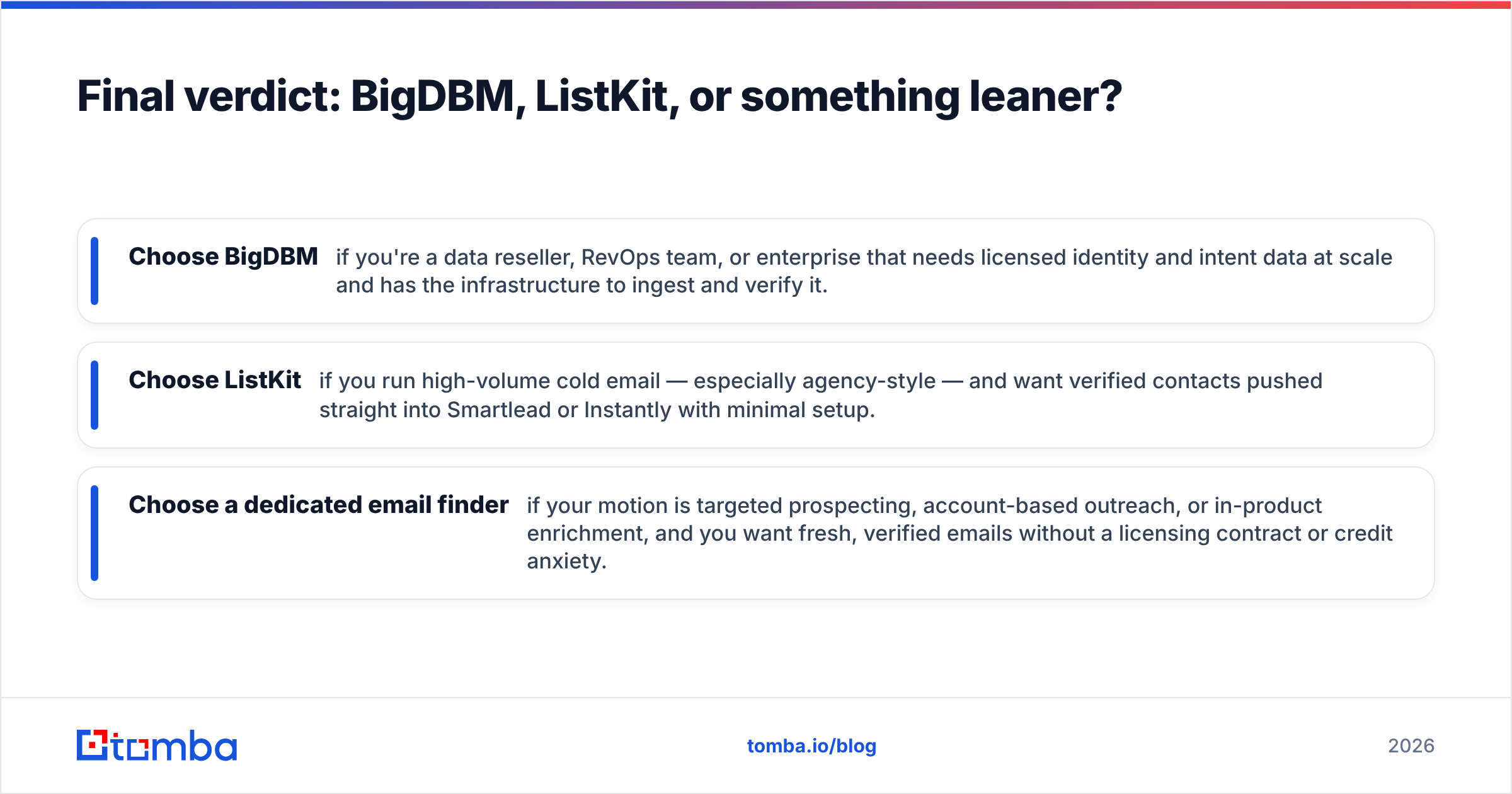
- Choose BigDBM if you're a data reseller, RevOps team, or enterprise that needs licensed identity and intent data at scale and has the infrastructure to ingest and verify it.
- Choose ListKit if you run high-volume cold email — especially agency-style — and want verified contacts pushed straight into Smartlead or Instantly with minimal setup.
- Choose a dedicated email finder if your motion is targeted prospecting, account-based outreach, or in-product enrichment, and you want fresh, verified emails without a licensing contract or credit anxiety.
Most growing teams end up with a hybrid: a focused finder for day-to-day prospecting, plus a heavier data source only when scale demands it.
If you're in that targeted-prospecting bucket, start with the Tomba Email Finder. Find professional email addresses by domain, name, or company, verify them in real time, and pull whole companies with domain search — all on a Free tier (25 searches/month) before you ever pay. It's the cheapest way to test whether you even need BigDBM or ListKit, and for many teams, it turns out you don't.
// get started
Find, verify and enrich your first contacts today
Start on the free plan with 25 searches a month, then scale when your team is ready.
Free plan · No credit card required · GDPR & CCPA
// about the author