BigDBM vs Lusha 2026: B2B Data Provider Comparison
BigDBM vs Lusha compared on data coverage, accuracy, pricing, and compliance — plus where each one fits and a leaner alternative for teams that just need verified B2B contacts.
You are choosing between two very different ways to buy B2B contact data, and the names get thrown around as if they compete head-to-head. They don't, exactly. BigDBM is a large-scale data provider and identity-resolution shop. Lusha is a self-serve prospecting tool that lives in your browser and CRM. This guide puts BigDBM vs Lusha side by side so you can tell which one matches how your team actually works — and where a leaner option beats both on cost per usable contact.
TL;DR#
- BigDBM sells bulk B2B and B2C data, identity graphs, and intent signals — built for data teams, list buyers, and marketers running large append or audience projects.
- Lusha is a seat-based prospecting tool with a Chrome extension and CRM enrichment — built for individual SDRs and small sales teams grabbing contacts one record at a time.
- Pricing models differ completely: BigDBM quotes custom volume deals; Lusha sells per-seat plans with monthly credit caps that get expensive at scale.
- Accuracy is the real battleground — both claim high match rates, but verified, deduped, deliverable contacts matter more than raw record counts.
- If you mostly need accurate, verified email addresses on demand without a six-figure data contract or per-seat lock-in, a focused email finder like Tomba covers the same job for far less.
What is BigDBM?#
BigDBM is a US-focused data provider that aggregates consumer and business records into large identity-resolution datasets. Think of it less like a Chrome extension and more like a wholesale data warehouse: you tell them the audience or the records you want appended, and they deliver volume.
Its core strengths are breadth and matching. BigDBM markets billions of records across emails, phones, postal addresses, demographics, and B2B firmographics, plus intent and identity-graph products that tie a person across devices and touchpoints. That makes it popular with performance marketers, data resellers, and ops teams running large enrichment or audience-building projects.
The tradeoff: it is a data-team product. You generally engage through a sales conversation, sign a volume agreement, and integrate via file delivery or API. There is no casual free tier where a single rep grabs ten emails before a Tuesday call.
What is Lusha?#
Lusha is a sales-intelligence and prospecting tool aimed at individual reps and small-to-midmarket sales teams. Its hook is the browser extension: open a LinkedIn profile or a company site, click the Lusha icon, and it surfaces emails and direct-dial phone numbers. It also offers CRM enrichment, list building, and an API on higher tiers.
Lusha's appeal is speed and simplicity for one person doing outbound. You don't need a data engineer. You install the extension, sign in, and start pulling contacts inside the tools you already use. You can read more about its positioning on the official Lusha site and user reviews on G2.
The catch is the pricing model. Lusha sells seats with monthly credit allotments. Costs climb as you add reps, and heavy users routinely hit credit ceilings mid-month, which forces upgrades or top-ups.
BigDBM vs Lusha: how do they compare?#
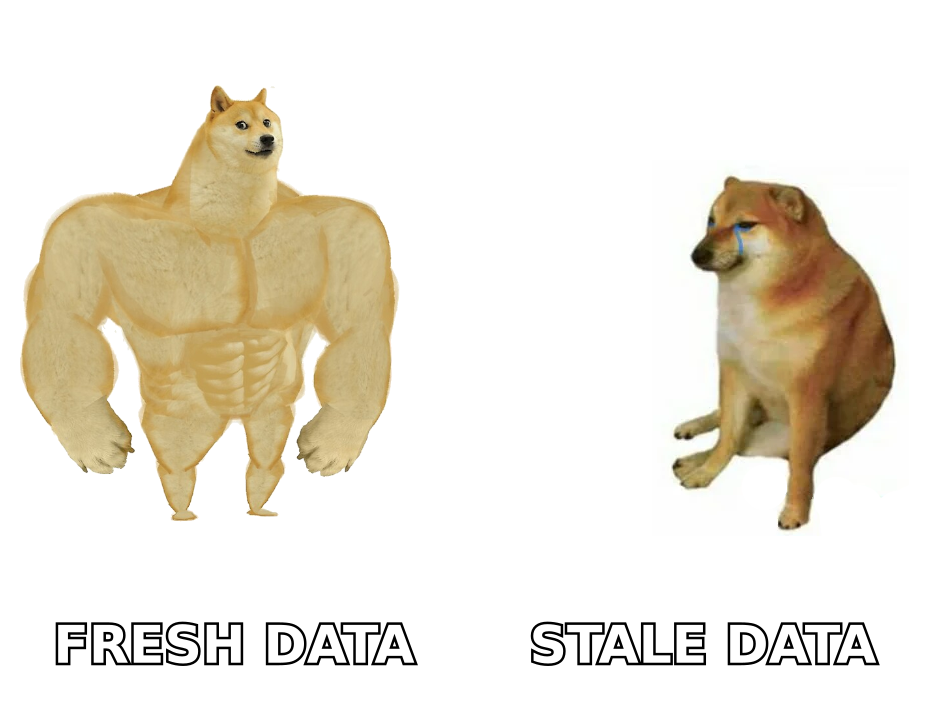
The fastest way to see the gap is to line up the attributes that actually affect your pipeline — data model, who it serves, how you pay, and how you get the data out.
| Attribute | BigDBM | Lusha |
|---|---|---|
| Product type | Bulk data provider / identity graph | Self-serve prospecting tool |
| Best for | Data teams, marketers, list/audience builders | Individual SDRs, small sales teams |
| Data scope | B2B + B2C, intent, identity resolution | B2B contacts (email + direct dial) |
| Access model | Custom contract, file or API delivery | Per-seat plans + Chrome extension |
| Free tier | No | Limited free credits |
| Pricing | Custom / volume-based, quote only | Seat-based, monthly credit caps |
| Entry cost | High (enterprise commitments) | Low to start, scales up fast |
| Verification | Append-level matching | Real-time lookup, variable accuracy |
| Typical friction | Sales cycle, minimums | Credit ceilings, per-seat cost |
The pattern is clear. BigDBM wins when you need volume and identity matching across millions of records and you have the budget and the data ops to use it. Lusha wins when one rep needs a few good contacts right now inside the browser. Neither is built around cheap, on-demand, verified email discovery for a whole team — which is the gap most outbound and demand-gen teams actually feel.
Which has better data accuracy?#
Accuracy is where these comparisons should be won or lost, and where marketing claims get slippery. Both vendors quote impressive match and coverage numbers. What you care about is different: the percentage of contacts that are deliverable and current when you actually use them.
A few principles hold regardless of vendor:
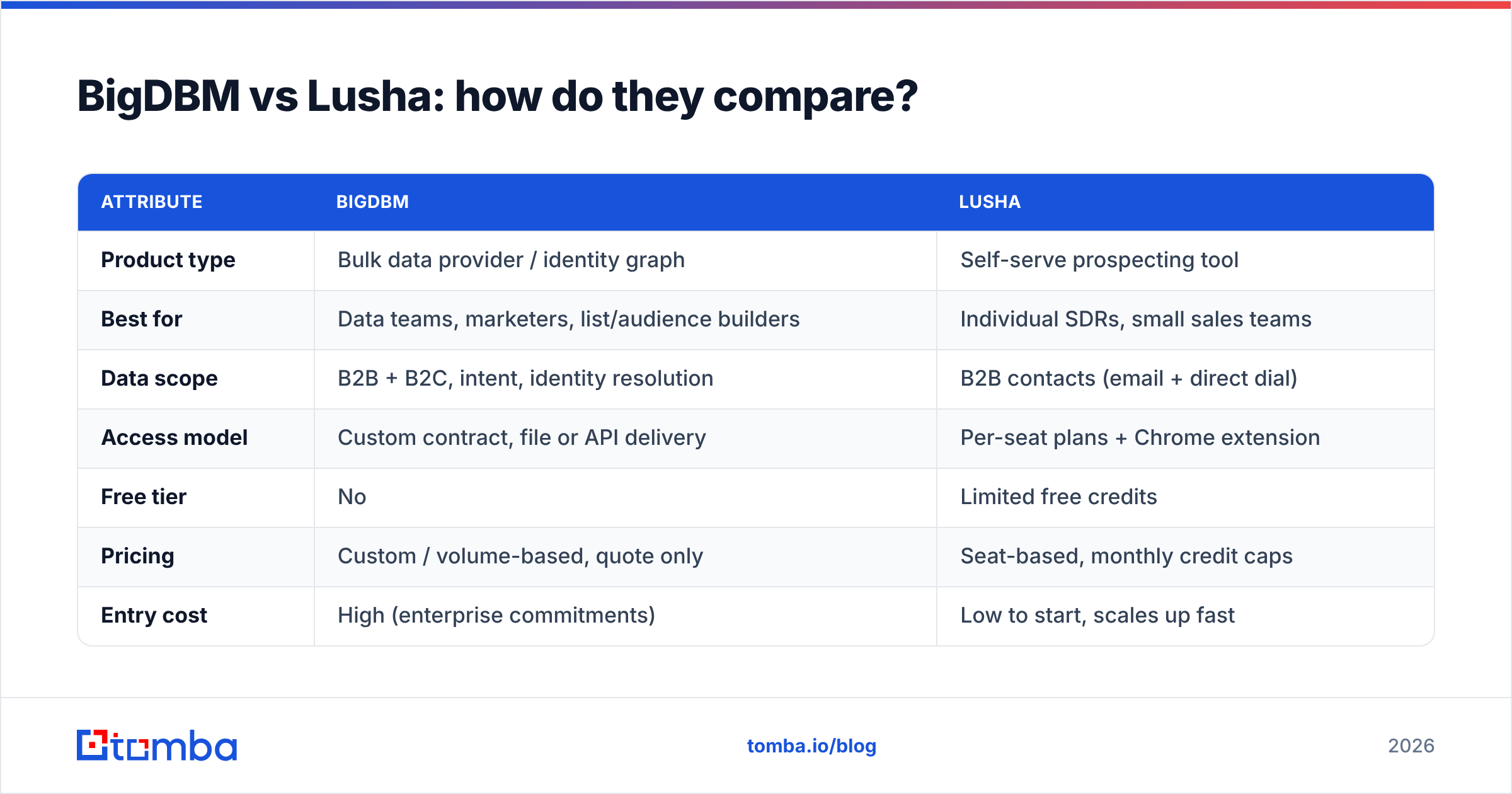
- Record count is not accuracy. "Billions of records" tells you nothing about how many are stale, duplicated, or wrong. A smaller, freshly verified set beats a giant stale one every time.
- B2C-heavy databases drift fast. Consumer data and personal emails decay quickly. B2B work emails change when people switch jobs, so freshness and re-verification cadence matter more than raw size.
- Catch-all domains hide failures. Many corporate domains accept any address at the server level, so a tool can report "valid" when the mailbox doesn't exist. Real email verification has to handle catch-alls explicitly, not just ping the server.
- Verify at the moment of use. Data verified six months ago and sold today is a guess. The closest you can get to truth is verification right before send.
This is why a dedicated verification layer matters more than database bragging rights. If you pull contacts from any provider, run them through an email verifier before you load a sequence. The cost of a bounce — to your domain reputation, not just one lead — is far higher than the cost of a verification credit.
How does pricing compare?#
Here is where the two diverge hardest, and where a third option starts to look obvious.
BigDBM uses custom, volume-based pricing. There is no public price card because deals are scoped to your record counts, data types, and use case. That is fine for a funded data project with a defined ROI, but it means a sales cycle, minimum commitments, and often a floor that prices out smaller teams entirely.
Lusha publishes per-seat tiers with monthly credit limits. Starting cost is low, which is the draw. But the model punishes growth: every new rep is another seat, and active prospectors burn through credits and hit walls. The "affordable" plan stops being affordable the moment outbound works and you want to scale it.
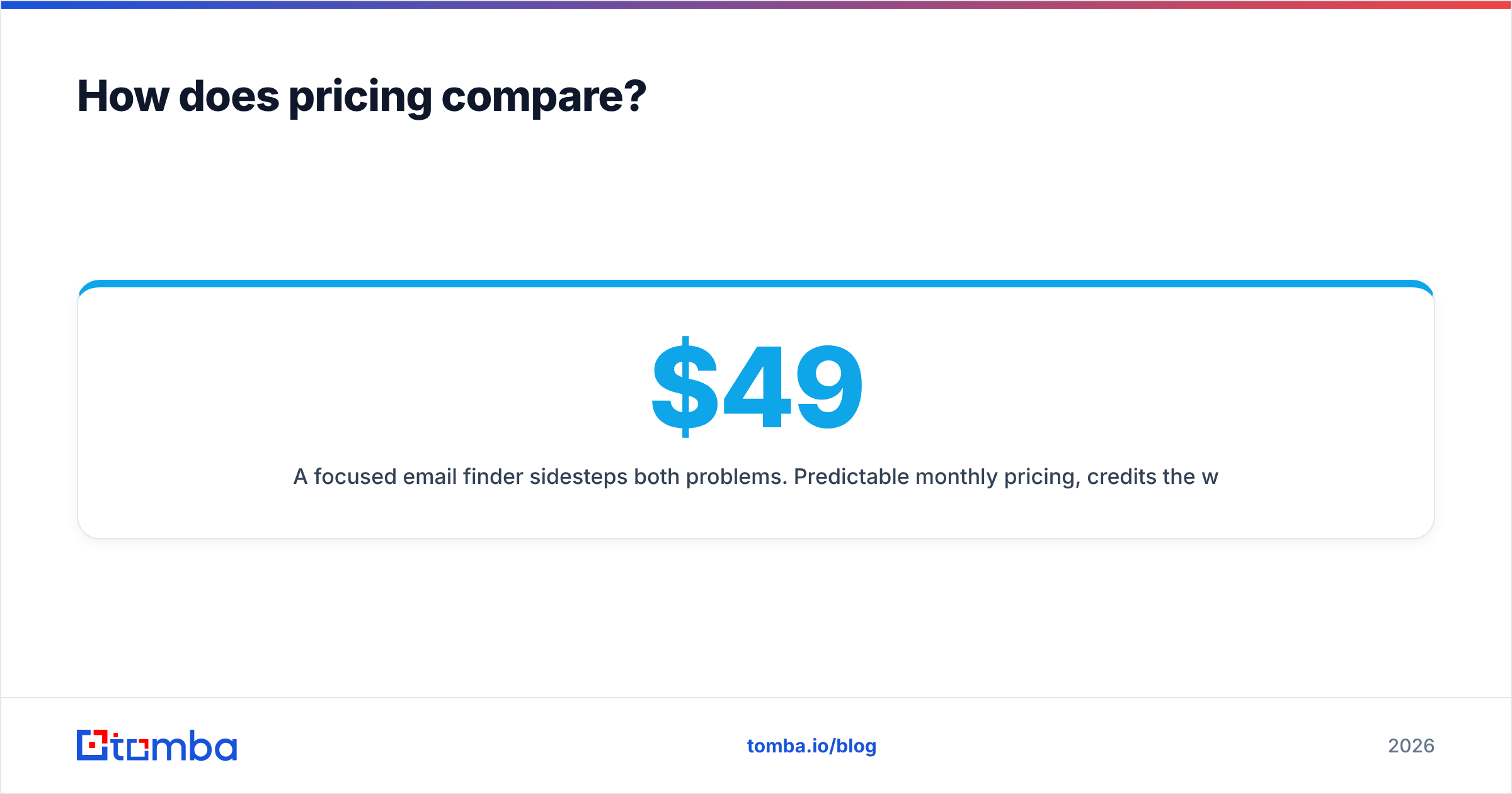
A focused email finder sidesteps both problems. Predictable monthly pricing, credits the whole team can draw from, and no enterprise contract to enter. For reference, Tomba's published pricing runs a Free tier at 25 searches/month, Starter at $49/month, Growth at $99/month, and Pro at $249/month, with custom Enterprise above that — flat numbers you can budget against without a quote call.
Which should you choose?#
Match the tool to the job rather than the brand:
- Choose BigDBM if you are a data or marketing team running large-scale audience builds, identity resolution, or B2B/B2C append projects, and you have the budget and ops to integrate bulk data. Its breadth and matching are the point.
- Choose Lusha if you are a single rep or a small team that wants click-to-grab contacts inside LinkedIn and your CRM, and your volume is low enough that per-seat credit caps won't bite.
- Choose a dedicated email finder if your real need is accurate, verified business emails on demand — by name, company, or domain — without a custom contract or per-seat ceiling. This covers the majority of outbound and demand-gen teams who got sold on a "data platform" but only use the find-and-verify part.
Most teams overbuy. They sign for an identity graph or a stack of seats when what they do every day is: find the right person's email, confirm it's deliverable, and push it into a sequence. That workflow does not require a six-figure data contract or a seat for every rep.
What's the best BigDBM and Lusha alternative?#
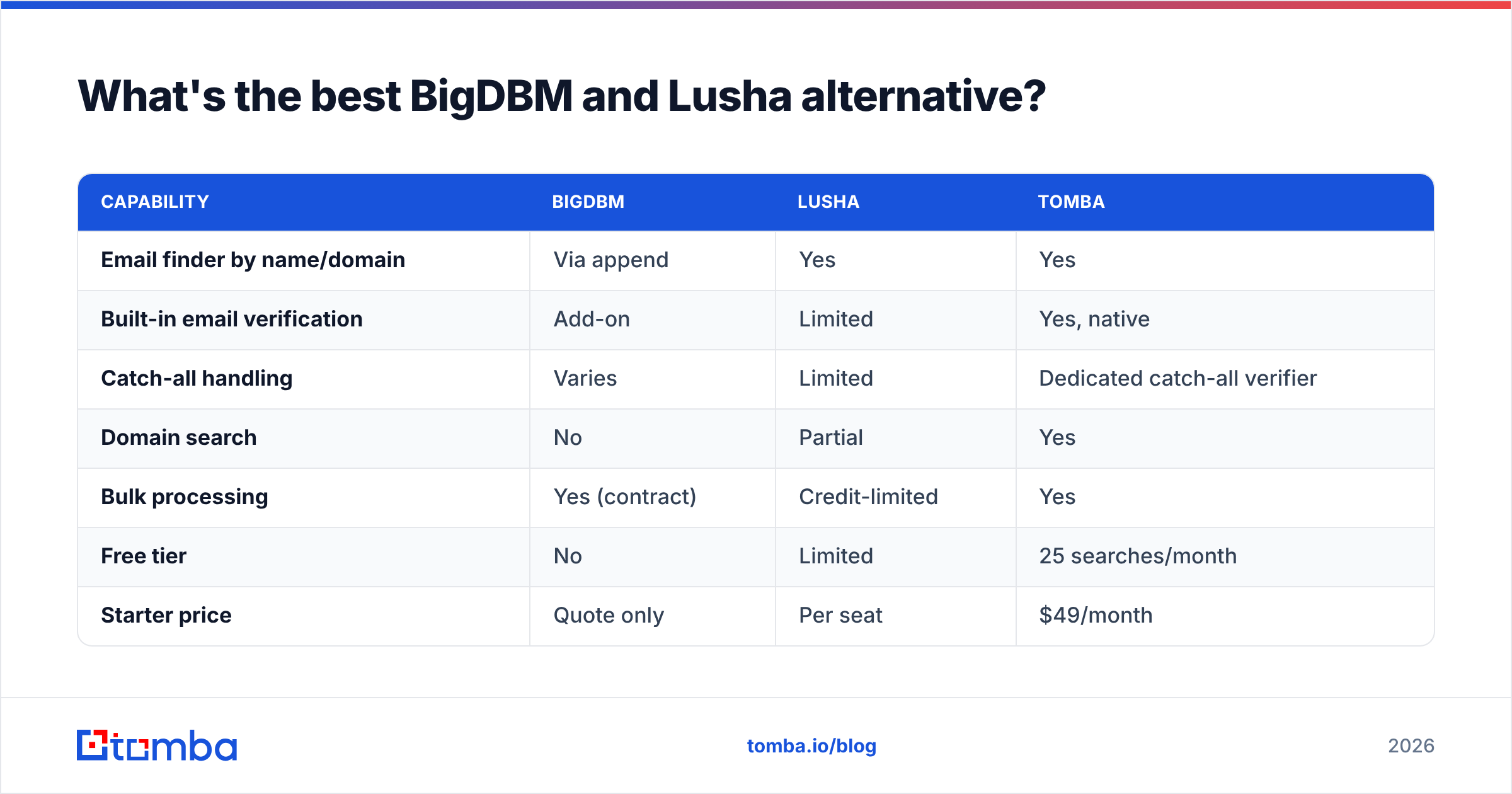
For the find-and-verify core, Tomba is the lean alternative that competes with both on the part that matters. It is purpose-built around getting you accurate, deliverable contacts without the overhead.
| Capability | BigDBM | Lusha | Tomba |
|---|---|---|---|
| Email finder by name/domain | Via append | Yes | Yes |
| Built-in email verification | Add-on | Limited | Yes, native |
| Catch-all handling | Varies | Limited | Dedicated catch-all verifier |
| Domain search | No | Partial | Yes |
| Bulk processing | Yes (contract) | Credit-limited | Yes |
| Free tier | No | Limited | 25 searches/month |
| Starter price | Quote only | Per seat | $49/month |
| API access | Yes | Higher tiers | Yes, all-tier |
Where Tomba lines up against this comparison:
- Email finding without a contract. Use domain search to pull every reachable contact at a company, or find a single person by name and domain — no quote call, no minimums.
- Verification built in, not bolted on. Every result can run through verification, and the catch-all verifier handles the domains that quietly wreck bounce rates.
- Enrichment when you need more than an email. Layer in data enrichment for firmographics and additional fields without switching to a separate identity-graph vendor.
- Predictable, team-friendly pricing. Shared credits and flat tiers instead of per-seat math or custom contracts.
The honest framing: if you genuinely need billions of B2C records and cross-device identity resolution, BigDBM does something Tomba doesn't try to. If you love the LinkedIn-click motion and run light volume, Lusha is convenient. But if your job is to reliably find and verify B2B emails for a team, paying for either of those is usually paying for surface area you never touch.
Frequently asked questions#
Is BigDBM the same kind of tool as Lusha? No. BigDBM is a bulk data provider and identity-resolution platform sold through custom contracts. Lusha is a self-serve, seat-based prospecting tool with a browser extension. They overlap only loosely — on "we have B2B contact data."
Does Lusha have a free plan? Lusha offers limited free credits to start, but active prospecting hits the monthly credit ceiling quickly, which pushes you toward paid seats or top-ups.
Can I get BigDBM pricing without talking to sales? Generally no. BigDBM quotes volume-based deals scoped to your data types and use case, so expect a sales conversation and minimums.
What's the cheapest way to find and verify B2B emails? A dedicated email finder with built-in verification. Tomba starts free at 25 searches/month and $49/month after, with verification included rather than sold as an add-on.
The bottom line#
BigDBM and Lusha solve different problems: one is wholesale data and identity matching for data teams, the other is click-to-grab prospecting for individual reps. Pick BigDBM for large-scale audience and append work, Lusha for low-volume browser-based prospecting — and don't pay for either if what you really do all day is find verified business emails.
If that last sentence describes your team, start with the Tomba Email Finder. Find contacts by name, company, or domain, verify them before you send, and keep the whole thing on predictable pricing your finance team won't flinch at. Try the free tier first, then scale only the part you actually use.
// get started
Find, verify and enrich your first contacts today
Start on the free plan with 25 searches a month, then scale when your team is ready.
Free plan · No credit card required · GDPR & CCPA
// about the author