Bigin vs HubSpot 2026: Which CRM Fits Your Sales Team?
Bigin vs HubSpot, compared head-to-head for 2026: pricing, pipelines, automation, and which CRM actually fits a small B2B sales team without overpaying.
Choosing between Bigin and HubSpot is really a choice about how much CRM you actually need. Bigin by Zoho is a deliberately small, pipeline-first tool built for teams that want to close deals without a six-week onboarding. HubSpot is a sprawling platform that can run your entire go-to-market motion — and price like it. This guide breaks down where each one wins so you stop guessing.
TL;DR#
- Bigin is the better fit if you're a 1–10 person sales team that wants a cheap, fast, pipeline-focused CRM with mobile-first design. Plans start around $7–12/user/month.
- HubSpot wins if you need marketing, service, and sales in one system, deep automation, and reporting that scales — but costs climb fast once you leave the free tier.
- Free tiers differ wildly: HubSpot's free CRM is genuinely usable for small teams; Bigin's free plan caps you at a single pipeline and one user.
- Both are only as good as the data you feed them. Neither finds or verifies contacts for you — that's a separate job a tool like Tomba handles before records ever reach your CRM.
- Pick Bigin for simplicity and price, HubSpot for breadth and growth headroom.
What is Bigin by Zoho?#
Bigin is Zoho's lightweight CRM aimed squarely at small businesses that found full Zoho CRM (or Salesforce, or HubSpot) too heavy. Think of it like a smartphone instead of a desktop workstation: it does the 80% of CRM work most small teams actually do — track deals through a pipeline, log calls and emails, set follow-up tasks — and it does it on a screen you can run from your phone.
The core unit in Bigin is the pipeline. You build stages, drag deals across them, and attach activities. "Team Pipelines" let you run separate workflows for sales, onboarding, and renewals without bolting on extra modules. It's opinionated, it's cheap, and it's fast to set up — most teams are live in an afternoon.
What is HubSpot CRM?#
HubSpot is a full customer platform built around a free CRM core, with paid "Hubs" for Marketing, Sales, Service, Content, and Operations. The free CRM alone gives you contact management, deal pipelines, email tracking, and basic reporting for unlimited users — which is why so many startups begin there.
The catch is that HubSpot's real power lives in the paid tiers. Workflow automation, custom reporting, sequences, and advanced permissions all sit behind Starter, Professional, and Enterprise plans that scale by seats and contact volume. HubSpot is less a CRM and more an operating system for revenue — powerful, but you pay for the surface area.

Bigin vs HubSpot: how do they compare?#
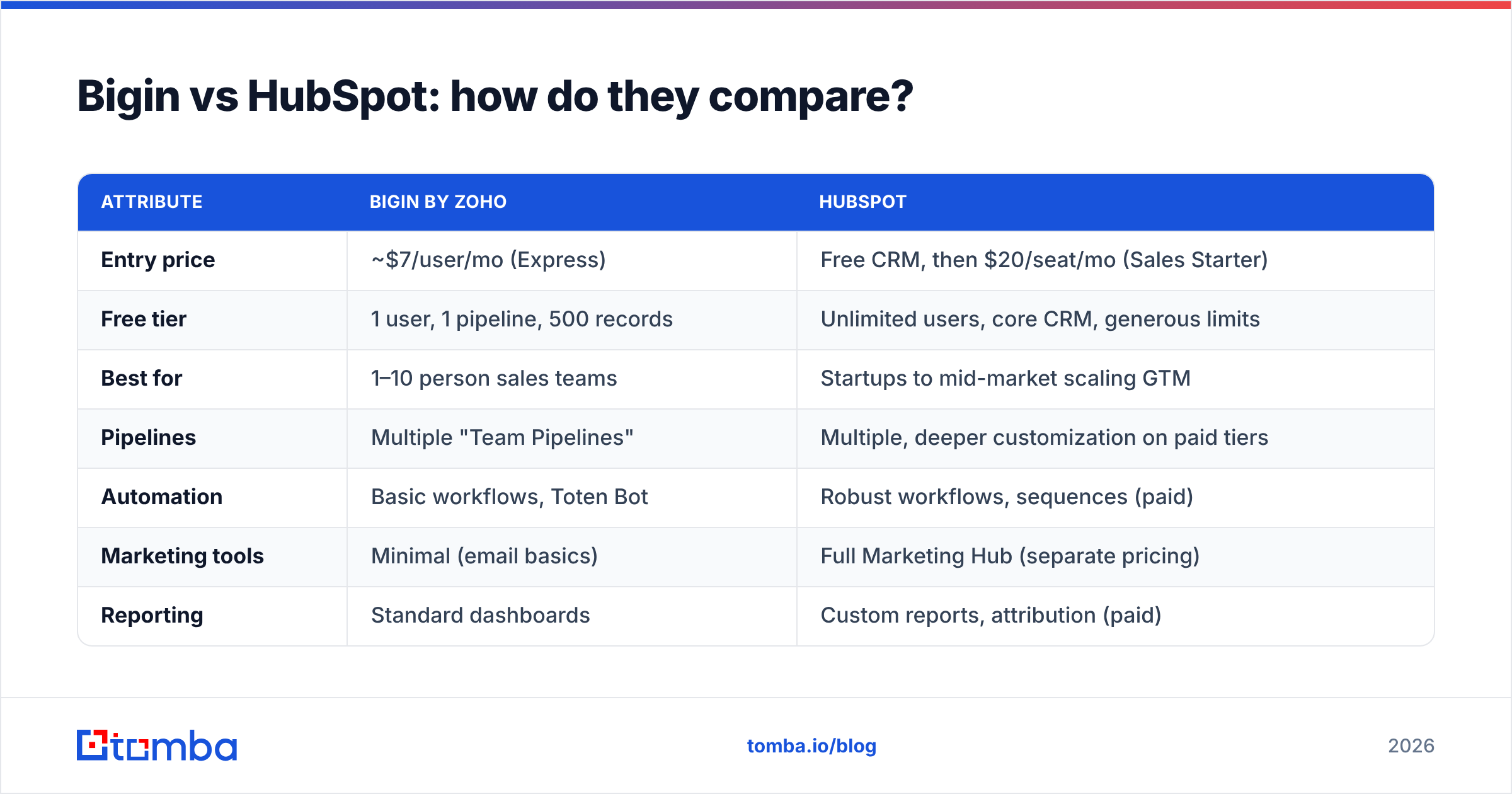
Here's the head-to-head on the attributes that decide most purchases. Prices reflect publicly listed 2026 plans and are billed annually unless noted.
| Attribute | Bigin by Zoho | HubSpot |
|---|---|---|
| Entry price | ~$7/user/mo (Express) | Free CRM, then $20/seat/mo (Sales Starter) |
| Free tier | 1 user, 1 pipeline, 500 records | Unlimited users, core CRM, generous limits |
| Best for | 1–10 person sales teams | Startups to mid-market scaling GTM |
| Pipelines | Multiple "Team Pipelines" | Multiple, deeper customization on paid tiers |
| Automation | Basic workflows, Toten Bot | Robust workflows, sequences (paid) |
| Marketing tools | Minimal (email basics) | Full Marketing Hub (separate pricing) |
| Reporting | Standard dashboards | Custom reports, attribution (paid) |
| Mobile app | Excellent, mobile-first | Solid, desktop-first design |
| Learning curve | Hours | Days to weeks |
The pattern is clear: Bigin optimizes for "get a small team selling today at a low price," while HubSpot optimizes for "one platform that grows with you, if you can fund it."
Which one is cheaper as you grow?#
Bigin stays cheap; HubSpot stays cheap only until you need the good features. That's the honest summary.
A five-person team on Bigin's mid-tier plan lands in the low hundreds per month, all-in. The same team on HubSpot's free CRM also costs nothing — until you want automation or sequences, at which point Sales Hub Professional jumps to roughly $90+/seat/month, and Marketing Hub Professional adds another large line item priced by contact tier. Many teams underestimate this and feel a sharp jump around month three.
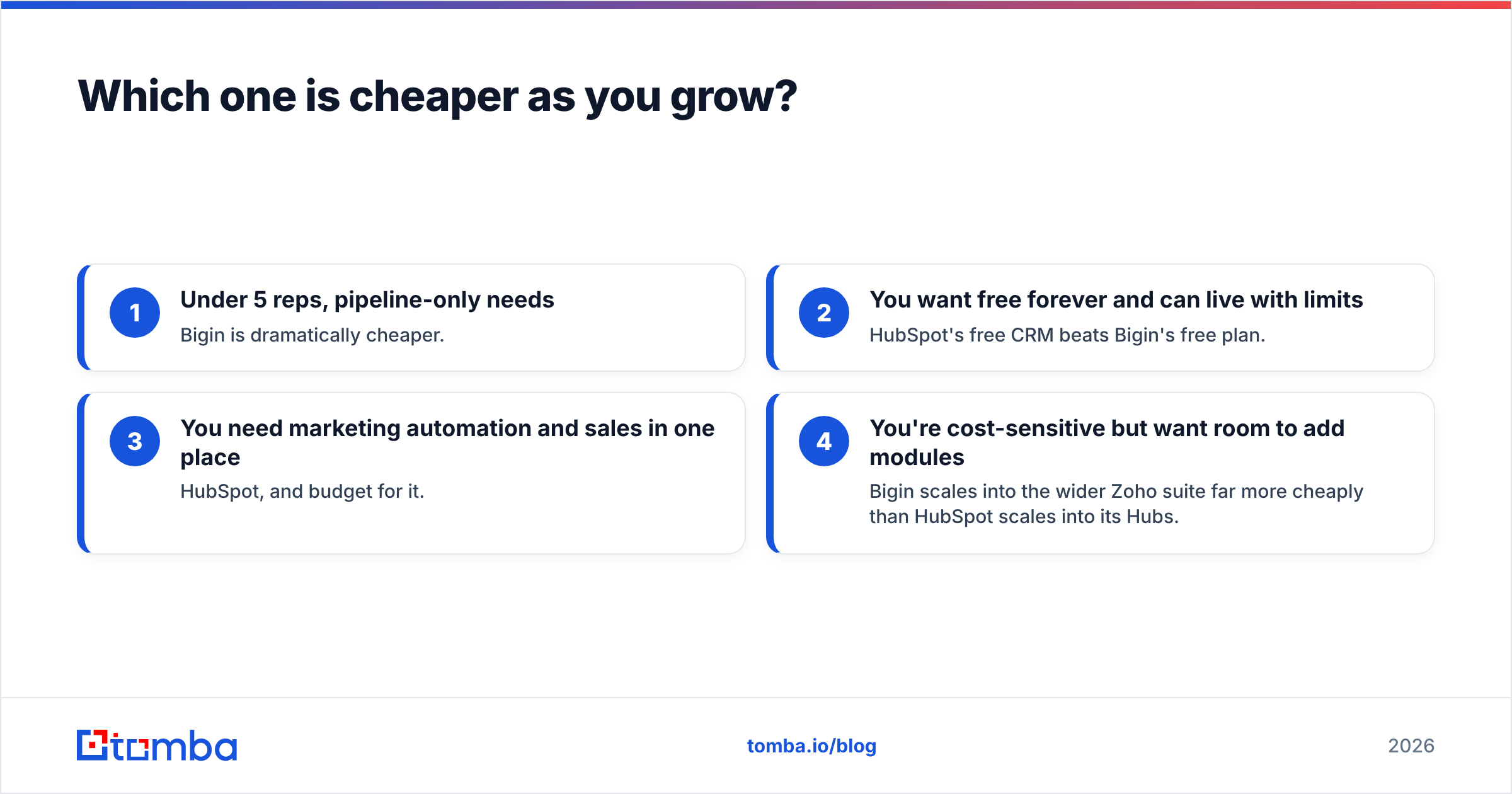
A useful rule of thumb:
- Under 5 reps, pipeline-only needs — Bigin is dramatically cheaper.
- You want free forever and can live with limits — HubSpot's free CRM beats Bigin's free plan.
- You need marketing automation and sales in one place — HubSpot, and budget for it.
- You're cost-sensitive but want room to add modules — Bigin scales into the wider Zoho suite far more cheaply than HubSpot scales into its Hubs.
For a sense of how teams structure tool budgets across the stack, our breakdown of Tomba pricing shows how a lead-data line item compares to a CRM seat — the two are separate spends, and conflating them is how budgets blow up.
/blog/generated/memes/2026-06-19/bigin-vs-hubspot-meme-2.png
Is Bigin better than HubSpot for small teams?#
For most teams under ten people doing straightforward B2B sales, yes — Bigin is the better tool, not just the cheaper one. The reason is focus. HubSpot's free tier tempts you with breadth you won't use, and the moment you need real automation you're funneled into pricing built for scaling companies. Bigin gives a small team exactly the pipeline, activity tracking, and mobile access they need, with none of the configuration tax.
But "better for small teams" flips fast. The day you add a marketing function, hire an ops person who wants attribution reporting, or need to manage thousands of contacts with branching workflows, Bigin's simplicity becomes a ceiling. HubSpot is built to absorb that growth. So the real question isn't which is better — it's which problem you have right now.
A practical tell: if you can describe your CRM need in one sentence ("track deals and remind me to follow up"), buy Bigin. If your need has commas and "and also" in it, look at HubSpot.
What about data quality? (the part both tools skip)#
Neither Bigin nor HubSpot solves your biggest CRM problem: the contacts inside it. A CRM is a filing cabinet — it stores and moves records, but it doesn't find prospects, verify that an email is deliverable, or enrich a thin lead into a full profile. Garbage in, garbage pipeline.
This is where a dedicated data layer sits in front of whichever CRM you pick. Before a contact ever becomes a Bigin deal or a HubSpot record, you want to:
- Find the right email — use an email finder to get verified work addresses by name and domain instead of guessing.
- Verify deliverability — run addresses through an email verifier so bounces don't wreck your sender reputation.
- Enrich the record — add title, company, and social data with contact enrichment so reps aren't researching from scratch.
- Push clean data in — connect through the HubSpot integration or Zapier so verified contacts flow straight into the pipeline.
/blog/generated/memes/2026-06-19/bigin-vs-hubspot-meme-1.png
Do this and both CRMs perform better, because the limiting factor was never the software — it was the inputs. A pristine HubSpot full of unverified emails still produces a 20% bounce rate.
Where does each CRM win on features?#
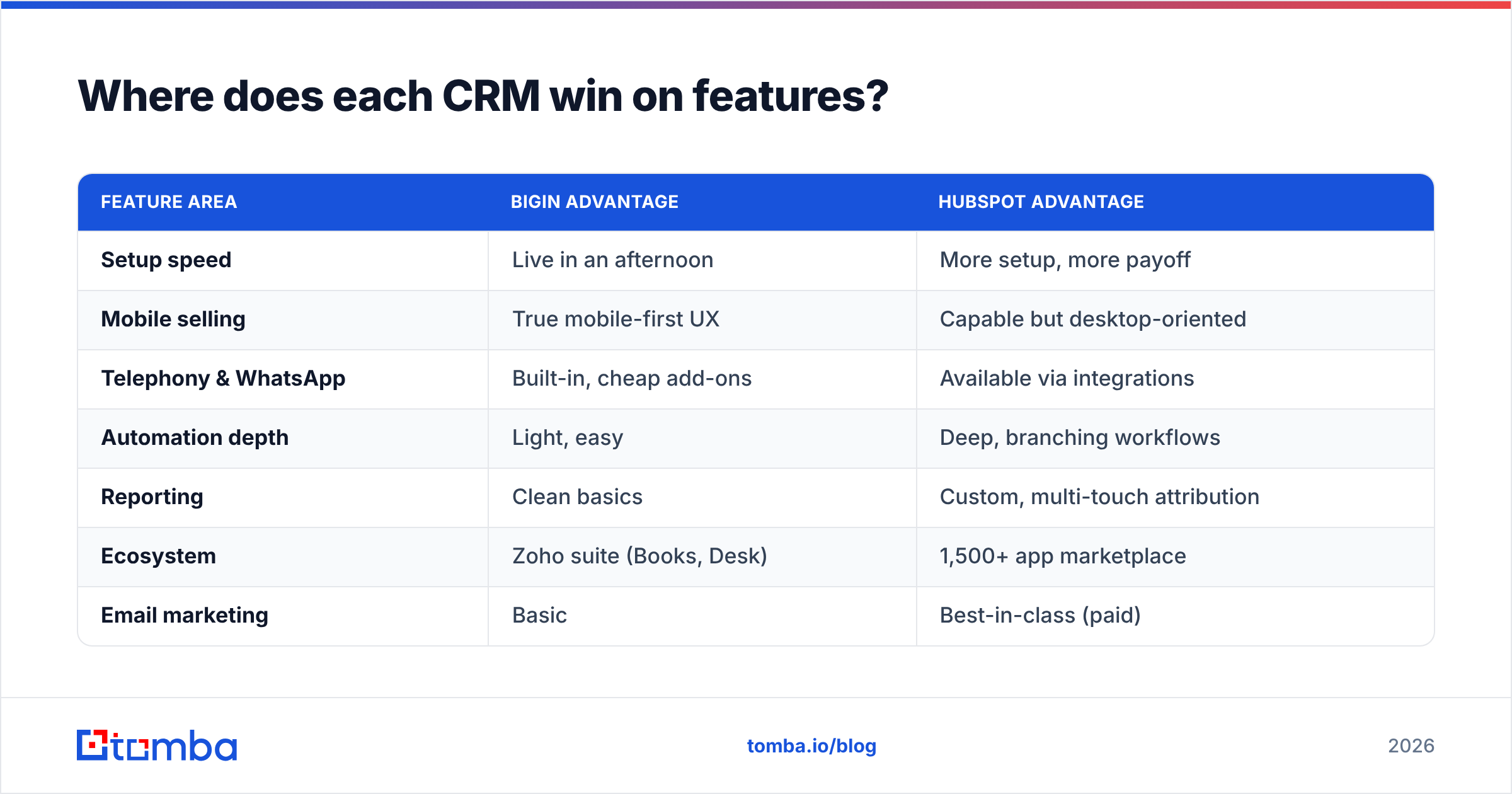
Beyond price and size, the feature philosophies diverge in ways worth naming:
| Feature area | Bigin advantage | HubSpot advantage |
|---|---|---|
| Setup speed | Live in an afternoon | More setup, more payoff |
| Mobile selling | True mobile-first UX | Capable but desktop-oriented |
| Telephony & WhatsApp | Built-in, cheap add-ons | Available via integrations |
| Automation depth | Light, easy | Deep, branching workflows |
| Reporting | Clean basics | Custom, multi-touch attribution |
| Ecosystem | Zoho suite (Books, Desk) | 1,500+ app marketplace |
| Email marketing | Basic | Best-in-class (paid) |
Bigin's quiet strength is the broader Zoho ecosystem — if you already use Zoho Books or Desk, the data flows naturally and cheaply. HubSpot's strength is its marketplace and the fact that sales, marketing, and service share one contact timeline, which removes a class of hand-off problems entirely.
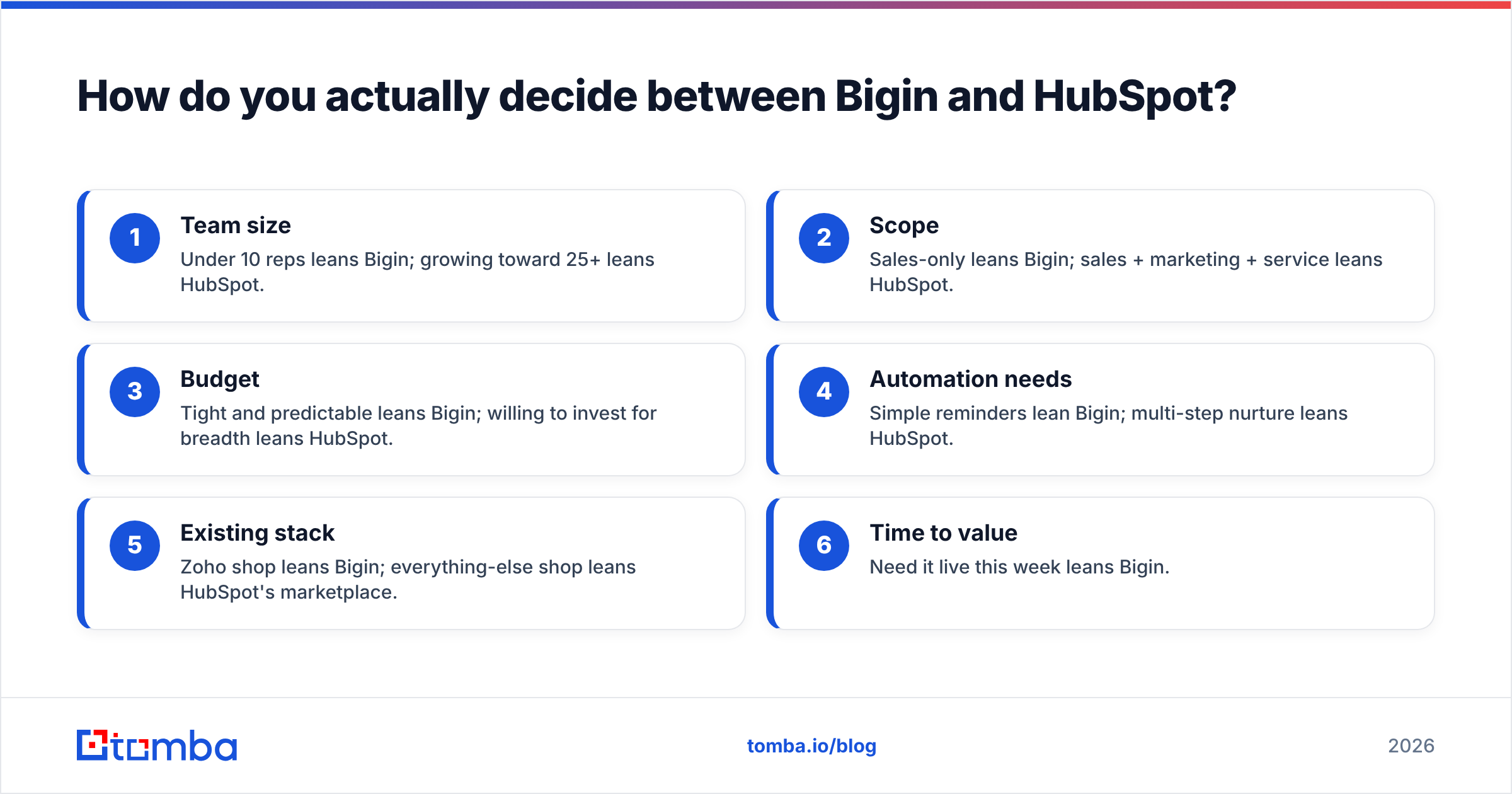
How do you actually decide between Bigin and HubSpot?#
Run this short checklist and let it pick for you:
- Team size — Under 10 reps leans Bigin; growing toward 25+ leans HubSpot.
- Scope — Sales-only leans Bigin; sales + marketing + service leans HubSpot.
- Budget — Tight and predictable leans Bigin; willing to invest for breadth leans HubSpot.
- Automation needs — Simple reminders lean Bigin; multi-step nurture leans HubSpot.
- Existing stack — Zoho shop leans Bigin; everything-else shop leans HubSpot's marketplace.
- Time to value — Need it live this week leans Bigin.
Most score 4+ in one column. If you land split down the middle, start on Bigin (you'll lose little by trying it cheaply) and migrate to HubSpot only when a real automation or marketing need forces the move. Migrating up is easier than walking back an overbought platform.
You can sanity-check either tool against verified peer reviews on G2 and dig into official capabilities on the Bigin and HubSpot sites before committing — vendor docs change, and you want current limits, not a blog's snapshot.
Common mistakes when picking between them#
- Buying HubSpot for features you'll "grow into." You pay now for value later — and most teams never reach it. Buy for the next 12 months, not the next five years.
- Treating Bigin's free plan as a real trial. One user and one pipeline isn't enough to evaluate team workflows; pay for a month of Express instead.
- Ignoring data hygiene. Both CRMs will happily store dead emails. Pair either with a verification step using a bulk email finder before import.
- Underpricing migration. Moving data, retraining reps, and rebuilding reports has a real cost. Factor it on both sides.
The bottom line#
Bigin vs HubSpot comes down to focus versus breadth. Bigin is the sharp, affordable pipeline CRM for small B2B teams that want to sell today without a platform project. HubSpot is the growth engine for teams that need marketing, service, and sales unified and can fund the climb. There's no universal winner — only the right fit for your team size, scope, and budget this year.
Whichever you choose, the CRM is the back half of the job. The front half is getting accurate, verified contacts into it in the first place — and that's a separate, specialized task. Start free with the Tomba Email Finder to find and verify professional emails by name or domain, then sync them straight into Bigin or HubSpot. Clean data in, real pipeline out — no matter which CRM wins your evaluation.
// get started
Find, verify and enrich your first contacts today
Start on the free plan with 25 searches a month, then scale when your team is ready.
Free plan · No credit card required · GDPR & CCPA
// about the author