Bigin vs Zoho CRM 2026: Which CRM Should You Pick?
Bigin vs Zoho CRM compared on pricing, features, automation, and scale. See which Zoho product fits a small sales team versus a growing revenue org in 2026.
Both products come from the same company, yet they solve very different problems. Picking the wrong one means either paying for power you never touch or hitting a ceiling six months after onboarding. This breakdown of Bigin vs Zoho CRM is built to help you choose the right tool the first time.
TL;DR — Bigin vs Zoho CRM at a glance#
- Bigin is Zoho's lightweight, pipeline-first CRM built for small teams and solopreneurs who want to manage deals without a learning curve. It starts free and tops out around $18/user/mo.
- Zoho CRM is the full-stack platform: multi-module data, deep automation, analytics, AI (Zia), and sprawling customization. It scales to large sales orgs but costs more and demands more setup.
- Choose Bigin if you live in pipelines, have under ~10 reps, and value speed over flexibility.
- Choose Zoho CRM if you need workflows, custom modules, forecasting, and territory management — and you have someone to administer it.
- Neither tool finds or verifies contact data for you. Whichever you pick, you still need a clean source of emails and phone numbers to feed it.
What is Bigin and who is it for?#
Bigin is Zoho's answer to "CRMs are too complicated." It strips the platform down to a pipeline-centric view: deals move through stages you can rearrange by drag-and-drop, and the whole thing is usable within an afternoon.
The target user is a small business owner, a freelancer, or a sales team of two to ten people who graduated from spreadsheets and want structure without an implementation project. Bigin keeps the surface area small on purpose — contacts, companies, deals, activities, and a handful of automations called "workflows." That constraint is the feature. You don't get lost in modules you'll never use.
Where Bigin shines:
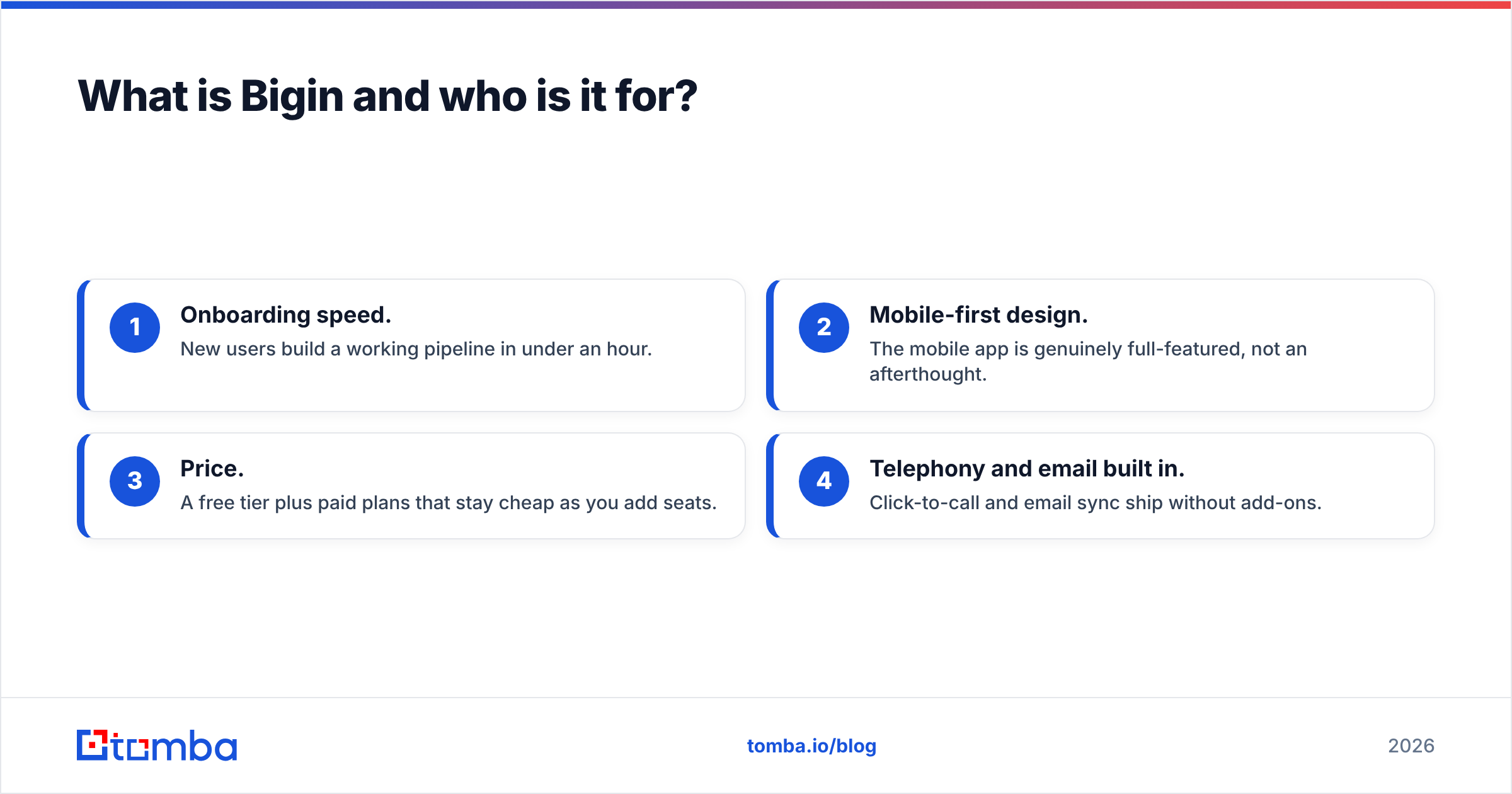
- Onboarding speed. New users build a working pipeline in under an hour.
- Mobile-first design. The mobile app is genuinely full-featured, not an afterthought.
- Price. A free tier plus paid plans that stay cheap as you add seats.
- Telephony and email built in. Click-to-call and email sync ship without add-ons.
Where it runs out of room: limited custom modules, shallow reporting, and automation that caps out fast once your process gets complex.

What is Zoho CRM and who is it for?#
Zoho CRM is the heavyweight. It's a configurable platform that models almost any sales process: custom modules, multi-step blueprints, workflow rules, scoring rules, territory management, and Zia, Zoho's AI assistant that handles lead scoring, anomaly detection, and predictions.
The target user is a growing or established sales organization — think 10 to 500+ reps — that needs the CRM to enforce process, integrate with marketing and support, and produce forecasting leadership trusts. You can read the full feature scope on the official Zoho CRM page.
Zoho CRM's strengths are also its costs. The flexibility that lets you build exactly the system you want also means you have to build it. Most teams that succeed with Zoho CRM have an admin (internal or a partner) who owns configuration. Drop a five-person team into Zoho CRM with no admin and they'll use 15% of it while paying for 100%.
Bigin vs Zoho CRM: how do the plans and prices compare?#
Here's the core comparison. Prices are per user, per month, billed annually, and reflect 2026 published rates — always confirm on the vendor site before buying.
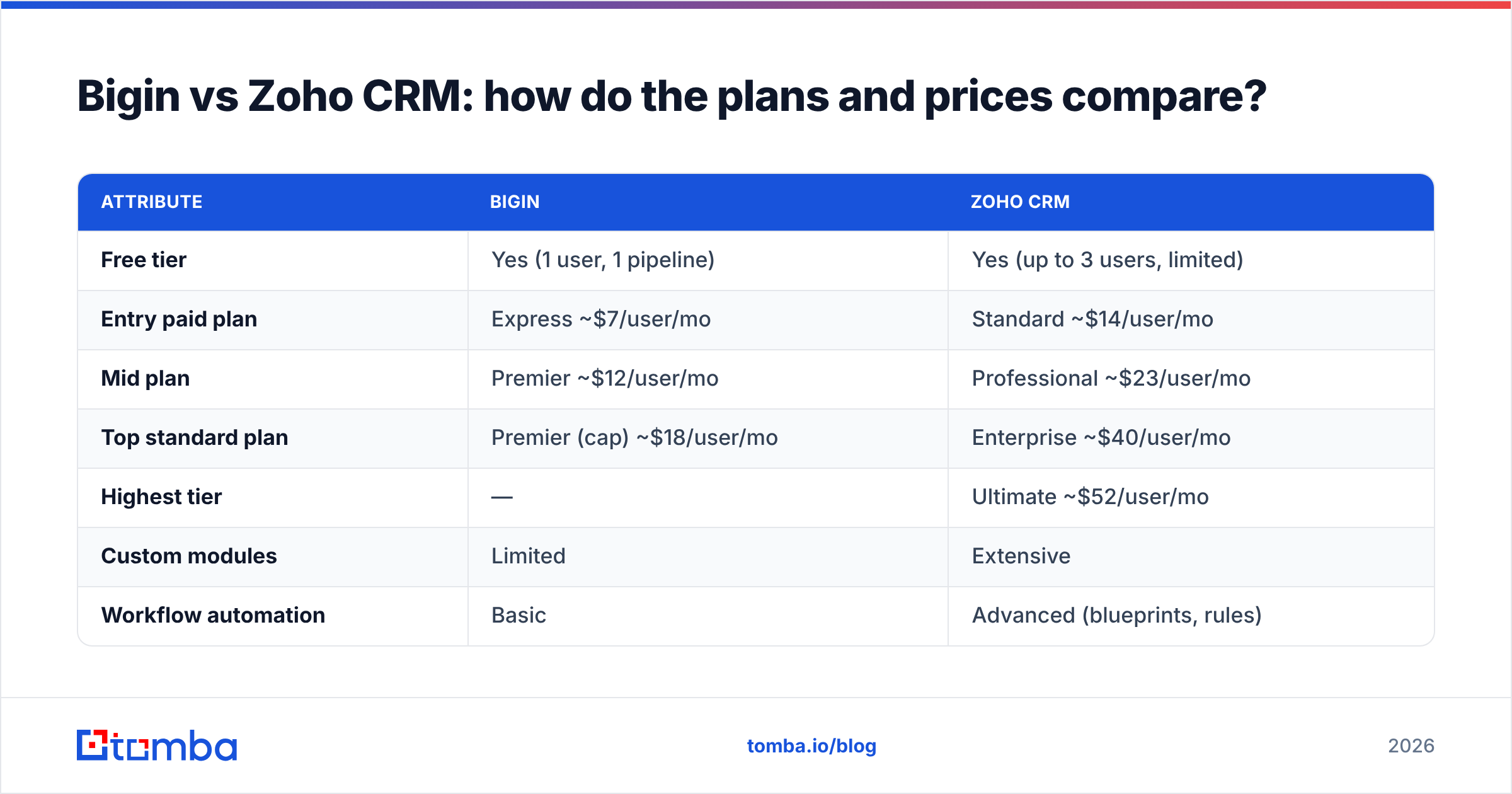
| Attribute | Bigin | Zoho CRM |
|---|---|---|
| Free tier | Yes (1 user, 1 pipeline) | Yes (up to 3 users, limited) |
| Entry paid plan | Express ~$7/user/mo | Standard ~$14/user/mo |
| Mid plan | Premier ~$12/user/mo | Professional ~$23/user/mo |
| Top standard plan | Premier (cap) ~$18/user/mo | Enterprise ~$40/user/mo |
| Highest tier | — | Ultimate ~$52/user/mo |
| Custom modules | Limited | Extensive |
| Workflow automation | Basic | Advanced (blueprints, rules) |
| AI assistant (Zia) | No | Yes (Enterprise+) |
| Best team size | 1–10 | 10–500+ |
| Setup effort | Hours | Days to weeks |
The pattern is clear: Bigin is cheaper at every comparable rung and far simpler, while Zoho CRM buys you depth you pay for in both money and configuration time.
Which one has better automation and customization?#
Zoho CRM wins decisively, and it isn't close.
Think of it like transportation. Bigin is a reliable commuter car — it gets your deals from A to B with no fuss. Zoho CRM is a truck with a modular trailer system: it hauls far more, but you have to assemble the trailer for your specific load.
Bigin's automation covers the essentials: trigger an email when a deal hits a stage, assign records, send notifications, update fields. For a linear sales motion that's enough. Once you need branching logic, approval steps, multi-module updates, or process enforcement that blocks reps from skipping stages, Bigin can't express it.
Zoho CRM's Blueprint feature models your sales process as a state machine — reps can only move a deal forward by completing the required actions at each stage. Add workflow rules, scoring rules, custom functions (Deluge scripting), and webhooks, and you can automate genuinely complex revenue operations. If you're standardizing a process across dozens of reps, this matters. If you're a four-person shop, it's overkill.
Bigin vs Zoho CRM: reporting, analytics, and AI#
Reporting is the other clear dividing line.
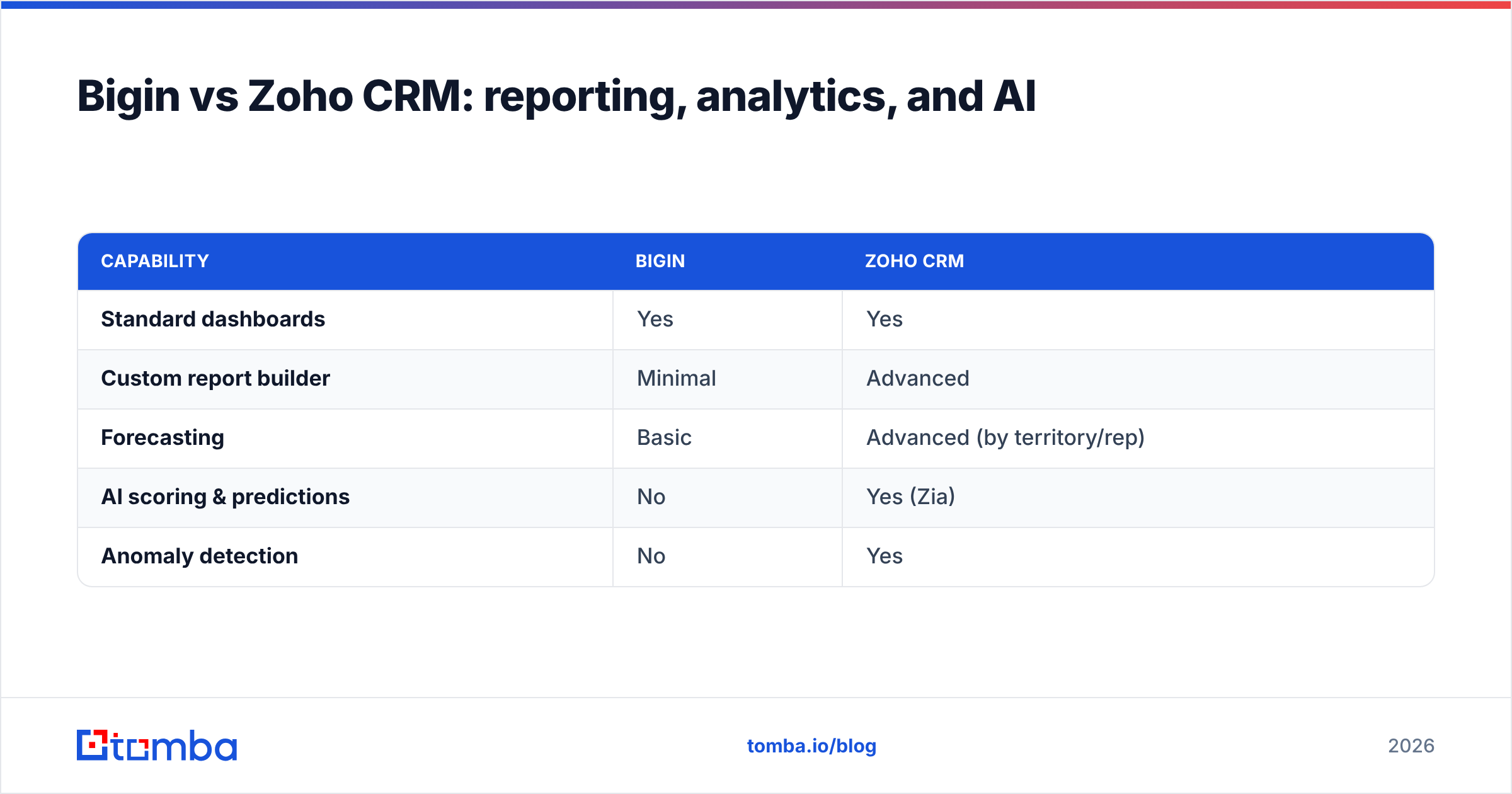
Bigin gives you dashboards covering pipeline value, conversion, and activity — useful at a glance, but you won't build a board-ready forecast in it. There's no custom report builder of any depth and no AI layer.
Zoho CRM ships a full analytics suite: custom reports, cohort and funnel analysis, quadrant and anomaly detectors, and Zia for predictive lead and deal scoring. For leaders who measure win rate, forecast by territory, and want the CRM to surface which deals are slipping, Zoho CRM is in a different category.
| Capability | Bigin | Zoho CRM |
|---|---|---|
| Standard dashboards | Yes | Yes |
| Custom report builder | Minimal | Advanced |
| Forecasting | Basic | Advanced (by territory/rep) |
| AI scoring & predictions | No | Yes (Zia) |
| Anomaly detection | No | Yes |
When should you pick Bigin over Zoho CRM?#
Pick Bigin when most of these are true:
- Your team is under ten people and you don't have a dedicated CRM admin.
- Your sales process is mostly linear — leads come in, you work them through stages, they close or die.
- You want to be productive this week, not after a six-week rollout.
- Budget sensitivity is real and you'd rather not pay for unused modules.
- Mobile usage is heavy (field sales, founders selling on the go).
Bigin is the rational default for a small team that's outgrowing spreadsheets. The mistake people make is assuming "more powerful" means "better for me." For a five-person team, Zoho CRM's power is a tax, not a benefit.
When should you pick Zoho CRM over Bigin?#
Pick Zoho CRM when:
- You're scaling past ten reps or already there.
- Your process needs enforcement — stages, approvals, handoffs between SDR and AE.
- You need custom modules to model your business (e.g., subscriptions, assets, projects).
- Forecasting and analytics drive leadership decisions.
- You want one platform spanning sales, marketing, and support (the broader Zoho ecosystem).
- You have someone who will own administration.
If you anticipate hitting these needs within a year, starting on Zoho CRM can be cheaper than migrating off Bigin later. Migration is never free — you'll rebuild automations, re-map fields, and retrain the team. Read independent user reviews on a platform like G2 before committing, since admin overhead is the most common complaint.
Can you migrate from Bigin to Zoho CRM later?#
Yes — and Zoho designed it that way. Because both products share the same company and data philosophy, Zoho provides a direct upgrade path from Bigin to Zoho CRM. Your contacts, companies, deals, and activities carry over.
The catch is everything around the data. Automations don't translate one-to-one, because Zoho CRM's automation model is more expressive than Bigin's. You'll rebuild workflows, and you'll likely redesign your pipeline to take advantage of features Bigin never had. Plan for a configuration project, not a one-click import. Compare the two products directly on the Zoho Bigin site before you decide which to start on.
What both tools can't do — and why it matters#
Here's the part most comparisons skip: neither Bigin nor Zoho CRM fills your pipeline with contacts. A CRM organizes the relationships you already have. It does not find the decision-maker's email at a target account, verify that the address still works, or enrich a thin lead record into something a rep can act on.
That gap is where deals quietly die. A pristine Zoho CRM blueprint is worthless if the records flowing into it are guesses scraped off a website. Bounced emails wreck your sender reputation, and stale data makes even the best automation fire into the void.
This is the workflow that actually produces revenue:
- Source the contact. Use an email finder to get a verified professional email by name and company domain.
- Verify before you send. Run addresses through an email verifier so your bounce rate stays low.
- Enrich the record. Layer in role, company size, and social profiles with data enrichment so reps personalize instead of guessing.
- Push clean data into your CRM — Bigin or Zoho CRM — and then let the automation do its job.
For teams building lists at volume, a bulk email finder handles whole account lists at once, then exports straight into your CRM of choice.
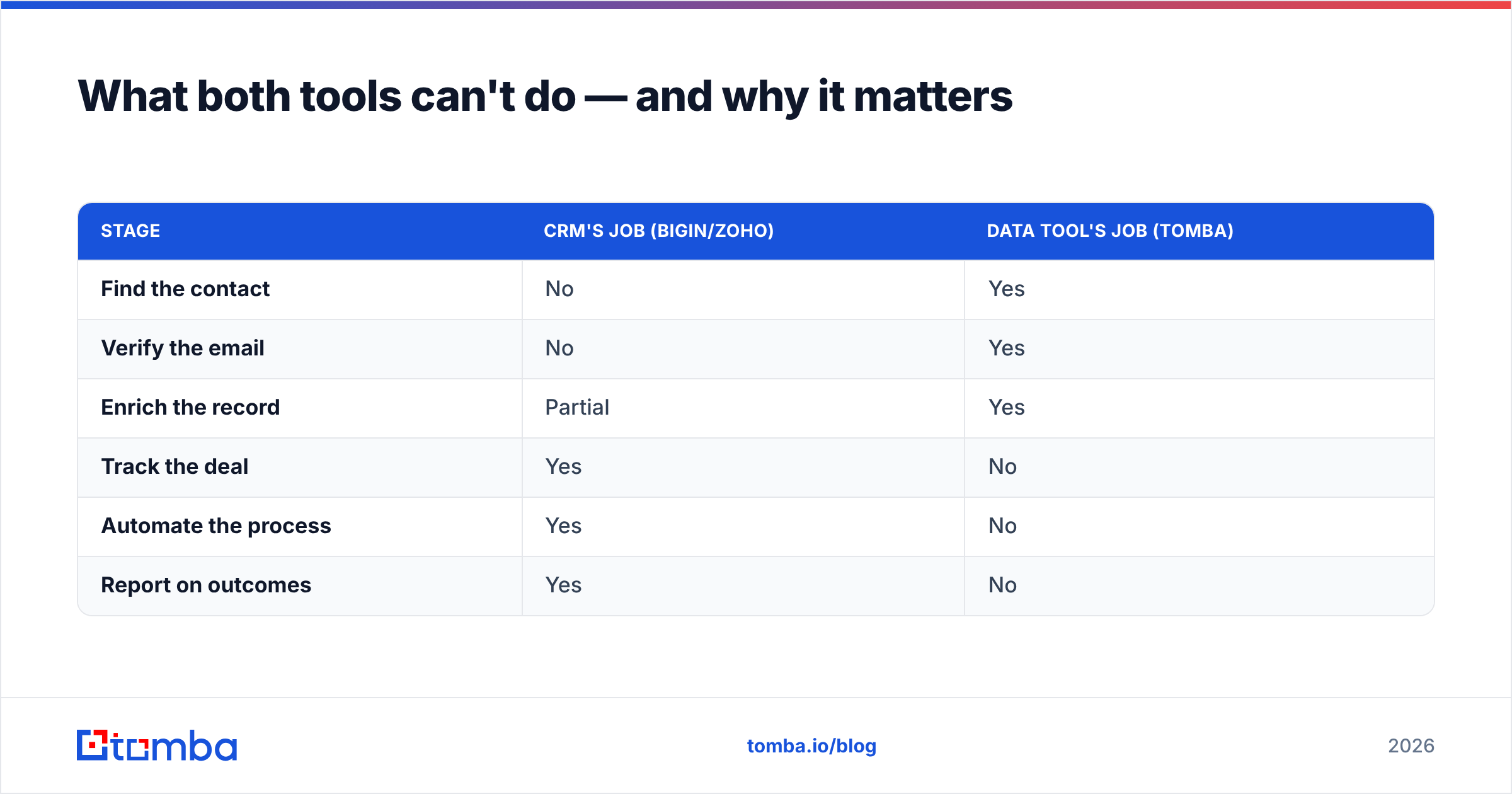
| Stage | CRM's job (Bigin/Zoho) | Data tool's job (Tomba) |
|---|---|---|
| Find the contact | No | Yes |
| Verify the email | No | Yes |
| Enrich the record | Partial | Yes |
| Track the deal | Yes | No |
| Automate the process | Yes | No |
| Report on outcomes | Yes | No |
The point isn't that one replaces the other. A CRM and a data tool are two halves of the same machine. Buy the CRM that fits your team size and process — then make sure what you pour into it is real.
The verdict: Bigin vs Zoho CRM in 2026#
Bigin is the right call for small, fast-moving teams that want a clean pipeline and zero setup pain. Zoho CRM is the right call for organizations that need process enforcement, deep automation, forecasting, and room to grow — and have the resources to administer it. They're not really competitors so much as two points on the same maturity curve, and the honest answer to "which one" is usually "where is your team headed in the next 12 months."
Whichever you choose, the CRM is only as good as the contacts inside it. Before your reps work a single deal, give them verified, enriched data to start from. Tomba's Email Finder finds and verifies professional email addresses by name, company, or domain, then exports clean records straight into Bigin or Zoho CRM — so your pipeline starts with real people, not guesses. Start free and feed your CRM data it can actually close on.
// get started
Find, verify and enrich your first contacts today
Start on the free plan with 25 searches a month, then scale when your team is ready.
Free plan · No credit card required · GDPR & CCPA
// about the author