Bitrix24 Alternatives: 9 Best CRM Platforms for 2026
Bitrix24 packs everything into one suite, but the bloat isn't for everyone. Here are 9 Bitrix24 alternatives compared on price, CRM depth, and the data that actually feeds your pipeline.
Bitrix24 Alternatives: 9 Best CRM Platforms for 2026
Bitrix24 is the Swiss Army knife of business software: CRM, project management, telephony, website builder, HR, and chat all bolted into one platform. That breadth is exactly why so many teams start looking for Bitrix24 alternatives within a year. The interface feels heavy, the learning curve is steep, and half the modules sit unused while the ones you need feel half-finished.
This guide compares nine alternatives across price, CRM depth, ease of use, and — the part most roundups ignore — how good the underlying contact data is. A CRM is only as useful as the records inside it, so we'll close on why your tool choice and your data strategy are two separate decisions.
TL;DR — The Quick Answer#
- Best all-in-one swap: Zoho CRM (or Zoho One) gives you Bitrix24's breadth with a cleaner UI and clearer pricing.
- Best for simplicity: Pipedrive — a visual pipeline you can set up in an afternoon, no module overload.
- Best for inbound + marketing: HubSpot, if you want CRM and marketing automation under one roof and can stomach the pricing tiers.
- Best free tier: Zoho and HubSpot both beat Bitrix24's free plan on usability; Bitrix24 still wins on raw seat count.
- The real bottleneck isn't the CRM — it's the data. Pair any platform with a dedicated email finder so your reps fill pipelines with verified contacts, not guesses.
Why Look for a Bitrix24 Alternative?#
Bitrix24's pitch is "everything in one place," and for a 50-person company replacing five tools, that math can work. But the common complaints are consistent across review sites like G2:
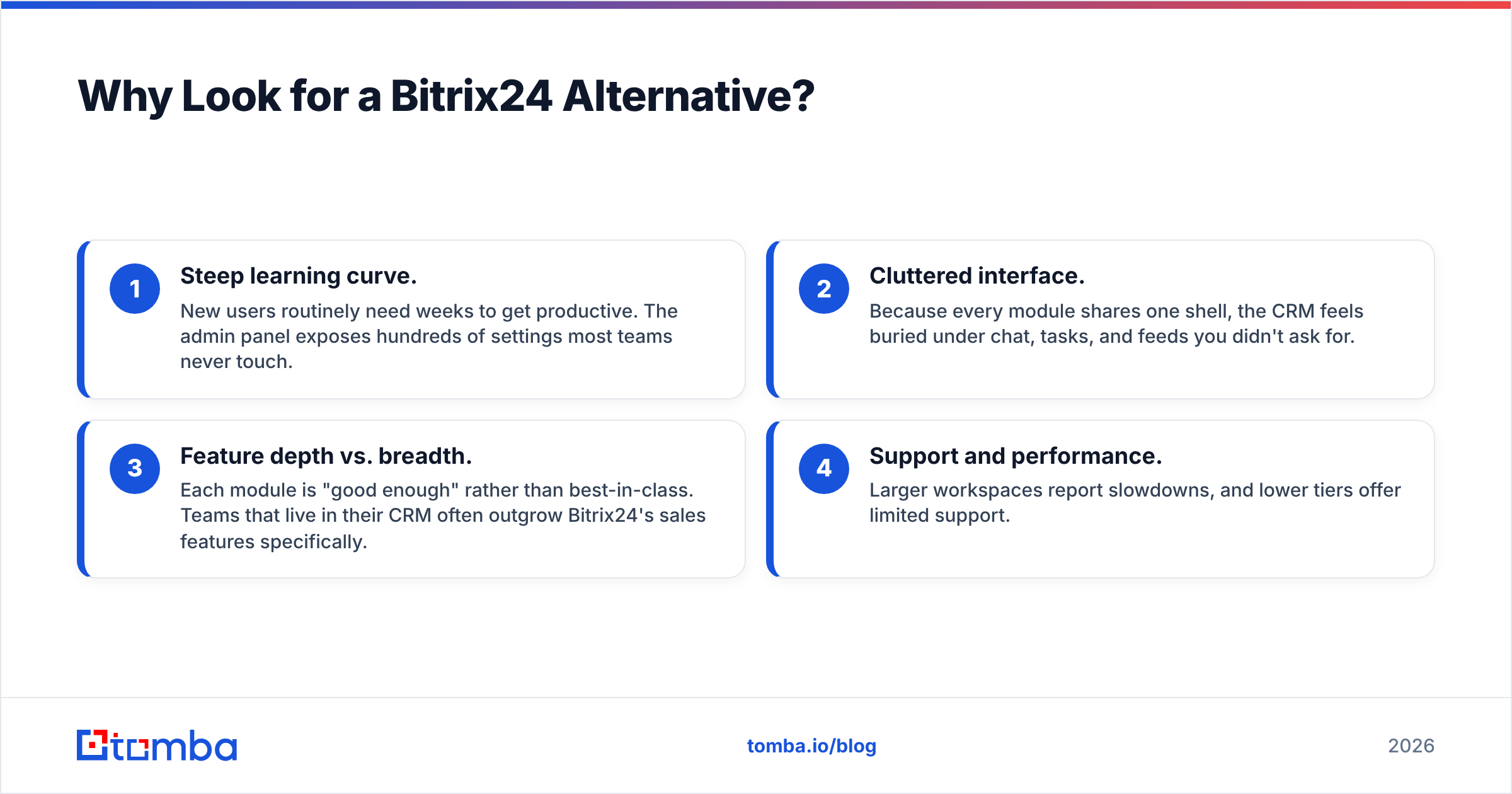
- Steep learning curve. New users routinely need weeks to get productive. The admin panel exposes hundreds of settings most teams never touch.
- Cluttered interface. Because every module shares one shell, the CRM feels buried under chat, tasks, and feeds you didn't ask for.
- Feature depth vs. breadth. Each module is "good enough" rather than best-in-class. Teams that live in their CRM often outgrow Bitrix24's sales features specifically.
- Support and performance. Larger workspaces report slowdowns, and lower tiers offer limited support.
If two or more of those hit home, a focused tool usually beats a do-everything suite.
What Are the Best Bitrix24 Alternatives in 2026?#
Here's the shortlist, grouped by what they're actually best at.
- Zoho CRM / Zoho One — closest like-for-like all-in-one, better UX, transparent pricing.
- Pipedrive — sales-first, visual pipeline, fastest to deploy.
- HubSpot — CRM plus serious marketing and service hubs; generous free CRM.
- monday CRM — flexible, board-based, great for teams that think in workflows.
- Freshsales (Freshworks) — AI-assisted CRM with built-in phone and email.
- Salesforce — enterprise ceiling, infinite customization, real cost and complexity.
- Insightly — CRM plus light project management for services businesses.
- EngageBay — budget all-in-one marketing + CRM + helpdesk.
- Capsule CRM — lightweight, clean, ideal for small teams that want less, not more.
How Do the Top Bitrix24 Alternatives Compare on Price?#
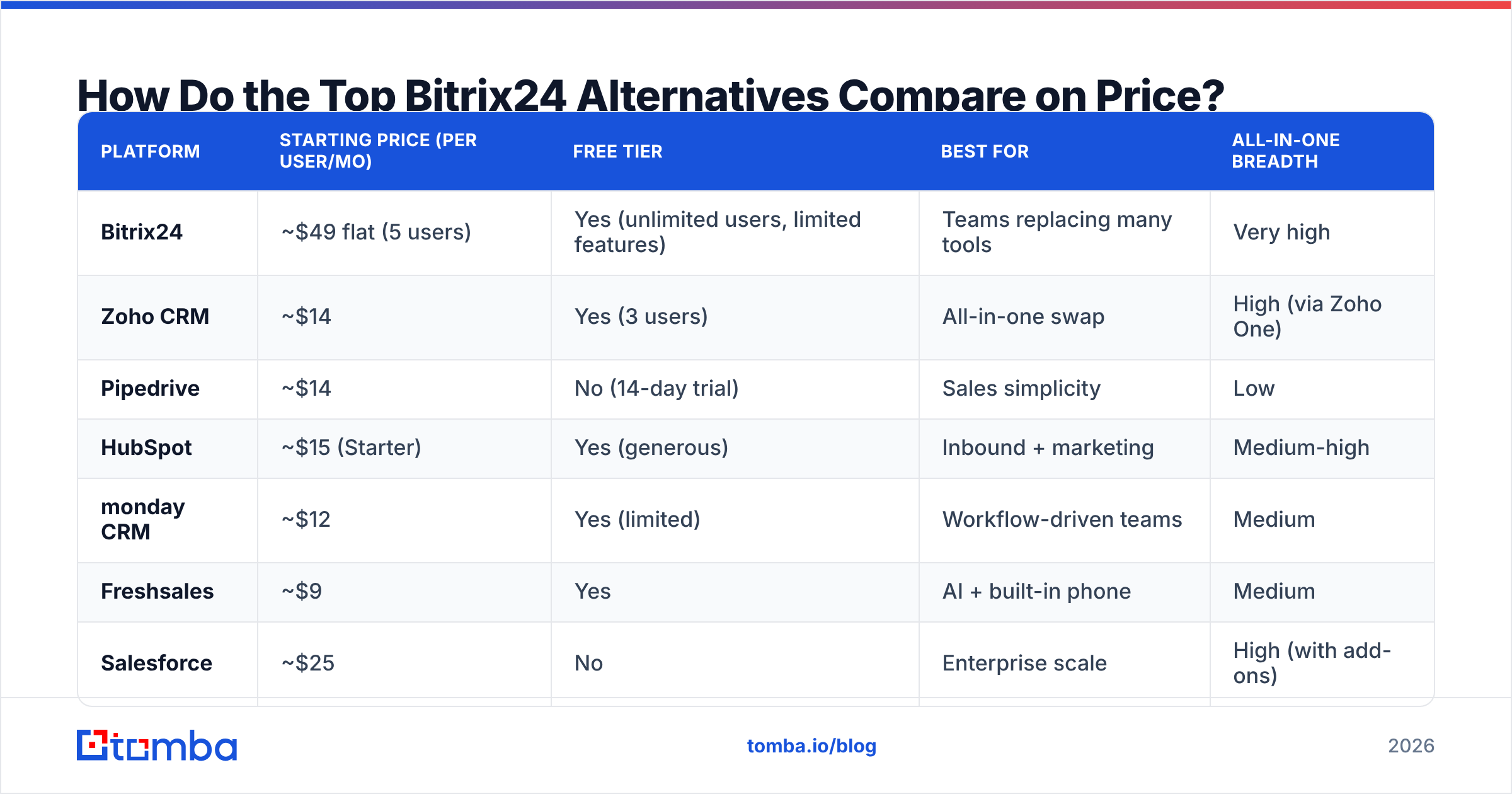
Pricing is where the differences get sharp. Bitrix24's appeal is unlimited-ish users on cheap tiers; most alternatives charge per seat but feel lighter to run. All figures are entry-level paid tiers billed annually and may shift — check each vendor before you commit.
| Platform | Starting price (per user/mo) | Free tier | Best for | All-in-one breadth |
|---|---|---|---|---|
| Bitrix24 | ~$49 flat (5 users) | Yes (unlimited users, limited features) | Teams replacing many tools | Very high |
| Zoho CRM | ~$14 | Yes (3 users) | All-in-one swap | High (via Zoho One) |
| Pipedrive | ~$14 | No (14-day trial) | Sales simplicity | Low |
| HubSpot | ~$15 (Starter) | Yes (generous) | Inbound + marketing | Medium-high |
| monday CRM | ~$12 | Yes (limited) | Workflow-driven teams | Medium |
| Freshsales | ~$9 | Yes | AI + built-in phone | Medium |
| Salesforce | ~$25 | No | Enterprise scale | High (with add-ons) |
| Capsule CRM | ~$18 | Yes (2 users) | Lightweight CRM | Low |
The takeaway: if you want Bitrix24's "one platform" feel, look at Zoho or HubSpot. If you secretly only needed the CRM, Pipedrive, Freshsales, or Capsule will feel like a weight lifted.
Is Zoho a Good Bitrix24 Alternative?#
Yes — Zoho is the closest one-to-one replacement. Zoho CRM handles pipeline, automation, and analytics, while Zoho One bundles 40+ apps (projects, desk, books, campaigns) for teams that genuinely want the all-in-one model Bitrix24 sells. The difference is polish: Zoho's modules are more independently mature, and the CRM doesn't feel buried.
Where Zoho wins over Bitrix24: cleaner UX, transparent per-app pricing, and a far better mobile experience. Where Bitrix24 still competes: its flat-rate tiers can be cheaper for very large, low-usage teams, and its built-in telephony is more turnkey out of the box.
Is Pipedrive Better Than Bitrix24 for Sales Teams?#
For pure sales execution, yes. Pipedrive strips away everything that isn't a deal moving through a pipeline. You can import contacts, build stages, and start tracking deals the same day — no module sprawl, no admin marathon. That focus is the point: reps adopt it because there's nothing to ignore.
The trade-off is breadth. Pipedrive isn't trying to be your helpdesk, intranet, or HR system. If you bought Bitrix24 for those modules, Pipedrive won't replace them. If you bought Bitrix24 and only ever used the CRM, Pipedrive is a clear upgrade in usability. Compare the broader category in our roundup of B2B sales tools before deciding.
Should You Choose HubSpot Instead of Bitrix24?#
Choose HubSpot if marketing and sales need to share one system. HubSpot's free CRM is the most usable free tier on this list, and its paid Marketing, Sales, and Service hubs are genuinely best-in-class — automation, email sequences, landing pages, and reporting that Bitrix24 can't match in depth.
The catch is cost. HubSpot's entry tiers are reasonable, but contact-based pricing and feature gating mean serious use gets expensive fast. For a deeper read on what "marketing qualified lead" handoffs look like inside these systems, the workflow matters more than the logo. HubSpot is the answer when your bottleneck is marketing-to-sales alignment, not just contact storage.
What About Enterprise and Niche Picks?#
- Salesforce is the ceiling. If you have a RevOps team and budget for admins, nothing customizes further. If you don't, it's overkill — and you'll pay for that flexibility in setup time.
- monday CRM suits teams that already think in boards and automations; it's a CRM layered on a flexible work OS.
- Freshsales is underrated for SMBs wanting AI lead scoring and a built-in dialer without HubSpot pricing.
- Insightly and EngageBay serve services firms and budget-conscious teams that still want light marketing automation.

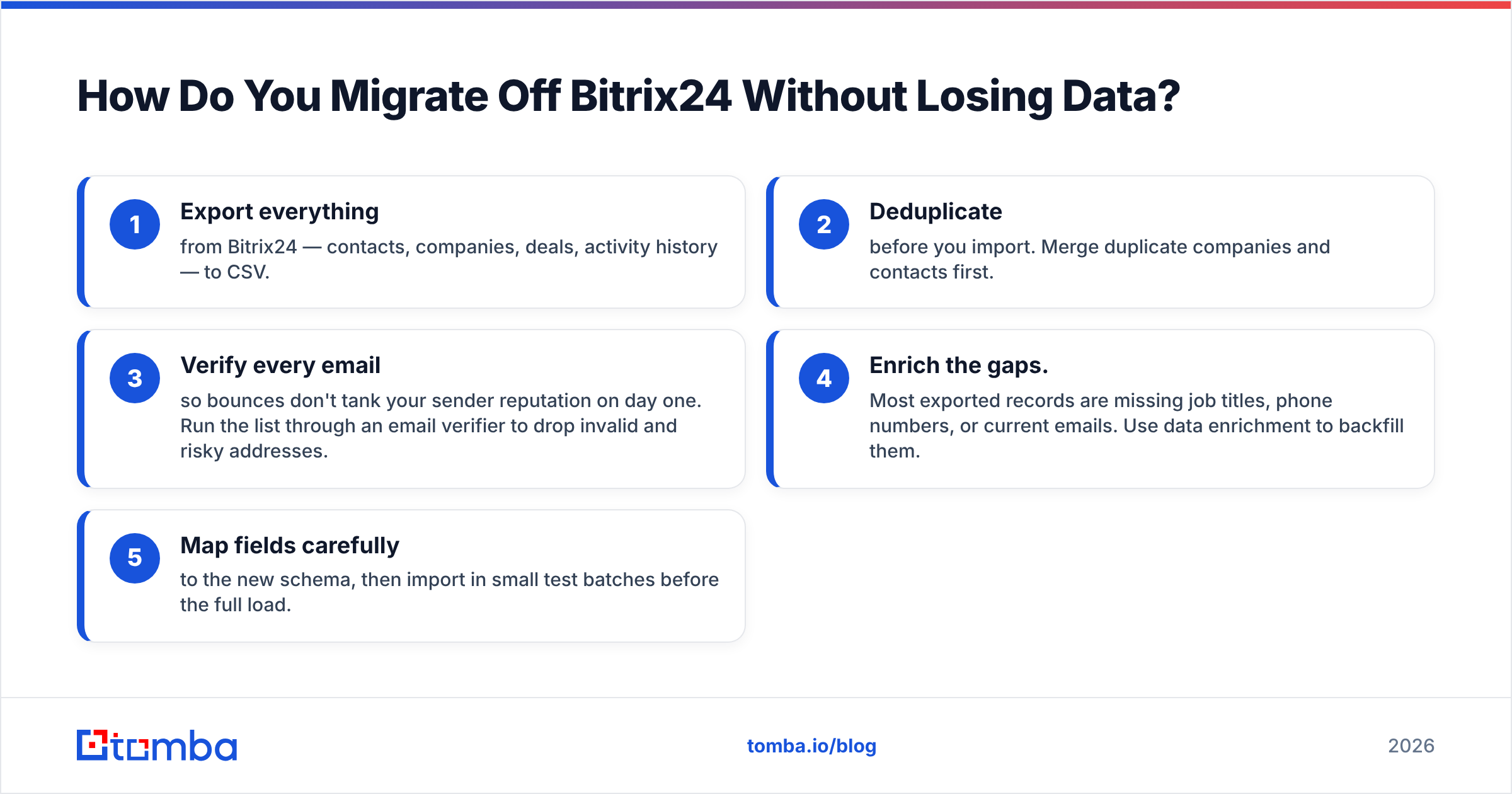
How Do You Migrate Off Bitrix24 Without Losing Data?#
Switching CRMs fails for one reason far more than any other: dirty data. Teams export a CSV full of stale emails, duplicates, and missing fields, import it into the shiny new tool, and inherit the same mess in a nicer UI. The platform changed; the garbage didn't.
A clean migration looks like this:
- Export everything from Bitrix24 — contacts, companies, deals, activity history — to CSV.
- Deduplicate before you import. Merge duplicate companies and contacts first.
- Verify every email so bounces don't tank your sender reputation on day one. Run the list through an email verifier to drop invalid and risky addresses.
- Enrich the gaps. Most exported records are missing job titles, phone numbers, or current emails. Use data enrichment to backfill them.
- Map fields carefully to the new schema, then import in small test batches before the full load.
Do steps 2–4 and your new CRM starts clean. Skip them and you've paid a migration tax for nothing.
Bitrix24 Alternatives vs. the Data Problem They Don't Solve#
Here's the uncomfortable truth every CRM roundup buries: switching from Bitrix24 to Zoho, Pipedrive, or HubSpot changes where your contacts live, not whether those contacts are reachable. Every platform on this list is a system of record. None of them is a system of acquisition. They store the leads you feed them; they don't find or verify those leads for you.
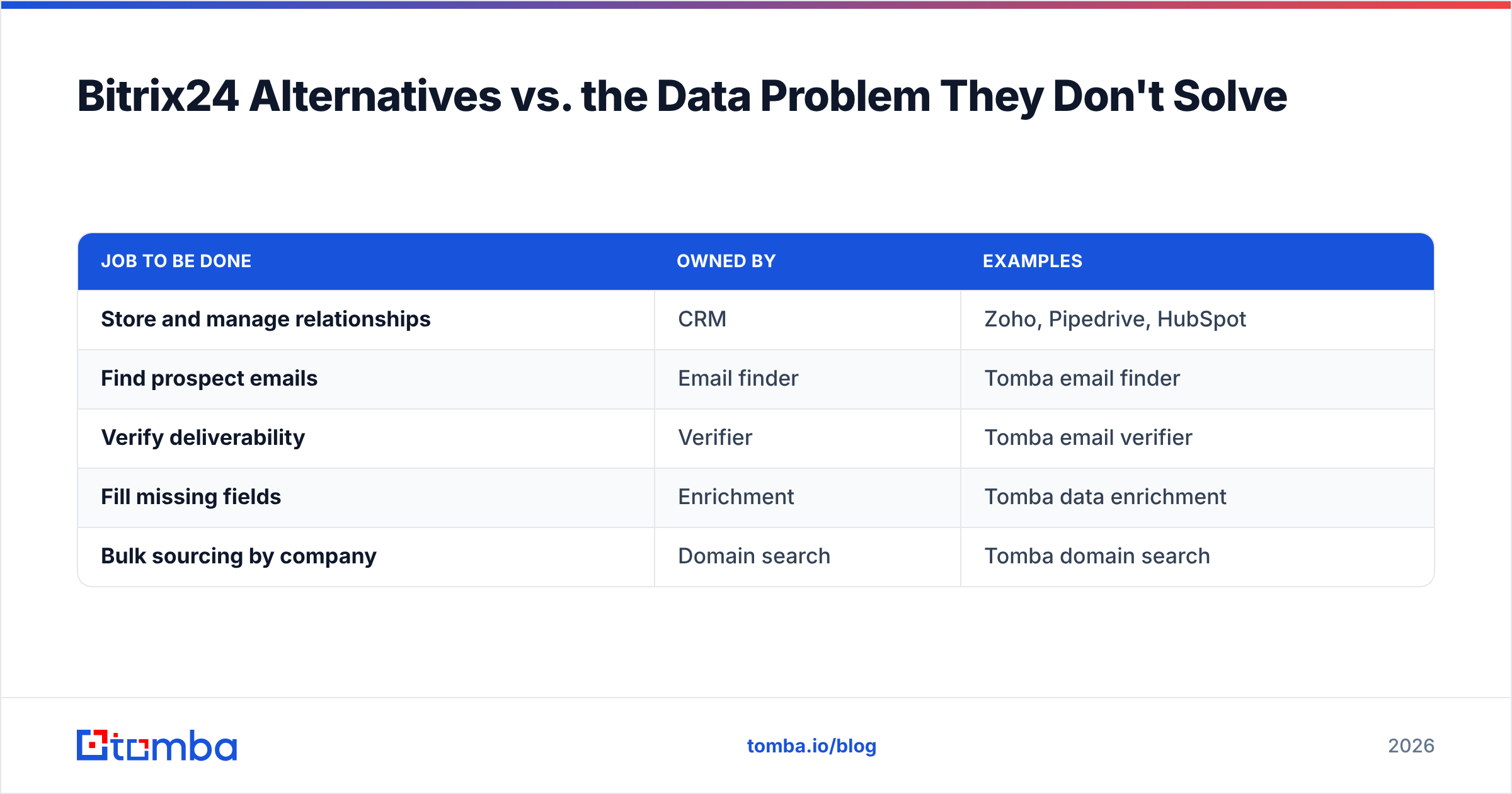
That's why the highest-performing teams treat the CRM and the data pipeline as two separate buys:
| Job to be done | Owned by | Examples |
|---|---|---|
| Store and manage relationships | CRM | Zoho, Pipedrive, HubSpot |
| Find prospect emails | Email finder | Tomba email finder |
| Verify deliverability | Verifier | Tomba email verifier |
| Fill missing fields | Enrichment | Tomba data enrichment |
| Bulk sourcing by company | Domain search | Tomba domain search |
You can run any of these alongside whatever CRM you land on. The CRM is the destination; the data layer is what makes the destination worth visiting. A pristine Pipedrive full of bounced addresses still loses to a humble spreadsheet of verified decision-makers.
Which Bitrix24 Alternative Should You Pick?#
Match the tool to your actual bottleneck:
- You wanted the all-in-one suite, done better: Zoho One.
- You only ever used the CRM: Pipedrive or Capsule.
- Marketing and sales must share a system: HubSpot.
- You're scaling into enterprise complexity: Salesforce.
- You want AI scoring and a dialer on a budget: Freshsales.
Whichever you choose, remember the migration discipline above — verify and enrich before you import — and keep a dedicated data tool in the stack permanently, not just for the move.
Fill Your New CRM With Contacts That Actually Convert#
Whatever platform replaces Bitrix24, it will only perform as well as the data inside it. Tomba's email finder lets you pull verified professional emails by name, company, or domain — then push them straight into your CRM via native integrations with HubSpot, Pipedrive, Salesforce, and more. Start on the free tier (25 searches/month), and scale to the Starter plan at $49/mo when your pipeline demands it. See full Tomba pricing and stop letting bad data sabotage a good CRM.
// get started
Find, verify and enrich your first contacts today
Start on the free plan with 25 searches a month, then scale when your team is ready.
Free plan · No credit card required · GDPR & CCPA
// about the author