Bitrix24 vs Salesforce 2026: Which CRM Wins for B2B Sales?
Bitrix24 vs Salesforce, compared on pricing, features, automation, and data quality so you can pick the right CRM for your B2B sales team in 2026.
Bitrix24 vs Salesforce: Which CRM Actually Fits Your Team in 2026?
Choosing between Bitrix24 and Salesforce is really a choice between two philosophies. One bundles a CRM into a sprawling all-in-one workspace at a flat price. The other is a configurable enterprise platform you build into exactly what you need — and pay for accordingly. This guide breaks down where each one wins, where each one hurts, and how to decide without a six-month evaluation.
TL;DR#
- Bitrix24 is the better fit for small-to-midsize teams that want CRM, telephony, project management, and a website builder in one flat-fee bundle.
- Salesforce is the better fit for larger organizations with complex sales processes, deep customization needs, and budget for admins and integrations.
- Pricing model is the real divider: Bitrix24 charges per plan (unlimited-ish users on higher tiers); Salesforce charges per user, per month, and costs scale fast.
- Both are only as good as the data inside them — a CRM full of stale or guessed contacts wastes either license. Pair whichever you pick with a reliable email verifier.
- Quick rule: under 50 reps and budget-conscious → Bitrix24. Enterprise process, big ecosystem, dedicated admin → Salesforce.
What is Bitrix24?#
Bitrix24 is an all-in-one business suite that happens to include a capable CRM. Think of it like a Swiss Army knife: the CRM is one blade, but you also get telephony, tasks and projects, a website and landing-page builder, document storage, HR tools, and internal chat — all under one login.
That bundling is the whole pitch. A 20-person company can run sales, support, internal collaboration, and a basic website without stitching together five separate subscriptions. Bitrix24 offers a genuinely usable free tier and flat-rate paid plans, which means adding your eleventh or fiftieth user does not automatically multiply your bill the way per-seat pricing does.
The trade-off is depth and polish. Because Bitrix24 tries to do everything, individual modules can feel less refined than a best-in-class point solution, and the interface has a steeper "where is that setting" learning curve than its marketing suggests.
What is Salesforce?#
Salesforce is the enterprise CRM standard — the platform most large sales organizations are measured against. Rather than a fixed bundle, it is a configurable foundation (Sales Cloud, Service Cloud, Marketing Cloud, and the rest) that you extend with custom objects, automation, and thousands of AppExchange apps.
Its strength is that almost anything you can describe as a sales process can be modeled in it. Custom fields, validation rules, complex approval flows, territory management, forecasting, and the Einstein AI layer give large teams precise control. Its G2 reviews consistently reflect that ceiling — and the cost of reaching it.
That power is also the catch. Salesforce typically needs a dedicated administrator (or an agency) to configure and maintain, the per-user pricing climbs steeply with add-ons, and a small team can drown in features it will never use.

Bitrix24 vs Salesforce: the core comparison#
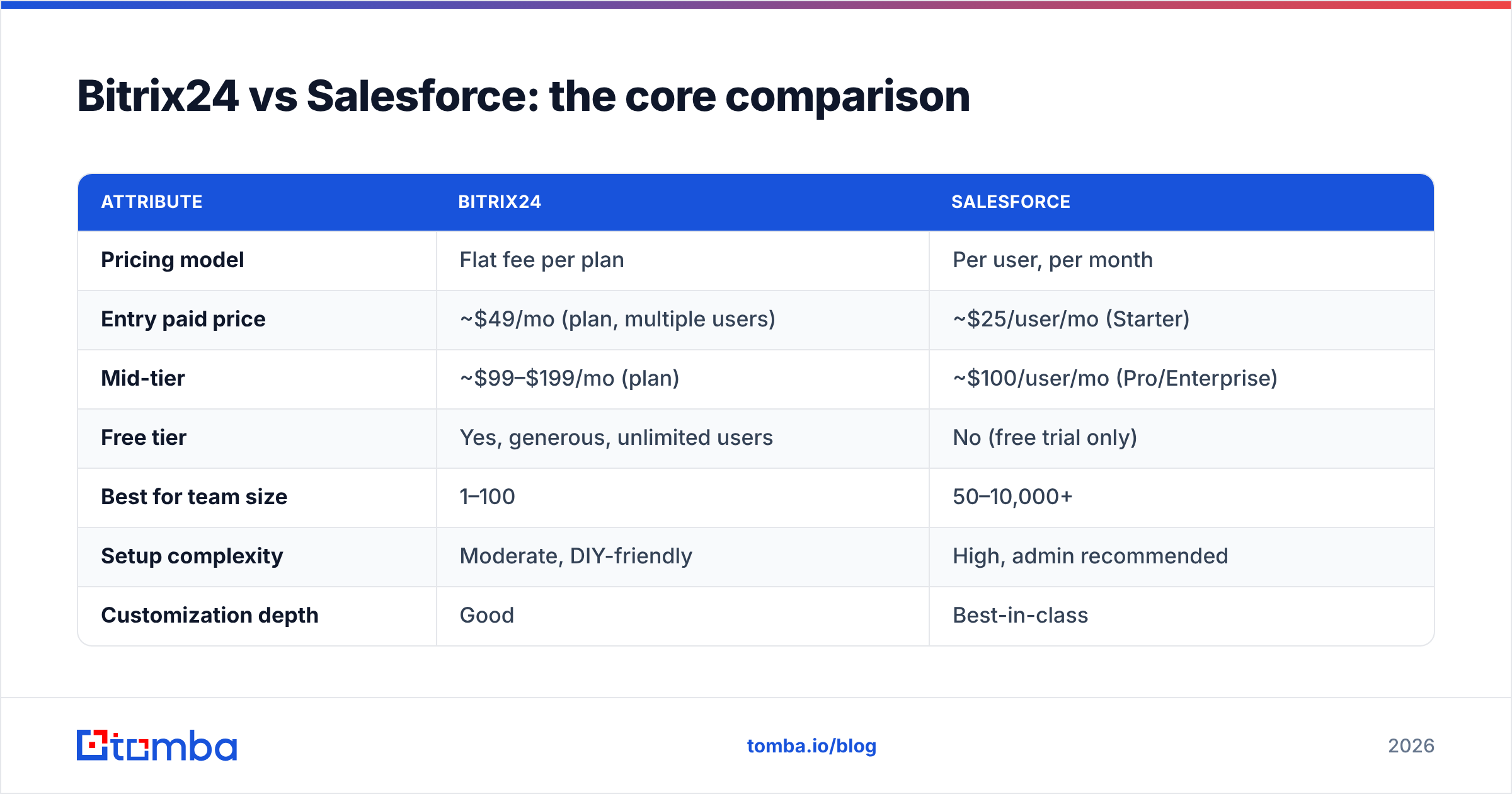
Here is the side-by-side most buyers actually care about. Prices reflect publicly listed 2026 plans and can change, so confirm on each vendor's site before signing.
| Attribute | Bitrix24 | Salesforce |
|---|---|---|
| Pricing model | Flat fee per plan | Per user, per month |
| Entry paid price | ~$49/mo (plan, multiple users) | ~$25/user/mo (Starter) |
| Mid-tier | ~$99–$199/mo (plan) | ~$100/user/mo (Pro/Enterprise) |
| Free tier | Yes, generous, unlimited users | No (free trial only) |
| Best for team size | 1–100 | 50–10,000+ |
| Setup complexity | Moderate, DIY-friendly | High, admin recommended |
| Customization depth | Good | Best-in-class |
| Beyond CRM | Tasks, telephony, sites, HR | Add-on clouds (paid) |
| Ecosystem / apps | Smaller marketplace | Huge (AppExchange) |
| AI features | CoPilot (included tiers) | Einstein (premium) |
A few things stand out. Salesforce has the lower per-seat entry price, but because it bills per user, a 30-person team pays roughly 30× that number — while Bitrix24's flat plans absorb additional users at no extra cost. For small teams, Bitrix24 is almost always cheaper in total. For enterprises that need Salesforce's ceiling, the cost is the price of admission.
Is Bitrix24 cheaper than Salesforce?#
For most small and midsize teams, yes — and it is not close. The reason is the billing model, not the sticker price.
Run the math on a 25-person sales team:
- Bitrix24 on a mid-tier flat plan: one predictable monthly bill regardless of whether you have 10 or 50 users on that tier. You budget one line item.
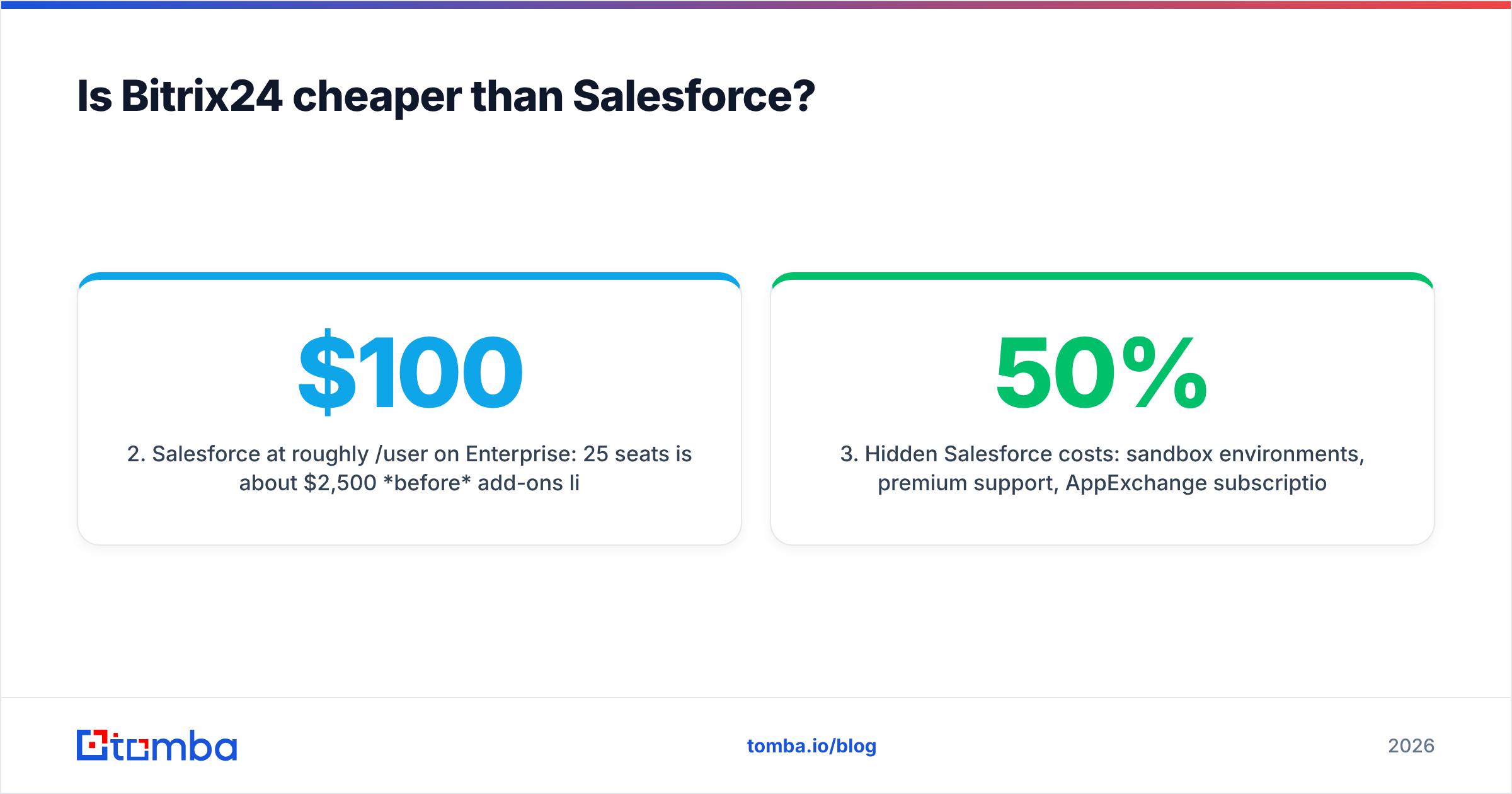
- Salesforce at roughly $100/user/mo on Enterprise: 25 seats is about $2,500/month before add-ons like CPQ, advanced analytics, or extra API capacity.
- Hidden Salesforce costs: sandbox environments, premium support, AppExchange subscriptions, and admin/consultant time. These routinely add 20–50% to the headline figure.
- Hidden Bitrix24 costs: mostly your team's time learning a dense interface, plus occasional add-ons for higher user counts or on-premise hosting.
So Bitrix24 wins on raw cost for SMBs. But "cheaper" is not the same as "better value" — if your revenue process genuinely needs Salesforce's forecasting, territory management, and ecosystem, paying more for the right tool beats saving money on the wrong one.
Which CRM is easier to use?#
Neither is plug-and-play, but they are hard in different ways. Bitrix24 is hard because it shows you everything at once — the density of modules makes the first week disorienting. Salesforce is hard because doing anything non-trivial requires configuration knowledge most reps do not have, which is why a Salesforce admin is practically a job description.
If you have no technical resource and want to be selling this week, Bitrix24's DIY setup is more forgiving. If you have (or will hire) an admin and want a system tailored to a specific playbook, Salesforce rewards that investment with a cleaner day-to-day experience for end users once it is configured.
A useful gut check: do you want software you operate, or a platform you build? Bitrix24 leans operate. Salesforce leans build.
How do they handle automation and integrations?#
Both automate the sales grind; the difference is scope and effort.
- Bitrix24 includes workflow automation, CRM rules and triggers, telephony, and email marketing inside the bundle. You can route leads, send sequences, and log calls without bolting on third-party tools — handy when you want fewer vendors.
- Salesforce offers deeper automation through Flow, plus the enormous AppExchange ecosystem and a mature API. If a tool exists in B2B sales, it almost certainly integrates with Salesforce first. That breadth is unmatched but often involves paid connectors and admin setup.
Whichever path you choose, automation only pays off when the records flowing through it are accurate. Garbage in, garbage automated. That is where your data layer matters more than the CRM brand — feed either platform through a clean enrichment step using a tool like Tomba's data enrichment so your workflows fire on real, current contact details instead of stale rows. You can connect Tomba to either CRM via the HubSpot integration patterns, Zapier, or the Tomba API.

Which one scales better?#
Salesforce, unambiguously, at the top end. It is built to run sales orgs with thousands of reps, multiple business units, complex territory rules, and compliance requirements. As you grow, you rarely outgrow Salesforce — you just keep configuring it.
Bitrix24 scales well into the low hundreds of users and across departments (because it is more than a CRM), but very large or highly specialized sales organizations can hit ceilings on reporting depth, granular permissions, and ecosystem maturity. It is a fast, affordable engine for a growing company, not necessarily the platform a Fortune 500 standardizes on.
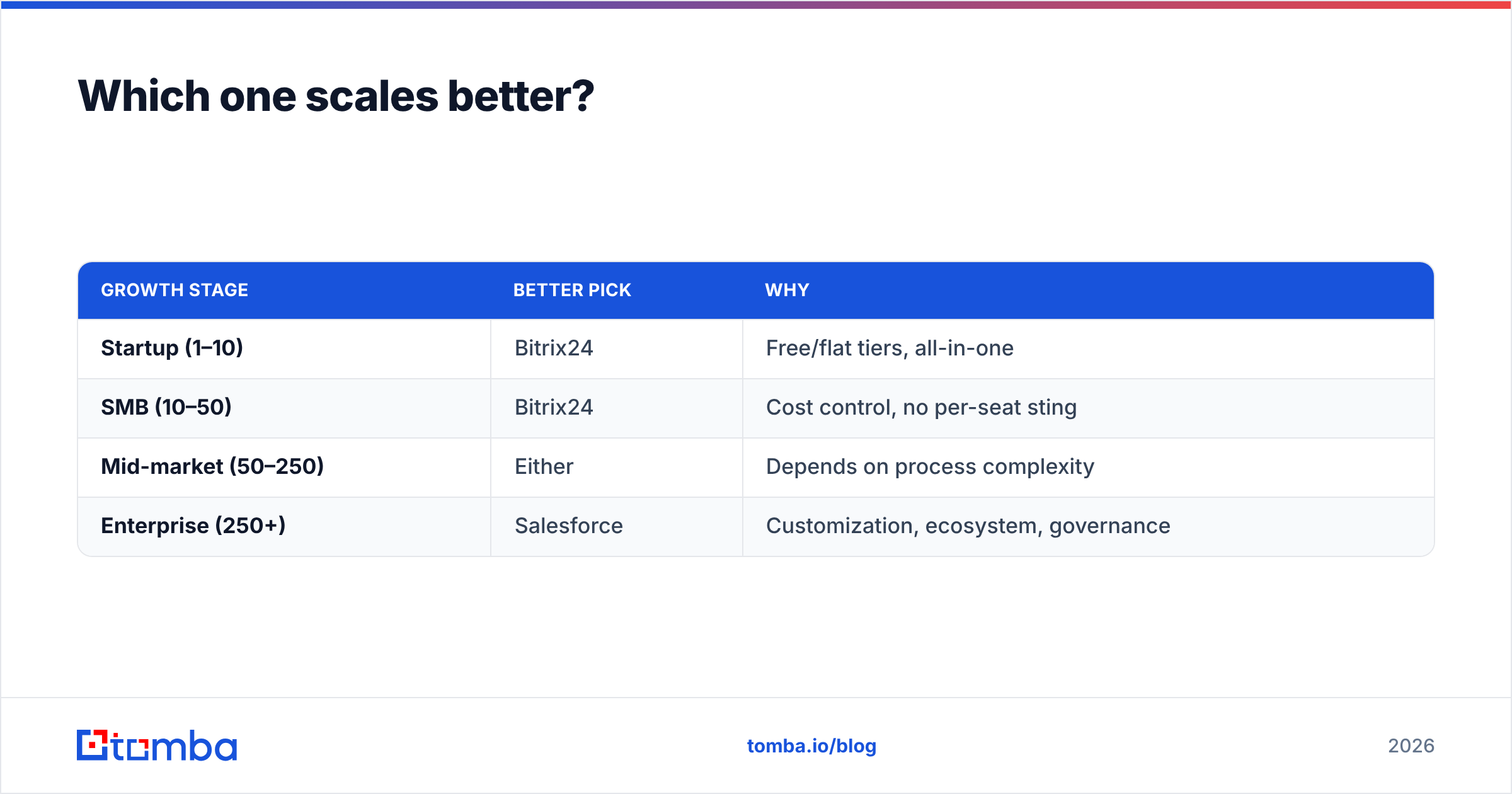
| Growth stage | Better pick | Why |
|---|---|---|
| Startup (1–10) | Bitrix24 | Free/flat tiers, all-in-one |
| SMB (10–50) | Bitrix24 | Cost control, no per-seat sting |
| Mid-market (50–250) | Either | Depends on process complexity |
| Enterprise (250+) | Salesforce | Customization, ecosystem, governance |
When should you choose Bitrix24?#
Pick Bitrix24 if most of these are true:
- You are a small or midsize team watching software spend closely.
- You want CRM, project management, telephony, and a website under one roof.
- You do not have a dedicated CRM administrator.
- Predictable flat-rate billing matters more than maximum configurability.
- You are fine trading some polish for breadth.
It is the pragmatic, value-first choice for companies that want to consolidate tools and avoid per-seat math.
When should you choose Salesforce?#
Pick Salesforce if most of these are true:
- You run a complex, multi-stage sales process that needs precise modeling.
- You have (or will fund) admin/developer resources.
- You depend on a wide integration ecosystem and best-in-class reporting.
- You are scaling past a few hundred users or operating across regions.
- Budget is available for the platform plus its add-ons.
It is the choice when the CRM is the operational backbone of a large revenue org and getting it exactly right justifies the cost and complexity.
What both tools won't fix: your data#
Here is the part vendors gloss over. A CRM is a container. Bitrix24 and Salesforce both assume the contact data you load is correct — and neither one finds or verifies that data for you at the quality a dedicated tool does. Industry analysts at Gartner have long flagged poor data quality as a top drag on revenue operations, and a pricey Salesforce org full of bounced emails performs worse than a cheap CRM full of verified ones.
This is the layer to get right regardless of which platform wins your evaluation:
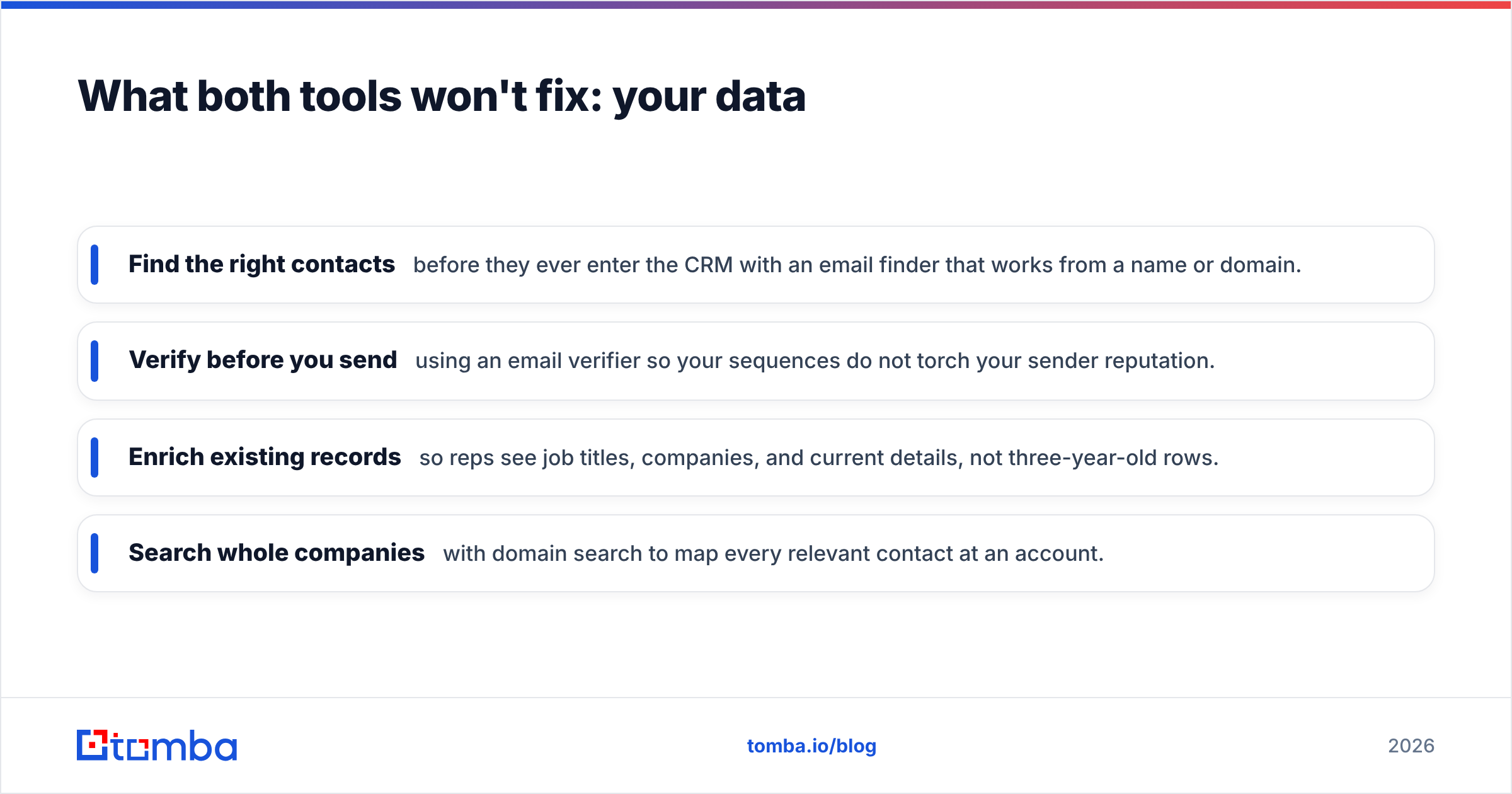
- Find the right contacts before they ever enter the CRM with an email finder that works from a name or domain.
- Verify before you send using an email verifier so your sequences do not torch your sender reputation.
- Enrich existing records so reps see job titles, companies, and current details, not three-year-old rows.
- Search whole companies with domain search to map every relevant contact at an account.
Do that, and either CRM performs dramatically better. Skip it, and the most expensive license in the world still emails dead inboxes.
Bitrix24 vs Salesforce: the verdict#
There is no universal winner — there is a winner for your situation.
Choose Bitrix24 if you are a cost-conscious SMB that wants an all-in-one workspace with predictable flat pricing and no admin overhead. It delivers more than a CRM for less money, and it is the smarter default for teams under ~50 people.
Choose Salesforce if you are an enterprise (or fast-heading there) with complex processes, the budget for proper configuration, and a need for the deepest customization and ecosystem in the market. You pay more because you are buying a ceiling you will actually reach.
Most teams overthink the platform and underthink the pipeline feeding it. Whichever CRM you land on, the deals come from accurate, verified contact data — not from the logo on your login screen.
Power your CRM with clean, verified data#
Bitrix24 or Salesforce, the outcome depends on what goes in. Start free with the Tomba Email Finder to source accurate, verified B2B contacts, then push them straight into your CRM of choice. The free tier covers 25 searches a month so you can test the data quality before you commit — see full Tomba pricing when you are ready to scale. Pick the right CRM, feed it the right data, and let your reps sell instead of cleaning spreadsheets.
// get started
Find, verify and enrich your first contacts today
Start on the free plan with 25 searches a month, then scale when your team is ready.
Free plan · No credit card required · GDPR & CCPA
// about the author