Bitrix24 vs Zoho CRM (2026): Which CRM Actually Wins?
A neutral, hands-on breakdown of Bitrix24 vs Zoho CRM in 2026 — pricing, features, automation, and which platform fits your sales team best.
Choosing a CRM is one of those decisions you live with for years. Migrate once, and you'll feel the pain of switching every time your team grows. Bitrix24 and Zoho CRM are two of the most common finalists on B2B shortlists, and for good reason: both are mature, both are affordable, and both promise to run your entire sales motion without forcing you onto enterprise pricing. But they are not the same product, and picking the wrong one will cost you months.
This is a neutral, hands-on comparison. No marketing fluff, no "it depends" cop-out. By the end you'll know which one fits your team.
TL;DR — Bitrix24 vs Zoho CRM at a glance#
- Bitrix24 is a full work-management suite (CRM + tasks + telephony + intranet + website builder). Best if you want one tool to run the whole company, not just sales.
- Zoho CRM is a focused, deeply customizable sales CRM that plugs into the wider Zoho ecosystem (40+ apps). Best if you want a clean, sales-first system with strong automation and AI.
- Pricing: Bitrix24 charges per plan (flat team pricing), Zoho charges per user — this flips the math depending on team size.
- Ease of use: Zoho wins for sales reps; Bitrix24 has a steeper learning curve because it does more.
- The catch nobody mentions: both CRMs are only as good as the contact data you feed them. Garbage leads in, garbage pipeline out.
What is Bitrix24?#
Bitrix24 is an all-in-one collaboration and business-management platform. Yes, it has a CRM, but it also ships with project tasks, a company intranet, group chat, video calls, a document drive, an HR module, and even a drag-and-drop website and landing-page builder. The CRM sits inside this larger workspace.
The pitch is consolidation: instead of paying for a CRM plus Slack plus Asana plus a phone system, you get one login. Bitrix24's pricing reflects that — most paid plans are billed as a flat fee for a user bucket (for example, up to a fixed number of users), not strictly per seat. For a 25-person company, that flat model can be dramatically cheaper than per-user CRMs.
The trade-off is surface area. Because Bitrix24 does so much, the interface is dense. New reps often feel like they've been handed an aircraft cockpit when all they wanted was to log a deal.
What is Zoho CRM?#
Zoho CRM is a sales-first CRM that has been refined for over a decade. It focuses on the core sales workflow: leads, contacts, deals, pipelines, forecasting, and automation. Where Zoho gets powerful is customization — custom modules, layouts, validation rules, blueprints (visual process enforcement), and Zia, its built-in AI assistant for lead scoring and anomaly detection.
Zoho CRM is also the front door to the broader Zoho One ecosystem: Zoho Books for accounting, Zoho Campaigns for email marketing, Zoho Desk for support, and dozens more. If you standardize on Zoho, the apps talk to each other natively, which removes a lot of integration headaches.
Zoho bills per user, per month, with a genuinely usable free tier for up to three users. That per-seat model scales linearly, which is predictable but gets expensive as headcount climbs.
)
How do Bitrix24 and Zoho CRM compare on pricing?#
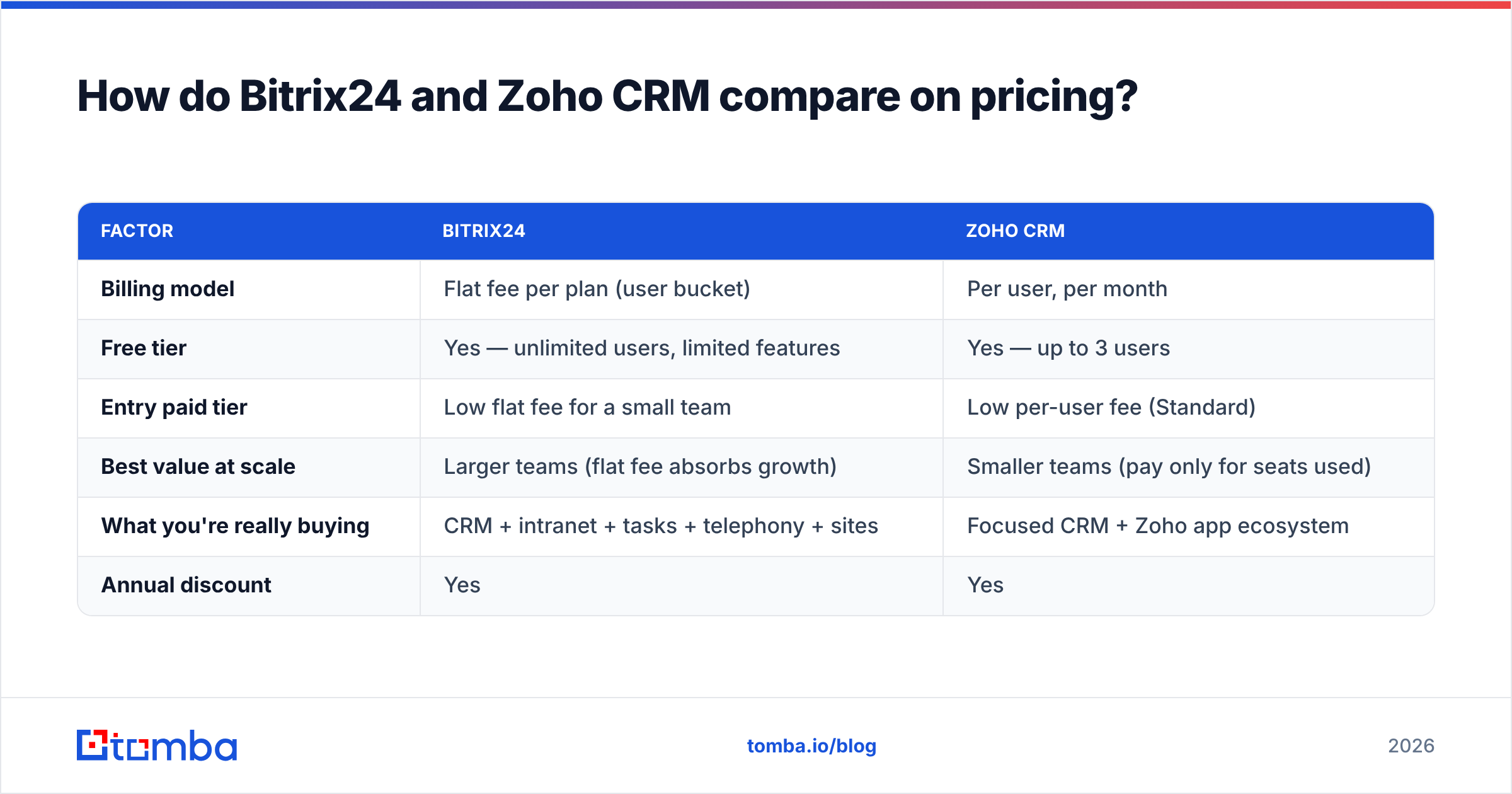
Pricing is where these two genuinely diverge, so read this section carefully. Bitrix24's flat-team model rewards bigger teams; Zoho's per-user model rewards smaller ones. The exact figures shift over time and by billing term, so always confirm on the vendors' own pages — Bitrix24 pricing and Zoho CRM pricing — before you commit.
| Factor | Bitrix24 | Zoho CRM |
|---|---|---|
| Billing model | Flat fee per plan (user bucket) | Per user, per month |
| Free tier | Yes — unlimited users, limited features | Yes — up to 3 users |
| Entry paid tier | Low flat fee for a small team | Low per-user fee (Standard) |
| Best value at scale | Larger teams (flat fee absorbs growth) | Smaller teams (pay only for seats used) |
| What you're really buying | CRM + intranet + tasks + telephony + sites | Focused CRM + Zoho app ecosystem |
| Annual discount | Yes | Yes |
The practical rule of thumb:
- Under 5 users — Zoho's per-seat pricing (and its free 3-user tier) usually wins on cost.
- 10–50 users who need more than CRM — Bitrix24's flat model often wins, because you're also replacing your chat, tasks, and phone tools.
- Sales-only team of any size — Zoho tends to feel cheaper per value delivered because you're not paying for modules you'll never open.
- Hard budget ceiling — Bitrix24's flat pricing makes forecasting spend trivial; you don't re-budget every time you hire.
Which CRM is easier to use?#
Zoho CRM is easier for a salesperson on day one. The lead-to-deal flow is linear and obvious, the mobile app is strong, and the default layout matches how reps actually think. Onboarding a new rep is a matter of hours.
Bitrix24 is more powerful but heavier. The same screen that shows your deals also exposes tasks, feeds, and tools, which is great for a founder running the whole business and overwhelming for a rep who just wants to make calls. Teams that adopt Bitrix24 successfully usually spend real time configuring it down to only what each role needs.
A blunt way to put it: Zoho is a CRM you can hand to a rep; Bitrix24 is a platform you configure for a company.
How do automation and AI compare?#
Both platforms automate the boring parts of selling, but they emphasize different things.
| Capability | Bitrix24 | Zoho CRM |
|---|---|---|
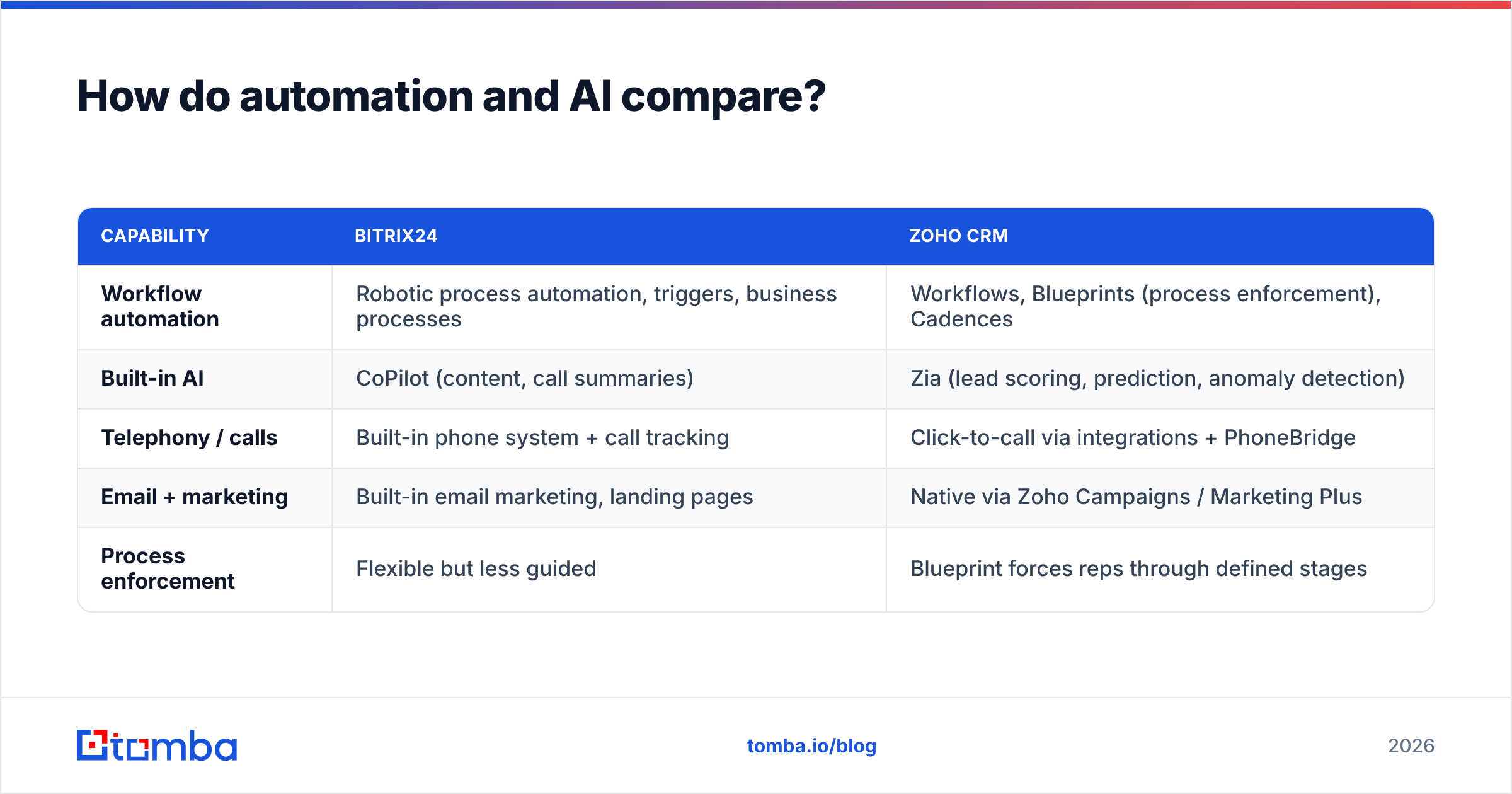
| Workflow automation | Robotic process automation, triggers, business processes | Workflows, Blueprints (process enforcement), Cadences |
| Built-in AI | CoPilot (content, call summaries) | Zia (lead scoring, prediction, anomaly detection) |
| Telephony / calls | Built-in phone system + call tracking | Click-to-call via integrations + PhoneBridge |
| Email + marketing | Built-in email marketing, landing pages | Native via Zoho Campaigns / Marketing Plus |
| Process enforcement | Flexible but less guided | Blueprint forces reps through defined stages |
If your priority is enforcing a sales process so reps can't skip steps, Zoho's Blueprint feature is best-in-class. If your priority is consolidating tools — having telephony, marketing, and automation all under one roof — Bitrix24 packs more into the base product.
For an objective third-party read on satisfaction and adoption, the user reviews on G2 are worth scanning before you decide; the two products score closely but split along exactly these lines.
Bitrix24 vs Zoho CRM: pros and cons#
| Bitrix24 | Zoho CRM | |
|---|---|---|
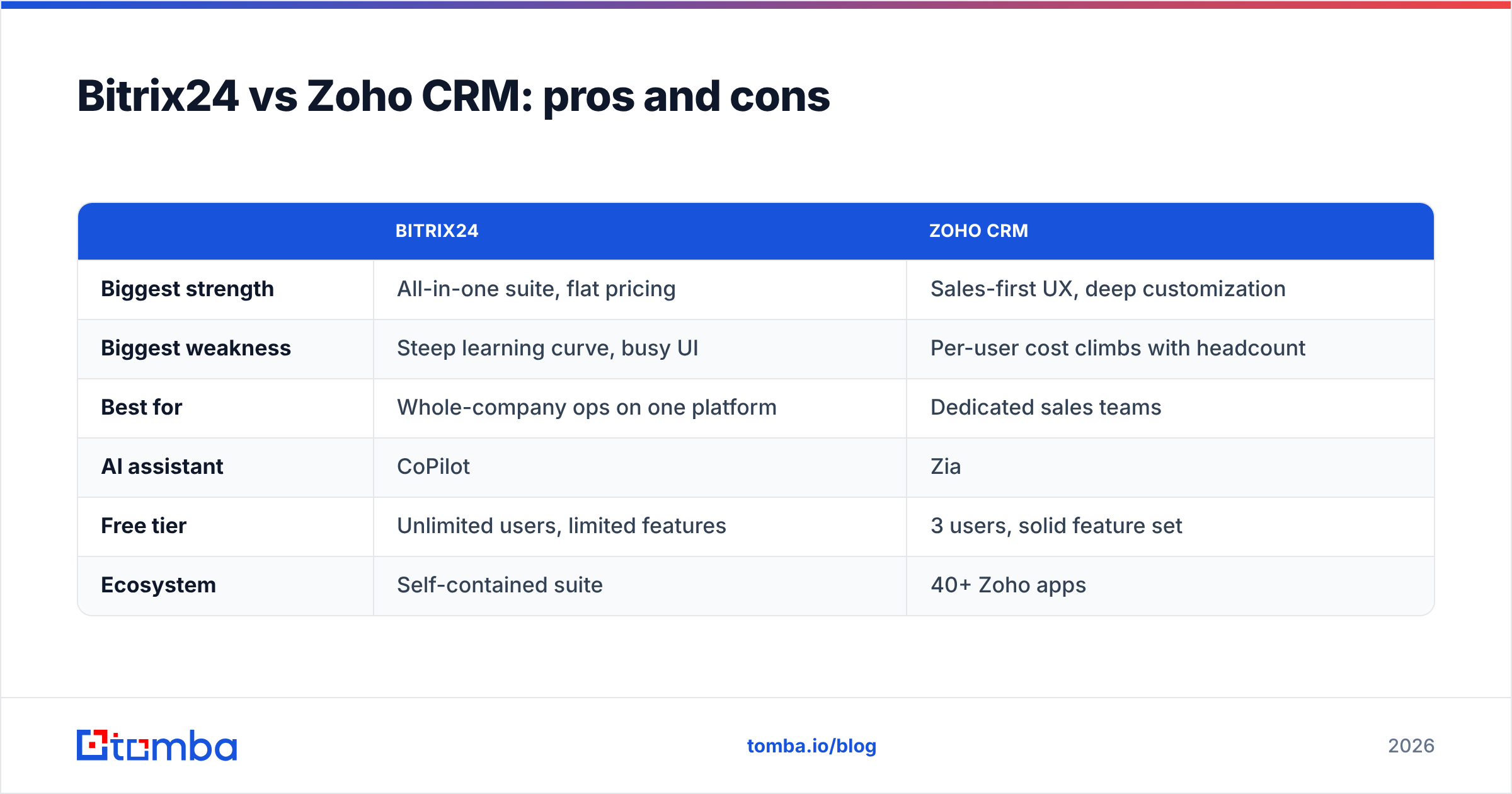
| Biggest strength | All-in-one suite, flat pricing | Sales-first UX, deep customization |
| Biggest weakness | Steep learning curve, busy UI | Per-user cost climbs with headcount |
| Best for | Whole-company ops on one platform | Dedicated sales teams |
| AI assistant | CoPilot | Zia |
| Free tier | Unlimited users, limited features | 3 users, solid feature set |
| Ecosystem | Self-contained suite | 40+ Zoho apps |
Does the CRM choice even matter if your data is bad?#
Here's the uncomfortable truth that no comparison post wants to lead with: the CRM is a container. It does not create contact data — it stores whatever you put in it. The most common reason CRM rollouts fail isn't the software; it's that the database fills up with stale, duplicate, or unverified contacts until reps stop trusting it.
You can buy the best CRM on the market and still email people who left their company two years ago. When that happens, your bounce rate climbs, your sender reputation tanks, and even your verified prospects stop seeing your messages. The CRM didn't fail — the data did.
That's why the smartest teams pair their CRM with a reliable enrichment and verification layer. Before a contact ever lands in Bitrix24 or Zoho, you find the right work email, verify it's deliverable, and enrich the record. A focused tool like the Tomba Email Finder handles the discovery, an email verifier confirms deliverability, and a domain search pulls every reachable contact at a target account — then you push clean records into whichever CRM you picked.
)
How do integrations and data enrichment work with each CRM?#
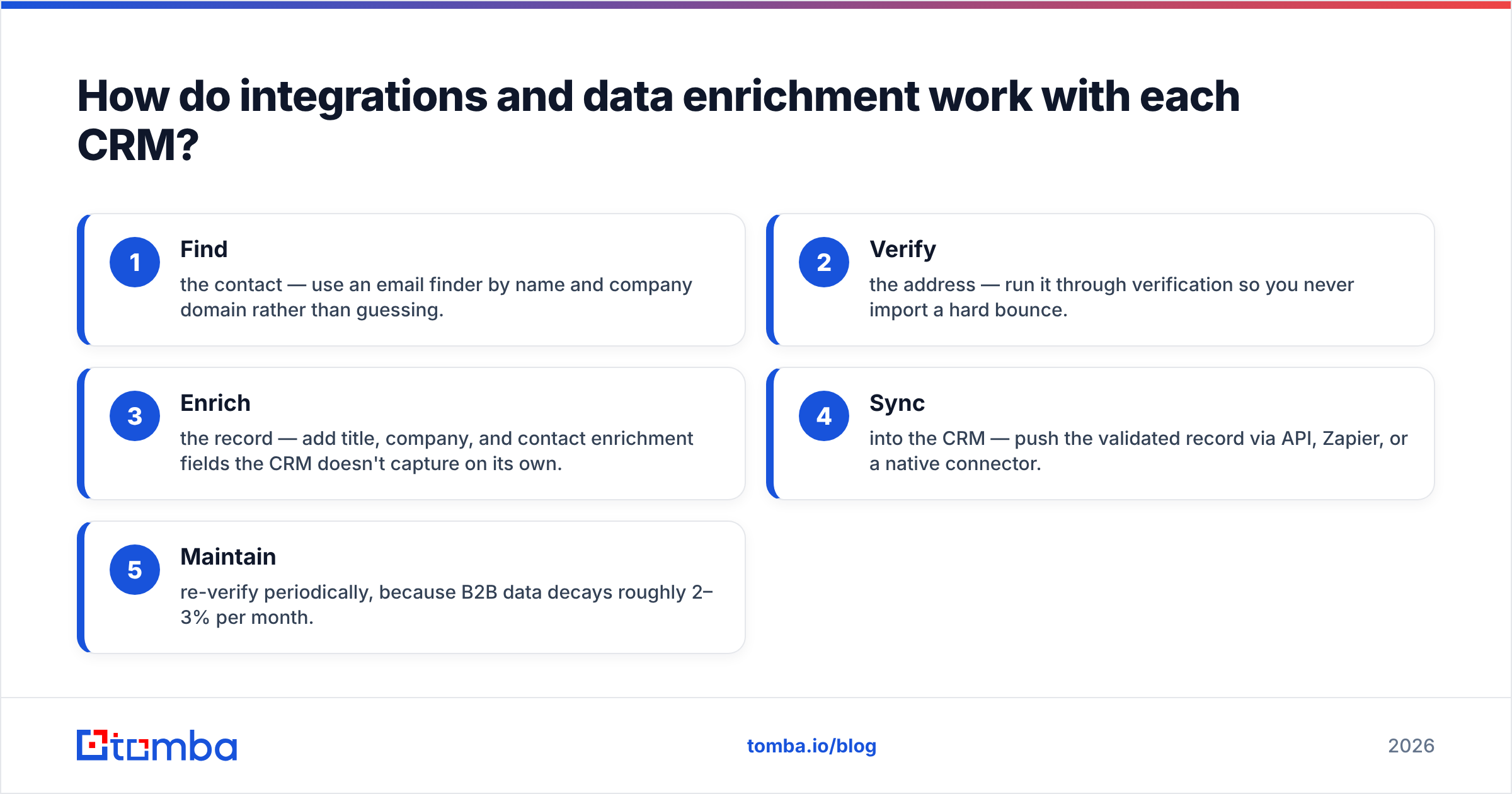
Both CRMs support inbound data from external tools, which matters because neither is a data vendor. Here's how a clean-data workflow looks regardless of which platform you choose:
- Find the contact — use an email finder by name and company domain rather than guessing.
- Verify the address — run it through verification so you never import a hard bounce.
- Enrich the record — add title, company, and contact enrichment fields the CRM doesn't capture on its own.
- Sync into the CRM — push the validated record via API, Zapier, or a native connector.
- Maintain — re-verify periodically, because B2B data decays roughly 2–3% per month.
Zoho CRM has a large native marketplace plus Zapier and webhook support. Bitrix24 exposes a REST API and a marketplace of its own, plus the same automation-platform connectors. Either way, you'll want an external source of truth for contact data feeding the pipeline — the Tomba API and the broader integrations catalog exist precisely to be that upstream layer for whichever CRM you land on. You can also see exactly where the data comes from so you're not importing mystery records.
Which CRM should you choose in 2026?#
Conclusion first: choose Zoho CRM if you're a sales team that wants a clean, customizable, sales-first system; choose Bitrix24 if you want one platform to run your whole company and you have flat-fee budget logic in mind.
Decide with these questions:
- Do you need more than a CRM? (chat, tasks, telephony, intranet) → Bitrix24.
- Is this strictly for the sales org? → Zoho CRM.
- Is your team small and likely to stay small? → Zoho's per-seat model is cheaper.
- Is your team large and growing fast? → Bitrix24's flat pricing protects your budget.
- Do you live in spreadsheets and want maximum customization? → Zoho's modules and Blueprints.
- Do you want minimal tool sprawl? → Bitrix24's consolidation.
Neither is a wrong answer. They serve different shapes of company. What is a wrong answer is treating either one as a magic fix for a pipeline that's starved of accurate contacts.
The bottom line#
Bitrix24 and Zoho CRM are both strong, affordable, well-supported platforms in 2026. Bitrix24 wins on breadth and flat pricing; Zoho CRM wins on sales-focused usability, customization, and AI. Map the choice to your org shape, not to a feature checklist, and you'll be happy either way.
But remember the part that decides whether your CRM earns its keep: the quality of the data inside it. A pristine pipeline starts before the CRM, with finding and verifying the right people. Start free with the Tomba Email Finder — 25 searches a month at no cost, scaling to a Starter plan at $49/mo — and feed Bitrix24 or Zoho clean, verified, deliverable contacts from day one. The best CRM in the world can't save bad data, and the cheapest CRM in the world performs like an enterprise suite when the records are accurate.
// get started
Find, verify and enrich your first contacts today
Start on the free plan with 25 searches a month, then scale when your team is ready.
Free plan · No credit card required · GDPR & CCPA
// about the author