Bizkonnect vs GetProspect 2026: Which Lead Tool Wins?
Bizkonnect sells org charts and account intelligence; GetProspect sells email discovery. We compare data, pricing, and accuracy so you can pick the right B2B lead engine for 2026.
You are comparing two tools that solve different halves of the same problem. Bizkonnect maps who reports to whom inside target accounts; GetProspect turns names and domains into verified email addresses. Choosing between them — or deciding you need a third option — depends on whether your bottleneck is finding the right person or reaching them.
TL;DR#
- Bizkonnect is an account-intelligence and org-chart platform. Its strength is visual reporting structures, contact mapping, and trigger-based account lists — not bulk email discovery.
- GetProspect is an email-finder and lightweight CRM. Its strength is turning LinkedIn profiles and domains into verified emails at scale, with a free tier.
- They are not direct substitutes. Many teams run an org-chart tool and an email finder side by side.
- On raw email discovery and verification economics, purpose-built finders like Tomba Email Finder and GetProspect usually beat a sales-intelligence suite.
- Pick Bizkonnect if you sell into large enterprises with complex hierarchies; pick GetProspect (or Tomba) if your job is volume prospecting and clean contact data.
What is Bizkonnect?#
Bizkonnect is a B2B sales-intelligence platform built around actionable org charts. Instead of handing you a flat list of contacts, it visualizes reporting lines inside a target company, so an account executive can see the VP of Engineering, the directors below them, and which of those people are likely to influence a deal.
Its core modules are organization charts, contact data tied to those charts, and "sales triggers" — signals like funding rounds, leadership changes, or expansion news that tell you when an account is worth a touch. It leans toward account-based marketing (ABM) teams who run a small number of high-value accounts and need to understand the buying committee, not reps blasting 5,000 cold emails a week.
The trade-off: org-chart data is expensive to build and maintain, so coverage is deepest for larger enterprises and thinner for SMBs and startups. You are paying for structure and context, not for the largest possible email database.
What is GetProspect?#
GetProspect is an email finder with a built-in contact-management layer. You feed it a domain, a name, or a LinkedIn profile, and it returns a professional email address with a deliverability status. It offers a Chrome extension for LinkedIn prospecting, bulk list building, and basic list management so you can organize what you pull.
GetProspect competes in the same lane as tools like Hunter, Apollo, and Tomba: the job is to convert identities into reachable, verified emails. It has a free tier (a capped number of valid emails per month) and scales by monthly verified-email volume, which makes it attractive to solo founders and small sales teams testing outbound.
It is not trying to map a 4,000-person enterprise's reporting structure. If you ask GetProspect "who are the five directors under this CMO," it is the wrong tool. If you ask "what's the email for this director I already identified," it is squarely on target.
)
Bizkonnect vs GetProspect: how do they compare?#
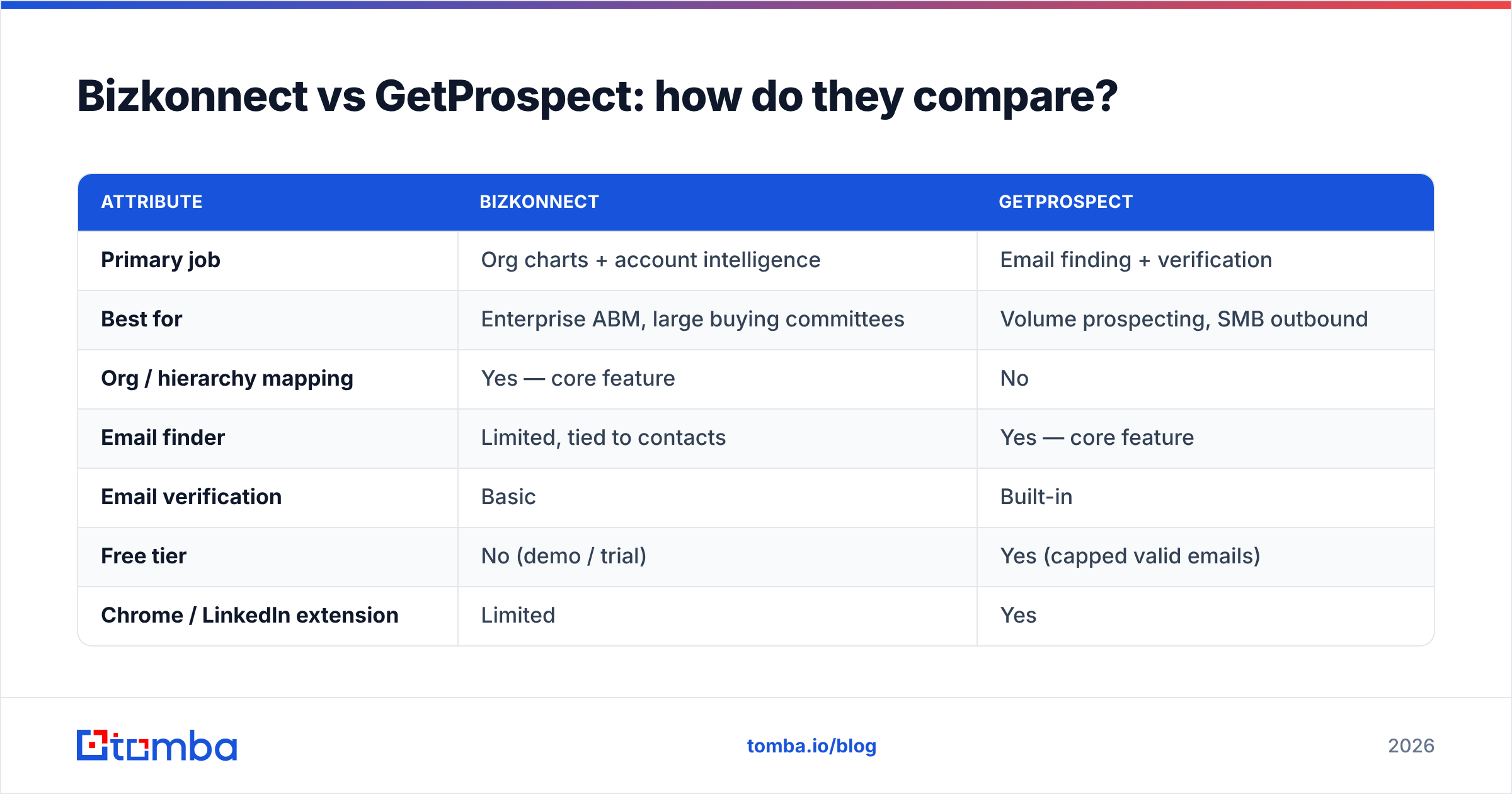
The cleanest way to see the gap is feature by feature. These two products overlap only at the edges.
| Attribute | Bizkonnect | GetProspect |
|---|---|---|
| Primary job | Org charts + account intelligence | Email finding + verification |
| Best for | Enterprise ABM, large buying committees | Volume prospecting, SMB outbound |
| Org / hierarchy mapping | Yes — core feature | No |
| Email finder | Limited, tied to contacts | Yes — core feature |
| Email verification | Basic | Built-in |
| Free tier | No (demo / trial) | Yes (capped valid emails) |
| Chrome / LinkedIn extension | Limited | Yes |
| Bulk list building | Account-focused | Yes — large lists |
| Typical buyer | Enterprise sales / marketing | Founders, SDR teams, agencies |
| Pricing transparency | Quote-based | Published tiers |
The pattern is consistent: Bizkonnect wins on context (who matters and why now), GetProspect wins on reach (the actual email, at volume, cheaply). Neither one does the other job well.
Which one finds better contact data?#
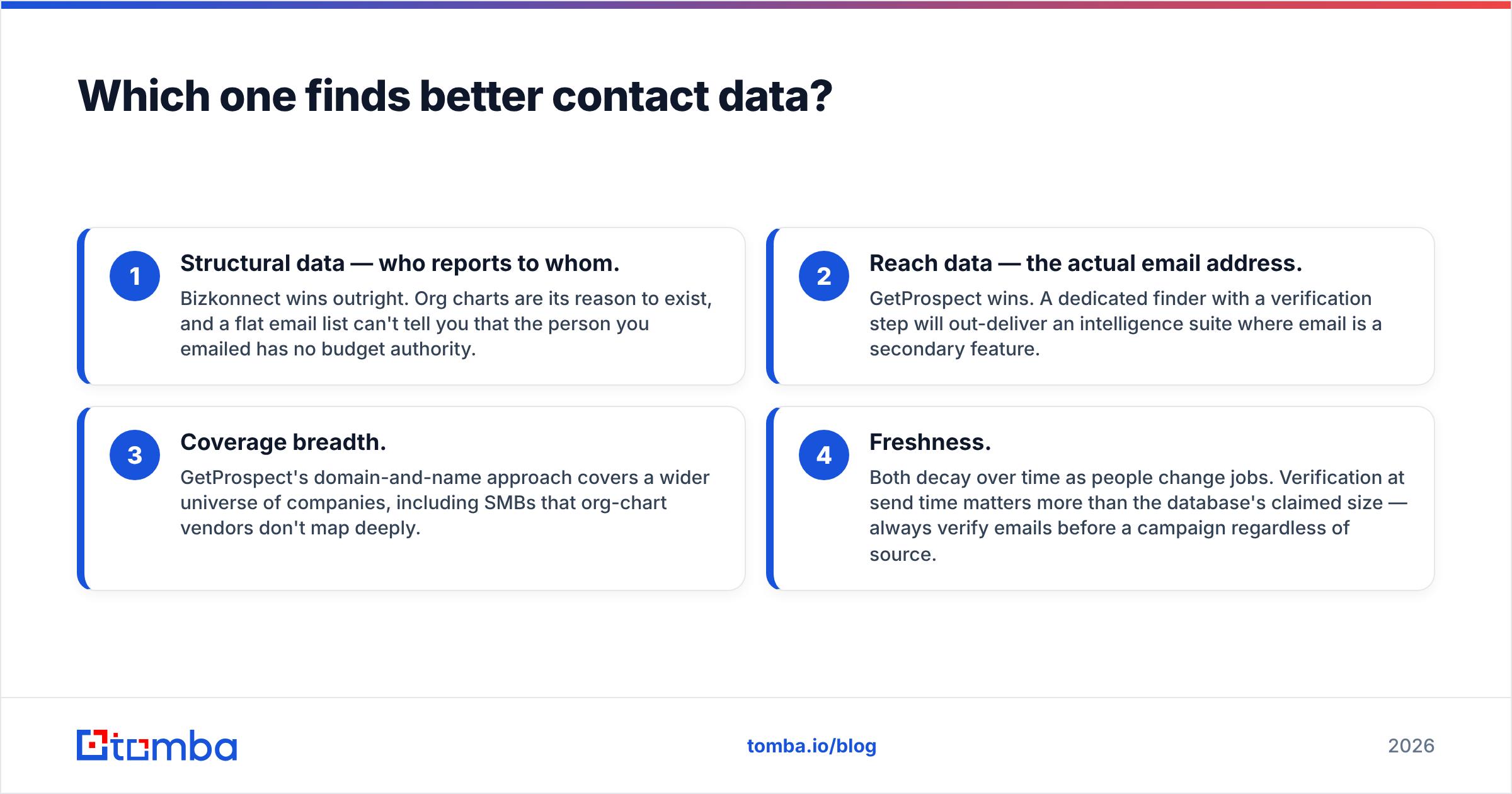
It depends on which type of "contact data" you mean.
- Structural data — who reports to whom. Bizkonnect wins outright. Org charts are its reason to exist, and a flat email list can't tell you that the person you emailed has no budget authority.
- Reach data — the actual email address. GetProspect wins. A dedicated finder with a verification step will out-deliver an intelligence suite where email is a secondary feature.
- Coverage breadth. GetProspect's domain-and-name approach covers a wider universe of companies, including SMBs that org-chart vendors don't map deeply.
- Freshness. Both decay over time as people change jobs. Verification at send time matters more than the database's claimed size — always verify emails before a campaign regardless of source.
If your outbound depends on hitting inboxes, the email-finder category is where you should spend. That's also where a focused tool like Tomba sits, and where accuracy benchmarks between finders actually matter for cost-per-valid-lead.
How does pricing compare?#
GetProspect publishes tiered pricing scaled by monthly verified emails, with a free plan to start. Bizkonnect is quote-based — you talk to sales, and pricing reflects enterprise org-chart access rather than a per-email meter. That difference tells you who each tool is built for.
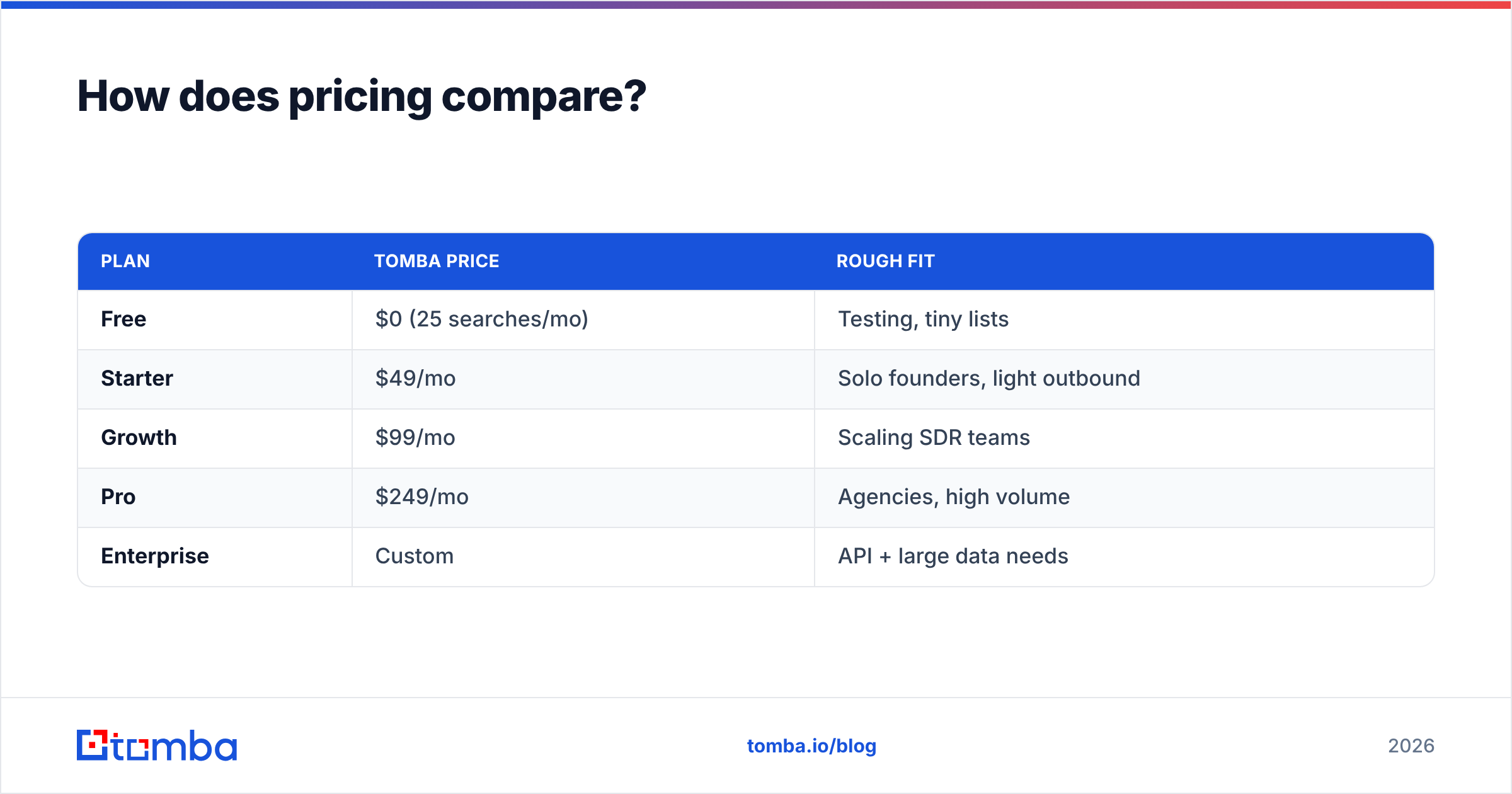
For reference, here's how a transparent email-finder pricing model looks using Tomba, so you can benchmark GetProspect's tiers against a known competitor:
| Plan | Tomba price | Rough fit |
|---|---|---|
| Free | $0 (25 searches/mo) | Testing, tiny lists |
| Starter | $49/mo | Solo founders, light outbound |
| Growth | $99/mo | Scaling SDR teams |
| Pro | $249/mo | Agencies, high volume |
| Enterprise | Custom | API + large data needs |
See full Tomba pricing for current credit allocations. The headline: email finders publish numbers and let you self-serve, while account-intelligence platforms like Bizkonnect gate pricing behind a sales conversation. If budget predictability matters, the published-tier model is easier to plan around.
)
When should you choose Bizkonnect?#
Choose Bizkonnect when the hard part of your sale is the org, not the email:
- You sell six-figure deals into enterprises with multi-person buying committees.
- You need to map influencers, blockers, and budget owners before you ever reach out.
- Your marketing runs true account-based marketing plays on a defined target list.
- Timing matters and you want trigger signals (funding, leadership change) to prioritize accounts.
In those motions, knowing who and when is worth more than another 10,000 raw emails. Bizkonnect's org charts shorten the research phase that reps otherwise spend hours on in LinkedIn.
When should you choose GetProspect — or a dedicated finder?#
Choose an email finder when the hard part is reach and volume:
- You run high-volume outbound and need fresh, verified emails every week.
- You prospect mostly from LinkedIn and want a LinkedIn email extractor workflow.
- You're an agency or SMB that needs predictable, self-serve pricing.
- You want a free tier to validate the workflow before committing budget.
GetProspect covers this well. So does Tomba, with a few extras worth weighing: a domain search for pulling every email pattern at a company, a bulk email finder for large lists, and a Tomba API for embedding lookups into your own product or workflow. If you already use spreadsheets, the Google Sheets add-on runs finds without leaving the tab.
What do third-party reviews say?#
Don't take any vendor's word — including this one. Cross-check both tools on independent review sites before buying. G2 and Capterra carry verified user reviews for sales-intelligence and email-finder categories, and they're the fastest way to see real complaints about data accuracy, billing, and support responsiveness. For Bizkonnect specifically, check coverage depth in your target market; for GetProspect, check verification accuracy and how credits are counted against bounced sends.
A practical reading tip: ignore the five-star and one-star extremes and read the three-star reviews. That's where you find the honest "great at X, weak at Y" assessments that match how these tools actually behave in production.
Can you use both together?#
Yes — and many enterprise teams do. The combination is logical because the tools don't compete:
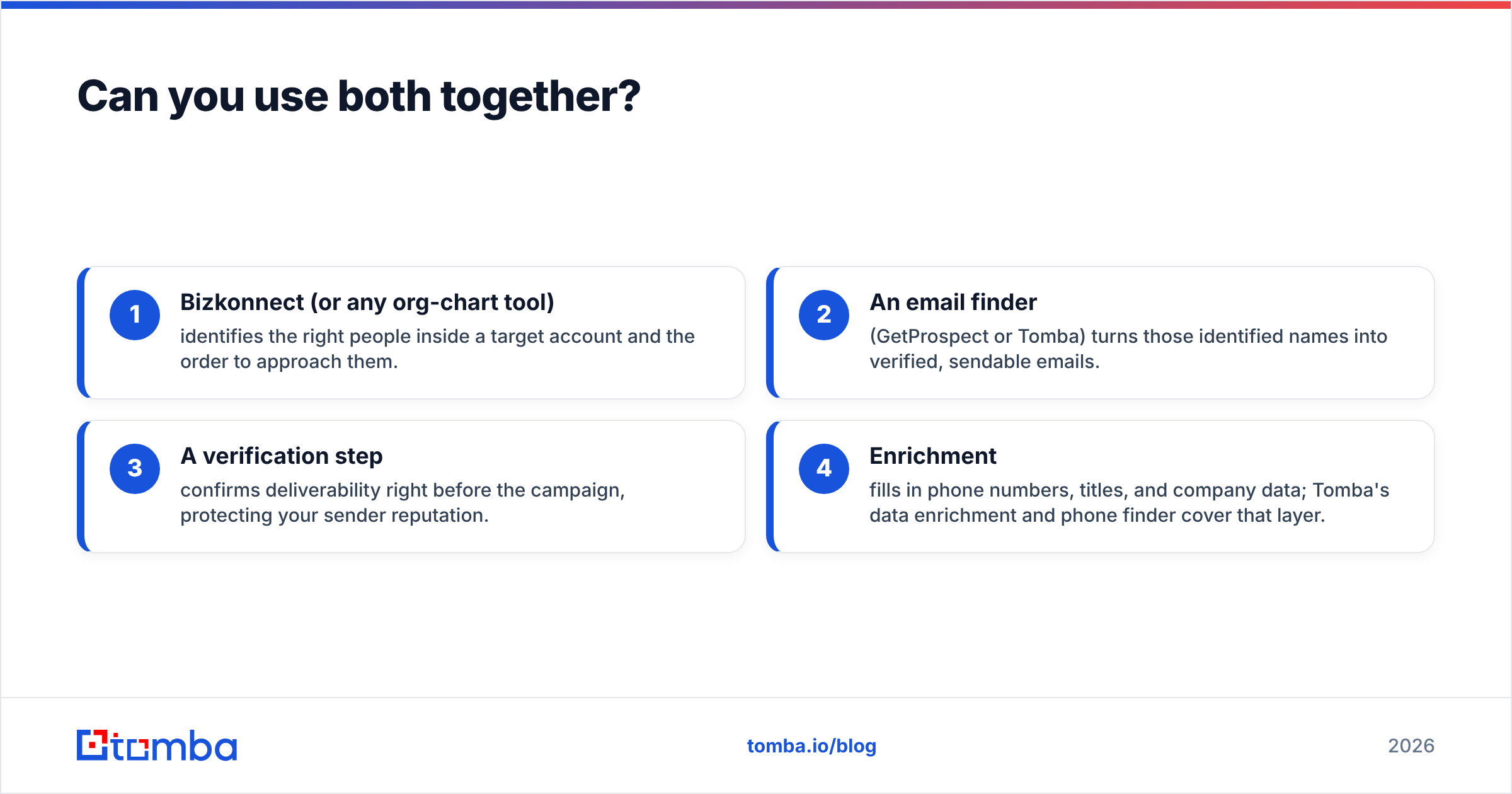
- Bizkonnect (or any org-chart tool) identifies the right people inside a target account and the order to approach them.
- An email finder (GetProspect or Tomba) turns those identified names into verified, sendable emails.
- A verification step confirms deliverability right before the campaign, protecting your sender reputation.
- Enrichment fills in phone numbers, titles, and company data; Tomba's data enrichment and phone finder cover that layer.
The mistake is paying enterprise prices for an intelligence suite and expecting it to also be your bulk email engine, or expecting a cheap finder to map a 5,000-person org. Match the tool to the bottleneck.
Which is the better value in 2026?#
Conclusion first: for most teams whose growth depends on outbound volume, the email-finder category delivers more measurable ROI than an org-chart suite — and within that category you should compare GetProspect against alternatives on accuracy and price-per-valid-email, not on database size claims.
Bizkonnect is genuinely valuable, but for a narrower buyer: enterprise ABM teams with complex committees and budget to match its quote-based pricing. If that's not you, the spend is hard to justify when a $49/mo finder gets reps into inboxes.
If you land on the finder side of the decision, it's worth testing more than one. Run the same 50 target contacts through GetProspect and through Tomba's free tier, then check which returns more verified (not just guessed) addresses. Cost-per-valid-lead, not headline price, is the number that should decide it.
The bottom line#
Bizkonnect and GetProspect answer different questions: "who should I talk to and why now?" versus "what's their email and is it valid?" If your pipeline stalls because reps can't navigate big accounts, Bizkonnect earns its keep. If it stalls because you can't get enough clean, deliverable contacts, an email finder is the fix.
Ready to test the reach side without a sales call or a credit card? Start with the Tomba Email Finder free tier — 25 searches a month, verified results, a Chrome extension for LinkedIn, and an API when you're ready to scale. Run it head-to-head against GetProspect on your own target list and let cost-per-verified-email make the decision for you.
Ready to find emails that actually work?
Join 150,000+ professionals who stopped guessing and started sending. Free credits on signup — no credit card required.
Get the Tomba newsletter
Practical outbound tactics and product updates — once every two weeks.
About the author