Bizkonnect vs Listkit (2026): Which B2B Data Tool Wins?
Bizkonnect sells account intelligence and org charts; Listkit sells ready-made cold-email lists. Here's an honest 2026 breakdown of which one fits your pipeline — and where a dedicated finder beats both.
Choosing between Bizkonnect and Listkit comes down to one question: do you need to understand an account before you sell to it, or do you just need a stack of contacts to email tomorrow morning? They look like competitors on a feature grid, but they solve different halves of the outbound problem.
This guide breaks down what each tool actually does, how they price, where the data holds up, and the honest gaps in both — so you can pick the right one without a three-week trial cycle.
TL;DR — Bizkonnect vs Listkit in 30 seconds#
- Bizkonnect is account-intelligence software: org charts, decision-maker mapping, trigger events, and "actionable sales intelligence." Best for enterprise and mid-market reps selling into complex buying committees.
- Listkit is a done-for-you list builder: you filter, it spits out verified B2B leads (email + sometimes phone) ready to drop into a cold-email tool. Best for agencies and SDR teams running high-volume outbound.
- Pricing models differ hard. Bizkonnect quotes custom/seat-based enterprise deals; Listkit sells credit-based subscriptions aimed at smaller teams.
- Neither is a pure email finder. If your real bottleneck is finding and verifying one contact at a time by domain or name, a dedicated tool like the Tomba Email Finder is cheaper and more accurate than paying for a full intelligence suite.
- Verdict: Pick Bizkonnect for account-based selling into large orgs, Listkit for volume list-building, and pair either with a verification layer so you don't burn your domain.
What is Bizkonnect?#
Bizkonnect is a B2B sales-intelligence platform built around the idea that you sell better when you can see who reports to whom. Its headline feature is the org chart — visual maps of a target company's decision-makers, influencers, and reporting lines — layered with company data, technographics, and trigger events (funding, hiring, leadership changes).
Think of it like a seating chart for a wedding you weren't invited to. Before you walk in, you already know who's at the head table, who actually makes decisions, and who just shows up for the cake. For account-based selling into a 5,000-person enterprise, that map is the product.
Bizkonnect's data is curated and human-verified rather than purely scraped, which is its main pitch against cheaper databases. The trade-off is volume and price: it's positioned for teams that run a small number of high-value accounts, not for someone who needs 50,000 emails by Friday.
What is Listkit?#
Listkit is a lead-list engine. You set filters — industry, title, headcount, location, technology — and it returns a list of contacts with verified emails, often with the verification baked in so you can export and send. It grew up alongside the cold-email-agency world, so the workflow is tuned for speed: build a list, push it to your sending tool, launch a sequence.
If Bizkonnect is the seating chart, Listkit is the catering order. You don't care about the politics of the room; you care that 2,000 deliverable addresses land in your CSV. That focus is its strength and its ceiling — you get reach, not depth.
Listkit also leans on triple-verification messaging to address the deliverability problem that kills most cold campaigns. That's the right instinct, because bounce rates above 3-5% damage your sender reputation and can land your domain in spam folders regardless of how good your copy is.
How do Bizkonnect and Listkit compare side by side?#
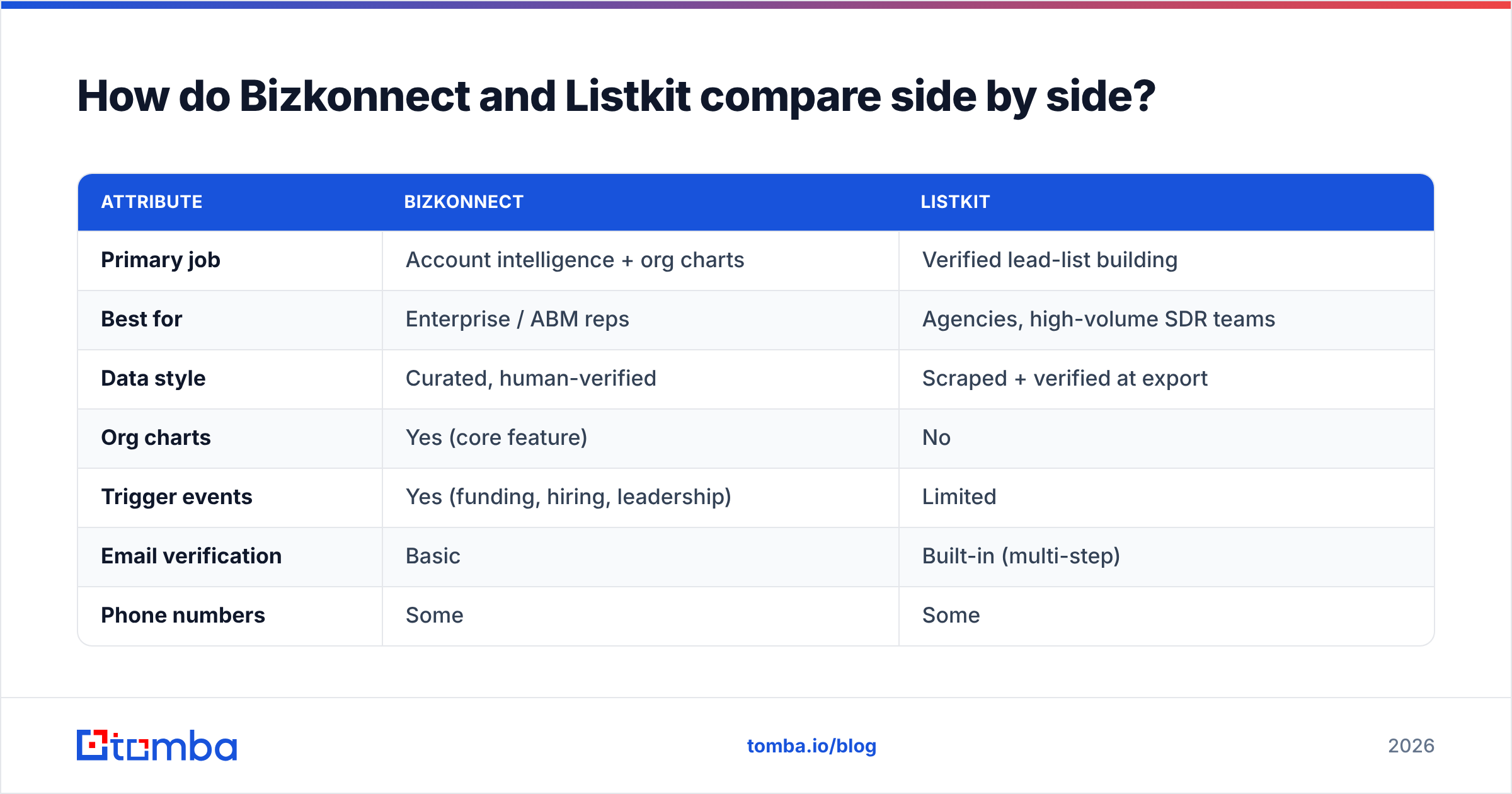
Here's the honest, attribute-by-attribute breakdown. Pricing for both moves around and Bizkonnect in particular is quote-based, so treat the dollar figures as directional and confirm on their sites.
| Attribute | Bizkonnect | Listkit |
|---|---|---|
| Primary job | Account intelligence + org charts | Verified lead-list building |
| Best for | Enterprise / ABM reps | Agencies, high-volume SDR teams |
| Data style | Curated, human-verified | Scraped + verified at export |
| Org charts | Yes (core feature) | No |
| Trigger events | Yes (funding, hiring, leadership) | Limited |
| Email verification | Basic | Built-in (multi-step) |
| Phone numbers | Some | Some |
| Pricing model | Custom / seat-based enterprise | Credit-based subscription |
| Entry price | Quote required (typically high) | Lower, self-serve tiers |
| Free option | Demo only | Limited trial / credits |
| API access | Limited | Limited |
The pattern is clear: Bizkonnect charges for insight per account, Listkit charges for contacts per dollar. Neither one is wrong — they're priced for different buyers.
Is Bizkonnect better than Listkit?#
It depends entirely on your motion, but here's the decision rule:
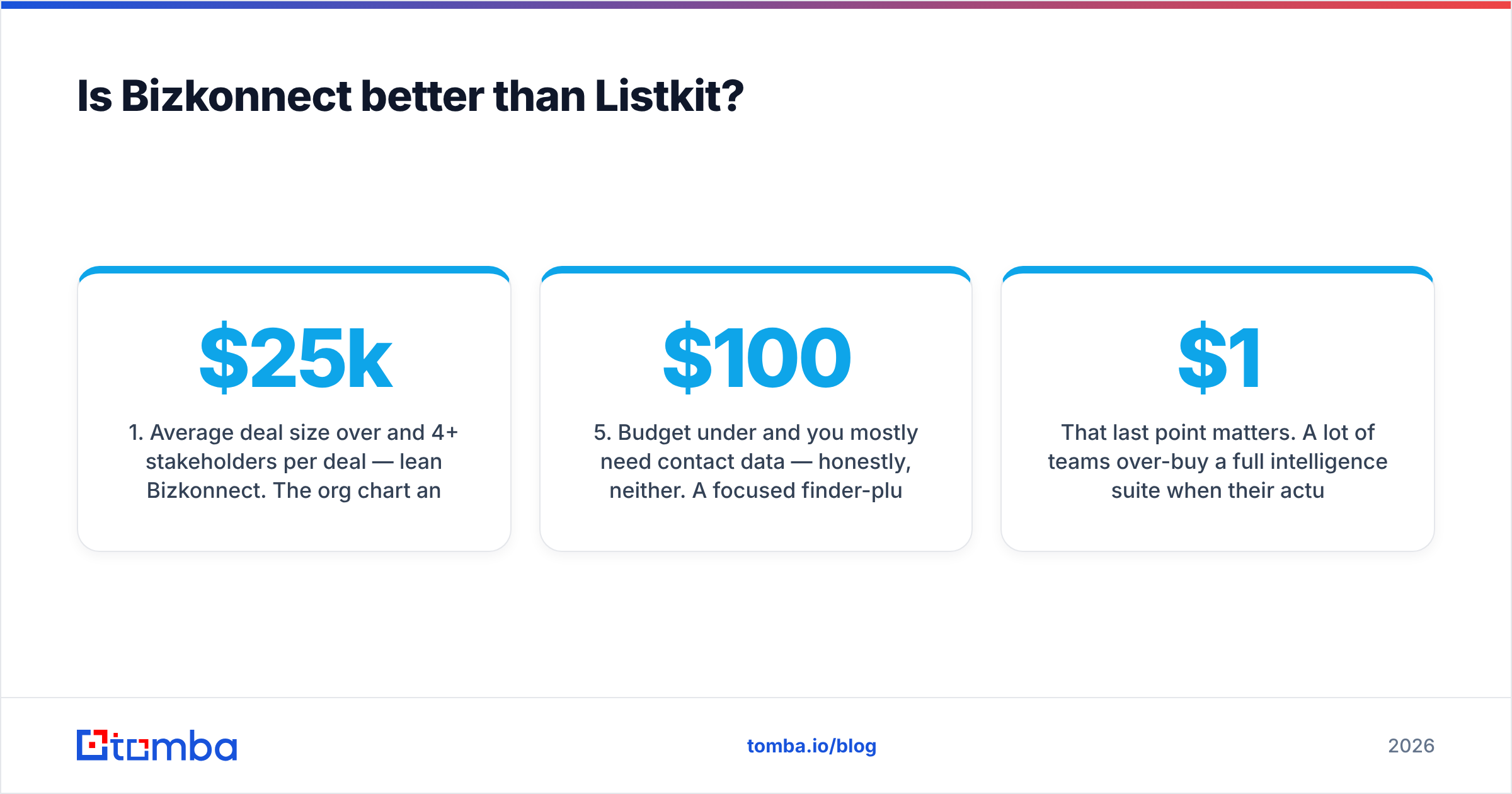
- Average deal size over $25k and 4+ stakeholders per deal — lean Bizkonnect. The org chart and trigger data pay for themselves the first time you reach the economic buyer two weeks before a competitor does.
- Outbound volume over personalization — lean Listkit. If your model is "send 3,000 emails, book 15 meetings," you need clean lists fast, not relationship maps.
- You're an agency billing clients for lead gen — Listkit's credit model and export speed fit the service workflow better.
- You sell into named accounts you already know — Bizkonnect adds depth to a target list you've already chosen; Listkit helps you build that list from scratch.
- Budget under $100/month and you mostly need contact data — honestly, neither. A focused finder-plus-verifier stack covers you for less.
That last point matters. A lot of teams over-buy a full intelligence suite when their actual daily task is "find the email for this one VP of Marketing whose company I already found on LinkedIn." That's a find email addresses job, not a $1,500/month platform job.
Where do both tools fall short?#
Both Bizkonnect and Listkit share two weak spots that show up once you scale.
Verification drift. Any B2B database decays at roughly 25-30% per year as people change jobs — Gartner and most data vendors cite similar figures. Bizkonnect's human curation slows this but doesn't stop it; Listkit verifies at export but the list goes stale the moment you save it. You still need a real-time check before send, which is why a standalone email verifier belongs in every outbound stack regardless of where the list came from.
Catch-all uncertainty. A huge share of corporate domains are catch-all (they accept any address, so verification returns "unknown"). Neither tool fully solves this. If your target list skews enterprise, you'll want a dedicated catch-all verifier to separate the real inboxes from the black holes before you waste sends on them.
There's also the lock-in question. Both platforms want you living inside their UI. If your team already runs HubSpot, Salesforce, or a sequencer, you may get more value piping data in through an email finder API than paying for another dashboard nobody logs into.
How does a dedicated email finder compare to both?#
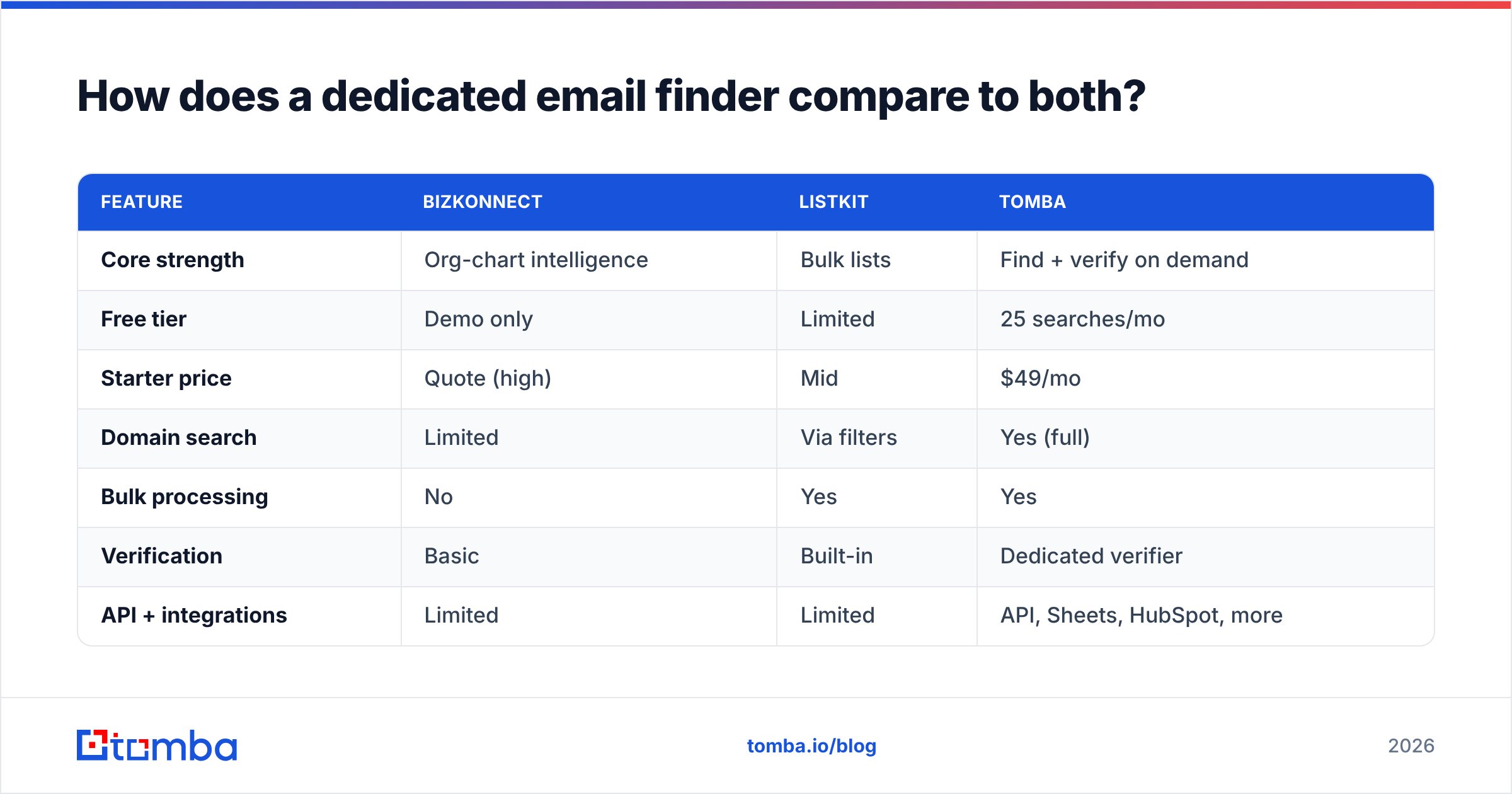
A finder-first approach is the third option most comparison posts skip. Instead of buying intelligence or buying lists, you find and verify contacts on demand, against your own target accounts, at a per-search cost.
| Feature | Bizkonnect | Listkit | Tomba |
|---|---|---|---|
| Core strength | Org-chart intelligence | Bulk lists | Find + verify on demand |
| Free tier | Demo only | Limited | 25 searches/mo |
| Starter price | Quote (high) | Mid | $49/mo |
| Domain search | Limited | Via filters | Yes (full) |
| Bulk processing | No | Yes | Yes |
| Verification | Basic | Built-in | Dedicated verifier |
| API + integrations | Limited | Limited | API, Sheets, HubSpot, more |
Tomba sits in a different lane: it's not trying to map a boardroom or hand you a pre-built 10,000-row list. It answers "what's the email for this person at this company, and is it real?" — fast, accurately, and at a price (Tomba pricing starts at a free tier of 25 searches, then $49/mo Starter, $99/mo Growth, $249/mo Pro). For teams whose real constraint is contact accuracy rather than account narrative, that's the cheaper and more direct buy.
You can also pull entire company rosters with domain search, enrich a CRM through data enrichment, or process thousands of rows with the bulk email finder — covering the list-building job Listkit does and the contact-data job Bizkonnect bundles, without the enterprise contract.
What about data accuracy and deliverability?#
Accuracy is where these tools win or lose real money, because a bounced email costs you twice: the wasted send and the reputation hit.
Independent buyers consistently rank email data tools on verified-accuracy rate, and the gap between "scraped and hoped" versus "verified at send time" is enormous. You can sanity-check any vendor's claims on a third-party review site like G2 before you commit, and you should — self-reported accuracy numbers are marketing, not benchmarks.
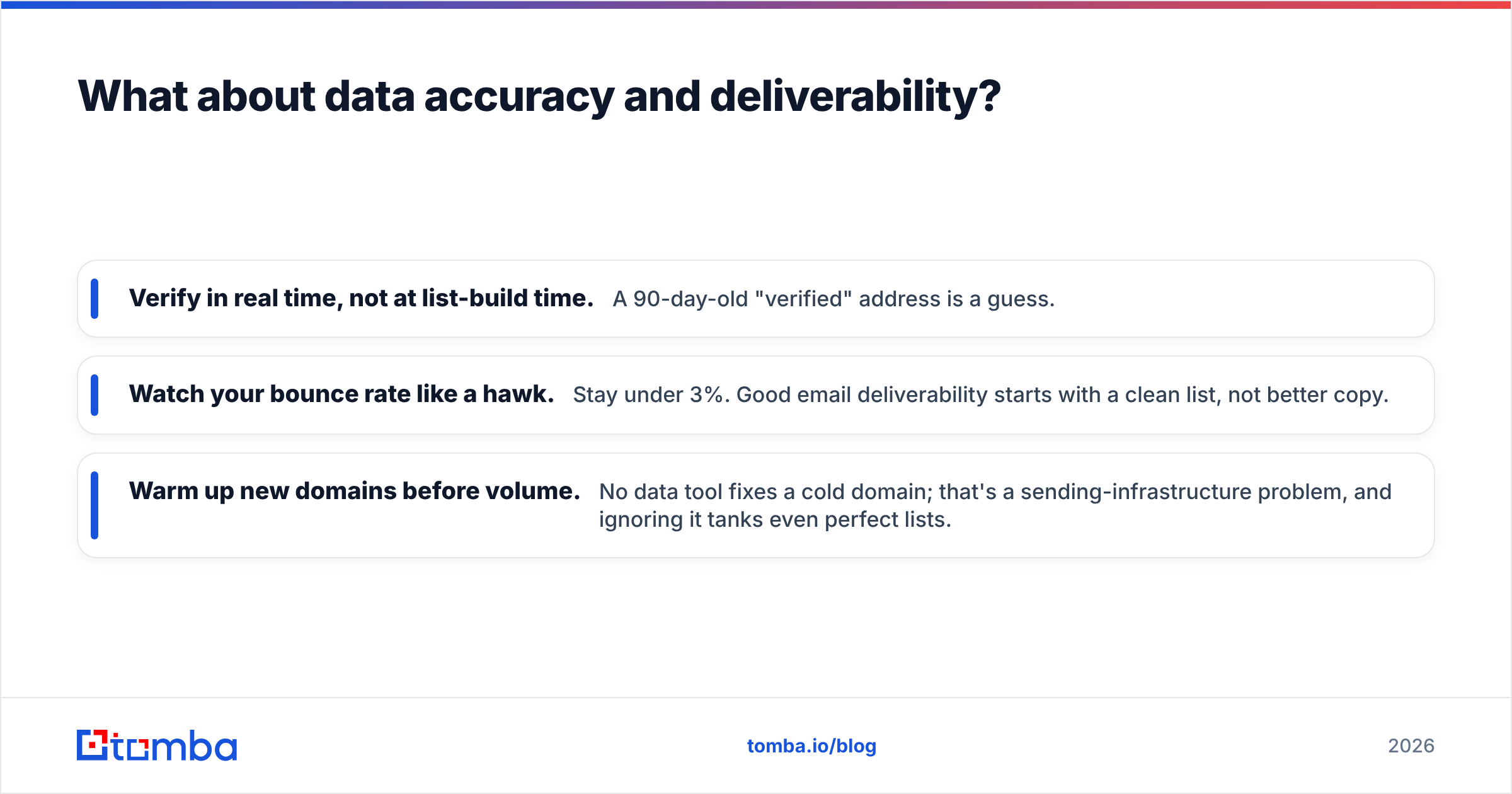
Three rules that hold no matter which tool you pick:
- Verify in real time, not at list-build time. A 90-day-old "verified" address is a guess.
- Watch your bounce rate like a hawk. Stay under 3%. Good email deliverability starts with a clean list, not better copy.
- Warm up new domains before volume. No data tool fixes a cold domain; that's a sending-infrastructure problem, and ignoring it tanks even perfect lists.
Bizkonnect's curated model gives it an edge on senior-title accuracy; Listkit's export verification gives it an edge on freshness at the moment of download. But both benefit from a final verification pass, and neither replaces basic sending hygiene like SPF, DKIM, and warmup.
Which one should you actually buy in 2026?#
Quick conclusion, then the nuance: buy Bizkonnect for account-based enterprise selling, buy Listkit for high-volume agency-style outbound, and buy a dedicated finder if your real job is accurate one-to-one contact data.
- You're an enterprise AE running 30 named accounts → Bizkonnect. The org charts and trigger events are the differentiator.
- You're an agency or SDR team sending thousands of emails a week → Listkit. Speed and credit pricing fit the model.
- You're a founder, recruiter, or small team that needs the right email for specific people → a finder like Tomba. Lower cost, higher precision, no platform lock-in.
- You already have a list and just need it clean → skip both and run a verifier.
Most teams end up with a combination: a list source for reach, plus a verification-and-finder layer for accuracy. The mistake is paying enterprise prices for a problem a $49 tool solves.
The bottom line#
Bizkonnect and Listkit aren't really rivals — they're answers to different questions. Bizkonnect tells you how to sell into an account; Listkit tells you who to email at scale. Both are legitimate buys for the teams they're built for, and both leave the same gap: real-time, per-contact accuracy.
If that gap is your actual problem — finding the right professional email and confirming it's deliverable before you hit send — start with the Tomba Email Finder. The free tier gives you 25 searches a month to test the accuracy yourself, the Starter plan is $49/mo when you're ready to scale, and it plugs into the CRM, spreadsheet, and sequencer you already use. Find the contact, verify it, send with confidence — without signing an enterprise contract to do it.
// get started
Find, verify and enrich your first contacts today
Start on the free plan with 25 searches a month, then scale when your team is ready.
Free plan · No credit card required · GDPR & CCPA
// about the author