Bizkonnect vs Lusha 2026: B2B Data Tools Compared
Bizkonnect vs Lusha compared head-to-head on data, org charts, pricing, and accuracy — plus where a leaner email-finder beats both for outbound teams in 2026.
Choosing between Bizkonnect and Lusha usually comes down to one question: do you need account intelligence and org charts, or do you need fast, accurate contact data at the point of prospecting? They look similar on a feature grid, but they solve different halves of the same problem — and most teams overpay because they buy the wrong half.
This breakdown compares both tools on data coverage, accuracy, org-chart depth, pricing, and real outbound workflows, then shows where a focused email-finder fits when you only need verified contacts without the enterprise overhead.
TL;DR — Bizkonnect vs Lusha at a glance#
- Bizkonnect is built for account intelligence: org charts, decision-maker mapping, and curated account lists for ABM-style outbound. It shines when you sell into large, multi-stakeholder organizations.
- Lusha is built for speed: a browser extension and database that surfaces direct dials and emails fast, ideal for SDRs working LinkedIn and company pages all day.
- Accuracy is the deciding factor for both. Lusha leans on community-sourced and licensed data; Bizkonnect leans on human-curated org data that updates more slowly.
- Pricing favors Lusha for per-seat speed, but credit caps and add-ons inflate the real cost. Bizkonnect is quote-based and skews enterprise.
- If you mainly need verified emails by domain or name, a dedicated email finder like Tomba covers the core job at a fraction of the price, with verification built in.
What is Bizkonnect and who is it for?#
Bizkonnect is a B2B sales intelligence platform focused on actionable org charts and account-level intelligence. Instead of handing you a flat list of contacts, it maps reporting structures so you can see who reports to whom, identify economic buyers, and plan multi-threaded outreach into an account.
Think of it like a building directory versus a phone book. A phone book gives you every name and number with no context. Bizkonnect gives you the floor plan — which office is the decision-maker's, who sits next to them, and which door to knock on first.
That makes it a strong fit for:
- Enterprise and ABM teams selling into 1,000+ employee organizations
- Field sales and strategic accounts where deals involve 5–10 stakeholders
- Marketing teams building curated target-account lists with hierarchy data
The tradeoff: org-chart curation is labor-intensive, so coverage is deepest for large, well-documented companies and thinner for SMBs and fast-changing startups.
What is Lusha and who is it for?#
Lusha is a contact-data platform best known for its browser extension. You land on a LinkedIn profile or company site, click the Lusha icon, and it surfaces direct dials, mobile numbers, and email addresses in seconds. It's optimized for the rep who lives in prospecting motion and wants data without leaving the tab.
Lusha targets:
- SDRs and BDRs running high-volume outbound
- Recruiters sourcing candidate contact details
- Small teams that want self-serve data without a long enterprise contract
Lusha's strength is friction-free access to direct dials. Its weakness, like every database, is that coverage and freshness vary by region and seniority — and credits run out faster than most buyers expect. You can read independent user sentiment on Lusha's G2 profile before committing.

Bizkonnect vs Lusha: the core comparison table#
Here's the head-to-head on the attributes that actually change your workflow and cost.
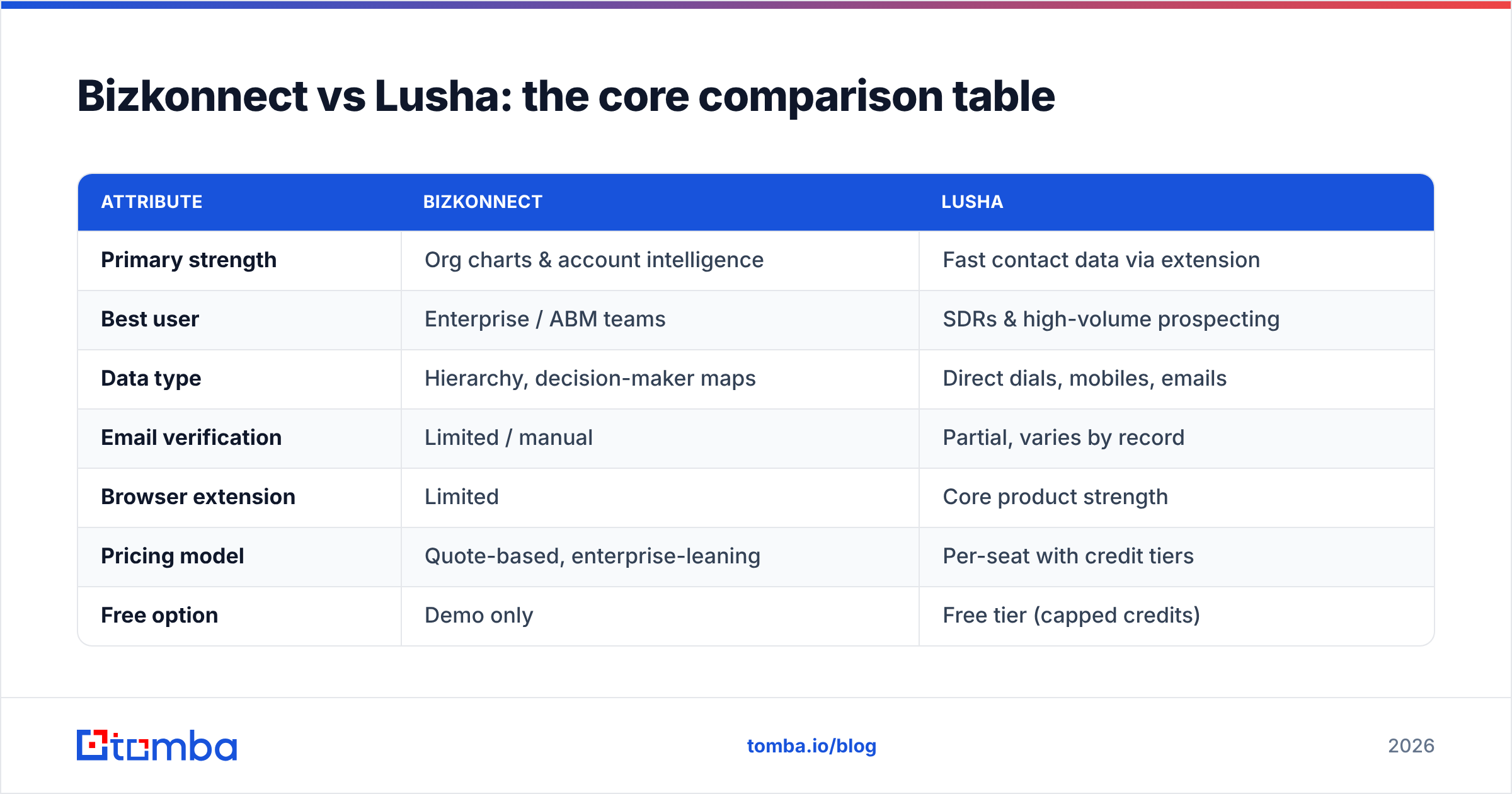
| Attribute | Bizkonnect | Lusha |
|---|---|---|
| Primary strength | Org charts & account intelligence | Fast contact data via extension |
| Best user | Enterprise / ABM teams | SDRs & high-volume prospecting |
| Data type | Hierarchy, decision-maker maps | Direct dials, mobiles, emails |
| Email verification | Limited / manual | Partial, varies by record |
| Browser extension | Limited | Core product strength |
| Pricing model | Quote-based, enterprise-leaning | Per-seat with credit tiers |
| Free option | Demo only | Free tier (capped credits) |
| Data freshness | Curated, slower refresh | Frequent but variable |
| API access | Available (enterprise) | Available on higher tiers |
| Learning curve | Higher (account planning) | Low (click-and-go) |
The pattern is clear: Bizkonnect optimizes for depth per account, Lusha optimizes for speed per contact. Neither is a pure email-finding tool, which matters once you price out what you're actually paying for.
Is Bizkonnect more accurate than Lusha?#
Neither tool wins accuracy outright — they fail in different places. Bizkonnect's human-curated org data is reliable for structure but can lag on job changes, because re-mapping a reorg takes time. Lusha's data refreshes more often but inherits the classic database problem: direct dials and emails for senior or non-US contacts are hit-or-miss, and you burn credits on records that bounce.
For outbound, the metric that matters most is bounce rate on the emails you actually send. A 95%+ deliverable list protects your sender reputation; a 15% bounce rate gets your domain throttled. That's why serious teams verify before sending regardless of where the data originated.
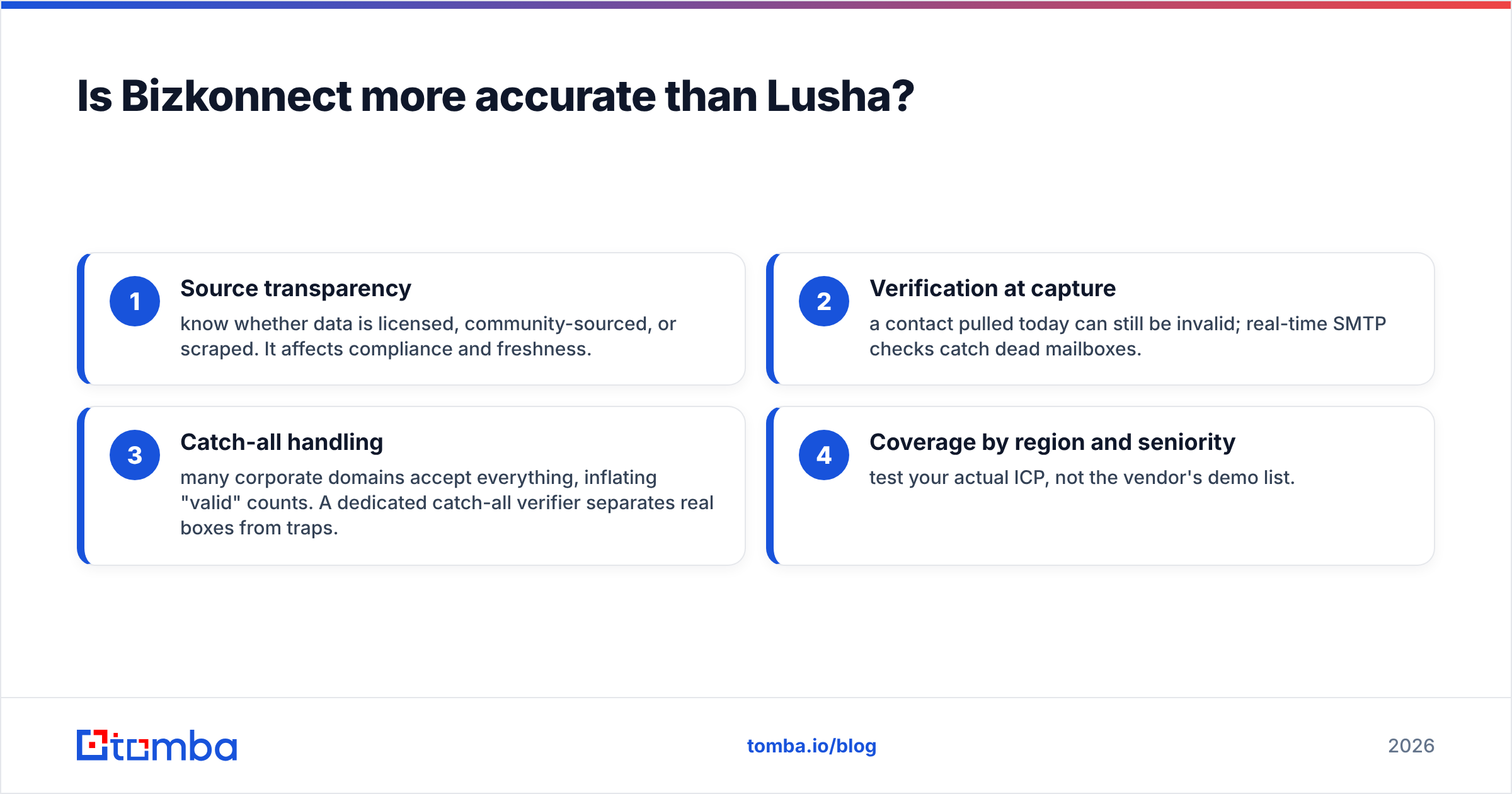
Four accuracy factors to weigh:
- Source transparency — know whether data is licensed, community-sourced, or scraped. It affects compliance and freshness.
- Verification at capture — a contact pulled today can still be invalid; real-time SMTP checks catch dead mailboxes.
- Catch-all handling — many corporate domains accept everything, inflating "valid" counts. A dedicated catch-all verifier separates real boxes from traps.
- Coverage by region and seniority — test your actual ICP, not the vendor's demo list.
If verified email is your core need, running results through an email verifier before any send removes the guesswork that both platforms leave on the table.
How do Bizkonnect and Lusha price out in 2026?#
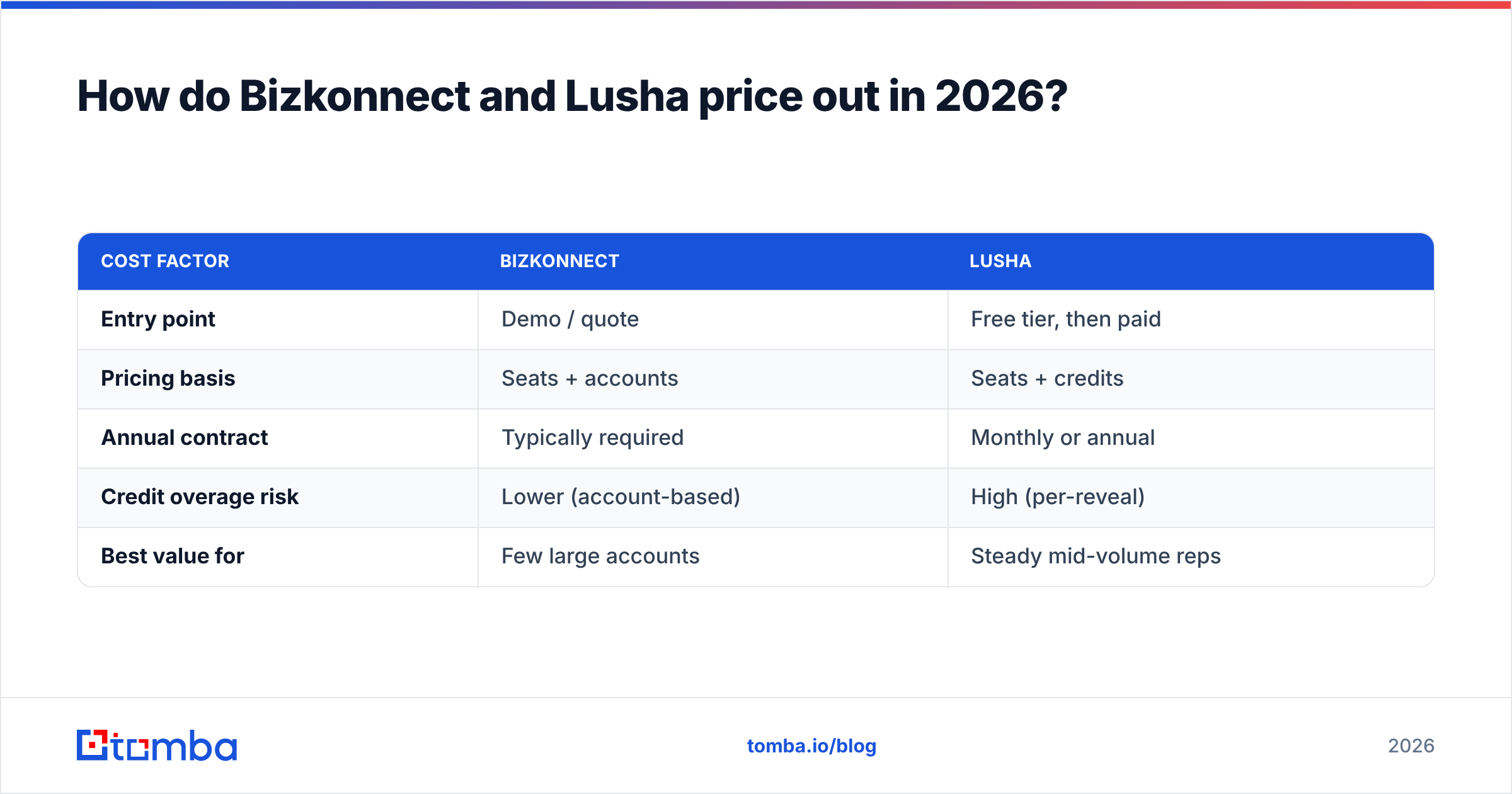
Bizkonnect is quote-based, so expect a sales call, annual commitment, and pricing that scales with seats and account volume — typical enterprise structure. Lusha publishes tiered plans with a free entry point, but the headline price hides the real constraint: credits. Each revealed contact spends a credit, and active SDRs exhaust monthly allowances quickly, pushing you into upgrades or overage.
| Cost factor | Bizkonnect | Lusha |
|---|---|---|
| Entry point | Demo / quote | Free tier, then paid |
| Pricing basis | Seats + accounts | Seats + credits |
| Annual contract | Typically required | Monthly or annual |
| Credit overage risk | Lower (account-based) | High (per-reveal) |
| Best value for | Few large accounts | Steady mid-volume reps |
The hidden lesson: if you're paying enterprise pricing for org charts but your reps mostly just need a verified email and a name, you're funding features you don't use. Compare that to transparent, search-based Tomba pricing — a Free tier with 25 searches/mo, Starter at $49/mo, Growth at $99/mo, and Pro at $249/mo — where you pay for finds and verifications, not seat-locked intelligence suites.

When should you choose a focused email finder instead?#
Choose a dedicated email finder when your bottleneck is getting verified contact details into a sequence, not mapping a 12-person buying committee. That's the majority of outbound and lead-gen work.
A focused tool wins on three fronts:
- Cost — you pay for the one job (find + verify), not a bundled intelligence platform.
- Accuracy at send — verification is native, so bounce rates stay low.
- Workflow fit — domain search, bulk processing, and API access slot into existing CRMs and outreach tools.
Concretely, Tomba covers the contact-data half of what Bizkonnect and Lusha do:
- Use domain search to pull every public email pattern at a target company in one query.
- Run data enrichment to fill gaps on names, roles, and companies you already have.
- Wire it into your stack with the Tomba API for programmatic find-and-verify at scale.
You won't get Bizkonnect's org charts or Lusha's one-click mobile reveal — but if your real goal is verified emails for cold outreach, that's paying for a Ferrari to drive to the mailbox.
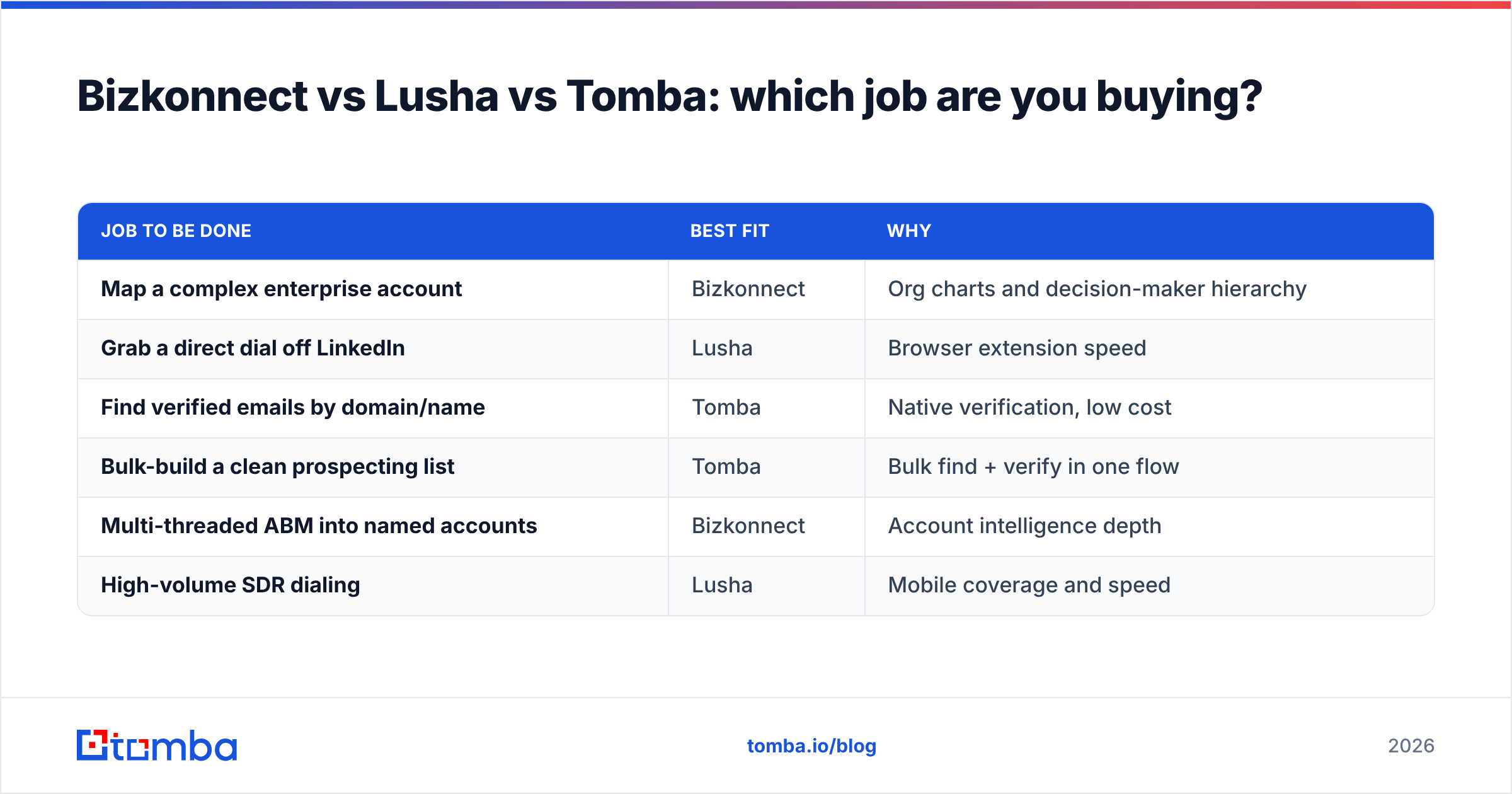
Bizkonnect vs Lusha vs Tomba: which job are you buying?#
| Job to be done | Best fit | Why |
|---|---|---|
| Map a complex enterprise account | Bizkonnect | Org charts and decision-maker hierarchy |
| Grab a direct dial off LinkedIn | Lusha | Browser extension speed |
| Find verified emails by domain/name | Tomba | Native verification, low cost |
| Bulk-build a clean prospecting list | Tomba | Bulk find + verify in one flow |
| Multi-threaded ABM into named accounts | Bizkonnect | Account intelligence depth |
| High-volume SDR dialing | Lusha | Mobile coverage and speed |
The honest takeaway: these aren't really three versions of the same product. Bizkonnect sells account context, Lusha sells reveal speed, and a tool like Tomba sells verified email accuracy. Pick by the job that's actually slowing your pipeline.
How to decide in five questions#
Run your team through this short checklist before signing anything:
- What's the deal size? Six-figure enterprise deals justify Bizkonnect's account intelligence. Transactional SMB deals don't.
- Where do reps work? If they live in the browser on LinkedIn, Lusha's extension reduces friction. If they work in a CRM or spreadsheet, an email finder integrates more cleanly.
- What's your bounce tolerance? If deliverability protection is critical, prioritize native verification over raw record volume.
- How predictable is your spend? Credit-based tools spike unpredictably; search-and-verify pricing is easier to forecast.
- Do you need hierarchy or just contacts? Be honest. Most teams think they need org charts and actually just need a verified email and a phone number.
If your answers cluster around "verified contacts, predictable cost, CRM-native," the heavyweight intelligence platforms are overkill.
The bottom line#
Bizkonnect and Lusha are both legitimate tools that solve real problems — Bizkonnect for account intelligence and ABM, Lusha for fast in-browser contact reveal. But both bundle cost and complexity that many outbound teams never use, and both leave email verification as something you should still handle yourself.
If the job you're actually buying is find a real person's verified email and get it into a sequence, start with a tool built for exactly that. The Tomba Email Finder finds professional emails by domain, name, or company, verifies them before they hit your outreach tool, and does it on a transparent Free-to-$249/mo plan with no enterprise contract required. Spin up the free tier, test it against your real ICP, and keep the deliverability your domain depends on.
// get started
Find, verify and enrich your first contacts today
Start on the free plan with 25 searches a month, then scale when your team is ready.
Free plan · No credit card required · GDPR & CCPA
// about the author